Idle Resource Costs: Metrics to Track

Cloud costs can spiral out of control, and idle resources are often the culprit. These "zombie resources" – like unused storage, inactive servers, or idle GPU clusters – can silently drain budgets. In fact, by 2025, 21% of global cloud spending (over $44.5 billion) is wasted on underused infrastructure. For enterprises, this figure jumps to nearly 30% of cloud budgets.
Here’s the key takeaway: Identifying and managing idle resources can save your business millions. Start by tracking key metrics like CPU usage, network activity, and storage operations. Combine this with automation tools (e.g., AWS Compute Optimizer) and strict tagging policies to eliminate waste. Companies that adopt these practices have cut cloud costs by up to 30%.
Key Metrics to Monitor:
- Compute resources: Peak CPU usage below 5%.
- Storage: Fewer than 1 operation per day.
- Load balancers: Zero active connections over 7 days.
- NAT Gateways: No data processed over 30 days.
Quick Example: A single idle EC2 instance and 30 unattached storage volumes could cost you over $5,400 annually. Addressing these inefficiencies isn’t just smart – it’s necessary for financial control and cloud efficiency.
How To Identify Unused Cloud Resources For Cost Savings?
Metrics to Track Idle Resource Costs
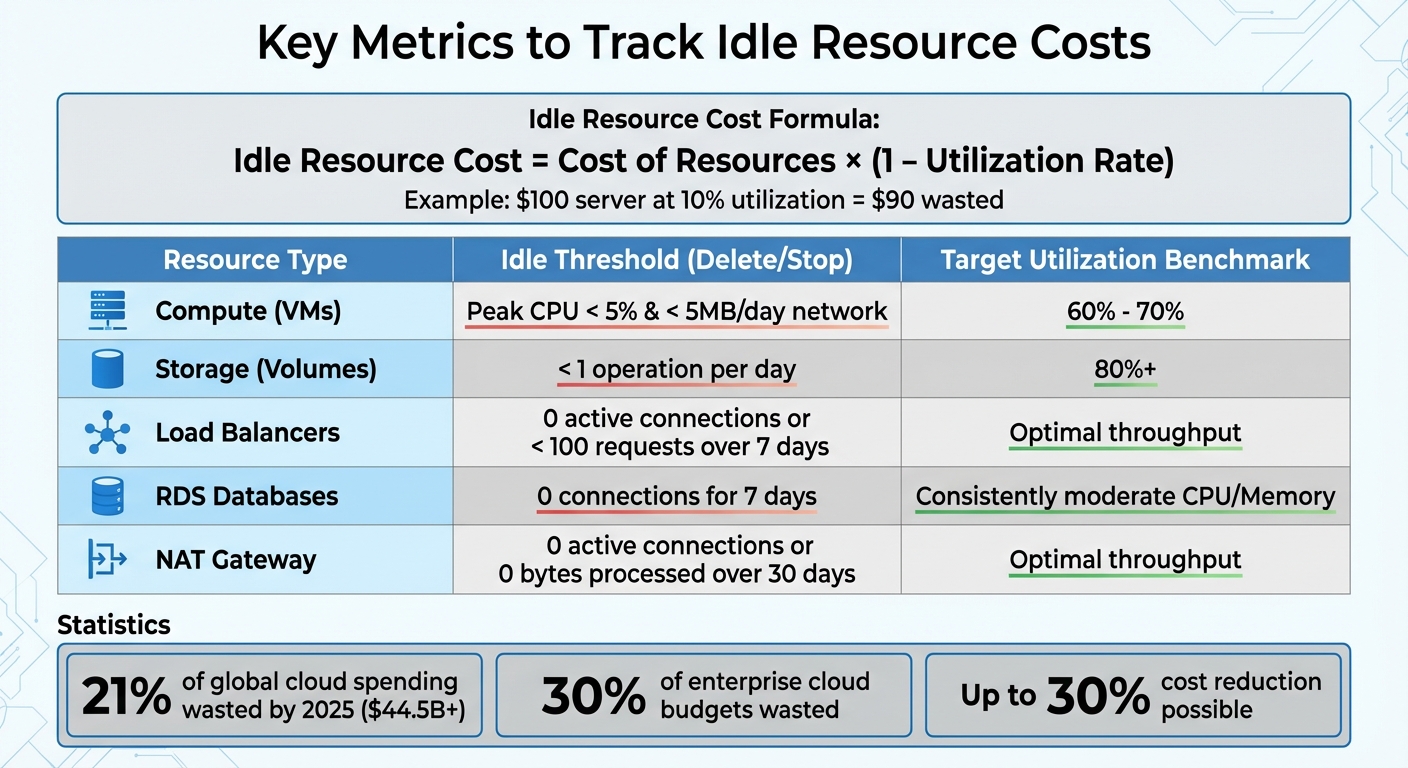
Cloud Idle Resource Cost Metrics and Thresholds by Resource Type
Keeping track of idle resources begins with understanding the waste they generate. Here’s a straightforward formula to calculate it:
Idle Resource Cost = Cost of Resources × (1 – Utilization Rate).
For example, if a server costs $100 and operates at just 10% utilization, $90 of that cost is essentially wasted. This formula gives you a clear dollar value for every underused resource in your setup.
Different types of resources require specific thresholds to determine idleness.
Idle Resource Cost Formula
The criteria for identifying idle resources vary depending on the type of resource. For compute instances (like EC2), idleness is usually defined as peak CPU utilization below 1% to 5%, combined with minimal network activity (less than 5MB of data transfer per day). Storage volumes are considered idle when they show fewer than one read or write operation per day over a monitoring period. For load balancers, idleness is flagged if there are zero active connections or fewer than 100 requests over seven days.
AWS, for instance, uses specific lookback periods to assess idleness: 14 days for compute resources and 32 days for EBS volumes and NAT Gateways.
Resource Utilization Rate
The next step is to measure how effectively these resources are being used. For compute instances, aim for a utilization rate of 60% to 70%. Storage resources should achieve 80% or higher utilization. If your resources consistently fall below these benchmarks, it’s a signal of inefficiency.
Google Cloud offers a useful approach by analyzing utilization metrics at the 95th percentile (P95) over a 30-day period. This method filters out short-term spikes, helping you identify actual usage trends. For load balancers and databases, metrics like ActiveConnectionCount are critical. If this count stays at zero over an extended period, it’s a clear indicator of idle spending.
Cost vs. Utilization Benchmarks
Industry benchmarks make it easier to identify waste. Here are some quick guidelines:
- Compute instances averaging less than 10% to 15% utilization over 30 days should be rightsized.
- Storage volumes with fewer than one operation per day for seven consecutive days should be deleted.
- RDS instances with zero active connections for seven days should be stopped.
- NAT Gateways with zero active connections or no data processed over 30 days should be removed.
A strong financial operations (FinOps) strategy also aims to keep cloud cost variances within 5% to 10% of forecasted spending.
| Resource Type | Idle Threshold (Delete/Stop) | Target Utilization Benchmark |
|---|---|---|
| Compute (VMs) | Peak CPU < 5% & < 5MB/day network | 60% – 70% |
| Storage (Volumes) | < 1 operation per day | 80%+ |
| Load Balancers | 0 active connections or < 100 requests over 7 days | Optimal throughput |
| RDS Databases | 0 connections for 7 days | Consistently moderate CPU/Memory |
| NAT Gateway | 0 active connections or 0 bytes processed over 30 days | Optimal throughput |
How to Find Idle Resources in Your Cloud Environment
Common Types of Idle Resources
Idle resources in your cloud environment can quietly inflate costs without adding any value. Some of the most common culprits include compute resources, storage assets, networking components, database services, and container setups.
- Compute resources: EC2 instances running at less than 10–15% CPU utilization over a 30-day period are a prime example of inefficiency.
- Storage assets: Unattached EBS volumes left behind after instance termination and orphaned snapshots contribute to unnecessary expenses.
- Networking components: Items like NAT Gateways, which incur hourly charges even without traffic, unattached Elastic IP addresses, and load balancers with no active connections can quietly drain budgets.
- Database and managed services: RDS instances with no active connections or low IOPS, along with Lambda functions that generate costs through log groups or provisioned concurrency despite zero invocations, also add to wasted spend.
- Container setups: Kubernetes nodes with low pod density result in paying for unused CPU and RAM capacity.
Identifying these idle resources is just the first step. To address them effectively, monitoring tools are essential.
Using Monitoring Tools to Find Idle Resources
AWS offers several built-in tools to help pinpoint and manage idle resources:
- AWS Compute Optimizer: This tool uses machine learning to analyze CloudWatch metrics, flagging resources for optimization or removal. For example, it considers an EC2 instance idle if its peak CPU utilization stays below 5% and its network I/O is less than 5MB per day over a 14-day period.
- AWS Cost Explorer: This tool provides insights into spending trends and can forecast costs up to 18 months, using up to 13 months of historical data.
- AWS Trusted Advisor: It automatically identifies cost-saving opportunities across your AWS environment.
When it comes to storage, S3 Storage Lens can highlight buckets with minimal or no access over 90 days, while Compute Optimizer can help detect unattached EBS volumes. For network resources, VPC Flow Logs – queried through Amazon Athena – can reveal Elastic Network Interfaces with no traffic, and CloudWatch metrics can flag underutilized NAT Gateways. To automate resource cleanup, AWS Lambda can be scripted to stop instances operating below a 10% CPU threshold over 24 hours.
Example: Calculating Wasted Spend
Let’s break down the costs of idle resources. Imagine you have 30 unattached EBS volumes, each provisioned at 100GB of General Purpose SSD storage. With AWS’s standard rate of $0.10 per GB-month, each volume costs $10.00 monthly. That adds up to $300.00 per month or $3,600.00 annually. Now, consider five idle EC2 t3.medium instances running 24/7 at $0.0416 per hour. This totals approximately $1,822.08 annually (0.0416 × 24 hours × 365 days × 5 instances). Combined, these two resource types alone result in an annual waste of $5,422.08.
Real-world examples demonstrate the potential savings from tackling idle resources. In 2025, logistics company Delhivery reduced its total cloud infrastructure costs by 15% within just 50 days through rigorous monitoring and optimization. Similarly, Alert Logic achieved a 28% cost reduction by focusing on idle asset removal. These cases show how targeted efforts to eliminate idle resources can cut your cloud expenses by nearly 30%. The numbers don’t lie – proactive monitoring pays off in a big way.
sbb-itb-f9e5962
How to Reduce Idle Resource Costs
To tackle idle resource costs effectively, you need a combination of automation, tagging, and routine audits. While metrics and detection methods lay the groundwork, automating the process of identifying and shutting down idle resources is crucial. Manual processes often lead to delays – 58% of organizations report taking weeks to address cloud-cost waste.
Automating Detection and Shutdown of Idle Resources
The first step is to define what qualifies as "idle" for your specific environment. For instance, AWS Compute Optimizer flags an EC2 instance as idle if its peak CPU usage remains below 5% and network I/O stays under 5 MB per day over a 14-day period. Similarly, Google Cloud applies a 15-day threshold for unattached disks. Tailor these metrics to align with your workload patterns.
Leverage tools like AWS Lambda or Azure Functions to automatically detect and shut down idle instances. Use services like CloudWatch or Azure Monitor to set up alerts that trigger actions when resources hit idle thresholds. For example, you could configure alerts to activate when CPU usage drops below 2% for 15 minutes.
"One of the biggest cost drivers in cloud is idle Virtual Machines (VMs) that keep running even when they’re not needed." – rmmartins, Microsoft
For resources with predictable usage, built-in tools like AWS Instance Scheduler or Azure Auto-shutdown can stop non-production resources during off-hours. Before deleting storage resources like EBS volumes or Persistent Disks, automate a final snapshot to safeguard data recovery. These strategies can collectively reduce cloud costs by up to 30%.
Automation works best when paired with systematic resource tagging to streamline management and accountability.
Resource Tagging and Management
Tagging is a game-changer for managing idle resources. It simplifies cost tracking by linking cloud expenses to specific owners, projects, or business units. Without consistent tagging, identifying who is responsible for idle resources becomes a time-consuming challenge.
Make tagging mandatory at the time of resource provisioning. Include tags like "Owner", "Project", and "Environment" for every resource. You can also use a "Schedule" tag with values such as mon-9am-fri-5pm to automatically shut down non-critical instances during off-hours.
"Consistent tagging makes it easy to trace spend to owners, projects, or business units and flag charges for inactive initiatives." – Juliana Costa Yereb, Senior FinOps Specialist, ProsperOps
Tagging also supports policy enforcement. For example, AWS Config can automatically remove resources that lack required tags after a set time, such as 48 hours. This prevents orphaned resources from piling up when developers forget to clean up after testing. Additionally, tagging by environment (e.g., Dev, Test, Prod) helps isolate costs associated with abandoned experiments.
Scheduling Regular Idle Resource Audits
Automation and tagging are powerful, but regular audits are essential to catch idle resources that might slip through the cracks. Unused resources often emerge from experimentation or frequent deployments, and they can quietly accumulate over time. Monthly or quarterly audits across all accounts can help identify and address these hidden costs.
These audits also mitigate risks. Idle resources can turn into "zombie servers", running outdated or incompatible software, which can lead to reliability issues and security vulnerabilities. Regular scans ensure that software stays up to date, maintaining the integrity of your environment.
Conduct audits after major development milestones, such as product launches or migration projects, when resource sprawl is likely. Use tools like health check endpoints, log reviews, and metadata tags to locate unused or outdated resources.
"By identifying and shutting down our idle resources, we managed to reduce their cloud costs by nearly 30%. This experience underscored the importance of continuously monitoring and managing cloud resources to avoid unnecessary expenses." – Steven Moore, FinOps Specialist, Zesty
To stay ahead, set proactive alerts that notify your team when resource utilization drops below a certain threshold – like 10–15% CPU usage – for more than seven days. This creates a feedback loop, helping you address idle resources before they become a financial burden. Companies that adopt AI-driven cloud management tools report an average ROI of $3.70 for every dollar spent.
Conclusion
Key Takeaways
Idle resources are a significant drain on enterprise cloud budgets, accounting for 20% to 30% of costs. Metrics such as low CPU and memory usage, minimal network activity, and infrequent storage access are key indicators of idle resources. By monitoring these metrics and addressing idle resource costs proactively, businesses can achieve meaningful savings.
Manual cleanup processes often fall short. Automating the detection and shutdown of idle resources using tools like AWS Lambda or Azure Functions, paired with strict tagging policies (e.g., Owner, Project, CostCenter), ensures consistent management and reduces the risk of orphaned assets. Companies leveraging AI-driven cloud management solutions report an average ROI of $3.70 for every dollar invested.
"Identifying idle and underutilized resources is often the most efficient place to start. It’s widely acknowledged as a low-effort, high-impact opportunity." – Juliana Costa Yereb, Senior FinOps Specialist, ProsperOps
Regular audits are another critical step to prevent costs from creeping back over time. Many organizations have seen substantial savings by implementing these strategies, proving that managing idle resources is a straightforward way to improve cost efficiency.
TECHVZERO builds on these principles to provide a comprehensive solution for managing and optimizing cloud spending.
How TECHVZERO Can Help

TECHVZERO focuses on cutting cloud costs by automating the detection and cleanup of idle resources. We monitor usage metrics across multi-cloud setups, enforce strict tagging policies, and use real-time tracking to identify underutilized assets before they become a financial burden. This combination of automation and infrastructure expertise ensures tangible results, as outlined in this article.
Our performance-based pricing model charges 25% of your annual savings, with no fees if guaranteed savings aren’t delivered. We’ve helped clients save as much as $333,000 in a single month while simultaneously mitigating risks like DDoS attacks. Whether you’re managing large-scale Kubernetes deployments or expanding your cloud infrastructure, we handle the technical complexities so you can focus on growing your business. Visit techvzero.com to discover how we can help you reduce costs, speed up deployments, and minimize downtime.
FAQs
How do I identify and address idle resources in my cloud environment?
To pinpoint idle resources in your cloud setup, start by examining low-utilization metrics and making use of the tools your cloud provider offers. For instance, AWS Compute Optimizer can help you identify idle resources like EC2 instances, Auto Scaling groups, EBS volumes, and NAT gateways by analyzing a 14-day history of minimal CPU usage, network activity, or attachment operations.
You can also check Cost Explorer and Trusted Advisor reports to uncover services with little or no activity. Keep an eye on dashboards for resources that show 0% CPU usage, 0% network I/O, or no active connections over the past 30 days. Regularly reviewing these metrics allows you to spot opportunities to either decommission or scale down underused resources, cutting unnecessary costs while boosting overall efficiency.
How can I automate the detection of unused cloud resources to reduce costs?
Automating the process of spotting unused cloud resources can lead to noticeable cost savings and help minimize waste. Thankfully, most cloud providers include built-in tools to assist with this. For instance, AWS Compute Optimizer evaluates EC2 instances, EBS volumes, and other services to pinpoint idle resources. Similarly, Google Cloud offers recommendations for resources like persistent disks and IP addresses. Over on Microsoft Azure, tools like Monitor and Metrics Explorer can identify virtual machines or load balancers with minimal CPU usage or no network activity. Meanwhile, Oracle Cloud Infrastructure provides features to uncover underutilized compute instances.
Beyond these native tools, platforms such as TECHVZERO take it a step further by streamlining and automating this process across multiple cloud environments. With custom alerts, APIs, and dashboards, you can detect and handle idle resources without the need for manual intervention – ultimately translating into clear cost savings in U.S. dollars ($).
What is resource tagging, and how does it help reduce cloud costs?
Resource tagging involves assigning metadata to cloud assets using key-value pairs. This approach helps you organize resources by categories like project, team, or environment, making it easier to monitor and manage them. With this level of detail, you can spot underused resources and manage costs more efficiently.
When businesses implement resource tags, they gain the ability to make informed decisions about spending, improve operational efficiency, and cut down on wasteful expenses. Tags also make tracking and reporting simpler, which supports better financial oversight and cost control in cloud environments.