AI Task Prioritization in DevOps
Managing DevOps workloads just got smarter. AI-driven task prioritization helps teams handle backlogs, reduce delays, and focus on what matters most by analyzing data like logs, metrics, and dependencies. Instead of manual prioritization, AI ranks tasks based on urgency, impact, and severity – saving time and improving efficiency.
Key takeaways:
- 82.7% of developers report higher productivity with AI tools.
- 122 hours saved per employee annually by automating routine tasks.
- $3.70 ROI for every $1 spent on AI cloud management tools.
In practice, AI speeds up CI/CD pipelines by dynamically prioritizing test cases and automating responses to system issues. For example, GitHub Copilot fixed a bug in one hour, allowing engineers to focus on new features. Companies adopting AI see faster releases, fewer failures, and lower costs.
Want to streamline your DevOps? Start centralizing your data, train AI models to prioritize tasks, and integrate them into your workflows. The result? Faster resolutions, better resource use, and reduced downtime.
Leveraging AI in DevOps: Next-Generation Strategies | Alejandro Mercado | Conf42 DevOps 2025

What is AI-Driven Task Prioritization in DevOps?
Building on our earlier look at AI’s role in DevOps, let’s dive into how AI-driven task prioritization is reshaping workflows and boosting efficiency.
At its core, AI-driven task prioritization leverages machine learning to rank work items based on urgency, impact, and dependencies. Unlike manual scheduling or rigid rule-based systems, AI processes real-time and historical data – like logs, telemetry, and metrics – to identify what needs attention first. This shifts DevOps from a "first-in, first-out" approach to a predictive model that highlights critical tasks amidst the noise.
AI evaluates tasks using 15–20 factors, including historical completion times, developer workload, code change impact, and cross-file dependencies. In Continuous Integration/Continuous Deployment (CI/CD) pipelines, AI prioritizes test cases dynamically, focusing on high-risk scenarios to save time while maintaining thorough testing. For incident management, AI correlates data across distributed systems to pinpoint root causes and prioritize alerts based on severity and business impact.
"DevOps builds the fast-moving pipeline, and AIOps ensures that pipeline runs reliably and efficiently by automatically detecting, diagnosing, and resolving issues." – Google Cloud
The Core Concept of AI Task Prioritization
AI models like Isolation Forests and LSTM analyze metrics such as CPU usage, memory leaks, and error rates to detect anomalies and set remediation priorities. Natural Language Processing (NLP) tools scan log files to classify errors by their historical severity. Combining these insights, AI creates "Urgency Matrices" that weigh deadline proximity against potential task impact to assign priority scores.
Real-time systems continuously monitor external data, like calendar updates and urgent keywords in emails, to adjust priorities on the fly. AI also maps dependencies to identify bottlenecks, ensuring upstream tasks that could delay downstream progress are prioritized. These systems can process over 50 tasks per hour, a pace that would take days with manual methods.
A compelling use case comes from Cisco, which implemented AI-driven DevOps for a 5G provider in Japan between 2020 and 2021. Managing over 950 software releases from 75 vendors, the AI engine reduced redundant test cases by over 60%. This automation cut a 12-step manual process for creating test projects down to just 2 steps, speeding up code releases while preserving quality.
Benefits for Scaling SaaS Teams
AI-powered task prioritization offers a game-changing advantage for SaaS teams. For smaller teams, it simplifies the management of complex microservices and hybrid-cloud infrastructures without requiring a proportional increase in infrastructure staff. It also reduces the time spent on repetitive, "firefighting" tasks, allowing developers to focus on building new features.
Companies adopting AI-driven DevOps report 30% faster release cycles and 40% fewer failures. AI can save 30–50% of the time previously spent organizing work, while boosting deadline adherence by 89%. Continuous feedback loops powered by AI have been shown to improve task completion rates by 25–40%. Beyond task management, AI can even trigger automated actions, like restarting services or scaling resources based on predicted demand.
"The complexity of modern infrastructure makes manual operations unsustainable at scale. AI agent workflows address this challenge by turning institutional knowledge into automated processes." – Marija Naumovska, Co-Founder & Head of Growth, Microtica
How to Implement AI Task Prioritization in DevOps
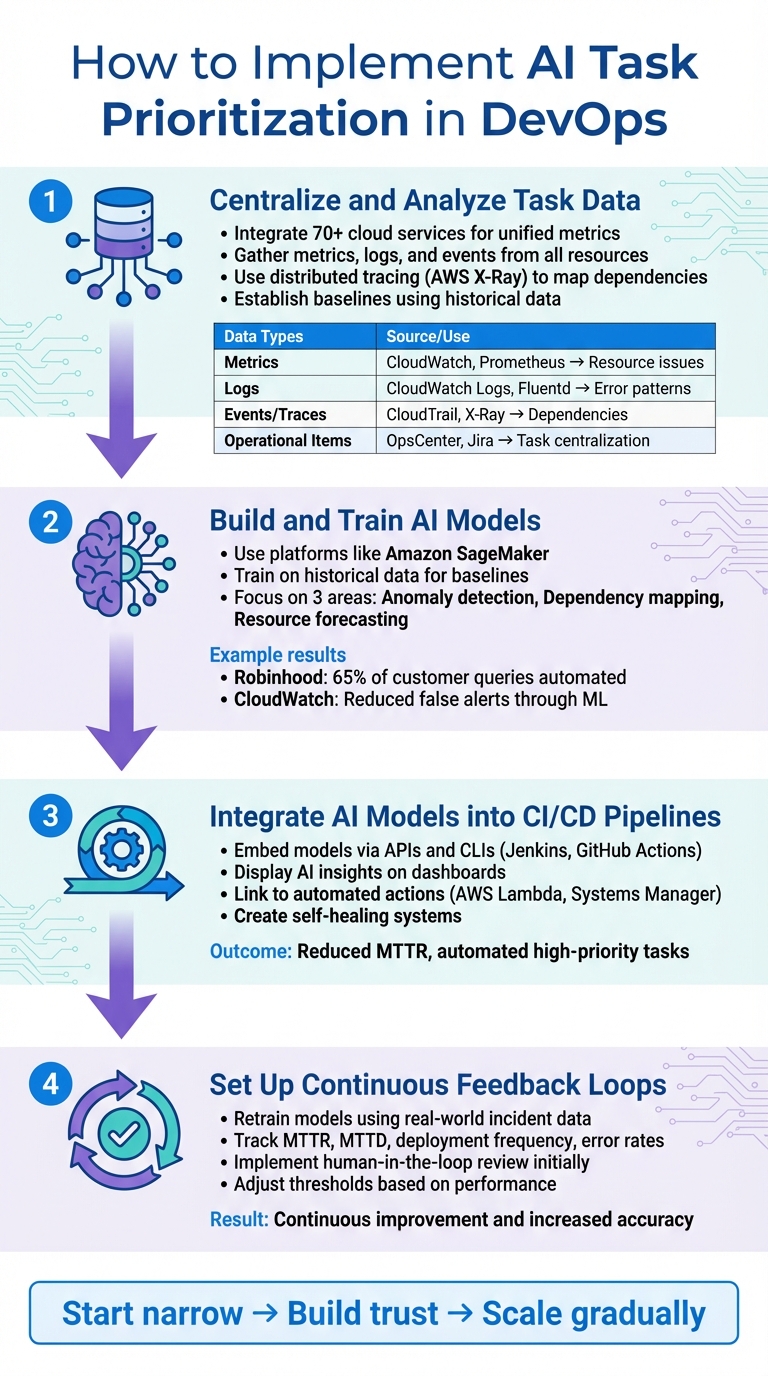
4-Step Implementation Process for AI Task Prioritization in DevOps
Putting AI to work in DevOps starts with a clear, structured approach to integrating data and models that support task prioritization. Here’s how to seamlessly incorporate AI into your workflows without disrupting existing operations.
Step 1: Centralize and Analyze Task Data
The backbone of AI-driven prioritization is having a unified view of your infrastructure. Tools like Amazon CloudWatch can integrate with over 70 cloud services, offering detailed metrics and custom data with up to one-second granularity. This eliminates data silos, giving AI models the full picture they need.
Gather metrics, logs, and events from all resources – whether it’s microservices, containers on EKS or ECS, or serverless functions like Lambda – into a centralized platform like Systems Manager OpsCenter. This provides a single view for investigations. Use distributed tracing tools such as AWS X-Ray to follow request flows across components. This helps AI identify dependencies and bottlenecks. Adding deep instrumentation to your code is essential to track task duration, frequency, and success or failure rates, all of which are critical for training accurate models.
Establish baselines using historical data to account for patterns over hours, days, and weeks. These baselines allow AI to detect deviations from normal behavior more effectively.
"Choose a tool that can leverage data and analytics to automatically infer predictions, and begin to feed data to it and inject failure to test the validity of the tool." – AWS DevOps Guidance
| Data Type | Source Examples | Purpose for AI Prioritization |
|---|---|---|
| Metrics | CloudWatch, Prometheus | Identifying resource issues and performance gaps |
| Logs | CloudWatch Logs, Fluentd | Providing error patterns and root cause context |
| Events/Traces | CloudTrail, X-Ray | Mapping dependencies and auditing activities |
| Operational Items | OpsCenter, Jira | Centralizing tasks and incident reports |
When starting out, focus on a narrow scope to avoid overwhelming users with alerts and to build trust in the system’s accuracy. Use chaos engineering to simulate failures and validate the AI’s ability to correctly identify and prioritize tasks.
Step 2: Build and Train AI Models
Once your data is centralized, the next step is building models that learn from it. Platforms like Amazon SageMaker simplify the process of creating, training, and deploying machine learning models. These tools handle infrastructure tasks, letting your team focus on the logic behind the models.
Train your models using historical data to establish baselines for system behavior. Prioritize three key areas: anomaly detection (identifying patterns like memory leaks or unusual CPU usage), dependency mapping (understanding task relationships), and resource forecasting (predicting when capacity issues might occur). For example, CloudWatch’s anomaly detection uses machine learning to analyze past data and account for cyclical patterns, reducing false alerts.
Tools like Amazon DevOps Guru can automatically detect operational issues by correlating anomalies in metrics, traces, and configuration changes – no manual training required. Companies like Robinhood have used AI to handle 65% of customer queries through automated reasoning, while Cox Automotive scaled AI agents with Amazon Bedrock AgentCore to streamline workflows.
If you’re running Kubernetes, open-source frameworks like Bodywork can deploy machine learning pipelines directly to your clusters, managing containerization and orchestration for you. This eliminates the need for custom scripts and speeds up the iteration process for data scientists.
Step 3: Integrate AI Models into CI/CD Pipelines
Once your models are trained, the next step is making them actionable by integrating them into CI/CD pipelines. Use tools like Jenkins or GitHub Actions to embed AI models via APIs and CLIs. The AI can assign priority scores in real time, dynamically reordering tasks based on risk.
Display AI insights on existing dashboards and link them to automated actions using AWS Lambda functions or Systems Manager runbooks. For instance, if AI detects a critical memory leak, it can trigger a runbook to scale resources or roll back a deployment before users even notice an issue.
"Artificial Intelligence for IT Operations (AIOps) can help you increase service quality by grouping related incidents, predict incidents before they happen, and classify new incidents and insights." – AWS Cloud Adoption Framework
High-priority tasks, such as restarting a service or scaling infrastructure, can be automated to execute without waiting for manual approval. This creates self-healing systems that reduce Mean Time to Repair (MTTR) and free up engineers for more complex work.
Step 4: Set Up Continuous Feedback Loops
AI models aren’t static – they need regular updates as system behaviors change. Establish a feedback loop to retrain and refine models using real-world incident data. Track metrics like MTTR, Mean Time to Detect (MTTD), deployment frequency, build times, and error rates.
Involve stakeholders like product managers, developers, and operations staff to gather qualitative feedback. Use this input to adjust thresholds, limits, and event-handling rules automatically based on historical performance.
"Ensure that there is a feedback loop to continuously train and refine these models based on real-world data and incidents." – AWS DevOps Guidance
During early adoption, have human operators review AI-generated task priorities. This human-in-the-loop approach builds trust while catching edge cases the AI might miss. Over time, refine the system based on real-world outcomes to improve its accuracy and effectiveness.
sbb-itb-f9e5962
Measuring the Impact of AI Task Prioritization
Understanding the impact of AI-driven task prioritization is crucial for improving DevOps workflows. To evaluate its effectiveness, start by establishing baseline metrics and then track key performance indicators (KPIs) to measure progress.
Key Metrics to Track
To assess performance, focus on DORA metrics – these include Deployment Frequency, Lead Time for Changes, Change Failure Rate, and Mean Time to Restore (MTTR). High-performing teams deploy on-demand, achieve lead times under 24 hours, maintain change failure rates between 0–15%, and restore service in less than an hour.
In addition to DORA metrics, monitor operational efficiency indicators like CPU and memory usage, auto-scaling events, and underutilized resources. These metrics help ensure that AI is reducing over-provisioning and optimizing resource allocation. For financial insights, calculate metrics such as Cost per Deployment and Savings from Automation by comparing labor and resource costs before and after AI implementation.
Quality metrics are equally critical. Track measures like Defect Density, reductions in Technical Debt, and Mean Time to Acknowledge (MTTA) to confirm that speed improvements don’t come at the expense of system health. AI-powered predictive analytics, for example, can predict system failures with up to 90% accuracy 24–48 hours in advance. Similarly, organizations using machine learning for security have reduced Mean Time to Detect (MTTD) by as much as 60%.
These metrics provide a solid foundation for comparing performance before and after implementing AI.
Before and After Performance Comparison
Comparing metrics from before and after AI adoption highlights its impact across key areas. The table below illustrates some of the measurable improvements:
| Metric | Before AI Implementation | After AI Implementation |
|---|---|---|
| Deployment Failures | Baseline | 70% Reduction |
| Incident Resolution | Baseline | 45% Faster |
| Infrastructure Costs | Baseline | 30% Reduction |
| Operational Automation | Manual/Low | 80% Automated |
| Deployment Speed | Baseline | 60% Faster |
To achieve these results, gather baseline data before rolling out AI and use automated tools to collect near real-time metrics. Conduct quarterly reviews to measure progress against your goals and refine AI models as needed based on ongoing feedback. This iterative process ensures continuous improvement and maximizes the benefits of AI in task prioritization.
Conclusion
Organizations leveraging AI in their operations have seen impressive results – deployment failures drop by 70%, incidents are resolved 45% faster, and infrastructure costs shrink by 30%. These numbers highlight a transformative shift in how engineering teams operate.
Shifting from manual workflows to intelligent automation requires centralized data, continuous model refinement, and human oversight. Companies that start small and target critical bottlenecks – like alert triaging or test case de-duplication – tend to achieve quicker wins and experience smoother transitions. Industry leaders are already paving the way for this change.
"Companies that integrate AI into their DevOps workflows will gain a lasting competitive advantage… The ones that hesitate risk being stuck in reactive mode." – Matthew Smith, Director of Digital Operations, Modus Create
The era of autonomous DevOps is here. AI automation is delivering real productivity gains, and the market is evolving rapidly. The real question isn’t if you should implement AI for task prioritization – it’s how soon you can do it effectively.
The results speak for themselves. Ready to move beyond reactive operations? TECHVZERO is here to help. Specializing in DevOps automation, AI integration, and performance optimization, we’ve managed operations at a 99,000+ node scale and helped clients save $333,000 in a single month – all while maintaining reliability. Visit techvzero.com to see how we can help you achieve faster deployments, lower costs, and reduced downtime.
FAQs
How does AI-driven task prioritization enhance efficiency in DevOps workflows?
AI-powered task prioritization transforms DevOps workflows by ranking tasks intelligently based on urgency, impact, and dependencies. This eliminates the need for time-consuming manual planning, allowing teams to focus on what truly matters and boosting overall productivity.
With machine learning in the mix, teams can cut organizational delays by 30-50%, improve deadline adherence to nearly 89%, and speed up release cycles – all while reducing failure rates. The result? Faster deployments, less downtime, and smoother, more dependable operations.
How can AI-driven task prioritization be implemented in DevOps workflows?
Implementing AI-driven task prioritization in DevOps can streamline workflows and improve efficiency. Here’s how to get started:
Begin by clearly defining your goals and identifying the data you’ll need to prioritize tasks effectively. This might include factors like task urgency, potential impact, and any dependencies. Once you’ve outlined these criteria, organize your task data by standardizing labels and incorporating historical performance metrics to provide a strong foundation for AI analysis.
With your data prepared, configure the AI model to evaluate and rank tasks based on the criteria you’ve established. This step ensures that the system aligns with your specific needs and priorities. To make the process seamless, integrate the AI system with your current DevOps tools, such as Jira or CI/CD pipelines. This enables real-time updates to task priorities, keeping everything aligned and up to date.
After deployment, it’s crucial to monitor the system’s performance. Track metrics, collect feedback from your team, and make adjustments to improve the model’s accuracy and effectiveness. As the system proves its value, you can scale it across different teams or projects to further enhance productivity.
TECHVZERO makes this process even more accessible by providing comprehensive support. They handle everything from platform selection and data preparation to integration and ongoing optimization. With their expertise, organizations across the U.S. can achieve quicker deployments, minimize downtime, and enjoy measurable cost savings.
What metrics can help measure the impact of AI in DevOps workflows?
Measuring how AI influences DevOps is all about keeping an eye on metrics that showcase improvements in efficiency, quality, and overall business performance. Here are some key areas to focus on:
- Deployment velocity: This tracks how often and how quickly new updates are rolled out, giving insight into the speed of delivery.
- Code quality and review speed: Evaluates how effective and fast code reviews are, as well as the overall quality of the deployed code.
- Operational efficiency: Looks at improvements in system reliability, delivery consistency, and reductions in downtime.
- Team productivity and satisfaction: Measures how AI tools help teams work better by automating repetitive tasks and lightening manual workloads.
- Business impact: Focuses on measurable results like cutting costs, speeding up release cycles, and reducing failure rates.
These metrics paint a clear picture of how AI-driven tools streamline DevOps workflows, enabling faster, more reliable deployments while minimizing inefficiencies.