How to Prioritize Workloads for Risk-Free Migration

Migrating workloads without a clear plan can lead to failures, downtime, and compliance risks. Prioritizing workloads ensures a smooth transition by ranking applications based on risk, complexity, and business impact. Here’s how you can approach it:
- Start with Data Collection: Use tools like Azure Migrate or AWS Discovery Service to gather details about applications, dependencies, and performance metrics.
- Score Workloads: Rank applications by criteria such as business criticality, compliance needs, and technical complexity. Use a scoring framework to prioritize migration waves.
- Begin with Low-Risk Pilots: Test your process by migrating non-critical workloads with minimal dependencies first.
- Map Dependencies: Identify connections between systems to group related workloads and avoid disruptions.
- Plan Migration Waves: Organize workloads into phases, starting with simpler systems and gradually moving to critical ones.
- Mitigate Risks: Prepare rollback plans, optimize resources, and account for compliance requirements like GDPR or HIPAA.
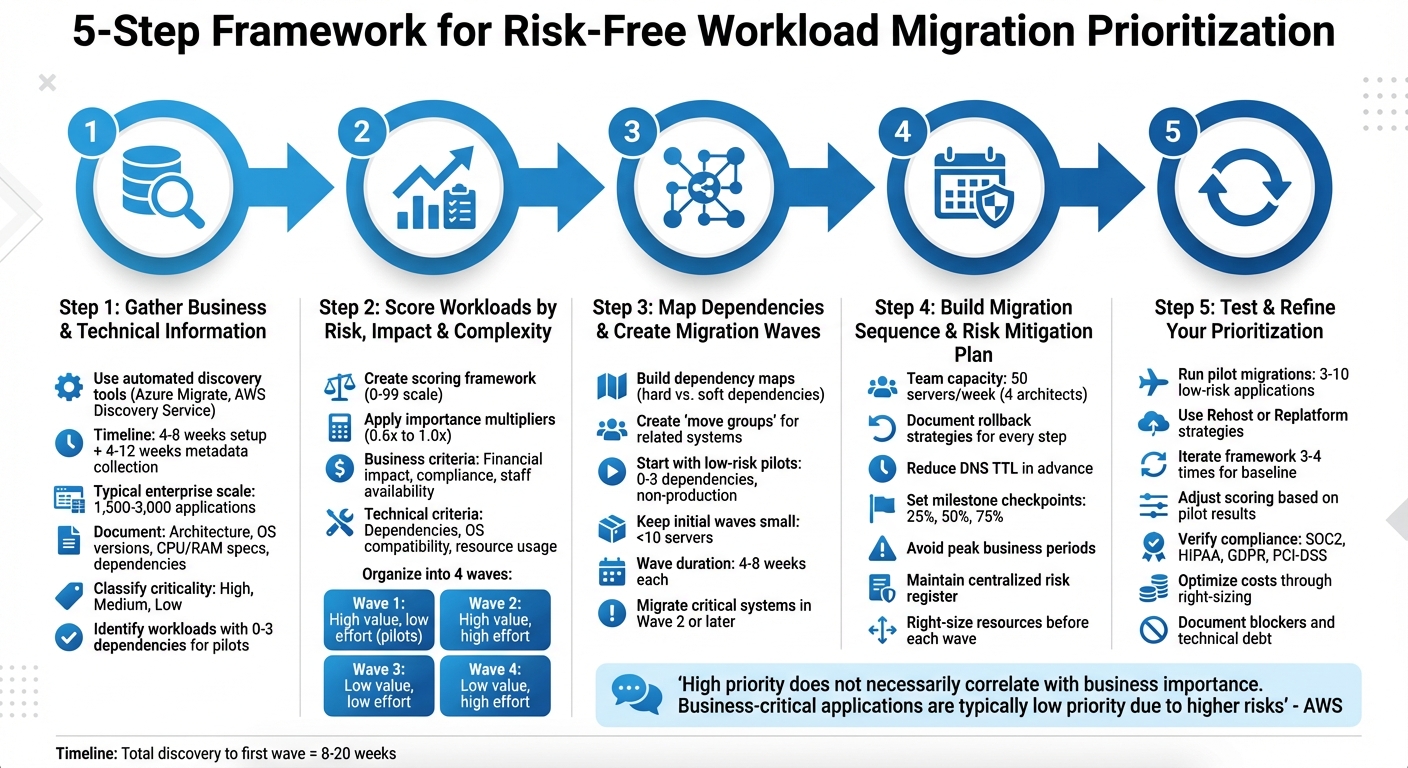
5-Step Workload Migration Prioritization Framework
Use Azure Migrate for AI assisted insights and cloud transformation | BRK139
sbb-itb-f9e5962
Step 1: Gather Business and Technical Information About Your Workloads
To kick things off, gather detailed business and technical information for each workload. This includes understanding the business context and technical specs for every application in your environment. For large enterprises – those with 100,000 employees, for instance – managing 1,500 to 3,000 applications is typical. To handle this scale, automated discovery tools like Azure Migrate or AWS Application Discovery Service are invaluable. They help capture component data and network traffic patterns efficiently. Keep in mind, these tools need 4–8 weeks for setup and another 4–12 weeks to gather enough metadata. This inventory is the foundation for scoring workloads effectively in the next step.
Identify Your Most Critical Workloads
Begin by identifying which workloads are key to revenue, customer satisfaction, or essential operations. Work closely with business stakeholders to determine the criticality of each workload – classify them as High, Medium, or Low based on the impact of downtime. Make sure to document ownership for each workload, both from the business and IT sides, and understand its role within the organization. This classification ensures you avoid migrating critical systems too early, allowing your team time to refine their migration process.
Document Dependencies and Resource Requirements
Your technical inventory should include architecture diagrams, OS versions, CPU and RAM specs, and storage types (e.g., SSD vs. HDD). Capture performance baselines for metrics like CPU usage, memory, disk I/O, and network throughput to help size the target environment accurately. It’s equally important to map out workload connections – document internal dependencies, external integrations (like SaaS platforms or APIs), and data pipelines. For pilot migrations, prioritize workloads with 0–3 dependencies, as they’re easier to manage. Additionally, take note of software licensing details early on, since programs like Azure Hybrid Benefit can lead to significant cost savings.
Work with Stakeholders During Assessment
Automated tools can sometimes miss undocumented or informal dependencies, so it’s essential to engage the people who manage these systems daily. Conduct interviews or workshops with workload owners to uncover these hidden connections. Collaborate with security and compliance teams to identify data sensitivity levels and regulatory requirements, such as GDPR, HIPAA, PCI DSS, or SOX, as these will shape decisions around region selection and data protection. Microsoft emphasizes this point:
The assessment phase ensures you have full visibility into every component, dependency, and requirement before moving to Microsoft Azure.
Don’t forget to document operational factors like SLAs, Recovery Point Objectives (RPOs), and Recovery Time Objectives (RTOs), as these will guide your backup and failover strategies. Also, note maintenance windows and blackout periods when migration activities cannot occur. This thorough assessment sets the stage for developing a scoring framework in Step 2.
Step 2: Score Workloads by Risk, Impact, and Complexity
Once you’ve gathered workload data, the next step is to assign scores based on migration risk, impact, and complexity. These scores will help determine the order in which workloads should be migrated. AWS Prescriptive Guidance explains this process well:
Complexity scoring is the process used to assess the difficulty of migrating an application… evaluating all applications against the same set of business and technical criteria, which you define.
Build a Scoring Framework
To create a scoring framework, include both business and technical criteria. On the business side, factors like financial impact, regulatory compliance (e.g., GDPR, HIPAA, PCI, SOC), and the availability of staff for testing and cutover are key considerations. On the technical side, look at factors such as dependency counts, operating system compatibility (cloud-ready vs. legacy), CPU and memory usage, and the complexity of migrating data.
Assign each attribute a numerical score between 0 and 99, then apply a weighting multiplier (ranging from 0.6x to 1.0x) to reflect its importance to your organization. For example, if reducing costs is a top priority, workloads running expensive legacy databases like Oracle or SQL Server might receive higher weighting. Focus on a manageable number of criteria to ensure scores effectively differentiate workloads.
Here’s a sample scoring framework:
| Attribute (Data Point) | Possible Values | Base Score (0-99) | Importance Multiplier |
|---|---|---|---|
| Environment | Test / Dev / Production | 60 / 40 / 20 | High (1.0x) |
| Business Criticality | Low / Medium / High | 60 / 40 / 20 | High (1.0x) |
| Compliance | None / HIPAA / FedRAMP | 60 / 20 / 10 | High (1.0x) |
| Dependencies | 0–3 / 4–10 / 11+ | 60 / 40 / 20 | Medium-High (0.8x) |
| Migration Strategy | Rehost / Replatform / Refactor | 70 / 30 / 10 | Medium (0.6x) |
Create a Prioritization Matrix
A prioritization matrix is a helpful tool for organizing scored workloads. It visually lays out key details like workload name, business criticality score, complexity score, risk score, and total priority rank. This makes it easier to identify low-risk, low-complexity workloads that are ideal for pilot migrations.
To structure your migration, consider grouping workloads into four waves:
- Wave 1: High business value, low effort (ideal for pilots).
- Wave 2: High value, high effort.
- Wave 3: Low value, low effort.
- Wave 4: Low value, high effort.
Focus on planning enough workloads for the first 3 to 5 waves. This approach allows flexibility, as priorities often shift with experience.
Scoring System in Action
When you finalize your scores, aim for a bell curve distribution across your portfolio. This means a few workloads will rank as very high or very low priority, while most will cluster in the middle. If too many workloads end up with similar scores, adjust the weighting factors to create sharper distinctions. AWS offers an insightful perspective:
High priority does not necessarily correlate with the importance of the application to the business. In fact, applications that are business-critical are typically low priority for the migration because business-critical applications have higher risks.
Starting with "easy wins" – low-risk, low-complexity workloads – builds team confidence and helps refine your process before tackling more challenging systems. Be prepared to adjust your scoring criteria three or four times to establish a reliable baseline. Finally, validate your results with workload owners and business stakeholders. This ensures the migration sequence takes into account blackout periods, business deadlines, and any hidden constraints. Once validated, you’re ready to map dependencies and plan your migration waves in the next step.
Step 3: Map Dependencies and Create Migration Waves
Once you’ve scored your workloads, the next step is to identify their interdependencies and organize them into migration groups. AWS explains this concept clearly:
A move group is a block of servers or applications that should be moved together in a group. This is the building block of a migration wave.
Using the scoring framework you developed in Step 2, dependency mapping will help you determine the order and structure of your migration waves.
Build Dependency Maps
Start by using automated discovery tools like Azure Migrate, Google Migration Center, or AWS discovery tools to uncover the relationships between servers, applications, and their dependencies. This process builds on the technical inventory you created earlier. To ensure no detail is missed, supplement the data from these tools with interviews to capture undocumented connections, such as manual file transfers, batch jobs, or informal API integrations.
When mapping dependencies, it’s important to distinguish between two types:
- Hard dependencies: These require close proximity due to low latency needs or high traffic, such as an application server communicating with its database. These components must migrate together.
- Soft dependencies: These are more flexible and can handle some latency, making it possible to separate components between on-premises and the cloud during the transition.
Be thorough in documenting both internal connections (e.g., server-to-server) and external ones (e.g., SaaS platforms, partner APIs, or third-party data pipelines). Group resources that need to move together into "move groups" to avoid service interruptions. Store all maps, architecture diagrams, and component lists in a shared repository – like a wiki, spreadsheet, or database – to ensure team collaboration and easy access.
Start with Low-Risk Pilots
Transitioning from dependency mapping to executing migration waves begins with a controlled pilot phase. Focus your first migration wave on low-risk applications – those with 0–3 dependencies, non-production environments, and cloud-ready operating systems. Google emphasizes this approach:
The apps in the first wave let your teams test the deployment in the cloud environment, while focusing on the migration instead of on the complexity of the apps.
This phase is ideal for moving development, staging, or QA environments before touching production systems. It allows you to validate your processes in a safe environment, test security configurations, and uncover potential technical issues such as schema mismatches or performance bottlenecks – all without risking critical downtime. Successfully completing these initial migrations also helps demonstrate value to stakeholders and builds momentum for larger, more complex efforts.
Keep these early waves small – fewer than 10 servers – so your team can learn quickly and pivot if needed. While planning, outline 4–5 waves in advance but remain flexible to incorporate lessons learned as you progress.
Migrate Critical Systems After Pilots
Once the pilot migrations are complete, you can shift your focus to business-critical systems. As AWS points out:
High priority does not necessarily correlate with the importance of the application to the business. In fact, applications that are business-critical are typically low priority for the migration because business-critical applications have higher risks.
The insights gained from pilot migrations will help you refine your strategy for handling high-risk, critical systems. These systems should not be moved until Wave 2 or later, after your team has gained experience and fine-tuned the migration process. Typically, migration waves take 4–8 weeks, and overlapping waves can speed up timelines. For example, while one team manages cutover and testing for Wave 1, another team can begin preparing the infrastructure for Wave 2.
Timing is crucial. Be mindful of business cycles and avoid scheduling migrations during busy periods like end-of-month processing, holidays, or major application releases. Every wave should include a tested rollback plan to ensure you can quickly restore systems if issues arise during the migration.
Step 4: Build Your Migration Sequence and Risk Mitigation Plan
Now that you’ve scored and grouped your workloads, it’s time to turn those findings into a migration strategy you can act on. Using the waves and dependency maps you’ve already outlined, this phase focuses on creating a detailed migration schedule. The goal? Balance speed with risk management by setting clear timelines, assigning resources, and including contingency plans.
Create a Migration Timeline
For a team of four architects, handling up to 50 servers per week for rehost patterns is a reasonable pace. Plan your migration waves accordingly to prevent overburdening your team and avoid unnecessary risks. Keep the workflow steady but adaptable, allowing room for adjustments based on lessons learned from earlier waves.
Stick to the recommended approach: migrate non-production environments first, followed by production systems. Before locking in your schedule, confirm that application owners and subject matter experts will be available during critical cutover windows. Also, align the migration timeline with business cycles to avoid peak operational periods. To stay on track, set milestone checkpoints at 25%, 50%, and 75% through each wave to evaluate progress and make necessary adjustments.
Add Risk Mitigation Tactics
For every migration step, have a rollback strategy documented and ready to go. Time-box each migration task with a maximum execution limit – if the limit is exceeded, the rollback procedure should kick in automatically. Reduce your DNS Time to Live (TTL) well in advance to enable swift traffic redirection if needed.
Set up backup communication channels, such as secondary internet access, to avoid being locked out during unexpected failures. Test workloads under stress scenarios – like network disruptions or message duplication – in non-critical environments before the actual migration. Maintain a centralized risk register to track, prioritize, and monitor technical and operational risks throughout the process. For large-scale migrations involving multiple time zones, implement "follow-the-sun" protocols. Detailed hand-off documentation ensures each shift knows exactly what actions have been taken.
Align Plans with Business Goals
Your migration plan needs to directly support your business priorities, such as minimizing downtime and managing costs. Define clear criteria for retiring source environments – things like verified data consistency, meeting SLA requirements, and confirming no network traffic – to avoid the ongoing expense of running dual environments. Group workloads based on business functions (e.g., supply chain, fraud monitoring, customer service) to ensure critical processes remain operational and efficient during the transition.
Monitor interconnect capacity between migrated and non-migrated workloads, as high latency during hybrid phases can negatively affect SLAs. Perform right-sizing exercises before each migration wave to ensure the target environment meets latency and response time expectations. Build buffer time into your estimates to handle unexpected technical hurdles. For instance, discovery alone can take 4–8 weeks to set up, with another 4–12 weeks needed for metadata collection. While standard migration decision trees work for 70–80% of workloads, the remaining ones often require manual exception handling.
With your migration sequence and risk mitigation plan in place, you’re ready to test your approach through pilot migrations and refine as you go.
Step 5: Test and Refine Your Prioritization
Run Pilot Migrations
Start by testing your prioritization framework with pilot migrations. Choose 3–10 low-risk applications from non-production environments to uncover any hidden blockers that might not have been identified earlier. These pilot migrations act as a feedback loop, helping you confirm whether your scoring criteria for business criticality and technical complexity align with the actual migration effort.
"Using low-risk, low-complexity workloads in initial migrations reduces the risk and gives teams the opportunity to gain experience."
– AWS Prescriptive Guidance
For these initial migrations, stick to straightforward strategies like "Rehost" or "Replatform." These allow you to quickly validate your landing zone setup and security controls. Define clear exit criteria, such as ensuring target compatibility, minimal downtime, and proper security alignment. Pilots often reveal technical blockers that automated tools might miss – like unsupported operating systems or specific stored procedures that hinder migration to PaaS. Document these findings immediately, as they will help you refine your scoring framework and improve your wave planning.
Adjust Based on Results
Use the insights from your pilot migrations to fine-tune your prioritization framework. Expect to go through at least three or four iterations to establish a reliable baseline. After running the pilots, review workload rankings and adjust the scoring criteria if the sequence doesn’t align with expectations. Visualizing workload scores with a histogram can help confirm a balanced distribution, avoiding clusters of identical priorities.
As you refine the framework, gradually shift your focus from low-risk pilots to priorities driven by business goals, such as reducing costs or enabling innovation. If technical blockers emerge during pilots, consider deferring those workloads to later waves or creating specific mitigation workstreams. If you need to override the prioritization logic for certain workloads, document the reasoning instead of altering the entire framework.
Maintain Compliance and Optimize Costs
Once you’ve refined your framework through pilots and adjustments, make sure compliance and cost efficiency remain central to your migration strategy. Confirm that all workloads meet regulatory standards – such as SOC2, HIPAA, GDPR, or PCI-DSS – by enforcing measures like encryption, role-based access, and data masking. Use pilot data to optimize compute and storage needs, avoiding over-provisioning in your target environment. Continuously monitor resource usage and leverage auto-scaling features to manage costs effectively.
Before scaling up the migration, establish performance benchmarks for your on-premises infrastructure. These benchmarks will serve as a comparison point for post-migration performance. Cleanse and deduplicate your data to minimize storage costs and prevent analytics issues in the target environment. Additionally, eliminate unused ETL jobs, tables, and reports post-migration to reduce technical debt. For workloads with stringent regulatory constraints, consider scheduling separate migration waves to avoid delaying non-regulated systems. These steps ensure you’re prepared to scale your migration efforts efficiently.
TechVZero partners with engineering-focused leaders to tackle these challenges. With experience managing over 99,000 nodes and saving a client $333,000 in a single month while mitigating a DDoS attack, we provide actionable insights to help you cut costs and stay compliant – without the noise of vendor hype.
Conclusion: Key Points for Risk-Free Migration
Summary of the Prioritization Process
When it comes to workload prioritization, the process begins with a thorough, data-driven scoring of both business criteria (like criticality, impact, and compliance) and technical criteria (such as dependencies, OS support, and server count). Start by piloting low-risk, non-critical workloads – those with minimal dependencies (0–3) – to help your team gain experience and refine migration processes. Use automated tools or stakeholder interviews to map out dependencies, ensuring systems that rely on each other are grouped into the same "move group". Organize the migration into phases, starting with standalone applications and gradually moving to more complex systems as your team’s cloud expertise grows. Keep in mind that business-critical applications often migrate later due to the higher risks involved. This structured approach helps reduce risk while delivering measurable business outcomes.
Working with Migration Partners
A robust scoring framework is essential, but having the right expertise on your side can make all the difference.
"Cloud Migration skills and experience are the most important risk mitigation strategy for completing a migration."
– AWS Cloud Operations Blog
Collaborating with experienced infrastructure teams can fast-track your migration by filling gaps in internal cloud expertise. This allows your engineers to focus on application logic rather than the complexities of cloud infrastructure. For example, TechVZero partners with engineering-savvy founders who want results without diving deep into infrastructure management. With experience managing operations at a scale of over 99,000 nodes and saving clients $333,000 in a single month while mitigating DDoS attacks, TechVZero delivers actionable advice that cuts through vendor hype to achieve practical, impactful results.
Next Steps
Now that you’ve established a prioritization process and identified potential partners, it’s time to outline your next steps:
- Define business drivers: Pinpoint goals like innovation, cost reduction, or exiting a data center to guide your framework.
- Select scoring attributes: Choose 2–10 key factors, such as environment type or business criticality, to establish a baseline for prioritization.
- Identify pilot applications: Pick 3–5 applications for your initial wave to test your migration landing zone and evaluate team readiness.
- Maintain a risk register: Document technical and operational risks, along with mitigation strategies and assigned responsibilities.
- Conduct stakeholder interviews: Use these to uncover hidden dependencies or constraints, like blackout periods, that could impact the migration timeline.
FAQs
How can I identify the most important workloads to migrate?
To figure out which workloads should be migrated first, start by looking at their business impact. Prioritize workloads that are essential for driving revenue, keeping customers happy, or meeting regulatory requirements – these are often the most urgent.
Then, evaluate the risk level involved in migrating each workload. Workloads with a lot of dependencies or high complexity might need more detailed planning and are better tackled after simpler ones. Beginning with low-risk workloads allows your team to gain experience and fine-tune the migration process.
Lastly, think about the technical complexity and how ready each workload is for migration. Focus on workloads that need minimal adjustments to move over, leaving the more complicated or resource-heavy tasks for later stages. Following this methodical approach can help ensure a smoother transition while keeping both business and technical priorities in check.
What are the best tools for identifying dependencies during workload migration?
Mapping dependencies is a key step to ensuring a smooth and low-risk workload migration. Using tools that reveal network and application relationships can make the process more efficient and dependable.
For mapping network dependencies, tools like Nmap, Device42, Intermapper, and Spiceworks Network Mapper are invaluable. These tools can automatically or manually uncover connections between devices and create visual representations of network topologies. They’re particularly helpful in complex setups, making it easier to understand how systems and services interact.
When it comes to analyzing application dependencies, observability tools such as SolarWinds, Splunk, Datadog, and Dynatrace provide deep insights. They track system performance, communication flows, and data exchanges between applications, helping uncover critical connections and areas that could be affected during migration.
By combining network mapping tools with observability solutions, organizations can build precise dependency maps, focus on high-priority workloads, and minimize migration risks. This approach ensures a smoother transition to the new environment.
Why are low-risk pilot projects essential during migration?
Starting with low-risk pilot projects can be a smart way to approach migration. These smaller-scale initiatives help reduce overall risks while giving your team a chance to gain confidence and fine-tune their processes. By focusing on simpler workloads first, you can spot potential problems early on without putting critical systems at risk.
These pilot projects also offer a chance to uncover technical hurdles, estimate resource needs, and better understand timelines. This knowledge makes it easier to handle more complex workloads later, creating a smoother and more dependable migration process.