HPA vs. VPA: Scaling Metrics Explained
When managing Kubernetes clusters, HPA (Horizontal Pod Autoscaler) and VPA (Vertical Pod Autoscaler) are two key tools for scaling workloads. Here’s the difference:
- HPA adjusts the number of pods dynamically based on real-time metrics like CPU, memory, or custom signals. It’s ideal for handling sudden traffic spikes, scaling in minutes.
- VPA fine-tunes CPU and memory allocations for individual pods based on historical usage patterns. It optimizes resource efficiency over hours or days but may disrupt workloads by restarting pods.
Key Takeaways:
- Use HPA for stateless apps (e.g., APIs) that need quick scaling.
- Use VPA for stateful apps (e.g., databases) to reduce resource waste.
- Avoid using both on the same metric (e.g., CPU) to prevent conflicts.
- Combine with node-level tools like Cluster Autoscaler for seamless scaling.
Quick Comparison
| Feature | HPA | VPA |
|---|---|---|
| Scaling Focus | Number of pod replicas | Resource allocation per pod |
| Response Time | Minutes | Hours to days |
| Best For | Sudden traffic spikes | Long-term resource efficiency |
| Pod Impact | Minimal | Potential restarts |
Choose the right tool based on your workload’s needs and scaling priorities.
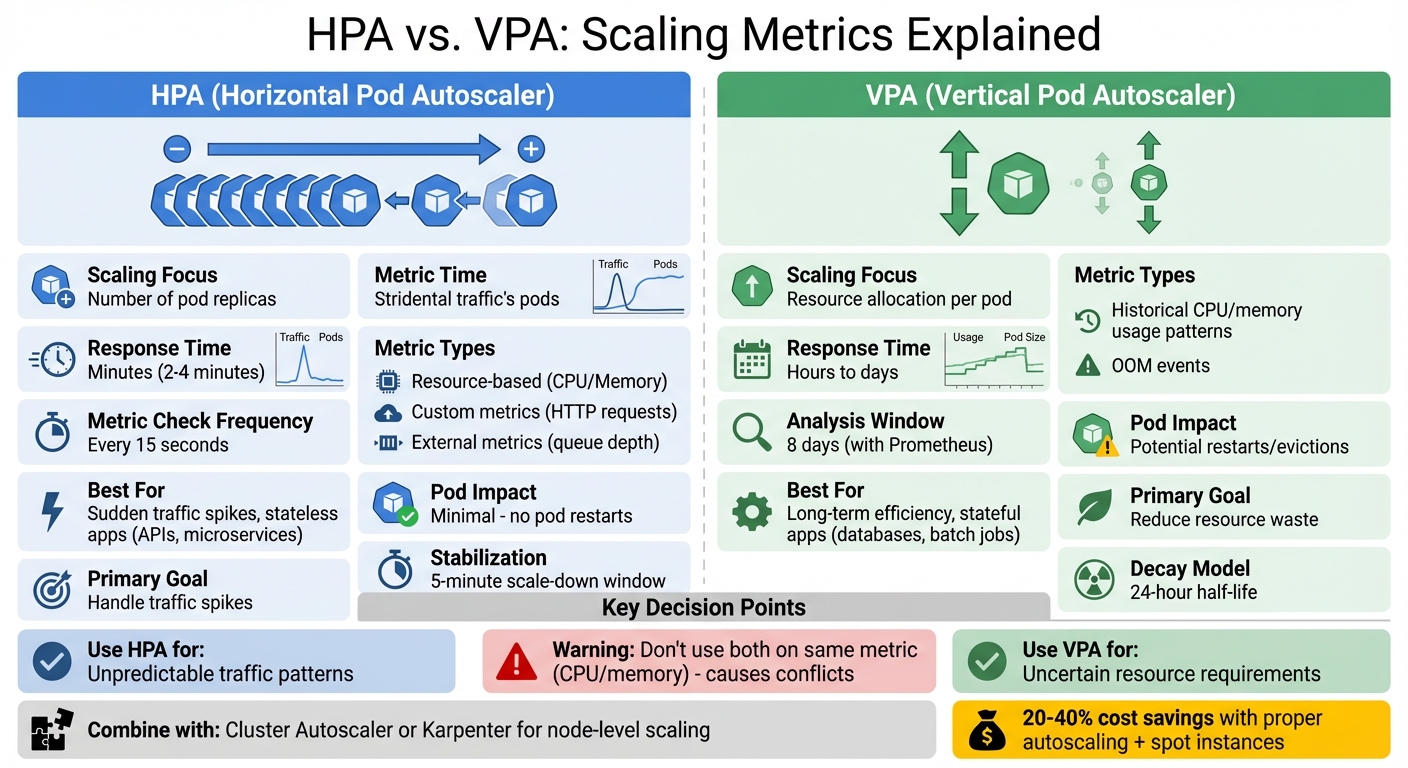
HPA vs VPA Kubernetes Autoscaling Comparison Chart
HPA Metrics
How HPA Measures Demand
HPA tracks three types of metrics: resource-based (like CPU and memory), custom metrics (such as HTTP requests or database connections), and external metrics (e.g., message queue depth).
For resource metrics, HPA calculates CPU and memory usage as a percentage of the pod’s resource requests. If these requests aren’t defined, HPA can’t measure utilization and won’t act on those metrics. The formula it uses is:
desiredReplicas = ceil(currentReplicas * (currentMetricValue / desiredMetricValue))[1].
Here’s an example: if your pods are running at 80% CPU usage with a target of 50%, the number of replicas will increase. This method ensures your application scales to meet demand while avoiding unnecessary overprovisioning.
Custom metrics provide a way to fine-tune scaling for specific workloads by using application-specific signals. When multiple metrics are configured, HPA evaluates each one separately and scales based on the highest recommended replica count, ensuring your application remains responsive under varying conditions.
These calculations enable HPA to adapt dynamically to changes in demand.
HPA’s Real-Time Response
The HPA controller checks metrics every 15 seconds. This frequent polling allows it to quickly identify traffic spikes and adjust scaling as needed. However, to prevent overreacting to minor changes, HPA ignores fluctuations within a 10% tolerance range.
HPA also takes pod startup behavior into account. For the first 5 minutes after a pod is created, CPU usage is typically excluded to avoid scaling based on temporary spikes during initialization. Additionally, a 30-second readiness delay ensures that pods are stable before their metrics influence scaling decisions.
When scaling down, HPA applies a 5-minute stabilization window to avoid rapid scaling cycles, often referred to as "thrashing". This approach ensures quick scale-ups during spikes in demand while delaying scale-down actions until lower demand levels are consistently observed.
VPA Metrics
How VPA Analyzes Resource Use
While Horizontal Pod Autoscaler (HPA) focuses on real-time scaling, Vertical Pod Autoscaler (VPA) takes a longer-term approach, refining resource allocation based on usage trends over time.
The Recommender component of VPA gathers CPU and memory usage data from the Metrics API (metrics.k8s.io). Unlike HPA, which reacts to immediate changes, VPA evaluates usage patterns over days by using exponentially bucketed histograms and applying time-based decay.
These histograms organize data into buckets that increase by 5% increments, starting at 0.01 cores for CPU usage. The Recommender then calculates recommendations based on specific percentiles, such as the 90th percentile, to reflect typical resource demands. For CPU, it averages core usage metrics, while for memory, it focuses on the working set – the memory actively used and less likely to be released under pressure.
To prioritize recent trends, VPA uses a 24-hour half-life time-based decay. When Prometheus is used as the data source, the analysis window typically spans eight days. This methodology ensures that recommendations are based on consistent patterns rather than reacting to short-lived spikes.
In cases where a pod crashes due to an Out-of-Memory (OOM) event, VPA immediately adjusts its memory recommendation, increasing it by either 20% or 100 MB, whichever is greater. The Recommender generates four key values: Target (optimal resource allocation), Lower Bound (minimum viable allocation), Upper Bound (maximum reasonable allocation), and Uncapped Target (a suggestion that disregards user-defined limits). However, VPA avoids evicting pods unless there’s a significant difference – at least 10% – between the current request and the recommended target.
"VPA’s primary goal is to reduce resource wastage while minimizing the risk of performance degradation due to CPU throttling or errors due to out-of-memory kills." – Povilas Versockas, SRE/Engineer
VPA’s 3 Operating Modes
VPA provides several modes for applying its recommendations, allowing flexibility based on workload requirements.
- Off Mode: In this mode, VPA generates recommendations and stores them in the
.statusfield of the VPA object. These recommendations are purely for review and do not affect running pods. - Initial Mode: Here, recommendations are applied only when pods are created. The VPA admission controller injects the suggested resource values during pod initialization, leaving existing pods unaffected. This mode is ideal for workloads where restarting pods is disruptive.
- Recreate Mode: This mode actively evicts running pods when resource requests differ significantly from recommendations. The workload controller then recreates the pods with updated resource settings. A newer mode, InPlaceOrRecreate (introduced in Kubernetes 1.34+), attempts to apply updates without restarting the pod, resorting to eviction only when necessary.
For example, in a MongoDB cluster test with three replicas, VPA reduced memory requests from 6 GB to 3.41 GB, saving 4.2 GB across the cluster. In another case, an etcd deployment with insufficient initial CPU requests (10m) benefited from VPA’s recommendation of 93m CPU and 599 MB memory.
HPA vs. VPA: Metric Comparison
Response Speed and Timing
HPA and VPA operate on very different timelines. HPA polls metrics every 15 seconds and reacts to demand changes within 2–4 minutes. This makes it a great fit for managing sudden surges in web traffic or API calls.
On the other hand, VPA takes a more long-term approach, analyzing resource usage over hours or even days to provide steady recommendations. By identifying trends and peak usage, it focuses on optimizing resource allocation over time. These differences in timing and focus play a major role in how each tool impacts your infrastructure.
| Feature | Horizontal Pod Autoscaler (HPA) | Vertical Pod Autoscaler (VPA) |
|---|---|---|
| Scaling Focus | Number of pod replicas | Resource allocation per pod |
| Metric Usage | Real-time and short-term averages | Historical trends and peak usage |
| Response Speed | Quick (minutes) | Slower (hours/days for stable recommendations) |
| Primary Goal | Handle sudden traffic spikes | Reduce waste and avoid throttling |
| Pod Impact | Minimal | Potentially disruptive |
| Best For | Unpredictable spikes (e.g., web APIs) | Steady workloads with uncertain resource needs |
"HPA is reactive to traffic patterns; VPA is reactive to resource utilization patterns." – Raz Goldenberg, ScaleOps
Impact on Running Pods
The way HPA and VPA interact with running pods is another key distinction. HPA’s quick adjustments generally leave active workloads unaffected, while VPA’s changes can disrupt operations.
HPA scales by adjusting the number of pod replicas without interfering with existing ones. This means applications can continue running smoothly while new pods are added or old ones are shut down gracefully.
VPA, however, updates resource settings by evicting and recreating pods. For example, if VPA determines that a pod needs more CPU or memory, it will evict the pod so it can be recreated with the updated resource settings. This process includes a pod restart, wiping out any in-memory state.
"HPA solves for throughput by adding more pods. VPA solves for efficiency by resizing existing pods." – Raz Goldenberg, ScaleOps
Some Kubernetes versions have introduced an InPlaceOrRecreate mode, which tries to update pod resources without restarting them. If that’s not possible, it falls back to recreating the pod. Despite this feature, most VPA implementations still rely heavily on pod eviction, which makes them unsuitable for workloads that cannot tolerate restarts.
It’s also important to avoid running HPA and VPA on the same metrics – like CPU or memory – for the same workload. This can create a feedback loop where VPA increases resource requests, reducing utilization percentages and causing HPA to scale down replicas unnecessarily. For mixed scaling needs, a good approach is to use HPA with custom metrics, such as requests per second, while letting VPA handle CPU and memory configurations.
Where Metrics Come From
Metric Sources for HPA and VPA
HPA and VPA gather their data from distinct sources, which explains the differences in how they operate. HPA relies on the metrics.k8s.io API, provided by the Metrics Server, to track basic CPU and memory usage in real time. This live polling gives HPA an up-to-the-minute view of resource consumption.
For more complex scaling needs, HPA can also access custom metrics (like HTTP requests per second) through the custom.metrics.k8s.io API or external metrics (such as cloud-hosted queue lengths) via the external.metrics.k8s.io API. These additional tools expand HPA’s ability to monitor and respond to varied workloads.
VPA, on the other hand, also uses the metrics.k8s.io API but takes things a step further by analyzing historical usage patterns, peak resource consumption, and critical events like Out-of-Memory (OOM) kills. This broader perspective allows VPA to make recommendations that balance resource efficiency and availability over time.
How Metric Accuracy Affects Scaling
The accuracy of metrics plays a huge role in how effectively HPA and VPA scale resources. Both systems depend on reliable data, and inaccuracies can lead to problems like underprovisioning or wasted resources.
When data is inaccurate or incomplete, scaling decisions get distorted. For example, missing resource requests disrupt accurate utilization calculations. If metrics are unavailable for specific pods, the system defaults to conservative scaling. Issues like startup spikes or lingering memory values can further skew scaling outcomes.
"HPA is a multiplier of your deployment’s quality: if your pod spec is flawed, HPA will happily and efficiently multiply that flaw across your cluster." – Nic Vermandé, ScaleOps
Using HPA and VPA on the same resource can create additional challenges. HPA calculates utilization as a percentage of requested resources, but VPA constantly adjusts those requests. This dynamic can lead to a feedback loop, causing oscillations and unstable scaling. To avoid this, it’s best to assign HPA to custom metrics, like requests per second, while letting VPA manage CPU and memory requests.
sbb-itb-f9e5962
HPA vs VPA Explained | Kubernetes Pod Autoscaling Concepts
Using HPA and VPA Together
Combining Horizontal Pod Autoscaler (HPA) and Vertical Pod Autoscaler (VPA) can be powerful, but it requires careful planning to avoid unintended consequences. A clear separation of metrics and proper node-level support are key to making this work effectively.
Preventing Scaling Conflicts
When HPA and VPA are used together without proper coordination, the result can be a destabilized cluster. Here’s why: VPA increases a pod’s CPU request, which lowers its utilization percentage. HPA then interprets this reduced utilization as a signal to scale down replicas. This back-and-forth creates a disruptive cycle of conflicting adjustments, leading to instability.
"This ‘tug of war’ leads to rapid fluctuation in both pod count and size. And in production environments, that’s not an option." – ScaleOps
To avoid this, ensure clear metric separation between HPA and VPA. Start by running VPA in "Off" or "Initial" mode to gather non-disruptive recommendations. VPA’s "Initial" mode applies resource recommendations only during pod creation, preventing unnecessary restarts. Additionally, set minAllowed and maxAllowed boundaries in VPA policies to prevent extreme resource allocations that could either destabilize workloads or drive up costs.
But scaling doesn’t stop at the pod level. It’s equally important to address node-level capacity for a seamless scaling experience.
Node-Level Scaling Tools
While HPA and VPA manage pod-level scaling, tools like Cluster Autoscaler (CA) and Karpenter ensure sufficient node-level resources for your workloads. Here’s how they work:
- Cluster Autoscaler: Monitors unschedulable pods and dynamically adds nodes to accommodate them. It also removes underutilized nodes to keep costs in check.
- Karpenter: Provisions nodes tailored to the specific resource requirements, taints, and tolerations of pending pods. This precision helps optimize resource usage and reduce waste.
Organizations that integrate node-level scaling solutions, especially with spot instance support, have reported cost savings of 20–40%.
"If you’re not doing cluster autoscaling, you’re not actually scaling – without it, you would have to provision static resources that would consume capacity whether or not you are scaling up your pods." – Azam Latoo, nOps
Choosing the Right Scaling Metrics
Selecting between HPA (Horizontal Pod Autoscaler) and VPA (Vertical Pod Autoscaler) isn’t about deciding which is better – it’s about aligning the scaling approach with your workload’s specific bottleneck. HPA focuses on handling throughput by adding more pods when traffic spikes, while VPA adjusts pod sizes to improve resource efficiency when allocations are misaligned.
"The decision between scaling out and scaling up is architectural, not merely technical." – Raz Goldenberg, ScaleOps
HPA is a great fit for stateless applications like web APIs and microservices, where quick, non-disruptive scaling is crucial to handle traffic surges within minutes. On the other hand, stateful applications, such as databases or batch processing jobs, often benefit more from VPA, as it optimizes resource usage without requiring distributed state management. If your challenge lies in handling high request volumes, HPA is the way to go. If the issue stems from per-pod resource capacity or unclear resource requirements, VPA is the better option.
It’s important to avoid scaling the same resource (like CPU) with both HPA and VPA simultaneously, as this can lead to destabilizing feedback loops. A good approach is to configure HPA to scale based on metrics like requests per second, while allowing VPA to handle CPU and memory adjustments. To minimize disruptions, many teams start VPA in "Off" mode, letting it gather resource recommendations without triggering pod restarts.
Key Takeaways
Here’s a quick summary of the differences and best practices:
- HPA: Scales horizontally and quickly (within minutes), making it ideal for traffic surges in stateless applications.
- VPA: Scales vertically over a longer period (hours or days) to optimize resource usage, suited for stateful applications.
- HPA adds pods without disruption, while VPA often requires pod restarts to apply new configurations.
- Using parameters like
minAllowedandmaxAllowedin VPA and stabilization windows in HPA helps prevent erratic scaling and resource swings. - Pairing HPA or VPA with node-level autoscalers like Cluster Autoscaler or Karpenter ensures your infrastructure can handle changes in pod count or size.
The best autoscaling strategy depends on your business priorities. Whether you aim to cut costs by maximizing resource efficiency or ensure system reliability with fast scaling, aligning your approach with these goals is key.
FAQs
Can you use HPA and VPA together without issues?
Yes, you can use Horizontal Pod Autoscaler (HPA) alongside Vertical Pod Autoscaler (VPA) since they handle different scaling needs. HPA focuses on adjusting the number of pods based on workload demand, while VPA fine-tunes the resource requests and limits for individual pods.
However, combining these tools requires careful configuration to prevent issues like resource contention or frequent pod restarts. Defining clear scaling rules and resource limits is crucial to ensure everything runs smoothly.
What are the key advantages of using a Vertical Pod Autoscaler (VPA) for stateful applications?
Using a Vertical Pod Autoscaler (VPA) for stateful applications comes with some standout advantages:
- Dynamic resource allocation: VPA automatically fine-tunes CPU and memory requests based on your application’s real-time needs, maintaining smooth performance.
- Minimized resource waste: By allocating only what’s necessary, VPA helps avoid over-provisioning, which can save on costs.
These features make VPA an excellent choice for managing stateful workloads, where maintaining stability and efficient resource usage is crucial for consistent performance.
How does the Horizontal Pod Autoscaler (HPA) efficiently manage sudden traffic spikes?
The Horizontal Pod Autoscaler (HPA) is a powerful tool for handling sudden traffic surges in a Kubernetes cluster. By keeping an eye on real-time metrics like CPU usage and memory utilization, it dynamically adjusts the number of Pods to meet changing demands. When traffic spikes, HPA scales up the Pods to ensure your application can handle the load. Once the traffic decreases, it scales the Pods back down, helping to conserve resources and reduce costs.
This automated scaling keeps your applications responsive during unpredictable demand, all without requiring manual adjustments.