Git for Compliance Documentation: Guide
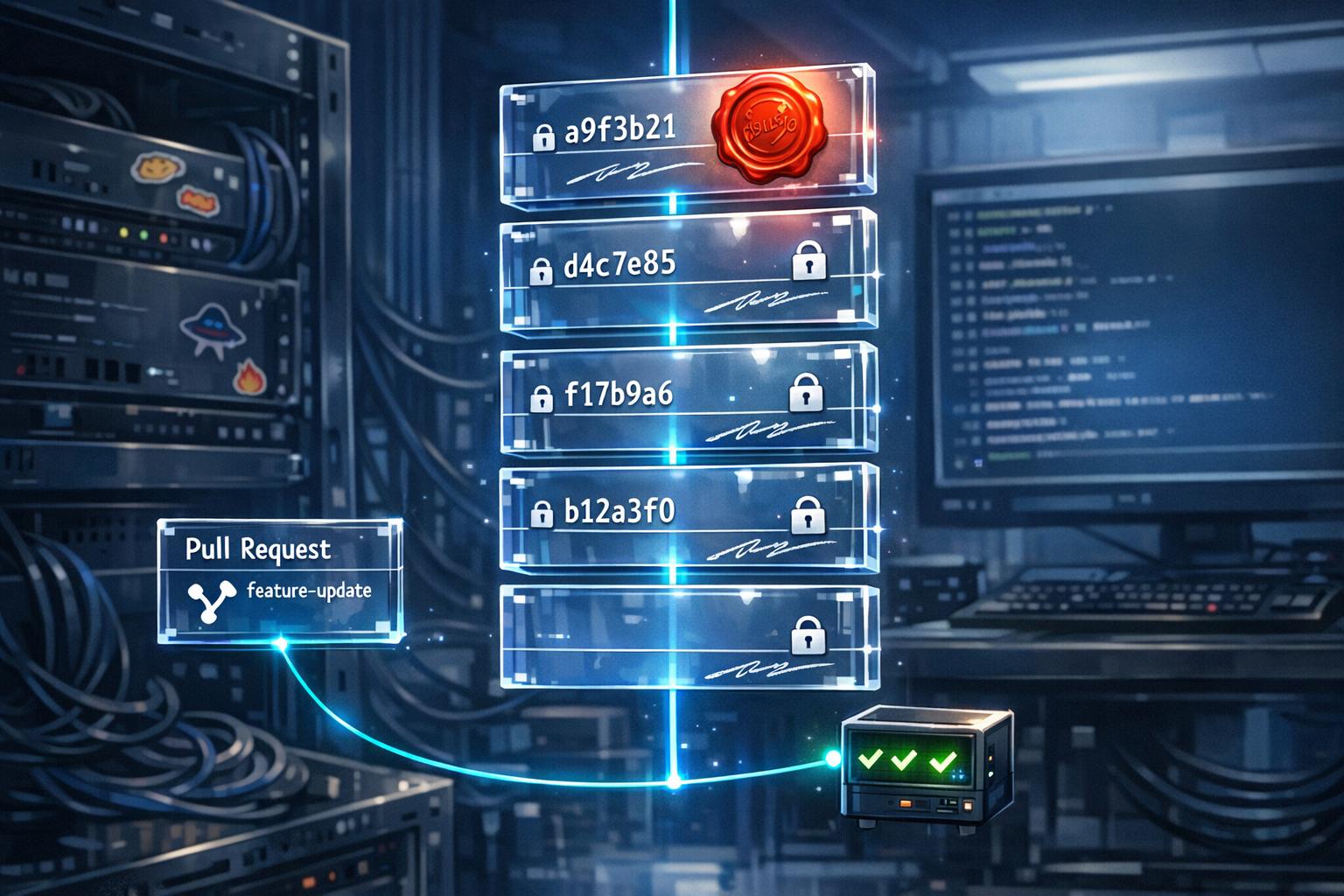
Git simplifies compliance documentation by transforming your existing development workflows into a system that meets regulatory requirements without extra tools. By using Git‘s built-in features like immutable commit logs, branch protection rules, and pull requests, you can create a secure, traceable audit trail. This ensures accountability and aligns with standards like FDA 21 CFR Part 11 and IEC 62304.
Key Takeaways:
- Immutable Logs: Git’s cryptographic commit history ensures tamper-proof records of "who, what, when."
- Branch Protection: Enforce reviews and prevent unauthorized changes with branch rules.
- Traceability: Link commits to issue trackers (e.g., Jira) for complete visibility from requirements to testing.
- Access Controls: Use unique user identities, multi-factor authentication (MFA), and role-based permissions.
- Audit Preparation: Structured workflows reduce audit prep time by up to 80%.
Git’s native tools, when configured properly, provide everything you need to meet compliance standards while keeping your processes efficient.
Repository Rules: Code Compliance at Scale
sbb-itb-f9e5962
Setting Up Git for Compliance Documentation
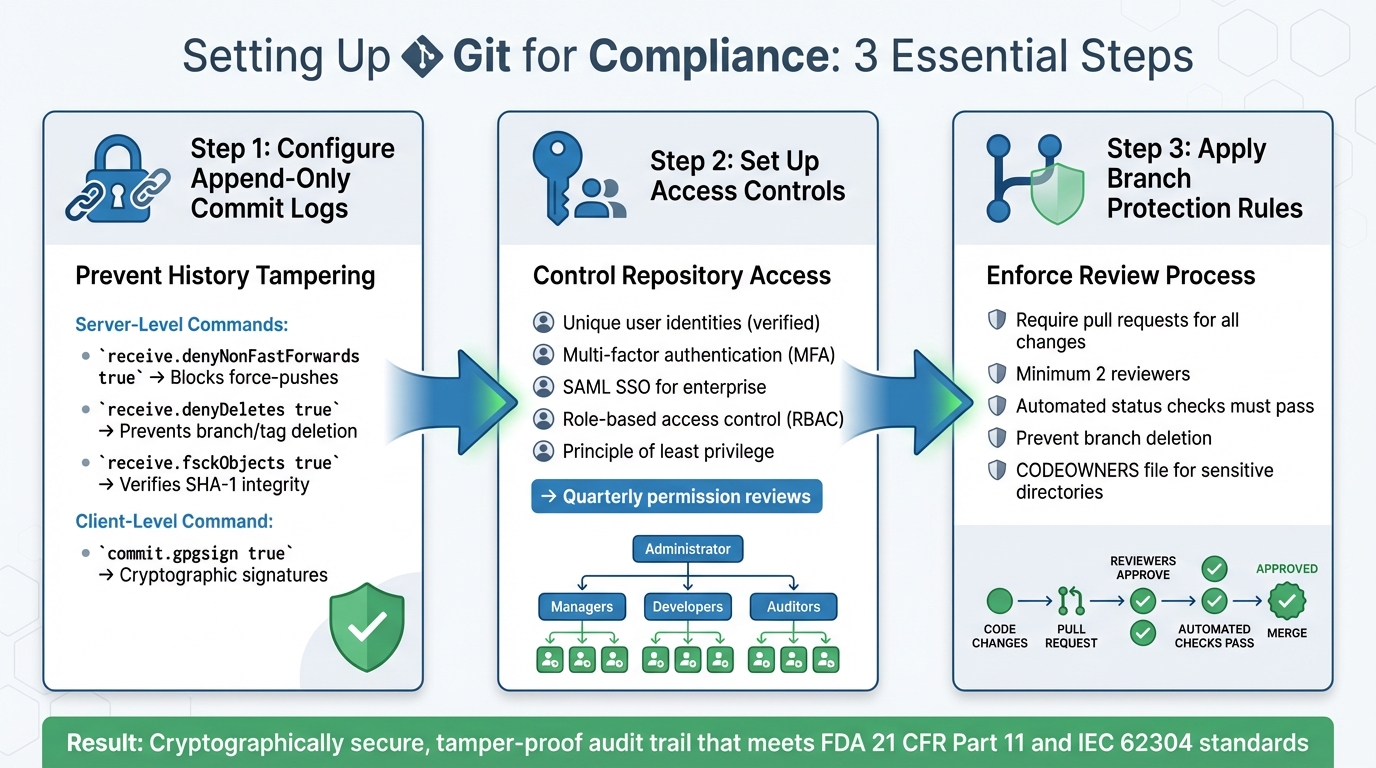
Git Compliance Configuration: 3-Step Setup Guide for Audit-Ready Repositories
When it comes to compliance documentation, there are three key areas to focus on: preventing history tampering, controlling access, and enforcing reviews. By configuring these properly, Git evolves from just a development tool into a defensible audit system.
Configuring Append-Only Commit Logs
Git’s SHA-1 hashing system creates a unique cryptographic fingerprint for every commit. This mechanism ensures that any change to content, timestamps, or author data breaks the chain, making tampering cryptographically detectable.
"Git was designed with integrity in mind. That accidental design choice changes everything." – Git Forensics
To prevent local history rewriting, you need to lock things down at the server level. For instance, rejecting pushes that attempt to rewrite history ensures your audit trail remains intact. Here are some critical commands to set up on your central Git server:
- Block history rewriting: Use
git config --system receive.denyNonFastForwards trueto stoppush --forcecommands from altering the commit history. - Disable branch deletion: Set
git config --system receive.denyDeletes trueto prevent branches or tags from being deleted. - Verify data integrity: Enable
git config --system receive.fsckObjects trueto validate the SHA-1 checksum of every object during a push.
Additionally, you can implement a server-side update hook to reject pushes that lack required metadata, such as ticket references or unauthorized author identities. On the client side, require contributors to enable git config --local commit.gpgsign true. This ensures every commit is cryptographically signed, providing non-repudiation for your logs.
| Configuration Setting | Level | Purpose |
|---|---|---|
receive.denyNonFastForwards |
Server | Blocks history rewriting and force-pushes |
receive.denyDeletes |
Server | Prevents deletion of branches and tags |
receive.fsckObjects |
Server | Verifies the cryptographic integrity of all pushed data |
commit.gpgsign |
Client | Adds cryptographic proof of authorship to every commit |
Once your commit logs are secure, the next step is to control repository access.
Setting Up Access Controls
Every user in your compliance repository should have a unique, verified identity. To enhance security, enable multi-factor authentication (MFA) for all accounts. This helps protect against unauthorized access and complements Git’s built-in audit trail. For organizations using centralized identity management, SAML Single Sign-On (SSO) ensures only authorized personnel can access the repository.
To further tighten security, enforce the principle of least privilege. Assign users only the permissions they need for their roles. Role-based access control (RBAC) can help streamline this process: developers might have write access to feature branches, but only maintainers should be able to approve merges into production. This separation of duties ensures no single individual can push unreviewed changes to critical branches.
It’s also important to regularly review and document access permissions. As teams grow or roles shift, outdated permissions can create vulnerabilities that auditors will catch. Conduct quarterly reviews to keep permissions up to date.
Applying Branch Protection Rules
Branch protection rules add another layer of security by controlling how changes are delivered. These rules not only help enforce compliance but also provide a clear audit trail, documenting every modification and its approval process. For your main branch, require pull requests for all changes. This ensures every alteration is logged, along with the discussion and reasoning behind it.
Set a minimum reviewer requirement (e.g., two reviewers) to ensure proper oversight. Additionally, enforce status checks that require automated tests and security scans to pass before any merge is allowed.
"For important branches in your enterprise’s repositories… your compliance framework should reduce the risk of errors or malicious code entering your production environments." – GitHub Enterprise Server Docs
To maintain a complete historical record, prevent branch deletion. Using a CODEOWNERS file can also help by requiring specific compliance experts to approve changes to sensitive directories, such as those containing regulatory documentation. If your organization manages multiple repositories, consider applying organization-wide rulesets or compliance frameworks. This reduces manual configuration errors and ensures consistency across all projects.
Creating Compliance Audit Trails
When it comes to creating a compliance audit trail, Git offers a solid foundation by automatically recording who made changes, when they were made, and what was changed – key elements for any compliance process. This section focuses on how to extract and store this data in ways that meet regulatory standards and ensure long-term accessibility.
Extracting Timestamped Audit Logs
Git functions as an immutable log, using cryptographic hash chains to track changes. By tagging releases or milestones, you can create clear reference points. Each commit inherently captures details like the author, committer, timestamp, and specific code modifications. This built-in functionality eliminates the need for additional tools to establish a basic audit trail.
"Git provides the same append-only cryptographic basis as blockchain, but it also has a document-oriented foundation for schema-less data generated by our domain." – Mike Long, Kosli
For accurate reporting, always use specific commit SHAs instead of branch names. While branches can be moved or altered, a SHA represents an unchangeable state.
To meet retention policies that exceed your Git platform’s limits, implement audit log streaming right away. This involves sending logs to external storage solutions like AWS S3, Azure Blob Storage, or SIEM platforms. These systems can help you comply with multi-year retention requirements.
Once logs are securely extracted, take the next step by aligning them with code reviews and issue tracking to create a fully traceable record.
Linking Code Reviews and Issue Tracking
Adding approval records to your secure logs enhances the strength of your audit trail. Pull requests (PRs) act as a centralized "request for change" record, capturing evaluations, automated test results, and the approvals required by frameworks such as ISO 27001 and PCI DSS. Every detail – discussions, review comments, approvals, and status checks – is preserved in the PR timeline as long as the repository exists.
"Committed code is discussed, reviewed, tested, analyzed for security issues, approved, and deployed within the context of a pull request, making them the logical place to center your audit and traceability efforts." – Philip Holleran, Director, Field Services, GitHub
To ensure traceability, standardize your commit message format to include issue tracking references, such as JIRA-123 or Resolves: #456. This links business requirements directly to the implemented changes. A 2023 review of FDA inspection data found that 23% of software-related Form 483 observations stemmed from insufficient traceability between requirements, code changes, and testing. Enforce this linkage with Git hooks or CI/CD actions that block commits or PRs without valid issue references.
Here’s an overview of how Git features contribute to audit evidence:
| Audit Component | Git Feature | Evidence Provided |
|---|---|---|
| Request for Change | Pull Request Description | Business justification and requirements |
| Authorship | Signed Commits (GPG/SSH) | Verified contributor identity |
| Technical Review | PR Approvals | Peer review and separation of duties |
| Verification | CI/CD Status Checks | Automated test results and security scans |
| Deployment | Tags and Releases | Link between source code and production |
Once these records are linked to business requirements, focus on preserving them for compliance over the long term.
Storing Records for Long-Term Access
Git’s distributed design ensures redundancy – a simple git clone captures the repository’s full history. However, relying solely on repository clones isn’t enough for regulated environments. Export audit data in open formats like JSON or CSV to ensure accessibility and compliance readiness.
To capture PR discussions and approvals, use organizational email addresses for notifications. These emails can be archived automatically, providing a secondary record. For example, GitLab’s Chain of Custody report offers CSV exports of commits, including details like commit SHA, author, committer, and merge request approvers, all with millisecond precision in UTC format.
"GitHub strongly recommends that enterprise customers set up some form of audit log streaming or automation so that they can retain this critical source of security data." – Jessi Moths, Director, Field Services, GitHub
Enable IP address logging in your audit settings – this feature is often disabled by default but can be critical for forensic investigations. Keep in mind that automated compliance test data (like pass/fail statuses) on GitHub is typically retained for only 400 days. If your policy requires longer retention, stream this data to external systems.
Building Secure Git Workflows
Once you have audit trails and access controls in place, the next step is refining workflows to safeguard code integrity and meet compliance requirements. Secure workflows not only prevent tampering but also ensure accountability and create reliable documentation for auditors.
Implementing Signed Commits
Git allows users to set arbitrary author details, which can make verifying the authenticity of commits tricky. This is where signed commits come in. By using cryptographic keys like GPG, SSH, or S/MIME, signed commits confirm the origin of a commit and help detect tampering. Platforms such as GitHub store verification records when a commit is pushed, and these records remain marked as "Verified", even if the associated keys are rotated later. This provides a dependable historical audit trail.
Starting with Git 2.34, teams can use existing SSH keys for signing, simplifying key management. To enable automatic signing, configure your Git settings with the command:
git config --global commit.gpgsign true
You can verify signed commits locally using:
git log --show-signature.
Enforcement matters. Repository admins can require signed commits by setting branch protection rules, ensuring that unsigned or unverified contributions can’t be merged into protected branches. GitHub’s "vigilant mode" flags all unsigned commits from a user as "Unverified", making impersonation attempts more visible. For automated commits, like dependency updates, organizations can use GitHub Apps or bots to ensure every commit in the documentation chain is signed.
One tip: avoid using the "Rebase and Merge" feature in GitHub’s web interface. Instead, perform rebases locally to preserve commit signatures.
With commit authenticity locked down, the next focus is on maintaining consistent and structured commit messages.
Writing Consistent Commit Messages
In compliance-heavy environments, commit messages are more than just notes for developers – they’re part of the official record. Standardized commit messages enhance traceability and save time during audits.
"In regulated environments, git commit messages serve a dual purpose… they’re not just developer notes for the team – they’re legal documentation." – Levente Szabo, Midori
A good approach is using the Conventional Commits format:
<type>[optional scope]: <description>
Common types include feat, fix, security, compliance, docs, and refactor. The subject line should be written in the imperative, present tense (e.g., "Add", "Fix", "Remove") and kept under 50 characters. For the body, wrap lines at 72 characters for better readability across tools.
To link commits to specific tasks, include work item keys (like SEC-431 or JIRA-123) in the header or footer. Use the body to explain the reasoning behind the change, covering the problem, solution, and any side effects or risks. Add structured metadata in the footer, such as Reviewed-by, Compliance-tags, or CVE, for machine-readability.
Organizations that implement structured commit standards often report a 30% to 40% reduction in time spent on "code archaeology" and change analysis. Audit prep time can drop by 60% to 80% when Git history is used as the main evidence for change control processes.
To make this process easier, create a .gitmessage file in the repository root with a pre-defined structure and set it as the default template:
git config commit.template .gitmessage.
Additionally, include commit message validation in your CI pipeline to block pull requests that don’t meet the required standards or omit task references.
Documenting Team Workflows
Compliance isn’t just about commits – it’s also about having clear, documented processes that teams can consistently follow. This builds on the foundation of your secured audit trail. It’s important to differentiate between "Controlled Documents" (like policies and procedures required for compliance) and "Uncontrolled Documents" (dynamic content not subject to strict change control).
"Controlled Documents: Change-controlled documents pertaining to policies, procedures, standards, or guidelines which are maintained for purposes of regulatory compliance, customer trust, and/or security best practices." – GitLab
Organize documentation into categories such as controlled policies, mandatory standards, and detailed procedures.
Use a CODEOWNERS file to restrict changes to controlled documents, ensuring only authorized maintainers can approve updates. Set branch protection rules to block direct commits to the main branch, requiring pull requests and at least one non-author approval for changes. Add metadata labels (e.g., Visibility: Audit or Visibility: Non-Audit) to classify documents for auditors and internal teams.
Include a CONTRIBUTING.md file in your repository to explain contribution guidelines, testing requirements, and acceptable practices. Controlled documents should undergo an annual review and approval process by designated code owners. For exceptions to standard workflows, document the request and approval process in an auditable format, such as Git issues, and set clear expiration dates for these exceptions.
Presenting Compliance Evidence to Auditors
You’ve set up secure workflows and audit trails – now comes the challenge of presenting them in a way that auditors can understand and use. Auditors require structured reports, portable data formats, and evidence of integrity that aligns with specific regulatory frameworks.
Creating Reports from Git Logs
Auditors need reports that are concise yet meet regulatory requirements. To achieve this, export audit logs in formats like JSON or CSV for offline analysis. These logs should also be retained externally to comply with long-term regulatory policies. Streaming logs to external storage solutions such as AWS S3, Azure Blob, or SIEM platforms like Splunk or Datadog can help meet these retention requirements.
"We integrated our audit logs with our security information and event management (SIEM) platform to create a variety of automated alerts around events on GitHub."
- Tommy MacWilliam, Engineering Manager for Infrastructure, Figma
Tools like Auditree transform Git repositories into "evidence lockers", using Python-based checks to collect, verify, and report compliance data. Similarly, policy-as-code frameworks like Rego can automatically generate evidence packages tailored for frameworks like SOC 2 Type II, GDPR, and HIPAA. These automated solutions can reduce audit preparation from days of manual effort to just minutes.
When generating these reports, include detailed metadata such as Commit SHA, author, committer, precise UTC timestamps, and associated merge request IDs or approvers. Commands like git log --format=fuller provide detailed author and committer information, while git log --show-signature verifies GPG-signed commits. For file-specific history, use git log --follow --name-status -- [filename] to trace changes, even through renames.
These detailed and structured reports integrate seamlessly into compliance evidence, ensuring secure data export and verifiable integrity.
Exporting Data in Open Formats
After generating reports, portability becomes crucial. Regulations like the EBA Outsourcing Guidelines require procedures for exporting Git history and metadata in open, vendor-neutral formats to avoid lock-in and ensure data portability. This ensures that data can be migrated or retrieved from third-party providers without restrictions.
Exporting data in formats like CSV or JSON ensures compatibility with external analysis tools. GitHub’s audit logs, for instance, can include up to 180 days of events. For large repositories, shallow downloads using the shallow_days option can fetch only recent commits, speeding up CI/CD processes while maintaining compliance.
When presenting evidence, reference specific commit SHAs rather than tags or branches. Unlike tags or branches, SHAs are immutable, which makes them more reliable for audits. To keep evidence current, implement a "Time To Live" (TTL) property that triggers alerts when evidence becomes outdated.
Protecting Evidence Integrity
Git’s use of Merkle Trees and SHA-1 hashing ensures that any tampering is immediately detectable, safeguarding evidence integrity. This is supported by three timestamps: the commit timestamp (when changes were made), the push timestamp (when changes reached the server), and the clone timestamp (when others accessed the data). Since Git is distributed, every clone acts as an independent, verifiable copy, making it nearly impossible to alter all copies simultaneously.
"Git provides the same append-only cryptographic basis as blockchain, but it also has a document-oriented foundation for schema-less data."
- Mike Long, Author, Kosli
To verify integrity, use git fsck --full to confirm all objects remain intact. Enable GPG signing by configuring git config --global user.signingkey to cryptographically tie evidence to verified identities. During audits, git log --show-signature can be used to confirm commit authenticity.
Since Git events have limited retention periods, streaming audit logs to long-term storage ensures permanent accessibility. Audit log streaming can even be paused for up to seven days without losing data. Additionally, enabling IP logging on Git platforms provides source IP addresses for each event, meeting strict forensic and threat-response requirements.
Conclusion
This guide has shown how incorporating Git’s native features into your workflow can streamline compliance while boosting efficiency. Git shifts compliance efforts from being a periodic scramble to a seamlessly integrated, ongoing process. By leveraging cryptographic hashes, branch protection rules, and pull requests as central audit tools, you create an unchangeable record that meets regulatory demands – without needing separate documentation systems. The same commits, reviews, and CI logs your team already generates become the evidence auditors require.
First Steps for Implementation
To get started, focus on protecting your main branch. Disable direct pushes and require at least one approving review for every merge – this enforces the four-eyes principle automatically. Use a pull request template to capture key metadata, such as Jira ticket IDs and risk levels. Configure your CI/CD pipeline to retain test logs for at least 400 days, ensuring all evidence remains accessible during audits. Standardizing commit messages to include specific requirement or issue IDs creates a traceable link between every change and its business rationale. These adjustments blend seamlessly into your Git workflow, laying the foundation for a dependable audit system.
Meeting Compliance Without Overhead
Once these measures are in place, your process not only satisfies compliance standards but also reduces operational strain. Pull request timelines serve as permanent audit URLs. A Forrester report highlights that embedding compliance directly into developer workflows can cut down audit preparation time and costs significantly. By using existing artifacts as audit evidence, smaller teams can avoid the hassle of maintaining separate documentation systems.
"Building audit and traceability around pull requests keeps compliance work within existing developer workflows, reducing friction for both development teams and auditors." – Philip Holleran, Director, Field Services, GitHub
Long-Term Benefits of Git for Compliance
Over time, the advantages of this approach grow, especially as your team expands. Automated workflows scale effortlessly, managing increased compliance requirements without adding manual tasks. One organization reported a 75% reduction in audit preparation time after adopting automated compliance checks. Git’s immutable history ensures you can retrieve the exact state of your project at any point in time, using commit SHAs to maintain a permanent, reliable record for regulatory submissions. With 90% of the Fortune 100 relying on GitHub, the platform’s stability ensures your compliance framework evolves alongside changing regulations. As new requirements arise, they can be incorporated as additional automated checks in your CI/CD pipeline, keeping your compliance system flexible without requiring a complete overhaul.
FAQs
What’s the minimum Git setup needed to pass an audit?
To successfully navigate an audit, it’s essential to establish a clear chain of custody for all commits. This means tracking who made changes and when. Implement role-based access control to ensure that only the right people have the appropriate permissions. Additionally, maintain documented repository ownership so it’s clear who is responsible for each repository.
Keep audit logs for key activities, such as commits, pull requests, and any changes to permissions. These logs serve as critical evidence during an audit.
For added security, enable multi-factor authentication (MFA), use signed commits to verify authorship, and enforce access control through HTTPS or SSH. Together, these measures create a reliable and auditable trail, which is crucial for proving compliance.
How can we verify that commit authorship is authentic?
The best way to confirm who authored a commit is by using cryptographic signing methods like GPG or SSH keys. When a commit is signed, it includes a cryptographic signature linked to a private key. Others can then verify this signature using the associated public key. To ensure the process works correctly, make sure the email in the commit matches the verified email tied to the key. This adds an extra layer of security, confirming the author’s identity and making it harder for anyone to fake commits.
How can we keep PR and CI evidence for multi-year retention?
Automate the process of gathering evidence in Git workflows to ensure that every commit, merge, and release is securely documented. Leverage pipelines to record key details like commit metadata, pipeline executions, and approvals, all linked to specific Git hashes. Make it a habit to archive audit logs, chain of custody reports, and compliance data in a secure manner to align with retention policies. To maintain a reliable, long-term audit trail, incorporate practices like immutability and controlled data purging to ensure everything remains verifiable and compliant.