Selective Test Execution: How to Run Less and Ship Faster

Selective test execution is a smarter way to run software tests. Instead of running every test for every code change, it focuses only on tests affected by the specific changes made. This approach saves time, reduces cloud costs, and speeds up deployment. Here’s how it works:
- Why It Matters: Running all tests wastes time and resources, especially for minor changes. Selective testing solves this by identifying and running only the relevant tests.
- Key Benefits:
- Faster Feedback: Developers get results in minutes, not hours.
- Lower Costs: Fewer tests mean less cloud compute usage.
- Better Accuracy: Avoids running irrelevant tests, reducing false failures.
- How It Works:
- Test Impact Analysis (TIA): Tracks which tests are linked to specific code changes.
- Dependency Mapping: Analyzes code structure and runtime behavior to refine test selection.
- AI-Driven Tools: Predict which tests are likely to fail based on historical data.
Companies like Instawork and ZetaCorp have cut test times by up to 50% using these methods. Tools like CloudBees Smart Tests and Harness Test Intelligence make it easy to implement selective testing in your CI pipelines. By focusing on relevant tests, you can deploy faster, save money, and maintain high-quality software.
Speed up build times with selective test execution using dynamic CI/CD pipelines
sbb-itb-f9e5962
Core Techniques for Selective Test Execution
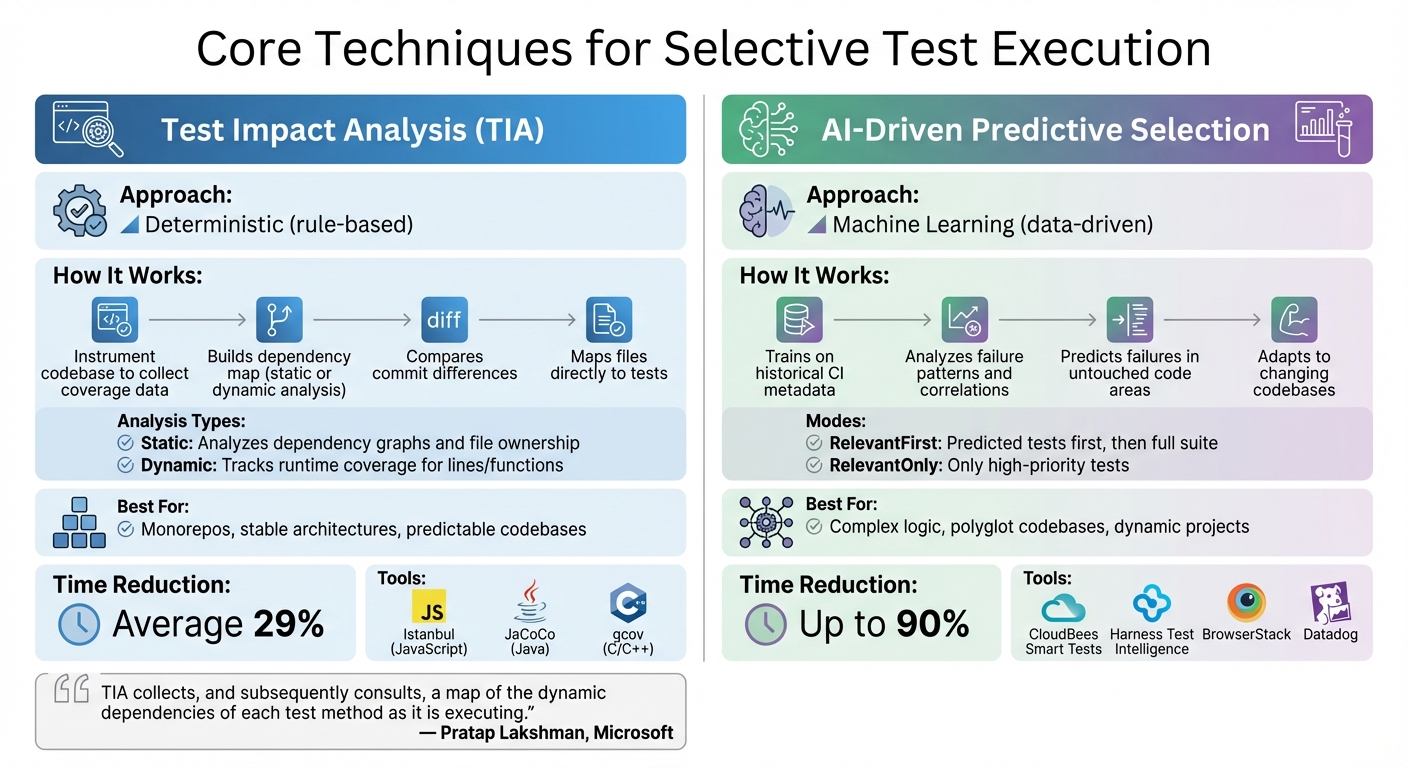
Selective Test Execution Methods: TIA vs AI-Driven Comparison
Selective test execution relies on two key methods: Test Impact Analysis (TIA) and dependency mapping. These approaches work together to ensure that only the tests affected by recent code changes are executed. The result? Faster cloud DevOps pipelines and lower infrastructure expenses.
Test Impact Analysis (TIA)
TIA works by deterministically identifying which tests to run, using code-path tracking to capture detailed coverage for each test. Tools like Istanbul (JavaScript), JaCoCo (Java), and gcov (C/C++) are commonly used to gather this data during test runs.
Here’s how TIA operates: it instruments the codebase to collect coverage data, builds a dependency map through static or dynamic analysis, and compares commit differences to determine which tests are relevant. Static analysis examines the structure of the code and dependency graphs, while dynamic analysis observes which files are accessed during execution.
"TIA collects, and subsequently consults, a map of the dynamic dependencies of each test method as it is executing."
- Pratap Lakshman, Senior Program Manager, Microsoft
To ensure reliability, TIA must include fallback mechanisms. If it encounters file types that it cannot map accurately – like configuration files or UI assets – it should default to running the entire test suite. This safeguards against missed regressions. For languages that aren’t supported, manual XML dependency maps can help maintain full coverage.
To make test selection even more precise, dependency mapping comes into play, analyzing both code structures and runtime behavior.
Dependency Mapping Strategies
Dependency mapping enhances TIA by providing a more refined connection between tests and code changes. It combines static and dynamic approaches to improve precision.
- Static mapping relies on analyzing code structures to quickly identify dependencies. It’s faster but less detailed.
- Dynamic mapping uses runtime data to pinpoint specific lines or functions impacted by changes, offering greater accuracy.
Mapping dependencies at the method or function level, rather than at the broader file level, can significantly reduce the number of tests required. Storing these dependency maps as text files within the repository ensures they evolve with the code and remain compatible with branching workflows.
| Mapping Strategy | How It Works | Best Use Case |
|---|---|---|
| Static TIA | Analyzes dependency graphs or file ownership | Monorepos and stable architectures |
| Dynamic TIA | Tracks runtime coverage data for lines/functions | Complex logic and polyglot codebases |
To start, focus on high-cost, time-intensive test targets to see immediate improvements in pipeline speed and cost savings. Build confidence in your setup by running TIA-selected tests alongside the full suite during initial implementation. If the TIA-selected tests pass while the full suite fails, it’s a sign that your mapping needs adjustment. Additionally, use path filters (like minimatch patterns) to prevent unnecessary full test runs when non-critical files, such as documentation or configuration files, are modified.
Implementing AI-Driven Predictive Test Selection
AI-driven predictive test selection takes the concept of deterministic test selection and pushes it further, offering a smarter way to handle dynamic codebases. While techniques like TIA and dependency mapping rely on fixed rules, this approach uses machine learning (ML) to predict test failures based on historical execution data. By analyzing past runs, AI can pinpoint high-risk tests – even in parts of the code that haven’t been recently modified. Instead of sticking to static code structures, AI adapts to the ever-changing nature of complex projects, making it a valuable addition to traditional testing methods.
How Predictive Models Work
Predictive models build on deterministic TIA but introduce a more flexible, data-driven approach by analyzing historical failure patterns. These models train on CI metadata, such as test results, durations, and details about code changes, to uncover correlations between specific changes and test failures. For example, the model might recognize that modifying certain files often causes specific tests to fail or that similar source code paths share a relationship.
Unlike traditional TIA, which maps files directly to tests, AI looks beyond the obvious connections. It evaluates the characteristics of changes to predict failures in untouched areas of the codebase. Most tools offer two primary modes:
- RelevantFirst: Runs the predicted tests first, followed by the full suite.
- RelevantOnly: Runs only the tests flagged as high priority.
Users can also set optimization goals, such as achieving a 90% confidence level in catching failures or running the most critical tests within a set time limit, like 10 minutes.
It’s still necessary to run smoke tests and perform full-suite runs on main branches or during nightly builds to ensure stability. Before predictive models can deliver accurate results, they need a learning phase to analyze project history. Running builds consistently – several times a week – and maintaining a failure rate of around 10% helps provide the clear signals the model needs to learn effectively.
Tools for Predictive Test Selection
Several tools make it easier for teams to adopt predictive test selection without needing to build custom systems. Here’s a look at some popular options:
- CloudBees Smart Tests: Previously known as Launchable, this tool works with most CI systems and major programming languages. It uses ML to prioritize tests and can cut test execution time by up to 80%.
- BrowserStack Smart Test Selection: Compatible with Selenium, Playwright, and Appium, it supports Java and Python SDKs and offers both RelevantFirst and RelevantOnly modes.
- Harness Test Intelligence: Provides features like call graph visualization and test splitting for languages such as Java, Python, Ruby, C#, Kotlin, Scala, and JavaScript (Jest).
- Datadog Test Impact Analysis: Integrates with CI Visibility to identify impacted tests using code coverage data across multiple languages.
"AI-driven test selection reduces test time by 80%, while automated triage eliminates the manual grind of debugging."
- CloudBees
These tools integrate smoothly with popular CI pipelines like Jenkins, GitHub Actions, and GitLab. For instance, in one case, AI reduced a 28-minute CI run to just 90 seconds by identifying that only a few tests were relevant to a small code change. For projects with multiple repositories, you can give the AI agent read-only access to diff metadata or clone the repositories into the test job, allowing the model to analyze the changes effectively.
Optimizing Cloud Pipelines with Selective Test Suites
Once you’ve pinpointed the tests to run, the next step is organizing your cloud pipeline to handle them efficiently. The key is balancing feedback speed with the level of risk from changes – there’s no need for heavy processes to validate minor tweaks. This requires careful design of your CI/CD stages and smart resource management to make the most of targeted tests.
Designing Efficient Pipeline Stages
Start by dividing your pipeline into two phases: the Planning Phase and the Execution Phase. During the Planning Phase, identify changes, analyze dependencies, and select the appropriate tests. The Execution Phase then runs these selected tests using a dynamic child pipeline.
To maintain reliability, always run critical smoke tests and essential security checks with every commit. Save the full test suite for main branch merges or nightly builds.
Set up clear gates in your pipeline:
- Gate 1: Run unit and smoke tests (keep it under 2 minutes) on every commit.
- Gate 2: Execute selective integration tests (aim for 5–10 minutes) after passing the first gate.
- Gate 3: Schedule full end-to-end tests for larger milestones like main branch updates.
To manage costs, adjust your cloud runner allocation based on the number of tests being executed. Store dependency data in cloud storage tools like Amazon S3 to enable accurate impact analysis for feature branches.
With this streamlined pipeline in place, the next focus is on speeding up execution through parallelization.
Parallel Execution for Faster Results
Parallelizing tests can dramatically cut down execution time. Distribute your tests across cloud runners using sharding. Popular frameworks like pytest, Jest, and Playwright make this easy with built-in sharding capabilities. They use environment variables (e.g., CI_NODE_INDEX, CI_NODE_TOTAL) and historical timing data to evenly distribute workloads.
Here’s a real-world example: In May 2025, ZetaCorp, a fintech startup, was dealing with CI runs that took three hours to complete 15,000 tests. Maria, the team lead, implemented parallel execution with pytest-xdist and 12 workers. By sharding tests by module and using separate Redis namespaces per worker to avoid collisions, they cut runtime to just 18 minutes. On top of that, the flake rate dropped from 12% to 1.5%.
"Waiting 30 minutes for tests that could run in parallel is like having a sports car but driving it in first gear."
- Augment Code
To ensure smooth parallel execution, implement resource isolation strategies. For example, use a separate database per job or assign unique test data identifiers. For unit tests, transactional rollbacks can maintain isolation without needing multiple databases. Profiling tools like cProfile or pytest-profiling can help you diagnose bottlenecks – whether they’re CPU-bound or I/O-bound – and guide your parallelization strategy.
Another way to speed things up is by using matrix builds. Run different test groups simultaneously across various browsers and operating systems. This approach not only accelerates feedback but also helps manage infrastructure costs more effectively.
Measuring the Impact of Selective Test Execution
It’s important to track specific metrics to ensure that selective testing delivers on its promise of saving time and money without compromising quality. Keeping an eye on these metrics allows teams to adjust their approach, speeding up delivery cycles while confirming the efficiency gains discussed earlier.
Key Metrics to Track
Start by monitoring test execution time and feedback latency. These metrics reveal how quickly developers receive feedback. For example, Instawork applied Test Impact Analysis (TIA) on a 7-year-old codebase with 35,000 tests and managed to cut the median test execution time in half.
Another critical area is cloud infrastructure costs. Measure CPU and memory usage before and after implementing selective testing. Basic TIA methods have shown a 29% reduction in test execution times on average, while advanced AI-powered techniques have achieved reductions as high as 90%. A notable example: in September 2024, Symflower helped Tailscale reduce its test time from 17:39 to 10:55, saving 6 minutes and 44 seconds – or 38.14% of CI time.
Finally, keep track of quality metrics:
- Change Failure Rate: Ensures regressions aren’t slipping through.
- Flaky Tests Ignored: Measures the drop in noise caused by unstable tests.
- Test Selection Ratio and Fallback Run Rate: Help refine the logic behind test selection.
By focusing on these metrics, teams can validate their current performance and identify areas for further improvement.
Continuous Improvement Through Feedback
Metrics aren’t just for validation – they’re tools for improvement. If you notice a spike in the Change Failure Rate, it might mean your selection logic is too aggressive and needs fine-tuning. Use historical CI data, such as file diffs, test outcomes, and failure patterns, to update predictive models and dependency maps .
For instance, in February 2025, Evan Doyle, CTO of Gauge, demonstrated an impressive 8x speedup in testing for the FastAPI project using the Tach tool. By linking changes in fastapi/background.py to specific modules, the tool reduced the test suite from 2,012 tests (88.32 seconds) to just 750 relevant tests (11.69 seconds). This example underscores how analyzing which tests are catching bugs and refining selection criteria can lead to major efficiency gains.
To keep improving, set up dashboards to visualize time and cost savings. Include override mechanisms so engineers can manually trigger full test runs when necessary . These steps ensure that selective testing remains both effective and adaptable as your projects evolve.
Conclusion
Key Takeaways
Selective test execution is reshaping how SaaS and AI companies approach quality assurance. It offers faster feedback loops, lower costs, and quicker release cycles. For instance, Basic Test Impact Analysis can reduce test execution times by an average of 29%, while advanced AI-driven methods can push this reduction up to 90%. Companies like Instawork have seen their CI pipeline speeds double by adopting these strategies.
The challenge lies in maintaining a balance between speed and quality. Safety measures like mandatory smoke tests, periodic full-suite runs, and manual override options ensure that reliability isn’t sacrificed for efficiency.
"AI should act as an optimization layer, not a replacement for validation" – Pete Miloravac, Semaphore
This strategy minimizes flaky test exposure, slashes developer wait times from hours to seconds, and prevents CI infrastructure from becoming a bottleneck.
Next Steps for Implementation
To integrate techniques like Test Impact Analysis and AI-driven test selection, start with your slowest or most expensive test suites for maximum initial impact. Use tools like Istanbul or JaCoCo to map which tests correspond to specific code paths. Then, modify your CI pipeline to include a selection step that leverages git diff to identify changed files and adjust the test queue accordingly.
To maintain quality, include manual override options so developers can trigger full test runs when tackling complex dependencies. Use dashboards to track time and cost savings, and monitor metrics like the Change Failure Rate to ensure no regressions slip through the cracks.
"Test Impact Analysis (TIA) is a powerful technique to optimize the Test Execution step in CI pipelines. It had a positive impact on our usage of CI resources and developer productivity" – Smit Patel, Instawork
Adopt these methods gradually, measure their impact consistently, and refine based on actual performance data. The result? Faster deployments, reduced cloud costs, and high-quality releases.
FAQs
How do I make sure selective testing doesn’t miss regressions?
To avoid overlooking regressions during selective testing, leverage impact analysis to pinpoint and execute only the tests influenced by recent code changes. Pair this approach with change-to-test mapping to concentrate on the specific code areas that are most relevant. These methods help catch critical regressions while saving time by reducing the need to run full test suites, ensuring quality without unnecessary overhead.
What’s the fastest way to start Test Impact Analysis in my CI pipeline?
The fastest way to get Test Impact Analysis (TIA) up and running in your CI pipeline is by leveraging tools designed to pinpoint the tests affected by specific code changes. Begin by selecting a TIA tool that works seamlessly with your CI setup. Configure it to perform dependency analysis, ensuring it can map code changes to relevant tests. Then, automate the process so only the impacted tests are executed. This approach cuts down test execution time without sacrificing quality.
When should I use AI-based test selection instead of TIA?
Use AI-based test selection to dynamically prioritize high-impact tests by leveraging real-time signals such as code changes, failure history, and business importance. This approach is perfect for fast-moving, complex settings where static models often fall short. While Test Impact Analysis (TIA) excels at pinpointing tests affected by specific code changes, it may face challenges in dynamic CI/CD pipelines or environments with frequent updates and multiple programming languages.