Measuring the Cost of Flaky Tests: A Practical Metric

Flaky tests are automated tests that pass or fail unpredictably, even when the code hasn’t changed. They waste time, money, and resources by causing false failures in CI pipelines. Here’s what you need to know:
- Flaky tests cost money: Teams pay for cloud CI tools like GitHub Actions, where every rerun adds to the bill. For example, a 10-person team could waste $28,800 annually just on lost productivity due to flakiness.
- They drain developer time: Investigating flaky tests consumes 2.5% of developer hours, delaying projects and reducing time spent on meaningful work.
- They harm trust: Teams start ignoring failures, leading to missed bugs and unreliable test suites.
To calculate the cost of flaky tests, use this formula:
(Failures per week × Time wasted per failure × Hourly rate × Developers affected)
For example, 6 failures per week wasting 30 minutes each at $80/hour for 10 developers equals $2,400 per week – or $115,200 annually.
Fixing flaky tests involves identifying patterns, isolating problematic tests, and addressing root causes like timing issues or environment inconsistencies. Investing in solutions like bare metal infrastructure can also reduce flakiness.
Key takeaway: Flaky tests are more than a nuisance – they’re a measurable drain on resources. By quantifying their impact and prioritizing fixes, teams can save time, money, and improve overall productivity.
The True Cost of Flaky Tests: Statistics and Financial Impact
What Flaky Tests Are and Why They Cost Money
What Makes a Test Flaky
Flaky tests are unpredictable. They pass or fail inconsistently, even when the code, test scripts, and environments remain unchanged. Unlike tests that reliably highlight real problems, flaky tests can behave erratically – passing on your local machine but failing in CI, or succeeding on one run and failing the next without any actual changes.
The reasons behind flaky tests typically fall into five main categories:
- Timing and race conditions: Tests rely on operations completing within fixed time windows, which can vary.
- Selector fragility: UI tests fail when CSS classes or selectors are renamed.
- Environment inconsistency: Differences between local and CI environments can cause failures.
- Shared state pollution: Data left behind by one test affects subsequent tests.
- External dependencies: Failures occur due to network delays or third-party API issues.
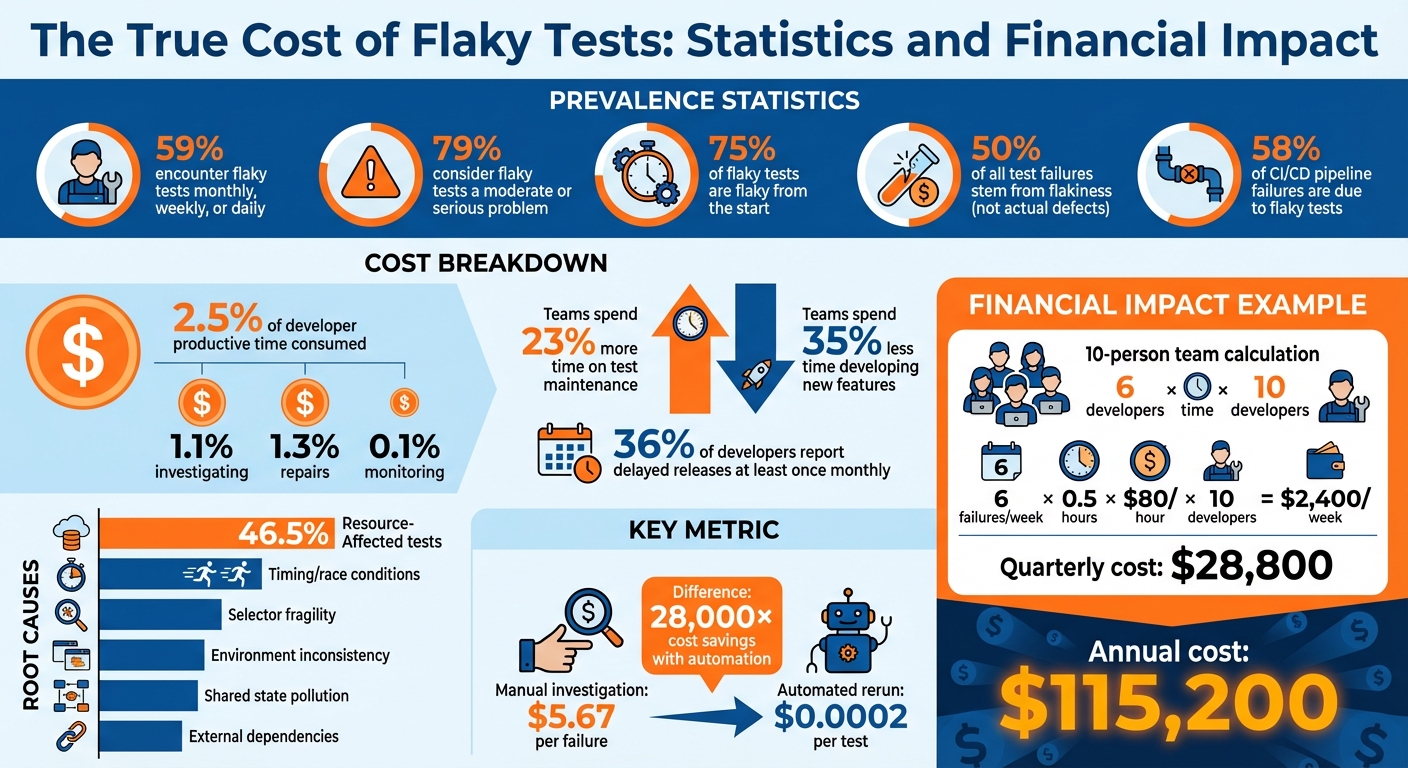
Interestingly, research shows that 46.5% of flaky tests are "Resource-Affected", meaning their success depends on the system’s available computational resources during execution.
"A flaky test produces inconsistent results without any changes to the code being tested. Unlike deterministic tests that always pass or always fail given the same conditions, flaky tests behave unpredictably." – Priyanka Gauro
These unpredictable behaviors make flaky tests a frequent and frustrating issue for development teams.
How Common Flaky Tests Are
Flaky tests are far from rare. They’re a regular headache for developers. Surveys reveal that 59% of developers encounter flaky tests on a monthly, weekly, or even daily basis. Worse still, 79% of developers dealing with flaky tests consider them a moderate or serious problem, not just a minor annoyance.
The problem often begins as soon as tests are added to the codebase. Research shows that 75% of flaky tests are flaky from the start. And the impact is widespread: a study by Mabl found that 50% of all test failures stem from flakiness, not actual code defects. Additionally, over 58% of CI/CD pipeline failures are due to flaky tests, forcing teams to chase false alarms instead of addressing real bugs.
Why Flaky Tests Drain Resources
Flaky tests don’t just waste time – they cost money. Their erratic nature creates a ripple effect, draining resources in three key ways.
First, flaky tests waste cloud infrastructure dollars. In usage-based CI systems like GitHub Actions, every rerun racks up costs for compute time, storage, and orchestration. A single flaky test can trigger a "multiplier effect", requiring entire workflows – like build, deploy, and integration stages – to be re-executed.
Second, they hurt developer productivity. Every flaky failure forces developers to switch gears, inspect logs, and rerun pipelines. On average, this costs 15 minutes per investigation. Teams plagued by flaky tests spend 23% more time on test maintenance and 35% less time developing new features.
Finally, flaky tests damage team confidence. Persistent flakiness leads to a "just re-run it" mindset, where developers ignore failures instead of investigating the root causes. This undermines the reliability of the test suite and weakens overall quality standards.
"When tests behave unpredictably, teams begin to ignore failures. Developers rerun failed pipelines until they turn green instead of investigating root causes. At this point, the test suite becomes unreliable, reducing its value and weakening the team’s quality culture." – NashTech Global
sbb-itb-f9e5962
The 3 Types of Costs from Flaky Tests
Flaky tests don’t just frustrate developers – they also come with a hefty price tag. These costs fall into three categories: direct, indirect, and hidden. By breaking them down, you can better understand the financial impact and make a solid case for addressing the issue.
Direct Costs: Wasted Cloud Infrastructure
Every time a flaky test fails, it forces your CI/CD system to rerun workflows. Platforms like GitHub Actions charge for every minute of compute time, and these reruns add up fast.
The real issue lies in the multiplier effect. A single flaky test can cause a full pipeline replay, redoing build, deployment, and integration steps across multiple runners. For example, if a pipeline takes 20 minutes and developers rerun it twice daily because of flaky failures, that’s 40 minutes of wasted compute time per developer each day. On a 10-person team, this balloons to 7 hours of wasted CI time daily.
"Every rerun consumes compute minutes, storage, and orchestration resources that cloud-based CI systems charge for explicitly. What looks like an engineering inconvenience often shows up as a line item on the cloud bill." – Cloud Atler
The numbers are staggering. One study found that a 20-developer team wasted 2,025 CI minutes monthly due to flakiness. This translated to $12 in direct CI costs and $1,725 in developer time – adding up to $20,844 annually. And that’s just the infrastructure side – next comes the cost of lost productivity.
Indirect Costs: Lost Developer Time
Flaky tests don’t just waste cloud resources; they also eat into developer productivity. Each flaky failure disrupts focus, pulling developers away from feature work to investigate logs and figure out if the failure is legitimate or just noise. On average, this costs 15 minutes of focus per incident.
Research shows that flaky tests consume 2.5% of a developer’s productive time: 1.1% for investigating failures, 1.3% for repairs, and 0.1% for monitoring. For a 30-person team, this equates to about $2,250 per developer per month in lost productivity.
The effect on feature development is substantial. Teams dealing with flaky tests spend 23% more time on test maintenance and 35% less time building new features. At Atlassian, 15% of Jira test failures were flaky, consuming 150,000 hours of engineering time annually.
"Automatically rerunning a test costs 0.02 cents, while not rerunning and thus letting the pipeline fail results in a manual investigation costing $5.67 in our context." – Fabian Leinen et al., Technical University of Munich
Hidden Costs: Slower Deployments and Lost Trust
Some costs from flaky tests are harder to quantify but just as damaging. For instance, flaky tests often lead developers to rerun pipelines by default, rather than investigating failures. This creates a dangerous habit and undermines trust in the test suite. When tests fail repeatedly without reason, teams may start ignoring legitimate bugs, assuming they’re just another flaky issue.
36% of developers report delayed releases due to test failures at least once a month. These delays ripple through an organization, disrupting schedules and delaying customer deliveries.
The opportunity cost is massive. While developers babysit unreliable tests, they’re not building features, fixing real bugs, or improving the product. Microsoft tackled this issue in 2020 by enforcing a policy requiring flaky tests to be fixed or removed within two weeks. Over six months, they reduced flakiness by 18% and boosted productivity by 2.5%, saving significant engineering time.
"When flaky tests are left to grow unchecked in your repositories, CI no longer functions as a reliable indicator of whether the tested code is correct and performant." – Datadog
How to Calculate Flaky Test Costs
The Cost Formula
Figuring out the financial toll of flaky tests becomes straightforward with the right formula. Here’s how it looks:
(Failures per week × Time wasted per failure × Hourly rate × Developers affected)
This equation captures the dual impact of how often flaky tests disrupt workflows and the total time lost across your team. When calculating "time wasted per failure", factor in everything – debugging, fixing, and the inevitable context switching that slows everyone down. The goal is to measure the overall team impact, not just the cost to individual developers.
Now, let’s break this down with a practical example.
Example: Calculating Costs for a 10-Person Team
Imagine a 10-person team dealing with 6 flaky test failures every week. Each failure wastes 30 minutes, and the hourly rate is $80. Here’s how the math works:
6 failures/week × 0.5 hours × $80/hour × 10 developers = $2,400 per week
Over the course of a 12-week quarter, that adds up to $28,800 in lost productivity – or $115,200 annually. And that’s just the labor cost. If you include the cost of continuous integration (CI) pipeline reruns, the numbers climb even higher. For example, if each flaky test triggers a 20-minute pipeline rerun twice a day, you’re burning 7 hours of CI time daily. This could easily add hundreds of dollars to your monthly infrastructure bill.
These calculations provide a solid foundation for convincing stakeholders that improving test stability is worth the investment.
Using the Results to Justify Fixes
When you can tie flaky test issues to a specific dollar amount, it becomes easier to argue for change. For instance, losing $115,200 annually – the equivalent of a full-time engineer’s salary – makes a strong case for directing resources toward solving the problem. Whether it’s upgrading your infrastructure, switching to bare metal servers, or adopting a more reliable testing framework, the numbers speak for themselves.
Take this example: In January 2026, an 8-person JavaScript development team found they were spending 40 hours every week dealing with flaky tests. By replacing their H2 databases with Testcontainers and removing unreliable tests, they slashed maintenance time from 40 hours to just 4 hours per week. This change saved them an estimated $112,320 annually.
These real-world savings highlight the tangible benefits of prioritizing test stability improvements.
How Flaky Tests Affect DevOps Metrics
Which Metrics Flaky Tests Damage
Flaky tests can wreak havoc on critical DevOps metrics, with over 58% of CI failures attributed to them. These unreliable tests create false failures, marking builds as "red" even when the code is correct. This erodes trust in the system and makes debugging more challenging.
Another major issue is the increase in Mean Time to Green (MTTG). Developers are forced to scrutinize logs to figure out if a failure is legitimate or just another flake. This process slows down workflows significantly, especially in larger repositories where a single flaky test can trigger multiple job reruns.
Flaky tests don’t just waste time – they also inflate CI infrastructure costs and delay deployments. Every rerun adds to cloud expenses, while stalled pipelines push back release schedules.
| Metric | Impact of Flaky Tests | Why It Changes |
|---|---|---|
| Build Success Rate | Decreases | False failures cause red builds even when the code is correct |
| Mean Time to Green (MTTG) | Increases | Time is spent diagnosing whether failures are real or flaky |
| Build Duration | Increases | Reruns extend total execution time |
| CI Cost | Increases | Repeatedly failed stages consume extra compute minutes |
| Deployment Frequency | Decreases | Pipeline stalls delay feature merging and releases |
Case Study: 30-Developer Team Loses 2.5% Productivity
The damage caused by flaky tests isn’t just theoretical – it translates into real productivity losses. A study from May 2024 examined a software project with 30 developers working on a 1-million-line codebase over five years. The findings were eye-opening: automated reruns cost a mere $0.0002 (0.02 cents) per test, while manual investigations cost a whopping $5.67 per failure.
To combat this, the team shifted their approach. Instead of immediately diving into manual fixes, they prioritized automated reruns to keep the pipeline moving while scheduling repairs. This strategy minimized disruptions and limited productivity losses, showing how even small inefficiencies can ripple through deployment timelines and team performance.
How to Find and Fix Flaky Tests
Using Metrics to Spot Flaky Tests
Once you’ve outlined the cost of flaky tests, the next step is identifying them using measurable data. CI tools can help by tracking "result flips" and "retry outcomes", which often point to flakiness. These metrics act as your guide to pinpoint problematic tests.
Here are four key metrics to focus on:
- Flake Rate: This measures the percentage of test failures that pass when re-run. A healthy benchmark is keeping this under 5%.
- Flip Count: Tracks how often a test alternates between passing and failing within a 14-day period.
- First-Attempt Pass Rate: Indicates how often tests succeed on the initial run, before retries.
- Time Impact: Reflects the number of developer hours wasted investigating false positives.
Tests with high flip counts tend to be the biggest offenders, consuming unnecessary time and resources.
"When developers see a failing test and their first thought is ‘probably just flaky,’ you have lost the signal that tests are supposed to provide." – Grizzly Peak Software
When introducing automated detection, start with a "Report Only" mode. This mode highlights flaky tests on your CI dashboard without masking genuine failures. It’s a great way to gauge the extent of the problem before taking further action.
Methods to Reduce Flaky Tests
After identifying flaky tests, isolate them in a dedicated, time-limited pipeline. This involves creating a non-blocking pipeline job for these tests and assigning each one a specific owner and resolution deadline – typically within two sprints. If a test isn’t fixed by the deadline, consider rewriting or removing it to prevent the pipeline from becoming a permanent dumping ground.
Common causes of flaky tests include timing issues, shared state, and external dependencies. Here’s how to address them:
- Replace fixed
sleep()calls with explicit waits that check for specific conditions, such as waiting for an element to become visible within a set timeout. - For shared state issues, use unique identifiers, isolated schemas, or enforce transaction rollbacks to ensure tests don’t interfere with one another.
- Mock external APIs to avoid delays caused by network latency or service outages.
Interestingly, research shows that 75% of flaky tests fail in clusters, often due to shared issues like intermittent networking or unstable external dependencies. Fixing one systemic issue can often resolve multiple tests. Running your test suite on a schedule – every few hours – can also reveal patterns tied to time-of-day or system load that might not surface during standard pull request runs.
"The first appearance of a flaky test is the best moment to fix it… the related history is still fresh in the developers’ memory." – Semaphore CI
By addressing these root causes and improving your infrastructure, you can create a more reliable test environment and reduce flakiness across the board.
How Bare Metal Infrastructure Reduces Test Flakiness
Infrastructure inconsistencies are another major contributor to flaky tests. Resource contention – when multiple CI jobs share the same runner – can lead to problems like CPU throttling, port conflicts, and file lock errors. A 2024 IEEE study highlighted how resource dependency amplifies these issues.
Bare metal infrastructure helps eliminate these inconsistencies by providing dedicated, stable resources for each test run. This consistency reduces environment drift caused by differences in hardware or OS versions between local development and CI environments. Reliable first-attempt test runs mean fewer reruns, less compute waste, and less time spent debugging false positives.
For teams struggling with flaky test costs, investing in bare metal infrastructure can stabilize the testing process, cut down on rerun expenses, and free up developer time for more productive work.
Conclusion: Measure and Control Flaky Test Costs
Flaky tests aren’t just a minor annoyance – they’re a hidden financial and productivity sink. They can inflate your cloud bills with unexpected charges and sap valuable developer time. Research shows that flaky tests account for 13% to 16% of test failures, consuming at least 2.5% of a developer’s productive hours annually. Factor in the cost of additional CI compute minutes, and the financial impact climbs into the thousands every year.
To tackle this, start by calculating the cost of flaky tests. Track metrics like flake rate and rerun frequency, then use the provided formulas to translate these into real-dollar figures. For example, while a manual investigation costs $5.67 in developer time, an automated rerun costs just $0.0002 – a staggering 28,000× difference. Turning these inefficiencies into measurable data highlights the urgency for action.
Once the costs are clear, focus on reducing them. Separate flaky tests into dedicated pipelines, assign clear ownership, and set defined SLAs. Dive into root causes like timing issues, shared states, or external dependencies – problems that can impact up to 75% of tests in some clusters. You might also explore bare metal solutions to reduce resource contention and create a more stable testing environment.
Teams that prioritize test reliability see tangible benefits. They automate flaky test detection on feature branches, replace unreliable fixed sleep commands with explicit waits, and use dashboards to monitor failure patterns and their impact. By making flakiness visible and actionable, developers stop shrugging off failures as "probably flaky" and start trusting their tests again. This shift not only reduces wasted time and money but also alleviates the frustration caused by unreliable testing systems. Addressing flaky tests head-on ensures smoother DevOps workflows and a more stable financial outlook.
FAQs
How can I accurately estimate ‘time wasted per failure’?
To figure out the ‘time wasted per failure’, start by tracking how long developers typically spend investigating flaky test failures over a set period. Research indicates that each failure can consume several minutes, potentially accounting for around 1.28% of a developer’s monthly time. By measuring this, you can better understand the impact on productivity and find ways to streamline workflows tailored to your team’s needs.
What’s the fastest way to identify the flakiest tests in CI?
The fastest way to spot flaky tests in your CI pipeline is by using tools designed to catch non-deterministic behavior in test results. Patterns in test suite failures, such as clusters or repeated co-occurring failures, can also reveal underlying flakiness. On top of that, observability tools or machine learning models trained on test data can identify tests with inconsistent failure rates, helping teams zero in on the most troublesome cases quickly and effectively.
When should we quarantine a flaky test vs. delete it?
If a test fails unpredictably but has the potential to be fixed, or if it disrupts workflows and requires deeper analysis, it’s a good idea to quarantine it. This way, the issue is isolated temporarily, allowing progress to continue without unnecessary interruptions.
On the other hand, you should delete a flaky test if it’s found to be outdated, irrelevant, or beyond repair after a thorough investigation. Removing these tests keeps your testing suite reliable and ensures they don’t erode trust or hinder productivity.