Hybrid Architecture Patterns That Minimize Transfer Costs
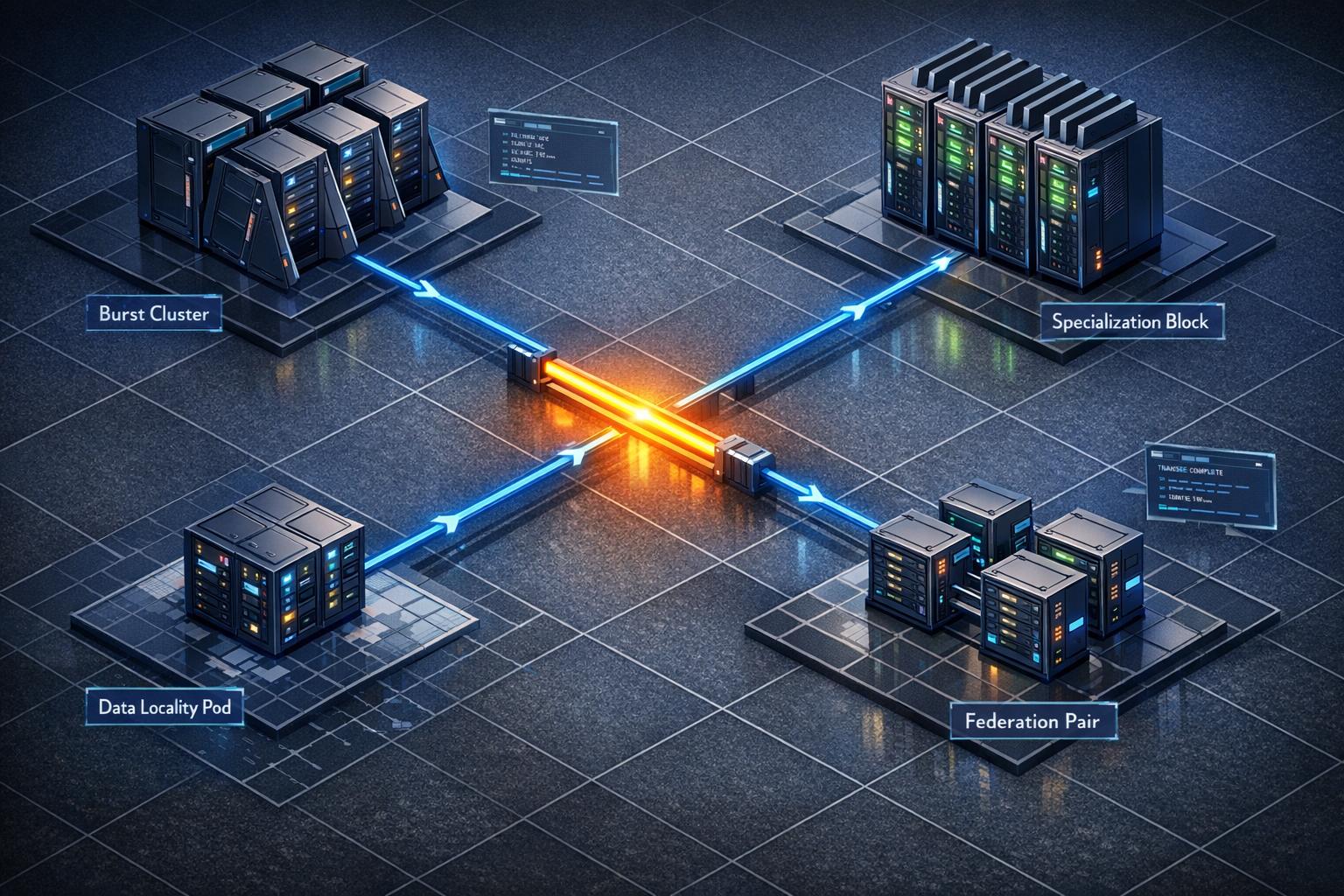
Cloud transfer fees can silently drain your budget. For SaaS and AI companies, these costs often make up 20–40% of cloud spending. The good news? Hybrid architecture patterns can drastically reduce these expenses while improving efficiency.
Here’s what you need to know:
- Data transfer costs add up fast: Internet egress fees, inter-region transfers, and NAT Gateway charges are common culprits.
- Hybrid setups save money: By combining cloud for flexibility and dedicated infrastructure for steady-state tasks, you can slash transfer costs.
- Key patterns to reduce costs:
- Burst: Use cloud only during demand spikes.
- Specialization: Match workloads to the most cost-effective environment.
- Data Locality: Cache data near compute resources to avoid unnecessary transfers.
- Direct Interconnect: Use private links to lower egress fees for large transfers.
- Federation: Query data where it resides instead of replicating it.
For example, switching from NAT Gateways to VPC Interface Endpoints can reduce processing costs by 78%. Similarly, caching "hot" data locally can cut egress fees by up to 50%.
Start saving now: Audit your transfer costs, use caching, and explore private connectivity options like AWS Direct Connect. These strategies can reduce egress costs by 60–85%, making your hybrid setup more cost-efficient.
5 Hybrid Architecture Patterns That Cut Transfer Costs
These patterns address costly data movement scenarios, offering ways to reshape your hybrid architecture for better efficiency.
Burst Pattern: Manage Demand Spikes Without Skyrocketing Cloud Costs
This pattern is all about balance. Keep your baseline workload on-premises or on bare metal, and only "burst" to the public cloud during peak demand. This way, you’re not paying premium cloud costs 24/7 but still have the flexibility to scale when needed.
Tools like Kubernetes and Nutanix Clusters (NC2) make it easier to shift workloads to the cloud during spikes and bring them back when demand eases. For batch jobs, Spot instances can further save costs with auto-restart setups.
"The hybrid cloud does away with over-provisioning while still keeping the bulk of the workload on-premise. Orchestration tools facilitate the on-demand and transparent movement or ‘bursting’ of additional application loads to the public cloud during peak usage times."
- Dipti Parmar, Nutanix
This approach has proven effective, with organizations reporting a 44% lower Total Cost of Ownership over five years. It’s particularly handy for CI/CD pipelines, seasonal traffic surges, and batch processing where constant cloud capacity isn’t necessary.
Specialization Pattern: Place Workloads in the Right Environment
Here, the idea is to match workloads with the environment that makes the most financial sense. Steady, high-volume tasks go to dedicated infrastructure, while spiky, event-driven jobs stay in the cloud. This avoids paying cloud premiums for predictable, round-the-clock usage.
Core databases, always-on APIs, and AI inference platforms are better suited for dedicated systems. On the other hand, short-term environments and ephemeral tests make sense for the cloud. It’s no surprise that 86% of enterprise CIOs plan to move some workloads back to private infrastructure to improve cost efficiency.
For example, in January 2026, CTO Naeem ul Haq’s team faced high cross-cloud transfer costs when training data stored in Amazon S3 was used with TPUs on another cloud. By setting up a regional replica in Google Cloud Storage and adding a Redis distributed caching layer, they cut monthly data transfer costs by 40% and improved model training time by 30%.
Data Locality Pattern: Cache Data to Avoid Unnecessary Transfers
This pattern focuses on reducing data movement by keeping frequently accessed (or "hot") data close to its compute resources. Instead of repeatedly pulling the same datasets across cloud boundaries, you cache them locally and transfer only compressed or aggregated outputs.
In-memory caches like Redis or Memcached are great for local reads, while S3-compatible storage solutions (e.g., MinIO or Ceph) can host large assets via signed URLs to minimize egress fees. For example, if 10% of your data accounts for 90% of egress costs, caching that subset can reduce inter-region egress by up to 50% in content-heavy applications. Using Time-to-Live (TTL) or event-driven invalidation ensures that outdated data doesn’t disrupt operations.
Direct Interconnect Pattern: Use Private Connectivity to Save on Egress Fees
Public internet egress fees can add up fast – for instance, transferring 1 PB per month can cost over $53,800. This pattern swaps those high costs for private connectivity options like AWS Direct Connect or GCP Cloud Interconnect. These private links usually offer flatter, more favorable bandwidth pricing, making them ideal for steady, high-volume transfers at petabyte scales.
You can further optimize by setting up an "Egress Gateway", where application logic stays in the cloud, but heavy outbound data delivery is handled by dedicated infrastructure connected through private links.
Federation Pattern: Synchronize Data Without Full Replication
Instead of replicating entire datasets across clouds, this pattern uses data virtualization to query data where it resides. A virtualization layer breaks down queries, sends them to the source systems, and aggregates only the final, smaller result set for transfer. For state synchronization, a "delta sync" approach transfers only the changes made since the last update, significantly reducing transfer volumes while keeping distributed systems consistent.
The principle here is simple: move the query to the data, not the data to the query. This method is excellent for multi-cloud analytics, as it transfers only query results rather than raw data from each source.
Summary of Patterns
| Pattern | Primary Mechanism | Best Use Case |
|---|---|---|
| Burst | On-demand public cloud scaling | Batch jobs, CI/CD, seasonal spikes |
| Specialization | Workload-to-environment matching | Core databases, AI inference, streaming |
| Data Locality | Caching "hot" data near compute | Read-heavy applications, ML feature stores |
| Direct Interconnect | Private links with discounted egress rates | High-volume, steady-state hybrid-cloud transfers |
| Federation | Query in place; transfer only results | Multi-cloud analytics, state synchronization |
sbb-itb-f9e5962
Cost Comparison: How Much Each Pattern Saves
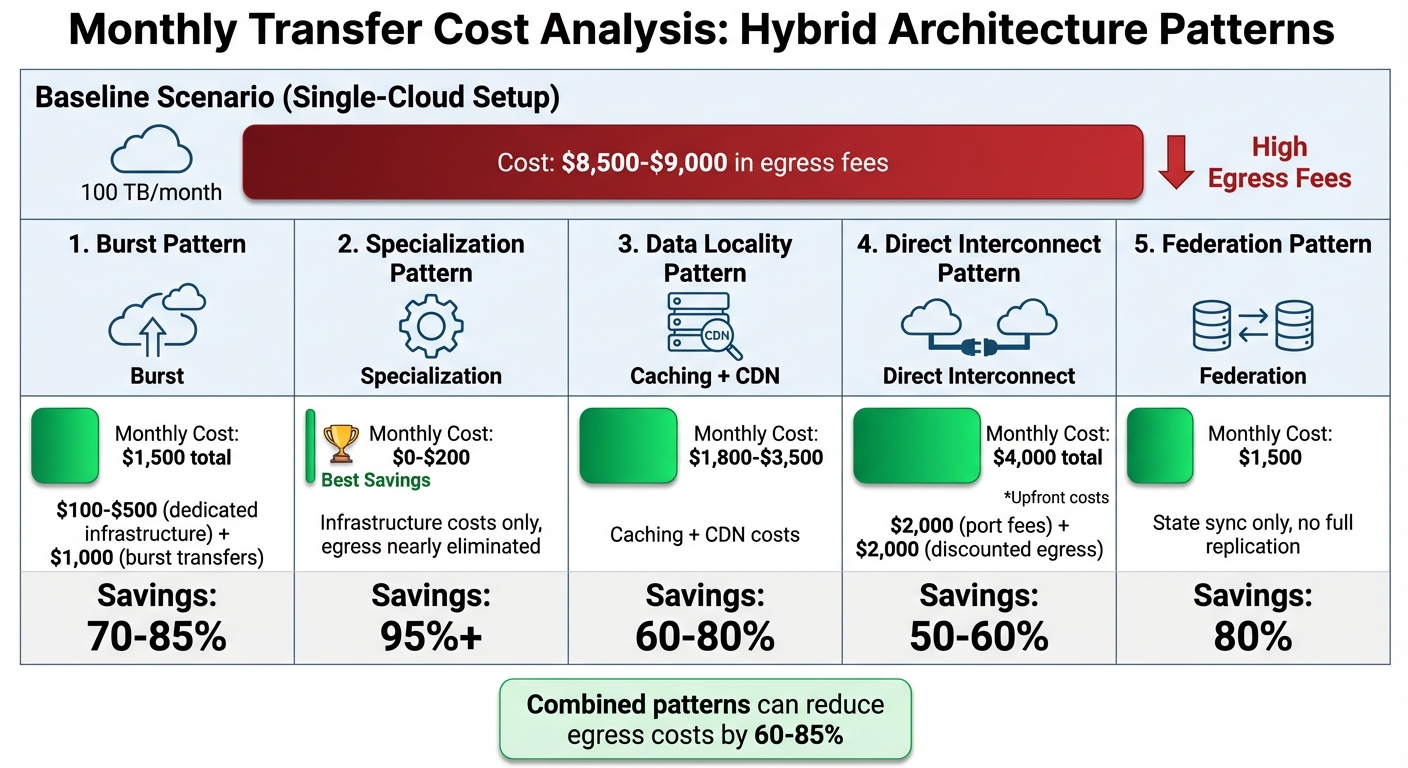
Hybrid Architecture Patterns Cost Savings Comparison
Monthly Transfer Cost Analysis by Pattern
Different patterns offer clear opportunities to cut costs: Burst Pattern reduces expenses by 70–85%, Specialization by over 95%, Data Locality by 60–80%, Direct Interconnect by 50–60%, and Federation by 80%.
Let’s break it down with an example. Moving 100 TB of data each month in a single-cloud setup typically costs $8,500–$9,000 in egress fees. Switching to the Burst Pattern brings that down to about $1,500 total. This includes $100–$500 for dedicated infrastructure and another $1,000 for burst transfers, saving 70–85%. The Specialization Pattern offers even greater savings by shifting predictable workloads entirely to dedicated infrastructure. This approach nearly eliminates egress fees, leaving you with just $0–$200 in costs for the infrastructure itself – 95%+ savings.
The Data Locality Pattern, which uses caching and CDNs to minimize origin requests and cross-region transfers, reduces costs to $1,800–$3,500, saving 60–80%. Direct Interconnect involves upfront costs, such as $2,000 for port fees and another $2,000 for discounted egress, but it still provides 50–60% savings compared to public internet rates. Lastly, the Federation Pattern, which focuses on syncing only state changes rather than duplicating full datasets, lowers costs to around $1,500, achieving 80% savings.
"The underlying economics of data transfer does not reflect how the cloud providers price for it. We are still paying 1990s prices for bandwidth when we are in the cloud." – Industry Analyst
Combining these patterns – like layering caching, compression, and regional optimizations – can further reduce egress costs by 60–85%. The trick lies in aligning your workload type (steady-state vs. spiky, read-heavy vs. write-heavy) with the pattern that tackles the priciest aspects of your data transfer. With these savings in mind, the next section will delve into the tools and configurations you can use to make these patterns work for you.
Tools and Configurations for Implementation
Kubernetes Federation and Spot Instance Orchestration
Kubernetes federation simplifies managing multiple clusters across on-premises and cloud environments by using a single control plane. Instead of juggling separate, manually synchronized setups, federation automatically aligns configurations and deployments without the need to transfer entire datasets back and forth. This setup allows you to optimize costs by keeping data-intensive workloads on-premises while using cloud spot instances for compute tasks during demand spikes.
Spot instances can cut compute costs by 70–90% compared to on-demand rates. For example, AWS Spot can reduce monthly costs from $45 to $18 for batch jobs that can handle interruptions. Tools like Karpenter and Cluster Autoscaler integrate seamlessly with Kubernetes, automating the provisioning of the most cost-effective hybrid infrastructure. If you’re a small team, AWS EKS Anywhere lets you federate on-premises and cloud EKS clusters, enabling smooth workload portability without requiring advanced infrastructure expertise.
To further optimize costs, co-locate resources within the same Availability Zone to avoid internal data transfer fees entirely, especially for Kubernetes pods that frequently communicate across hybrid setups. Additionally, reducing transfer volumes by 50–70% is achievable by using compression through sidecar proxies and private endpoints like AWS PrivateLink.
Pairing these orchestration tools with bare metal infrastructure can also ensure consistent performance at reduced costs.
TechVZero Bare Metal: 40–60% Cost Savings for Hybrid Workloads
TechVZero’s bare metal infrastructure offers reliable performance at 40–60% lower costs compared to managed cloud services. This solution is ideal for workloads with stable, high utilization, such as databases, file servers, and applications with predictable demands. By reducing reliance on public cloud resources, businesses can achieve significant savings without compromising on performance. For SaaS and AI companies scaling their infrastructure, this approach allows predictable workloads to remain on bare metal while utilizing cloud resources for fluctuating demands.
Compliance is another area where TechVZero shines. Sensitive customer data can stay in private environments, ensuring adherence to SOC2, HIPAA, or ISO standards without facing the compliance hurdles often associated with public cloud solutions. TechVZero also manages the infrastructure partnership, making it accessible for small teams (10–50 people) that lack dedicated in-house expertise. Their pricing model is performance-based: you pay 25% of the savings for a year, and if no savings are achieved, there’s no cost. One notable client saved $333,000 in a month while mitigating a DDoS attack, proving that cost efficiency and security can coexist.
Migration Steps for Hybrid Setups
To transition to a hybrid infrastructure, follow these practical steps:
- Evaluate workload portability by assessing performance, utilization, and costs. Critical services requiring zero downtime should remain on-premises or in regulated environments. Services with moderate latency tolerance, like image processing or search indexing, can move to more economical setups. Non-critical tasks, such as batch jobs or backups, should use the most affordable option available.
- Eliminate internet egress fees by implementing VPC Peering or AWS Transit Gateway. For syncing over 10 TB per month between on-premises and cloud environments, consider AWS Direct Connect, which provides free data ingress and lower egress rates compared to public internet.
- Use Terraform for infrastructure-as-code to maintain consistent configurations across environments. Deploy blue-green setups with spot orchestration to minimize downtime, and validate data consistency using caching and asynchronous replication.
For smaller teams without infrastructure specialists, start with non-critical workloads on spot instances. Helm charts can ensure consistent Kubernetes configurations. One organization, for example, moved five development environments from AWS (costing $600 per month) to Docker Compose running locally, cutting costs to $0 while retaining functionality. The key is tailoring infrastructure decisions to actual workload behavior instead of opting for a one-size-fits-all approach.
Next Steps for Reducing Transfer Costs
Summary of Cost-Saving Patterns
To tackle transfer cost challenges, consider these strategies: Burst, Specialization, Data Locality, Direct Interconnect, and Federation. Each addresses specific inefficiencies:
- Burst helps manage spikes in demand without committing to constant cloud costs.
- Specialization ensures workloads run in the most cost-effective environment based on actual usage.
- Data Locality reduces cross-environment transfers by 30–60% through caching.
- Direct Interconnect avoids pricey internet egress fees by using private connectivity.
- Federation synchronizes states across clouds without full replication, cutting down redundant data movement.
These approaches don’t just lower costs – they also streamline data movement and optimize traffic flow. The next step? Implementing these strategies to see immediate savings.
How to Start Implementation
Begin by auditing your transfer costs. Tools like AWS Cost Explorer, Azure Cost Management, and GCP Billing Reports can help pinpoint where high egress fees are occurring. Break down your expenses into categories like internet egress, inter-region transfers, cross-AZ traffic, and NAT Gateway processing fees to create a clear baseline.
For quick savings, try the following:
- Enable Gzip or Brotli compression on load balancers.
- Set up VPC Gateway Endpoints for S3 and DynamoDB to eliminate the $0.045 per GB NAT processing fee.
- Within two weeks, analyze NAT Gateway traffic and implement Redis for API response caching to cut down on repeat transfers.
"The goal is not zero egress – it is right-sized egress. Pay for the bytes that deliver value, not the bytes that leak through misconfiguration." – Nawaz Dhandala, OneUptime
If your team is small (10–50 people) and lacks infrastructure expertise, consider TechVZero’s bare metal partnership. They handle migration while you stay focused on your product. Their pricing model? You pay 25% of the savings for a year – no savings, no cost. For larger-scale hybrid operations, evaluate dedicated interconnects like AWS Direct Connect or Azure ExpressRoute to replace expensive public internet routes.
FAQs
Which transfer fees are driving my bill the most?
The biggest chunk of your cloud bill often comes from egress costs – charges for data leaving your cloud provider’s network. This includes internet egress fees, which are about $0.09 per GB for the first 10 TB, and cross-region transfer fees, typically ranging from $0.02 to $0.12 per GB. Combined, these costs can account for a hefty 20–40% of your total cloud expenses.
How do I pick the right hybrid pattern for my workload?
To pick the best hybrid pattern, aim to cut down on data transfer costs without sacrificing performance. Keep data and compute resources in the same region to avoid high egress fees. Process data closer to users by using edge-first processing and selective replication. Add caching layers, CDNs, and tools like VPC peering to reduce inter-region and inter-VPC transfer expenses. Make sure to balance cost efficiency with scalability and the complexity of operations.
When does private interconnect actually pay off?
Private interconnect can save money by cutting data transfer costs, especially for high-volume, predictable traffic. It’s particularly useful for connecting on-premises systems to cloud platforms or linking different cloud regions. Services like AWS Direct Connect offer dedicated private connections, which not only reduce bandwidth expenses but also improve performance. This makes them a great option for handling steady, large-scale data transfers.