One‑Person On‑Call: How to Handle Infra Emergencies Without Burnout
Being the only person on-call for infrastructure emergencies can be overwhelming, but it doesn’t have to lead to burnout. Here’s how you can manage it effectively:
- Filter Alerts: Focus on actionable notifications. Use severity levels (Critical, Warning, Info) to reduce noise and avoid unnecessary interruptions.
- Automate Tasks: Use tools like Terraform and scripts for repetitive fixes, diagnostics, and resource scaling. Automation saves time and reduces stress.
- Prioritize Incidents: Classify issues by impact (e.g., P1 for outages, P3 for minor issues). Respond to user-facing problems first and set clear response times.
- Protect Your Health: Limit wake-up pages to two per week, take recovery time after overnight alerts, and watch for early signs of burnout.
- Improve Infrastructure: Reliable systems, like bare metal setups, reduce emergencies and costs while improving stability.
On-Call Best Practices: 6 Ways to Prevent Burnout (2026)
sbb-itb-f9e5962
Setting Up Alerting Systems That Filter Out Noise
If you’re part of a one-person on-call team, handling alerts effectively is crucial. When you’re bombarded with 50 alerts a week, but only 2% to 5% require action, you’re not just wasting time – you’re training yourself to ignore real emergencies. Research shows that 70% of alerts engineers receive don’t need immediate action, and teams with heavy alert loads face three times higher attrition rates. Cutting out unnecessary alerts protects your focus and lowers stress during on-call shifts.
A good starting point is a three-tier severity framework: Critical (S1), Warning (S2), and Info (S3). Here’s how it works:
- Critical alerts (S1): These should wake you up at 3:00 AM because they involve active user impact or revenue loss.
- Warning alerts (S2): These signal degraded performance but no immediate user impact, so they can wait until normal working hours.
- Info alerts (S3): These are purely informational and shouldn’t interrupt you at all.
"When every alert screams with equal urgency, teams learn to ignore them all."
– Nawaz Dhandala, Author, OneUptime
Focus your alerts on symptoms users experience. For example, instead of flagging high CPU usage (which might be normal), trigger alerts for high error rates or latency. Use clear thresholds: set latency alerts at twice your P95 baseline, trigger saturation alerts at 70–80% utilization to allow time for action, and start error rate alerts at 1%, adjusting them based on your Service Level Objectives (SLOs).
You can also suppress noise with inhibition rules. For instance, if a "Database Down" alert is active, don’t let related "Database Connection Error" alerts flood your system. Group related alerts with a group_wait setting of 30–60 seconds and use deduplication keys to combine similar alerts into one notification. Every alert should include a link to a runbook with clear resolution steps – if there’s no actionable fix, the alert shouldn’t exist.
Setting Up Severity-Based Alert Filters
Tie your severity levels to notification urgency. High-urgency notifications (Critical and Error alerts) should escalate if unacknowledged within 10 minutes. Lower-priority alerts like Warnings or Info should generate low-urgency notifications and wait until business hours. To avoid burnout, configure support hours so only high-severity alerts trigger off-hours pages. For example:
- Critical alerts: Acknowledge within 5 minutes, 24/7, via phone or SMS.
- Warnings: Acknowledge within 30 minutes during business hours.
- Info alerts: No immediate action required.
Set up email filters or suppression rules to block non-actionable notifications. Fine-tune these filters to clearly separate minor issues from real emergencies.
Defining Thresholds for Actionable Alerts
The difference between "Warning" and "Critical" should come down to actual impact. For example, set CPU thresholds at 70% for warnings and 90% for critical alerts. Use burn rate alerts to track how quickly your error budget is being consumed, helping you catch escalating problems early.
Cut down on false positives by using composite alerts. These only trigger when multiple conditions – like high traffic, high latency, and a recent deployment – happen together. For repetitive issues, such as low disk space, automate fixes with scripts that rotate logs instead of paging someone unnecessarily. Regularly review and remove outdated alerts that no longer serve a purpose.
"If you wouldn’t wake up at 2am to handle it, then maybe it shouldn’t be an alert."
– Ashley Mathew, VP of Architecture, Aptible
By refining your thresholds, you’ll ensure that only meaningful incidents demand your attention.
Using Dashboards to Monitor System Health
Dashboards are your frontline tools for spotting trends before they escalate into emergencies. Set up displays for key metrics like latency, error rates, saturation levels, and availability. These help you monitor system health during regular business hours and address issues before they spiral.
Prioritize user-facing metrics on your dashboards. Users care about speed and functionality – not internal stats like CPU usage at 65%. Include your SLOs and real-time error budget consumption so you can decide when to focus on reliability over new features. To streamline your workflow, link dashboards directly in alert notifications. This way, when an alert fires, you can instantly access the full context, reducing decision fatigue and speeding up resolutions.
Automating Repetitive Tasks to Cut Down Manual Work
When you’re the only person on call, every minute spent on manual tasks eats into the time you need for critical analysis. Automation can take over repetitive tasks, giving you the bandwidth to tackle more complex problems. Focus on automating routines with predictable steps and clear outcomes that you handle at least weekly.
Start with Infrastructure-as-Code (IaC) tools like Terraform to build reliable incident response workflows. Terraform can automatically manage tasks like spinning up resources, isolating affected systems, or rolling back deployments – no manual effort required. For instance, in May 2024, PagerDuty showcased a complete "Operations as Code" setup for a GCP-based microservices environment. They automated the creation of technical services, defined intricate service dependencies, and linked them to escalation policies and API integrations.
"The future isn’t runbooks in shared docs – it’s infrastructure as code triggering real-time fixes without intervention."
– hoop.dev
For common emergencies, write scripts to handle routine fixes. For example, scripts can detect error patterns like OOMKilled and automatically execute a kubectl rollout restart. Diagnostic scripts can also collect logs, check pod statuses, and query deployment pipelines. Even if the fix itself isn’t automated, gathering data quickly can save precious minutes during triage.
Set up drift detection systems to run every two hours, flagging any infrastructure deviations from their desired state. In February 2026, OneUptime documented how self-healing patterns could reapply safe changes – like tags or monitoring settings – while blocking dangerous modifications to security groups or IAM policies. This proactive approach keeps small issues from escalating into major problems.
Let’s break down how specific tools and scripts can streamline these repetitive tasks.
Using Infrastructure-as-Code Tools
Terraform is a cornerstone for predictable incident response, enforcing pre-defined workflows. The concept of "Operations as Code" expands IaC principles to operational tasks, such as defining escalation policies, linking runbooks, and standardizing workflows through version-controlled configurations. Teams using IaC for operations report about 30% faster Mean Time to Resolution (MTTR).
"Operations as Code extends the principles of Infrastructure as Code (IaC) to operational procedures… ensuring that operational practices are standardized, version-controlled, and can be executed with minimal human intervention."
– Heath Newburn, PagerDuty
Use Terraform’s -target flag to limit the scope of changes, and always create a retroactive pull request after an emergency apply to maintain your repository as the single source of truth. Build safety guardrails into your scripts, such as blocking plans that attempt to destroy more than three resources without manual approval. Classify changes as "safe" (auto-remediable) or "dangerous" (requiring manual review). Assign least-privileged tokens to each Terraform workspace and rotate secrets regularly to minimize vulnerabilities.
Beyond IaC, custom scripts can further automate recurring emergency responses.
Writing Scripts for Common Emergency Scenarios
Automate tasks you handle frequently, such as restarting services, running diagnostics, scaling resources, or cleaning up disks. For diagnostics, create scripts that parse JSON outputs for pod statuses, collect logs, and check deployment pipelines to quickly identify issues. For resource scaling, automate capacity adjustments during traffic spikes or high error rates.
"The goal is not to replace human judgment but to handle the mechanical parts automatically, freeing engineers to focus on the parts that actually require thinking."
– Nawaz Dhandala, Author
Add circuit breakers to your scripts to prevent repeated triggers and send alerts. Use timeouts on service calls to avoid cascading failures, and design systems to fail fast – returning a 503 status immediately if a dependency is unhealthy. These measures keep your automated processes efficient and prevent them from creating new problems.
Finally, integrate these tools into a cohesive incident response system.
Building Automation into Your Incident Response
Automate non-technical tasks like creating Slack channels or paging team members, which often take 10 to 15 minutes per incident. Automated runbooks can handle these tasks, further reducing MTTR.
Structure your automation into layers:
- Layer 1 (Trigger/Triage): Automatically create communication channels and assign severity levels based on alert details.
- Layer 2 (Diagnostics/Read): Fetch deployment histories, logs, and metric graphs to provide immediate context.
- Layer 3 (Remediation/Write): Execute actions like restarting services or scaling resources.
For sensitive actions, include human approval steps to maintain control over automated rollbacks. Use webhook integrations to streamline your workflow – set up a Python endpoint to receive monitoring alerts and trigger specific remediation scripts. This approach can cut MTTR by 30% to 50% while keeping you in charge.
Start by mapping out your manual processes, identifying frequent incidents, and automating low-risk tasks first. By reducing manual work, you’ll ease the burden of being on call and handle emergencies more effectively as a one-person team.
Prioritizing Emergencies with Incident Triage Methods
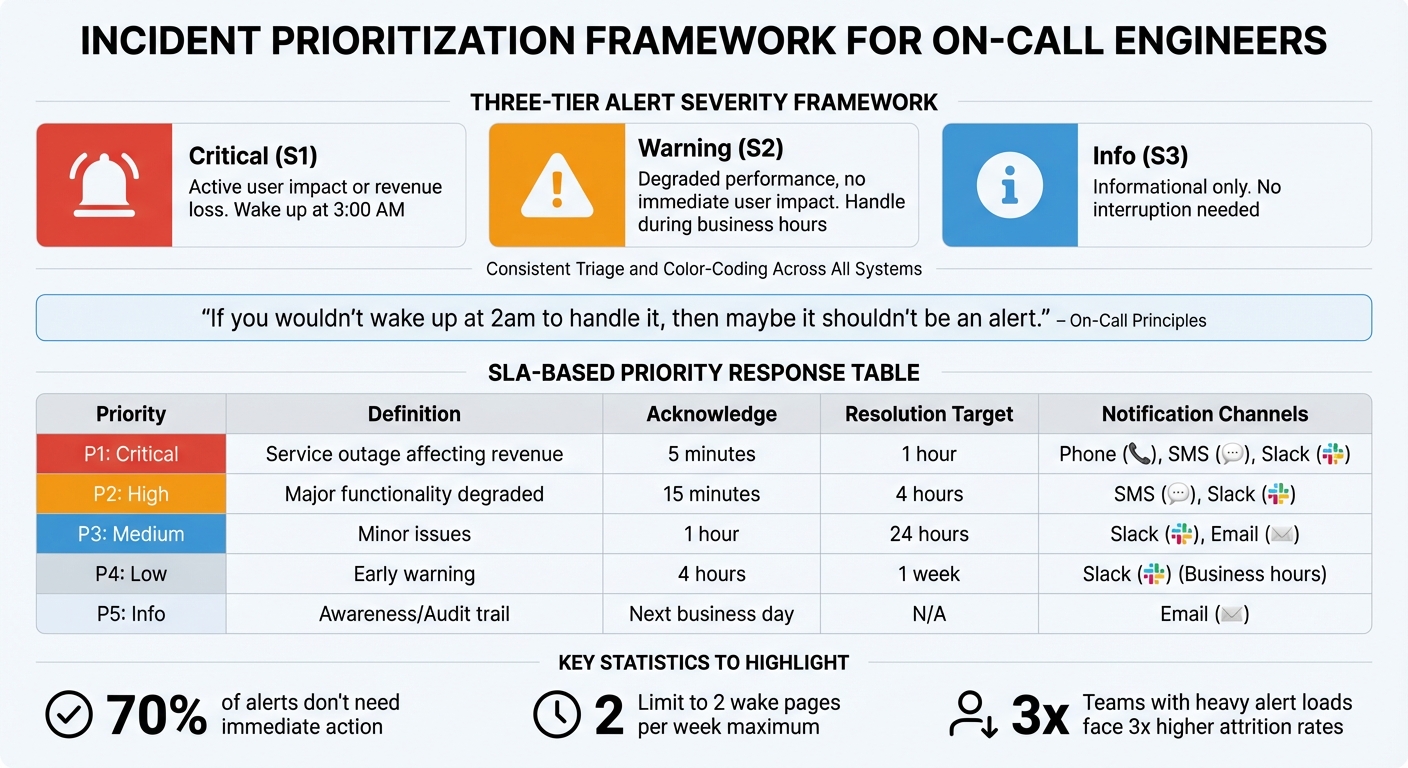
Alert Severity Framework and SLA Response Times for On-Call Engineers
When you’re the only on-call engineer, your focus should be on user-impact alerts. A clear triage system ensures you deal with issues that affect revenue or service availability, while less urgent tasks can wait for regular business hours. Without proper prioritization, you risk wasting energy on minor alerts and potentially missing critical ones.
One effective approach is using a P1–P5 severity framework to classify incidents based on their impact. For example, a P1 (Critical) incident, like a service outage affecting revenue, demands acknowledgment within 5 minutes and resolution within 1 hour. Meanwhile, a P3 (Medium) incident, such as a performance issue, might safely wait until the next business day. This system helps you avoid the trap of treating every alert as equally urgent.
"If an alert fires and the on-call engineer cannot take a specific action to resolve it, the alert should not exist."
– Nawaz Dhandala, Author
Focus on user-facing symptoms, not internal metrics. For instance, high error rates or checkout latency should take priority over something like CPU usage, which may not need immediate attention. If your database CPU is at 90% but users aren’t experiencing slowdowns, it’s a monitoring concern, not an emergency.
To maintain balance, limit yourself to two wake pages per week. If you’re getting more, it’s a sign your alerting system needs adjustment. Combine related alerts – like multiple failing health checks for the same service – into a single notification to reduce noise.
Using SLA-Based Prioritization
Adding Service Level Agreements (SLAs) to your severity framework provides clear response targets for each priority level. SLAs define acknowledgment and resolution windows, ensuring you know exactly which issues need immediate action.
| Priority | Definition | Acknowledge | Resolution Target | Notification Channels |
|---|---|---|---|---|
| P1: Critical | Service outage affecting revenue | 5 minutes | 1 hour | Phone, SMS, Slack |
| P2: High | Major functionality degraded | 15 minutes | 4 hours | SMS, Slack |
| P3: Medium | Minor issues | 1 hour | 24 hours | Slack, Email |
| P4: Low | Early warning | 4 hours | 1 week | Slack (Business hours) |
| P5: Info | Awareness/Audit trail | Next business day | N/A |
Use multi-window SLO alerting to confirm sustained issues before paging yourself. For instance, a burn rate of 14.4 over a 1-hour window means you’re consuming 2% of your monthly error budget in 60 minutes – a clear emergency. This method helps distinguish real problems from temporary spikes.
Adapt alert severity based on context. A P3 issue during business hours might escalate to P2 overnight when fewer staff are available. Automated escalation timers are a useful tool, even for solo responders. For example, if you don’t acknowledge an alert within 5 minutes, it should automatically escalate to a manager or backup.
Limiting Incidents Per Shift
Sustainable on-call work depends on setting strict boundaries. If you’re getting more than two wake-up pages per week, burnout becomes a serious risk. Group related alerts together to avoid being overwhelmed by notifications for a single service failure.
During your weekly on-call handoff, pick one "noisy" or non-actionable alert to address. For instance, if you’re repeatedly paged for a disk space warning that never leads to an outage, consider raising the threshold or implementing auto-cleanup scripts.
After your on-call rotation, give yourself a cooldown period. Take at least one recovery day to recharge, and if you’re paged overnight, use time-off-in-lieu (TOIL) the next day to avoid fatigue. Regularly review acknowledgment times in your paging tools (e.g., SMS, phone, Slack) to identify patterns, such as slow responses, and adjust your systems or backup support as needed.
Building Incident Runbooks
Runbooks are essential for streamlining your triage process. They minimize the mental load during stressful situations and save time by providing step-by-step guidance. Every alert notification should include a direct link to a specific runbook to avoid wasting time searching for documentation.
"The best time to write a playbook is before the incident. The second best time is right after."
– Nawaz Dhandala, Author
A strong runbook includes four key sections:
- Overview: Service owner details and escalation contacts.
- Quick Diagnosis: A few commands that solve the majority of issues.
- Common Issues: Symptoms, causes, and resolutions.
- Escalation Paths: When and how to seek help.
Include copy-paste commands (e.g., kubectl or psql scripts) to simplify tasks during incidents. Use decision trees to guide troubleshooting, like: "Is the database responding? YES → Check logs; NO → Go to the Database Recovery Playbook." This structured approach reduces the need for deep technical recall in high-pressure moments.
Runbooks should also define clear escalation triggers, such as "Escalate if customer-facing impact exceeds 15 minutes" or "If you’re unsure after 10 minutes of investigation, page the Engineering Manager." This ensures you get help before an issue worsens.
Since runbooks can become outdated, validate them monthly and test them through quarterly tabletop exercises. Update them after every incident to capture new failure modes and resolution steps. Use systems that flag runbooks not reviewed in 90 days to ensure they remain accurate.
Finally, include communication templates for status updates and incident declarations. Pre-written messages save time during initial triage and help you focus on resolving the issue, especially when every second counts. Concentrate on incidents that impact service availability to safeguard both user satisfaction and your own well-being.
Using TechVZero Bare Metal for Better Reliability and Lower Costs
Opting for bare metal infrastructure can significantly improve system reliability while slashing costs. By using bare metal Kubernetes, you gain direct control over your infrastructure, avoiding the added complexity of abstraction layers. This setup not only reduces disruptions but also enhances overall stability and efficiency. TechVZero’s approach offers a way to cut incident frequency and reduce costs by 40–60% compared to managed setups.
Reducing Emergency Frequency with Better Infrastructure
A solid infrastructure means fewer late-night emergencies. TechVZero’s bare metal solution minimizes the overhead caused by virtualization and reduces resource contention, which helps prevent unnecessary alerts.
For example, built-in DDoS protection addresses a common source of emergencies. In one case, TechVZero thwarted a DDoS attack while simultaneously cutting infrastructure costs by $333,000 in just one month. This type of solution is a game-changer, especially for teams with limited on-call staff, as each avoided incident saves valuable time and energy.
Switching to SLO-based monitoring can further reduce alert noise by as much as 85%. Instead of being alerted for every spike in CPU usage, you’re notified only about issues that directly affect your users. Bare metal infrastructure makes this easier to implement because you have complete visibility into system behavior without interference from additional abstraction layers.
Cutting Costs by 40–60%
Beyond reducing emergencies, streamlining your infrastructure can lead to substantial cost savings. Inefficient systems can cost startups up to $2,000 per hour in lost revenue, so every improvement positively impacts both your budget and your team’s workload. TechVZero offers a performance-based pricing model – taking 25% of the savings for one year, with no fees if they fail to meet the agreed-upon benchmarks. This ensures their success is tied directly to your results.
Teams using optimized infrastructure can improve Mean Time to Acknowledge (MTTA) and Mean Time to Resolve (MTTR) by up to 500%. Bare metal systems support these gains by delivering consistent performance and eliminating issues tied to third-party providers. This means no more monitoring external status pages or troubleshooting problems outside your control.
For teams of 10–50 people, this setup provides enterprise-level reliability without the need to hire an in-house infrastructure specialist. It also simplifies compliance with standards like SOC2, HIPAA, and ISO, allowing you to meet requirements on your own timeline without draining resources. For those managing on-call responsibilities solo, this infrastructure solution means fewer emergencies, more predictable costs, and a smoother workflow. Combined with smarter alert systems and automated responses, the efficiency gains can be transformative.
Protecting Your Mental Health and Avoiding Burnout
Being the sole person on-call comes with a unique set of pressures that go beyond handling emergencies. Many DevOps professionals highlight burnout as a significant issue, with on-call responsibilities often being a major factor. The constant expectation of availability can disrupt sleep and mood, even when emergencies don’t occur.
It’s important to recognize that 24/7 availability isn’t sustainable in the long run. Research shows that recovering from the sleep disruptions caused by on-call duties takes at least two full nights of rest. If you’re paged during overnight hours (11:00 PM–7:00 AM), consider taking the following day off to allow your brain to recover. This practice not only helps prevent mental fatigue but also reduces the risk of costly mistakes.
Just as automation reduces technical burdens, structured practices for mental health can ease the cognitive strain of being on-call. Clear schedules and intentional recovery methods are key to staying balanced.
Setting Clear On-Call Schedules
Defining boundaries around your availability is crucial for maintaining your mental and physical health. Establish a "pager budget" by limiting yourself to no more than two separate incidents during a 12-hour shift. If you find this limit is regularly exceeded, pause other tasks and focus on improving system reliability. This could mean addressing recurring problems, refining runbooks, or automating repetitive responses.
Separate your on-call responsibilities from development work. Dedicate on-call days solely to incident management and process improvements. In practice, scaling back development work by 30–50% during on-call shifts can help alleviate the mental strain of constant interruptions.
For smaller teams that can’t provide full 24/7 coverage, consider negotiating for business-hours-only on-call schedules or "best-effort" responses for non-critical issues outside of peak hours. As the saying goes, consistency is more effective than sporadic heroics. A predictable schedule that allows for proper recovery is always more sustainable than pushing through exhaustion.
Once a clear schedule is in place, you can focus on stress management techniques to further protect your mental health.
Taking Breaks and Managing Stress
After resolving an incident, take a moment to offload your thoughts by jotting down key details. Then, shut down work devices to signal the end of your shift. Engaging in activities that disconnect you from work – like going for a walk or exercising – can help reset your nervous system. Walking at least 5,000 steps a day has been shown to combat depression. Scheduling phone-free activities, such as workout classes or social dinners, can also help break the cycle of being "always-on."
If you’ve just handled a high-pressure incident, try mindfulness techniques to ease back into a calm state. A quick 60-second deep-breathing exercise or a 5-minute mindfulness reset can work wonders. To improve your chances of falling back asleep after a late-night page, avoid screens for 20–30 minutes to minimize blue light exposure, which can interfere with your recovery.
Spotting and Addressing Burnout Early
Burnout doesn’t happen overnight – it creeps up gradually. Be on the lookout for early signs, such as chronic fatigue despite adequate sleep, irritability over minor issues, a lack of motivation for things you once enjoyed, or physical symptoms like headaches or stomach problems. Behavioral changes, like skipping documentation, avoiding team interactions, or experiencing rapid heart rate spikes when an alert goes off, can also be red flags.
Tracking your personal health indicators can help you identify burnout before it gets worse. Pay attention to patterns like frequent sleep interruptions or accumulating "time-off debt."
| Burnout Indicator | Early Warning Sign | Proactive Measure |
|---|---|---|
| Cognitive | Slower resolution times; skipping documentation | Reduce development workload by 30–50% |
| Emotional | Irritability; withdrawal; cynicism | Schedule monthly stress-focused check-ins |
| Physical | Sleep issues; heart rate spikes | Create "off-switch" routines; allow late starts |
| Operational | High false alert rates | Enforce zero-tolerance for non-actionable alerts |
If you notice these patterns, act quickly. Introduce formal compensatory time-off policies, allowing for late starts or extra time off if you spend more than two hours handling incidents overnight.
"Everyone who is on-call should be compensated, whether they’re paged or not. Holding a pager is inconvenient. It means your non-work time isn’t completely yours"
Conclusion
Handling one-person on-call emergencies doesn’t have to mean giving up your health or weekends. By combining strategies like efficient alerting, automation, smart prioritization, and protecting your mental well-being, you can create a manageable approach to on-call responsibilities.
Start by cutting through the noise. Since only 2–5% of alerts require immediate attention, focus on refining notifications to highlight what truly matters. Pair this with automating routine fixes to reduce mental strain. Clear runbooks and effective triage methods help ensure quick, targeted action when you’re paged.
Reliable infrastructure is just as important. High-quality systems reduce the chances of emergencies by minimizing unpredictability. Optimized bare metal setups not only improve reliability but can also save money – fewer incidents mean fewer late-night disruptions and more resources for essential tools and support.
Remember, resilient systems depend on resilient people. Healthy on-call routines require healthy individuals. Set firm boundaries around your availability, prioritize recovery time, and watch for early signs of burnout. Sustainable practices allow you to respond effectively without jeopardizing your long-term well-being.
The aim isn’t to eliminate alerts entirely but to eliminate unnecessary noise, ensuring you achieve both reliability and a balanced schedule.
FAQs
How do I decide which alerts should actually wake me up?
To make sure you’re only interrupted by truly important alerts, it’s essential to create rules that cut down on unnecessary noise and highlight urgent issues. Start by setting precise thresholds – this helps avoid triggering alerts for minor fluctuations. Combine duplicate alerts to prevent being overwhelmed by repeated notifications for the same issue. You can also use smart filtering to block out non-critical alerts.
By reducing the clutter, you’ll avoid alert fatigue, stay focused on actual problems, and reduce the risk of burnout. Adjusting your alert settings ensures you’re only notified when something requires immediate attention.
What’s the safest first automation to add for solo on-call?
Reducing alert noise and improving routing is often the best starting point for solo on-call automation. Tools like AI-powered alert correlation can cut down on unnecessary notifications, ensure critical issues are prioritized, and help prevent burnout. Beyond that, automating repetitive tasks – such as initial incident triage or sending status updates – can simplify workflows and enhance reliability. This way, you can focus your energy on addressing urgent problems without getting bogged down by routine processes.
When should I ask for backup instead of pushing through alone?
When your workload starts to feel unmanageable, it’s time to ask for help. This can happen when you’re swamped with alerts, juggling long or complicated issues, or noticing signs of burnout – like struggling to focus or feeling unusually stressed. If you’re dealing with a situation that requires specialized expertise or if the sheer volume of work is affecting the quality of your responses, reaching out for support is essential. Doing so not only keeps the system running smoothly but also helps you maintain a healthy, sustainable approach to being on-call.