Checklist: What To Ask Provider Support During a Billing Dispute
When facing a billing dispute with your cloud provider, preparation and asking the right questions are key to resolving issues quickly. Start by gathering detailed billing data, reviewing your provider’s policies, and pinpointing specific charges in question. Use this checklist to guide your conversation with support:
- Ask for a detailed charge breakdown: Confirm the resources, services, and time periods tied to the disputed charges.
- Verify discounts and credits: Ensure all applicable discounts, reservations, or credits were correctly applied.
- Clarify pricing tiers: Confirm why specific pricing tiers or rates were used, especially for custom agreements or regional differences.
- Request raw usage data: Obtain logs and metrics to verify how charges were calculated, such as compute hours or data transfer amounts.
- Check for service outages: Investigate if downtime or reporting delays impacted your charges.
- Understand policies and deadlines: Confirm dispute timelines, SLA credits, and escalation procedures.
- Provide strong documentation: Submit necessary evidence like resource IDs, usage reports, and tax details to support your case.
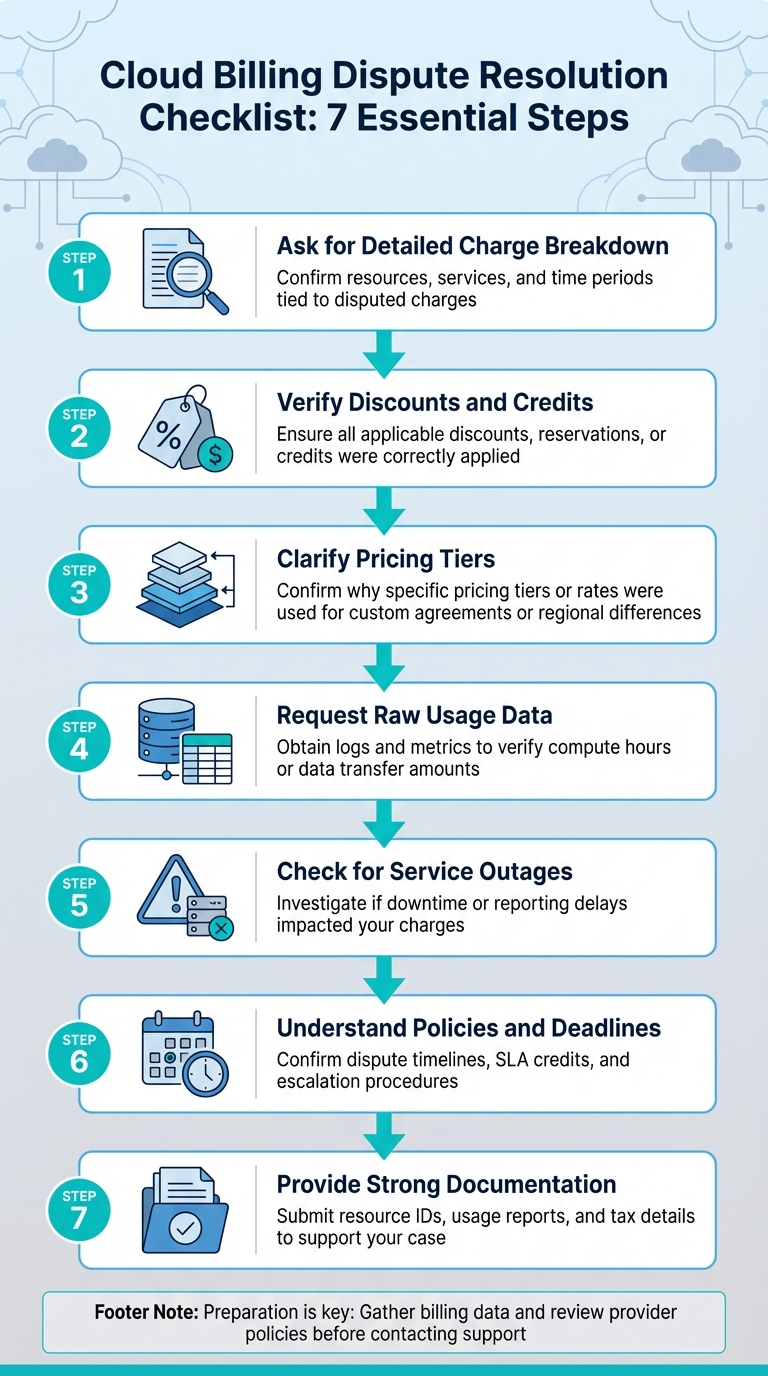
Cloud Billing Dispute Resolution Checklist: 7 Essential Steps
Troubleshoot AWS Billing Issue Under 16 Minutes || K21Academy
sbb-itb-f9e5962
Preparation Before Contacting Provider Support
When dealing with a billing dispute, going in unprepared can cause unnecessary delays. To streamline the process, ensure you have all the necessary evidence and information ready to present a clear, fact-based case.
Gather Your Billing Data
Start by collecting both PDF and CSV versions of your monthly invoices, along with your Cost and Usage Report (CUR). The CUR provides granular details such as Resource IDs, usage amounts, and unblended costs – critical for pinpointing disputed charges. Be sure to identify specific Resource IDs tied to the charges in question since support teams often require these to proceed. Additionally, document the usage dates and include screenshots of your billing dashboards to strengthen your claim.
If you’re part of an organization managing multiple accounts, confirm whether you’re viewing blended or unblended rates. Blended rates average costs across all linked accounts, which can differ from standalone pricing and may lead to confusion. For trend analysis, enable Cost Explorer at least 24 hours in advance to allow time for the data to populate.
Once your data is organized, familiarize yourself with your provider’s policies to ensure you follow the correct procedures.
Review Provider Policies
After gathering your billing data, review your provider’s billing policies to understand dispute requirements. Check their dispute policy for deadlines and the evidence you’ll need to submit. Be mindful of Free Tier expiration dates – unexpected charges often occur when the six-month or 12-month free period ends or when usage limits are exceeded. If you’ve recently closed your account, remember that commitments like Reserved Instances, Savings Plans, or Marketplace subscriptions remain active until their term ends.
"The costs of late-reported usage might not be included on that month’s invoice and instead might roll over to the next month’s invoice." – Google Cloud Documentation
Ensure your Tax Registration Number (TRN), VAT ID, and business legal address are accurate, as tax discrepancies are a common source of billing issues. Also, check that your "Alternate Contacts" for billing are up to date to avoid dispute-related emails being sent to an unmonitored inbox.
Identify the Disputed Charges
Now that your data is organized and you’ve reviewed the policies, focus on identifying the specific charges that seem incorrect. Use your billing console to examine the details of each service and pinpoint which regions are generating the charges. Watch out for hidden or recurring costs, such as those caused by orphaned resources or auto-restarted services. To ensure no resources are overlooked, run the AWSSupport-ListEC2Resources automation tool. This tool generates a comprehensive list of active resources across all regions, helping you uncover any unexpected charges.
Questions About Charge Breakdown
When you’re on the call with support, start by requesting a detailed breakdown of the resources tied to the disputed charge. Cloud providers typically categorize costs by service (e.g., compute instances, storage), resource type, and unique SKU IDs. Focus your inquiry on a thorough breakdown, including unit quantities, billing units (like vCPU-hour or GiB-month), and usage dates. These specifics will help you pinpoint the source of the charges and steer the conversation effectively.
What resources and time periods does this charge cover?
Find out which services, resources, and timeframes contributed to the charge. Sometimes, unexpected costs stem from secondary resources, such as unattached Elastic IP addresses, preserved EBS volumes, or auto-restarted services. Ask for resource IDs so you can cross-check them against your inventory. Also, confirm whether the charge is based on the usage date (when the activity occurred) or the invoice month (when the bill was issued). This is important because reporting delays may result in "late-reported usage" from previous months showing up on your current bill.
Were all discounts, credits, or reservations applied?
Make sure all applicable discounts, credits, or promotional offers were correctly applied. Clarify any differences between blended and unblended rates. In detailed billing reports, Reserved Instance discounts are usually listed under "Discounted Usage" and often show a blended rate of zero. Ask support to compare blended rates (which reflect organization-wide discounts) with unblended rates (what a standalone account would pay).
"The Bills page provides a ‘cash’ view of your charges – it reflects the actual amount that you pay to AWS each month, inclusive of discounts, credits, refunds, and taxes." – AWS Billing Console FAQs
Why was this pricing tier used?
Request clarification on why a particular pricing tier was applied. Verify that any custom rates or regional pricing differences were factored in correctly. If you have a custom pricing agreement, ask for a breakdown of "Negotiated Savings" to understand how your contract rates compare to standard list prices. Ensure your Reserved Instances or Savings Plans are active and being applied. Lastly, confirm that the rate aligns with the specific region where your resource is deployed, as pricing often varies by location.
Questions About Usage Data and Metrics
After reviewing the charge breakdowns, it’s crucial to double-check the usage metrics behind them. To do this, request detailed logs that include timestamps, resource IDs, and measurement units. For AWS users, you may need an updated usage report. If you’re using Google Cloud, the Cost Table Report can help clarify disputed charges. These details are essential for analyzing how usage was calculated and identifying any potential service interruptions.
Can I get raw usage data for the disputed period?
Yes, you can request raw usage data for the timeframe in question. For AWS, if your report doesn’t include resource IDs, ask support to generate a new report with this feature enabled. You can also request a "backfill" of cost data for specific billing periods by opening a support case. This process regenerates historical data with the correct configurations applied. On Google Cloud, the Cost Table Report provides a detailed breakdown of all charges on an invoice. It allows you to examine individual line items, which is helpful for verifying charges and cross-checking calculations.
How were compute hours or data transfer calculated?
Once you have the raw data, ask for an explanation of how your usage metrics were calculated. For instance, Amazon S3 storage is billed in "GB-Months", which is calculated by summing all GB-hours used during the month and dividing by the total hours in that month. If you’re dealing with EBS snapshots, clarify any specific rules, like how incremental snapshots are measured. For data transfer charges, confirm whether incomplete transfers were billed, as data already "in transit" is often charged even if the transfer was interrupted.
Were there service outages during this period?
After reviewing usage calculations, investigate whether any outages, maintenance events, or performance issues occurred during the disputed period. Cloud providers occasionally experience usage reporting delays, particularly at the end of a calendar month, which can cause charges to appear on the next invoice. Ask if rounding adjustments were made during high-precision calculations. Additionally, verify whether auto-healing features were active. These features can sometimes restart resources automatically after manual terminations, leading to unexpected compute hour charges.
Questions About Provider Policies and SLAs
Once you’ve gathered detailed usage data, the next step is to ensure that your provider’s policies and SLAs match the terms outlined in your contract.
Does this charge match the agreed pricing schedule?
Take a close look at the invoice to confirm it aligns with your contract’s pricing structure. Check that any applicable discounts, credits, or promotional offers have been applied correctly at the SKU level. Also, verify that the billing entity details match your legal records. For Google Cloud users, be aware that automatic thresholds can trigger multiple charges in a single month when your account balance hits a set limit (e.g., $500). Additionally, billing for reserved services will continue until the reservation period ends, no matter the status of your account.
What SLA credits apply for downtime?
For any service downtime, it’s important to know what SLA credits you’re entitled to. These credits typically follow a tiered structure:
- 10% credit for uptime between 99.0% and 99.9%
- 25% credit for uptime between 95.0% and 99.0%
- 100% credit if uptime drops below 95%
Keep in mind, SLA credits are usually the only compensation offered for unavailability – cash refunds are not provided [28,29]. To claim these credits, make sure to submit your request promptly with the subject line "SLA Credit Request" [28,31].
What is the deadline for escalating this dispute?
Understanding the provider’s policies can help you resolve billing issues more effectively. Clarify the escalation process and deadlines if your current support level doesn’t resolve the dispute:
- Google Cloud: Cases can be reopened within 15 days of closure.
- AWS: You have a 90-day window after account closure to access past billing information [3,16].
- Ensure the person handling the dispute has Billing Account Administrator rights.
Response times depend on your support plan. For example, AWS Enterprise Support addresses business-critical issues within 15 minutes, while general guidance requests may take up to 24 hours. Keep a record of these deadlines and the necessary administrative permissions for future reference when dealing with escalations.
Documentation and Follow-Up
Once you’ve prepared and asked the necessary questions, the next step in resolving a billing dispute involves thorough documentation and clear follow-up communication. Without proper evidence, your claim could face delays or even rejection. Detailed documentation backs up your concerns and strengthens your case when interacting with your provider.
What evidence do you need to process this dispute?
Before submitting your dispute, ask for a complete list of required documents. These may include resource identifiers like snapshot IDs or instance ARNs, along with their associated AWS Regions, to pinpoint the charges in question. If the dispute involves errors in invoice headers or tax details, you’ll need to provide updated Tax Registration Numbers, business addresses, or Purchase Order information.
When submitting your case through AWS Support, keep in mind their restrictions: a maximum of three attachments, each no larger than 5 MB. For disputes related to terminated services, include proof that the parent service – such as Elastic Beanstalk or OpsWorks – was deleted prior to the charges being incurred for individual resources.
What is the expected timeline for resolution?
Most providers focus on committing to initial response times rather than guaranteeing a resolution timeframe, as the total time required often depends on the complexity of the issue. For example, AWS offers response times ranging from 15 minutes for critical issues under Enterprise plans to 24 hours for general inquiries. If you have AWS Business Support, you might get a response within an hour for cases marked as "Production system down". Meanwhile, Google Cloud allows you to reopen a resolved billing support case within 15 days; after that, a new case must be filed.
Check the details of your support plan to understand your expected response times. To avoid service disruptions during extended dispute resolutions, AWS advises keeping a backup credit card on file. Additionally, confirm how and when final updates will be communicated to ensure the process is completed smoothly.
How will you communicate the resolution?
Before starting the process, confirm how your provider will deliver updates or final decisions. Communication typically occurs via email, live chat, phone, or through the provider’s support console. For example, Google Cloud lets you track, update, and comment on open billing cases directly in the Google Cloud console under the "Billing support cases" section. Once your dispute is resolved, double-check the adjustment by reviewing your transaction history. For chargebacks, Google Cloud sends an automated email confirming receipt of your request before starting their review. Clear and documented communication not only signals the resolution but can also help you avoid similar issues in the future.
Conclusion
Billing disputes don’t have to drain your cloud budget or your team’s energy. The key? Preparation and precision. Start by gathering detailed usage data, reviewing your provider’s policies, and identifying the exact charges you’re questioning before reaching out to support. This groundwork makes the resolution process smoother and faster. By asking specific questions about charge breakdowns, usage patterns, and SLA credits, you can bring clarity to what might otherwise feel like a messy and confusing process.
Strong documentation transforms what could be a frustrating back-and-forth into a well-organized case. Attach screenshots, raw usage logs, and resource IDs directly to your support ticket. These records not only help speed up the resolution but also safeguard you against similar issues in the future.
Beyond resolving disputes, think ahead with cost management strategies. Use tools like AWS Budgets or CloudWatch alarms to catch anomalies early – setting even a small threshold, like $1, can help you spot hidden costs from unused or forgotten resources before they spiral out of control. For example, deploying S3 Gateway Endpoints can cut data transfer fees without extra charges, while lifecycle policies can automatically archive or delete outdated billing reports.
"It’s important not to assume any AWS service is cheap or free, even for small projects." – Runal Paliwal, CloudThat
FAQs
What should I collect before contacting billing support?
Before contacting billing support, make sure you have all the necessary details to clearly explain your issue. This should include billing statements, usage reports, invoices, and any records of account activity linked to unexpected charges. Having these documents ready can help pinpoint discrepancies and make the resolution process faster and more efficient.
How do I prove a charge doesn’t match my actual usage?
To challenge a charge that doesn’t align with your usage, start by thoroughly reviewing your detailed billing data and activity logs. Tools like Cost and Usage Reports can help you break down line items and match them to specific resource activities, such as network traffic or compute usage. If you still notice inconsistencies, gather your logs and reports as evidence and reach out to support. Having this clear, data-backed documentation can make your case stronger and lead to a quicker resolution.
When should I escalate a billing dispute?
If your billing issue isn’t resolved after reaching out to the provider’s support team, it’s time to escalate the matter. Begin by clearly explaining your concerns to the support team. If they’re unable to resolve the issue, ask to speak with a supervisor or follow the company’s formal escalation process. Acting quickly is essential to ensure your dispute gets the attention it needs without unnecessary delays.