Automating Compliance Documentation: Guide
Automating compliance documentation simplifies meeting regulatory standards by using software to handle repetitive tasks like evidence collection and audits. This saves time and reduces errors. Companies using automation tools report spending 82% less time on compliance tasks, cutting costs and accelerating certification processes like SOC 2 or ISO 27001. Key components include centralized document storage, system integrations (e.g., AWS, Okta, GitHub), and automated alerts for timely task completion. Automation ensures continuous monitoring, replacing manual, error-prone processes with real-time insights and efficiency.
Key Benefits:
- Saves up to 82% of time on compliance tasks.
- Cuts costs significantly (manual: $50,000–$100,000 vs. automated: $15,000–$25,000).
- Enables faster certification (SOC 2 in days vs. months manually).
- Reduces audit preparation time by up to 90%.
How It Works:
- Centralized Storage: A single hub for all evidence and policies.
- System Integration: Automates data collection from tools like AWS and Okta.
- Automated Alerts: Real-time notifications for compliance drift or overdue tasks.
Start by identifying high-priority tasks, testing workflows on a small scale, and documenting processes thoroughly. Tools like Drata and Vanta integrate seamlessly into existing systems, making compliance faster and more efficient.
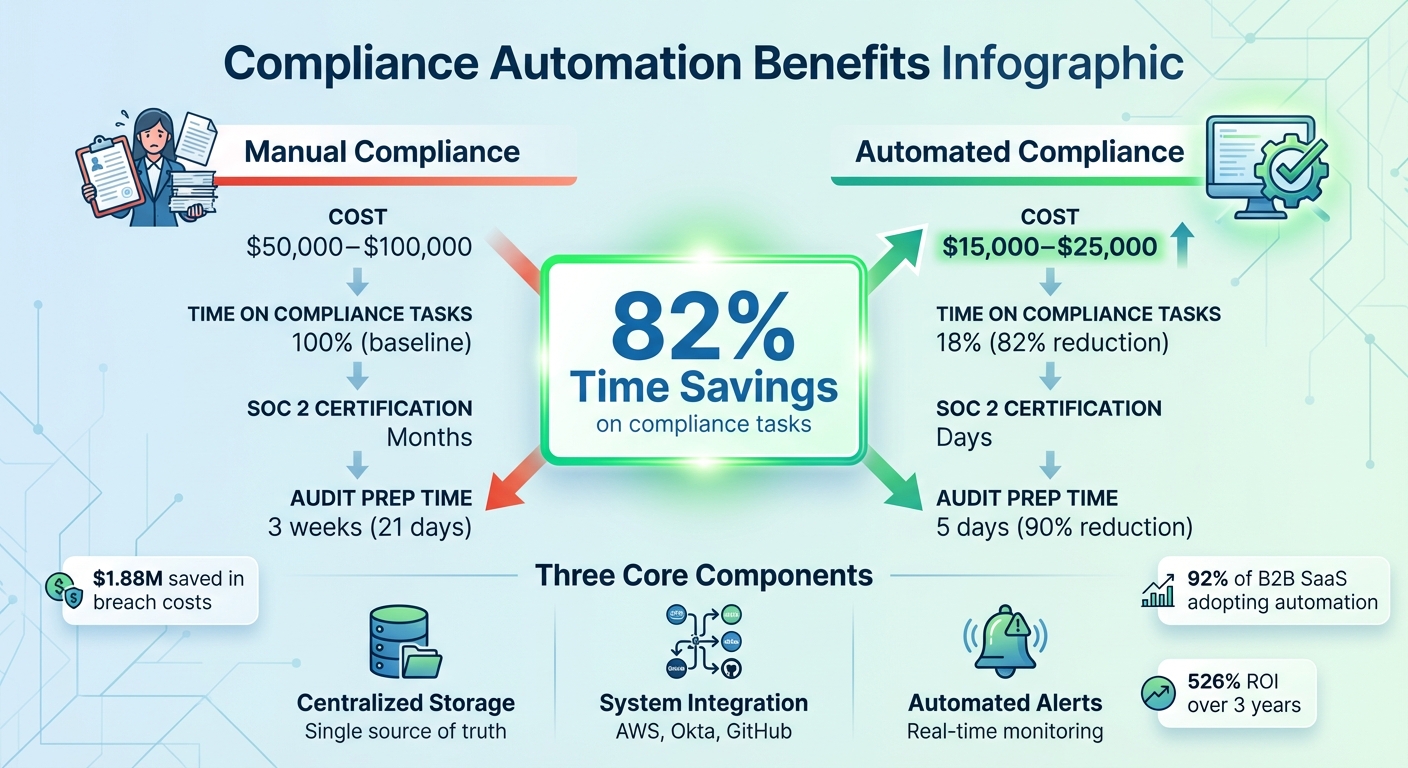
Manual vs Automated Compliance: Cost and Time Savings Comparison
Automate Compliance Tests & Audits with Trustero AI
Core Components for Automating Compliance
Creating a reliable compliance automation system hinges on three essential elements working in harmony: a centralized hub for storing all evidence and policies, integrations that automatically pull data from existing systems, and automated alerts to ensure timely task completion. Together, these components replace cumbersome spreadsheets, scattered email chains, and manual tracking.
Let’s break down these components in detail.
Centralized Document Storage
A centralized repository acts as the single source of truth for compliance materials, including policies, audit trails, evidence files, and vendor certifications. This eliminates version control issues, where teams struggle to identify the most current document or validate outdated evidence. Platforms like GRC tools or secure cloud data lakes fulfill this role, offering immutable audit trails that log who accessed or updated files and when.
For audits, a centralized system can automatically link evidence to relevant controls. Technologies like Amazon QLDB or S3 with Object Lock ensure cryptographically verifiable records, providing auditors with confidence that data remains untampered. One financial services firm, for example, cut audit preparation time from three weeks to just five days by consolidating scattered compliance documents into a single integrated platform.
System Integration
Integrating your HRIS, cloud infrastructure, and ticketing systems via APIs enables workflows that automatically pull employee access logs from tools like Okta, configuration data from AWS, or code commits from GitHub. This eliminates the need for manual screenshots or transferring data into spreadsheets.
Policy-as-Code tools, such as Open Policy Agent (OPA) or Sentinel, can be embedded into CI/CD pipelines to block non-compliant deployments. For example, a policy file like pci_dss_3_4_1.rego can prevent engineers from launching unencrypted databases, creating a direct, auditable link between the control and the specific PCI DSS requirement it addresses. This enables continuous compliance by scanning configurations for issues – like public S3 buckets or disabled multi-factor authentication – before they escalate into audit failures.
Automated Alerts and Reminders
Automated notifications ensure that critical tasks, such as evidence submissions, policy acknowledgments, or quarterly access reviews, are completed on time. If a task isn’t addressed, workflows can escalate it to a manager or compliance team member for resolution.
The Moxo Team highlights this shift:
"Compliance automation uses workflows, integrations, and AI to reduce manual effort and human error".
Real-time alerts also monitor infrastructure for compliance drift. For instance, teams can be instantly notified when a security group is misconfigured to allow unrestricted SSH traffic. Additionally, Magic Links let external stakeholders upload certifications or sign documents directly from an email, streamlining collaboration.
How to Implement Compliance Automation
To put compliance automation into action, start by assessing risks, piloting workflows, and documenting processes. The key is to identify vulnerabilities early, test workflows on a smaller scale, and maintain thorough documentation. This approach ensures that auditors can clearly follow your logic from policy creation to execution. These steps lay the groundwork for a scalable and efficient compliance automation system.
Start with a Compliance Risk Assessment
Kick things off by conducting a risk-based gap analysis that aligns with your framework requirements. This process helps uncover weak spots, such as unclear access controls, inefficient reporting, or manual data transfers between systems. These areas are prime candidates for automation.
A risk assessment also helps you focus on high-priority areas. For instance, if your vendor payment process handles a high volume of transactions, automating controls in this area can provide immediate benefits. Automated tools and proactive data analysis can cut fraud losses and detection times by at least 50%. Instead of trying to automate everything at once, concentrate on the 10–15 most critical controls.
Test Small Before Scaling Up
Begin with a single compliance workflow, such as automating evidence collection for quarterly access reviews or Know Your Customer (KYC) checks, and evaluate its performance before scaling. Use the trigger → action → control model: a trigger (e.g., adding a new vendor) initiates an action (e.g., sending a file request via Magic Link), while a control (e.g., escalating overdue requests) ensures compliance.
This model automates repetitive, rule-based tasks while leaving judgment-heavy responsibilities, like interpreting policies or managing incidents, to humans. Once you’ve confirmed that the workflow reduces manual effort without introducing errors, you can deploy similar workflows across other frameworks. Organizations using this approach have reduced audit preparation time from three weeks to just five days.
Document Automated Processes Thoroughly
Success in small-scale tests sets the standard for documenting automated processes. Link each workflow to its corresponding policy, ensuring full traceability from high-level requirements to execution and remediation. Use version-controlled systems to store policies, detection scripts, and reporting queries, so they are peer-reviewed, tested, and properly versioned. This creates an unchangeable audit trail that clearly shows how evidence was collected, who approved it, and when.
Pre-built templates can simplify the documentation of automated workflows and highlight areas requiring manual oversight, such as regulatory filings or complex contract reviews. This ensures clarity and transparency during audits.
sbb-itb-f9e5962
Choosing Compliance Automation Tools
When building on automated processes, picking the right compliance tools can make all the difference. The tools you choose should work seamlessly with your existing tech stack and deliver clear, measurable results. Take Vanta, for instance – it reports an impressive $535,000 in annual benefits and a three-year ROI of 526%. The goal is to eliminate manual tasks while avoiding new inefficiencies. Below, we’ll explore key categories of tools that can streamline compliance automation.
Document Management Systems
Document management systems are essential for organizing compliance documentation. They offer features like version control, centralized storage, and workflow automation. These systems keep track of changes to policies and procedures, creating a clear audit trail. With version control, your team always works from the latest policy, while centralized storage eliminates the headache of hunting through email threads or local drives. Many systems also simplify approval workflows by automatically routing documents to the right stakeholders and capturing e-signatures – no manual follow-ups required. Once your documentation is under control, the next step is automating repetitive tasks.
Robotic Process Automation (RPA) Tools
RPA tools handle tedious, repetitive tasks like data entry, report generation, and formatting evidence. These tools can slash manual effort by as much as 80%. Here’s how it works: when a trigger occurs (e.g., a new vendor is added), the RPA tool takes action (e.g., sends a file request) and enforces controls (e.g., escalates overdue submissions). RPA is especially useful for high-volume processes, such as access reviews, which often involve hundreds of repetitive steps each quarter. For a more comprehensive compliance solution, consider moving to cloud-based platforms.
Cloud-Based Compliance Platforms
Cloud-based platforms like Drata are game-changers for compliance automation. They integrate with tools like HRIS, SSO, cloud providers, and DevOps systems to automatically gather evidence. Drata users have reported cutting audit prep time by 90%, reducing what used to take three weeks down to just five days. These platforms monitor your compliance posture continuously, testing controls hourly or daily instead of relying on periodic audits. Many also allow cross-framework mapping, so evidence collected for SOC 2 can be reused for ISO 27001 or GDPR compliance. Advanced features, such as AI that pre-validates evidence for completeness, can save your team even more time. Pricing for regulatory compliance software typically ranges from $10,000 to $80,000 annually, depending on your organization’s size and requirements.
"Capable regulatory compliance software translates requirements into easy-to-follow controls." – Tim Blair, Sr. Manager, GTM GRC SMEs, Vanta
When finalizing your tool selection, make sure the platform integrates seamlessly with your existing tech stack. This ensures a smoother implementation and maximizes the tool’s effectiveness.
Conclusion
Automated compliance documentation shifts the focus from frantic, last-minute evidence gathering to a state of constant audit readiness. By using centralized storage and real-time monitoring, organizations not only streamline their processes but also see measurable benefits. For instance, companies with advanced security automation save an average of $1.88 million in data breach costs compared to those relying on manual methods ($3.84M vs. $5.72M). This shift paves the way for practical steps and meaningful improvements.
Key Takeaways
Effective compliance automation depends on three pillars: centralized document storage, system integration, and automated alerts. When these elements work together, organizations can dramatically reduce manual workloads – up to 80% in some cases – allowing teams to focus on higher-priority tasks like strategic risk management instead of repetitive spreadsheet updates.
Another game-changer is the move from periodic reviews to continuous monitoring. Automated systems don’t just look back at what happened during quarterly reviews; they provide real-time insights, answering the question, “What’s happening right now?” across your entire operation. This approach grows alongside your business, enabling you to map evidence across multiple frameworks (SOC 2, ISO 27001, GDPR) without duplicating efforts.
Next Steps for Your Team
To get started, conduct a gap analysis of your current compliance processes. Pinpoint the most time-consuming manual task – whether it’s evidence collection or access reviews – and test automation in a pilot program before scaling it across other departments.
Select tools that seamlessly integrate with your existing systems, such as HRIS platforms, cloud providers, or DevOps tools, to automate evidence collection. Make sure the tools you choose fit well within your current tech stack. Track measurable outcomes like task completion times and error rates to gauge success. With 92% of B2B SaaS companies already adopting or planning to adopt compliance automation tools, the real question isn’t if you should automate – it’s how soon you can get started.
FAQs
What are the main advantages of automating compliance documentation?
Automating compliance documentation offers organizations a host of advantages, particularly in boosting efficiency and accuracy. By taking over repetitive tasks such as gathering evidence, updating policies, and conducting compliance checks, automation frees up teams to tackle more strategic goals. It also ensures continuous compliance by keeping a real-time eye on systems, reducing the need to rely solely on periodic audits.
Another major perk is the consistency it brings. Automation applies compliance policies uniformly, producing error-free, audit-ready reports. This makes preparing for audits under frameworks like SOC 2 or ISO 27001 much smoother, saving time and lowering the chances of non-compliance. In short, automating compliance documentation helps organizations stay on top of regulatory demands while cutting down on resource use and reducing human error.
How does integrating systems make compliance easier?
When systems are connected, managing compliance becomes much easier. Integration allows tools and platforms to share data, run compliance checks, and automatically update documentation. This reduces the need for manual work and helps cut down on errors.
With this setup, compliance can be tracked in real-time, potential issues are flagged early, and audit trails stay current. Automated alerts and updates also ensure that organizations are aware of regulatory changes, making it easier to stay in line with the latest standards. In short, linking systems makes compliance processes smoother, more accurate, and easier to scale.
How can we effectively automate compliance documentation?
To streamline compliance documentation through automation, begin by establishing clear workflows that match your compliance needs and integrate smoothly with your current systems. Leveraging policy-as-code is a smart move – it allows you to codify compliance requirements, making automated validation and enforcement possible across both development and operations. This not only ensures consistency but also cuts down on manual work.
Add automated compliance checks directly into your CI/CD pipelines with tools that can catch deviations early in the process. Continuous monitoring plays a crucial role here – set up real-time dashboards to track compliance status and use automated remediation to quickly address any drift. Keep your policies up to date and automate the collection of evidence to stay prepared for audits and to adjust to changing regulations. This method reduces the risk of human error and creates a scalable, consistent way to manage compliance.