Balancing Encryption Costs and Performance for Multi‑Cloud

Encryption in multi-cloud setups is a balancing act between security, cost, and performance. With 87% of enterprises adopting multi-cloud strategies, encryption is critical for compliance and data protection. However, it introduces challenges like increased costs, latency, and operational complexity.
Key Takeaways:
- Costs: Encryption can drive up expenses. For instance, AWS KMS costs $1/month per key, but frequent API calls (e.g., 1,000 transactions/second) can exceed $25,000/month.
- Performance: Encryption adds latency (5%-10% increase in execution time) and CPU overhead. Hardware-accelerated encryption (e.g., AES-256 on AWS Graviton processors) mitigates this.
- Key Management: Centralized solutions, like HashiCorp Vault, simplify multi-cloud key handling, reducing "key sprawl" and costs.
- Protocol Choices: AES-256 is efficient for bulk encryption, while X25519 (ECC) outperforms RSA for key exchanges.
- Optimizations: Tools like AWS S3 Bucket Keys and data key caching can cut encryption API costs by up to 99%.
Practical Solutions:
- Use centralized key management to reduce complexity and expenses.
- Optimize encryption protocols (e.g., TLS 1.3, AES-256) for better cost-performance balance.
- Automate key rotation to maintain security without disruptions.
- Benchmark encryption impact on latency and CPU usage to set acceptable thresholds.
- Reduce API costs with caching and workload placement strategies.
Encryption is essential for compliance and security, but managing its costs and performance requires thoughtful strategies and continuous monitoring.
Akeyless Encryption & Multi Cloud KMS Video
sbb-itb-f9e5962
Choosing Encryption Protocols That Balance Cost and Performance
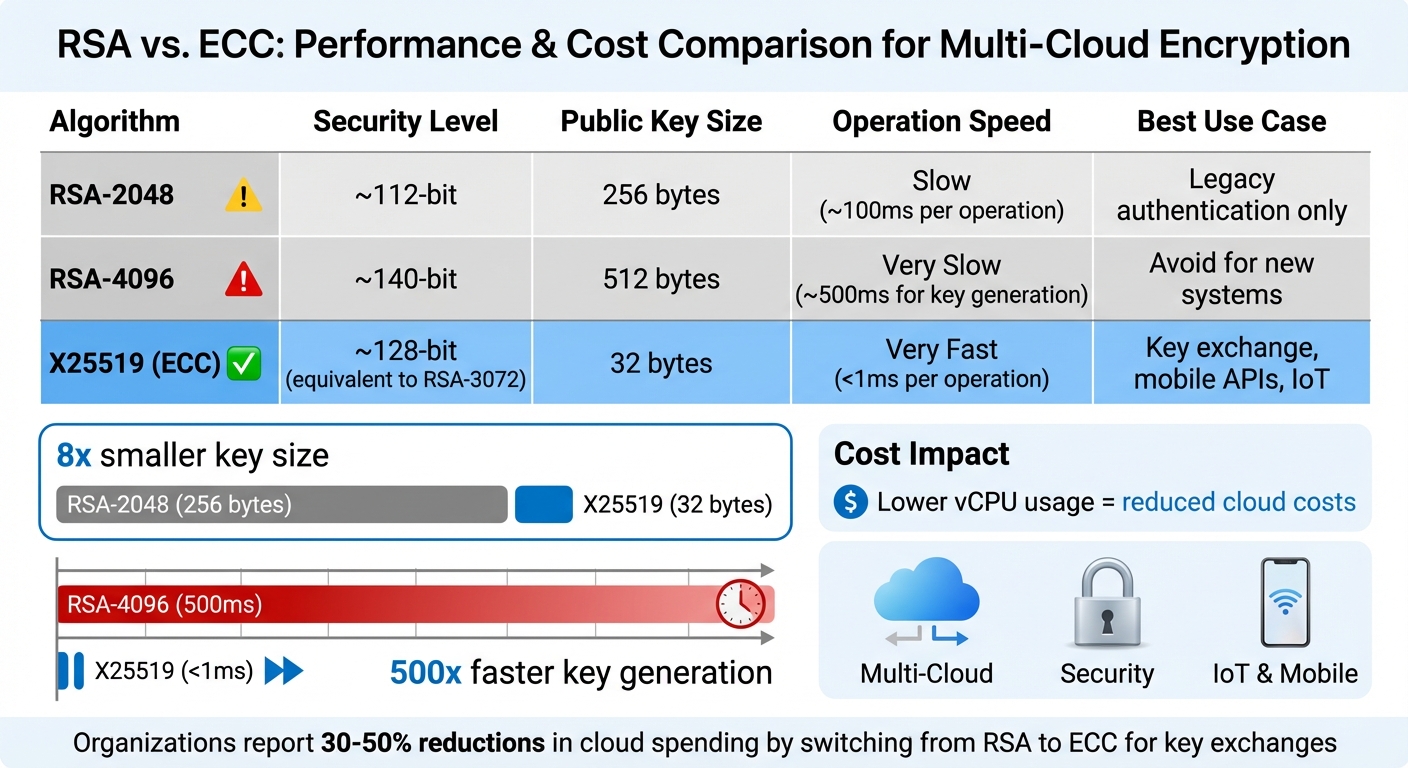
RSA vs ECC Encryption Performance and Cost Comparison
Selecting the right encryption protocols is a balancing act between cost efficiency and application speed. With AES-256 powering over 90% of cloud storage solutions, it’s clear that encryption choices significantly influence both performance and expenses. However, the ideal protocol depends on your workload and hardware setup.
Modern cloud providers like AWS, Google Cloud, and Azure equip their instances with hardware-accelerated encryption capabilities, such as AES-NI or ARM Cryptography Extensions. For example, on AWS Graviton 4 processors, AES-256-GCM outpaces ChaCha20 by 122% to 211%.
"The ‘mobile devices need ChaCha20’ advice from 2015 no longer applies to modern chips",
says cryptography researcher Ash Vardanian.
The costs extend beyond speed. RSA-2048, for instance, takes approximately 100ms per operation, compared to under 1ms for X25519 (ECC). X25519 not only matches the security of a 3,072-bit RSA key but also reduces bandwidth and compute overhead. For high-frequency authentication tasks, these differences translate directly into lower vCPU usage and cloud costs.
When it comes to data in transit, TLS 1.3 offers a significant upgrade. Its 0-RTT (zero round-trip time) feature minimizes handshake latency, while its use of modern AEAD ciphers like AES-256-GCM ensures efficient and secure encryption. These optimizations can save milliseconds per connection, which adds up across millions of API calls. Some organizations have reported 30% to 50% reductions in cloud spending by fine-tuning their encryption strategies.
AES-256: Hardware-Accelerated Symmetric Encryption
AES-256 is the backbone of bulk data encryption, thanks to its ability to leverage hardware acceleration. Most Intel, AMD, and ARM processors in cloud environments come equipped with AES-NI, making AES-256-GCM highly efficient. This makes it the go-to choice for encrypting databases, object storage, and backups.
Benchmarks from 2025 highlight AES-256’s performance on AWS Graviton 4 instances, achieving encryption speeds between 563 and 2,436 MB/s and decryption speeds of 753 to 2,781 MB/s. In contrast, ChaCha20 lags behind, with encryption speeds of 280 to 895 MB/s and decryption speeds of 310 to 794 MB/s. As data volumes grow, this performance gap becomes even more pronounced, solidifying AES-256-GCM as the preferred option for server-side encryption.
One caveat to keep in mind is nonce management. Reusing a nonce with the same key can lead to severe security vulnerabilities. For scenarios like database field encryption, where nonce errors are more likely, AES-256-GCM-SIV provides added safeguards against implementation mistakes.
TLS 1.3 for Reduced Latency in Data Transit
TLS 1.3 streamlines the handshake process by eliminating unnecessary steps. Its 0-RTT feature allows clients with prior connections to send encrypted data immediately, cutting out a round trip. The protocol also mandates AEAD ciphers, such as AES-256-GCM and ChaCha20-Poly1305, ensuring authenticated encryption is always in place. Additionally, encrypting the handshake adds another layer of security by protecting metadata.
These improvements save microseconds per connection, which can significantly reduce vCPU usage and costs when scaled across thousands of simultaneous connections. By optimizing encryption protocols, organizations can better manage multi-cloud expenses.
RSA vs. ECC for Key Exchange
Switching from RSA to Elliptic Curve Cryptography (ECC) offers substantial performance benefits, especially in multi-cloud setups. RSA-4096 key generation, for example, takes about 500ms, while X25519 (ECC) completes the same task in under a millisecond. This speed advantage is crucial for authenticating API requests, establishing VPN connections, or supporting mobile clients.
The difference in key size is also striking. RSA-2048 keys are 256 bytes, while X25519 keys are just 32 bytes. This eightfold reduction in size not only decreases bandwidth costs but also accelerates data transmission. For IoT devices or mobile apps communicating with cloud backends, this efficiency is a game-changer. Additionally, RSA-2048 has a 190-byte limit per encryption operation, making it unsuitable for anything beyond small key exchanges.
Here’s a quick comparison of RSA and ECC:
| Algorithm | Security Level | Public Key Size | Operation Speed | Best Use Case |
|---|---|---|---|---|
| RSA-2048 | ~112-bit | 256 bytes | Slow | Legacy authentication only |
| RSA-4096 | ~140-bit | 512 bytes | Very Slow | Avoid for new systems |
| X25519 (ECC) | ~128-bit | 32 bytes | Very Fast | Key exchange, mobile APIs, IoT |
The computational demands of RSA also drive up costs in cloud environments where vCPU usage is tied to billing. Transitioning to X25519 or Ed25519 for tasks like handshakes and digital signatures reduces CPU usage, enabling smaller, more cost-effective instance types. This shift is particularly beneficial for SaaS platforms, where authentication happens at the edge before requests are processed by core servers.
Managing Encryption Keys Across Multiple Clouds
Handling encryption keys across AWS, Google Cloud, and Azure requires a careful balance between strong security measures and controlling operational costs. Each additional key adds to monthly expenses, making efficient key management just as important as selecting robust encryption protocols.
Simplifying with Centralized Key Management
Centralized key management can significantly cut down on complexity and expenses. Instead of generating separate keys for every service in every account, you can store your KMS keys in a central account. Other accounts can then access these keys through role delegation, reducing the risk of key sprawl and accidental deletions. For SaaS providers, using one customer-managed key per tenant across all services – rather than separate keys for each service – can lead to noticeable savings on storage costs.
Another effective strategy is envelope encryption. This method uses a Key Encryption Key (KEK) to secure Data Encryption Keys (DEKs). By doing so, you can rotate keys without re-encrypting all existing data, as older KEK versions can still decrypt previously encrypted DEKs. Pairing envelope encryption with data key caching (e.g., AWS Encryption SDK) further reduces API calls and associated costs.
Access control also plays a vital role. Using aliases like alias/customer-<id> to associate keys with specific tenants or applications enables more precise IAM policies. This approach eliminates the need for unique keys across every microservice. Additionally, splitting permissions between "Key Administrators" (who handle key policies and lifecycles) and "Key Users" (who only have encrypt/decrypt rights) enhances security by reducing potential misuse.
For multi-cloud setups, tools like HashiCorp Vault provide a unified solution. Vault’s Key Management Secrets Engine (KMSE) simplifies managing keys across AWS, Azure, and Google Cloud, offering a standardized workflow and a shared root of trust.
Benefits of Centralized Key Management
Centralizing key management removes the hassle of toggling between multiple accounts or cloud platforms for key maintenance. Instead of maintaining dozens – or even hundreds – of keys across environments, you can consolidate to a few centralized keys, granting access via IAM roles. This simplifies governance and reduces the risk of privilege escalation.
Consider this example: If you manage 100 tenants with 10 microservices each, creating a key for each service per tenant results in 1,000 keys, costing $1,000 per month at $1 per key. By consolidating to one key per tenant, you could cut monthly costs by up to 90% and reduce API request charges.
Centralization also addresses key proliferation, which often leads to misconfigurations or accidental deletions. For instance, AWS enforces a default waiting period of 7 to 30 days before permanently deleting a key. Once this window expires, recovery is impossible. To avoid such issues, disable inactive keys rather than deleting them.
Comparing AWS KMS, Google Cloud KMS, and HashiCorp Vault
The ideal key management system for your organization depends on your cloud strategy and budget. Here’s a quick comparison:
| Feature | AWS KMS | Google Cloud KMS | HashiCorp Vault (KMSE) |
|---|---|---|---|
| Multi-Cloud Support | Primarily AWS; supports multi-region keys | Primarily GCP; CMEK for data at rest | Cloud-agnostic; works with AWS, Azure, GCP |
| Key Rotation | Annual for AWS-managed keys; optional for customer-managed keys | Configurable schedules; manual for asymmetric keys | Automated lifecycle management across clouds |
| Access Control | Resource-based key policies with IAM | IAM and CMEK for ownership | Internal auth and policy engines |
| Primary Strength | Deep AWS integration; cost optimizations like S3 bucket keys | Strong CMEK ownership and versioning | Prevents vendor lock-in with unified interface |
For example, AWS KMS charges $1 per month per key, plus $0.03 per 10,000 API requests. Google Cloud KMS pricing is similar, while HashiCorp Vault requires an Enterprise license with the Advanced Data Protection module. If you’re already using Vault, its KMSE module simplifies multi-cloud workflows.
"The management of cryptographic keys becomes increasingly complex in cloud environments due to differences in ownership and control between cloud consumers and providers."
- NIST
If your workloads are AWS-heavy, AWS KMS paired with S3 bucket keys can help lower costs. For multi-cloud environments, HashiCorp Vault offers flexibility, while Google Cloud KMS is well-suited for GCP-centric operations.
Automating Key Rotation Without Interruptions
Automating key rotation is essential for maintaining security and compliance in multi-cloud environments. Standards like PCI DSS require annual cryptographic key rotation. Cloud providers use key versioning to make this seamless: new keys encrypt new data, while older versions decrypt existing data, leaving your application code unaffected.
AWS KMS supports automatic yearly rotation for customer-managed keys. Google Cloud KMS allows you to set rotation intervals as short as 24 hours. Tools like Terraform can automate rotation schedules, such as every 90 days, across multiple environments.
To avoid downtime during rotation:
- Use key aliases instead of hardcoding key IDs. For instance, referencing
alias/customer-123ensures smooth operation when underlying key material rotates. - Schedule background re-encryption tasks during off-peak hours. This updates data with the latest key version while phasing out older versions.
- Set soft-delete periods of at least 30 days. This gives you time to recover a key version if mistakenly marked for deletion.
For multi-cloud setups, HashiCorp Vault standardizes rotation workflows, reducing the complexity of managing different provider APIs. This approach ensures consistent rotation policies and simplifies key management.
"Cloud KMS makes rotation straightforward for symmetric encryption keys. You set a rotation schedule, and KMS automatically creates new key versions… Old versions remain available for decryption, so existing ciphertext continues to work without any changes to your application."
- Nawaz Dhandala
If you suspect a key compromise, immediate manual rotation is a wise step. This adds an extra layer of security on top of automatic schedules.
Measuring and Reducing Encryption Overhead
Managing encryption’s impact on system performance is crucial for balancing cost and security. Pinpointing where encryption slows things down helps streamline operations without cutting corners on protection.
How to Benchmark Encryption Performance Impact
To measure how encryption affects performance, compare metrics like latency, throughput, IOPS, and CPU usage both with and without encryption. This side-by-side analysis highlights the extra load encryption adds to your system.
Key metrics to focus on include:
- I/O latency (measured in milliseconds)
- Throughput (measured in Mbps or Gbps)
- IOPS (Input/Output Operations Per Second)
- CPU utilization
Because encryption demands significant processing power, expect to see noticeable spikes in CPU usage during these operations.
Nicolas Corrarello from HashiCorp explored this impact in a 2018 test. Using an m4.large AWS instance, he encrypted 4,000 rows in a MySQL database via Vault’s Transit backend, storing the results in Amazon S3. The test showed a 5%–10% increase in execution time, with Vault consuming 15% CPU compared to the Python application’s 140% load.
"The objective… is not to explain the capabilities of Vault, but rather to do an analysis of what’s the overhead of using Vault to encrypt a single field in the application."
- Nicolas Corrarello, Regional Director for Solutions Engineering, HashiCorp
For more detailed insights, tools like vault-benchmark can help test encryption performance across various infrastructures. These benchmarks provide a foundation for setting realistic performance goals.
Setting Acceptable Performance Thresholds
Once you have benchmark data, define acceptable overhead limits. For application-level encryption, a 5%–10% increase in execution time is often a reasonable trade-off for maintaining security.
Beyond execution time, system configurations play a role. For example:
- Adjusting the "Max open files" limit (LimitNOFILE) to 65,536 or higher can prevent issues during high-concurrency encryption tasks.
- Enabling jumbo frames in AWS environments can significantly enhance network throughput. A test showed that increasing the MTU from 1500 to 9600 on a t3.small instance improved throughput from 3.35 Gbps to 9.96 Gbps.
Watch for bottlenecks like context switching and I/O blocking, which can occur before CPU usage maxes out. Monitoring parameters such as vault.expire.num_leases can help identify lease saturation and storage limitations. For multi-cloud setups, dedicating around 10% of host memory to the log shipper buffer can support high-volume updates.
"Short TTLs have a load smoothing effect. It is better to have a lot of small writes spaced out over time, than having a big backlog of expired leases all at once."
- HashiCorp Developer Documentation
Shorter time-to-live (TTL) values for leases and tokens can prevent storage systems from being overwhelmed by a flood of expired credentials.
Optimizing Workload Placement for Lower Costs
Once you’ve established benchmarks and thresholds, strategically placing workloads can help trim encryption-related expenses. For instance, AWS KMS multi-region keys let you encrypt data in one region and decrypt it in another, avoiding the cost and latency of cross-region API calls.
Regional workload placement also reduces cross-region data transfers and network charges. Global load balancers can cut cross-region API calls by up to 70%.
For Amazon S3, enabling S3 bucket keys can slash AWS KMS request costs by up to 99%. Using the AWS Encryption SDK to cache data keys locally reduces both latency and the risk of throttling from repeated KMS API calls. Additionally, processing data within its source region before transferring it can help lower egress fees.
To keep costs in check, enforce a tagging system across cloud providers. Tags like "environment", "product", and "team" make it easier to identify which regional workloads drive encryption expenses. Automating the movement of infrequently accessed encrypted data to cheaper storage tiers, such as Amazon S3 Glacier or Azure Archive, can further reduce costs.
Controlling Encryption Costs Through Metrics and Automation
Encryption costs can be broken into three main parts: key storage, key usage, and infrastructure. In multi-cloud environments, the account making the API request typically bears the cost of key usage, even if the key resides in another account. To manage these expenses effectively, it’s crucial to identify which applications or IAM principals are driving the request volume. This insight allows for more precise cost-reduction strategies.
Calculating Total Encryption Costs
To calculate your overall encryption costs, you can use tools like Amazon Athena to audit CloudTrail logs and identify applications or cross-account calls that are inflating your bills. For AWS KMS, customer-managed keys are priced at about $1.00 per month, while symmetric cryptographic operations cost around $0.03 per 10,000 requests. On the other hand, Google Cloud KMS charges $0.06 per active key version per month for software-backed keys, with similar operations priced at $0.03 per 10,000 operations.
However, asymmetric operations can significantly increase costs. For example, generating RSA key pairs in AWS can cost as much as $12.00 per 10,000 requests, while ECC operations are far less expensive at about $0.10 per 10,000 requests.
| Cost Component | AWS Pricing | Google Cloud Pricing |
|---|---|---|
| Key Storage | $1.00 per key/month | $0.06 per key version/month (Software) |
| Symmetric Operations | $0.03 per 10,000 requests | $0.03 per 10,000 operations |
| RSA Key Pair Generation | $12.00 per 10,000 requests | N/A |
| Key Rotation | $1.00/month (capped at 2 rotations) | Free |
Caching Keys to Reduce API Calls
Caching encryption keys in memory can drastically cut API costs – potentially reducing the cost of 1 million API calls from $5.00 to $0.05. AWS Encryption SDK’s Caching Cryptographic Materials Manager (CMM) allows you to store plaintext data keys in an in-memory LRU cache. This method keeps keys secure by ensuring they are never written to disk, while also improving performance by reducing latency.
"Encryption best practices generally discourage extensive reuse of data keys. … As a rule, use the minimal caching required to achieve your cost and performance goals."
- June, AWS Security Blog
To maintain security while caching, set strict limits on key usage. For example, enforce maximum key age, restrict the number of messages encrypted, and cap the bytes processed per key. Start with a small cache of 5–10 entries and scale up only if performance demands it. For high-volume workloads, such as object storage, Amazon S3 Bucket Keys can reduce KMS request costs by up to 99%. This means a workload handling 10 million uploads and downloads per month could see costs drop from $60.00 to $0.60. By reducing API calls, caching also lays the groundwork for automated controls that prevent unexpected cost spikes.
Automation Tools for Cost and Security Management
Automation can streamline encryption management while keeping costs in check. It also helps prevent high-cost patterns from reaching production. For instance, policy engines can analyze Terraform or CloudFormation templates to block costly operations like RSA key generation. Google Cloud KMS Autokey automates key creation, rotation, and assignment, while offering HSM protection with AES-256 GCM encryption and a default one-year rotation period.
In AWS, caching temporary IAM credentials can help you avoid exceeding STS AssumeRole limits. On Google Cloud, enforcing policies such as constraints/gcp.restrictNonCmekServices ensures customer-managed encryption keys are used across all projects. Setting up AWS Budgets or Google Cloud billing alerts specifically for KMS and Secrets Manager can also help catch cost spikes early. For example, consolidating related credentials into a single JSON object in Secrets Manager can cost just $0.40 per month, compared to incurring multiple individual fees.
Conclusion: Balancing Encryption Costs and Performance in Multi‑Cloud
Managing encryption in a multi-cloud environment revolves around smart protocol choices, effective key management, and careful cost-performance trade-offs. For data-at-rest workloads, symmetric encryption with AES-256 stands out as the go-to option. Thanks to hardware acceleration, it keeps computational demands minimal while maintaining robust security. Centralizing key management – such as using one KMS key per tenant – not only reduces monthly storage expenses but also simplifies the operational workflow.
Cost-saving measures like data key caching and leveraging cloud-specific tools, such as Amazon S3 Bucket Keys, can slash encryption request costs by as much as 99%. Striking the right balance between granularity and expense is key. For instance, using one key per project or service often achieves both strong isolation and better cost efficiency compared to assigning one key per resource.
However, encryption management isn’t a “set it and forget it” process. Continuous monitoring is crucial as workloads change. Cary Huang highlights this point:
"Technical optimization (better autoscaling, faster queries) doesn’t automatically translate to financial optimization if nobody is measuring it in cost terms"
- Cary Huang
To keep costs under control while staying compliant, organizations can use tools like AWS Budgets to track KMS usage, enforce tagging standards across providers, and automate key rotation. These steps reduce manual effort and ensure alignment with regulatory requirements.
Ultimately, successful multi-cloud encryption requires treating the process as an ongoing discipline. Start by monitoring usage patterns for 6–12 months before committing to long-term discounts. Keep refining strategies as workloads shift. By combining the right encryption protocols, centralized key management, and automated cost controls, organizations can maintain strong security without letting encryption costs spiral out of control.
FAQs
How do I estimate my monthly KMS bill before deploying?
To figure out your monthly AWS KMS costs, start by calculating the number of customer-managed keys you’ll need. Each key costs $1 per month. Then, estimate your request volume – for example, encryption or decryption requests are priced at $0.03 per 10,000 requests.
Factor in other elements like key storage, the total request volume, and any optional features you might use, such as key rotation. By combining these variables, you can get a clearer picture of your potential expenses and plan your budget effectively before rolling out your deployment.
When should I use AES-256 vs ECC (X25519/Ed25519)?
When dealing with large data volumes like databases or video streams, AES-256 is a top choice. It delivers high-speed performance and handles bulk encryption tasks efficiently, making it perfect for scenarios where speed and reliability are critical.
For secure key exchanges and digital signatures, ECC (such as X25519 or Ed25519) stands out. Its asymmetric design and smaller key sizes make it ideal for creating secure communication channels. However, keep in mind that ECC isn’t designed for encrypting large amounts of data – it shines in establishing secure connections instead.
How can I rotate keys without downtime across clouds?
To rotate keys smoothly in multi-cloud setups without causing downtime, centralized key management tools are your best ally. Here’s how you can do it:
- Centralize key management: Use a unified tool to manage keys across all environments.
- Automate rotation schedules: Set up automatic schedules to handle key rotations efficiently.
- Deploy new keys alongside old ones: Introduce new keys while keeping the old ones functional during the transition.
- Update applications to recognize both keys: Ensure applications can work with both the old and new keys during the switchover.
- Monitor the process: Keep an eye on the rotation process to catch and resolve any issues promptly.
This step-by-step method ensures a secure and seamless key rotation process, keeping your systems compliant and operational without interruptions.