How We Built a Bare-Metal TCO Model That Saved a Startup $333k in 30 Days
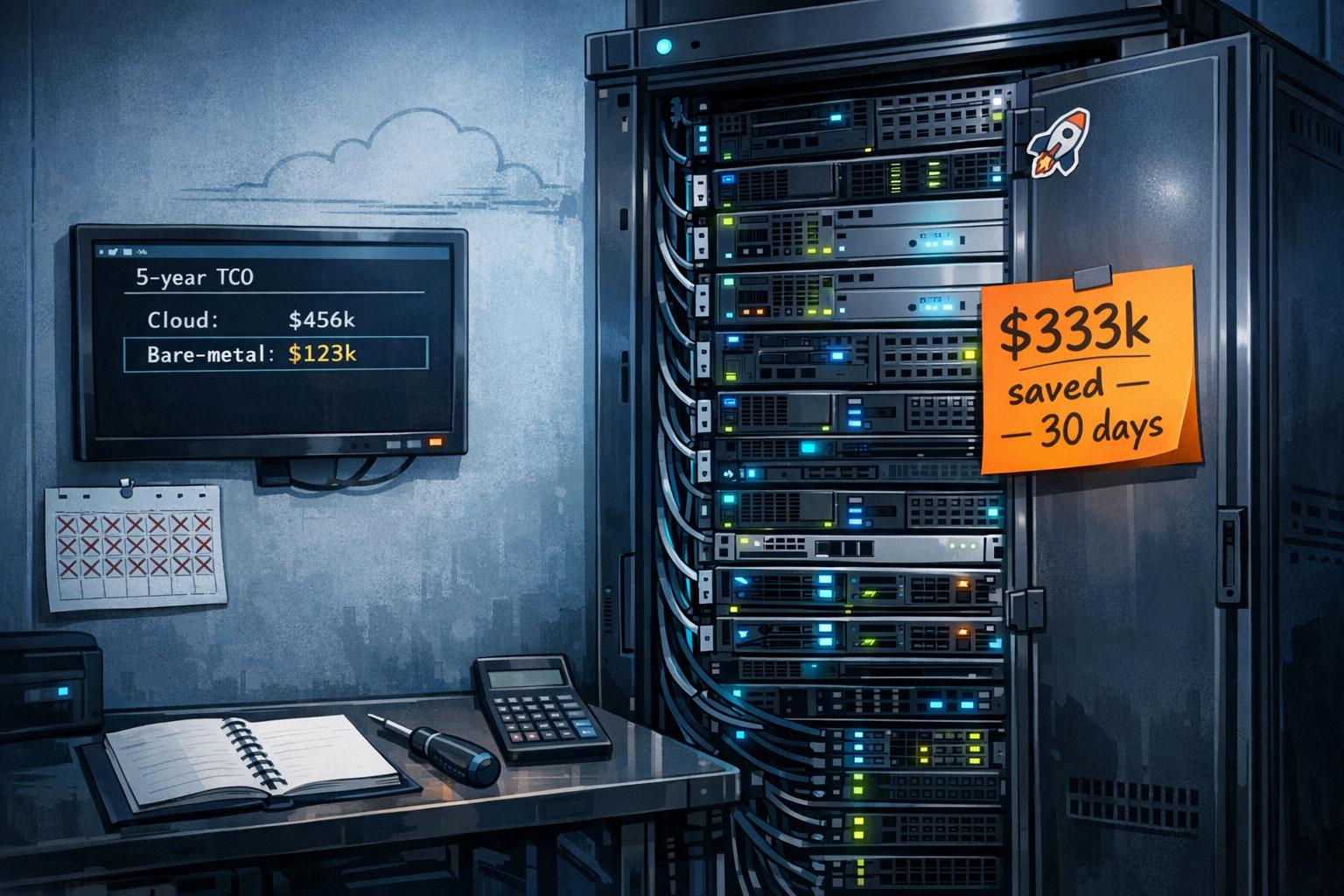
In just 30 days, we helped a SaaS startup save $333,000 annually by moving predictable workloads off AWS to bare-metal servers. Here’s how we did it:
- Problem: The startup’s $1 million annual AWS bill was unsustainable, with costs rising faster than revenue.
- Solution: We built a Total Cost of Ownership (TCO) model comparing cloud costs to bare-metal infrastructure. This revealed an 80% cost reduction potential for steady workloads.
- Steps Taken:
- Audited cloud spending to identify waste (20–40% of expenses were avoidable).
- Defined bare-metal costs (hardware, colocation, labor) and compared them to AWS charges.
- Created a detailed TCO spreadsheet to calculate savings over five years.
- Validated the model by migrating workloads incrementally, confirming the savings.
Key Takeaway: Cloud providers charge a premium for convenience. For predictable workloads, bare-metal servers can cut costs by up to 80%, extend cash runway, and improve valuation metrics. Start with a cloud audit, build a TCO model, and migrate incrementally to see results.
How Dukaan moved out of Cloud and on to Bare Metal w/ Subhash | Ep 5
sbb-itb-f9e5962
Step 1: Audit Your Cloud Spending and Find Waste
Before diving into building a Total Cost of Ownership (TCO) model, it’s essential to understand where your cloud budget is actually going. Many startups keep an eye on their overall cloud expenses but rarely scrutinize individual charges. When we reviewed one startup’s AWS account, we discovered that 20–40% of their spending was pure waste.
The audit process took three days. We analyzed 90 days of billing data, breaking it down by service type, region, and business unit. We also compared allocated resources to actual usage. For example, some database instances had no active connections for weeks, and numerous unattached storage volumes were left behind after their related instances were terminated. As Mike Fuller, a FinOps expert, aptly says:
"removing gravity before adding wings" – you must eliminate waste before optimizing commitments.
Break Down Costs by Category
Once you’ve gathered the billing data, the next step is to categorize your expenses. Cloud costs typically fall into four main categories: compute (e.g., EC2, EKS), storage (e.g., S3, EBS), networking (e.g., data transfer, NAT gateways), and support fees. Tools like AWS Cost Explorer, Azure Cost Management, or GCP’s BigQuery billing exports can help you organize this data [5,14]. Tagging resources by owner, environment, and application is crucial to avoid unallocated spending [9,10].
Unexpected costs often surface during this process. For instance, hidden fees like inter-AZ traffic and NAT Gateway charges can add up quickly. Storage expenses can also be a surprise. One startup was paying $23 per terabyte per month for S3 Standard storage on data that hadn’t been accessed in six months. By moving this data to Glacier Flexible Retrieval, they could have slashed costs by 84%, bringing it down to $3.60 per terabyte.
Look for idle compute instances, over-provisioned databases, and unnecessarily expensive storage setups. Tools like AWS Trusted Advisor or Azure Advisor can help flag unattached EBS volumes, unused Elastic IP addresses, and stopped virtual machines [11,12]. In one internal benchmark, 28.1% of instance runtime was found to be stale or idle. Vincent Hus, CEO of Tracer, conducted a similar audit across 348 instances and identified 101 completely idle instances, unlocking $1,179.58 in recurring monthly savings without impacting active workloads.
Measure Resource Utilization Rates
After categorizing costs, the next step is to evaluate how efficiently resources are being used. Use performance monitoring tools like AWS CloudWatch, Azure Monitor, or GCP Cloud Monitoring to gather data. Focus on the 95th percentile (p95) for CPU, memory, and I/O usage over a 14-day period. Resources with less than 5% CPU utilization are strong candidates for termination or resizing [5,10]. For example, many instances averaged only 8–12% CPU usage, indicating significant over-provisioning in both bare-metal and Kubernetes workloads.
For Kubernetes environments, compare inflated pod requests to actual p95 usage using tools like Prometheus or Metrics Server. Over-provisioned namespaces can often be consolidated onto fewer, larger nodes. Techniques like vertical pod autoscaling and bin packing can reduce costs by 30–50% [5,17].
Set up alerts for unattached storage volumes older than seven days or databases with no connections for 30 days. Automate cost-saving measures, such as scheduling development and test environments to shut down during nights and weekends, using tools like AWS Instance Scheduler or Azure Cloud Functions [5,12]. Conduct weekly reviews of your top cost drivers and anomalies to catch spending spikes before they inflate your monthly bill [5,9]. These insights will directly inform your TCO model, turning your cloud bill into a clear, actionable dataset instead of an overwhelming expense.
Step 2: Define TCO Components for Bare-Metal Comparison
After auditing your cloud expenses, the next step is to outline the full range of costs associated with bare-metal infrastructure. This involves creating a framework to compare cloud spending with bare-metal costs. While cloud bills often break down charges for compute, storage, and networking, bare-metal infrastructure requires a deeper dive into both upfront capital expenses (CapEx) and ongoing operational expenses (OpEx). This comparison ensures you’re looking at a complete picture of Total Cost of Ownership (TCO).
Calculate CapEx and OpEx for Bare-Metal
Capital expenditures (CapEx): These are the upfront costs of acquiring hardware and infrastructure. You’ll need to account for compute resources (like CPUs, GPUs, and RAM), networking equipment (switches, NICs, and cabling), storage systems (e.g., NVMe SSDs or NAS/SAN arrays), and data center essentials like racks and power distribution units (PDUs). For example, in 2023, 37signals spent $700,000 on Dell servers and Pure Storage arrays as part of their AWS exit, amortizing this cost over five years to about $140,000 annually.
Operational expenditures (OpEx): These are the recurring costs that keep your infrastructure running. They include power and cooling, colocation fees (typically $1,000–$2,000 per 42U rack), bandwidth charges, and software subscriptions. Don’t forget labor costs for system administrators and network engineers. It’s easy to underestimate these indirect costs – some organizations miss them by 20–30% in initial TCO estimates. For instance, OneUptime calculated that maintaining their bare-metal stack required about 14 hours of labor monthly after setup.
Migration and transition costs: Moving from cloud to bare metal involves additional expenses for professional services, migration planning, data transfers, and staff training on platforms like Kubernetes or Ceph. You should also budget for a 30–90 day overlap period where both systems run concurrently for testing and validation.
Compare Cloud vs. Bare-Metal Costs
To make a meaningful comparison, map cloud cost categories to their bare-metal equivalents. For example:
- Cloud compute instances (like EC2 or EKS) align with amortized server hardware and associated power/cooling costs.
- Managed storage (such as EBS) is replaced by local NVMe drives or SAN arrays.
- Egress fees, which can range from $0.06 to $0.09 per GB, are replaced by fixed bandwidth commitments or 95th percentile billing – offering savings of 60–80% for data-heavy workloads.
Here’s a quick breakdown:
| Cloud Cost Category | Bare-Metal Equivalent | Cost Impact |
|---|---|---|
| Compute Instances | Amortized Server Hardware | Fixed cost vs. variable; 70–80% cheaper at scale |
| Managed Storage (EBS) | Local NVMe / SAN | Higher performance (500,000+ IOPS) at lower cost |
| Egress/Data Transfer | Bandwidth Commit / Transit | Major savings for high-volume data workloads |
| Support Fees | Maintenance Contracts / Labor | Fixed annual cost instead of percentage-based charges |
| Managed K8s (EKS) | Self-managed (e.g., MicroK8s) | Eliminates $1,260/month control-plane fees |
Take Dropbox as an example: between 2015 and 2017, they moved 90% of their workloads from AWS to custom infrastructure. This shift saved $75 million over two years and boosted gross margins from 33% to 67%. Andreessen Horowitz summarized this well:
"If you’re operating at scale, the cost of cloud can at least double your infrastructure bill."
Performance is another key consideration. Bare-metal NVMe drives deliver far more IOPS than typical cloud storage volumes. OneUptime saw a 19% reduction in customer-facing latency after moving to bare metal, avoiding issues like noisy neighbors and virtualization overhead. To fully understand the cost benefits, use a 3-to-5-year analysis period and factor in potential growth scenarios (e.g., 10%, 20%, or 30% annual increases). This approach will help you model savings and make informed decisions about your migration.
Step 3: Build a TCO Model Spreadsheet
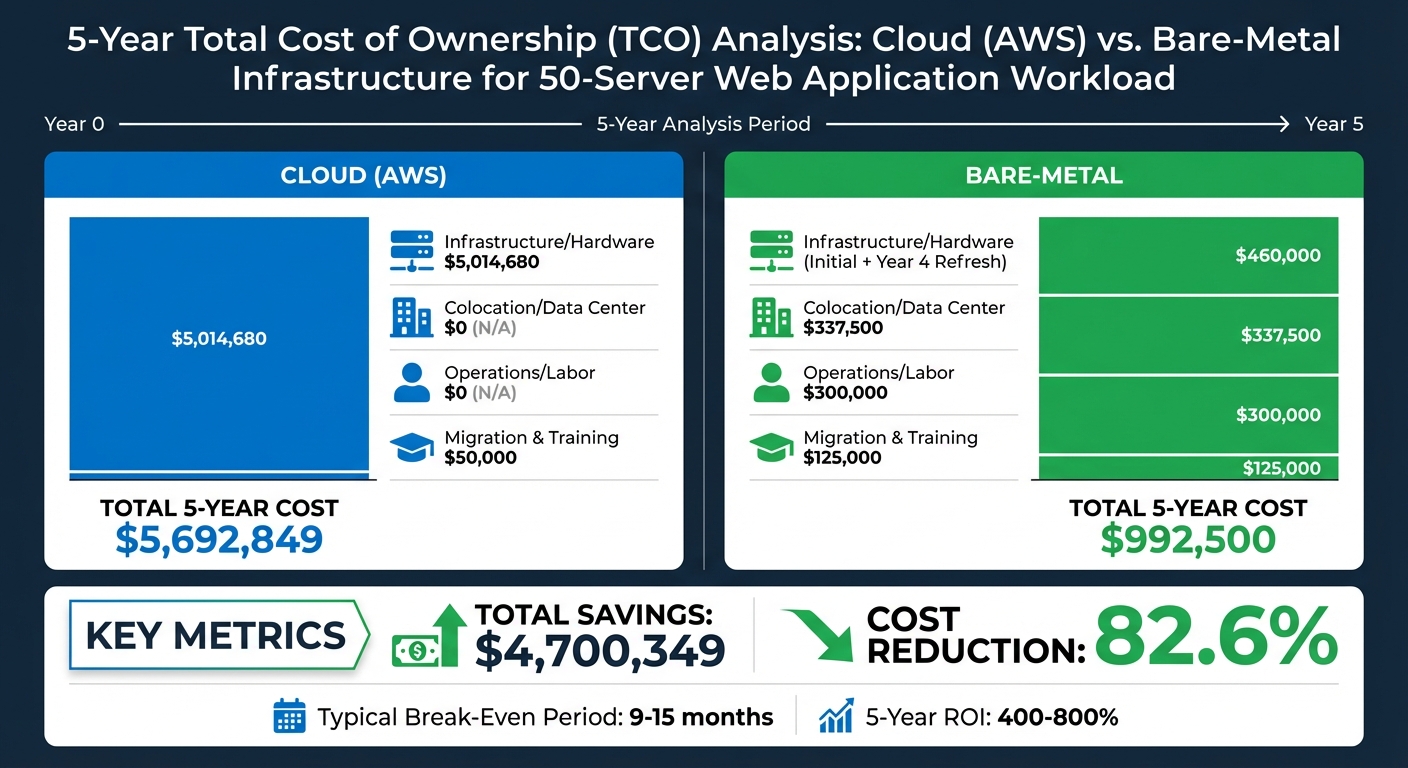
5-Year Cloud vs Bare-Metal TCO Comparison: Cost Breakdown and Savings
Now that you’ve identified your cost components, it’s time to organize them into a practical Total Cost of Ownership (TCO) spreadsheet. This will allow you to calculate potential savings and evaluate whether bare metal is a smart financial choice for your workload. The goal is to create a side-by-side comparison of total costs over a 3-to-5-year period – not just focus on monthly expenses.
Set Up Key Inputs and Assumptions
Start by adding a dedicated input section to your spreadsheet. This keeps things organized and reduces the risk of formula errors. Your inputs should address four main areas: infrastructure specifications, data center costs, software licensing, and personnel expenses.
- Infrastructure: Include server details (vCPUs, RAM, storage), networking equipment, and storage systems.
- Data Center Costs: Account for colocation fees, which typically range from $1,000–$2,000 per 42U rack per month, as well as power and cooling costs.
- Software Licensing: Factor in operating systems, database licenses (e.g., SQL Server), security tools, and backup software.
- Personnel: Calculate labor costs using a fully loaded hourly rate. To do this, divide the annual salary (including benefits and taxes) by 2,080 working hours.
Don’t forget to include realistic growth factors and an average inflation rate (around 2.1–2.65%) for future cost modeling. Additionally, plan for migration costs. This includes running both cloud and bare-metal environments in parallel for 30 to 90 days and budgeting for professional services like data transfers and staff training.
Run Baseline and Scenario Comparisons
With your inputs ready, create separate tabs for "Cloud Baseline" and "Bare-Metal Scenario." For the cloud baseline, use verified monthly costs for compute, storage, egress, and support fees. Be sure to factor in the "support tax", as cloud providers often charge 10% to 15% of your monthly spend for business or enterprise-level support. Also, include egress fees, typically $0.09 per GB, which can make up as much as 22% of your total cloud bill.
For the bare-metal scenario, amortize hardware costs over 3 to 5 years. For instance, a 50-server setup with networking equipment costs roughly $230,000 upfront, or around $6,389 per month when spread over three years. Add monthly colocation fees, power expenses, and labor costs (calculated at your fully loaded rate). Compare total costs over five years to find the break-even point. In many cases, bare-metal migrations break even within 9 to 15 months and deliver a five-year return on investment (ROI) of 400% to 800%. This comparison will help guide your decision-making process for the next steps.
Sample TCO Model with Example Numbers
Here’s an example comparison for a 50-server web application workload over five years:
| Cost Category | Cloud (AWS) | Bare Metal |
|---|---|---|
| Infrastructure/Hardware | $5,014,680 | $460,000 (Initial + Year 4 Refresh) |
| Colocation/Data Center | Included | $337,500 |
| Operations/Labor | Included | $300,000 |
| Migration & Training | $50,000 | $125,000 |
| Total 5-Year Cost | $5,692,849 | $992,500 |
| Total Savings | N/A | $4,700,349 (82.6%) |
This example demonstrates an 82.6% cost reduction. However, your actual savings will depend on your workload type and utilization. For cost efficiency, aim to size bare-metal hardware for 60% to 80% average utilization, leaving room for growth. If your traffic is unpredictable, consider a hybrid setup: use bare metal for steady base loads (about 80% of capacity) and cloud resources for occasional traffic spikes (the remaining 20%).
Step 4: Validate Savings and Execute the Migration
To ensure your Total Cost of Ownership (TCO) model holds up in practice, start migrating workloads incrementally. This step not only verifies your cost assumptions but also guides your scaling strategy moving forward.
Migrate Your First Workload to Bare Metal
Begin with a low-risk workload for your initial migration. A great example comes from October 2025, when OneUptime migrated a 28-node Kubernetes cluster from AWS to bare metal in Paris and Frankfurt. They utilized MicroK8s, Ceph, and Talos Linux, achieving an impressive 99.993% availability over 730 days and cutting costs by $230,000 annually – a 55% reduction that eventually scaled to $1.2 million in savings.
For Kubernetes workloads, a blue-green pool migration strategy is highly effective. Set up new bare-metal worker pools with the same labels as your existing cloud nodes. Then, systematically drain cloud nodes one at a time, allowing a grace period (300 seconds works well) for pods to reschedule onto the bare-metal infrastructure. This method ensures a safe, reversible migration process.
During the first 30 days, closely monitor expenses like hardware, colocation, power, and remote-hand charges. Compare these costs against your cloud baseline to validate your TCO model. For instance, Prerender successfully executed this approach by migrating caching and S3 storage services off AWS to bare-metal servers, slashing monthly costs by 80% and saving over $800,000 annually.
Once the initial migration is confirmed, shift to consistent monitoring to ensure your anticipated benefits are realized.
Monitor Metrics and Expand the Migration
With a successful proof-of-concept migration under your belt, focus on tracking four critical metrics:
- Performance: Keep an eye on latency, CPU usage, and I/O performance.
- Cost: Monitor egress charges and the unit cost per request.
- Availability: Measure uptime and the frequency of incidents.
- Resource Efficiency: Compare actual resource usage against provisioned capacity.
"We instantly identified 28.1% waste in our cloud infrastructure, unlocking $1,179.58 in recurring monthly savings with zero disruption." – Vincent Hus, CEO, Tracer
To maintain consistency between cloud and bare-metal environments, use tools like Terraform or Talos Linux. These ensure parity in configurations, making it easier to shift workloads back to the cloud if needed.
Once your first workload validates the TCO model, expand the migration strategically. Focus on workloads with stable traffic patterns and high cloud egress costs, as these typically generate the best immediate returns. For workloads with bursty traffic, maintain a hybrid approach: let bare metal handle 80% of your steady-state load while relying on cloud resources for occasional spikes.
Before transitioning additional workloads, lower your DNS TTL settings to 300 seconds and drain nodes sequentially to minimize risks. Between 2015 and 2017, Dropbox followed a similar phased migration strategy, moving 90% of its workloads off AWS to custom-built infrastructure. This shift saved the company $75 million over two years while boosting gross margins from 33% to 67%.
Conclusion: The ROI of a Bare-Metal TCO Model
A well-constructed TCO model can turn cloud spending into reinvestable capital, directly influencing your startup’s valuation and extending its runway. For example, saving $333,000 in just 30 days can fund product development, hiring, or simply provide more breathing room for growth.
Here’s the reality: AWS operates with profit margins of 30–40%, meaning nearly 40 cents of every dollar spent goes straight to their bottom line. Shifting predictable workloads to bare metal allows you to avoid subsidizing these margins. Over five years, this strategy can cut costs by up to 80% for the same workloads. These savings can then be redirected into initiatives that drive innovation and expansion.
Key Lessons for Founders and Technical Teams
Start by conducting a detailed cloud spend audit to identify where your money is going – whether it’s compute, storage, egress fees, or support costs. Many startups discover that as much as 28.1% of their cloud runtime is wasted on idle or unused instances. Addressing this inefficiency alone can unlock substantial monthly savings without requiring major changes to your infrastructure.
When building your TCO model, account for key factors like hardware amortization (typically over five years), colocation fees, power costs, and part-time operational support. Modern bare-metal setups generally require about 14 engineer-hours per month, which is comparable to the time spent managing cloud cost anomalies and IAM policies.
A hybrid approach can maximize your ROI. Use bare metal for predictable base loads (like databases and core applications) while reserving cloud resources for variable traffic spikes. This strategy balances flexibility with efficiency, reducing steady-state workload costs by 70–80%. Many bare-metal migration projects achieve payback in 9–15 months and deliver a five-year ROI of 400–800%.
Efficient infrastructure doesn’t just save money – it can also boost valuation multiples significantly. In today’s funding environment, metrics like your burn multiple (how much you spend to generate $1 of new ARR) are critical to investors. By reducing costs and improving scalability, this approach positions startups for long-term success.
How TechVZero Delivers Results
TechVZero uses a performance-based pricing model: we charge 25% of the savings for one year – and nothing if we don’t deliver results. This ensures our incentives align with yours. With experience managing infrastructure at a scale of over 99,000 nodes, we’ve helped clients save $333,000 in a single month while simultaneously mitigating a DDoS attack.
For founders who value efficient infrastructure but don’t want to become experts themselves, we handle bare-metal Kubernetes migrations that provide the same reliability as managed cloud services – at 40–60% lower cost. We also integrate compliance protocols like SOC2, HIPAA, and ISO into your timeline, serving as a comprehensive infrastructure partner.
The startups that succeed in the next funding cycle won’t just grow quickly – they’ll demonstrate they can scale efficiently. This is where TechVZero helps you stand out.
FAQs
What are the steps to build a TCO model for switching to bare-metal servers?
To develop a TCO model for migrating to bare-metal servers, you’ll need to break the process into a few key steps. Start by calculating your current cloud costs. This includes expenses for compute, storage, data transfer, and any additional support services you’re using.
Next, identify your infrastructure requirements. Think about what your workloads demand in terms of CPU, memory, storage, and network capacity. These details will help you determine the hardware specifications needed to match your performance needs.
Once you have that, estimate the cost of acquiring or leasing bare-metal servers. Be sure to factor in the amortization of these servers over their typical lifespan (usually about three years). On top of that, include operational expenses such as colocation fees for data center space, power, cooling, maintenance, and ongoing management.
Finally, compare the total costs of cloud infrastructure versus bare-metal servers over the same time frame. This will give you a clear picture of any potential savings. Beyond the numbers, also weigh the non-cost advantages of bare-metal servers, like enhanced performance, more control over your environment, and reduced dependency on a single vendor. These factors can be just as important when making your decision.
How do bare-metal servers stack up against cloud services in cost and performance?
Bare-metal servers offer a performance-focused and budget-friendly alternative to cloud services, especially for businesses operating on a larger scale. Cloud providers often bake hefty profit margins into their pricing, which can drive up infrastructure costs significantly. By transitioning to bare-metal servers, companies can eliminate extra charges like data transfer, storage, and API fees, potentially cutting costs by more than 50%.
From a performance standpoint, bare-metal servers stand out due to their dedicated hardware, lower latency, and lack of multi-tenant interference. While the upfront setup might demand a higher investment, the long-term savings and enhanced control over resources make bare-metal servers a smart choice for SaaS and AI companies aiming to streamline costs and boost performance.
What challenges should I expect when switching from cloud to bare-metal infrastructure?
Switching from cloud infrastructure to bare-metal systems brings its own set of hurdles. First, managing physical hardware demands a specialized skill set. Tasks like server setup, ongoing maintenance, and troubleshooting – services typically handled by cloud providers – become your responsibility. This shift requires a well-trained team and a hands-on approach.
There’s also the time factor. Procuring, installing, and deploying servers isn’t instant. It requires careful planning and can stretch timelines significantly. Unlike the near-instant scalability of cloud platforms, bare-metal systems involve upfront capacity planning. Scaling up to meet sudden workload changes can take longer, making it harder to adapt quickly.
On top of that, there are risks like hardware failures, network configuration challenges, and maintaining stable connectivity. These issues demand robust operational processes and constant monitoring to ensure smooth performance. While the potential cost savings of bare-metal infrastructure are appealing, the added complexity in operations is something every organization must weigh carefully.