Building Security Compliance Pipelines

Fixing security issues early saves money and prevents chaos. Bugs caught during development cost up to 100x less to fix than those in production. Yet, many teams treat security as an afterthought, leading to rushed audits, downtime, or costly breaches – averaging $4.88 million per incident.
The solution? Automating security compliance pipelines. These pipelines integrate checks into tools like GitHub or Jenkins, catching vulnerabilities (e.g., exposed API keys, misconfigured infrastructure) before deployment. By embedding security into every stage – from code commits to production – you reduce risks without slowing down development.
Key components include:
- SAST, DAST, and IAST: These tools analyze code at different stages to detect vulnerabilities.
- Software Composition Analysis (SCA): Scans dependencies for risks, including transitive ones.
- Infrastructure as Code (IaC) Scanning: Identifies misconfigurations in templates like Terraform or Kubernetes YAML.
Pre-commit hooks, automated scans, and runtime monitoring ensure compliance throughout the pipeline. Policy as Code (PaC) automates regulatory checks, while RBAC and artifact security protect your CI/CD infrastructure. Finally, continuous monitoring and incident response close the loop, making security a constant, not an afterthought.
DevSecOps Governance: Automate Compliance Checks in Your CI/CD Pipeline
Core Components of a Security Compliance Pipeline
A security compliance pipeline relies on three key scanning mechanisms – SAST, DAST, and IAST – to identify vulnerabilities at various stages of the development process.
Static Application Security Testing (SAST) inspects source code or binaries without executing them, aiming to uncover coding errors and security flaws. Dynamic Application Security Testing (DAST), on the other hand, evaluates the application in real-time, catching issues that static analysis might miss. Lastly, Interactive Application Security Testing (IAST) combines both static and dynamic methods during quality assurance to analyze code behavior in real-world scenarios.
The timing of these scans is crucial. SAST tools, like SonarQube or Semgrep, are integrated early in the build process to "fail fast" and prevent flawed code from progressing. DAST tools, such as OWASP ZAP, are employed in staging or test environments, while IDE plugins – like the one from Amazon Q Developer – provide instant feedback as developers write code. Below, we’ll dive deeper into how these scanning approaches reinforce security compliance.
Static and Dynamic Security Testing
Static scans tend to generate more false positives since they analyze all potential code paths, while dynamic scans focus on actual application behavior, leading to fewer false alarms. To streamline your pipeline, configure it to block deployments for Critical issues (severity scores of 90–100), issue warnings for High risks (70–89), and log lower-severity findings. As Nikita Mosievskiy, an Information Security & Compliance Consultant, explains:
"Developers hate security tools that block PRs for minor issues. My rule is simple: Block on Critical, Warn on High, Ignore the rest."
Standardizing outputs can also simplify the process. Formats like the Static Analysis Results Interchange Format (SARIF) allow results from various scanners to feed into a unified dashboard, such as GitHub Security or AWS Security Hub. Integrating these findings with tools like Jira helps automate remediation tracking, eliminating the need for manual handoffs. Alongside these scans, addressing risks from third-party dependencies is equally important.
Software Composition Analysis (SCA)
SCA tools focus on identifying vulnerabilities in project dependencies and ensuring compliance with licensing requirements. A striking statistic reveals that 70% of applications that are five years old or more contain at least one security flaw, with 32% showing vulnerabilities even on their first scan.
SCA tools go beyond direct dependencies, analyzing transitive ones – those dependencies of your dependencies – that could introduce hidden risks. Tools like Snyk can automatically generate pull requests to update vulnerable packages, while open-source options like Trivy and OWASP Dependency-Check provide budget-friendly alternatives for quick scans. Automated pull requests for upgrading dependencies work similarly to other automated audits, helping teams address issues early in the development cycle. Fixing these vulnerabilities during development is far less costly than resolving them in production.
Infrastructure as Code (IaC) Scanning
Misconfigured infrastructure is a common source of security vulnerabilities. Issues like publicly accessible S3 buckets, overly permissive security groups, or exposed API keys often evade traditional code scanners. IaC scanning tools catch these problems in templates like Terraform, CloudFormation, Kubernetes YAML, and Docker files before they are deployed. Popular tools like Checkov, tfsec, KICS, and Terrascan support multiple formats and often allow for custom policy configurations.
Start with a "soft-fail" approach, where policy violations trigger warnings but don’t block builds. As your team becomes more comfortable, transition to "hard-fail" policies that enforce stricter standards. To ensure comprehensive coverage, use multiple scanners since each may detect different types of vulnerabilities. Any changes to IaC scanning policies should require approval from the security team. Keep in mind that IaC scanning only validates templates at rest, so it’s essential to pair it with runtime scanning to catch any manual changes that bypass the pipeline.
Implementing Security Compliance at Pipeline Stages
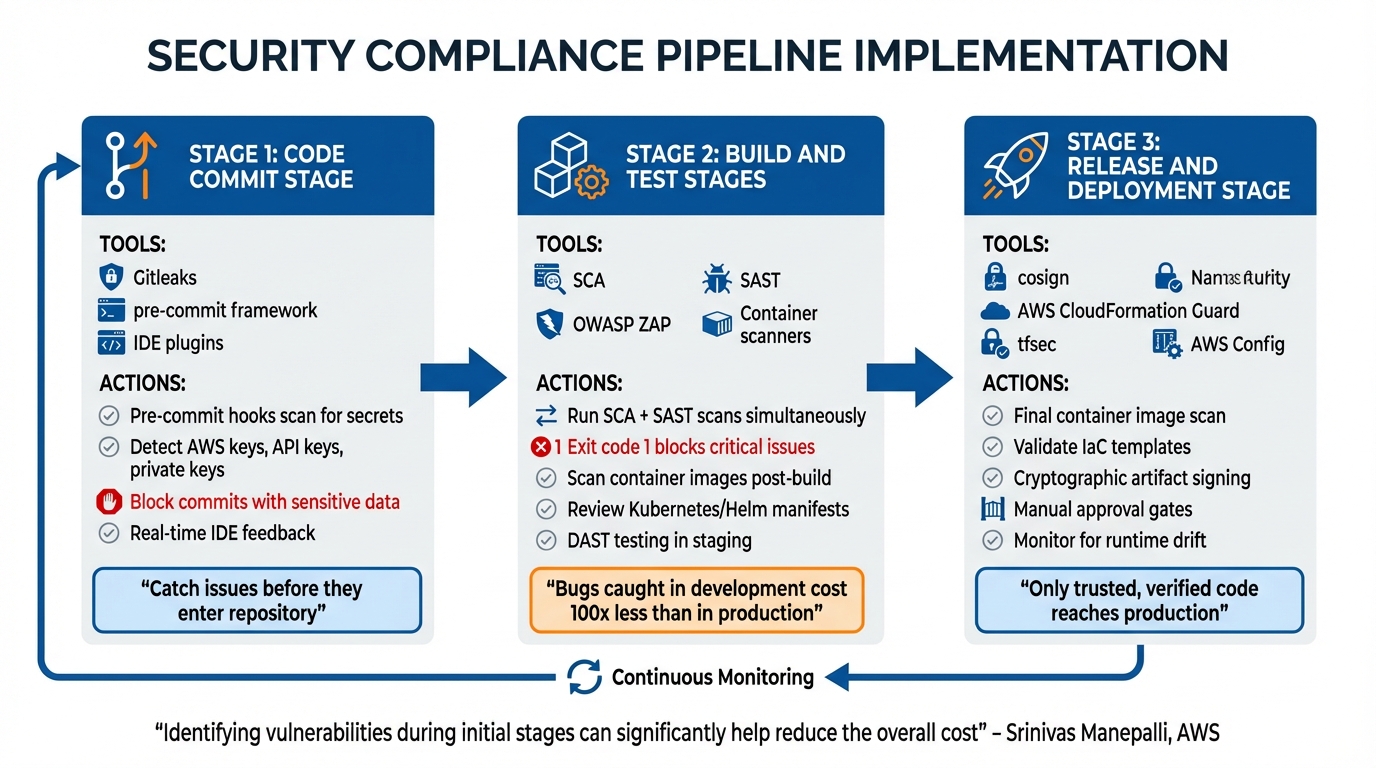
Security Compliance Pipeline Stages and Tools Implementation Guide
Running security checks at the right points in your pipeline is essential for catching issues early, when they’re less expensive to fix. Addressing bugs in the initial stages can significantly lower remediation costs. The goal is to align the appropriate security tools with the proper stages – pre-commit hooks can catch secrets before they enter your repository, SAST tools analyze code during builds, and DAST tools test your application in staging environments.
Code Commit Stage
Pre-commit hooks act as gatekeepers, preventing non-compliant code from entering your repository. These scripts run directly on a developer’s machine and immediately flag issues like hardcoded secrets or severe vulnerabilities. Tools such as Gitleaks scan for sensitive information like AWS Access Keys or API keys using custom regex patterns. Frameworks like pre-commit can manage multiple hooks through a .pre-commit-config.yaml file, enabling checks like detect-private-key, detect-aws-credentials, or even language-specific linters, such as Bandit for Python or tfsec for Terraform.
IDE plugins can also provide real-time feedback as developers write code, helping catch problems before they even attempt to commit. If sensitive data does make it into the repository, ensure the build is blocked immediately and take steps to clean the repository history. This stage lays the groundwork for robust security checks during subsequent build and release phases.
Build and Test Stages
During the build phase, run SCA and SAST scans simultaneously to identify vulnerabilities in dependencies and source code. Configure these tools to return specific exit codes (e.g., exit code 1) for critical issues, ensuring that insecure artifacts are automatically blocked from progressing further. Each build should take place in a clean, isolated environment to prevent any contamination from previous builds.
For containerized applications, scan the resulting image as soon as the build finishes, and review deployment manifests – such as Kubernetes YAML files, Helm charts, or ECS task definitions – for misconfigurations. To maintain integrity, use immutable tags for container registries to ensure secure images aren’t overwritten by untrusted versions. Following a successful build and deployment to staging, use DAST tools like OWASP ZAP to test the running application for runtime vulnerabilities that static analysis might overlook.
"Identifying the vulnerabilities during the initial stages of the software development process can significantly help reduce the overall cost of developing application changes" – Srinivas Manepalli, DevSecOps Solutions Architect at AWS
To simplify triage and avoid alert fatigue, consolidate findings from all security tools into a single dashboard, such as AWS Security Hub. With more than 40,000 new CVEs published in the past year alone, centralized management is critical. These rigorous checks ensure that the release stage begins with a secure foundation.
Release and Deployment Stage
Once the build and runtime security are verified, the release stage ensures compliance across the finish line. Before deploying to production, perform a final container image scan. Set severity thresholds to block deployments automatically if critical vulnerabilities are detected. Validate Infrastructure as Code (IaC) templates one last time using tools like AWS CloudFormation Guard or tfsec to catch potential misconfigurations that could lead to security gaps in production.
Use artifact signing tools like Sigstore’s cosign to cryptographically verify that only trusted, untampered code is deployed. Incorporate manual approval gates after scans – especially after Terraform plans or DAST runs – to allow for a final human review before release. Once the deployment is live, tools like AWS Config can monitor for runtime drift, where secure deployments may become non-compliant due to manual changes bypassing the pipeline.
"Security is not static, and drift can silently reopen known risks" – Qualys
Automating Compliance with Policy as Code
Relying on manual audits can be both error-prone and inefficient. Policy as Code (PaC) offers a solution by converting abstract regulatory requirements into executable code that runs automatically within your pipeline. This shift allows organizations to move away from periodic, high-pressure audits to a state of continuous compliance that can be verified at any time. Instead of waiting for quarterly reviews, violations are flagged the moment a developer commits non-compliant infrastructure.
The process starts with mapping regulatory controls to specific configuration settings. Take HIPAA encryption requirements as an example – these can be enforced by ensuring that an S3 bucket’s ServerSideEncryptionConfiguration is set to either AES256 or aws:kms. Naming policy files to match specific controls, such as pci_dss_3_4_1.rego, creates a direct and auditable link, simplifying evidence collection. This proactive system integrates seamlessly with automated scans and continuous monitoring tools.
Implementing PaC typically involves four key steps:
- Prevent: Stop non-compliant configurations during Terraform planning stages.
- Detect: Continuously scan environments for configuration drift.
- Remediate: Automatically resolve violations or notify resource owners.
- Report: Consolidate compliance data into dashboards for real-time insights.
When rolling out new guardrails, it’s a good idea to start in observation mode. This approach identifies non-compliant resources without disrupting workflows, giving teams time to address issues before enforcement is activated.
Tools for Policy as Code
Several tools are available to help implement Policy as Code, each with its own strengths:
- Chef InSpec: A Ruby-based DSL for auditing applications, operating systems, and cloud infrastructure. It supports reusable profiles for specific platforms, and AWS Systems Manager can run InSpec scans on demand, ensuring a clean runtime environment by installing and uninstalling the Chef client automatically.
- AWS Config: Monitors resource configurations continuously, detecting drift against predefined rules and conformance packs after deployment.
- CloudFormation Guard: Validates IaC templates and JSON/YAML data before deployment using a declarative DSL. CloudFormation Hooks can also inspect resource configurations during provisioning to block non-compliant deployments.
- Open Policy Agent (OPA): A versatile policy engine that uses the Rego language to validate JSON-formatted files, making it applicable across a wide range of use cases, from IaC to Kubernetes.
Here’s a quick comparison of these tools:
| Tool | Primary Use Case | Policy Language | Timing |
|---|---|---|---|
| Chef InSpec | Runtime/instance compliance (OS hardening, ports) | Ruby-based DSL | Post-deployment |
| AWS Config | Detective resource configuration monitoring | JSON/SQL-like | Post-deployment |
| CloudFormation Guard | Validating IaC templates and JSON/YAML data | Guard DSL | Pre-deployment |
| Open Policy Agent (OPA) | General-purpose static policy checking (IaC, Kubernetes) | Rego | Pre-deployment |
A practical starting point is to focus on 10–15 critical controls for a single framework and cloud provider. Store all compliance rules in a dedicated, version-controlled repository to ensure they’re reusable across your organization. Additionally, enforce security team approvals for changes using tools like CODEOWNERS files.
Maintaining Up-to-Date Compliance Profiles
Once PaC tools are in place, keeping compliance profiles current is essential as regulations evolve. Frameworks like SOC2, HIPAA, and ISO frequently update their requirements, so automated policies must adapt accordingly. Storing compliance rules in Git repositories or S3 buckets ensures they remain version-controlled, peer-reviewed, and easy to update. Treating compliance rules as code – with pull requests, reviews, and automated testing – ensures a smooth update process.
Just as automated scans help identify vulnerabilities early, regularly updated compliance profiles ensure ongoing adherence to changing standards. To maintain audit integrity, store evaluation decisions in immutable repositories like S3 with Object Lock enabled.
In December 2019, Truist Financial Corporation – formed after the merger of BB&T and SunTrust Banks – successfully implemented a continuous compliance workflow. This initiative, led by Gary Smith (Group VP Digital Enablement and Quality Engineering) and David Jankowski (SVP Digital Application Support Services), scaled security checks across their development teams. By using observation mode initially, they gained valuable insights without slowing down delivery. David Jankowski explained:
"The continuous compliance workflow provided us with a framework over which we are able to roll out any industry standard compliance sets – CIS, PCI, NIST, etc. It provided centralized visibility around policy adherence to these standards, which helped us with our audits".
sbb-itb-f9e5962
Securing Pipeline Infrastructure and Artifacts
Protecting pipeline infrastructure – like runners, automation platforms, and artifact registries – is absolutely critical. The CI/CD system itself is a prime target for attackers. Risks such as "Inadequate Identity and Access Management" (CICD-SEC-2) and "Insufficient Pipeline-Based Access Controls" (CICD-SEC-5) are among the top 10 CI/CD security threats. If an attacker gains access to your pipeline infrastructure, they can inject malicious code, steal secrets, or tamper with production deployments without needing to touch your source repository.
Role-Based Access Control (RBAC)
To mitigate these risks, implementing strict access controls is essential. Access control should cover three main layers: the Source Control Management (SCM) system, the CI/CD automation platform, and the underlying build infrastructure. Each layer requires its own Role-Based Access Control (RBAC) setup, adhering to the principle of least privilege – granting users only the permissions they need to do their job. As defined by NIST, this approach ensures "each entity is granted the minimum system resources and authorizations needed to perform its function".
Start by linking CI/CD users to a centralized Identity Provider (IdP) to create a single source of truth for permissions. For example, in CircleCI, you can use Contexts to group secrets and environment variables, restricting access based on team roles. CircleCI documentation explains:
"Only a job that has a context specified to it in a workflow is able to use the context’s secrets as environment variables".
Similarly, tools like CloudBees and Jenkins use Folders to isolate resources by team.
For critical stages, such as production deployment, use manual approval gates that only authorized security groups can trigger. Protect your main branches with repository rules, requiring peer reviews before any code is merged. Make pipeline configuration files (like pipeline.yml) read-only for most users, restricting modification rights to organization administrators. Replace long-lived credentials with short-lived tokens or OIDC-based authentication to minimize the risk of compromised credentials.
| RBAC Layer | Implementation Method | Objective |
|---|---|---|
| SCM (GitHub/GitLab) | Protected branches, code owners, signed commits | Prevent unauthorized code injection |
| CI/CD Platform | Restricted contexts, manual approval jobs, SSO | Control access to secrets and deployments |
| Infrastructure | Dedicated agent pools, RBAC-enabled clusters | Isolate sensitive workloads |
| API/CLI | Scoped API keys, IP-restricted tokens | Prevent unauthorized programmatic access |
Artifact Security
Once your pipeline generates a build artifact, that artifact can become a potential attack surface. Artifact attestations – cryptographically signed claims – link an artifact to its specific workflow, repository, and commit SHA. As GitHub explains:
"Artifact attestations enable you to create unfalsifiable provenance and integrity guarantees for the software you build. In turn, people who consume your software can verify where and how your software was built".
Use tools like cosign or Notary to sign container images directly in your pipeline. If the build is altered after signing, the signature fails verification, blocking the distribution of tampered software. Enable tag immutability in your container registry to prevent attackers from overwriting trusted images. Instead of using mutable tags like :latest, pin container images to immutable SHA-256 digests (e.g., image: node@sha256:012345...) to ensure client-side integrity.
Generate a Software Bill of Materials (SBOM) for every build to provide transparency about open-source dependencies, making it easier to respond to vulnerabilities. Verify the checksums of third-party tools or binaries downloaded during the build process before execution. Use lock files (like package-lock.json or go.sum) and commands that enforce them (e.g., npm ci or yarn install --frozen-lockfile) to ensure the build uses exact, verified library versions.
Pipeline Tool Security
Automation servers like Jenkins, GitLab CI, or GitHub Actions need deliberate hardening. Disable default settings, enforce multi-factor authentication (MFA), and restrict IP access. Each build should run in a fresh, isolated runner image or container to prevent compromised builds from affecting future processes.
Pin Docker images using SHA hashes instead of mutable tags. When using wget or curl to download tools in scripts, always verify the file’s checksum before running it. Use OpenID Connect (OIDC) to authenticate CI/CD workloads with cloud providers (AWS, Azure, GCP) instead of storing long-lived credentials in the CI/CD system. As GitHub warns:
"If an attacker can modify the build process, they can exploit your system without the effort of compromising personal accounts or code".
Treat CI/CD plugins like third-party software – vet them for active maintenance and reputation before installation, and remove any unused ones. For high-security needs, consider hermetic builds (SLSA Level 3), where build steps run in sealed environments with no internet access. This ensures all resources are locally verified. Store CI configuration files in version control, and use tools like CODEOWNERS to limit who can modify build instructions.
Continuous Monitoring and Incident Response
Once your system is deployed, security efforts don’t stop there. Ongoing monitoring is essential to detect and respond to threats in real time. This process creates a continuous feedback loop, helping to identify risks and act on them before they cause widespread damage. Without this safeguard, attackers could exploit vulnerabilities, steal credentials, or navigate through your infrastructure unnoticed for extended periods.
Setting Up Continuous Monitoring
To keep a vigilant eye on your system, implement threat detection tools that analyze key data sources around the clock. For instance, Amazon GuardDuty monitors CloudTrail management events, VPC Flow Logs, and DNS query logs to spot unusual behavior, such as credential theft. It assigns severity levels to its findings: Low (0.1–3.9), Medium (4.0–6.9), and High (7.0–8.9). For even deeper insights, you can use runtime monitoring tools like CNCF Falco or GuardDuty Runtime Monitoring. These tools track operating system events, network traffic, and file changes within EC2, ECS, and EKS environments. To avoid being overwhelmed by alerts, you can configure suppression rules to archive low-risk findings or safe, routine activities like internal port scans.
Centralizing all security events is another key step. Tools like AWS Security Hub consolidate data across multiple regions or accounts using the AWS Security Findings Format (ASFF). To take it a step further, configure event buses like Amazon EventBridge to detect specific issues and trigger automatic workflows using AWS Lambda or AWS Step Functions. By integrating these tools, you’ll have a centralized view of threats and the ability to initiate immediate responses.
Automated Incident Response
After setting up continuous monitoring, the next step is automating your incident response to act swiftly when threats are detected. Quick action can significantly limit the impact of an attack, much like early detection reduces costs during earlier stages of a pipeline. For example, you can use resource tagging (e.g., SecurityIncidentStatus: Analyze) to trigger automation tools like Lambda functions. These functions can isolate compromised instances by applying restrictive security groups or attaching limited IAM roles. For more complex scenarios – such as isolating an instance, capturing forensic snapshots, and notifying your security team – AWS Step Functions can coordinate multi-step responses while maintaining detailed audit trails.
Developing clear incident playbooks is also essential. These playbooks should outline steps for handling specific threats, such as DoS attacks, ransomware, or credential breaches. They should cover detection, analysis, containment, eradication, and recovery. The AWS Security Incident Response User Guide emphasizes the importance of balancing automation with human intervention:
"As issues arise or incidents repeat, build mechanisms to programmatically triage and respond to common events. Use human responses for unique, complex, or sensitive incidents where automations are insufficient".
Another critical measure is creating separate security accounts dedicated to forensic analysis. This ensures that artifacts like logs and snapshots are preserved securely, preventing attackers from tampering with evidence or exhausting service quotas in compromised accounts. Automatically store logs, disk snapshots, and memory dumps in a centralized and secure location.
Finally, if your infrastructure is managed through Infrastructure as Code (IaC), be cautious about potential "drift." Update your original templates to reflect any security fixes made during remediation. This ensures future deployments don’t overwrite those fixes, keeping your pipeline aligned with the latest security standards. By closing this loop, you continuously improve your system’s defenses while adapting to evolving threats.
Conclusion
By implementing the strategies outlined above, an automated security compliance pipeline can transform your development process. Instead of relying on sporadic audits, these pipelines ensure continuous and verifiable compliance. Integrating security checks throughout the workflow – from code commits to deployment and monitoring – helps identify vulnerabilities early, when they are easier and less expensive to address. This approach eliminates the chaos of last-minute audits or the fallout from breaches.
Consider this: organizations lose an average of $2.4 million annually due to manual compliance efforts, and 67% of deployments are delayed because of last-minute issues. Automated pipelines can dramatically reduce these inefficiencies – cutting operational overhead by 60–75% and slashing compliance validation time by up to 85%. Without automation, remediation efforts can drag on for an average of 180 days.
To get started, focus on automating the 10–15 most critical controls for a single framework and cloud provider. Treat compliance policies as code – store them in Git, review them with your team, and version them like any other critical asset. Begin with "soft-fail" configurations that provide visibility without disrupting workflows, and gradually shift to "hard-fail" enforcement as your team becomes more comfortable.
As threats and compliance standards evolve, keeping your security tools and practices up to date is essential. Regularly update CI/CD tools, revise policy definitions, and store evidence logs securely in immutable locations, such as S3 buckets with Object Lock enabled. Use insights from past incidents to refine your threat models and strengthen your defenses over time.
FAQs
What’s the difference between SAST, DAST, and IAST in a security compliance pipeline?
SAST, DAST, and IAST are three distinct approaches to security testing, each tackling vulnerabilities at different points in the software development lifecycle.
SAST (Static Application Security Testing) works by analyzing the source code or binaries without actually running the application. This method is great for catching issues early, such as injection flaws or insecure APIs. However, it has its limitations – it can’t detect runtime issues and often generates more false positives.
DAST (Dynamic Application Security Testing) takes a different route by focusing on a running application. It operates as a black-box test, simulating attacks to uncover runtime vulnerabilities like server misconfigurations or authentication bypasses. While it typically produces fewer false positives, it’s usually performed later in the development pipeline and might miss deeper code-level issues.
IAST (Interactive Application Security Testing) blends the strengths of both SAST and DAST. By monitoring the application in a test environment during runtime, it offers real-time feedback and ties vulnerabilities directly to specific parts of the code. This method significantly reduces false positives but requires the application to be instrumented and actively running in a controlled testing setup.
By strategically combining these methods – using SAST early in development, IAST during testing, and DAST in staging – teams can achieve thorough security coverage. This layered approach not only helps catch vulnerabilities at every stage but also keeps costs in check while meeting compliance standards.
How does Policy as Code improve security compliance in CI/CD pipelines?
Policy as Code weaves automated compliance checks right into CI/CD workflows, ensuring security policies are upheld throughout the development lifecycle. By moving these checks earlier in the process, developers get instant feedback on any changes that don’t meet compliance standards. This allows them to fix issues right away, cutting down on the time and effort needed for later remediation.
With this method, compliance becomes a natural and ongoing part of development. It helps organizations uphold security standards while keeping the pace of innovation intact.
How does Infrastructure as Code (IaC) scanning help prevent security vulnerabilities?
Infrastructure as Code (IaC) scanning plays a crucial role in spotting misconfigurations and security flaws in IaC files like Terraform or CloudFormation. By integrating this process into development workflows or CI/CD pipelines, teams can automatically analyze these files early, catching issues well before they make it to production.
This approach, known as "shift-left" security, helps tackle vulnerabilities before infrastructure is provisioned. The result? Reduced risks, fewer headaches, and significant savings in both time and costs compared to fixing problems after deployment.