6 Alerts to Automate for Cost Monitoring

Cloud costs can spiral out of control without proper monitoring. Misconfigurations, idle resources, and unexpected spikes often go unnoticed until it’s too late. Automating alerts can help you identify and address these issues in real-time, saving both time and money. Here are six essential alerts to set up for effective cost monitoring:
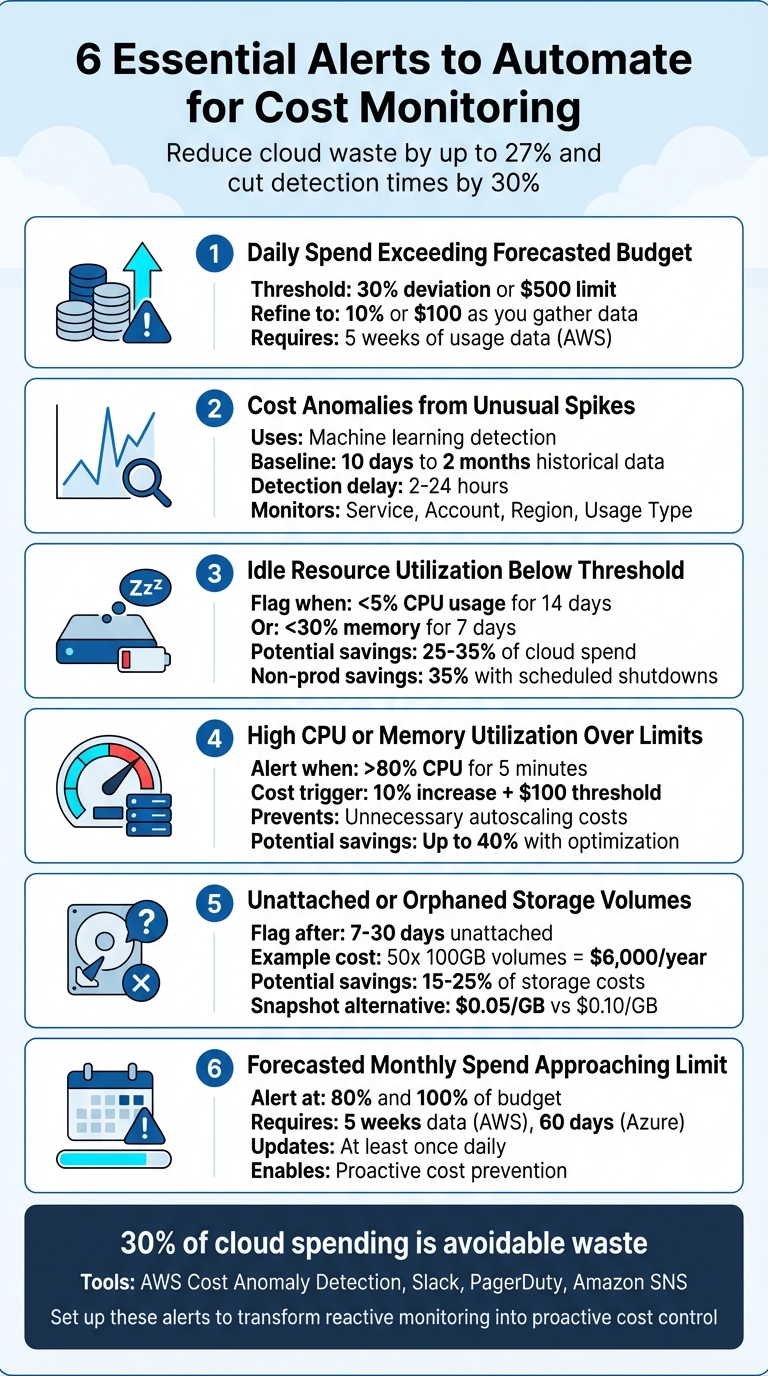
- Daily Spend Exceeding Forecasted Budget: Catch unexpected spikes with threshold-based notifications (e.g., 30% deviation or $500 increase).
- Cost Anomalies from Unusual Spikes: Use machine learning to detect sudden, unexpected spending changes.
- Idle Resource Utilization Below Threshold: Identify and remove underused or idle resources draining budgets.
- High CPU or Memory Utilization Over Limits: Prevent unnecessary autoscaling and optimize resource usage.
- Unattached or Orphaned Storage Volumes: Flag unused storage volumes to avoid waste.
- Forecasted Monthly Spend Approaching Limit: Predict and address overspending before it happens.
These alerts not only help reduce cloud waste – estimated at 27% of total spend – but also improve response times, cutting detection and resolution times by up to 30%. Tools like AWS Cost Anomaly Detection, Slack, and PagerDuty can streamline this process further. Automating these alerts ensures better cost control while freeing up engineering teams to focus on higher-value tasks.
6 Essential Cloud Cost Monitoring Alerts to Automate
1. Daily Spend Exceeding Forecasted Budget
Threshold-Based Notifications
Daily spend alerts are a powerful tool for spotting issues that monthly budget checks might completely overlook. For instance, if a service suddenly doubles its cost but remains under your monthly budget cap, standard alerts won’t flag it. However, with daily monitoring, such spikes are caught right away, helping you identify and address costly misconfigurations quickly.
To strike a balance between sensitivity and unnecessary alerts, start with a threshold of a 30% deviation or $500 limit. As you gather more usage data, refine this to 10% or $100, depending on your needs. Keep in mind that AWS requires about five weeks of usage data to provide reliable forecasts, while their anomaly detection systems need at least 10 days of historical data to establish an accurate baseline.
Fine-tuning these thresholds for specific roles within your organization can make the system even more effective.
Cost Control
Adjust thresholds based on team responsibilities. For example, application teams may benefit from a 20% deviation to gain detailed insights, while leadership teams might need higher absolute limits – such as $10,000 or more – to focus on major spikes without being overwhelmed by smaller fluctuations. A dual-layered monitoring system is particularly effective for FinOps teams. This approach combines absolute thresholds (e.g., spending exceeds $1,000) with relative ones (e.g., spending is 30% above expectations), ensuring both large and proportionally significant increases are flagged.
"Infrastructure-as-Code (IaC) moves your FinOps strategy from reactive firefighting to proactive governance." – Ott, Hykell
Set alerts to notify teams through tools like Slack, PagerDuty, or Amazon SNS, enabling engineers to respond within hours. Use "immediate" alerts for production environments and reserve daily or weekly summaries for development settings. Organizations that pair automated detection with continuous optimization efforts have reported cutting their overall cloud expenses by as much as 40%.
sbb-itb-f9e5962
2. Cost Anomalies from Unusual Spikes
Anomaly Detection for Unexpected Spend
Keeping tabs on daily spend is helpful, but anomaly detection goes a step further by flagging unexpected spikes that might otherwise slip through the cracks. While static budget alerts can catch predictable overruns, machine learning–based anomaly detection identifies sudden, unexpected changes in spending patterns. These systems analyze anywhere from 10 days to 2 months of historical data to create a dynamic baseline that adjusts for natural growth and seasonal trends. This approach helps uncover issues like misconfigured Lambda functions stuck in infinite loops, auto-scaling groups that fail to scale back down, or GPU node pools experiencing sudden bursts of activity.
Without tools like these, such problems often remain unnoticed until the end-of-month bill arrives. AWS Cost Anomaly Detection, for instance, is free to use and processes billing data about three times a day. However, it’s worth noting that native detection typically has a delay of 2 to 24 hours from the time a resource is launched to when an alert is triggered. This kind of monitoring also helps track inefficiencies at the resource level.
Resource Efficiency Monitoring
Anomaly detection works best when it examines spending across four key dimensions: Service, Account/Subscription, Region, and Usage Type. This detailed breakdown makes it easier to pinpoint the root cause of a cost spike. Common culprits include:
- Orphaned EBS volumes
- Unexpected increases in data transfers between regions
- Sudden surges in query activity
- Expiring Reserved Instances falling back to higher on-demand rates
"Cost awareness must be part of the engineering culture, not just something assigned to a governance team on the side." – Subbu Allamaraju, Vice President, Expedia
Threshold-Based Notifications
Fine-tuning alert thresholds based on the environment is crucial. For production environments, aim for alerts at 10% above baseline for quicker detection, while less critical environments like development or sandbox setups can use a more relaxed 30% threshold to reduce unnecessary noise. Combining absolute dollar thresholds (e.g., alerts when spending crosses $100) with percentage-based deviations ensures you don’t miss meaningful changes while ignoring minor fluctuations.
For faster responses, route alerts directly to engineering teams through tools like Slack, PagerDuty, or Amazon SNS. Organizations using this approach have managed to cut their total cloud expenses by as much as 40%. Additionally, refining thresholds for idle resource usage can further tighten cost control.
3. Idle Resource Utilization Below Threshold
Resource Efficiency Monitoring
Idle resources can quietly drain budgets without adding any value. These include compute instances, storage volumes, or networking services that remain active but see little to no use for extended periods. It’s essential to distinguish between "underutilized" and "idle" resources. For example, an EC2 instance running at 10% CPU usage might just need resizing, but if it’s operating below 5% CPU usage with no network traffic for two weeks, it’s likely idle and should be terminated. This distinction helps focus efforts where they matter most, cutting unnecessary expenses.
Research shows that 25%-35% of cloud spending goes to waste on unused resources. Take this example: an unattached 100GB EBS volume costs about $10 per month while sitting dormant, and 1TB of old snapshots can rack up $50 monthly without serving any purpose. These costs may seem small in isolation but quickly add up across large environments.
Threshold-Based Notifications
Setting precise thresholds can help identify and address inefficiencies with greater accuracy. For instance, idle resources might be defined as those with less than 5% average CPU usage over 14 days. Similarly, resources with memory utilization below 30% for seven days – or under 10% for 14 days – can be flagged for rightsizing. Tools like CloudWatch Alarms can even automate part of this process, stopping instances if CPU usage remains below 2% for an hour. To avoid false alarms during normal traffic fluctuations, it’s wise to configure alarms to trigger only after at least 12 consecutive 5-minute periods of low activity.
Organizations that monitor idle resources in real time have reported slashing cloud bills by as much as 30%. The trick lies in using multiple data points – like combining CPU metrics with CloudTrail logs and VPC Flow Logs – to confirm a resource is truly idle before taking action. In non-production environments, scheduling automatic shutdowns during nights and weekends can cut costs by around 35% without affecting operations.
4. High CPU or Memory Utilization Over Limits
Cost Control
After addressing idle resource consumption, keeping an eye on high CPU or memory usage is essential to avoid skyrocketing costs. When resource saturation goes unchecked, autoscaling can kick in, leading to sudden and steep cost increases. If these issues aren’t monitored properly, they can quickly spiral into unexpected budget overruns.
It’s important to differentiate between genuine performance demands and cost-related anomalies. For example, production environments may see higher resource usage during peak times, which justifies scaling up. However, persistent high utilization in non-critical environments often points to problems like looping scripts or inefficient processes. Setting alerts – such as triggering notifications when CPU usage exceeds 80% for five minutes – can help identify these issues before they escalate into costly scaling events.
Threshold-Based Notifications
To address high utilization effectively, configure alerts that activate when costs increase by 10% and surpass $100, filtering out minor fluctuations. Tools like AWS Cost Anomaly Detection leverage machine learning to establish usage baselines, though they require at least 10 days of historical data to function accurately.
Make sure critical alerts are routed through visible channels like Slack or PagerDuty to ensure a quick response. For production environments, set alerts to "IMMEDIATE" to catch spikes within 24 hours. On the other hand, development sandboxes can rely on daily or weekly summaries. Combining automated detection with continuous optimization has helped some organizations cut their cloud costs by as much as 40%.
Resource Efficiency Monitoring
Keeping tabs on high utilization not only prevents unnecessary autoscaling but also highlights opportunities to optimize resources. According to Gartner, around 30%–40% of cloud budgets are wasted on underused or forgotten resources. For environments with consistently high resource usage, rightsizing may be the solution. On the other hand, environments experiencing occasional peaks might benefit from better load balancing.
Streamlining alert policies can also help lower monitoring expenses. For instance, instead of creating 100 separate policies for 100 virtual machines, use a single policy to monitor aggregated data. Excluding non-critical assets, like development environments, can also prevent issues related to data overload.
5. Unattached or Orphaned Storage Volumes
Cost Control
Unattached storage volumes can quietly drain your budget if left unchecked. Unless the "Delete on Termination" setting is enabled, cloud providers will keep storage volumes even after a virtual machine (VM) is terminated. This means you’ll continue to pay full storage rates, whether the volume is actively attached or sitting idle. For example, fifty unused 100GB EBS volumes on AWS gp2 storage could cost around $500 per month – or a hefty $6,000 annually. By identifying and removing these unused disks, organizations can cut cloud storage expenses by 15% to 25%. For a medium-sized business, this could translate into annual savings of $5,000 to $15,000.
Threshold-Based Notifications
Setting up alerts for unattached volumes is key to preventing waste. You can configure notifications to trigger if a storage volume remains "available" for 7 to 30 days, depending on your team’s workflow. A 7-day grace period is often enough to confirm whether a volume is temporarily detached or truly unnecessary, without letting costs pile up.
For smarter alerts, factor in both the age of the volume and its financial impact. High-priority notifications (via email or Slack) should only be sent when the cumulative waste from unattached resources exceeds $100 per month. This prevents unnecessary alerts while ensuring costly issues get immediate attention. Tools like AWS Lambda can analyze CloudTrail logs for "DetachVolume" events and notify the resource owner using SNS. This targeted approach integrates seamlessly with broader resource monitoring efforts.
Resource Efficiency Monitoring
Monitoring shouldn’t stop at attachment status. Check for actual data transfer or IOPS activity over the past 30 days to identify volumes that might be attached but still wasteful – like those linked to instances no longer serving traffic.
Before deleting orphaned volumes, always create a snapshot to safeguard data. Automated tools like AWS Systems Manager can handle this, ensuring data is preserved. Snapshot storage costs $0.05 per GB per month, compared to $0.10 per GB per month for active volumes, offering a cheaper way to retain recovery options. To avoid accidental deletions, implement tagging strategies – such as "Exemption" or "Backup" tags – for volumes intentionally left unattached for disaster recovery purposes.
6. Forecasted Monthly Spend Approaching Limit
Cost Control
If you wait until the invoice arrives to realize you’ve overshot your budget, you’re already too late. Forecasted spend alerts tackle this problem by predicting your costs before they hit your account. Instead of reacting to past expenditures, you can proactively address misconfigurations or runaway resources in real time.
Cloud providers like AWS and Azure rely on machine learning to crunch historical usage data, factoring in trends like seasonality and organic growth. AWS requires about five weeks of usage data to deliver accurate forecasts, while Azure’s anomaly detection model needs 60 days of historical data. These models continuously update – at least once per day – giving you a rolling estimate of where your monthly expenses are heading. This predictive approach sets the stage for precise budget threshold alerts.
Threshold-Based Notifications
Set up your alerts to trigger based on forecasted expenses, not just actual spending. A common strategy is to configure notifications for when you’re at 80% and 100% of your monthly budget. The 80% alert gives your team a chance to investigate and fix potential issues, while the 100% alert signals an immediate need for action.
Forecast-based alerts are dynamic and may trigger multiple times as predictions shift. To ensure these notifications reach the right people quickly, send them through tools like Amazon SNS, Slack, or PagerDuty. For high-cost workloads, immediate notifications are crucial to prevent costs from escalating out of control.
Anomaly Detection for Unexpected Spend
To go further, combine forecasted budget alerts with anomaly detection to catch unexpected issues that might otherwise fly under the radar. For example, a sudden spike in compute costs could point to a misconfiguration or unauthorized activity. AWS Cost Anomaly Detection scans billing data about three times a day, looking for deviations from your historical spending patterns.
"Without real-time visibility, you are often stuck waiting for an end-of-month invoice surprise to realize your costs have spiraled out of control." – Ott, Hykell
Tailor your anomaly detection sensitivity to your environment. For production workloads with stable usage, set tighter thresholds (e.g., 10% above the historical average). In contrast, development or sandbox environments can handle looser limits (e.g., 30%) to avoid excessive alerts. Keep in mind that native cloud tools often have a detection lag of 2–24 hours, which can be costly when high-velocity spending spikes occur.
Distilling Cloud Anomalies into Golden Alerts
TechVZero Perspective
Automated alerts are a key part of managing cloud costs, but they don’t solve the problem of waste on their own. Traditional cost monitoring alerts can tell you when spending spikes, but they don’t address the inefficiencies causing those spikes. For instance, a staggering 83% of provisioned cloud compute resources go unused, primarily due to overprovisioning. Alerts might flag the issue, but they don’t fix it.
TechVZero’s bare-metal Kubernetes approach focuses on tackling these inefficiencies at their core. Take the example of a client we helped save $333,000 in just one month while simultaneously fending off a DDoS attack – not by using better alerts, but by eliminating egress fees and cutting out compute waste baked into standard cloud setups. Using live migration technology (CRIU), we seamlessly move running applications across nodes with zero downtime, consolidating workloads and avoiding the inefficiency of leaving nodes idling with minimal activity.
Our strategy goes beyond basic autoscaling. The Multi-dimensional Pod Autoscaler dynamically adjusts CPU, memory, and replicas based on real-time usage, replacing guesswork with precision. Unlike standard tools like Karpenter, which scale nodes but leave them active even if underutilized, we consolidate workloads onto optimized nodes and shut down the rest. This approach addresses the fact that most Kubernetes clusters operate at just 10–20% resource utilization. By contrast, we’ve managed clusters at a scale of over 99,000 nodes while consistently achieving 40–70% cost reductions.
In short, while alerts are valuable for early warnings, the real savings come from building an infrastructure designed for efficiency. This efficiency-first mindset not only amplifies the value of alerts but also transforms cost monitoring into a streamlined, impactful strategy.
Conclusion
Setting up these six automated alerts transforms cost management from a reactive scramble to a proactive strategy. Instead of discovering budget overruns at the end of the month, you can identify excessive spending within minutes. And that’s no small feat – about 30% of total cloud spending is considered avoidable waste.
By catching small issues early, you prevent them from snowballing into major problems. Automating alerts for daily spend, anomalies, idle resources, utilization limits, orphaned storage, and forecasted budgets creates a strong framework for consistent cost control. Think of it as a digital safety net that protects both your infrastructure and your budget.
Organizations leveraging event-driven alerts can address problems in seconds rather than hours. This speed is crucial for catching issues like infinite serverless loops or idle databases before they rack up unnecessary expenses.
Beyond cost savings, automated alerts reduce the workload on your teams. By eliminating the need for constant manual monitoring, engineering teams save countless hours, freeing them to focus on innovation and experimentation. As Ben Johnson, Co-founder and CTO of Obsidian Security, wisely notes:
"Every engineering decision is a cost decision"
FAQs
Which 3 alerts should I set up first for quick savings?
Start with these three types of alerts to save money quickly:
- Anomaly detection alerts: These help you spot unexpected cost spikes early, so you can act before they get out of hand.
- Forecasted cost alerts: Get notified when projected expenses are likely to exceed your budget, giving you time to adjust.
- Real-time monitoring alerts: Keep an eye on costs as they happen and address increases immediately.
These alerts are your first line of defense against overspending and help you respond faster to potential issues.
How do I choose alert thresholds without getting spammed?
To keep alerting systems effective without overwhelming users, set thresholds that strike the right balance between detecting issues and minimizing unnecessary noise. Use historical data and normal usage patterns to establish baselines, and incorporate anomaly detection to spot real problems. Implement multi-level thresholds, such as fast-burn for urgent issues and slow-burn for less critical concerns, to help prioritize responses and cut down on false alarms. Periodically review and tweak these thresholds to ensure they stay aligned with changes in your system, maintaining efficient and relevant monitoring.
What should happen automatically when an alert fires?
When an alert is triggered, setting up automated responses can help tackle the problem swiftly. These actions might involve shutting down unused resources, halting non-critical workloads, or tweaking scaling policies. By automating these steps, you can respond quickly, avoid overspending, and keep costs under control.