Designing Spot‑Friendly Data Pipelines: Checkpoints, Shards, Retries

Spot instances can save up to 90% on cloud costs but come with interruptions that disrupt data pipelines. To make pipelines resilient and cost-efficient, you need to plan for these interruptions with smart design strategies. Here’s how:
- Checkpoints: Save progress externally (e.g., to S3) so pipelines can resume without restarting from scratch.
- Sharding: Break large tasks into smaller, independent pieces to limit the impact of interruptions.
- Retries: Automate task recovery and fallback to On-Demand instances when needed.
These methods let you handle interruptions gracefully, ensuring reliability while maximizing savings. For example, Lyft cut compute costs by 75% using spot instances, and the NFL saved over $20 million since 2014.
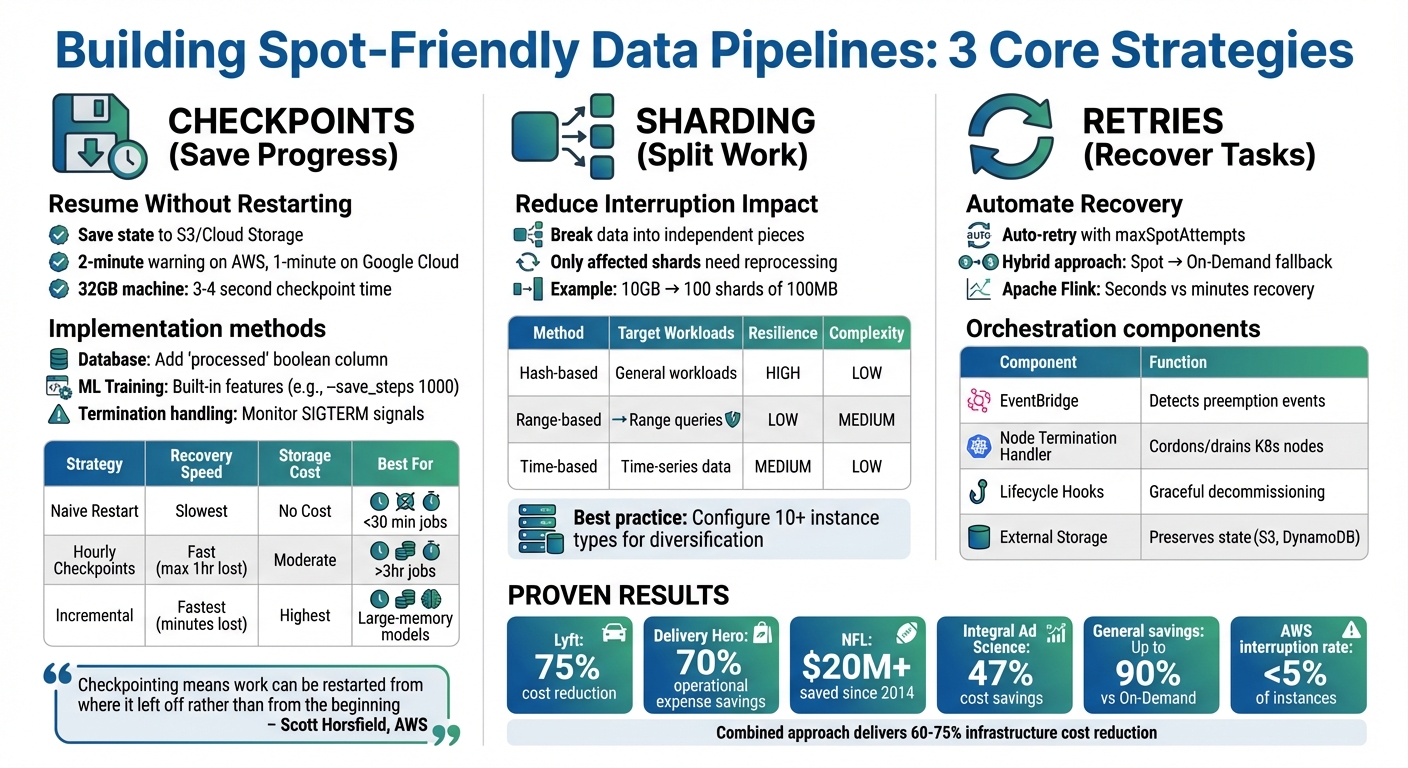
Spot Instance Pipeline Resilience Strategies: Checkpoints, Sharding, and Retries Comparison
Checkpoints: Saving Pipeline Progress During Interruptions
What Checkpoints Do
Checkpoints are like a safety net for your pipeline. They save the pipeline’s state – metadata, processed offsets, and intermediate results – by storing them in persistent storage solutions like S3 or Google Cloud Storage. This way, if a spot instance is reclaimed, the pipeline can pick up right where it left off instead of starting from scratch.
Without checkpoints, interruptions can waste all the compute time and costs already spent. As Scott Horsfield, Sr. Specialist Solutions Architect for EC2 Spot, puts it:
"Checkpointing means that as work is completed within your application, progress is persisted externally. So, if work is interrupted, it can be restarted from where it left off rather than from the beginning".
The key here is persistence. Checkpoints need to outlast the termination of the compute instance, which means storing them externally – never on local instance storage. This understanding lays the groundwork for practical implementation techniques.
How to Implement Checkpoints
If you’re using spot instances, implementing checkpoints is essential for creating resilient and cost-efficient pipelines. The method you choose depends on your pipeline’s structure.
For database-driven workflows, a straightforward approach is adding a processed boolean column to your database tables. Tasks can then query only unprocessed records (e.g., WHERE processed = 0) and mark them as completed in batches of 100. This ensures minimal lost work if an interruption occurs.
For tasks like machine learning model training, built-in checkpointing features are the way to go. For example, in October 2022, SkyPilot demonstrated checkpointing with HuggingFace‘s BERT model. By mounting a cloud bucket to /checkpoint and using the --save_steps 1000 argument, the training job could resume from the latest saved state after preemption.
Another critical component is handling termination notices. AWS provides a two-minute warning, while Google Cloud offers a one-minute notice. Use these signals to initiate immediate cleanup and checkpointing. In January 2025, Metaflow showcased a "SpotInterruptionFlow" that periodically checked for a current.spot_termination_notice. When detected, it triggered a checkpointing routine before the instance was reclaimed.
For checkpoints to work reliably, three technical requirements must be met:
- Idempotency: Restarting should not corrupt the data.
- Persistent storage: Use options like S3, Cloud Storage, or relational databases.
- Result serialization: Define how and where task results are stored.
With these in place, you can evaluate and refine checkpoint strategies to fit your workflow.
Checkpoint Strategy Comparison
The frequency of checkpoints plays a big role in balancing recovery speed and overhead. The right strategy depends on how much work you’re willing to lose and the extra runtime or storage costs you can handle. Frequent checkpoints reduce wasted compute but may increase runtime and storage expenses. For example, a 32GB machine can complete a checkpoint in just 3–4 seconds, which is a minimal overhead. However, for larger memory models, where saving the state within a two-minute warning isn’t feasible, incremental checkpoints become necessary.
The trade-off is straightforward: while frequent checkpoints save time by avoiding re-processing, they come with added storage costs. To clean up, automate the deletion of checkpoints after successful job completion using post-execution scripts or AWS Lambda functions. Interestingly, one team found that using the Hadoop fs -rm command to delete checkpoint data was three times faster than the AWS S3 CLI.
| Strategy | Recovery Speed | Storage Cost | Best For |
|---|---|---|---|
| Naive Restart | Slowest (full rerun) | None | Short jobs under 30 minutes |
| Hourly Checkpoints | Fast (max 1 hour lost) | Moderate | Critical paths; jobs over 3 hours |
| Incremental Checkpoints | Fastest (minutes lost) | Highest | Large-memory models; long training runs |
Optimizing Trino using spot instances with Zillow

Sharding: Splitting Work to Reduce Interruption Impact
Sharding divides your data into smaller, independent pieces that can be processed separately. Instead of tackling a massive dataset in one go, you break it into manageable chunks for individual workers. If a spot instance is interrupted, only the shards handled by that instance are affected, not the entire pipeline. This approach reduces the impact of interruptions significantly.
For instance, imagine processing a 10 GB dataset as a single job. If interrupted at 90% completion, all progress is lost. However, splitting the same dataset into 100 shards of 100 MB each means only the shards on the interrupted instance need reprocessing.
Sharding also supports a stateless design. Workers can directly pull their assigned shards from object storage like S3, process them, and then write the results back. If an interruption occurs, only the CPU cycles are wasted – the data remains intact and ready for new workers to pick up where others left off.
Tracking completed shards is critical. By storing this metadata in external systems like Redis or DynamoDB, new workers can quickly identify which shards remain unprocessed if an instance fails. This strategy not only minimizes data loss but also lays the groundwork for exploring specific sharding techniques.
3 Sharding Techniques for Data Pipelines
Here are three common sharding methods, each suited to different needs and interruption patterns:
Hash-based sharding:
This method uses a hash function on a key (like a user ID or transaction ID) to assign records to shards. It ensures an even distribution of data across nodes, preventing any single instance from being overloaded – especially important in spot environments.
Range-based sharding:
Data is divided by key ranges, such as splitting customer records from A–M into one shard and N–Z into another. While efficient for range queries, this method can lead to uneven data distribution, causing a single node to become a bottleneck if interrupted.
Time-based sharding:
Data is organized into time intervals (e.g., hourly, daily), aligning with batch windows and simplifying checkpoints. For example, if you’re processing data from January 1–7, an interruption only requires restarting the next time window. This method works well for log analytics and time-series data.
Avoid large shuffles. Operations like GroupBy create wide dependencies with significant intermediate data. If a node fails during such a shuffle, the entire operation may need to restart. Pre-shuffling data into S3 using bucketing can help mitigate this risk.
Dynamic Shard Allocation with Kubernetes
In addition to splitting data into shards, efficiently reallocating shards after interruptions is key to maintaining pipeline stability. Kubernetes automates this process by reallocating tasks when spot instances are preempted. Upon receiving a termination signal, Kubernetes decommissions the affected node – stopping new tasks and migrating ongoing work to healthy instances. It can even relocate shuffle files or cached data shards to fallback storage like S3 before the instance is reclaimed.
Using Persistent Volume Claims (PVCs) helps decouple data from processing. These claims persist beyond the lifetime of executor pods, allowing new pods to seamlessly reattach pre-computed data. For example, configuring Spark on Kubernetes with PVC reuse (spark.kubernetes.driver.reusePersistentVolumeClaim) can significantly improve pipeline stability.
"Because Spot is an interruptible service, if we can move or reuse the intermediate shuffle files, it improves the overall stability and SLA of the job."
– Kinnar Kumar Sen, Sr. Solutions Architect, Amazon Web Services
Tools like Karpenter optimize this process further by enabling faster node scheduling through early pod binding and intelligent bin-packing. This maximizes CPU and memory utilization per node. Event-based controllers can also speed up pod autoscaling by as much as 60% compared to traditional polling methods. In 2024, Delivery Hero cut operational expenses by 70% by migrating Kubernetes-based CI/CD pipelines to spot instances using these tools.
Diversification is another key factor. Configuring Kubernetes node groups to accept at least 10 different instance types (e.g., m5.large, r5.large, c5.large) improves access to spot capacity and reduces the risk of losing all resources if a particular instance type becomes unavailable. Lyft, for example, reduced monthly compute costs by 75% by diversifying its spot instance fleet.
To improve flexibility, size executors at around 2 cores each. Smaller executors can operate on a wider range of instance types, increasing access to available spot capacity and lowering interruption rates.
Sharding Method Comparison
| Sharding Method | Best Use Case | Spot Instance Resilience | Implementation Complexity |
|---|---|---|---|
| Hash-based | General workloads, avoiding hot spots | High: Uniform distribution minimizes single-node impact. | Low |
| Range-based | Range queries (e.g., "all records from A–C") | Low: Data skew can lead to hotspot failures. | Medium |
| Time-based | Time-series data, log analytics | Medium: Provides clear checkpoint boundaries. | Low |
For pipelines designed to handle spot interruptions, hash-based sharding offers a great balance of simplicity and resilience. Time-based sharding works well for time-series data, providing natural checkpoint boundaries. Range-based sharding should only be used when range queries are essential, and data distribution can be balanced.
One practical tip: extensive sharding can lead to S3 throttling. If you encounter 503 "Slow Down" errors, increase retry limits (e.g., set fs.s3.maxRetries between 20 and 50) or use coalesce() to reduce output partitions. Choosing the right sharding method is key to building pipelines that balance cost savings with resilience on spot instances.
sbb-itb-f9e5962
Retries and Orchestration: Recovering from Failed Tasks
After addressing progress preservation with checkpoints and sharding, the next step to building resilient, spot-friendly pipelines is implementing robust retry and orchestration mechanisms. These tools ensure your pipeline resumes processing automatically when a spot instance is interrupted. By combining smart retry strategies with effective orchestration, you can detect interruptions, preserve progress, and pick up where things left off.
Retry Strategies for Spot Instances
Cloud providers like AWS Batch offer automatic retries for interrupted tasks using parameters such as maxSpotAttempts. While helpful, these retries often happen behind the scenes, leaving pipeline managers with limited visibility.
For more control, orchestrator-level retries – like Nextflow‘s errorStrategy (e.g., retry) – allow for better monitoring and diagnostics. Notably, in Nextflow versions 24.10 and later, the maxSpotAttempts default is set to 0 to avoid unexpected costs, meaning retry limits must be manually configured.
A hybrid approach is often the most effective. Start with a spot instance for the initial attempt, then automatically switch to On-Demand instances for retries if the task fails. This ensures critical tasks don’t get stuck in a loop of interruptions.
"Checkpointing-restart is a design choice when writing HPC applications. However, it can unlock the ability to use a greater range of resources, like Amazon EC2 Spot Instances."
– AWS HPC Blog
To preserve state during interruptions, capture SIGTERM signals and set container stop timeouts to 120 seconds or less. You can also query the Instance Metadata Service (IMDS) every 5 seconds at:
http://169.254.169.254/latest/meta-data/spot/instance-action
This helps detect interruption notices quickly.
For example, Apache Flink minimizes recovery time by restarting only the affected components of a pipeline instead of the entire execution graph. This approach can cut recovery time from minutes to seconds.
Orchestrating Pipelines on Spot Instances
Retry strategies set the stage, but orchestration tools take recovery to the next level by automating preemptive actions. These tools manage everything from capturing cloud events to draining nodes, keeping your pipeline running smoothly.
Amazon EventBridge, for instance, captures EC2 Spot Instance Interruption Warning events in real time. It can trigger actions like updating DNS records, draining load balancers, or issuing AWS Systems Manager commands to preserve state. For example, EventBridge can initiate an SSM command that writes a "stop file" to an application’s head node, allowing restart files to be saved to FSx for Lustre in just 0.3 seconds before the instance is reclaimed.
In Kubernetes environments, a Node Termination Handler (NTH) acts as a DaemonSet to monitor IMDS or EventBridge for interruption notices. When an interruption is detected, the handler cordons and drains nodes, ensuring pods are rescheduled onto healthy instances. Configuring Pod Disruption Budgets (PDB) ensures a minimum number of pods remain operational during such interruptions.
Auto Scaling Groups (ASGs) enhance resilience with capacity rebalancing. Upon receiving a "rebalance recommendation" signal – often before the two-minute warning – the ASG can temporarily exceed its maximum size by up to 10% to launch replacement instances. This ensures new instances are ready before terminating at-risk ones. For ECS, enabling ECS_ENABLE_SPOT_INSTANCE_DRAINING=true prevents tasks from being scheduled on at-risk nodes, while lifecycle hooks allow time for actions like flushing logs or gracefully shutting down services.
| Component | Role in Spot Recovery | Implementation |
|---|---|---|
| EventBridge | Detects preemption events | Rule matching interruption warnings |
| Node Termination Handler | Cordons and drains Kubernetes nodes | Kubernetes DaemonSet |
| Lifecycle Hooks | Enables graceful decommissioning | Auto Scaling Group configuration |
| External Checkpoint Storage | Preserves state during interruptions | S3, DynamoDB, or similar persistent store |
Fallback Options for Critical Tasks
When retries fail or spot capacity runs out, fallback mechanisms ensure critical tasks are completed without sacrificing the cost benefits of spot instances. However, avoid defaulting to On-Demand instances for all retries, as this can lead to capacity exhaustion in certain instance types or Availability Zones.
Instead, diversify your fleet with at least 10 instance types across multiple families and Availability Zones. Use a price‑capacity‑optimized allocation strategy to balance cost and availability. Store pipeline state externally – using options like S3, EBS, or DynamoDB – so replacement instances can resume from the last checkpoint instead of starting over.
"For many fault-tolerant workloads, simply replacing the instance upon interruption is enough to ensure the reliability of your service."
– Scott Horsfield, Sr. Specialist Solutions Architect, EC2 Spot
Finally, test your fallback mechanisms with the AWS Fault Injection Service (FIS). Simulate spot interruptions to evaluate how well your pipeline handles failures. Beyond tracking interruptions, focus on customer experience metrics like response times and connection errors to measure the true impact of your strategy.
Monitoring and Testing Spot Pipeline Performance
Keeping an eye on your spot-friendly pipelines and testing them regularly is key to ensuring they’re both resilient and cost-effective.
Tracking Interruptions with Prometheus and Grafana
Start by focusing on lifecycle metrics to get a clear picture of your cluster’s composition. Metrics like the total number of nodes split by lifecycle type (Spot vs. On-Demand) can give you a snapshot of your fleet at any given time.
Prometheus exporters are essential here. Use metrics like ocean_managed_nodes{lifecycle="Spot"} to track current spot node counts, ocean_nodes_removed_total{reason="recoveryReplacement"} to measure how often providers reclaim capacity, and ocean_failed_scale_ups_total to pinpoint capacity or configuration issues. To visualize these insights, build Grafana dashboards that categorize nodes by Virtual Node Group and lifecycle, showing spot availability across zones.
But it’s not just about interruptions. Resource utilization metrics are equally important. Compare pod resource requests (vCPU, Memory, GPU) against allocatable resources using metrics like ocean_total_pod_vcpu_requests divided by ocean_allocatable_cpu_vcpus. This helps identify over-provisioning or bottlenecks that could be driving up costs unnecessarily.
For pipeline performance, measure the difference between "net runtime" (actual CPU processing time) and "wall-clock time" (total time from start to finish). This gap highlights any overhead caused by interruptions and recovery. Additionally, keep an eye on Load Balancer metrics like RejectedConnectionCount and TargetResponseTime to ensure that spot interruptions aren’t negatively impacting users.
"Rather than tracking interruptions, look to track metrics that reflect the true reliability and availability of your service."
– Scott Horsfield, Sr. Specialist Solutions Architect, EC2 Spot
Set alerts in Prometheus for metrics such as ocean_failed_scale_ups_total to act immediately if spot capacity becomes unavailable in a specific market. This proactive approach can help you avoid pipeline stalls before they occur.
Once monitoring is in place, it’s time to test your pipeline’s resilience.
Testing Pipeline Resilience with Fault Injection
Simulating failures is a great way to validate your checkpointing and retry mechanisms. The AWS Fault Injection Service (FIS) allows you to trigger the aws:ec2:send-spot-instance-interruptions action, mimicking real-world interruptions by sending both a Rebalance Recommendation (RBR) and a two-minute Instance Termination Notification (ITN).
"The triggered interruption will be preceded with a Rebalance Recommendation (RBR) and Instance Termination Notification (ITN) so that you can fully test your applications as if an actual Spot interruption had occurred."
– Steve Cole, WW SA Leader for EC2 Spot, and David Bermeo, Senior Product Manager for EC2
For local testing, the Amazon EC2 Metadata Mock (AEMM) is a handy tool. It lets you simulate the two-minute warning without needing to launch real infrastructure. This tool mimics the Instance Metadata Service (IMDS) endpoint, allowing you to test how your application handles SIGTERM signals.
FIS also offers flexibility in testing. You can select nodes to interrupt using modes like ALL, COUNT(n), or PERCENT(n), and adjust interruption behaviors (e.g., stopping instead of terminating) to control the scope of your tests. For example, interrupting 50% of nodes can help you see if your pipeline remains operational.
Incorporate these fault injection experiments into your CI/CD pipeline using the AWS CLI or SDK. This ensures that every code change is tested for resilience against interruptions. During these tests, track the difference between net runtime and wall-clock time to measure the overhead introduced by your recovery process.
Fault injection not only validates resilience but also highlights areas for optimization.
Spot Optimization Results and Metrics
The benefits of proper monitoring and testing are clear. Lyft, for instance, cut its monthly compute costs by 75% by modifying just four lines of code to support spot instances. Similarly, Delivery Hero saved 70% by running Kubernetes clusters on spot instances. Even the NFL has saved over $20 million since 2014 by using Amazon EC2 Spot Instances for complex scheduling tasks.
AWS interruptions affect less than 5% of spot instances before they are intentionally terminated by customers. By using reliability-aware spot selection, interruption rates can drop significantly – 23.2% on AWS, 28.7% on Google Cloud, and 40% on Azure. Cast AI reported in February 2026 that applying machine learning-based "Reliable Spot Instances" to an Azure cluster reduced node interruptions from over 50% on some days to just one per day.
Diversifying instance types across different families, sizes, and Availability Zones is another effective strategy. Monitoring data can guide you toward a "capacity-optimized" allocation strategy, which prioritizes instances from the deepest capacity pools. For applications like Apache Flink, task-local recovery (storing state on local EBS volumes) can cut recovery times from minutes to seconds by avoiding network delays during state restoration.
"Knowing which Spot Instances are more reliable opens the doors to proactive decision-making when selecting capacity for workloads."
– Mantas Čepulkovskis, Cast AI
Key metrics to focus on include availability (GroupInServiceInstances, Service Running Task Count), performance (TargetResponseTime, wall-clock vs. net runtime), and reliability (RejectedConnectionCount, TargetConnectionErrorCount). These metrics reveal whether your optimization efforts are paying off in terms of resilience and cost efficiency.
Conclusion: Building Cheaper, More Reliable Pipelines
Spot instances can slash costs by up to 90% – but only if pipelines are designed to handle interruptions effectively. Techniques like checkpoints, sharding, and retries are key to building resilient pipelines that can recover seamlessly when disruptions occur. For instance, checkpoints save progress externally (e.g., to Amazon S3), allowing pipelines to restart close to where they left off. Sharding spreads tasks across multiple instances, minimizing the impact of any single instance being reclaimed. Meanwhile, retries detect failures and automatically launch replacements, ensuring tasks are completed without manual intervention. These methods not only safeguard your work but also deliver significant cost reductions.
The results speak for themselves. In February 2021, Integral Ad Science processed over 100 billion daily data events using a combination of EMR Spot Fleets, Spot Blocks, and Airflow-driven retries with S3 checkpointing. This setup achieved an impressive 47% cost savings compared to On-Demand instances. Across various real-world scenarios, savings have ranged from 47% to 75%.
"The slight reliability trade-off is usually acceptable for most data workloads, especially when Prefect’s durability mechanisms ensure that jobs will complete successfully."
– Prefect Blog
Practical design choices like checkpointing, sharding, and retries can turn cost unpredictability into reliable and efficient data pipelines.
To get started, implement incremental checkpoints that can complete within AWS’s two-minute interruption window. Use Auto Scaling groups configured with the "capacity-optimized" allocation strategy, which selects instances from the deepest Spot capacity pools. Diversify across instance families, sizes, and Availability Zones to improve availability. For workloads that are highly time-sensitive, set a fallback threshold (e.g., a 10-minute delay) to trigger On-Demand instances if Spot capacity runs out.
AWS data shows that fewer than 5% of Spot instances are interrupted before customers terminate them. With proper checkpointing, even a 32GB machine can save its state in just 3–4 seconds, making the interruption almost unnoticeable in terms of runtime. These strategies make Spot instances not only a cost-saving measure but also a reliable tool for reducing infrastructure costs by 60% to 75%, without sacrificing dependability. Together, these approaches turn Spot instances into a powerful solution for efficient cloud operations.
FAQs
How do I choose the right checkpoint frequency?
Choosing the right checkpoint frequency is all about finding the sweet spot between minimizing data loss and avoiding unnecessary overhead. For jobs that run over extended periods, setting checkpoints every 2–3 hours works well. For tasks that are more critical, aim for every hour. If you’re using spot instances, it’s smart to checkpoint at significant processing milestones or every 1–2 hours. Ultimately, the frequency should depend on factors like how long the job runs, the chances of interruptions, and the cost of re-executing tasks. This approach helps strike a balance between recovery efficiency and resource usage.
How big should shards be for spot jobs?
When dealing with spot jobs, it’s best to keep shard sizes between 10–30 GiB for workloads where low search latency is a priority. For write-intensive tasks, such as log analytics, consider shard sizes of 30–50 GiB. This range strikes a good balance between performance and ease of management, ensuring reliable and efficient use of spot instances.
When should retries fall back to On-Demand?
When spot instances get interrupted, retries should automatically switch to On-Demand instances if the workload can’t tolerate disruptions. This approach is especially important for long-running tasks or workloads tied to strict service level objectives (SLOs) that demand consistent reliability to maintain performance and meet deadlines.