When Commitments Hurt: Exit Strategies and Rebalancing Across Clouds

Cloud contracts often promise big discounts but can lead to wasted resources, high egress fees, and vendor lock-in as businesses scale. Multi-cloud setups may further strain engineering teams, consuming 20–30% of their capacity on integration tasks. With regulations like the EU’s DORA now requiring exit strategies, companies must reassess their cloud commitments.
Key takeaways:
- Inventory resources: Identify unused assets (e.g., orphaned volumes) and over-provisioning.
- Review contracts: Check for termination rights, data portability, and hidden fees.
- Plan migrations: Use triage systems for workload complexity, backups, and canary cutovers to minimize risks.
- Rebalance workloads: Shift predictable tasks to bare metal for cost savings (50–75%) and use public clouds for elastic needs.
- Track metrics: Monitor CPU utilization, idle spend, and RI/Savings Plan usage for cost efficiency.
How To Design A Public Cloud Exit Strategy?
sbb-itb-f9e5962
Evaluating Your Current Cloud Commitments and Risks
Before planning a cloud exit or rebalancing workloads, it’s crucial to assess your current commitments. Many companies realize they’re paying for unused resources or face challenges migrating certain workloads. For example, orphaned volumes and snapshots can account for 20–30% of wasted resources in large organizations. Even more striking, 84% of organizations still struggle to manage cloud costs effectively. Here’s how you can inventory resources, identify potential lock-in risks, and calculate your financial exposure.
Create an Inventory of Your Cloud Resources
Start by identifying every workload, including servers, virtual machines, code, and data. Tools like AWS Resource Explorer, Azure Migrate, or Google Cloud Asset Inventory can help map out your entire cloud footprint and reveal interdependencies.
Next, collect baseline performance data for each resource, such as p95 CPU utilization, memory usage, disk I/O (IOPS), network throughput, and peak concurrency. If average CPU or RAM usage is below 30–40%, you’re likely over-provisioned and should consider downsizing. Resources with no network activity for seven or more consecutive days are prime candidates for decommissioning.
To better track costs, link your billing data to a Configuration Management Database (CMDB). This allows you to map spending to specific applications, teams, and environments. Use mandatory tags like application, environment, owner_email, and cost_center to ensure no resource is overlooked. Additionally, document each workload’s owner, criticality (high/medium/low), data sensitivity (e.g., GDPR, HIPAA), and operational constraints like maintenance windows.
Spot Vendor Lock-In Risks
With a complete inventory, assess your dependence on vendor-specific services. Technical lock-in happens when proprietary services, like AWS Lambda or Azure Functions, make migration more challenging.
To reduce these risks, design applications with flexibility in mind. Using Docker containers and microservices can make deployments more portable. When proprietary services are unavoidable, create an abstraction layer (or "façade") to allow for easier switching without a full rewrite. Keep business logic separate from application logic, and rely on open standards like Linux, SQL, and KVM to lower future switching costs.
Also, examine your software licenses. Determine if they are tied to a specific vendor or issued in perpetuity, as this could complicate migration. Lastly, evaluate your team’s expertise beyond vendor-specific tools to ensure you’re not facing a skills gap during a potential transition.
Calculate Your Financial Exposure
Understanding your financial exposure is critical for refining your cloud strategy. Use tools like AWS Cost Explorer or CloudHealth to analyze current commitments and model potential savings. Focus on two metrics: Coverage (the percentage of spend covered by Savings Plans or Reserved Instances) and Utilization (how effectively those commitments are used). Aim for 60–85% coverage with over 90% utilization.
Compare allocated versus actual usage to identify over-provisioning. For instance, if a container requests 2 vCPUs but only uses 0.6 vCPU, that’s a clear sign of inefficiency. Eliminate "zombie" resources like powered-off VMs attached to premium storage, unattached EBS volumes, orphaned snapshots, and idle Elastic IPs, as these accrue unnecessary charges. Even small costs, such as NAT Gateway data processing fees (around $0.045 per GB on AWS), can add up to over $1,000 per month for high-throughput applications.
Finally, use the AWS Pricing Calculator to compare your current costs against optimized scenarios. For example, if a 1-year Reserved Instance costs $4,800 upfront and saves $600 per month over On-Demand pricing, the break-even point is around eight months. This type of analysis helps determine whether your existing commitments align with your evolving workload needs or if adjustments are necessary.
Reviewing Cloud Contracts for Exit Options
It’s crucial to carefully review the exit terms in your cloud service agreement. Many businesses only realize too late that their contracts include restrictive clauses or hidden fees, making migration a headache. As Morgan Lewis highlights:
"Having an exit strategy is important when negotiating cloud services agreements. By planning accordingly, parties are better positioned to mitigate risks".
Start by identifying the termination rights and notice periods in your contract. Determine if termination is allowed "for convenience" or only "for cause", and check how much notice is required. With the EU Data Act (effective September 12, 2025), cloud providers will be limited to requiring no more than two months’ notice for termination. Be sure to examine the fine print for clauses like auto-renewals and inflation adjustments, which can lead to escalating costs.
Your contract should also address data ownership, portability, and post-termination support. It’s essential to align these terms with your business needs to avoid financial and operational risks down the line. Verify that the agreement explicitly states you retain full ownership and control of your data. Additionally, ensure that data can be returned in machine-readable, non-proprietary formats such as CSV, JSON, Avro, or Parquet. Don’t overlook post-termination support – confirm how long you’ll have access to your data and what kind of technical assistance will be available.
Data egress costs are another critical factor. While providers like AWS and Google Cloud now offer free data transfer programs for customers exiting their platforms entirely, there are conditions. For instance, Google Cloud requires you to submit an "Exit Notice", followed by a 30-day "Initiation Period" to begin migration and an additional 30-day "Migration Period" to complete it. Beyond cost, ensure the contract outlines clear procedures for secure data handling after exit.
Finally, create a checklist to maintain business continuity in case of unexpected service termination. This should include provisions for secure data destruction or return to meet compliance standards like GDPR or HIPAA. As The Negotiator Guru wisely points out:
"The biggest risks aren’t always in the contract – they’re the terms that never made it in".
Exit Strategies for Cloud Providers
Planned Migration Approaches
Careful planning is essential to minimize financial and operational risks during cloud migrations. Start by categorizing your workloads based on their complexity. Use a simple triage system: label workloads as "green" for straightforward migrations, "yellow" for moderately complex ones, and "red" for those that are highly intricate. This approach helps prioritize tasks and allocate resources efficiently. Once you’ve classified your workloads, ensure every asset is secured before making any production changes.
Before diving into production, create backups for all critical assets. This includes database snapshots, object storage copies, container images, and VM snapshots. Once your backups are safely stored, test the new environment thoroughly. Load tests will confirm its ability to handle real-world traffic, and security scans will help identify vulnerabilities that might arise during migration.
When it’s time to switch, use a canary cutover strategy. Start by routing a small portion of traffic to the new environment, monitor its performance closely, and gradually increase the load as stability is confirmed. Update DNS records and configure load balancers only after ensuring everything runs smoothly. If your applications need to stay live throughout the migration, tools like Rsync can synchronize data at the last moment to avoid any loss.
Keep in mind that you’ll likely need to maintain both the old and new environments during this transition, which means double costs for a period. As Isaac Douglas, CRO of Servers.com, explains:
"A lot of customers that we work with on reverse cloud migrations just want to pick up their infrastructure and move it. But that’s not how migrations work."
Since migrations can take months to complete, consider negotiating ramp pricing with your cloud providers to reduce costs during this dual-environment phase.
Emergency Exit Plans
In a crisis, quick action is critical. Establish Key Risk Indicators (KRIs) that signal when an immediate exit is necessary – such as provider insolvency, significant security breaches, or sudden regulatory changes. Decide beforehand where your workloads will go, whether it’s another cloud provider, an on-premises data center, or bare metal infrastructure.
Always maintain off-site backups, like database snapshots, object storage copies, and application images, stored independently of your primary provider. Automated discovery tools can help keep a real-time inventory of your cloud assets and their dependencies. This is especially important during emergencies, as manual assessments can be too slow and prone to errors.
Form a cross-functional team that includes IT leadership, legal, finance, and security experts. Review your exit plan annually, and test it with tabletop exercises or simulated migration drills to uncover potential issues before a real crisis occurs.
For emergency migrations, a "Rehost" or lift-and-shift strategy is often the fastest option. This allows you to move workloads without making any code changes, which is crucial when time is of the essence. To avoid lock-in with proprietary systems, design your applications using open standards like Kubernetes, OCI images, and OpenAPI. This ensures they can be rebuilt on alternative infrastructure if needed.
With 94% of IT leaders reporting some level of cloud repatriation within three years, having a well-practiced emergency plan is not just a precaution – it’s a necessity.
Rebalancing Workloads Across Multi-Cloud and Bare Metal
Select the Right Mix of Providers
Choosing the right environment for each workload is key to balancing cost and performance. For example, steady-state services like databases or backend APIs are best suited for bare metal or private clouds with fixed monthly pricing. On the other hand, elastic or seasonal workloads thrive in public clouds, where pay-as-you-go pricing can handle traffic spikes without breaking the bank.
Be mindful of data egress fees, which can add up quickly when moving large amounts of data. Opt for providers with low or flat-rate fees to keep costs manageable. Here’s a real-world example: a deployment with 500 virtual machines and 50TB of bandwidth could save about $17,631 per month – or over $211,000 annually – by switching to a private cloud setup.
Bare metal also eliminates "noisy neighbor" issues common in multi-tenant public clouds, offering predictable performance and lower latency. This makes it ideal for performance-critical applications. Additionally, compliance requirements like GDPR, HIPAA, or DORA may necessitate specific geographic locations or dedicated hardware. By aligning workloads with these factors, you can address regulatory needs, enhance performance, and cut costs.
Use Bare Metal for Cost Savings
For predictable workloads, bare metal infrastructure is a cost-effective option. In 2025, hosting platform Convesio cut costs by more than 50% by migrating from Google Cloud to OpenMetal‘s hosted private cloud infrastructure. Similarly, Arabesque AI slashed server expenses by 75% by using preemptible instances on Google Cloud for stateless workloads.
Switching steady workloads to bare metal can lead to savings of 50–75%. This approach avoids paying for elasticity you don’t need and sidesteps the premium pricing often associated with hyperscaler-managed services. It’s a smart way to tighten budgets while maintaining robust infrastructure.
To ensure flexibility, adopt open standards like Kubernetes and OCI images. These standards make it easier to move workloads between bare metal and cloud environments without requiring significant re-architecting. When selecting a bare metal provider, look for features like ramp pricing or money-back guarantees to minimize financial risk during the transition phase.
Manage Workloads with Kubernetes Federation
Once workloads are assigned to the right environments, orchestrating them efficiently becomes the next step. Kubernetes federation is an effective tool for managing clusters across multiple environments. It uses a centralized control plane to distribute traffic and workloads seamlessly.
Service meshes like Consul can enhance security by establishing encrypted connections (mTLS) between services operating across different clusters, such as AWS EKS and Azure AKS. Mesh gateways further simplify communication, enabling services to discover and route traffic across datacenters or providers. This setup also strengthens disaster recovery strategies – if one provider experiences downtime, traffic can automatically shift to another healthy platform.
Infrastructure-as-Code tools like Terraform are invaluable for provisioning and managing federated Kubernetes clusters across diverse environments, including public clouds and bare metal. For centralized monitoring, tools like Prometheus, Grafana, or Kubecost can provide a unified dashboard to track metrics and spending across all environments. By placing steady, always-on services on bare metal or private clouds and keeping elastic workloads on public clouds, you can optimize costs while maintaining flexibility.
Tracking Success with Metrics and Tools
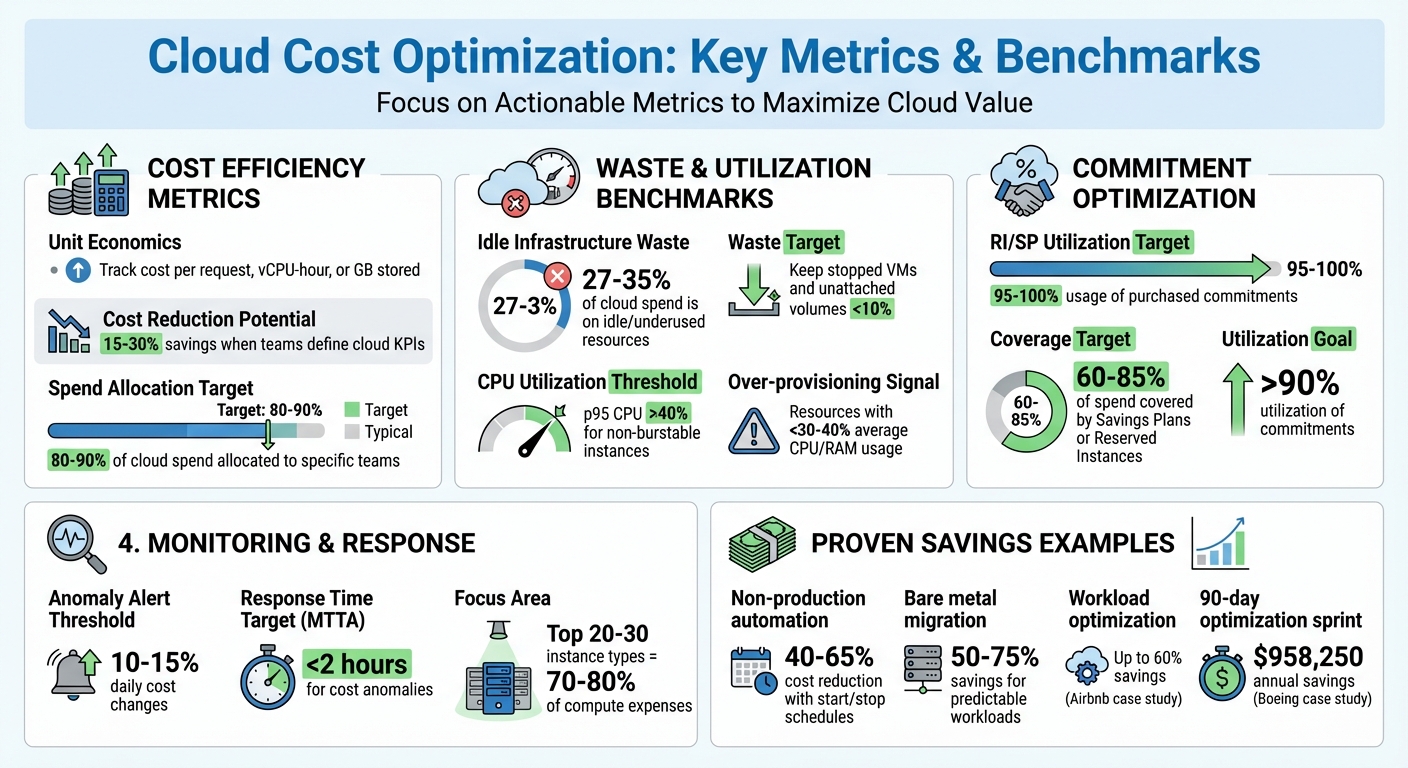
Cloud Cost Optimization Metrics and Benchmarks
Measuring outcomes is essential to ensure your migration efforts achieve their intended goals. Without clear metrics, it’s hard to determine whether you’ve managed to cut costs, boost performance, or simply shifted expenses around. This step focuses on turning your updated setup into measurable improvements.
Key Cost and Performance Metrics
To maintain alignment with your cloud strategy, it’s important to track specific cost and performance metrics. For instance, monitoring unit economics – such as cost per request, vCPU-hour, or GB stored – can highlight efficiency improvements. Allocate 80–90% of cloud spend to specific teams, and flag any unallocated charges to uncover inefficiencies. Research shows that teams that define KPIs for cloud expenses often achieve cost reductions of 15–30% as they mature.
When evaluating commitments, keep an eye on Reserved Instance (RI) and Savings Plan (SP) utilization. Aim for 95–100% usage of purchased commitments. Additionally, track waste metrics – around 27–35% of cloud infrastructure spend is often tied up in idle or underused resources. Keep spending on stopped VMs and unattached volumes in the single-digit range. Workload efficiency is another critical area; analyze p95 CPU and memory utilization. Instances with less than 40% maximum usage over a four-week period are typically good candidates for downsizing.
Monitoring and Analysis Tools
Cloud providers offer built-in tools to help you monitor costs and performance. Examples include AWS Cost Explorer and Trusted Advisor, Azure Cost Management + Billing, and GCP Billing Reports with the FinOps Hub. For performance tracking, tools like CloudWatch (AWS), Azure Monitor, and Google Cloud’s operations suite are highly effective. If you’re working with Kubernetes, open-source tools like Prometheus are invaluable.
For multi-cloud setups, platforms like Cloudaware and Usage.ai provide unified dashboards that simplify anomaly detection and automate commitment management across providers. A case in point: Boeing used Cloudaware in early 2026 to link billing data with CMDB resource relationships across AWS, Azure, and GCP. This effort uncovered idle storage, optimized compute resources, and improved commitment alignment, saving $958,250 annually within just 90 days.
"Governance isn’t the audit log. It’s the runtime." – Mike Fuller, FinOps Foundation
Set up alerts to detect anomalies, such as daily cost changes of 10–15%, to catch provisioning issues early. Also, monitor Mean Time to Acknowledge (MTTA) for cost anomalies, aiming for a response time of under two hours.
Compare Before and After Metrics
Once your monitoring tools are in place, compare your baseline metrics to track progress. Start by establishing a 30–90-day baseline for usage and costs. Normalize billing data from different providers – using tools like AWS CUR, Azure EA, or GCP BigQuery – into a unified taxonomy for accurate comparisons.
Create a central dashboard to visualize pre- and post-change metrics. This allows teams to observe immediate cost reductions or improved utilization after implementing changes. It also ensures that cost-saving measures don’t negatively impact p95 response times beyond acceptable limits.
Real-world examples highlight the value of these strategies. One organization reduced hosting costs by 60% through workload optimization and Kubernetes auto-scaling. Similarly, Airbnb achieved 60% savings by combining reserved resources, spot pricing, and container orchestration, supported by regular FinOps reviews.
| Metric Category | Specific KPI | Target/Benchmark |
|---|---|---|
| Cost Efficiency | Effective Savings Rate (ESR) | Varies by risk posture |
| Allocation | Tagging Coverage by Spend | 80–90% |
| Waste | Idle Capacity Spend % | <10% |
| Commitment | RI/SP Utilization | 95–100% |
| Responsiveness | Anomaly MTTA | <2 hours |
| Utilization | p95 CPU Utilization | >40% (non-burstable) |
Focus on the top 20–30 instance types that account for 70–80% of your compute expenses. For non-production workloads, automating start/stop schedules can cut costs for those resources by 40–65%.
Conclusion
Cloud agreements that initially seem advantageous can turn into challenges as business needs evolve. The solution isn’t to avoid cloud providers altogether – it’s about staying in control of workload placement and keeping the flexibility to adapt when performance or cost dynamics shift. As CIO.com (via OpenMetal) aptly put it:
"Place each workload where cost, control, and service quality align, and preserve the option to move as signals change."
In today’s fast-changing landscape, regularly reviewing cloud commitments and having agile exit strategies are essential. For scaling SaaS and AI companies, unpredictable infrastructure costs can shrink profit margins and complicate financial planning. Ongoing evaluations help protect against sudden price surges – like the Broadcom-VMware hikes that led to cost increases of 800% to 1,500% for some customers – while ensuring infrastructure investments drive growth instead of holding it back.
The strategies outlined here have delivered measurable results. Case studies highlight how strategic rebalancing – focusing on flexible architectures rather than treating them as an afterthought – has led to substantial cost savings.
Measuring unit economics, monitoring commitment utilization, and identifying waste are key to ensuring that rebalancing efforts improve margins instead of just shifting costs. Companies that set clear KPIs for cloud spending and adopt mature FinOps practices can reduce costs by as much as 30%.
As the traditional hyperscaler models give way to more diversified infrastructure setups, having a well-thought-out exit strategy becomes indispensable. It’s not just a safeguard against vendor lock-in – it’s a negotiating tool and a way to align workloads with both cost efficiency and performance needs. By implementing these strategies, you can maintain control over your infrastructure and achieve stable, predictable financial outcomes.
FAQs
What risks should I consider when relying heavily on one cloud provider?
Relying heavily on one cloud provider can lead to vendor lock-in, which poses several challenges. It often means becoming tied to specific proprietary tools and services, making it both expensive and complicated to switch providers down the line. This dependence can also restrict your ability to adapt to evolving business needs or explore better options elsewhere.
Switching providers isn’t always straightforward. Migrating data and applications can bring compatibility headaches, potential downtime, and even the risk of losing access to essential resources. To steer clear of these pitfalls, it’s smart to plan ahead with clear exit strategies. Exploring multi-cloud or hybrid-cloud setups can also provide more flexibility and resilience, helping you stay agile in a changing landscape.
How can businesses manage and reduce their cloud costs effectively?
To keep cloud costs in check, businesses need to dig into their cloud providers’ pricing models and apply disciplined cost management strategies. This means taking the time to regularly review expenses, pinpoint wasteful spending, and fine-tune workloads to make sure resources are being used wisely.
Embracing FinOps practices, renegotiating contracts, and planning transitions between providers can also be game-changers. These steps help avoid vendor lock-in and trim unnecessary costs. By carefully managing commitments and spreading workloads across multiple clouds, companies can stay flexible, boost performance, and save a substantial amount on their cloud bills.
What are the best steps to plan a smooth cloud migration or exit strategy?
Planning a successful cloud migration or exit strategy requires careful preparation to ensure everything runs smoothly. Start by taking a close look at your current workloads, data, and dependencies. This step helps you understand the full scope of your migration or exit. Be sure to define your goals clearly, identify any risks, and account for technical, operational, and legal considerations, such as data residency requirements and contract terms.
Once you’ve assessed your situation, develop a detailed plan. This should cover risk management, data transfer methods, and testing protocols. Assign clear responsibilities, set realistic timelines, and run simulations to identify and resolve potential issues before they escalate. Pay special attention to making workloads portable, maintaining good relationships with providers, and keeping data transfer costs under control to avoid unnecessary disruptions.
Lastly, keep a close eye on costs, cloud commitments, and governance practices. Regular monitoring will help you manage expenses, adjust to evolving needs, and maintain flexibility in your cloud strategy. By staying proactive, you can ensure a smooth transition while keeping your operations efficient and adaptable.