Finding Hidden Discounts in Your Provider Invoice
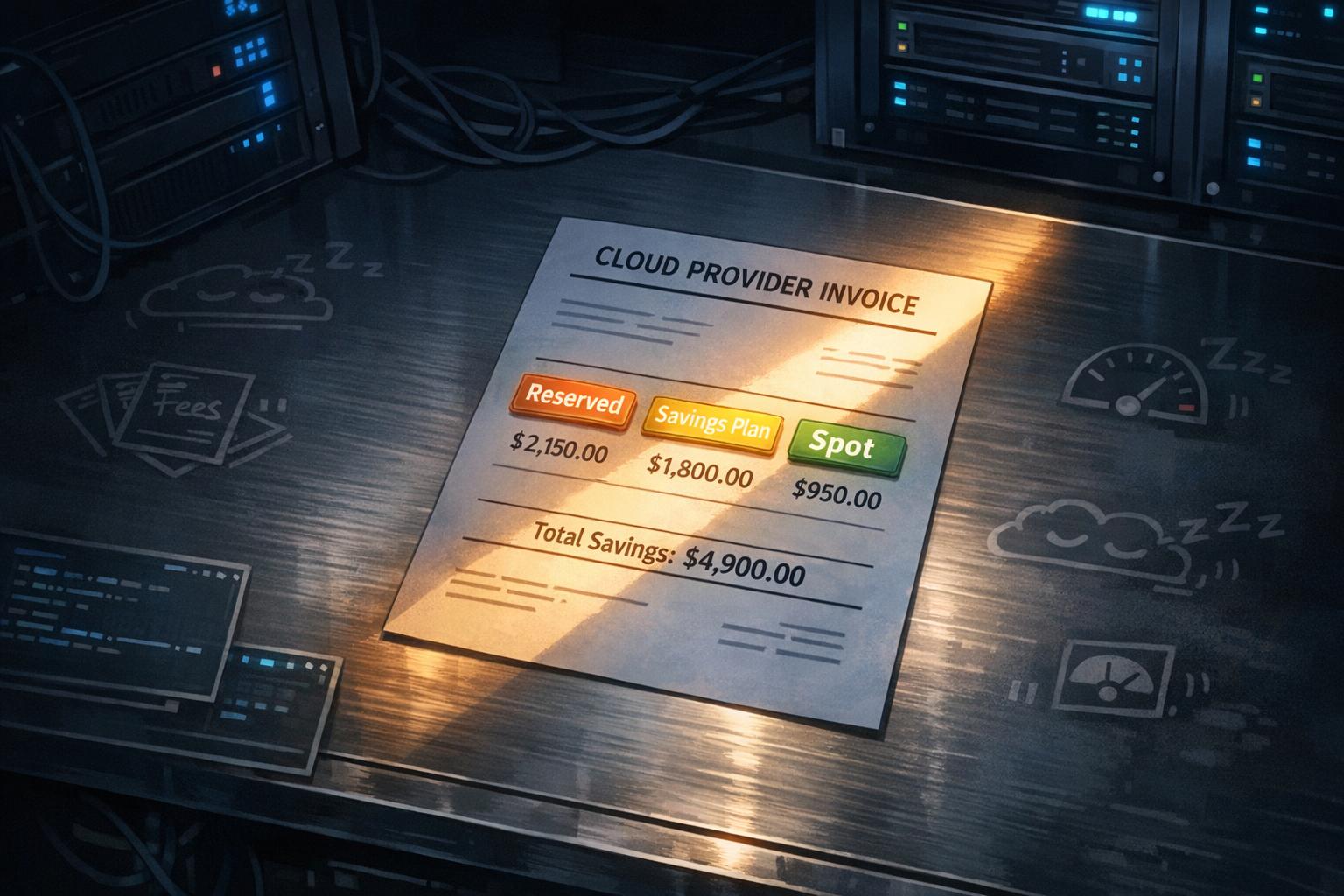
Cloud bills are confusing, but ignoring them can cost you thousands. Many companies waste 30–40% of their cloud budgets on idle resources, hidden fees, and unoptimized pricing plans. For example, unused Elastic IPs or orphaned EBS volumes can quietly drain your budget. A $50,000 monthly cloud bill might include $15,000 in unnecessary costs, just from overlooked charges.
Here’s how you can fix it:
- Audit your invoices: Look for idle EC2 instances, unassigned EBS volumes, and sneaky data transfer costs like NAT Gateway fees.
- Use discounts: Programs like Reserved Instances or Savings Plans can cut costs by up to 72%.
- Tag resources: Apply cost allocation tags to track spending by project, team, or environment.
- Leverage tools: AWS Cost Explorer and Google Cloud Recommender can highlight savings opportunities automatically.
These steps help you reclaim wasted dollars and reinvest them in growth. Start by reviewing your current cloud spend – every hidden charge you eliminate is money back in your pocket.
How to Use Flexera One Cloud Cost Optimization to Get the Most Out of Commitment Discounts
sbb-itb-f9e5962
Finding Overlooked Costs in Your Invoice
Cloud Cost Optimization: Common Hidden Charges and Detection Methods
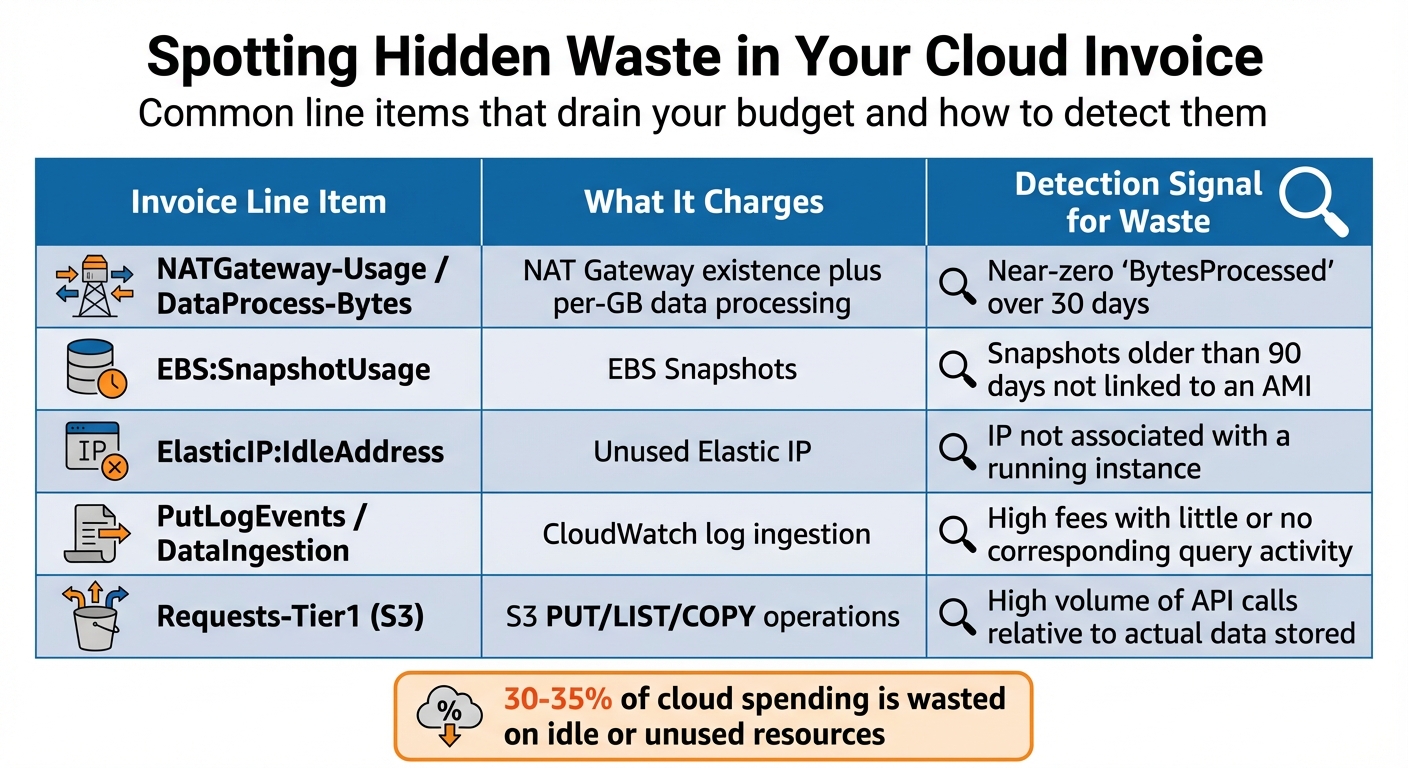
Hidden costs can quietly drain your cloud budget. Research shows that 30–35% of cloud spending is often wasted on resources that are idle or unused. For example, a company spending $100,000 monthly might lose around $30,000 on infrastructure that serves no purpose. The tricky part? These expenses are tucked away in line items that seem ordinary at first glance.
Spotting Idle and Underutilized Resources
Idle resources (like Lambda functions with no activity) and underused resources (e.g., EC2 instances running at only 10% CPU) are common culprits. They silently consume your budget, often hiding in plain sight.
Start by checking for unassigned EBS volumes or RDS instances with minimal activity, such as near-zero "DatabaseConnections" over a week. A NAT Gateway might cost you about $32 per month, even with minimal traffic. Reviewing "BytesProcessed" metrics can help you identify gateways that are no longer necessary.
Elastic IPs are free when attached to a running instance but cost roughly $3.60 per month if unattached or linked to stopped instances. Look for IPs without an "AssociationId" to cut these charges. Similarly, idle load balancers rack up $16–$22 monthly, even with no traffic.
Another common issue is stopped EC2 instances. While compute charges stop when an instance is halted, you’ll still pay for attached EBS volumes, Elastic IPs, and orphaned snapshots. These remnants, often called "zombie infrastructure", can pile up unnoticed until a detailed bill audit reveals them.
Once you’ve addressed idle resources, it’s time to dig into your invoice for other hidden charges.
Reading Line Items for Hidden Charges
Cloud invoices are notoriously cryptic. For instance, AWS’s "EC2-Other" category can mask costs for EBS volumes, snapshots, NAT Gateway processing fees, and unattached Elastic IPs. Using tools like Cost Explorer, you can drill down into these categories to find and remove orphaned resources.
Data transfer charges are another sneaky expense. Look for items like DataTransfer-Out-Bytes (internet traffic) and DataTransfer-Regional-Bytes (traffic between Availability Zones or regions). These charges may seem small – just pennies per GB – but they add up fast. For example, a web app serving 10,000 users might transfer 500GB monthly, leading to about $45 in internet egress fees. As EdwardsCG notes:
"NAT Gateway charges in particular can be surprisingly expensive – you pay both an hourly rate and a per-gigabyte data processing fee for all traffic that passes through it".
CloudWatch logs are another cost to watch. Log ingestion can cost up to $0.50 per GB, and with the default retention set to "infinite", storage costs can quickly spiral out of control. Setting a retention period – like 90 days – can help keep these costs in check. Similarly, EBS snapshots cost around $0.05 per GB per month. Without proper retention policies, you may end up paying for snapshots tied to deleted volumes indefinitely.
For S3, pay attention to Requests-Tier1 (operations like PUT, LIST, or COPY) and Requests-Tier2 (typically GET requests). High Tier 1 charges might indicate inefficient application behavior, such as excessive bucket listing, which drives up API call costs. This isn’t about storage size – it’s about how your application interacts with the data.
The table below offers a quick guide to spotting waste in common invoice line items:
| Invoice Line Item | What It Charges | Detection Signal for Waste |
|---|---|---|
NATGateway-Usage / DataProcess-Bytes |
NAT Gateway existence plus per-GB data processing | Near-zero "BytesProcessed" over 30 days |
EBS:SnapshotUsage |
EBS Snapshots | Snapshots older than 90 days not linked to an AMI |
ElasticIP:IdleAddress |
Unused Elastic IP | IP not associated with a running instance |
PutLogEvents / DataIngestion |
CloudWatch log ingestion | High fees with little or no corresponding query activity |
Requests-Tier1 (S3) |
S3 PUT/LIST/COPY operations | High volume of API calls relative to actual data stored |
Using Provider-Specific Discounts
Once hidden charges are eliminated, the next step is to tap into discount programs that can dramatically reduce your cloud expenses. Studies reveal that organizations waste about 32% of their cloud budget by paying full price for resources that could qualify for discounts. The major cloud providers – AWS, Azure, and Google Cloud – offer programs designed to lower costs significantly.
Reserved Instances and Savings Plans
Reserved Instances (RIs) and Savings Plans (SPs) are two popular options for cutting costs, but both require a commitment – usually for one or three years. RIs are tied to specific configurations, such as instance family, size, region, and operating system. Savings Plans, on the other hand, are more flexible, as they commit you to a set hourly spend rather than a specific configuration.
AWS and Azure offer discounts of up to 72% for three-year, all-upfront commitments, while Google Cloud offers up to 70% for similar terms. However, any unused commitment goes to waste, so it’s smart to base your commitments on 70–80% of your baseline usage, not peak usage.
Here’s a real-world example: TechCorp reserved eight Standard_D8s_v3 SQL Server VMs on Azure, slashing their costs from $2,243 per month to $628 per month per VM. This move saved them $12,920 per month and $155,040 annually on database infrastructure. Another success story is TechFlow, which saved $59,184 annually – a 43% reduction – by systematically analyzing and optimizing workloads.
Before diving into commitments, use tools like AWS Cost Explorer, Azure Advisor, or GCP Recommender to review the past 30 days of usage and get tailored recommendations. A smart approach is to layer your discounts: use a Savings Plan for flexible workloads and add Reserved Instances for stable, always-on resources to maximize savings [22,38].
| Feature | Reserved Instances (RI) | Savings Plans (SP) | Standard On-Demand |
|---|---|---|---|
| Commitment | 1 or 3 years | 1 or 3 years | None |
| Discount | Up to 72% | Up to 72% | 0% |
| Flexibility | Low (Fixed config) | High (Spend-based) | Maximum |
| Best For | Stable, legacy systems | Evolving architectures | Spiky/New workloads |
Now, let’s look at how to save on interruptible workloads.
Spot and Preemptible Instances
Spot Instances (AWS), Spot VMs (Azure and GCP), and Preemptible VMs (GCP) can deliver savings of 60–90% compared to on-demand rates [28,30]. Some GCP Spot VMs even reach discounts as high as 91%, particularly for certain machine types, GPUs, and Local SSDs [29,31]. As CloudBurn puts it:
"Spot isn’t for every workload, but for fault-tolerant applications, it’s effectively free money."
The catch? These instances can be interrupted. AWS provides a two-minute warning, while Azure and GCP give just 30 seconds [28,30,32]. To make the most of these options, your architecture should treat interruptions as routine events. Nawaz Dhandala explains:
"The key to success is treating interruptions as expected events rather than failures – design your architecture around them, and spot instances become a powerful cost optimization tool."
Spot and Preemptible Instances work well for tasks like batch processing, CI/CD pipelines, big data analytics (e.g., Spark or Hadoop), and dev/test environments [28,30]. To reduce interruption risks, diversify across 10+ instance types and multiple availability zones. This strategy can lower interruption rates by 50–80%. For long-running tasks, implement checkpointing to save progress periodically to persistent storage (e.g., S3), so you can resume work after an interruption [28,29].
Additionally, tools like AWS Spot Fleets, Azure VM Scale Sets, and GCP Managed Instance Groups can automatically replace preempted instances to maintain capacity [29,30,32]. For Kubernetes workloads, solutions like the AWS Node Termination Handler or Karpenter can automate draining and replacing spot nodes before they’re reclaimed.
Improving Cost Allocation and Visibility
Finding hidden discounts is just the beginning; understanding where your money is going is what completes the picture. Once you’ve secured discounts, it’s crucial to monitor every dollar spent. Without clear visibility, you’re essentially flying blind, unable to determine which teams, projects, or environments are driving costs. Studies reveal that 30% to 50% of cloud expenses often fall into the "unallocated" category, meaning they can’t be tied to any specific business function. This lack of clarity makes optimization difficult. By standardizing cost allocation through tagging, you can bring much-needed transparency to your spending.
Using Cost Allocation Tags
Cost allocation tags transform cloud expenses into actionable insights. These tags are essentially key–value pairs (like Project: mobile-app or Environment: production) that you attach to resources. They enable two impactful practices: Showback, which raises cost awareness by reporting charges, and Chargeback, where departments are billed internally for their usage.
Tagging uncovers inefficiencies. For example, tags can help you pinpoint fast-growing workloads, assess return on investment (ROI), and identify untagged resources. These "orphaned" resources are often ripe for decommissioning or optimization. AWS supports up to 50 tags per resource, while Google Cloud allows up to 64 labels per resource.
To ensure tagging works effectively, establish a standardized tagging dictionary with approved keys like CostCenter, Project, Owner, and Environment. Set up policies to enforce tagging at the time of resource creation, eliminating inconsistencies from the start. Tools like Terraform can automate this process using features like the default_tags block, ensuring consistency without manual effort. However, applying tags isn’t enough – tags must be activated manually in your cloud provider’s billing console to appear in financial reports. Keep in mind, it can take up to 24 hours for tagged data to show up in cost analysis tools.
Once set up, these tags integrate with provider tools to further refine your cost-saving strategies.
Provider Tools for Automated Recommendations
Cloud provider tools use tagging data to uncover additional savings opportunities. For instance, AWS’s Cost Optimization Hub gathers recommendations for actions like rightsizing, removing idle resources, and purchasing Savings Plans or Reserved Instances. These recommendations are based on a 14-day usage analysis, giving you a clear picture of potential savings across all accounts and regions. AWS Cost Explorer even lets you filter for "untagged resources" or "uncategorized resources", helping you identify areas where money might be slipping through the cracks.
On Google Cloud, the FinOps Hub acts as a one-stop shop for cost management. It provides recommendations for Committed Use Discounts (CUDs) and allows you to simulate various usage scenarios before making a commitment. The Cost Breakdown Report uses a waterfall chart to display how base costs are reduced by negotiated savings, credits, and adjustments, making it easier to confirm you’re receiving the discounts you negotiated. Both platforms also let you sort recommendations by estimated monthly savings, ensuring you can prioritize the changes that will have the biggest impact.
Conclusion
Main Strategies Recap
Take control of your cloud spending by starting with an audit of your invoices. Look for idle resources like unattached Elastic IPs, orphaned load balancers, and unnecessary snapshots. For example, one financial services company saved $45,000 annually simply by deleting orphaned EBS volumes. Next, address those sneaky, invisible costs – data egress and NAT Gateway fees can account for 20% to 40% of your total bill. Switching from NAT Gateways to free VPC endpoints could slash specific route costs by up to 80%.
Leverage provider-specific discounts such as Reserved Instances and Savings Plans, but avoid locking in long-term commitments on unnecessary resources. If you’re a high-volume user spending six figures monthly, consider negotiating custom committed-use agreements instead of relying on standard pricing. Lastly, enforce cost allocation tags to ensure every dollar is attributed correctly. As Hoang Le, Founder of INNOMIZE, aptly notes:
"Your AWS bill tells you what you spent. It doesn’t tell you what you wasted".
These strategies can deliver immediate savings, but maintaining cost efficiency over time requires consistent effort.
Building Regular Cost Review Habits
Finding hidden savings is just the beginning – keeping them requires ongoing discipline. Build a routine for reviewing costs: spend 15 minutes each week using Cost Explorer to spot unusual spikes, conduct monthly deep dives into how well your commitments are utilized, and perform quarterly audits to clear out accumulated waste. This proactive approach helps you catch issues early, like avoiding a scenario where a misconfigured Lambda function racks up $12,000 in data transfer fees over three months.
Use automation to stay ahead. Tools like AWS Cost Anomaly Detection can flag unexpected charges before they spiral. Set retention policies for CloudWatch logs and snapshots to avoid runaway storage costs. Automate shutdowns for development and staging environments, which can cut non-production costs by over 60%. These practices not only reduce your bill but also turn cost management into a competitive edge. Considering that 31% of IT leaders believe half of their cloud spending is wasted, you have the opportunity to break free from this trend. Start your audit today, and make cost reviews as routine as deploying code.
FAQs
Which line items usually hide the biggest cloud costs?
Cloud expenses can sneak up on you, especially when it comes to data transfer fees, idle resources (like stopped instances or unused elastic IPs), and premium support charges. These often-overlooked costs can push your bill much higher than you initially planned. Taking the time to review your invoice for these items can reveal hidden charges and help you manage your budget more effectively.
How do I choose between Reserved Instances and Savings Plans?
Choosing between Reserved Instances (RIs) and Savings Plans comes down to understanding your workload patterns, flexibility requirements, and cost-saving priorities.
- Reserved Instances (RIs) can save you up to 72% when you commit to using specific instance types in a particular region for 1 or 3 years. These are a great choice if your workloads are predictable and consistent, but they do lock you into fixed configurations.
- Savings Plans, on the other hand, offer similar discounts but with more flexibility. They let you maintain a consistent hourly spend across services without tying you to specific instance types or regions. This makes them a better fit for dynamic or evolving workloads.
To choose, evaluate how predictable your workloads are and whether you need the freedom to adjust configurations over time.
What tagging rules should we enforce for accurate chargeback?
To manage resources effectively, it’s crucial to establish a strong tagging strategy. This includes using business tags like "Owner" or "CostCenter" to keep financial tracking in check. Meanwhile, technical tags such as "Environment" and "ApplicationID" help streamline workload organization.
Don’t overlook automation tags like "ScheduledStop", which can play a big role in reducing costs by cutting down on idle resources. Make sure every resource is properly tagged to enable accurate chargeback processes and precise cost allocation.