Hidden Costs of ‘Free’ Managed Services

"Free" managed cloud services might sound appealing, but they often come with unexpected expenses that can quickly add up. Here’s a quick breakdown of the hidden costs:
- Performance Limits: Free tiers often provide minimal resources (e.g., single-core CPUs or limited RAM), which may not handle real workloads. Surpassing these limits triggers standard pricing.
- Surprise Overage Charges: Default settings like logging, monitoring, and egress fees can silently rack up hundreds – or even thousands – of dollars in charges.
- Vendor Lock-In: Egress fees and proprietary tools make switching providers costly and technically challenging.
- Scaling Costs: Free credits typically expire after 12 months, leading to sudden, steep bills when transitioning to pay-as-you-go pricing.
For example, a small team on Azure incurred $1,200 in charges within six months due to unmanaged logs, diagnostics, and data transfer fees. These pitfalls highlight how "free" services can lead to long-term financial commitments.
To avoid these hidden costs:
- Set up billing alerts and track usage.
- Optimize log retention and sampling.
- Consider alternatives like bare metal infrastructure for predictable, flat-rate pricing.
The bottom line: "Free" isn’t always free. Be proactive in managing cloud resources to prevent unplanned expenses.
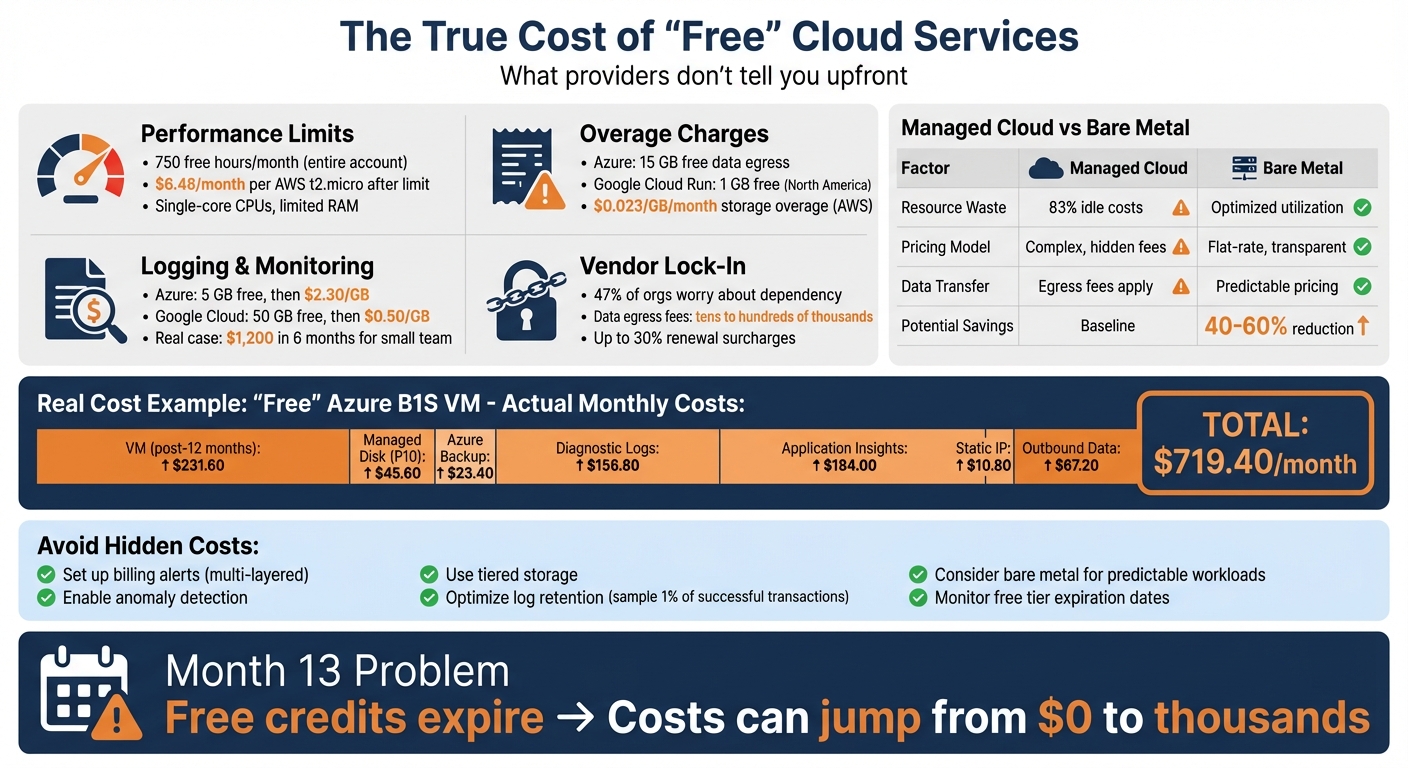
Hidden Costs Breakdown: Free Cloud Services vs Bare Metal Infrastructure
The Hidden Costs of Cloud Computing with Jack Ellis
Hidden Costs in Free Managed Services
Free tiers might look appealing at first glance, but they often come with hidden limits that can turn small experiments into unexpectedly expensive ventures. Let’s break down these hidden costs.
Performance Limits and Resource Caps
Free tiers often limit you to entry-level resources. For example, Azure and AWS provide basic instance types like Azure’s B1S VMs and AWS‘s t2.micro/t3.micro instances. These options come with minimal CPU and RAM – enough for light workloads but likely to struggle under heavier demand.
The fine print? The 750 free hours per month apply to your entire account, not per resource. So, if you run two instances continuously, you’ll hit the limit in just over two weeks. After that, you’ll pay standard rates – around $6.48 monthly for each AWS t2.micro instance in the US East region.
Serverless functions have their own restrictions. Most providers allow up to 1 million executions per month, but a sudden traffic spike could burn through that limit in hours. Beyond the cap, AWS Lambda, for instance, charges $0.20 per million requests.
"The Free Tier isn’t a locked test environment, it’s a pricing tier. And pricing tiers, by nature, don’t stop you from spending." – CloudOptimo
Adding to the problem, many providers don’t cut off services when you exceed the free limits. Instead, they automatically switch to pay-as-you-go pricing without requiring approval. This can lead to staggering costs – over $500 in a single month, covering things like managed disks, log ingestion, and outbound data fees.
Overage Charges and Data Egress Fees
Data egress is another area where costs can quickly spiral. For instance, Azure includes 15 GB of outbound data transfer per month, while Google Cloud Run offers just 1 GB within North America. Going over these limits triggers standard egress rates immediately.
Storage is similarly constrained. AWS S3 and Azure Blob Storage both cap free storage at 5 GB. Beyond that, you’ll pay about $0.023 per GB per month on AWS. Other essential resources aren’t included at all – like static IP addresses and managed disks. For example, Azure charges approximately $3.60 per month for a static public IP and $1.52 per month for a P10 managed disk. These charges persist even if the associated VM is stopped unless you explicitly deallocate or delete the resource.
Geographic restrictions can further complicate things. Free tier benefits are often limited to specific regions, so deploying services outside those areas means instant standard rates.
Logging and Monitoring Costs
Default logging and monitoring configurations can lead to unexpected expenses once you exceed free limits. Azure Log Analytics offers 5 GB of free ingestion per month, with overages billed at roughly $2.30 per GB. Google Cloud Logging, on the other hand, provides 50 GB per project monthly, but charges $0.50 per GB for anything beyond that.
Here’s an example: A small development team using Azure’s free tier racked up over $1,200 in charges over six months, despite having fewer than 100 users. In just one month, they were billed $184 for Application Insights log ingestion and $156.80 for diagnostic logs sent to Log Analytics. These costs stemmed from default settings that went unchecked by system alerts.
Retention policies can add even more costs. Google Cloud charges $0.01 per GB per month for logs stored beyond 30 days, while AWS CloudTrail charges $2.00 per 100,000 management events if additional copies are delivered to S3. Even querying or listing log data through APIs can incur fees after free allotments are used up. Starting May 1, 2026, Google Cloud Monitoring will introduce a $0.10 monthly charge for each condition in an alerting policy.
| Service Component | Provider | Free Tier Limit | Overage Cost |
|---|---|---|---|
| Log Ingestion | Azure | 5 GB/month | ~$2.30 per GB |
| Log Storage | Google Cloud | 50 GB/month | $0.50 per GB |
| Log Retention (>30 days) | Google Cloud | N/A | $0.01 per GB/month |
| Management Events | AWS | First copy free | $2.00 per 100,000 events |
| Alerting Conditions | Google Cloud | N/A | $0.10 per condition/month (from May 2026) |
Billing Surprises from Default Settings
Examples of Silent Charges
The problem with "free" managed services often isn’t the fees you know about – it’s the ones you don’t. Many cloud providers don’t enforce strict limits on free-tier usage. Instead, when you exceed those limits, services seamlessly switch to pay-as-you-go pricing without asking for your consent.
Here’s a common example: spinning up a free Azure B1S virtual machine (VM) might seem harmless, but it can trigger additional services that rack up costs. You could end up paying for a P10 managed disk ($45.60/month), Azure Backup ($23.40/month), a static IP ($10.80/month), and diagnostic logging, which can balloon to $156.80/month after 5 GB of usage. None of these extras are covered under the free tier, and you won’t need to approve them before the charges start piling up.
This isn’t unique to Azure. AWS has similar hidden costs. For instance, Elastic Beanstalk and OpsWorks may automatically restart manually stopped instances to ensure high availability. Even unattached Elastic IPs will continue charging $3.60 per month after the associated instance is terminated. And if you stop a VM in the console without deallocating it, the compute resources remain billable.
Table: Free Tier Limits vs. Actual Charges
| Service | Free Limit | Hidden Charge Example | Monthly Cost ($) |
|---|---|---|---|
| B1S Virtual Machine | 750 hours/month | Post-12-month expiry charge | $231.60 |
| Managed Disk (P10) | 0 GB (attached to VM) | Storage for "free" VM | $45.60 |
| Azure Backup | 0 (Auto-enabled) | Automated VM backups | $23.40 |
| Diagnostic Logs | 0 (Sent to Log Analytics) | Network/Resource diagnostics | $156.80 |
| Application Insights | 5 GB/month ingestion | Telemetry beyond free limit | $184.00 |
| Static Public IP | 0 (Assigned by default) | Unattached or default IP | $10.80 |
| Outbound Data | 15 GB/month | Egress traffic to internet | $67.20 |
Up next, we’ll outline steps you can take to identify and mitigate these unexpected charges.
sbb-itb-f9e5962
Provider Lock-In and Scaling Problems
Vendor Lock-In and Exit Fees
"Free" managed services often come with hidden costs, particularly steep exit fees. One of the biggest culprits is data egress fees – what providers charge to move your data out of their ecosystem. These fees are significantly higher than what you’d pay for internal data transfers and can climb into the tens or even hundreds of thousands of dollars for high-volume applications [26, 7].
"The single largest obstacle to switching cloud providers is often the cost of moving the data, which can run into the tens or hundreds of thousands of dollars." – Fivetran
But it’s not just about the money. Many providers build deep technical dependencies into their services, using proprietary APIs and certifications that make migrating elsewhere a massive headache. In some cases, switching providers means rewriting your entire application architecture, not just swapping out infrastructure. On top of this, investing in provider-specific certifications can create an organizational inertia, making it even harder to make a move. No wonder nearly half (47%) of organizations worry about their reliance on major players like AWS, Azure, and Google Cloud Platform.
This combination of high costs and technical barriers doesn’t just trap you – it also sets the stage for scaling challenges you might not see coming.
Scaling Bottlenecks and Cost Spikes
Even if you can navigate the lock-in, scaling "free" services can lead to sudden and overwhelming expenses. Free tiers often lack safeguards, meaning rapid growth can automatically bump you into pay-as-you-go pricing. This can result in a shocking bill – one month might be free, and the next could cost thousands [7, 9].
Things get even trickier during the so-called "Month 13." After the first year, when free credits typically expire, costs can skyrocket. Many architectures, built without efficiency in mind during the free period, suddenly rack up full pay-as-you-go charges. To make matters worse, businesses often face cloud contract renewal surcharges of up to 30%, leaving them with little room to negotiate. In the end, it’s not just about being locked in – it’s about being locked in at whatever price your provider decides to set.
How to Evaluate and Reduce Risks
These steps tackle the hidden charges discussed earlier, helping you manage costs effectively.
Set Billing Alerts and Track Usage
Keeping an eye on spending is crucial. Tools like AWS Budgets and Google Cloud Budgets let you compare actual expenses to your planned costs and send alerts when limits are exceeded. But static alerts alone might not cut it – unexpected charges can still creep in. That’s where anomaly detection comes in. Services like AWS Cost Anomaly Detection and GCP’s Cloud Billing Anomaly Detection analyze past spending patterns to catch unusual spikes, even if they don’t cross your budget thresholds.
A good practice is to set multi-layered alerts. For instance, you could create one alert for a flat cost increase (like a $200 jump) and another for a percentage-based rise (e.g., 20% above the usual spend). Streamline your alerting policies to cover multiple resources (like 100 virtual machines) and focus on production-critical environments by filtering out non-production data.
Monitoring alone isn’t enough, though. Managing log data is another key step to avoid hidden costs.
Optimize Log Retention and Sampling
Logs can quickly turn into a major expense. For example, Google Cloud charges $0.50 per GiB for the first 30 days of log storage and $0.01 per GiB per month after that. Keeping every log indefinitely can balloon costs. A smarter approach is log sampling and tiered storage. For example, you could store 100% of failed transactions and security events while sampling only 1% of successful transactions. This strategy can slash log volume by up to 50% while retaining critical troubleshooting data.
You can also manage logs through lifecycle stages. Use "Hot" storage for active investigations, "Warm" storage for logs from the past 30–90 days, and "Cold" or archived storage (like Amazon S3) for long-term compliance needs. Services like Azure’s "Basic Logs" can also reduce costs for high-volume debugging scenarios. To prevent unexpected expenses, set rule-based quotas to cap log ingestion – this can help avoid surprises caused by bugs in CI/CD pipelines.
Consider Bare Metal for Cost Efficiency
If optimizing alerts and logs doesn’t sufficiently curb costs, it might be time to explore alternative infrastructure options. Bare metal servers can be a cost-effective solution when managed services become too expensive. For instance, Kubernetes clusters waste an average of 83% of container costs on idle resources – 54% due to overprovisioned infrastructure and 29% from oversized workload requests. Managed services often come with hidden egress fees, whereas bare metal eliminates virtualization overhead, provides straightforward flat-rate data transfer pricing, and maximizes hardware utilization.
| Aspect | Managed Service Risk | Bare Metal Benefit |
|---|---|---|
| Resource Waste | 83% of container spend is idle | Better hardware utilization |
| Data Egress | Hidden egress fees | Clear, flat-rate pricing |
| Pricing Model | Complex billing structures | Transparent flat-rate pricing |
| Management | Automated by provider | Requires dedicated management |
For smaller teams (10–50 people), TechVZero offers bare metal infrastructure with the same reliability as managed cloud services but at 40–60% lower costs. Their performance-based pricing means you pay 25% of the savings over a year – nothing if no savings are achieved. They also include built-in security (evidenced by thwarting a DDoS attack during a client engagement) and compliance support (SOC2, HIPAA, ISO) tailored to your timeline, eliminating the need for an in-house infrastructure specialist.
Conclusion
"Free" managed services often come with a catch. Costs like data egress, log ingestion, and idle resource fees can pile up quickly, turning "free" into anything but.
These hidden costs don’t stop at billing surprises. For example, integration work can eat up 50–60% of an AI project’s budget, while maintaining self-hosted Kubernetes clusters may require around $185,000 annually in specialized talent. When combined, these operational expenses amplify the financial strain of so-called free services.
To keep expenses in check, use layered alerts and manage log retention efficiently. These steps can help you avoid unnecessary charges that inflate costs.
The takeaway? Align your infrastructure choices with your actual workload needs. Bare metal infrastructure offers a simpler alternative to hyperscaler billing, featuring flat-rate pricing and potential savings of 40–60% – all while maintaining reliability. Not every application demands global multi-region elasticity, and not every "free" service is worth the hidden price tag.
For teams of 10–50 people who want predictable costs without hiring a dedicated infrastructure specialist, solutions like TechVZero stand out. Their bare metal infrastructure uses performance-based pricing: you pay 25% of the yearly savings or nothing if no savings occur. In one instance, TechVZero saved a client $333,000 in just one month while also mitigating a DDoS attack [website].
FAQs
What hidden costs should I watch out for in ‘free’ managed cloud services?
While "free" managed cloud services might look like a budget-friendly option upfront, they often come with hidden costs that can catch you off guard. For instance, free tiers often involve performance trade-offs, such as slower speeds or reduced reliability. There’s also the issue of provider lock-in, where switching to a different service later can become both costly and complicated. And let’s not forget scaling limitations – most free plans have strict resource caps, meaning you’ll likely need to pay for upgrades as your needs grow.
Other potential expenses include data transfer fees for moving information in and out of the cloud, charges for idle resources that aren’t actively in use, and integration or maintenance costs when connecting services or resolving technical issues. These expenses can quickly add up, especially as your usage increases. That’s why it’s important to weigh these risks carefully before jumping into a free plan.
How can I prevent unexpected costs when using free cloud service plans?
If you’re using free cloud service plans, it’s crucial to understand the limits of the free tier. Most providers set usage caps for things like storage, compute power, and data transfer. Going over these limits can result in unexpected charges.
To keep things under control, make it a point to monitor your usage regularly. Use the provider’s dashboard or set up alerts to track how close you are to the free tier boundaries. Another smart move? Shut down or delete resources you’re not using. This is especially important as you approach the end of the free tier period or if you’re nearing its limits.
By staying on top of your usage and managing resources wisely, you can enjoy the benefits of free cloud services without any surprise bills.
What makes vendor lock-in a risk with ‘free’ managed services?
Vendor lock-in is a major concern when it comes to "free" managed services. These services often rely on proprietary tools and technologies that don’t easily translate to other platforms. For instance, serverless computing or specialized databases might require unique configurations or custom code that are tied exclusively to the provider’s ecosystem.
This reliance can become a costly headache if you decide to switch providers later. Not only could migration be complex, but once the free credits or trial period expires, unexpected charges might crop up, making it harder to maintain control and flexibility over your cloud infrastructure. Taking the time to assess these risks early on can help you avoid expensive complications in the future.