How to Build an SLA That Protects Your Budget

Want to avoid cloud spending overruns? Start with your SLA.
Your Service Level Agreement (SLA) isn’t just a technical document – it’s a financial tool that directly impacts cloud costs. With cloud spending projected to exceed $1 trillion by 2026, poorly designed SLAs can lead to unpredictable bills, hidden fees, and wasted resources. Here’s the key takeaway: how you structure your SLA can either protect your budget or drain it.
Key Points:
- Uptime vs. Cost: Higher availability (e.g., 99.99% vs. 99.9%) requires costly infrastructure upgrades, like multi-zone deployments.
- Common Budget Drains: Hidden fees (data egress, cross-region traffic) and unused resources can inflate costs by 20–40%.
- Metrics That Matter: Focus on availability, resource utilization, and commitment coverage to align spending with business needs.
- Error Budgets: Use allowable downtime margins to balance reliability and innovation.
- Negotiation Tips: Push for spending caps, automatic service credits, and tighter definitions of downtime in contracts.
By treating your SLA as a financial agreement, you can avoid waste, control costs, and ensure your cloud spending delivers real value. Let’s break down how to achieve this.
Service Level Agreement In Cloud Computing | SLA Management | Types of SLA | Life Cycle of SLA
sbb-itb-f9e5962
Choosing SLA Metrics That Control Costs
SLA metrics can significantly influence your cloud expenses. Some metrics lead to higher costs with every incremental improvement, while others help fine-tune resource allocation to avoid waste. The challenge lies in selecting the right metrics to monitor, ensuring you’re not overspending on levels of reliability that your business doesn’t require. Below, we’ll explore how these metrics tie into the financial aspects of SLA design.
Metrics That Directly Affect Your Cloud Spending
Availability targets are a major factor in cloud costs. For example, aiming for 99.9% uptime versus 99.99% may seem like a small difference, but it has a big impact on infrastructure. A 99.9% SLA allows for approximately 43.2 minutes of downtime per month, while 99.99% uptime limits downtime to just 4.32 minutes. Achieving the higher target typically requires multi-zone deployments and redundant systems, which can drive up monthly expenses.
Resource utilization rates offer insights into potential overspending. If your CPU or memory usage consistently stays below 40% over a four-week period, you’re essentially paying for unused capacity. As Konrad Kur, CEO of SoftwareLogic.co, explains:
"On average, adjusting resource allocation can drive cost reductions of 25-40% without impacting performance."
Idle and unattached resources – often referred to as "zombie" resources – are another source of waste. These include unused storage, orphaned snapshots, and inactive load balancers, all of which continue to incur charges without delivering any value. Research shows that between 27% and 35% of cloud infrastructure spend is tied up in idle or underutilized resources.
Commitment coverage ratio measures how much of your compute spend is covered by Reserved Instances or Savings Plans instead of more expensive on-demand rates. Teams that formalize cloud spending KPIs often see reductions of 15% to 30% as their practices mature. Ideally, 80-90% of your spending should be tied to specific projects or owners, ensuring efficient allocation.
Focus Resources on High-Priority Services
In most cases, 10–20 services account for 60–80% of your total cloud costs. Applying the same SLA standards across all services not only wastes money but also consumes valuable engineering time.
Prioritize services based on business impact. For example, critical production databases might require 99.99% availability, but development environments can often operate effectively at 99.5%. Non-production environments, which can account for up to 44% of compute spending, frequently remain idle outside of business hours. Automating shutdowns for these environments during off-hours can reduce non-production costs by 40–65%.
Use unit cost metrics to better align spending with business value. Instead of focusing solely on total costs, measure expenses per customer, transaction, or API call. This helps pinpoint which services provide a strong return on investment and which ones are draining resources. For storage-heavy workloads, consider lifecycle policies that automatically move infrequently accessed data to archival tiers after 30 days, which can significantly lower costs.
Focus on tracking metrics that have the biggest impact. For instance, set thresholds to flag resources running below 40% CPU or memory usage for potential rightsizing or consolidation. For non-critical workloads like CI/CD pipelines, use spot instances or preemptible VMs, which can save 70–90% compared to on-demand pricing. As Konrad Kur aptly states:
"Every dollar spent on idle resources is a dollar not invested in business growth."
Setting Thresholds and Error Budgets That Protect Your Budget
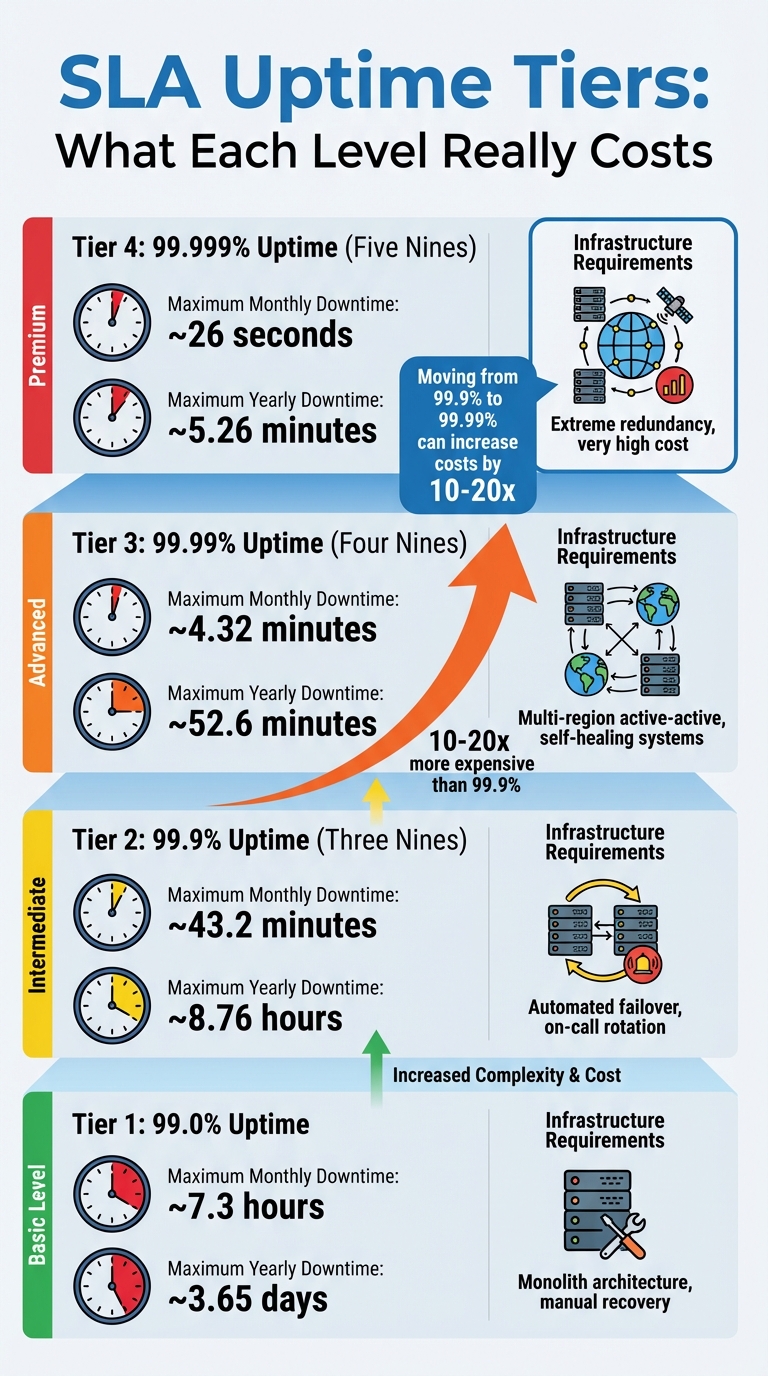
SLA Uptime Tiers: Downtime Limits and Infrastructure Requirements
How to Set Realistic SLA Thresholds
Jumping from 99.9% to 99.99% availability isn’t just a minor upgrade – it comes with a major price tag. Costs and complexity can skyrocket by 10 to 20 times when moving from three nines to four nines. Why? At 99.99% uptime, you’re allowed only 4.32 minutes of downtime per month, which often demands automated, self-healing systems. Manual recovery just can’t keep up with those demands.
So, how do you set realistic thresholds? Start by looking at your historical performance. For example, if your system has consistently delivered 99.7% uptime over the past six months, promising 99.9% externally is achievable. Internally, though, you might set your SLO (Service Level Objective) slightly higher – say, 99.95% – to give yourself a buffer. As the UpReport Team puts it:
"Your internal SLO should always be stricter than your external SLA… This creates a buffer, allowing your monitoring tools to alert you before you breach a contract."
Dependencies play a big role here, too. If your app depends on multiple services – each with 99.9% availability – the composite availability drops. For instance, an app relying on a database and an authentication provider, both at 99.9%, will end up with a combined availability closer to 99.7%. Overcommitting beyond what your dependencies can handle can lead to penalties and frustrated customers.
Here’s a quick breakdown of SLA tiers and their requirements:
| SLA Tier | Max Monthly Downtime | Max Yearly Downtime | Requirements |
|---|---|---|---|
| 99.0% | ~7.3 hours | ~3.65 days | Monolith, manual recovery |
| 99.9% | ~43.2 minutes | ~8.76 hours | Automated failover, on-call rotation |
| 99.99% | ~4.32 minutes | ~52.6 minutes | Multi-region active-active, self-healing |
| 99.999% | ~26 seconds | ~5.26 minutes | Extreme redundancy, high cost |
These thresholds are essential for aligning costs with your operational goals, ensuring you don’t overpromise or overspend.
Using Error Budgets to Control Cost Overruns
Once your thresholds are set, error budgets become your go-to tool for managing SLA breaches and keeping costs in check. An error budget is simply the margin of allowable failure – calculated as 100% minus your SLO. For example, a 99.9% SLO gives you a 0.1% error budget. If you’re processing 1 million requests daily, that translates to about 30,000 failed requests per month.
Error budgets let you balance innovation with reliability. When the budget is healthy, teams can focus on rolling out new features. But if you’re burning through it too fast, it’s time to hit pause and focus on improving system reliability. Take Spotify’s engineering team, for example. In Q4 2018, they noticed they had used up 78% of their error budget during the holiday season. To avoid SLA penalties, they paused non-critical feature deployments for two weeks and redirected efforts toward reliability. The result? A 35% drop in incidents the following quarter – without spending extra.
To make the most of error budgets, consider tiered alerts. For instance:
- If your error budget drops below 25%, freeze non-critical deployments and prioritize reliability fixes.
And don’t forget automation. By integrating error budget checks into your CI/CD pipeline, you can automatically block deployments when the budget is critically low. As Caleb Poku Ackom, an SRE, explains:
"The Error Budget is the most powerful management tool… It is the allowable unreliability you can ‘spend’ before corrective action is mandated."
This approach ensures you stay ahead of potential issues while keeping your budget intact.
Negotiating SLA Terms That Prevent Hidden Costs
To truly manage your cloud expenses, it’s not just about choosing cost-conscious metrics – it’s about crafting contract terms that shield you from surprise charges. These safeguards work hand-in-hand with your SLA metrics, creating a well-rounded approach to protect your budget.
Contract Clauses That Cap Your Spending
The fine print in your SLA can have a massive impact on your cloud costs. Standard service credits might sound reassuring but often fall short. For example, AWS Budgets provides credits based on uptime: 10% if uptime drops below 99.9%, 25% for below 99.0%, and 100% for below 95%. But here’s the catch – these credits apply to future payments, not as cash refunds. According to the AWS Budgets SLA:
"Unless otherwise provided in the AWS Agreement, your sole and exclusive remedy for any unavailability or non-performance or other failure by us to provide AWS Budgets is the receipt of a Service Credit."
This "sole and exclusive remedy" clause means you can’t claim compensation for revenue lost due to downtime. If you’re running mission-critical operations, this limitation can be a dealbreaker. During negotiations, push to remove such restrictions. You could ask for higher credit percentages or shorter claim windows – standard contracts often require claims to be filed within two billing cycles, which delays any relief.
Beyond service credits, consider adding usage quota overrides to your agreement. These set strict limits on costly resources like GPUs or high-CPU instances. You can also negotiate for automated controls that halt non-essential resources or scale down capacity once your spending crosses a certain threshold (e.g., 120% of your monthly budget). To make this work, define "essential" resources clearly using tags (e.g., essential=true) so the system knows what to prioritize during budget overruns.
Another key area to address is bandwidth and egress charges. Without clear limits, these fees can balloon into thousands of dollars each month. Setting explicit caps on these costs ensures you won’t be blindsided by unexpected bills. But capping costs is only part of the equation – you also need to ensure vendors stick to their commitments.
Making Vendors Accountable for Cost Commitments
Holding vendors accountable starts with precise language in your SLA. Many agreements exclude downtime caused by external factors like force majeure, internet issues, or customer configuration errors. For example, Azure‘s SLA guide states:
"SLAs don’t cover downtime due to customer configuration errors, application software, force majeure, or preview features."
These exclusions can be overly broad, so it’s worth negotiating tighter definitions of "uptime" and "planned maintenance" to avoid loopholes.
Another common pitfall is scaling restrictions. While many SLAs allow on-demand upward scaling, they often limit downward scaling to annual reviews. This forces you to pay for unused capacity for months on end. Negotiating terms that allow for quarterly – or even monthly – downward adjustments can save significant costs.
Automatic service credits are another way to ensure accountability. Instead of requiring you to file a claim, these credits should kick in as soon as performance drops. If the standard credit is 5%, counter with 25%, or request monthly calculations instead of quarterly ones for faster compensation.
Lastly, transparency is key. Insist on audit and expense breakdown clauses in your SLA. These provisions allow you to monitor costs closely and spot hidden charges before they spiral out of control. With roughly 30% of cloud budgets wasted on unused resources, having clear visibility into your spending is crucial.
Monitoring SLA Compliance and Optimizing Cloud Costs
Once your SLA is set, the challenge shifts to keeping costs in check and ensuring compliance. Even the best-negotiated terms won’t save you if you’re not actively monitoring and managing your cloud usage. The trick lies in combining native tools with automated alerts to catch issues before they spiral into costly problems.
Tools for Tracking Cloud Costs Against SLAs
Start with the cost management tools provided by your cloud provider. Platforms like Google Cloud Cost Management, Microsoft Cost Management, and AWS Cost Explorer give you insights into spending trends, forecasts, and budget tracking. Many of these tools now include AI assistants – such as Google Cloud’s Gemini, Azure’s Copilot, and Amazon’s Q – that let you ask straightforward questions like, “Which region had the largest cost increase last month?” without wading through complex dashboards.
For organizations using multiple cloud providers, third-party tools like Datadog Cloud Cost Management and Binadox Cost Explorer can consolidate data across platforms like AWS, Azure, GCP, and DigitalOcean. Datadog also includes Service Level Objective (SLO) tracking, with alerts and burn rate notifications to flag SLA breaches early. Meanwhile, Binadox offers right-sizing recommendations, which can trim cloud costs by around 30% by identifying over-provisioned resources.
Automated anomaly detection is another must-have. Both Google Cloud and AWS use systems that identify unexpected spending spikes in real time. For instance, AWS Budgets updates cost data up to three times a day – roughly every 8–12 hours – and allows multi-stage alerts at thresholds like 25%, 50%, 90%, and 100% of your budget. This gives you time to act before costs get out of hand.
For deeper analysis, export billing data to tools like BigQuery or Snowflake and use BI platforms such as Looker Studio to uncover custom insights.
Running Regular SLA Audits
Routine audits turn raw data into meaningful action. Weekly FinOps reviews should focus on pinpointing the biggest budget drains, such as low Reserved Instance or Savings Plan utilization, and identifying waste.
Idle resources are a common culprit. Unattached storage volumes, orphaned snapshots, and unused Elastic IPs can eat up 30–40% of cloud budgets in unmanaged environments. Rule-based automation can help here – shutting down non-production resources during off-hours or cleaning up unused storage can significantly reduce waste. Poor tagging practices are another issue, as they can lead to “unallocated spend” that’s hard to trace back to specific teams or projects. Tools like Terraform can enforce consistent tagging policies to address this.
Another key area is commitment coverage. Regular audits ensure that Reserved Instances or Savings Plans are being fully utilized. It’s estimated that around 32% of cloud spending is waste. If you spot underutilization, don’t wait for annual reviews – renegotiate SLA terms during quarterly meetings to avoid months of unnecessary costs.
Finally, don’t overlook SLA credits. For example, AWS may offer credits for downtime, but claiming them requires detailed logs of errors and connection failures. Make sure to submit these within the required billing cycles. Without proper documentation, you risk losing compensation even when the provider doesn’t meet uptime guarantees.
Conclusion
Key Takeaways
Creating an SLA that aligns with your budget isn’t about stifling growth – it’s about making cost a deliberate design factor, just like performance or security. Treat your budget as a service level objective (SLO) with the same focus you’d give uptime or latency targets.
Start by setting multi-stage budget thresholds with alerts at 25%, 50%, and 90% of your spending limit to catch potential issues early. For non-production environments, consider automated "kill switches" (like Deny IAM policies or stopping instances) to halt spending once you hit 100% of your budget, as discussed earlier. This layered approach – combining alerts, notifications, anomaly detection, and automated actions – helps prevent runaway costs. Complement these measures with strict tagging policies to ensure at least 90% of your cloud expenses are tied to specific teams or projects. Keep in mind that an estimated 32% of total cloud spend is often wasted.
"The goal isn’t to make engineers afraid of spending. It’s to make cost a design constraint, like performance or security." – The Cloud Standard
By adopting these practices, you’ll build a more actionable and effective cloud cost management strategy.
Next Steps for Budget-Conscious Founders
To start, audit your current setup. If you don’t have cost guardrails in place, begin by configuring basic alerts. AWS, for instance, offers two free budgets per account, and setting them up takes just a few minutes. Review your SLA terms quarterly and take advantage of cost-saving options like Reserved Instances or Savings Plans where applicable.
Additionally, track cost per active user or transaction alongside traditional metrics like uptime. This lets you directly link cloud performance to business outcomes, making it easier to predict the financial impact of scaling. Transition from annual IT budgeting to a continuous FinOps model, incorporating weekly reviews and monthly adjustments to thresholds.
Don’t overlook SLA credits. Most cloud providers offer compensation ranging from 10% to 100% of charges for uptime failures, but you’ll need detailed error logs and must file claims within 60–90 days. Without proper documentation, you could miss out on these credits, even when the provider doesn’t meet their commitments.
FAQs
How do I pick the cheapest uptime target that still meets business needs?
To determine the most budget-friendly uptime target, weigh the expense of higher uptime guarantees against how essential your services are. Start by identifying the minimum uptime your business can handle without facing serious issues. For instance, opting for 99.0% uptime will generally cost less but allows for more downtime compared to 99.9%. Carefully examine your provider’s SLA terms, including any remedies or credits offered, to ensure the uptime target fits both your financial constraints and operational priorities.
What hidden cloud charges should my SLA cap or exclude?
Your SLA should clearly define and limit any hidden charges, such as fees for data transfer, bandwidth, storage, and support services. Additionally, it’s crucial to account for costs tied to extra hardware, software licensing, compliance requirements, and usage-based fees, as these can quickly add up and strain your budget. By explicitly addressing these terms in your SLA, you can avoid surprises and maintain better control over your expenses.
How can I enforce budget limits automatically without risking outages?
To keep your budget in check while avoiding service disruptions, rely on automated cost controls. Start by setting spending thresholds within your cloud platform. These thresholds can trigger actions like scaling back resources when limits are approached.
For added efficiency, combine these budget alerts with automation tools like Lambda or Cloud Functions to handle adjustments automatically, ensuring your services stay stable. You can also use service control policies or IAM policies to enforce budget rules without needing constant manual oversight. This approach keeps everything running smoothly while staying within your financial limits.