Migrating Stateful Databases to Bare Metal: A Practical Guide

If rising cloud costs and unpredictable performance are hurting your bottom line, migrating stateful databases to bare metal servers could be the solution. Bare metal offers direct access to hardware, eliminating the overhead and variability of virtualized environments. This means faster database performance, reduced latency, and fixed costs – ideal for SaaS and AI companies managing stable, high-performance workloads.
Here’s what you need to know:
- Why move off the cloud? Cloud expenses grow as workloads stabilize, with high IOPS costs, egress fees, and licensing tied to virtual CPUs. Bare metal eliminates these issues, offering consistent performance and predictable pricing.
- Performance boost: Databases like PostgreSQL can achieve 30%-40% more transactions per second on bare metal compared to virtualized setups.
- Cost savings: Companies like Ahrefs and Dropbox have saved millions by switching to bare metal infrastructure.
- Who benefits most? Businesses with stable, predictable workloads and a need for high IOPS or low latency.
This guide walks you through evaluating your current setup, planning the migration, designing bare metal architecture, and optimizing post-migration performance. Whether you’re cutting costs or improving database reliability, this approach puts you in control of your infrastructure.
How Dukaan moved out of Cloud and on to Bare Metal w/ Subhash | Ep 5

Planning the Migration
Bare Metal vs Virtualization Performance Comparison for Database Workloads
When migrating to a new system, the first step is deciding what to move and where it will go. A well-thought-out plan is your best defense against outages and data loss. The preparation phase is critical – it can either set you up for success or turn into a cautionary tale.
Evaluating Your Current Database Workloads
Start by creating a detailed inventory of all your servers. This includes cataloging every physical and virtual server, noting hostnames, operating system versions, patch levels, and hardware specs like CPU, RAM, and storage allocations. Instead of relying on static spreadsheets – which can quickly become outdated – use a Configuration Management Database (CMDB) as your single source of truth.
Next, map system dependencies. This process often uncovers undocumented connections, such as legacy services relying on old databases or hardcoded APIs tied to specific IP addresses. While predictive AI can improve mapping accuracy by 40%, manual audits are still essential. Talk to stakeholders and review configuration files to find hidden dependencies.
Analyze performance metrics like peak I/O, latency, and how virtualization impacts workloads. Tools like tcpdump or Wireshark can help you monitor real-time system communications. These insights are crucial for sizing your bare metal hardware.
Compare the costs of your current cloud setup with bare metal alternatives. Keep in mind that 38% of applications are challenging to migrate due to technical debt, so identifying these early is critical to planning a phased migration strategy.
Define Recovery Time Objectives (RTO) and Recovery Point Objectives (RPO) for each application based on its importance to the business. These goals will shape your migration plan and determine acceptable downtime. Additionally, lower your DNS Time-to-Live (TTL) settings well ahead of the cutover to speed up changes during the switchover.
With all this data in hand, you can design a bare metal architecture that meets your performance and compliance needs.
Designing Your Bare Metal Architecture
Your architecture should prioritize performance, reliability, and meeting compliance standards. Use a multi-tier resource hierarchy with a load balancer to distribute traffic across application servers, which then connect to dedicated database servers.
Network segmentation is key. Isolate database and application tiers using Virtual Cloud Networks (VCN) with regional subnets for security. Layer 2 VLANs within your bare metal environment add further isolation for sensitive data. Secure storage volumes with XTS-AES-256 encryption keys generated at the time of volume creation.
For orchestration, Kubernetes-native platforms let you manage stateful workloads declaratively with resources like VirtualMachine and VirtualMachineDisk. Reliable Kubernetes setups on bare metal require at least 4 CPUs, 16GB of RAM, and 100GB SSD storage for the master node. Disable swap on all nodes to avoid performance hits, and ensure net.ipv4.ip_forward is enabled for proper pod-to-node communication.
To ensure high availability, deploy resources across multiple Fault Domains – hardware groupings designed to withstand server failures. For Kubernetes-based setups, aim for at least three control plane nodes to maintain redundancy. Testing has shown that a 50 TB Oracle database can be recovered within 24 hours using specialized backup and disaster recovery services.
Storage design is another critical factor. High-performance NVMe drives or dedicated Storage Virtual Machines (SVM) on NetApp clusters are ideal for ensuring I/O performance and tenant isolation. If live migration is part of your plan, make sure your storage supports ReadWriteMany (RWX) access mode.
Meeting compliance requirements like SOC2, HIPAA, or PCI DSS is easier with bare metal. Physical security measures (e.g., biometric locks, 24/7 monitoring) and data-at-rest encryption simplify audits. Unlike cloud environments, bare metal gives you complete control over network boundaries, encryption, and audit trails, streamlining compliance processes.
Cloud vs. Bare Metal: Cost and Performance Comparison
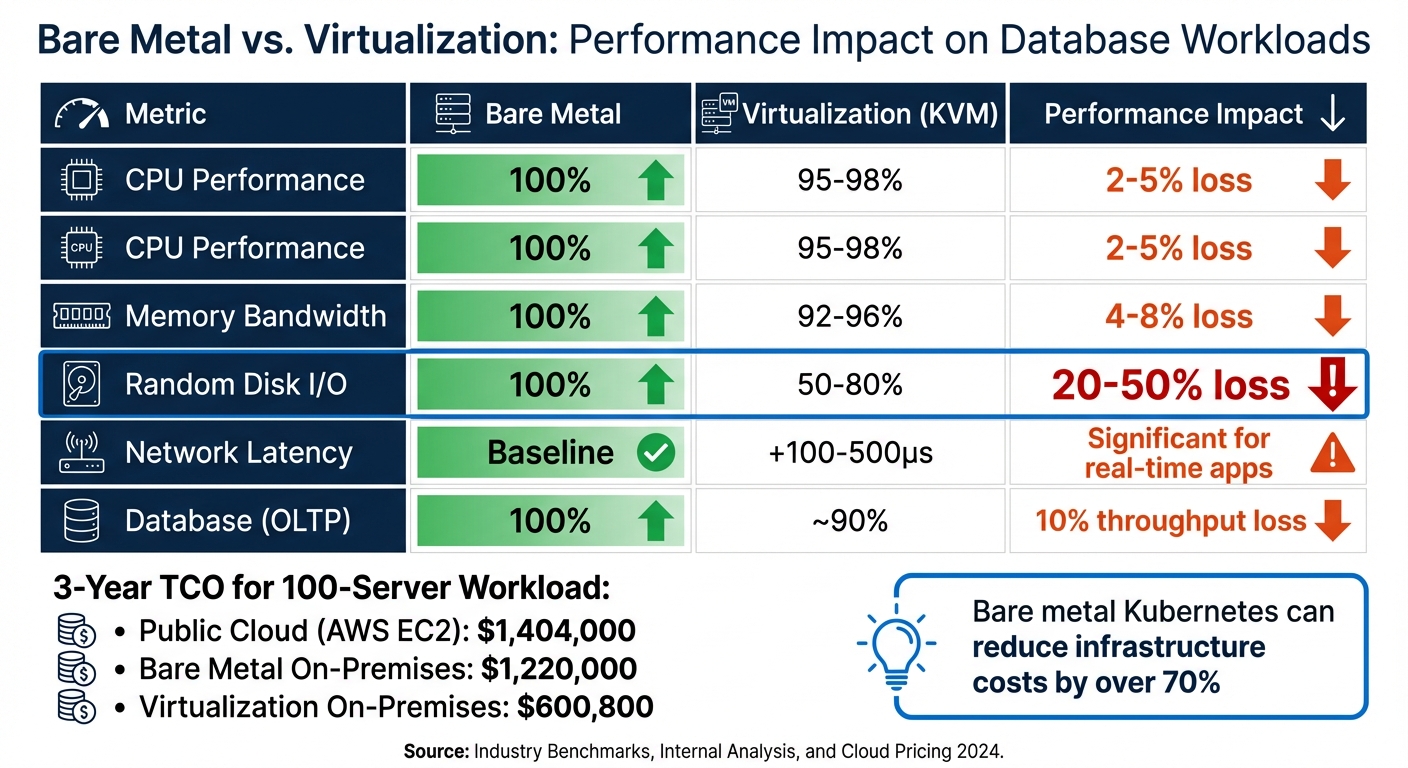
Use your workload analysis to weigh the performance and cost benefits of bare metal. For stateful databases, bare metal outshines virtualization in both areas. For example, PostgreSQL on virtualization experiences a 10% drop in throughput and a 12-15% increase in latency. Meanwhile, virtualization causes a 20-50% loss in random I/O performance, making it less suitable for I/O-intensive workloads.
| Metric | Bare Metal | Virtualization (KVM) | Performance Impact |
|---|---|---|---|
| CPU Performance | 100% | 95-98% | 2-5% loss |
| Memory Bandwidth | 100% | 92-96% | 4-8% loss |
| Random Disk I/O | 100% | 50-80% | 20-50% loss |
| Network Latency | Baseline | +100-500µs | Significant for real-time apps |
| Database (OLTP) | 100% | ~90% | 10% throughput loss |
From a cost perspective, the differences are striking. A 3-year total cost of ownership (TCO) comparison for a 100-server workload shows public cloud (AWS EC2) at $1,404,000, bare metal on-premises at $1,220,000, and virtualization on-premises at $600,800. Companies moving from public cloud to bare-metal Kubernetes have reported infrastructure cost reductions of over 70%.
The shift in cost models is also worth noting. Cloud operates on a variable OpEx model, often with unpredictable "Cloud Tax" (30-60% provider margins), while bare metal uses a predictable CapEx or fixed monthly lease model. However, bare metal requires careful forecasting and N+1 redundancy planning due to hardware supply chain lead times.
For databases needing more than 100,000 IOPS or sub-millisecond latency, bare metal is the clear choice. These comparisons highlight why bare metal is often the go-to solution for demanding workloads.
Setting Up Bare Metal Infrastructure
To maximize the cost and performance advantages of bare metal, you need to transition your planned architecture into a well-automated infrastructure. After finalizing your architecture, the next step is to deploy and configure your hardware. The key here is automation – relying on manual configuration can lead to inconsistencies and challenges when scaling. Start by setting up your servers to create a solid, scalable foundation.
Setting Up Servers with TechVZero
Make sure every server includes a Baseboard Management Controller (BMC) that supports IPMI or Redfish protocols. This feature allows for remote management tasks like power cycling, mounting virtual media, and monitoring hardware health without needing physical access. For automated operating system provisioning, ensure your hardware supports PXE (Preboot Execution Environment).
When dealing with stateful databases, proper storage configuration becomes essential. Use RAID configurations on NVMe drives to improve both performance and redundancy, especially for critical database operations. Marcus Chen, a Senior Cloud Infrastructure Engineer, shared:
"In my testing, bare metal often delivers 20-30% better performance than VPS for GPU-intensive applications".
For backups, object storage solutions like MinIO offer scalable storage and compatibility with S3 APIs.
For Kubernetes control plane nodes, ensure each has at least 4 CPU cores, 16GB RAM, and 100GB SSD storage. Worker nodes should have a minimum of 2 CPU cores and 8GB RAM, but these requirements may vary depending on your database workload. Red Hat documentation highlights the importance of disk performance:
"OpenShift Container Platform and Kubernetes are sensitive to disk performance, and faster storage is recommended, particularly for etcd on the control plane nodes".
Control plane nodes also need at least 300 IOPS to maintain cluster stability.
Before initializing your cluster, disable Linux swap on all nodes to optimize performance. Enable the br_netfilter kernel module and set net.ipv4.ip_forward to 1, which allows traffic routing between pods and nodes. Synchronize system clocks across all nodes using NTP to prevent issues like authentication failures and logging errors caused by clock drift. Assign static IP addresses to avoid connectivity problems for stateful services.
Installing Infrastructure and Tools
Once your hardware is configured, use Infrastructure as Code (IaC) tools to automate the rest of the setup. Tools like Terraform and Ansible not only streamline the process but also make the setup reproducible, eliminating the "it works on my machine" dilemma.
Install kubeadm to initialize your cluster, use containerd or CRI-O as the container runtime, and deploy kubectl for managing the cluster. For monitoring, set up Prometheus for metrics collection and Grafana for visualization. This combination provides insights into hardware health, database performance, and resource usage.
For centralized logging, deploy the ELK Stack or Graylog. Ben Treynor Sloss, VP of 24/7 Operations at Google, offers this caution:
"Putting alerts into email and hoping that someone will read all of them and notice the important ones is the moral equivalent of piping them to /dev/null: they will eventually be ignored".
Set up alerts with only three actionable outputs: Pages (immediate action required), Tickets (action needed within a few days), or Logging (for later review).
Configuring Network and Storage
Network configuration plays a big role in both security and performance. Use private VLANs to separate provisioning traffic from application data traffic. Implement Link Aggregation Control Protocol (LACP) on bonded network interfaces to ensure redundancy – if one link fails, traffic is automatically rerouted to a backup. For failover capabilities, configure virtual IP addresses (VIPs) using tools like keepalived and haproxy to handle API and Ingress endpoints.
For high-speed networking, enable Single Root I/O Virtualization (SR-IOV) on dual-port NICs. This partitions the NICs into multiple virtual functions, reducing latency and boosting throughput for database connections.
Storage performance depends on the technology you choose. NVMe drives offer the best performance with low latency and high IOPS, making them ideal for active database workloads. Network-attached storage (NAS) allows shared access but may introduce additional network latency, while object storage like MinIO is suitable for backups and less frequently accessed data. Assess your workload and plan for growth while maintaining RAID redundancy for data protection.
Finally, open the necessary network ports for cluster communication: 6443 for the Kubernetes API server, 2379-2380 for etcd, and 10250 for the kubelet API. For provisioning, ensure UDP ports 67-68 for DHCP and 69 for TFTP are open. Strengthen security by disabling unused ports, using SSH keys instead of passwords, and segmenting your network between database and application traffic. These steps protect your data and align with earlier migration strategies.
sbb-itb-f9e5962
Running the Migration
With your bare metal setup ready and automated, the migration process itself demands a careful, step-by-step approach. The priority here is maintaining uptime and ensuring data stays intact. The aim is to transition production workloads smoothly, avoiding disruptions for users or any risk to data consistency.
Using a Canary Migration Approach
Start by migrating your development and staging environments first. This gives your team a low-risk opportunity to uncover potential problems, such as mismatched storage configurations or networking issues, before touching production systems.
Once the non-critical systems are stable, implement traffic shadowing. This technique mirrors 100% of your production traffic to the new bare metal cluster, but without affecting live users. It’s a way to test how the new environment handles real-world traffic and to identify performance issues before they impact users. After confirming compatibility with shadowing, move to weighted traffic routing. Use tools like AWS Route 53 or Istio to direct a small portion – typically 10% – of live traffic to the new cluster.
From there, gradually increase the traffic in increments – 25%, 50%, 75% – while closely monitoring for errors and latency. Each stage should last between 5 and 30 minutes, depending on the complexity of your setup. Automated migration tools can trigger a rollback if error rates exceed 1% during any phase. To prepare for a quick rollback, reduce DNS Time-to-Live (TTL) settings to 60 seconds before the final cutover.
For stateful databases, set up a continuous replication stream (e.g., PostgreSQL physical replication slots) between the source and the bare metal target. This keeps your data up-to-date and ready for the switch. As Giri Radhakrishnan from CAST AI puts it:
"Stateful workloads can’t simply be stopped and restarted without risking data loss or interruption".
During the final cutover, briefly pause writes to allow the replication to finish syncing. This typically results in a disruption of less than 1 second. With traffic successfully migrated, the next focus is on ensuring stateful applications remain stable and connected.
Handling Stateful Applications During Migration
Stateful applications come with unique challenges because of their reliance on persistent connections and critical data. Before migrating, conduct a "pre-mortem" to identify potential failure points and rank them by severity. This step allows you to prepare rollback scripts and contingency plans in advance.
Use tools like row-level validation (e.g., MOLT Verify) to catch inconsistencies in table structures, column definitions, and data accuracy early on. Configure sticky sessions through your service mesh (e.g., DestinationRules) to maintain persistent connections for users.
Kernel tuning on the bare metal side is also essential. For example:
- Enable
net.ipv4.ip_forwardfor packet forwarding. - Disable swap to avoid container runtime issues.
- Load the
br_netfiltermodule to ensure reliable pod networking.
Assign static IP addresses to all nodes and confirm proper DNS settings to ensure stateful services stay connected. If your source application uses READ COMMITTED isolation levels, configure the target database to match this setting. Otherwise, you could face frequent transaction retry errors.
As during the canary phase, maintain the continuous replication stream to keep data current. Before the final cutover, stop traffic at the source and wait for the replication to reach an idle state.
Achieving Cost Savings with TechVZero
After the migration, measure cost efficiencies by monitoring resource usage. TechVZero’s bare metal Kubernetes platform can reduce costs by 40–60% compared to cloud-based solutions, thanks to the elimination of hypervisor overhead and better hardware utilization.
Track resource utilization and node fragmentation to ensure these savings are realized. Automated tools can consolidate stateful workloads into fewer nodes, cutting infrastructure costs without impacting performance. Tools like Prometheus and Grafana are useful for monitoring memory and disk usage right after the migration, helping you catch and address potential resource issues early.
Define clear Recovery Point Objectives (RPO) and Recovery Time Objectives (RTO) for each application. RPO determines how much data loss is acceptable, while RTO sets a limit on downtime. These metrics are critical for evaluating whether the migration meets your business needs.
Finally, perform a dry run in a development environment that mimics production. This helps estimate downtime and ensures your team is fully prepared. Take both full and incremental backups, and test restoring them in a separate environment to confirm they work as a fallback plan. This preparation minimizes risk and boosts confidence as you approach the production cutover.
Post-Migration Optimization and Testing
After completing your migration, the next step is to confirm that everything is running smoothly. This phase is all about ensuring your system performs better, your data is intact, and you can clearly see the cost benefits of the move.
Tuning Performance and Setting Up Monitoring
Start by fine-tuning your operating system for database workloads. For Linux, keep the swappiness setting low (between 1–10) to minimize database page swapping. Enable hugepages to improve memory efficiency. If you’re using Oracle RAC clusters, configure jumbo frames (MTU 9000) to prevent packet fragmentation.
Storage setup is another key factor. For write-heavy workloads, RAID 10 is a solid choice. To reduce latency, separate write-ahead logs (WAL) or redo logs from your main data files. For backup operations, tools like Oracle RMAN can use the RATE parameter to avoid overloading your storage with excessive IOPS during backups.
For monitoring, tools like Prometheus and Grafana are excellent for tracking metrics like transactions per second (TPS), disk I/O wait times, and lock statistics. Keep an eye on specific metrics such as sys.host.disk.iopsinprogress – values over 10 could mean your storage can’t handle the workload. For distributed databases like CockroachDB, monitor sys.runnable.goroutines.per.cpu; if this exceeds 30, it might indicate CPU overload. Watch for WAL fsync latencies over 100ms, as this can signal disk stalls.
Database parameters also need attention. Adjust buffer pool sizes (e.g., innodb_buffer_pool_size or shared_buffers) based on memory usage. If you’re running CockroachDB alongside older applications, enabling the READ COMMITTED isolation level can help with compatibility. Where possible, use direct I/O (O_DIRECT) to avoid double caching between the database and the OS.
Once performance is optimized, shift focus to verifying data integrity.
Checking Data Integrity and Compliance
Right after migration, conduct row count checks to ensure no data was lost or duplicated. Use aggregate checksums (like MD5 or SHA-256) to detect any silent corruption. Confirm that tables, columns, data types, and constraints were replicated correctly.
Review migration logs for errors. Phrases like "duplicate key", "null constraint", or "truncate" might reveal underlying issues. For high-value records, perform field-by-field comparisons to catch semantic problems like timezone or currency mismatches. Tools like MOLT Verify or Percona Monitoring and Management (PMM) can automate row-level validation and checksum comparisons.
As Jim Kutz, a Data Analytics Expert, puts it:
"You don’t get a second chance to move mission-critical data. A single corrupted record can stall a supply chain, trigger GDPR penalties, or erode customer trust in minutes".
For compliance, ensure sensitive data remains encrypted and access controls meet standards like SOC2 or HIPAA. Simulate access scenarios and review audit logs, as misconfigured permissions are a leading cause of data breaches during transitions. Keep detailed metadata, including scripts and baseline snapshots, to support regulatory audits.
Calculating ROI and Recording Results
Evaluate your migration’s success by comparing metrics like CPU usage, query latency, and total cost of ownership (TCO) before and after the move. Using TechVZero’s platform, for instance, can result in significant savings by removing hypervisor overhead and cloud egress fees.
Here’s an example of what the improvements might look like:
| Metric | Before (Cloud) | After (Bare Metal) | Change |
|---|---|---|---|
| CPU Utilization | 75% | 55% | -27% |
| P99 Query Latency | 120ms | 85ms | -29% |
| Monthly TCO | $12,000 | $5,500 | -54% |
Make sure query response times either improve or stay within 10% of your original benchmarks. For user-facing applications, aim to keep average query response times under 100ms, as anything higher can lead to user dissatisfaction. Ensure replication lag stays below 5 seconds for transactional workloads, and avoid sustained CPU usage above 80%, which could require resource adjustments.
Finally, run standardized query tests using tools like pgbench or sysbench to confirm P95 and P99 latency improvements. These metrics highlight the enhanced performance and predictable costs that come with bare metal setups.
Conclusion
Migrating stateful databases to bare metal shifts unpredictable costs into a framework of controlled infrastructure. Companies like Ahrefs and 37signals have shown how moving away from cloud services can lead to massive savings – cutting costs by hundreds of millions and slashing annual expenses by more than 50%. But the benefits go beyond just financial savings; this move also enhances performance and reliability.
Bare metal provides dedicated hardware with consistent I/O and low latency, sidestepping the inefficiencies of virtualization. For AI workloads and large-scale databases, this means predictable query times and the ability to fully leverage CPU, RAM, and NVMe storage without the overhead of a hypervisor.
To ensure a smooth migration, it’s essential to perform checksum validations, minimize downtime through incremental transfers and blue-green deployments, and have a rollback plan ready to address critical issues. Following a structured strategy ensures that every phase of the migration – from planning to optimization – aligns with your business objectives. As DataBank explains:
"Continuous monitoring of your new environment is crucial to identifying and addressing any issues that may arise post-migration… This proactive approach ensures long-term success and maximizes the value of your migration efforts".
FAQs
How do I estimate migration downtime for my database?
When planning a database migration, understanding potential downtime is crucial. Several factors come into play, including database complexity, the migration methods you choose, and the tools you plan to use. Techniques like change data capture (CDC) or a phased cutover can help minimize downtime, making the process smoother.
Key considerations include the volume of data, network speed, and the specific approach you adopt for the migration. Running a trial migration beforehand can provide valuable insights into how long the process might actually take. This helps in setting realistic expectations and crafting accurate SLAs (Service Level Agreements).
Keep in mind that offline migrations often require more time, especially when dealing with large datasets or slower transfer speeds. Planning carefully around these factors can make all the difference in reducing disruption.
What’s the safest way to validate data integrity after cutover?
Ensuring data integrity after a cutover requires careful validation to confirm accuracy, completeness, and consistency. Here’s how you can do it:
- Calculate checksums: Generate checksums both before and after migration to verify that data hasn’t been altered.
- Compare row counts: Match the number of rows in the source and destination systems to spot any missing or extra records.
- Sample records: Randomly check individual records to ensure they’ve been migrated correctly.
Additionally, leveraging automated validation tools can streamline this process. Accurately mapping data models and keeping a close eye on data post-migration are also critical. These practices help identify discrepancies early, reducing the chances of data loss or corruption during the transition.
How should I size bare metal hardware for my IOPS and latency needs?
When setting up bare metal hardware, it’s crucial to match your hardware capabilities with your workload’s performance needs. Start by determining the IOPS (Input/Output Operations Per Second) and latency targets required for your application. These metrics will guide your decisions on CPU, memory, and storage.
For storage, consider high-performance options like NVMe SSDs, which are designed to handle demanding workloads with low latency. Once you’ve selected your hardware, use performance testing tools to validate that your configuration meets your targets. Testing ensures the system can handle real-world demands without bottlenecks.
By carefully planning and validating your setup, you can build a system that delivers the performance your applications need.