Outsourcing Runops: How to Keep Control and Save Money
Outsourcing Runops can save up to 70%-80% of operational costs compared to building an in-house team. But cost savings are just one part of the equation. To succeed, you need to maintain control over your systems, ensure visibility, and establish clear metrics upfront.
Here’s the key takeaway: Outsourcing Runops doesn’t mean giving up ownership of your infrastructure. Instead, you delegate repetitive tasks like incident response, CI/CD management, and cloud cost optimization to a specialized team while retaining strategic oversight. This approach helps SaaS and AI companies reduce waste, improve efficiency, and prevent cloud costs from spiraling out of control.
Key points covered in this guide:
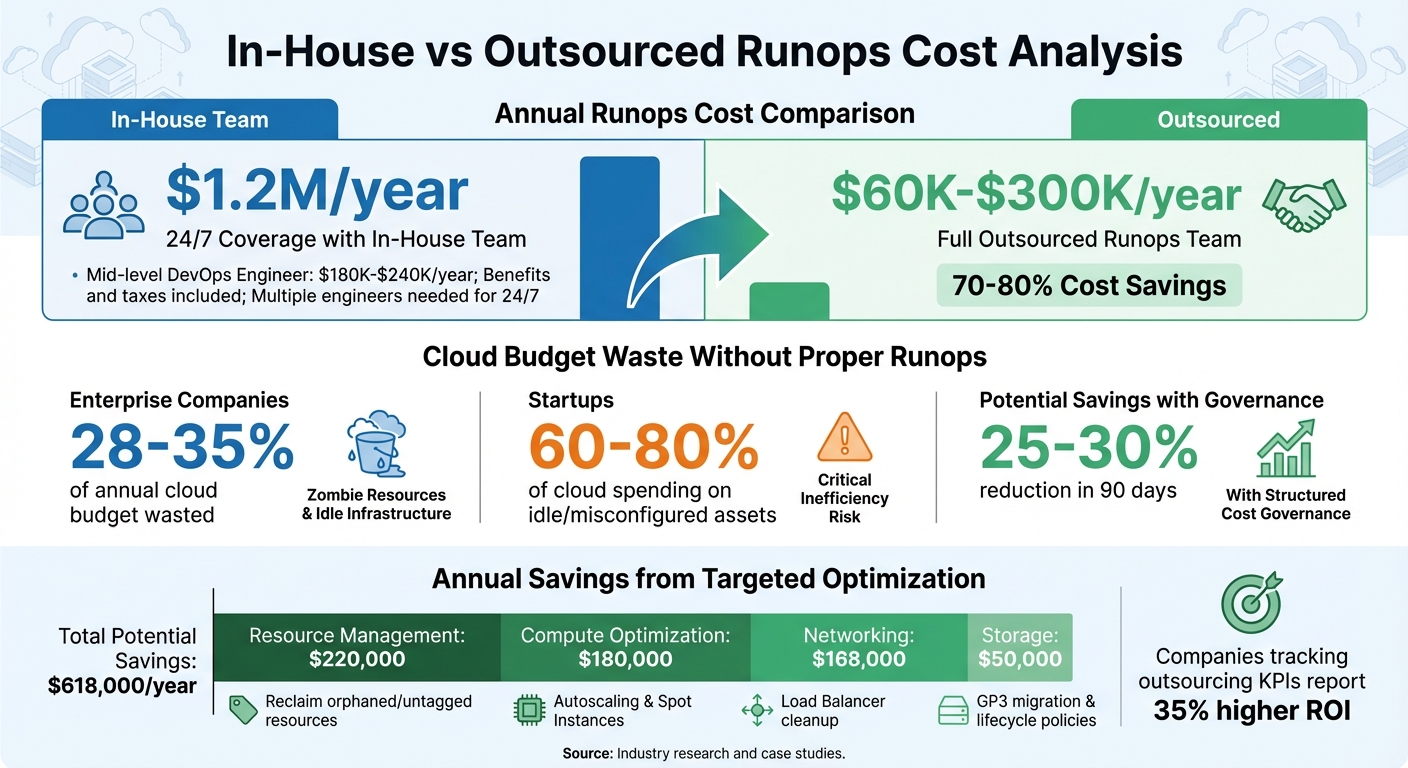
- Cost Savings: In-house teams can cost $1.2M/year for 24/7 coverage, while outsourcing ranges from $60K-$300K/year.
- Cloud Cost Management: Idle resources waste 28%-35% of cloud budgets. Outsourcing with proper oversight can eliminate this.
- Hybrid Control Model: Delegate execution but keep control through shared dashboards, tagging policies, and automated alerts.
- Metrics to Track: Focus on KPIs like MTTR, deployment frequency, and cloud spend ROI to measure success.
- Selecting the Right Partner: Look for certifications (SOC 2, ISO 27001), strong security practices, and multi-cloud expertise.
- Transitioning Back In-House: Use structured handoffs, documentation, and co-managed operations to ensure smooth transitions.
Outsourcing Runops is about balancing cost savings with control. By setting up clear metrics, monitoring tools, and contracts, you can reduce risks and make your cloud operations more efficient.
In-House vs Outsourced Runops: Cost Comparison and Savings Breakdown
How Runops Affects Cloud Costs
Runops refers to the ongoing management of cloud infrastructure. This includes tasks like monitoring production systems, managing CI/CD pipelines, responding to incidents, and maintaining security. Unlike the initial architecture phase, which focuses on building systems, Runops is all about keeping operations running smoothly. How well you handle Runops can directly impact your cloud spending and the reliability of your systems under stress. These practices lay the groundwork for addressing scaling challenges later.
When Runops processes are inefficient, cloud costs can quickly spiral out of control. A major issue is the presence of "zombie resources" – things like idle load balancers, unattached storage volumes, or unused instances running unnecessarily. These inefficiencies are costly: enterprises waste between 28% and 35% of their annual cloud budgets on such resources. For startups, the numbers are even more alarming, with 60% to 80% of cloud spending often going toward idle or misconfigured assets. This is essentially money leaking out with no value in return.
Outsourcing Runops is not the same as outsourcing your entire infrastructure. When you outsource infrastructure, you typically move to a managed platform where the provider controls the hardware and platform layers. Outsourcing Runops, on the other hand, involves working with a specialized team that handles daily operations – like monitoring, automation, and incident response – while you retain control of your cloud accounts and strategic decisions. It’s about delegating the execution, not relinquishing ownership.
Why Cloud Costs Spike as You Scale
Cloud costs tend to grow faster than revenue because inefficiencies multiply with scale. For example, development environments often run 24/7, resources are over-provisioned to handle hypothetical traffic surges, and teams create resources without clear oversight. This fragmented approach leads to a lack of accountability, where no one knows who’s responsible for managing what.
As these inefficiencies pile up, so do the costs. AI workloads, for instance, often rely on GPU instances that are 5 to 10 times more expensive per hour than general-purpose CPUs. If left idle, these resources can rack up bills of $15,000 to $40,000 over a single weekend. Networking costs also add up invisibly, with data egress and cross-region traffic rarely tied to specific teams or projects. With global cloud spending projected to hit $840 billion by 2026, growing 21% year-over-year, a significant portion of this increase comes from companies failing to monitor where their money is going.
"Cloud spending is the only major line item where engineers make purchasing decisions dozens of times a day… without anyone from finance seeing it until the invoice arrives." – The Cloud Standard
The solution lies in structured cloud cost governance. Programs designed to improve visibility and accountability can reduce spending by 25% to 30% within just 90 days. The key is to establish these controls before costs spiral out of hand. A hybrid control model is one approach that balances operational flexibility with strategic oversight, helping to address these challenges as your business scales.
What a Hybrid Control Model Looks Like
A hybrid control model allows you to delegate execution while maintaining oversight of your cloud systems. Instead of handing over complete control, you set parameters like budget limits, tagging rules, and approved instance types. Your outsourcing partner operates within these guidelines, while you retain access to centralized dashboards showing real-time spending, performance metrics, and incident logs. The partner takes care of day-to-day tasks like automating deployments, responding to alerts, and optimizing resources.
This model works by separating decision-making from execution. You decide on priorities – such as which workloads to run, budget caps, and compliance standards – while your partner follows through using documented processes and automated workflows. For example, if a cost anomaly arises, such as a sudden spike in database queries, you’ll see it immediately through shared monitoring tools. Your partner can then investigate and resolve the issue without needing constant input from your team.
Another advantage of this approach is the ability to optimize workloads based on their characteristics. For instance, you can run steady-state workloads on reserved instances with fixed capacity, saving 30% to 60% compared to on-demand pricing. Meanwhile, bursty or experimental workloads can stay in elastic cloud environments that scale as needed. Your outsourcing partner manages both types of environments, but you retain the authority to reallocate resources based on your business goals.
sbb-itb-f9e5962
Setting Up Metrics Before You Outsource
Before outsourcing, it’s essential to establish a clear baseline. Without it, you won’t know if your outsourcing partner is genuinely improving performance or cutting costs. Companies that track outsourcing KPIs report a 35% higher ROI compared to those that don’t. This success often comes down to preparation: documenting current performance, selecting the right metrics, and using monitoring tools that provide real-time insights.
Picking the Right KPIs
Your KPIs should directly align with your business objectives. For cost reduction, track metrics like cost per transaction or cloud spend ROI. If reliability is your focus, monitor Mean Time Between Failures (MTBF) and Mean Time to Repair (MTTR). For speed and efficiency, consider deployment frequency and lead time for changes. Quality-related metrics such as change failure rate and SLA adherence help identify issues before they affect customers.
"You can’t manage what you don’t measure. And you certainly can’t optimize what you don’t understand." – Noon Dalton
Financial metrics are just as important as operational ones. Calculate net savings by comparing the costs of in-house operations with vendor fees. For example, a mid-level DevOps engineer in the U.S. costs between $180,000 and $240,000 annually (including benefits and taxes), while outsourced Runops ranges from $60,000 to $300,000 per year depending on the scope. If you work in regulated industries, don’t overlook security and compliance metrics like the rate of security incidents or patch deployment speed.
Once you’ve identified the right KPIs, you’ll need to quantify your current costs and performance to create a baseline.
Recording Your Current Costs and Performance
Start by breaking your cloud expenses into specific categories such as compute, databases, storage, networking, and logging. Tools like AWS Cost Explorer, Azure Cost Management, and GCP Cost Management can help you build dashboards and identify the primary drivers of your spending. Typically, 80% of costs come from just three or four services.
Before setting a baseline, audit for zombie resources – idle load balancers, unattached storage volumes, or development environments running 24/7. Studies show that about 37% of cloud compute capacity is wasted on unused resources. Cleaning up these inefficiencies ensures your baseline reflects optimized performance, not historical waste. Once that’s done, implement a tagging policy to label resources with metadata like team, project, and environment. Without proper tagging, your dashboards won’t provide the detail you need.
In addition to total spend, track unit economics such as cost per customer, cost per transaction, or cost per API call. These metrics scale with your business and provide a clearer picture of performance. Record operational data like CPU, memory, and network usage, as well as metrics like ticket resolution times and error rates. Spend at least 30 days defining mandatory tags, setting up dashboards, and identifying anomalies before engaging with outsourcing partners.
Once your baseline is ready, focus on selecting tools that provide real-time monitoring.
Selecting Monitoring Tools
Real-time monitoring can make or break an outsourcing initiative. Use tools like Prometheus for collecting metrics and setting up alerts, and Grafana for visualizing data. For managing cloud costs, platforms like CloudZero offer more in-depth analysis than native tools. Tools like Jira and Microsoft Power BI can help track project timelines, budgets, and quality benchmarks.
Automation is just as critical as monitoring. Use Infrastructure as Code (IaC) tools like Terraform, Pulumi, or CloudFormation to maintain consistent environments. For CI/CD pipelines, platforms like Jenkins, GitLab CI, or GitHub Actions ensure deployments are reliable and auditable. Set up automated alerts to catch cost anomalies or performance issues quickly – this can help prevent 63% of potential outages, saving both time and money on recovery efforts.
Choosing an Outsourcing Partner
Once you’ve established your baseline metrics, it’s time to find a partner who can deliver results without introducing unnecessary risks. Statistics show that 20%–25% of outsourcing relationships fail within the first two years, often due to governance or security issues. With the average cost of a data breach now at $4.88 million and 61% of organizations reporting third-party breaches in the past year, choosing the wrong partner can lead to regulatory penalties, customer loss, and operational disruptions.
Checking Security and Compliance Credentials
Start by ensuring your potential partner holds relevant certifications like SOC 2 Type II, ISO 27001, PCI DSS, HIPAA, GDPR, or FedRAMP, depending on your industry and needs. For instance, SOC 2 Type II evaluates how effectively a company implements security controls over a period of 6–12 months, while ISO 27001 sets the international standard for managing information security.
"Even with the best internal security posture, your data is only as safe as the weakest link in your supply chain." – Svitla Systems
To verify these credentials, request audit reports and system log access. Make it a point to review quarterly SOC 2 Type II reports and monitor system logs regularly. Additionally, examine how the partner has handled security incidents in industries similar to yours to better understand potential risks.
Writing Contracts That Preserve Control
Your contract should clearly state that all code, data, and derivative assets – such as Infrastructure as Code scripts, CI/CD pipelines, runbooks, and diagrams – produced by the outsourced team belong to your organization. This is essential to maintaining ownership and control over your intellectual property.
The Capital One breach, which impacted 100 million individuals due to a misconfigured firewall, highlights the importance of including audit rights in your agreement. These should cover access to quarterly SOC 2 Type II reports and raw backend logs. Also, ensure the contract specifies a breach notification window of 24 to 72 hours.
A RACI matrix can help clarify roles and responsibilities between your team, the vendor, and any third parties. This prevents confusion during incidents. Additionally, plan for the end of the partnership by including an exit strategy. This should outline how data will be exported and deleted in a usable format and require a transition support period of 60 to 120 days for knowledge transfer.
"Outsourcing fails more often due to unclear agreements than due to technical capability." – Global Technology Services
To protect your business, include liability caps that align with the contract’s annual value or your risk exposure. Also, negotiate a minimum 180-day notice period for contract termination to avoid being stuck in a poorly performing partnership.
Finding Partners Who Work Across Tech Stacks
Your outsourcing partner should demonstrate expertise across various technologies and hold relevant certifications, such as CKA or AWS Certified DevOps Engineer. They should also be proficient with Infrastructure as Code tools. Evaluate their ability to integrate seamlessly with enterprise systems like SAP, Salesforce, or ServiceNow through API-first architecture. Avoid partners that depend heavily on a single cloud provider, as this could lead to vendor lock-in. Additionally, outdated internal tools may indicate unresolved technical debt, so assess their tooling carefully.
It’s worth noting that corporate data input into AI tools like ChatGPT surged by 485% between March 2023 and March 2024, increasing the risk of "Shadow IT" in outsourced environments. Ask prospective partners how they mitigate risks from unauthorized AI tools or third-party software. Solutions might include using pre-configured virtual desktops or secure integrated development environments (IDEs).
Keeping Costs Down While Outsourcing
When outsourcing Runops, managing costs effectively is just as important as implementing robust metrics. Outsourcing doesn’t inherently save money – it shifts spending. Without proper oversight, you might replace labor expenses with unnecessary costs like cloud waste, orphaned resources, and untagged instances. In fact, 28–30% of cloud spending is often wasted. Outsourced environments are no exception, especially when external teams aren’t held accountable for the bill. By following specific cost-management strategies, you can keep control of your budget while using outsourced Runops to maintain efficient cloud operations.
Setting Budgets and Cost Structures
One of the first steps is ensuring mandatory resource tagging through tools like Terraform. Every resource your outsourcing partner creates should be tied to a specific cost center, environment, or owner. This simple step can prevent "invisible" expenses. For instance, a cloud engineer once reclaimed orphaned EC2 instances and EBS volumes, saving $220,000 annually in a large-scale setup.
"Unmonitored resources are budget leaks waiting to happen. Without strict tagging and enforcement, you will inevitably pay for orphaned or underused infrastructure." – Bran Kop, Cloud Engineer
To further control costs, lock in predictable workloads with Reserved Instances – these can provide up to 75% savings compared to on-demand pricing. For non-critical tasks, dynamic autoscaling and spot instances can reduce annual compute expenses by $180,000. Automated nightly cleanup scripts can terminate untagged instances, and resource quotas enforced with GitOps tools like Argo CD add another layer of control.
Here’s a snapshot of potential savings from targeted actions:
| Optimization Category | Action Taken | Estimated Annual Savings |
|---|---|---|
| Resource Management | Reclaim orphaned/untagged resources | $220,000 |
| Compute Optimization | Autoscaling & Spot Instance adoption | $180,000 |
| Networking | Load Balancer cleanup and optimization | $168,000 |
| Storage | GP3 migration & snapshot lifecycle policies | $50,000 |
Once these budget structures are in place, automated monitoring becomes the backbone for catching and addressing cost deviations early.
Using Automated Monitoring and Alerts
Daily monitoring can identify cost spikes 30 times faster than monthly reviews. Setting up multi-threshold budget alerts at 50%, 80%, and 100% of both actual and forecasted spending helps flag issues before they spiral out of control. This proactive approach ensures small overruns don’t turn into major headaches.
Statistical methods like rolling averages and standard deviations can automatically detect anomalies. Companies without monitoring often see 30–40% resource waste, while those using automated systems keep waste under 10%. Tracking unit economics, such as cost per transaction or request, ensures that scaling outsourced operations remains efficient.
"Without proper monitoring, you cannot optimize what you cannot see." – Nawaz Dhandala, OneUptime
Automated weekly reports that highlight spending changes, team breakdowns, and anomalies can maintain transparency and accountability with external partners. Tools like Kubecost can assist in this process. Proactive monitoring also reduces downtime costs by 41% and prevents 63% of potential outages through better incident response.
Pair these automated systems with regular reviews to ensure ongoing cost efficiency.
Scheduling Regular Cost Reviews
To stay ahead of cost issues, conduct monthly variance reviews. Keep these meetings short – no more than 45 minutes – and limit attendees to five to seven key stakeholders. Focus on the top three variances with the biggest dollar impact, assign a Directly Responsible Individual (DRI), and aim for a 30-day resolution. This process helps catch cost drift early.
"A monthly feedback loop catches drift in weeks, not quarters. That’s the difference between a small adjustment and a fire drill." – OpenMetal
In addition to monthly reviews, schedule quarterly structural reviews to make more significant adjustments. These reviews, held every 90 days, might include renegotiating a contract, optimizing a workload, or implementing a new automated cost guardrail. Without this rhythm, cost savings often erode within six months as new services are added and accountability wanes. Include representatives from Engineering, FinOps, and Finance to align on priorities and actions.
Here’s a quick breakdown of review schedules:
| Review Frequency | Primary Focus | Key Participants | Typical Duration |
|---|---|---|---|
| Monthly | Variance analysis, root cause of spikes, 30-day resolution targets | Eng Lead, FinOps Lead, Finance Partner | 45 Minutes |
| Quarterly | Contract renegotiation, workload right-sizing, guardrail implementation | Executive Leadership, FinOps, Finance | 1-2 Hours |
| Real-Time | Automated alerts, anomaly detection, dashboard monitoring | DevOps, Engineering, FinOps | Continuous (Automated) |
Moving Operations Back In-House
When your team expands, budgets adjust, or your internal expertise strengthens, it might make sense to bring Runops back in-house. The challenge is ensuring this transition happens smoothly, without disrupting systems or losing critical knowledge. Here’s a sobering statistic: 70% of IT projects fail due to poor requirement gathering. On the flip side, companies with well-documented processes and clear workflows are 92% more likely to succeed during operational transitions. Treat this process as a formal project with dedicated resources – it’s not something to rush through in the final weeks of a contract. This method not only aligns with a metrics-driven strategy but also reduces dependency costs while keeping control firmly in-house. Start by focusing on thorough documentation and structured handoff processes.
Transferring Knowledge and Documentation
A central repository for operational knowledge is non-negotiable. Tools like Confluence or Notion are excellent for creating a "Living Wiki" that houses system architecture diagrams, API references, deployment playbooks, and troubleshooting guides. But don’t stop at the "what" – document the "why" as well. Use Architecture Decision Records (ADRs) to lay out the reasoning, trade-offs, and business context behind key decisions. Without this context, your team could face roadblocks when maintaining or updating the system.
"Transitions encompass decisions, trade-offs, and domain context." – Absolute TechTeam
Static text is helpful, but supplement it with video walkthroughs. A 15-minute video explaining a complex subsystem can often convey more than pages of documentation. Additionally, request a detailed, step-by-step guide for redeploying the system. This ensures your team can recover from disasters and operate independently if needed. Poor knowledge-sharing practices cost organizations an average of $2.1 million annually, and 67% of companies struggle to prevent knowledge loss when working with distributed or outsourced teams.
During the handover, tighten security by auditing user accounts, removing vendor access, and rotating shared API keys and SSL certificates. With strong documentation in place, execute a phased transition to gradually take back control.
Running Co-Managed Operations
Rather than flipping a switch overnight, ease into the transition with a co-managed phase. Begin with shadowing, where your internal team observes the partner’s daily operations to understand how everything works in practice. Then shift to reverse shadowing, where your team takes the lead on tasks while the partner provides feedback and steps in to correct mistakes. This structured approach can reduce post-handover incidents by 70%.
Clear decision-making roles are crucial during this phase. A RACI matrix (Responsible, Accountable, Consulted, Informed) can help ensure tasks are neither duplicated nor ignored. Track progress using tangible outputs like backlog updates, merged pull requests, and working increments in staging environments – don’t rely solely on status meetings. Maintain quality by enforcing mandatory code reviews and requiring all code to pass CI/CD tests before merging.
Finally, negotiate a 2–4 week post-handover support period where the outgoing team remains available to answer questions and resolve blockers. This safety net allows your team to fully take ownership without risking the stability of your systems.
Conclusion
Outsourcing Runops isn’t about losing control – it’s about gaining flexibility and efficiency. Instead of committing to the high costs of hiring a single in-house engineer for $180,000 to $240,000 annually, you can access a full team of specialists for $60,000 to $300,000 per year through predictable monthly fees. This shift can reshape how you allocate resources and manage risks.
The key is to approach outsourcing as a strategic partnership rather than a simple delegation. Tools like Service Level Agreements, shared monitoring dashboards, and Infrastructure as Code standards ensure you maintain both visibility and control. Start small with a pilot project on less critical systems, set measurable KPIs such as deployment frequency and Mean Time to Recovery, and conduct regular cost reviews to verify the value your partner delivers. This strategy allows your in-house team to focus on creating features that directly benefit customers, while your partner takes care of infrastructure maintenance and firefighting.
"Outsourcing DevOps amplifies your team’s impact, not replaces it." – EZOps Cloud
The numbers back this up: outsourced teams can help you deploy code 46 times faster and recover from failures 96 times quicker. With metrics like these, outsourcing transcends cost-cutting – it becomes a tool for growth. In a world where 67% of CTOs are under pressure to "do more with less", the right outsourcing partner can transform your infrastructure into a competitive edge.
When internal teams are stretched thin and cloud expenses keep climbing, outsourcing provides a way to refocus on innovation and delivering customer value. Success comes from blending external expertise with internal oversight – keeping control over what matters most while letting specialists execute faster and more cost-effectively than traditional hiring ever could.
FAQs
How do I keep full control of my cloud accounts while outsourcing Runops?
When outsourcing Runops, it’s essential to maintain control by setting up clear governance and oversight frameworks. Start with well-defined contracts that outline responsibilities, expectations, and accountability. Pair this with regular audits and assessments to stay on top of outsourced activities.
Use metrics-driven oversight to track performance and ensure everything stays on course. It’s also critical to ensure your data architecture and privacy protocols are not only understood but also secure. This approach minimizes risks like non-compliance or data breaches while maintaining visibility and control over your cloud systems.
What should a Runops SLA include to prevent outages and unexpected cloud costs?
A Runops Service Level Agreement (SLA) should set clear expectations for performance, availability, and cost management. Here’s what to focus on:
- Uptime Targets: Define measurable goals, like 99.9% uptime, to guarantee reliability and minimize downtime.
- Resource Usage and Cost Controls: Include metrics to track resource consumption and manage expenses, such as limits on data egress or unused resources.
- Automatic Service Credits: Outline compensation for any breaches in agreed performance levels.
- Escalation Procedures: Clearly define steps to address and resolve issues promptly.
- Continuous Monitoring: Implement regular monitoring to catch problems early and ensure operations align with business objectives.
These elements work together to maintain high service standards while keeping costs and disruptions in check.
How long does it take to see real savings after outsourcing Runops?
You can start noticing savings in as little as two weeks. A billing audit during this period often uncovers and recovers 30%–60% of cloud expenses, allowing you to cut costs swiftly while keeping your operations running smoothly.