Reducing Cloud Costs with Data Lifecycle Policies

Cloud storage costs can quickly escalate, especially for businesses dealing with large datasets. The solution? Data lifecycle policies. These automated rules manage how data is stored, moved, and deleted, helping reduce expenses while ensuring compliance with retention regulations. Here’s how they work:
- Move data to cheaper storage tiers: Automatically transition inactive files (e.g., from "Standard" to "Archive") based on access patterns.
- Delete unnecessary data: Set rules to remove files after their retention period ends, cutting costs.
- Manage versions and snapshots: Automatically clean up outdated file versions and incomplete uploads.
For example, a company saved $333,000 in one month by implementing tiered storage and lifecycle rules. Platforms like AWS and Azure offer these features, with some requiring minimum storage durations to avoid fees.
Key Takeaway: Organize data by access frequency, set up tier transitions, and configure rules for deletions. This approach reduces costs, simplifies management, and ensures compliance with minimal manual effort.
How Do Data Lifecycle Policies Optimize Cloud Costs?
sbb-itb-f9e5962
What Are Data Lifecycle Policies?
Data lifecycle policies are automated rules designed to manage how your data is stored, moved, and deleted throughout its lifespan. These policies work continuously, automatically acting based on criteria you set – like how old the data is or when it was last accessed.
By using these policies, you can optimize storage costs. Frequently accessed files stay in high-performance storage, while less-used data is shifted to more affordable options. Let’s break down how these policies work and why they’re important.
What Lifecycle Policies Do
Lifecycle policies handle three main tasks:
- Transitioning data between storage tiers: For example, new data might stay in standard storage for 30 days, move to an infrequent access tier for 90 days, and then either get archived or deleted.
- Deleting unnecessary data: Once files reach the end of their retention period, lifecycle policies automatically delete them. This helps cut storage costs. In Amazon S3, for instance, billing stops as soon as a file qualifies for deletion, even if the actual removal takes a little longer.
- Managing object versions and snapshots: Without policies, old versions of files can pile up over time. Lifecycle policies clean up by automatically deleting outdated versions after a set period.
Why Use Lifecycle Policies
These policies offer more than just convenience – they’re a practical way to save money and meet compliance requirements.
The most obvious advantage is lower storage costs. By automatically shifting older data to cheaper storage tiers and deleting files you no longer need, you avoid unnecessary expenses. For example, Azure allows you to configure lifecycle management policies at no extra charge, with costs applying only for the API calls that handle transitions.
Lifecycle policies also help with regulatory compliance. They enforce retention periods required by laws like GDPR and HIPAA, ensuring data is only kept as long as necessary and then permanently deleted. This reduces the chance of human error and keeps you aligned with legal standards.
Finally, automation minimizes manual effort. Once you set the rules, the system takes over, so there’s no need to constantly monitor and manage storage. On platforms like Azure and AWS, new policies may take up to 24 hours to activate, but once they’re live, they run seamlessly.
How to Set Up Data Lifecycle Policies
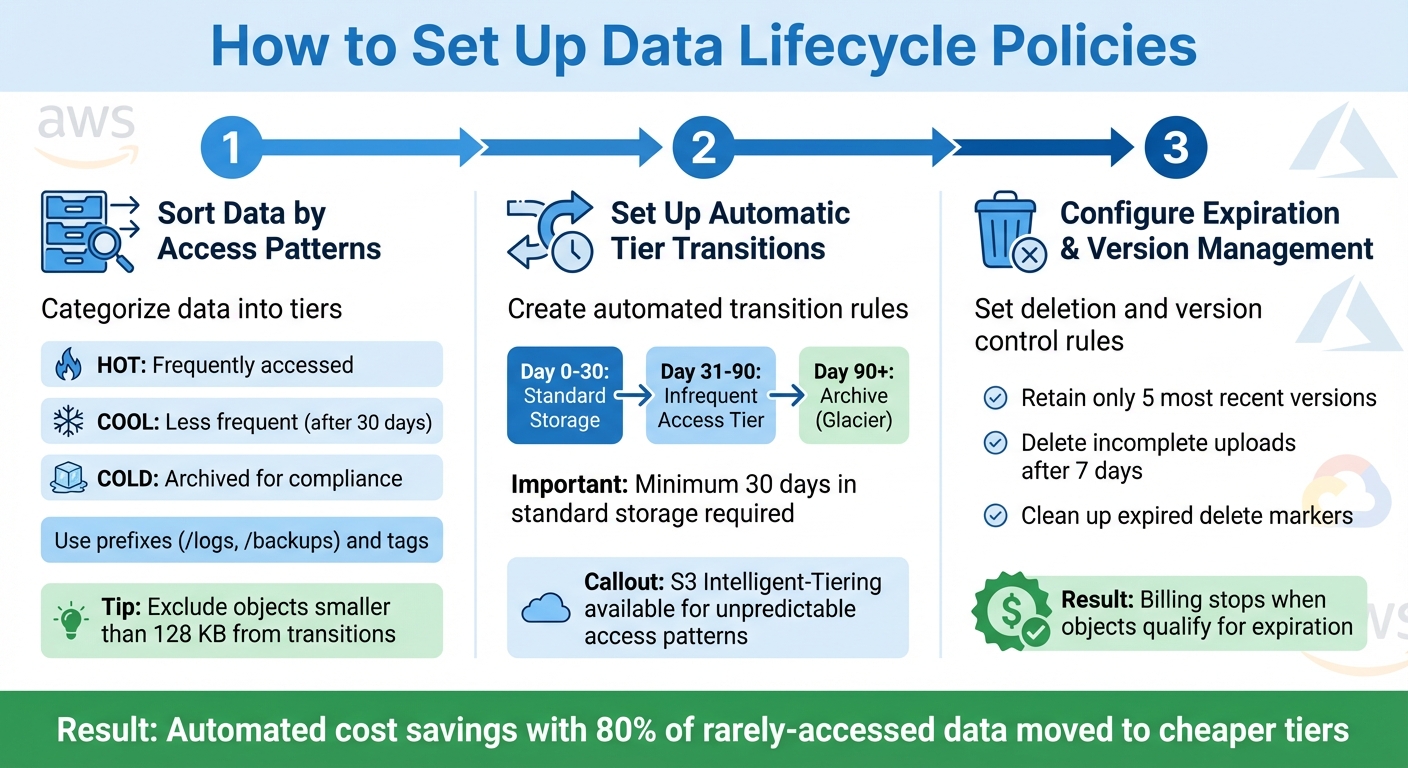
3-Step Guide to Setting Up Data Lifecycle Policies for Cloud Cost Reduction
To take full advantage of automated retention and cost management, follow these steps to set up effective lifecycle policies. The process involves three key phases: sorting data, creating rules for transitions, and managing deletions and versions.
Sort Data by Access Patterns and Retention Needs
Start by categorizing your data based on how often it’s accessed and how long it needs to be stored. Think of it in three tiers: hot (frequently accessed), cool (less frequent access after 30 days), and cold (archived for compliance or long-term storage). This classification determines which storage tier each dataset should use.
You can organize data using prefixes, such as /logs, /backups, or /projects/2025, and apply tags for more precise control over retention periods. This approach lets you manage lifecycle rules for different data groups without having to overhaul your storage system entirely.
For example, exclude objects smaller than 128 KB from transitions. Amazon S3 automatically prevents such small objects from transitioning because the cost of moving them often outweighs the savings. To identify which datasets are good candidates for tiering, use storage analytics tools to monitor access patterns.
Set Up Automatic Storage Tier Transitions
Once your data is categorized, create rules to automate the movement of objects between storage classes based on their age or usage patterns. For instance, you might store new data in standard storage for 30 days, move it to an infrequent access tier for 90 days, and then archive it to Glacier after a year. By automating these transitions, you can reduce storage costs by moving inactive data to lower-cost tiers at the right time.
Keep in mind that objects must stay in standard storage for at least 30 days before transitioning to infrequent access tiers. Additionally, certain storage classes have minimum duration requirements – S3 Glacier Flexible Retrieval requires 90 days, and Deep Archive requires 180 days. If you move or delete data before these periods are up, early deletion fees will apply.
For datasets with unpredictable access patterns, consider using S3 Intelligent-Tiering. This service monitors usage and automatically shifts data between frequent, infrequent, and archive access tiers, eliminating the need for manual adjustments. You can set up to 1,000 configurations per bucket to align with specific workflows.
Configure Expiration Rules and Version Management
The final step is to set rules for deleting expired data and managing object versions to avoid unnecessary storage costs. For versioning-enabled buckets, lifecycle policies can handle current versions and older, noncurrent versions separately.
For example, you could configure a rule to retain only the five most recent versions of an object and delete older ones. Additionally, set a rule to abort incomplete multipart uploads after seven days. These partial uploads can still consume storage space, and this rule ensures you don’t pay for data you can’t use.
To further optimize, clean up expired delete markers. In versioned buckets, deleting an object creates a delete marker. If all noncurrent versions are later removed, this marker becomes "expired". Billing for an object typically stops as soon as it qualifies for expiration, even if the physical deletion takes extra time.
Measuring Cost Savings and Compliance Impact
When lifecycle policies kick in, storage costs drop as data moves to lower-cost tiers, and billing adjusts almost immediately once objects meet the criteria for removal. With around 80% of organizational data rarely accessed, moving cold data to cheaper storage tiers can lead to substantial savings while ensuring compliance. The trick lies in analyzing your storage costs to pinpoint datasets that can transition without disrupting operations.
These savings aren’t just theoretical – they show up in real-world scenarios.
Example: $333,000 Saved Through Tiered Storage
Take TechVZero as an example. They helped a client save $333,000 in just one month by combining tiered storage with infrastructure improvements. This case highlights how automated data tiering not only slashes storage costs but also strengthens the overall infrastructure. It’s a clear demonstration of the financial and operational advantages of using tiered storage.
For large-scale data lakes or workloads with unpredictable access patterns, S3 Intelligent-Tiering is a game-changer. It automatically monitors data access patterns and shifts data between frequent, infrequent, and archive tiers without any retrieval charges. While there’s a small monthly monitoring fee, the savings from automated tiering usually outweigh the cost, especially when access needs fluctuate over time.
Storage Tier Cost Comparison
Here’s a breakdown of the cost and performance trade-offs across key storage tiers:
| Storage Tier | Access Frequency | Typical Use Case | Cost Profile |
|---|---|---|---|
| S3 Standard | Frequent | Active apps, content distribution | Highest storage cost; no retrieval fees |
| S3 Standard-IA | Infrequent | Backups, older sync data | Lower storage cost; retrieval fees apply |
| S3 Glacier Instant Retrieval | Rare (Immediate) | Medical images, news assets | Low storage cost; millisecond retrieval |
| S3 Glacier Deep Archive | Long-term Archive | Regulatory compliance (7–10 years) | Lowest storage cost; retrieval takes hours |
It’s worth noting that some tiers come with minimum storage duration requirements. For instance, S3 Standard-IA mandates a minimum of 30 days, while Glacier Deep Archive requires 180 days. If data is deleted or transitioned early, pro-rated fees may apply, so it’s essential to plan your lifecycle rules carefully.
How TechVZero Helps Reduce Cloud Costs
Combining Lifecycle Policies with Bare Metal Kubernetes
TechVZero approaches cloud cost reduction in a way that stands out: it merges automated lifecycle policies with Bare Metal Kubernetes. This combination provides the reliability of a managed service while slashing costs by 40-60%. By cutting out hyperscaler markups, TechVZero ensures you save money without compromising performance or compliance.
The process is hands-off, with lifecycle configurations deployed automatically. This automation handles transitions and expiration tasks seamlessly, ensuring data moves to the correct storage tier at the right time. Compliance is maintained through automated rules for retention and deletion. The result? Lower costs paired with operational efficiency.
A Track Record of Delivering Results
TechVZero’s approach isn’t just theoretical – it’s been proven in real-world scenarios. Their methods consistently deliver significant savings while maintaining performance.
With operations at a 99,000+ node scale, TechVZero brings expertise honed in environments where mistakes aren’t an option. This is infrastructure built by practitioners with deep production experience. For founders who want to focus on their product rather than navigating complex infrastructure, TechVZero takes care of the heavy lifting, allowing you to stay focused on what matters most.
Conclusion
Data lifecycle policies make managing cloud storage simpler and less expensive while keeping compliance on track. By automating the movement of data to cheaper storage tiers and removing unused files, these policies eliminate the need for manual intervention. This not only reduces costs but also ensures better governance. When combined with a solid infrastructure strategy, organizations can see substantial savings.
Start by categorizing your data based on how often it’s accessed and how long it needs to be retained. Then, set up automated rules for transitioning and deleting files. This helps prevent the buildup of "dark data" – files that are no longer used but still rack up storage fees .
That said, implementing these policies isn’t without risk. If best practices aren’t followed, mistakes can happen. To avoid issues, test your policies on non-production data first. Keep in mind that every cloud provider has its own setup process, and changes to lifecycle rules might take up to 24 hours to take effect .
At TechVZero, we take this a step further by combining lifecycle automation with bare metal Kubernetes. This approach not only drives down costs but also provides effortless management. With experience scaling over 99,000 nodes, we ensure your infrastructure runs smoothly behind the scenes – letting you focus on building your product. This lifecycle-focused strategy is key to efficient cloud data management.
FAQs
How can data lifecycle policies ensure compliance while saving on cloud costs?
Data lifecycle policies rely on automated rules to manage how long data is retained by archiving, transitioning, or deleting it after a set period. These policies are crucial for meeting legal and regulatory standards, such as those found in GDPR or HIPAA. By ensuring data is kept only for the required time and securely removed afterward, businesses can minimize the risk of over-retention, which could lead to fines. At the same time, these policies provide an auditable trail to demonstrate compliance.
Automation eliminates the need for expensive manual processes and helps organizations manage storage costs more effectively. For instance, sensitive data can be shifted to more affordable storage tiers before it’s deleted, ensuring both compliance with data governance practices and reduced expenses. Solutions like Amazon S3 lifecycle rules allow businesses to easily define and enforce these policies, turning what might otherwise be a complex task into a streamlined, cost-effective process. TechVZero excels in implementing these strategies, helping companies maintain compliance while cutting costs.
What are the risks of misconfiguring data lifecycle policies?
Mismanaging data lifecycle policies can lead to a range of problems, including unexpected costs, compliance headaches, and inefficiencies in operations. For instance, neglecting to shift data to lower-cost storage tiers or relying on manual deletions can drive up expenses and demand extra effort.
Here are some key risks to watch out for:
- Unexpected charges: Improperly transitioning data or expiring objects can rack up fees, especially if minimum storage duration requirements are ignored.
- Data loss or compliance issues: Overly strict rules might delete important data too soon, potentially violating legal or audit obligations.
- Orphaned resources: Without automated retention policies, unused snapshots or artifacts can pile up, increasing costs and making cleanup more challenging.
- Performance problems: Placing frequently accessed data in cold storage tiers can result in costly retrieval fees and slower application performance.
To steer clear of these issues, TechVZero advises starting with small, well-tested policies. Regularly monitor their impact and scale up gradually. This method helps ensure both cost-efficiency and compliance while minimizing the risk of unpleasant surprises.
What’s the difference between S3 Intelligent-Tiering and standard S3 Lifecycle policies?
S3 Intelligent-Tiering is designed to simplify data management by automatically tracking how often your data is accessed and shifting it between storage tiers – frequent, infrequent, and archive – based on actual usage patterns. The best part? It does all this without needing you to set up manual processes or predefined rules.
On the other hand, standard S3 Lifecycle policies operate on fixed, age-based rules to transition or delete objects. These policies work well for workflows where data access patterns are predictable, but they demand more manual configuration and ongoing maintenance compared to the adaptive approach of Intelligent-Tiering.
Choosing the right method for managing your data can make a big difference in controlling cloud storage expenses while meeting data retention requirements.