Rolling Back a Bare‑Metal Migration: Exit Strategies That Work
Rolling back a bare-metal migration is a complex but necessary process when expectations don’t match reality. Moving workloads from bare-metal infrastructure back to the cloud or on-premises setups can involve significant challenges, including data transfer costs, operational hurdles, and potential downtime. Here’s what you need to know:
- Why Rollbacks Happen: Cost overruns, operational difficulties, and performance issues are the top reasons organizations revert to their previous setups.
- Key Risks: Poorly executed rollbacks can lead to service outages, data loss, security vulnerabilities, and double costs from maintaining dual environments.
- Metrics to Monitor: Track latency, error rates, data integrity, resource usage, and costs to determine if a rollback is necessary.
- Rollback Steps: Develop a clear plan with defined triggers, test the rollback on non-critical systems, ensure data synchronization, and phase the transition to minimize risks.
- Cost Considerations: Data egress fees and dual-environment costs can add up, but automated solutions can cut rollback expenses significantly.
A solid rollback strategy, backed by automation and clear metrics, can minimize disruption and ensure a smoother transition. Always document lessons learned to refine future migration plans.
Episode 31 – VM storage and lifecycle: images, snapshots, migrations, and network modes
sbb-itb-f9e5962
Deciding If You Need a Rollback
Not every situation calls for a full rollback. Sometimes, a simple configuration adjustment or performance tweak can resolve the issue. The challenge lies in knowing when to fine-tune and when to pull the plug. This decision should be based on hard data – objective metrics, side-by-side comparisons, and realistic cost assessments – not on instinct or the reluctance to abandon sunk costs. These data points are critical in determining whether to stick with bare metal or revert to a previous setup.
Metrics to Track
Accurate metrics are the backbone of any rollback decision. They provide the clarity needed to move from analysis to action.
Start with latency and response times. Monitor average query response times and tail latencies (P95, P99). A 20% increase over your baseline is a red flag. For user-facing applications, keep response times below 100ms.
Data integrity is non-negotiable. Use automated tools like row counts and cryptographic checksums (MD5 or SHA-256) to ensure your data matches across environments. If discrepancies exceed 0.01%, it’s time to investigate or roll back. Similarly, error rates – such as failed queries or connection drops – should stay under 0.1%. Spikes beyond 0.5% indicate deeper issues that may require a rollback.
Keep an eye on resource saturation. If your CPU usage consistently exceeds 80% or memory is maxed out, your hardware could be under-provisioned or misconfigured. For storage, track throughput metrics like MBps and IOPS. For OLTP workloads, aim for at least 5,000 writes per second; any significant drop suggests a potential problem. During phased migrations, ensure replication lag stays below 10 seconds to avoid data inconsistencies. Lastly, watch for cost spikes – unexpected expenses like egress fees or dual operation costs can quickly offset any savings.
| Metric | Recommended Threshold | Rollback Trigger |
|---|---|---|
| Query Latency | Sub-100ms (User-facing) | >20% increase from baseline |
| Error Rate | <0.1% | Persistent spikes above 0.5% |
| Data Integrity | 100% match | >0.01% discrepancy |
| System Uptime | 99.9%+ | >30 minutes total unavailability |
| Replication Lag | <10 seconds | >10 seconds |
Before and After Performance Comparison
Once you’ve established your metrics, compare performance before and after the migration to validate rollback triggers. Before moving to bare metal, document baseline metrics like CPU usage, disk I/O, memory, network throughput, and response times. Without this data, you’re essentially operating in the dark. Use tools to log details such as hostnames, IPs, resource allocations, and third-party dependencies.
In the new environment, replicate these tests and compare results. Running services in both environments simultaneously can highlight issues like "noisy neighbor" effects that might have disrupted your previous cloud setup. Reconciliation queries and smoke tests ensure data integrity and functionality match your pre-migration state.
Set specific rollback triggers aligned with your SLAs. For example, if response times exceed SLA limits by more than 50%, it’s a clear signal to roll back. Likewise, if over 25% of users face critical functionality issues or if downtime exceeds 30 minutes, initiate a rollback immediately. Organizations with documented rollback strategies recover 80% faster, often completing rollbacks in under 15 minutes, compared to over 60 minutes without a plan.
Calculating Costs and ROI
Both sticking with an underperforming setup and executing a rollback come with costs. A thorough 12–36 month Total Cost of Ownership (TCO) analysis can clarify the financial implications. Start by calculating current bare-metal expenses – hardware depreciation, power, cooling, bandwidth, and staff time – and compare them to cloud costs like compute, storage, egress fees, and managed service premiums.
Data egress fees can be a major expense. Cloud providers typically charge between $0.08 and $0.12 per GB for outbound data. For example, transferring 50TB back to the cloud could cost $4,000 to $6,000. If your workloads are unpredictable or seasonal, the fixed nature of bare-metal infrastructure could lead to even higher costs. On the flip side, predictable workloads can yield substantial savings. A deployment with 500 VMs and 50TB of bandwidth might save $17,631 per month – or over $211,000 annually – by moving to private infrastructure. For larger setups with 1,000 VMs and 150TB of bandwidth, monthly savings could hit $44,163, totaling nearly $530,000 per year.
"Managing cloud costs ranks as the top challenge for many organizations, with analyst projections showing end-user spending reaching $723 billion in 2025." – CIO.com
Perform a sensitivity analysis to evaluate variables like egress fees, cross-zone traffic, and managed service costs. Pinpoint the point where bare metal becomes more cost-effective. Don’t forget to include exit costs like contract penalties, training, and downtime. Manual rollbacks can cost between $180,000 and $360,000, while automated solutions may cut those losses to $45,000 or less. If your TCO analysis shows that bare metal will cost more over the next few years than returning to the cloud, the decision to roll back becomes clear.
Planning Your Rollback
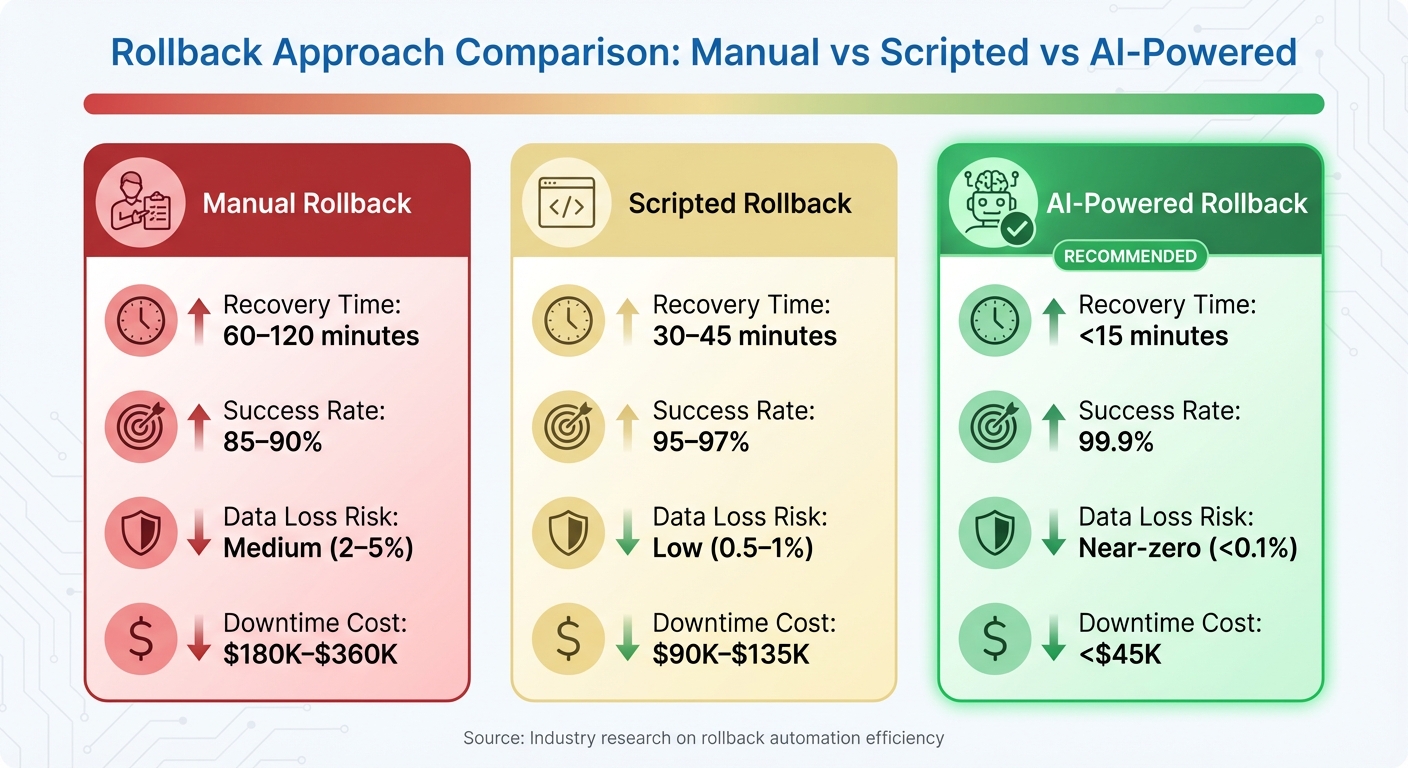
Manual vs Scripted vs AI-Powered Rollback Comparison: Recovery Time, Success Rate, and Costs
Once you’ve determined that a rollback is necessary, the next step is creating a detailed plan to minimize disruption and maintain system stability. Think of this plan as a binding agreement – clear, well-documented, and free of ambiguity. Proper preparation, including clearly defined triggers, validated automation scripts, and assigned communication roles, can mean the difference between a smooth recovery and complete chaos. This plan should build on earlier metrics and performance benchmarks to ensure best practices are consistently applied throughout the rollback process.
Building a Rollback Plan
A strong rollback plan starts with clearly defined, measurable triggers – your "go/no-go" criteria. These triggers should rely on predetermined metrics. For example, initiate a rollback if data discrepancies exceed 1% or if performance drops by more than 20% compared to the baseline. Other critical triggers might include major application errors or production downtime lasting over 30 minutes.
"Ambiguity fails during a crisis, so your triggers should be black and white."
– Stellans
Before proceeding, perform a final comprehensive backup and confirm its integrity. If you’re using specific platforms, tools like Snowflake‘s Zero‑Copy Cloning can create instant restore points without adding storage costs. Next, map out all dependencies, including workloads, integrations, third-party connections, and API endpoints. Missing even one dependency can result in cascading failures. Thorough documentation of these dependencies will serve as a critical guide during the rollback.
Clear communication is just as important as technical readiness. Define who has the authority to initiate the rollback and who will execute the technical steps. Set up dedicated communication channels, such as a bridge line or a Slack channel, for real-time coordination during the process. Use version-controlled scripts to automate tasks like re-pointing applications, updating DNS records, or restarting services. Pre-testing these scripts can significantly reduce human errors, especially when the pressure is on.
Using a Phased Rollback
A phased rollback approach helps reduce risks by allowing you to test the process on non-critical systems first. This strategy helps catch issues early and limits the potential "blast radius" if something goes wrong. Once the process is validated, you can move on to higher-stakes systems.
Running old and new systems in parallel is another effective tactic. For example, in "Reverse Shadow Mode", the new bare-metal system handles client traffic while the legacy cloud environment remains an active fallback. If issues arise, traffic can be redirected instantly. Load balancers can help split traffic – sending, say, 10% to the old system and 90% to the new one – so you can test the rollback without fully committing. For this approach to work, your software must maintain backward compatibility, allowing it to handle data written in both formats.
Data synchronization is the backbone of a phased rollback. Tools like Change Data Capture (CDC) enable continuous replication, keeping both the legacy and new environments in sync. If a rollback becomes necessary, you can configure "reverse replication" to flow data back from the new system to the old one. Adjust your DNS Time-to-Live (TTL) to 300 seconds at least 24 hours before the cutover to ensure traffic can be redirected quickly. While running two environments simultaneously can be expensive, this "crossover cost" is often a worthwhile investment for a safer transition.
Tools for Managing the Rollback
The right tools can dramatically reduce recovery time – potentially cutting it from over an hour to under 15 minutes. Automated tools that align with your rollback triggers ensure that each phase adheres to baseline metrics. Using AI-powered automation for tasks like backup restoration, service orchestration, validation checks, and anomaly detection can significantly speed up recovery and minimize errors. These tools boast a 99.9% success rate, compared to 85–90% for manual processes, and reduce data loss risk to less than 0.1%.
For container-based environments, tools like kubectl (Kubernetes) or oc (OpenShift) can manage pod restarts, data restoration, and persistent volume handling during a rollback. If you’re working with databases, Snowflake’s Zero‑Copy Cloning offers metadata-only snapshots, creating instant restore points without extra storage costs. For broader infrastructure, reverse CDC ensures that data written to the new system syncs back to the source, preventing any divergence during the transition phase.
| Feature | Manual Rollback | Scripted Rollback | AI‑Powered Rollback |
|---|---|---|---|
| Recovery Time | 60–120 minutes | 30–45 minutes | <15 minutes |
| Success Rate | 85–90% | 95–97% | 99.9% |
| Data Loss Risk | Medium (2–5%) | Low (0.5–1%) | Near‑zero (<0.1%) |
| Downtime Cost | $180K–$360K | $90K–$135K | <$45K |
Running the Rollback in Phases
Executing a rollback plan in phases helps ensure a smooth and controlled transition, moving from low-risk testing to full production cutover. This step-by-step approach minimizes disruptions and costs while providing checkpoints to confirm that everything is functioning as expected.
Phase 1: Test on Non-Critical Systems
Start with low-risk systems like internal tools, development environments, or non-critical backend services. These are ideal for identifying potential issues early without impacting customer-facing applications. For instance, in 2024, Prerender tested their rollback in low-risk environments to validate each step of the process.
Before touching production, conduct rollback tests in a controlled environment to confirm functionality, performance, and security. Ensure pre-migration backups are intact – these act as a safety net. Remoby faced issues during their AWS-to-bare-metal migration when Kubernetes Helm charts needed reconfiguration. Testing on non-critical nodes first allowed them to resolve the problem before scaling up.
Using a canary strategy can be effective here. Redirect a small portion of users (5–10%) to the restored environment and run automated health checks and smoke tests to verify system responsiveness and data accuracy. Document any errors and system statuses for a thorough analysis before moving to critical workloads.
Schedule a maintenance window during this phase to manage stakeholder expectations. Research shows that organizations with documented rollback plans recover 80% faster from migration failures. Rank remaining workloads based on their business impact and technical complexity, prioritizing less interconnected systems for the next phases.
Phase 2: Sync Your Data
Data synchronization is often the trickiest part of rollbacks. The goal is to transfer data back to your original or hybrid environment without losing anything captured during the migration.
Employ a dual-write strategy with two-phase delta synchronization. Start by taking a snapshot and transferring data while the system is live. Then, during a maintenance window, shut down the source environment to transfer the remaining changes.
Manually back up local NVMe SSD data to persistent storage to avoid data loss during reboots. Tools like rsync can simplify incremental synchronization during off-peak hours. Keep in mind that during this phase, you may need to budget for overlapping costs as both cloud and bare-metal environments remain active – a necessary expense for a safer rollback.
Establish a point of no return, where writes stop being sent to the original environment. Beyond this, a seamless rollback is no longer possible, and a complete migration would be required. Set a strict threshold for data integrity (e.g., 1% discrepancy), and halt all processes immediately if this limit is exceeded to prevent further issues.
Once data is fully synchronized and verified, you can move on to the final cutover.
Phase 3: Complete the Transition
With data synchronization confirmed, proceed to the final cutover. This step includes DNS updates, final approvals, and switching back to your original environment. Before moving forward, hold a team review to confirm validation results, backup integrity, and stakeholder readiness.
Update DNS records to redirect traffic to the rollback environment. Allow for a six-minute propagation delay for load balancer updates. Use a low TTL (300 seconds) to enable quick traffic redirection. Start by routing a small portion of traffic (around 10%) to the rollback environment to verify data integrity before fully cutting over.
Document all external API and partner connections. Changes in IP addresses may require notifying partners to avoid SLA breaches. Monitor for predefined triggers, and be prepared to pause if system unavailability exceeds 30 minutes, performance drops by more than 50%, or over 25% of users face critical issues.
"Convesio executed a 30-day proof-of-concept period to validate technical approaches and performance isolation before committing production workloads, ultimately achieving over 50% cost savings in their migration from Google Cloud to a private cloud infrastructure."
Phase 4: Verify and Optimize
After completing the cutover, run detailed checks to ensure everything is functioning properly. Perform smoke tests for critical systems and workflows to confirm operations. Use checksums and hash comparisons to validate data integrity, ensuring no corruption occurred during the rollback.
Conduct load tests to confirm the environment can handle expected traffic. For cloud systems, adjust instance sizes and storage configurations based on actual usage to avoid over-provisioning. Perform security scans to spot any vulnerabilities or misconfigurations, and review access logs for additional assurance.
Set up continuous monitoring of performance metrics to identify potential bottlenecks early. Verify that all systems meet SLA requirements and are fully operational. Leveraging AI-powered or scripted validation can significantly speed up this process, reducing recovery times from over 60 minutes to under 15 minutes.
"A good rollback strategy is what separates panic from professionalism."
– Saurav Singh, Data Engineer
Make reversibility a priority by conducting regular rollback drills and maintaining infrastructure-as-code that works across environments. Organizations that take this approach often see 2.5 times more value compared to those relying on a single platform. Finally, document lessons learned to improve future rollback strategies and infrastructure planning.
Confirming Success and Maintaining Stability
Running Post-Rollback Audits
Once a rollback is complete, it’s crucial to verify that all systems meet their established SLAs. Start by running reconciliation queries and using checksums to ensure the data aligns perfectly with its pre-migration state. This step is essential for confirming data integrity.
Conduct smoke tests to validate that critical workflows are functioning as expected. Compare post-rollback metrics – such as latency, IOPS, and response times – with pre-migration baselines to identify any potential performance issues. Additionally, perform thorough security and compliance audits to confirm that access controls, encryption settings, and regulatory standards like GDPR, HIPAA, and SOC 2 remain intact.
Documenting the rollback process is equally important. Collect logs, checksum results, and formal sign-offs to create a clear audit trail. This documentation not only proves the rollback’s success but also supports compliance efforts. Research shows that organizations with well-documented rollback plans recover 80% faster from migration failures, while AI-driven automation can achieve a 99.9% success rate in data recovery.
Once audits are complete, shift focus to continuous monitoring to catch any lingering issues before they escalate.
Setting Up Ongoing Monitoring
After confirming rollback success, maintain stability by implementing continuous monitoring. For the first few weeks, focus on identifying anomalies, especially during peak loads. Use unified dashboards to monitor key metrics like CPU usage, storage capacity, network performance, and application-specific SLIs such as availability, reachability, and traffic patterns.
Set up threshold-based alerts to catch performance dips early – preferably before they affect users. Monitor both application performance and security for any irregularities. To ensure rapid response, establish a brief warranty period (typically 1–7 days) for immediate support. Finally, schedule a post-mortem meeting to analyze the root cause of the migration failure and identify lessons for future improvements.
For organizations looking to bolster their rollback processes, expert assistance can be a game-changer.
Working with TechVZero
Partnering with specialists like TechVZero can add an extra layer of protection during and after a rollback. TechVZero brings expertise in bare-metal infrastructure transitions, tailored for engineering-focused teams. With experience managing over 99,000 nodes, they’ve saved clients $333,000 in just one month while successfully mitigating a DDoS attack. Their performance-based pricing model ensures you only pay 25% of the savings over a year – and nothing if they don’t meet their targets.
TechVZero also ensures compliance with SOC 2, HIPAA, and ISO standards on your timeline, offering a comprehensive infrastructure partnership without the need for additional in-house hires. For organizations navigating complex rollbacks, this level of expertise can make all the difference.
Conclusion
Rollback Best Practices
Rolling back a bare-metal migration demonstrates a team’s dedication to maintaining business operations without disruption. The most effective rollbacks tend to follow these key practices:
- Establish clear rollback triggers using predefined metrics.
- Use pretested, automated scripts to minimize the risk of human error.
- Conduct phased testing on non-critical systems before rolling out to production.
- Immediately halt incoming data to avoid inconsistencies.
- Verify data integrity with checksums and reconciliation queries.
- Perform smoke tests on essential workflows to ensure functionality.
- Set strict time limits for each migration step and abort if those limits are exceeded.
- Budget for dual-environment costs during the transition period.
Organizations that rely on detailed rollback plans and automation tools recover much faster. These practices not only safeguard the immediate rollback process but also lay the groundwork for better infrastructure decisions moving forward.
Making Better Infrastructure Choices
A rollback isn’t just a contingency plan – it’s also an opportunity to learn. Use the experience to conduct a blameless post-mortem and pinpoint the root causes of failure, whether they involve performance issues, data integrity problems, misconfigurations, or unexpected application behavior. Such reviews often highlight that some workloads are better suited for bare-metal or private cloud environments rather than paying for cloud flexibility that goes unused.
Future infrastructure strategies should prioritize reversibility. Opt for open formats like OCI images, Kubernetes, and OpenAPI, and utilize tools like Terraform and Ansible for infrastructure management to ensure portability. When evaluating options, look beyond initial costs and consider the total cost of ownership over 12 to 36 months, factoring in hidden expenses like cross-zone traffic fees and managed service premiums.
"Place each workload where cost, control, and service quality align, and preserve the option to move as signals change".
For complex transitions, working with seasoned experts can significantly reduce risks and recovery times. With the right support, your rollback process will be well-tested, your automation will stay dependable, and any future migration efforts will start from a position of confidence rather than uncertainty.
FAQs
How do I define a “point of no return” for a rollback?
The “point of no return” refers to the stage when client applications are completely transitioned away from the migration proxy or target environment, and the origin cluster stops receiving updates. In bare-metal migrations, this usually occurs after Phase 5, when write operations cease for both clusters. At this stage, rolling back seamlessly is no longer an option. If a reversal is needed, the target environment must be treated as the new origin, and the migration process would need to start over.
What’s the fastest way to cut over traffic back without breaking sessions?
The fastest way to redirect traffic without interrupting active sessions is by using traffic splitting combined with session affinity. These techniques ensure that ongoing requests are handled without disruption during the transition. On top of that, approaches like blue/green deployments or canary rollouts allow for a gradual shift in traffic, keeping downtime to a minimum while ensuring session continuity. Using pre-configured routing rules can make the process even smoother, enabling quick rollbacks if needed.
How can I estimate total rollback cost before I start?
To calculate the full cost of a rollback, create a Total Cost of Ownership (TCO) model. Start by auditing your current cloud expenses and then compare them to the potential costs of moving back. These costs could include hardware, colocation, labor, data transfer, and security measures. Fine-tune your estimate by revisiting your assumptions and running simulations. A well-thought-out cost model helps uncover hidden expenses and risks, ensuring you have all the information needed to make a smart decision before proceeding with the rollback.