Commit with Confidence: How to Size RI and Savings Plans for Small Clusters

When managing small Kubernetes clusters, AWS Reserved Instances (RIs) and Savings Plans can reduce compute costs by up to 75% compared to On-Demand pricing. However, these savings require a commitment to specific resources or hourly spend for 1–3 years. Here’s the key takeaway:
- RIs are best for stable workloads (e.g., system nodes, databases) as they lock in specific instance types and regions.
- Savings Plans offer more flexibility, applying discounts across instance types, families, and services like Fargate and Lambda.
- For small clusters (3–10 nodes), combining both strategies can maximize savings while maintaining flexibility.
Key Steps to Save:
- Analyze Workloads: Track CPU, memory, and autoscaling patterns for at least 30 days. Aim for 60–80% CPU and 60–75% memory utilization.
- Commit Cautiously: Cover 60–70% of baseline usage with RIs or Savings Plans, leaving room for growth.
- Layer Discounts: Use Savings Plans or RIs for steady workloads, Spot Instances for bursts, and On-Demand for unexpected needs.
- Leverage AWS Tools: AWS Cost Explorer, Compute Optimizer, and Pricing Calculator help rightsize and forecast usage.
Payment Options:
- All Upfront: Maximum savings (up to 75%) but requires full payment.
- Partial Upfront: Balances savings with cash flow.
- No Upfront: Smallest discount but preserves cash flow.
For small clusters, start with conservative commitments, monitor usage, and adjust as patterns stabilize. This approach ensures cost efficiency without overcommitting.
AWS Savings Plans Explained: Save Big Without Overcommitting
Analyzing Workload Patterns and Metrics for Small Clusters
Measuring workload patterns accurately is essential to avoid overspending and performance problems. By focusing on a few critical metrics, you can gain the clarity needed to fine-tune your cluster’s performance and cost efficiency.
Key Metrics for Measuring Cluster Usage
To get a clear picture of your cluster’s usage, track CPU and memory utilization over at least 30 days. If average CPU and memory usage exceeds 80%, your cluster is underprovisioned. On the other hand, if utilization consistently hovers between 7% and 20%, it’s overprovisioned. Ideally, small clusters should aim for 60–80% CPU utilization and 60–75% memory utilization to balance resource efficiency with performance. Falling outside these ranges either wastes money on unused capacity or risks issues like CPU throttling and Out of Memory (OOM) errors, which can crash your pods.
Another key area to monitor is the gap between resource requests and actual usage. Often, workloads request more resources than they need, creating "stranded capacity" where nodes appear full to Kubernetes but are underutilized in reality. Right-sizing these requests can significantly boost efficiency – potentially allowing nodes to host up to three times as many pods. Tools like the Vertical Pod Autoscaler (VPA) in recommendation mode can analyze historical data and suggest optimal request values, typically based on the 80th or 95th percentile of observed usage.
Additionally, track pod and node counts for 30–90 days to establish a baseline. The lowest resource usage during this period represents your base load, which should be covered by Reserved Instances. The difference between your peak and base load indicates additional capacity that might be better suited for Savings Plans or On-Demand instances. Pay attention to autoscaling frequency as well; frequent triggers of your Horizontal Pod Autoscaler (HPA) or node autoscaler suggest a variable workload that requires more flexible pricing strategies. This approach ensures small clusters can adapt without overcommitting to fixed resources.
These metrics will play a significant role in shaping the commitment strategies discussed later.
Comparing Stable vs. Variable Workloads
Understanding whether your workloads are stable or variable is crucial for choosing the right commitment strategy. Stable workloads, like system nodes, databases, or AI inference endpoints, tend to have consistent resource usage with minimal scaling. In contrast, variable workloads feature frequent spikes, aggressive autoscaling, and significant differences between peak and off-peak usage.
"Reserved Instances reward perfect forecasting. Unfortunately, real engineering environments rarely behave perfectly." – Usage.ai
The financial stakes are high. Standard three-year Reserved Instances can save up to 72%, but they demand absolute stability in configuration. If your workload shifts – say, from m5.large to c6i.xlarge – you could lose those savings. Savings Plans offer a more flexible alternative, providing 66–72% savings while accommodating changes in instance types.
| Workload Type | Usage Pattern | Scaling Behavior | Recommended Commitment |
|---|---|---|---|
| Stable (Base Load) | Constant, predictable baseline | Minimal or no autoscaling | Standard Reserved Instances or 3-year Savings Plans |
| Variable (Dynamic) | Spiky, seasonal, or growth-driven | Frequent HPA/VPA and node scaling | Compute Savings Plans or Spot Instances |
| Batch/ML Jobs | High resource demand for short periods | Interruptible, runs on schedule | Spot Instances (up to 90% savings) |
| Development/Test | Low usage during off-hours/weekends | Scheduled scale-to-zero | On-Demand with turndown automation |
For small clusters, start cautiously. Cover 60–70% of your proven baseline with commitments, leaving room for growth or unexpected workload changes. Gather at least 7–14 days of metrics to identify weekly usage patterns before making any purchasing decisions. Since most Kubernetes environments operate below 50% average utilization, there’s often room for optimization before locking into long-term commitments. This framework sets the stage for determining how to size Reserved Instances and Savings Plans in the next steps.
How to Size RI and Savings Plan Commitments
To accurately size your Reserved Instance (RI) or Savings Plan commitments, start by analyzing your workload metrics. Aim to cover 70–80% of your baseline usage. This leaves room for future adjustments or any unexpected changes in demand. By basing your calculations on real workload data, you ensure that your commitments align closely with actual usage patterns.
Using Formulas to Calculate Commitments
The annual sizing formula is straightforward:
(Average Hourly Usage × 24 × 365 × Coverage %) × Discount Rate.
For example, if your average On-Demand cost is $2.50 per hour, you aim for 75% coverage, and the discount rate is 60%, the calculation looks like this:
($2.50 × 24 × 365 × 0.75) × 0.60 ≈ $9,855 annually, or about $0.82 per hour.
Start by identifying your baseline – the lowest predictable 24/7 hourly spend. Use AWS Cost Explorer to gather hourly usage data, as daily or monthly averages can be misleading. Computing costs often make up 40–60% of your total cloud bill, so getting this calculation right is critical.
"This hourly application underscores the importance of aligning your Savings Plan commitment as closely as possible to your lowest predictable hourly spend to maximize the benefit and avoid paying for idle commitment." – Dnyaneshwar Bhosale, AWS re:Post
Before making any commitments, take the time to rightsize your instances. Eliminate idle instances (those with CPU utilization ≤1%) and downsize underutilized ones. Wait 1–2 weeks to gather fresh baseline data after these changes. AWS defines an idle instance as one where CPU utilization stays at or below 1% over a 14-day period.
Using AWS Tools for Accurate Sizing
AWS provides several tools to help fine-tune your sizing:
- AWS Cost Explorer: This tool generates recommendations based on 7-, 30-, or 60-day On-Demand usage. Use a 7-day lookback for small, dynamic clusters and 30–60 days for workloads that are more stable. Note that Cost Explorer requires an average On-Demand spend of at least $0.10 per hour during the lookback period to provide suggestions.
Key metrics to focus on:
- Utilization: Ensuring you’re fully using your commitment.
- Coverage: The percentage of total usage receiving a discount.
- AWS Compute Optimizer: This tool analyzes resource configurations and suggests the best instance types based on your usage patterns.
- AWS Pricing Calculator: Use this to model "what-if" scenarios for new workloads or architectural changes. It provides cost estimates that factor in any applicable discounts.
For Regional RIs or Savings Plans, normalized units offer flexibility. A single RI can cover multiple instance sizes within the same family. For example, one c4.8xlarge RI can support sixteen c4.large instances, allowing your cluster to scale more efficiently.
Once you’ve confirmed your sizing, choose a payment structure that aligns with your financial goals.
Comparing Payment Options
Your payment structure choice impacts both upfront costs and overall savings. Here’s a breakdown:
- All Upfront: Offers the highest discount (up to 75%) but requires full payment upfront.
- Partial Upfront: Balances savings and cash flow, with around 30% of the total cost paid upfront and lower monthly charges.
- No Upfront: Requires no initial payment, preserving cash flow, but provides the smallest discount (10–20%).
| Payment Option | Effective Discount | Upfront Cost | Best For |
|---|---|---|---|
| All Upfront | Highest (up to 75%) | Full amount | Organizations with capital seeking maximum ROI |
| Partial Upfront | Medium (25–40%) | ~30% of total | Balancing discounts with cash flow |
| No Upfront | Lowest (10–20%) | $0 | Preserving cash flow while achieving savings |
Start with conservative commitments and expand as your usage stabilizes. This approach minimizes risk – you can always add more coverage, but reducing an existing commitment may result in losses. Your payment structure should also align with this strategy, offering flexibility as your needs evolve.
sbb-itb-f9e5962
Choosing Between RI Types and Savings Plans for Small Deployments
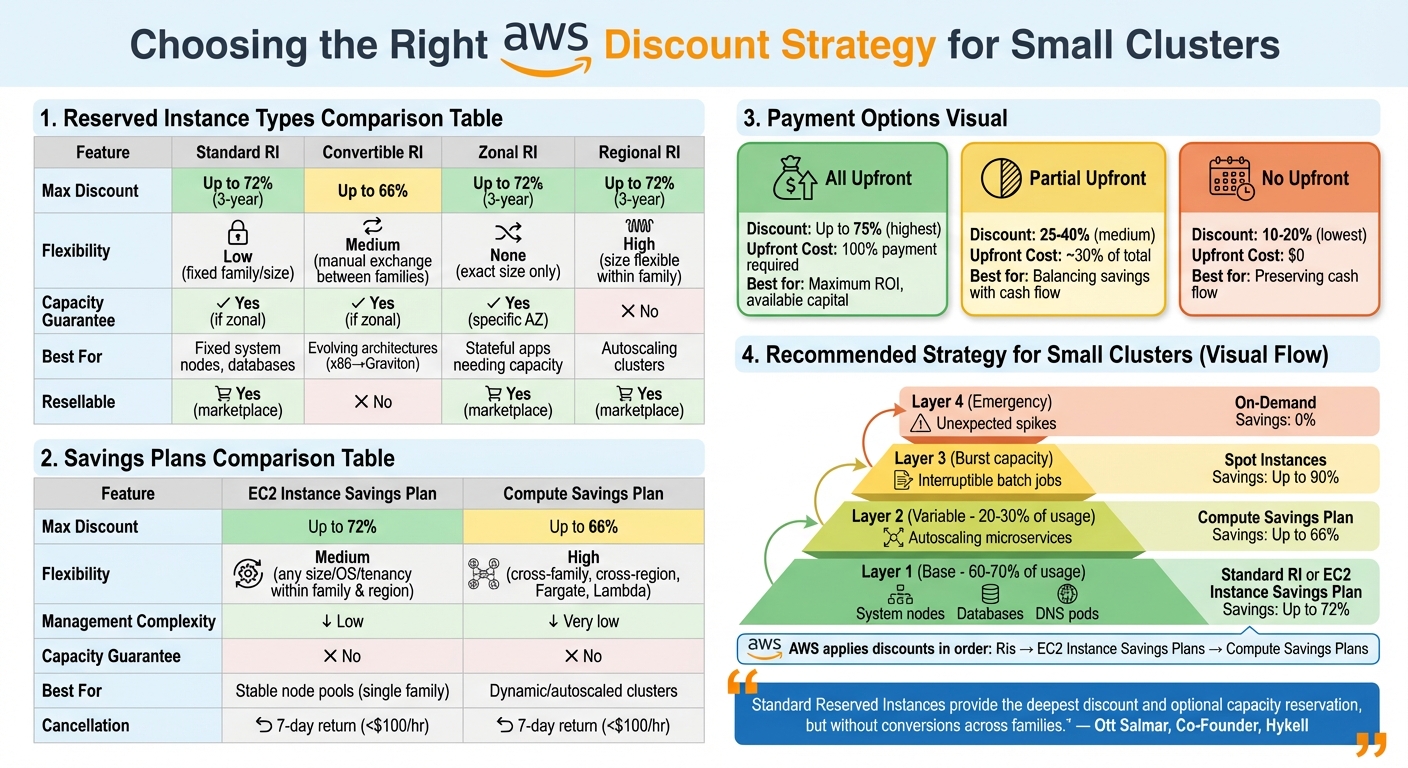
AWS Reserved Instances vs Savings Plans Comparison for Small Kubernetes Clusters
When managing small clusters, selecting the right discount mechanism is crucial. Your choice impacts both your cost savings and the complexity of managing your infrastructure. The decision boils down to understanding your workload’s stability and flexibility.
Comparing RI Types: Standard, Convertible, Zonal, and Regional
Standard Reserved Instances (RIs) offer discounts of up to 72% for a 3-year All Upfront commitment. These are perfect for workloads that remain consistent, like system nodes, DNS pods, or stateful databases running around the clock. However, they require you to stick to a specific instance family for the entire term.
Convertible RIs, on the other hand, allow you to switch between instance families and sizes. This flexibility is helpful if you’re planning a migration, such as moving from x86 to Graviton processors. While Convertible RIs provide discounts of up to 66%, they are better suited for workloads with steady usage patterns but evolving needs.
"Standard Reserved Instances provide the deepest discount and optional capacity reservation, but without conversions across families." – Ott Salmar, Co-Founder, Hykell
When deciding between Zonal and Regional RIs, consider your application’s requirements. Zonal RIs reserve capacity in a specific Availability Zone, which is crucial for stateful applications that can’t afford capacity shortages. However, the discount applies only to the exact size you purchase. Regional RIs, by contrast, provide flexibility across Availability Zones within a region and allow for instance size adjustments. For clusters with autoscalers, Regional RIs ensure that discounts follow instances as they shift between zones.
This foundational choice helps prepare you for selecting the most suitable Savings Plan for dynamic workloads.
Savings Plans Options for Small Clusters
Savings Plans offer an alternative to RIs, providing a simpler way to manage discounts across your infrastructure. Instead of committing to specific instance configurations, you commit to a dollar-per-hour spend.
EC2 Instance Savings Plans offer discounts of up to 72%. These apply to any instance size, operating system, or tenancy within a specific family and region, making them an excellent choice for stable node pools. Compute Savings Plans, on the other hand, provide broader coverage. They extend discounts across instance families, regions, and operating systems, and even include services like Fargate and Lambda. While their discounts max out at 66%, their flexibility makes them ideal for dynamic clusters that rely on autoscaling tools like Karpenter or Cluster Autoscaler.
| Feature | Standard RI | Convertible RI | EC2 Instance Savings Plan | Compute Savings Plan |
|---|---|---|---|---|
| Max Discount | Up to 72% | Up to 66% | Up to 72% | Up to 66% |
| Flexibility | Low (fixed family/size) | Medium (manual exchange) | Medium (family-wide) | High (cross-service/region) |
| Manual Management | High | High | Low | Very low |
| Capacity Guarantee | Yes (if zonal) | Yes (if zonal) | No | No |
| Best For | Fixed system nodes | Evolving architectures | Stable family usage | Dynamic/autoscaled clusters |
For small clusters, combining discount strategies can maximize savings. Use EC2 Instance Savings Plans or Standard RIs to cover the steady baseline (approximately 60–80% of usage). Then, layer Compute Savings Plans to handle variable microservices and burst capacity. AWS applies discounts in a specific order: first RIs, then EC2 Instance Savings Plans, and finally Compute Savings Plans. This ensures you always get the best rate for your spending.
If your cluster is decommissioned early, only Standard RIs can be resold on the AWS Reserved Instance Marketplace. While Convertible RIs and Savings Plans lack this option, AWS now offers a 7-day return policy for Savings Plans under $100 per hour.
Implementing and Monitoring RI and Savings Plans
Steps for Purchasing and Layering Commitments
To get started, open AWS Cost Explorer and head to the "Recommendations" section under Reservations or Savings Plans. Adjust the look-back period to 7, 30, or 60 days based on how stable your workloads are. A 7-day window offers the most up-to-date snapshot. Next, choose a term and payment option: All Upfront provides the largest discount, while No Upfront helps maintain cash flow.
Review the recommendations and pinpoint an hourly commitment that aligns with your baseline usage. Instead of committing all at once, spread your purchases over cycles, such as biweekly or monthly. This staggered approach allows flexibility as workloads change, reducing the risk of overcommitting. After purchasing, sync your autoscaler with your reserved capacity. For example, if you’re using Karpenter, configure your provisioners to prioritize reserved instances. If you’re relying on Cluster Autoscaler, adjust your Auto Scaling Group’s "minimum" setting to match your commitment.
To maximize savings, layer your strategy. Use Savings Plans or Reserved Instances (RIs) to cover your steady baseline needs, while leveraging Spot Instances for variable workloads that can handle interruptions. Keep On-Demand capacity reserved for unexpected spikes. Once your commitments are in place, shift your focus to monitoring and fine-tuning utilization.
Monitoring Utilization and Adjusting Commitments
Keeping an eye on utilization is key to maintaining cost efficiency. Focus on two main metrics: utilization (how much of your reserved capacity is being used) and coverage (the percentage of your total usage that benefits from discounts). If utilization falls below 80%, it could mean you’re overcommitted and wasting money. On the other hand, coverage below 80% for stable workloads suggests missed savings opportunities.
"Any unused commitment from one hour does not roll over to compensate for usage in subsequent hours." – Dnyaneshwar Bhosale, AWS Expert
Set up AWS Budgets to receive alerts if utilization or coverage dips below your target thresholds. Since Cost Explorer updates recommendations every 24 hours, check for changes frequently. If your cluster grows, revisit the recommendations and make additional purchases in small increments. If usage decreases, let existing commitments expire rather than trying to cancel them. While Standard RIs can be sold on the marketplace, Savings Plans cannot be canceled.
Case Study: Savings in a 5-Node Cluster
Here’s an example of how a development team optimized costs for their 5-node EKS cluster. The cluster included three t3.medium system nodes and two c5.large application nodes, running 24/7 and incurring about $0.15/hour in On-Demand costs.
To cut expenses, the team purchased a 1-year EC2 Instance Savings Plan with a $0.09/hour commitment to cover the t3.medium nodes, securing a 72% discount for that portion. For the c5.large nodes, which scaled up during business hours, they opted for Spot Instances, achieving a 75% discount during peak times while letting the remaining hours run On-Demand. This layered approach reduced their monthly costs from $108 to $45 – a 58% savings – while maintaining full availability. By tracking their Savings Plan utilization through Cost Explorer, they maintained a 95% utilization rate throughout the first quarter.
Conclusion: Building Confidence in Cloud Cost Optimization
When it comes to Reserved Instances and Savings Plans for small Kubernetes clusters, a clear and data-backed strategy is key. By analyzing 3–6 months of historical usage, you can determine a stable baseline. From there, committing to only 50–70% of this baseline gives you the flexibility to adapt as your architecture evolves, avoiding oversized or unnecessary commitments.
"Continually adjusting an application’s resource requirements is more important than getting them right the first time." – Amazon EKS Best Practices
This approach ensures your commitments are grounded in actual needs. Right-sizing your clusters can lead to infrastructure savings of 25–60%, and pairing this with Reserved Instances or Savings Plans creates a well-rounded cost optimization plan. These steps build the foundation for ongoing cost management.
For smaller clusters, Compute Savings Plans are often the best choice, offering discounts of up to 66% while maintaining flexibility across instance families, regions, and even services like Fargate or Lambda. For workloads with stable baselines, Standard Reserved Instances can provide even deeper discounts – up to 72%.
Sustained savings require constant monitoring and adjustments. Keep an eye on two key metrics: utilization (are you fully using what you’ve committed to?) and coverage (are you maximizing discount opportunities?). Aim for at least 85% utilization and 70% coverage, and set automated alerts if either metric drops below 70%. Adjust commitments incrementally as your cluster scales to ensure alignment with your hourly usage patterns, as commitments are hourly with no rollover.
A layered approach works best: use Savings Plans or Reserved Instances for your baseline, Spot Instances for fluctuating workloads, and On-Demand Instances for unexpected spikes. This strategy keeps costs aligned with usage while maintaining the flexibility your infrastructure needs.
FAQs
How can I choose between Reserved Instances and Savings Plans for a small Kubernetes cluster?
When deciding between Reserved Instances (RIs) and Savings Plans, it all comes down to how predictable and flexible your workloads are. If your small cluster runs steady, predictable workloads with specific instance configurations, RIs can offer substantial discounts and cost reductions. On the other hand, if your workloads are more dynamic – spanning various instance types, regions, or even services – Savings Plans might be the smarter choice because of their flexibility.
The best way to choose? Dive into your cluster’s usage data, anticipate future requirements, and weigh the level of flexibility you need. Both options aim to cut costs, but the key is aligning them with your operational goals to get the most value.
What key metrics should I monitor to optimize costs for my Kubernetes cluster?
To manage costs effectively in your Kubernetes cluster, start by keeping a close watch on CPU and memory usage. Compare the resources your containers are requesting to what they’re actually using. This can reveal over-provisioned resources that might be inflating your expenses unnecessarily.
It’s also crucial to analyze usage trends over time. Track how CPU and memory consumption changes to adjust resource requests and limits accordingly. Be on the lookout for idle or underutilized nodes, sudden resource spikes, and how well your autoscaling setup is performing. These observations can help you fine-tune your cluster, avoid waste, and ensure your resources are meeting workload needs without overspending. This approach strikes a balance between cost control and maintaining efficient performance.
How do I balance upfront costs and long-term savings when committing to AWS plans?
To manage upfront expenses while ensuring long-term savings with AWS, it’s crucial to find the right balance between Reserved Instances (RIs) and Savings Plans, tailored to the specific needs of your workloads.
RIs work best for steady, predictable workloads. By committing to specific instance types and regions, you can enjoy substantial discounts. In contrast, Savings Plans offer more flexibility, allowing you to save across a broader range of services and instance types, making them a better fit for workloads that are dynamic or subject to change.
The key is to start by analyzing your usage patterns and projecting your future needs. For workloads that remain consistent, allocate a larger portion to RIs to get the most savings. For workloads that fluctuate or are harder to predict, lean more on Savings Plans to retain flexibility. This strategy helps you manage costs effectively while avoiding overcommitting or leaving resources underutilized.