Spot Instances Without the Heartburn: A Playbook for Small Teams

Want to save up to 90% on cloud costs? Spot instances let you access unused computing power at massive discounts. But here’s the catch: providers can reclaim these resources with little notice. For small teams, this might seem risky, but with the right strategies, you can avoid interruptions and maximize savings.
Key takeaways:
- Spot instances are ideal for tasks like batch processing, CI/CD pipelines, and big data analytics.
- Use tools like AWS Auto Scaling Groups, Kubernetes controllers, and checkpointing to handle interruptions.
- Diversify instance types and zones to reduce risks and improve availability.
- Automation tools like Karpenter and AWS Node Termination Handler make managing spot instances easier.
This guide explains how to leverage spot instances effectively, covering workload selection, risk reduction, and automation tools. Let’s dive into the details.
Create Amazon EC2 Spot Instances Step-by-Step
How Spot Instances Work and Why They Matter
Spot instances are essentially unused computing resources that cloud providers like AWS, Azure, and Google Cloud Platform offer at steep discounts – sometimes up to 90% off their regular on-demand prices. The catch? These instances can be reclaimed by the provider when they need the capacity for other paying customers. Providers give short warnings before reclaiming capacity – AWS offers a 2-minute notice, while Azure and Google Cloud provide just 30 seconds. These instances come from specific capacity pools (availability zones and instance types), and when demand spikes, interruption notices are sent via the provider’s metadata service.
Performance-wise, spot instances are identical to on-demand instances. They use the same hardware, deliver the same speeds, and provide the same network capabilities. The only real difference lies in their pricing model and the possibility of interruptions. As Scott Horsfield, Sr. Specialist Solutions Architect for EC2 Spot, puts it:
"The only difference between an On-Demand Instance and a Spot Instance is that a Spot Instance can be interrupted by Amazon EC2 with two minutes of notification."
For small teams, this pricing model can be a game-changer. It enables them to run large-scale tasks – like data processing or high-demand workloads – that might otherwise be financially out of reach. Plus, the pricing isn’t as volatile as one might think. AWS, for instance, adjusts spot prices based on long-term supply and demand trends rather than minute-by-minute changes. This stability, paired with the cost savings, makes spot instances an appealing option.
Main Benefits of Spot Instances for Small Teams
The primary draw of spot instances is the cost savings, which can range from 70% to 90%. A 2025 Kubernetes Cost Benchmark Report revealed that teams combining on-demand and spot instances cut costs by an average of 59%, while those relying solely on spot instances saved up to 77%.
But the advantages go beyond just saving money. Spot instances also offer flexibility and scalability, which are especially useful for resource-limited teams. You’re not locked into long-term commitments, and you can deploy significant computing power for short-term tasks – like running CI/CD pipelines, processing large datasets, or testing new features – then shut it all down without incurring ongoing costs. Additionally, tools like AWS Auto Scaling groups and Kubernetes controllers now make it easier to manage interruptions. These tools can automatically transition workloads to on-demand instances if a spot instance is reclaimed, ensuring smoother operations.
Common Problems with Spot Instances
The biggest downside? Interruptions. When a provider reclaims capacity, you’ll only have a short window – 2 minutes in AWS’s case – to wrap things up. This can be a major issue for workloads that aren’t designed to handle abrupt stops, such as databases, stateful applications, or tightly connected processing tasks.
Not every workload is a good fit for spot instances. If restarting interrupted tasks ends up costing more in time and resources than the savings on compute, spot instances may actually work against you. Applications requiring continuous uptime or those that manage critical state are better suited for other solutions.
For smaller teams, operational complexity can also be a hurdle. To make the most of spot instances, you’ll need to implement strategies like checkpointing to save progress, configure automation to handle interruptions, and set up graceful shutdowns. Without these measures, the savings might be overshadowed by the effort required to manage interruptions.
Another challenge is capacity availability. Spot capacity fluctuates based on demand, so the instance type and availability zone you prefer might not always have spot capacity when you need it. To work around this, it’s recommended to diversify your options – using at least 10 different instance types increases your chances of finding available capacity.
While these challenges can seem daunting, there are practical solutions to address them. The following sections will dive into strategies to overcome these hurdles effectively.
Which Workloads Work Best with Spot Instances
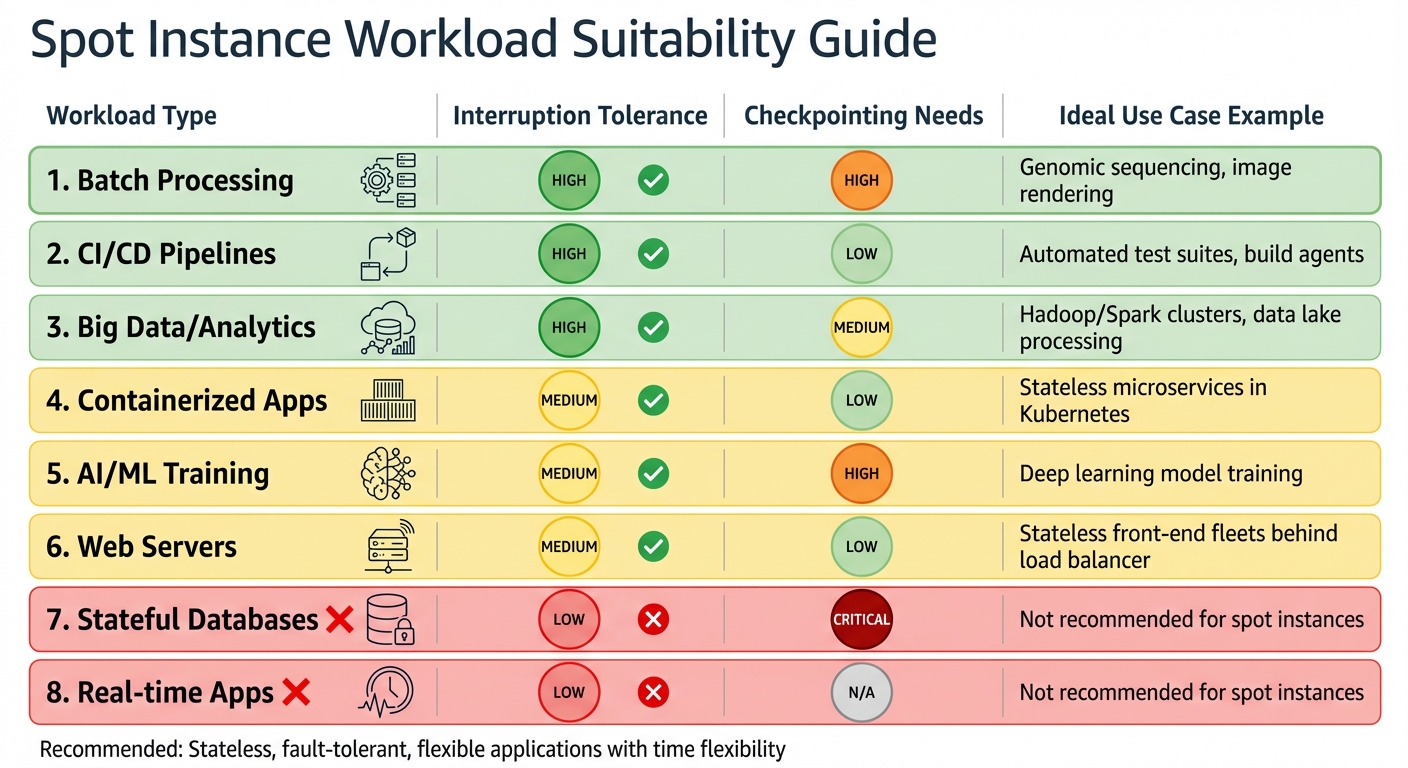
Spot Instance Workload Suitability Guide: Best and Worst Use Cases
Picking the right workloads for spot instances is all about balancing cost savings with the ability to handle interruptions. Spot instances are perfect for tasks that can tolerate sudden shutdowns without losing data or progress. Let’s dive into the types of workloads that thrive in this environment.
Stateless applications are a natural fit. Since they don’t store data locally, replacing or scaling them is straightforward. Think of microservices or web servers behind a load balancer – if one instance goes offline, it’s quickly replaced without missing a beat.
Fault-tolerant workloads are another strong candidate. Systems designed to handle hardware failures or unexpected shutdowns can easily incorporate spot instances. Similarly, time-flexible tasks like overnight batch jobs or queued data processing are ideal since they don’t require immediate completion.
Distributed workloads also shine here. Tasks split into smaller chunks – like those in Hadoop or Spark – can continue running even if an instance is interrupted. The work simply shifts to other nodes. For example, the National Football League (NFL) leverages 4,000 Amazon EC2 Spot Instances across over 20 instance types to schedule its season, saving $2 million annually.
AWS sums it up well:
"Spot Instances are recommended for stateless, fault-tolerant, flexible applications".
Fault-Tolerant Workload Examples
Here are some real-world examples showing how fault-tolerant workloads can make the most of spot instances.
Batch processing is a classic use case. Whether it’s genomic sequencing, image rendering, or large-scale data transformations, these tasks can pause and resume without issues. Adding checkpointing – saving progress to external storage like Amazon S3 – ensures that no work is lost if an instance is reclaimed.
CI/CD pipelines are another great match. Automated test suites and build agents are short-lived tasks that can easily restart if interrupted. Most modern CI/CD tools are built to handle retries, so a brief interruption is no big deal.
Big data frameworks like Hadoop and Spark excel with spot instances. These systems distribute work across many nodes, and if one node disappears, the task is reassigned. For large-scale analytics or data lake operations, this combination of parallel processing and fault tolerance is a game-changer.
Containerized applications running in Kubernetes also adapt well to spot interruptions. Kubernetes automatically reschedules pods to other nodes when a spot instance is reclaimed. By setting up multiple replicas and using Pod Disruption Budgets, availability is maintained even during large-scale interruptions.
AI and machine learning training can benefit significantly from spot instances, though they require some extra setup. Training deep learning models often takes days or weeks, so checkpointing model weights and state is essential. While the setup effort is higher, the potential savings – up to 90% – make it worthwhile.
Web servers can also run on spot instances, provided they’re stateless and behind a load balancer. If an instance is reclaimed, the load balancer routes traffic to other healthy instances. Features like connection draining ensure in-flight requests complete before the instance shuts down.
Spot Workload Suitability Table
Here’s a quick summary of how different workloads align with spot instances:
| Workload Type | Interruption Tolerance | Checkpointing Needs | Ideal Use Case Example |
|---|---|---|---|
| Batch Processing | High | High | Genomic sequencing, image rendering |
| CI/CD Pipelines | High | Low | Automated test suites, build agents |
| Big Data/Analytics | High | Medium | Hadoop/Spark clusters, data lake processing |
| Containerized Apps | Medium | Low | Stateless microservices in Kubernetes |
| AI/ML Training | Medium | High | Deep learning model training |
| Web Servers | Medium | Low | Stateless front-end fleets behind load balancer |
| Stateful Databases | Low | Critical | Not recommended for spot instances |
| Real-time Apps | Low | N/A | Not recommended for spot instances |
How to Reduce Spot Instance Interruptions
Interruptions are a common challenge with spot instances, but you can minimize their impact by using a mix of diversification and automation. By spreading workloads across different pools and setting up effective failover mechanisms, you can build a system that’s both cost-efficient and resilient. Here’s how you can do it.
Spread Requests Across Instance Types and Availability Zones
One of the most effective ways to reduce interruptions is to distribute your requests across multiple capacity pools. These pools consist of unused instances of the same type within a specific Availability Zone. If one pool runs out of capacity, others may still be available.
Use at least 10 different instance types for each workload. This approach significantly lowers the risk of interruptions. Many large organizations rely on diverse pools to ensure both reliability and cost savings.
To simplify this process, leverage Attribute-Based Instance Selection. Instead of manually choosing instance types, define your requirements (like vCPUs, memory, storage), and AWS will automatically match suitable options. This includes both older generations like c4 and c5, which often have more stable spot capacity due to lower demand, and newer releases.
Distribute workloads across all Availability Zones to access more independent capacity pools. Before deploying, check the Spot Placement Score, which rates your likelihood of getting capacity in a specific region or zone on a scale from 1 to 10.
For allocation strategies, opt for price-capacity-optimized. This method selects instances from pools with the most available capacity (and lowest interruption risk) at the best price. It strikes a balance between cost savings and stability, making it ideal for production workloads.
Use Checkpointing and State Persistence
Checkpointing ensures that your progress is saved to persistent storage, allowing interrupted tasks to resume without starting over.
For batch jobs or machine learning tasks, save checkpoints to Amazon S3 after completing major milestones. AWS SageMaker Managed Spot Training simplifies this process by automatically resuming jobs from the last checkpoint when a spot instance is interrupted. You just need to provide a checkpoint_s3_uri to the SageMaker Estimator.
Always separate compute from storage. Store critical data in Amazon S3, EBS volumes, or DynamoDB rather than on the instance itself. Data stored on instance store volumes is lost when the instance is reclaimed.
If you’re running Spark workloads on Kubernetes, enable PVC (Persistent Volume Claim) reuse. This allows shuffle files to persist even if an executor is interrupted, so they can be reused by the replacement executor, avoiding unnecessary recomputation.
Checkpointing not only protects your progress but also strengthens your system’s overall resilience.
Combine Spot and On-Demand Instances
Mixing spot and on-demand instances offers a balance of cost savings and reliability. This is particularly useful for workloads where certain components are critical.
Enable Capacity Rebalancing in Auto Scaling Groups. This feature acts on AWS’s "rebalance recommendation" signal, often received before the standard two-minute interruption notice. It proactively launches replacement instances to ensure continuity. As the Amazon EC2 Auto Scaling User Guide notes:
"With proactive replacement in Capacity Rebalancing, you benefit from graceful continuity."
For distributed systems like Spark, run the driver on an on-demand instance while using spot instances for executors. This setup prevents a single spot node failure from disrupting the entire job.
You can also configure lifecycle hooks to pause instance termination during the two-minute warning period. This gives applications time to drain connections and upload logs. Set deregistration delays to 90 seconds or less to ensure they finish within the interruption window.
Finally, test your system using the AWS Fault Injection Service. Simulating spot interruptions allows you to identify and fix vulnerabilities before they affect your production environment. It’s better to catch issues during testing than face them unexpectedly.
sbb-itb-f9e5962
Tools and Automation for Managing Spot Instances
Managing spot instances can be a game-changer for small teams. Automation tools take much of the stress out of the process, turning potential risks into opportunities for significant cost savings. AWS offers a range of built-in tools that make managing spot instances easier, allowing teams to focus on building their applications rather than constantly monitoring infrastructure.
AWS Spot Fleet and Auto Scaling Groups
Auto Scaling Groups (ASGs) are a cornerstone for managing spot capacity. They ensure your desired number of instances is always maintained by automatically replacing any that are interrupted. One standout feature here is Capacity Rebalancing, which proactively launches replacement instances when AWS detects a higher risk of interruption. To help applications shut down smoothly, you can configure a termination delay ranging from 120 seconds to two hours.
For larger deployments, EC2 Fleet simplifies launching multiple instances with a single request. AWS generally recommends using ASGs or EC2 Fleet over the legacy Spot Fleet API.
When setting up spot instances, the price-capacity-optimized strategy is invaluable. It selects instances from pools with the best balance of availability and cost. For even more flexibility, enable attribute-based instance type selection – this allows AWS to automatically match your requirements (like vCPUs and memory) with suitable instance types. A great example of this in action is the National Football League (NFL). In 2022, the NFL used 4,000 EC2 Spot Instances across over 20 instance types to plan its season schedule, saving $2 million annually.
You can also automate responses to interruption signals using Amazon EventBridge. By setting up rules, you can trigger automated actions like checkpoints or graceful shutdowns whenever a rebalance recommendation or a two-minute interruption notice is received.
Next, let’s see how Kubernetes simplifies spot instance management even further.
Using Kubernetes with Spot Instances
Kubernetes requires a tailored approach to handle spot instances effectively. The key is deploying an interruption handler to automate responses to AWS termination signals.
For this, Karpenter is a standout tool. It provisions nodes in seconds, making it faster than traditional Cluster Autoscaler solutions. When an interruption occurs, Karpenter drains the affected node and spins up a replacement almost instantly. Omer Hamerman, Principal DevOps Engineer at Zesty, highlights this advantage:
"Karpenter provisions nodes in seconds rather than minutes, crucial for handling Spot Instance interruptions."
If Karpenter isn’t an option, the AWS Node Termination Handler (NTH) is a reliable alternative. It monitors the EC2 metadata service for interruption signals and automatically cordons and drains nodes when a two-minute notice is detected.
For small teams, Kubernetes’ ability to replace nodes quickly minimizes manual intervention. To prevent mass outages during evictions, Pod Disruption Budgets (PDBs) are essential. Configuring terminationGracePeriodSeconds and using PreStop hooks ensures that pods can complete tasks like flushing data or finishing requests before shutdown. Applying taints (e.g., spot=true:NoSchedule) to spot nodes and adding tolerations to pods ensures only interruption-tolerant workloads run on spot capacity.
When provisioning nodes, diversify across multiple instance families (e.g., m5, c6i, r6g) and Availability Zones to minimize the impact of capacity shortages. Before going live, test your setup with tools like the AWS Fault Injection Simulator (FIS) or the amazon-ec2-spot-interrupter to ensure your PDBs and interruption handlers work as intended.
Monitor with CloudWatch and Spot Advisor
Monitoring is just as critical as provisioning when it comes to spot instances. Instead of fixating on how often interruptions occur, focus on metrics that reflect the health and reliability of your application.
Scott Horsfield, Sr. Specialist Solutions Architect for EC2 Spot, emphasizes this:
"It’s critical to pick metrics that reflect availability and reliability, and not get caught up tracking metrics that do not directly correlate to service availability and reliability."
For example, monitor load balancer metrics like TargetResponseTime and RejectedConnectionCount to see if interruptions are impacting user experience. In Auto Scaling Groups, track the gap between GroupInServiceInstances and GroupDesiredCapacity to ensure your fleet is meeting demand. For containerized environments like ECS or EKS, check the Service Running Task Count to confirm tasks are redistributed after a node is reclaimed.
Enable one-minute monitoring intervals for faster scaling responses. Use Amazon EventBridge to capture EC2 Spot Instance Interruption Warnings and Instance Rebalance Recommendations, which can trigger automated Lambda functions or scripts for graceful draining or checkpointing.
AWS Spot Advisor offers historical data on interruption rates for various instance types, helping you choose options with a lower risk of disruption. The Spot Placement Score (SPS) rates your chances of acquiring capacity in a specific Region or Availability Zone on a scale from 1 to 10. To track these scores over time, use the Spot Placement Score Tracker from AWS Labs, which stores data in CloudWatch for trend analysis. The cost for this setup is about $8.00 per month in the US East (N. Virginia) Region.
It’s worth noting that less than 5% of Spot Instances are interrupted by AWS before termination. However, keep in mind that spot capacity can fluctuate based on supply and demand, so past performance isn’t always a reliable indicator of future availability.
Step-by-Step Spot Instance Playbook
Now that you’re familiar with the tools and monitoring strategies, here’s a straightforward guide to integrating spot instances into your infrastructure. This playbook is tailored for small teams.
Step 1: Check if Your Workloads Are Suitable
Start by reviewing your workloads to determine which can handle interruptions. Look for stateless, fault-tolerant workloads that won’t suffer from occasional disruptions.
Your workload should be flexible about when it runs and adaptable to different instance types or Availability Zones. A key question to ask: Can this workload shut down gracefully or save its progress within two minutes? If the answer is yes, you’re ready to proceed.
Step 2: Choose Instance Types and Regions
If your workloads are interruption-friendly, the next step is diversifying your instances. Aim to use at least 10 instance types across multiple Availability Zones. Instead of manually selecting instance types, leverage Attribute-Based Instance Type Selection. This allows you to specify requirements like vCPUs, memory, and storage, and AWS will automatically include compatible, newly released instance types.
Set your maximum price close to the On-Demand rate to ensure availability. Remember, spot prices change gradually based on supply and demand trends, not sudden spikes.
Step 3: Test Interruption Handling
Before deploying live workloads, test how well they handle interruptions. Use the AWS Fault Injection Simulator (FIS) to replicate interruptions in a controlled setting. For local testing, try the Amazon EC2 Metadata Mock (AEMM) to simulate interruption signals and verify that your scripts respond as expected.
Ensure your applications are configured to handle SIGTERM signals, so they can stop processing tasks and close database connections within the 120-second window.
Scott Horsfield, Sr. Specialist Solutions Architect for EC2 Spot, explains:
"When you follow the best practices, the impact of interruptions is insignificant because interruptions are infrequent and don’t affect the availability of your application."
Test your automation by setting up an EventBridge rule that triggers a Lambda function to call the DetachInstances API. This will force your Auto Scaling Group (ASG) to replace interrupted instances immediately.
Step 4: Set Up Automation
To manage spot capacity efficiently, use ASGs or EC2 Fleet. Enable the price-capacity-optimized allocation strategy, which selects instances from the most available pools at the lowest cost.
Activate Capacity Rebalancing within your ASG or EC2 Fleet. This feature proactively launches replacement instances when AWS sends a "rebalance recommendation" signal, often before an actual interruption occurs.
If you’re using containers, take advantage of tools like the AWS Node Termination Handler for Kubernetes/EKS or enable the ECS_ENABLE_SPOT_INSTANCE_DRAINING parameter for Amazon ECS. These tools simplify the process of draining nodes and rescheduling tasks.
You can automate this setup using commands like CreateAutoScalingGroup or CreateFleet.
Step 5: Track Performance and Savings
With automation in place, continuous monitoring is key to maintaining efficiency. Keep an eye on metrics that reflect your application’s performance. For example, track load balancer metrics to ensure interruptions aren’t affecting users. For ASGs, monitor the gap between GroupInServiceInstances and GroupDesiredCapacity to confirm your fleet is meeting demand.
Enable one-minute monitoring intervals to improve scaling response times. Use EventBridge to capture EC2 Spot Instance Interruption Warnings and trigger automated actions like saving progress or shutting down gracefully.
Finally, measure your cost savings by comparing your spot instance spending to what you would have spent on On-Demand instances. This will give you a clear picture of the financial benefits.
Cost Savings Data and Examples
Concrete data and real-world examples show how small teams can take full advantage of spot instances while keeping disruptions under control.
Cost Savings Benchmarks
Spot instances can cut costs by 50% to 90% compared to On-Demand pricing across major cloud providers. For Kubernetes workloads, teams using a mix of On-Demand and Spot instances often see an average cost reduction of 59%, while those running entirely on Spot instances can achieve savings of up to 77%.
The AWS Spot Instance Advisor highlights typical discounts in the 60–75% range, with some instance types offering reductions as high as 90%. Beyond the financial benefits, metrics on interruptions and diversification further reinforce the advantages of using spot instances.
Interruption and Diversification Metrics
Interruption rates for spot instances vary depending on the instance type and region. AWS groups these rates into categories: less than 5%, 5–10%, 10–15%, 15–20%, and over 20%. Interestingly, more than 50% of interruptions happen within the first hour of use, making robust automation critical to managing early disruptions.
Diversification plays a key role in improving stability. By spreading requests across at least 10 different instance types, teams can minimize the risk of capacity shortages in any single resource pool. Since AWS shifted to a supply-demand pricing model in 2017, spot pricing has become more predictable. However, fluctuations still occur – over the past year, AWS Spot prices rose by 21%, while Google Cloud Platform (GCP) prices dropped by 26%.
Case Study: Bare Metal Kubernetes Migration
Real-world migrations demonstrate the potential savings and operational benefits. In mid-2024, a large SaaS company migrated its EKS workloads to Spot Instances using Karpenter and Compute Copilot. Their optimization efforts boosted savings from 12.5% to 50.5%, translating to $66,991 in monthly savings.
Similarly, Wio Bank moved 90% of its non-production environments to Spot VMs. This shift significantly cut infrastructure costs while maintaining performance levels. These cases highlight how automation and diversification can turn potential interruptions into manageable challenges, unlocking substantial savings.
Conclusion: Making Spot Instances Work for Small Teams
Spot instances can slash costs by up to 90% when used effectively. The key lies in thoughtful planning, smart automation, and consistent monitoring.
Start by identifying workloads that can handle interruptions. Diversify across instance types and availability zones to reduce risks. Leveraging the price-capacity-optimized allocation strategy ensures your workloads are placed in pools with the lowest chance of interruptions.
After qualifying and diversifying workloads, automation becomes essential. Automated tools can swiftly replace interrupted instances, keeping services running smoothly. For example, the AWS Node Termination Handler acts on the 2-minute warning, gracefully draining workloads before termination. This minimizes disruptions at critical moments.
"Running workloads on Spot is like surfing: the waves will crash, but with balance and preparation you can ride them instead of being thrown off." – Ido Slonimsky, Tech Lead, Zesty
Monitoring is equally important. Keep an eye on load balancer errors and response times to understand how interruptions affect users. Regular "Game Days" using AWS Fault Injection Simulator can test your system’s resilience, ensuring your automation strategies effectively handle interruptions without downtime.
With the right mix of planning, automation, and monitoring, small teams can harness the cost benefits of spot instances while maintaining strong performance.
FAQs
What strategies can small teams use to handle interruptions when working with spot instances?
Small teams can effectively manage spot instance interruptions by using a mix of smart planning and the right tools. One of the biggest helpers here is automation. Tools like Auto Scaling can step in to automatically replace terminated instances, keeping disruptions to a minimum. On top of that, designing workloads to handle interruptions smoothly – like using the two-minute termination notice to save work or reschedule tasks – can make a huge difference.
Another approach is building fault-tolerant architectures. For instance, breaking workloads into smaller, manageable tasks or using container orchestration platforms like Kubernetes allows systems to adjust dynamically when interruptions happen. Adding another layer of protection, diversifying instance types and spreading workloads across multiple availability zones helps reduce the chances of multiple interruptions happening at once, boosting reliability.
By blending automation, interruption-friendly workload designs, and a diversified setup, small teams can lower risks, keep systems running smoothly, and still enjoy the cost-saving perks of spot instances.
What kinds of workloads are ideal for using spot instances to save costs?
Spot instances work well for workloads that can tolerate interruptions and adapt to changes. Think of tasks like big data processing, containerized applications, CI/CD pipelines, rendering jobs, high-performance computing (HPC), and data analysis. These workloads typically support horizontal scaling and can bounce back quickly from disruptions, making them a great fit for the cost-saving benefits of spot instances.
By using spot instances for these kinds of tasks, small teams can cut down on cloud costs without sacrificing efficiency.
How can small teams minimize the risk of spot instance interruptions?
To minimize the chance of spot instance interruptions, try these methods:
- Auto Scaling groups: These automatically replace interrupted instances, keeping your workloads running smoothly without needing manual input.
- Capacity rebalancing: This feature proactively swaps out instances when the provider signals a possible interruption.
- Spot Fleet or Auto Scaling configurations: Set these up to act on rebalance recommendations, moving workloads to more stable instances before disruptions occur.
These strategies help small teams maintain reliable services while reaping the cost benefits of spot instances.