Throttling CI for Budget Control: Patterns and Policies

Managing CI costs is a growing challenge for teams. Without proper controls, expenses can quickly escalate due to inefficient workflows, redundant builds, and over-provisioned resources. For example, a team of 50 developers could see monthly CI costs rise to $790 for Linux runners alone, while macOS runners cost 10x more at $0.062 per minute.
The solution? CI throttling – a set of strategies to limit concurrent builds, prioritize critical tasks, and cap resources during demand spikes. Key techniques include:
- Concurrency caps: Restricting the number of builds or GPU instances running simultaneously.
- Fail-fast strategies: Stopping jobs early when errors occur to save resources.
- Auto-cancel policies: Terminating outdated builds when new commits are pushed.
Before implementing throttling, it’s critical to measure your current costs. Tools like Infracost and AWS CloudWatch can help establish a baseline, track trends, and spot waste. For example, identifying idle resources and automating shutdowns during off-hours can reduce CI costs by up to 30%.
Smart scheduling, priority-based resource allocation, and spot instances can further optimize spending. For instance, using spot instances can cut costs by up to 90% compared to on-demand pricing. These strategies allow teams to control budgets without sacrificing productivity.
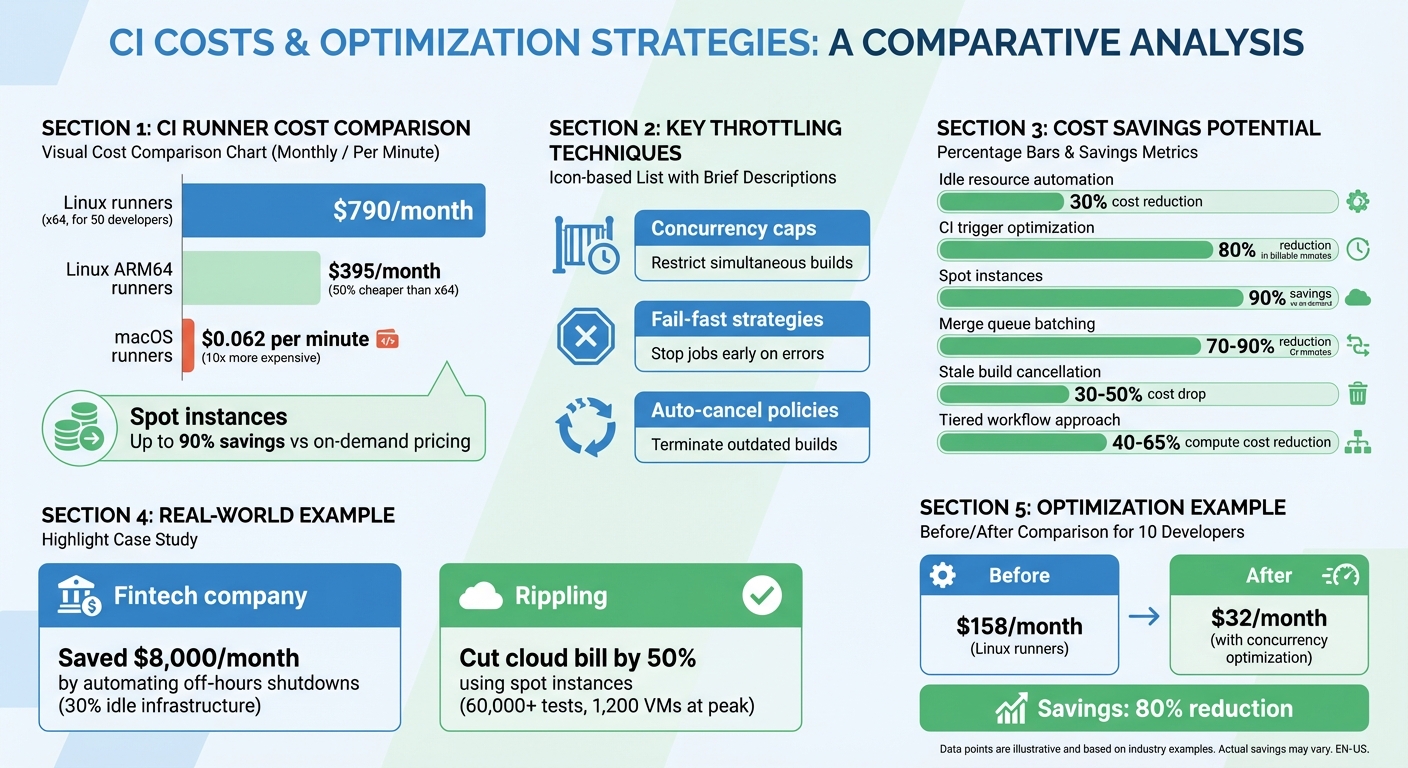
CI Runner Cost Comparison and Optimization Strategies
Measuring Waste and Setting Cost Baselines
Finding Idle and Over-Provisioned Resources
Cutting down on CI costs starts with identifying idle or over-provisioned resources. Keep an eye on CPU and memory usage across your build agents. If CPU utilization regularly dips below 10–15%, it’s a clear sign your infrastructure might be overbuilt. Also, look out for "zombie" resources – things like build agents left running between jobs, unattached EBS volumes, or unused NAT gateways lingering after VPC updates.
For example, a fintech company in London discovered that 30% of its CI/CD infrastructure sat idle outside of business hours. By automating shutdowns during these periods, they shaved over $8,000 off their monthly cloud bill. Another SaaS provider tackled idle costs by using auto-scaling groups and spot instances for CI/CD runners. The result? They slashed idle expenses by more than 50% and boosted build throughput by 20%.
It’s also worth examining your CI workflows. If you’re triggering 5–15 runs per pull request or seeing clusters of canceled jobs, it could mean your CI is overactive. Adjusting triggers to focus on meaningful events – like running CI only on pull requests instead of every push – can cut monthly billable minutes by as much as 80%. High idle time may also suggest switching to ephemeral runners, which spin up for a task and shut down immediately after completion.
Pinpointing idle resources is a critical first step in establishing accurate cost baselines across your environments.
Calculating Concurrency Costs Across Environments
To understand where your CI dollars are going, track costs across all environments – development, staging, and production. Use tagging strategies, like labeling CI runners or compute instances with tags such as "environment: production" or "team: platform." These tags make it easier to filter costs in your cloud provider’s billing dashboard and calculate spending for each environment.
Tools like Infracost can help establish a financial baseline by generating a baseline.json file from your Terraform configurations. This lets you evaluate "cost deltas" for infrastructure changes before they’re merged. Major cost drivers to monitor include instance types, the number of concurrent jobs, job durations, and autoscaler settings (e.g., min/max instances and cooldown periods). Keep tabs on total billable minutes, spending by runner type, and median job duration to get a clear picture of your costs.
By understanding these costs, you can better track trends and optimize spending.
Monitoring Cost Trends Over Time
Daily cost monitoring is essential for catching overspending before it spirals out of control. Without proper oversight, organizations often waste 30–40% of their resources. However, active monitoring can drive that waste down to under 10%. Plus, with real-time tracking, teams can address cost issues up to 30 times faster than waiting for the shock of a monthly invoice.
Start by establishing a 30-day baseline to define typical spending patterns for specific teams or repositories. At least 14 days of historical data is necessary for spotting anomalies effectively. To stay on top of budgets, set up automated alerts at 50%, 80%, and 100% of your budget limits. These alerts ensure stakeholders are notified before overspending becomes an issue.
sbb-itb-f9e5962
Throttling Patterns for CI Optimization
Setting Concurrency Caps by Team and Repository
Managing how many builds run simultaneously is crucial to keeping your CI resources balanced. By setting dynamic concurrency groups based on branch names, pull request numbers, or workflow IDs, you can apply precise limits. For example, in GitHub Actions, using group: ${{ github.workflow }}-${{ github.ref }} ensures concurrency is tied to a specific branch and workflow. This way, a build on one branch won’t interfere with builds on others.
Another effective tactic is auto-canceling outdated builds. By enabling cancel-in-progress: true for CI/test workflows, older runs are automatically terminated when a new commit is pushed. This reduces waste on outdated builds and can significantly cut costs. Companies have reported savings of up to 10% on their GitHub Actions expenses. For instance, a team of 10 developers transitioning from full CI on every push to a concurrency-optimized setup could see their monthly Linux runner costs drop from $158 to $32. Similarly, optimizing macOS runners could save over $1,300 per month per workflow.
For critical deployments – like infrastructure changes or Terraform runs – it’s safer to set concurrency to 1 and disable auto-canceling (cancel-in-progress: false). This ensures tasks run in a strict sequential order, avoiding potential race conditions or environment issues. As Gitdash emphasizes:
"If you are running a workflow that deploys to production or manages infrastructure…
cancel-in-progress: trueis your enemy".
These strategies not only safeguard critical jobs but also streamline job queues for tasks with varying priorities.
Queue Management for Low-Priority Jobs
Organizing workflows by urgency helps optimize resource allocation. Prioritize main branch and release builds, while deferring scheduled or non-essential tasks. Assigning priority levels (e.g., 0–100) ensures high-priority jobs get resources first when runner capacity is limited.
Concurrency groups are also useful for managing shared resources. For instance, jobs requiring the same testing environment or database can be grouped to run sequentially, avoiding conflicts while allowing unrelated jobs to run in parallel. For less critical tasks – like those involving a shared SaaS testing platform – eager concurrency can help maximize throughput and resource efficiency.
Auto-canceling redundant builds in the queue further optimizes resource use. When a new commit is pushed to the same branch, older builds are canceled immediately, freeing up capacity. Combining this with path filters (e.g., paths-ignore for documentation or README updates) prevents unnecessary CI triggers, saving time and resources. For even greater savings, explore alternative pricing models like spot instances.
Using Spot Instances for Cost Savings
Spot instances can slash CI costs by as much as 90% compared to on-demand pricing. However, they come with a trade-off: cloud providers can reclaim these instances with short notice – two minutes on AWS or as little as 30 seconds on GCP and Azure. This makes them ideal for non-critical builds that can handle interruptions.
In August 2023, Rippling‘s engineering team shifted their massive CI pipeline (running over 60,000 tests) to AWS Spot Instances. By adopting a lowest-price allocation strategy and modifying their test runner to skip completed tests on retries, they cut their million-dollar cloud bill by roughly 50%. At peak times, they managed 1,200 large VMs and dynamically switched to on-demand instances during spot outages.
To reduce the risk of interruptions, diversify instance types across multiple availability zones and shorten job durations through parallelization and caching. Use Auto Scaling Groups with mixed instance policies to maintain a base level of on-demand instances while scaling with spot instances during high demand. Additionally, configure your CI system to automatically retry jobs when an agent is terminated. Tools like Buildkite can distinguish between code errors and infrastructure interruptions, ensuring retries only occur when necessary.
CI/CD Cost Optimization Explained | Cut Build Time & Cloud Spend
Policies for Build Prioritization and Cost Control
Building on the throttling strategies discussed earlier, these policies are designed to streamline build prioritization and keep costs in check.
Assigning Priority Levels to Different Build Types
To make the most of CI resources, it’s important to rank builds by urgency. Assign each build a priority score between 0 and 100. For example, master promotions might score 65, standard master builds 60, and PR or tag builds 50. Higher-priority builds will always claim agent slots first.
For tasks that demand significant resources, match the job’s complexity to the right hardware. High-performance agents, like 16-core machines, should handle the most demanding jobs, while lightweight agents take on simpler tasks. If you’re using concurrency groups to manage limited resources, enabling "eager" settings ensures high-priority jobs can immediately access available slots, even if it means skipping over lower-priority tasks in the queue.
To avoid bottlenecks, implement a spillover strategy. Dedicate specific agents to high-priority jobs but allow them to overflow into general-purpose agents when needed. This approach balances efficiency without requiring an overcommitment to expensive hardware.
Setting Cost Thresholds and Approval Rules
Prioritization alone isn’t enough – you also need strong budget controls. Catch cost spikes early to avoid overspending. By embedding budget guardrails directly into your pull request workflow, you can block deployments that breach predefined thresholds, such as a $2,000/month increase or a 25% rise in expenses. As Infracost explains:
"Budget conversations usually happen after costs have already exceeded limits. Guardrails flip this around by triggering when a change would push costs over a threshold… before the code is merged".
Configure the CI pipeline to fail with a non-zero exit code when costs exceed the limit, halting deployment until the issue is reviewed and approved. Tailor approval paths to the size of the cost impact: small increases under $100/month can auto-approve, while changes between $100–$1,000/month might need team lead approval. Larger increases over $1,000/month should escalate to a director or FinOps team for sign-off.
Set multi-stage alerts at 50%, 80%, 100%, and 120% of your expected budget to catch overspending early. For tighter control, automated systems can shut down non-essential resources, like non-production VMs, if spending surpasses 120% of the budget. To save CI credits, configure cost estimation jobs to run only when infrastructure files (like **/*.tf or **/*.tfvars) are modified.
Scheduling Low-Priority Builds During Off-Peak Hours
To stretch your CI budget further, schedule non-urgent tasks during off-peak hours. Use labels like low-priority to ensure background jobs only run when runners are idle, avoiding interference with critical builds. For even better timing, set up cron triggers to schedule these tasks during periods of lower activity.
A two-tiered workflow gating system can also help. Run quick, low-cost checks like linting for every push, but hold off on expensive integration or end-to-end tests until pull requests or merge queues are ready. Merge queue batching takes this one step further by running the full test suite for a batch of approved PRs instead of testing each push individually.
This scheduling approach works hand-in-hand with auto-cancellation and path filtering. For example, when using auto-cancellation for stale runs, you can protect critical production builds by adding conditions like cancel-in-progress: ${{ github.ref != 'refs/heads/main' }} to ensure these builds are never interrupted.
Together, these policies help control costs while maintaining smooth development workflows, even as teams and projects grow in complexity.
Balancing Cost Control with Development Speed
The tricky part about managing CI costs isn’t just cutting expenses – it’s doing so without slowing your team down. As Mergify highlights:
"A single, long-running test suite can become a bottleneck for an entire engineering team… That cost completely dwarfs the price of the CI runner itself".
Think about it: if ten developers spend 15 minutes waiting every day, that’s over two hours of lost productivity. That "time cost" can easily outweigh what you’re paying for CI runners.
The key is smarter resource allocation, not blanket restrictions. For instance, you can run lightweight preflight checks – like linting and unit tests – on every push. This gives developers immediate feedback while saving the more resource-heavy integration and end-to-end tests for pull requests or merge queues. This tiered approach can cut compute costs by 40–65% without sacrificing speed.
Another effective cost-saver is merge queue batching. By grouping approved pull requests into a single validation run, teams can reduce full-suite CI minutes by 70–90%. Plus, this ensures code is always tested against the latest state of the main branch. When combined with stopping stale builds, teams often see a 30–50% drop in costs.
Choosing the right runner setup is just as important. For example, upgrading from a 2-core to an 8-core machine only delivers a 1.67× speed improvement but costs four times as much. In many cases, Linux ARM64 runners – which are 50% cheaper than x64 – can handle routine tasks effectively. On the other hand, macOS runners are significantly pricier, costing 10× more than Linux options. It’s all about finding the point where more power stops being worth the added cost.
Finally, continuous monitoring ensures you’re balancing cost efficiency with speed. Keep an eye on queue times to catch any bottlenecks from throttling, and track lead time for changes – the time from commit to production. High-performing teams aim for lead times under a day, proving that you can optimize costs without slowing development. With the right strategies and ongoing monitoring, you can keep costs low and your team moving fast.
FAQs
What CI jobs should I throttle first?
Throttle CI jobs that don’t contribute much value when run too often – like those triggered on every push or for trivial changes. For example, running a full test suite on every feature branch or triggering duplicate jobs from multiple events can waste resources. Instead, prioritize critical tasks such as build verification or pull request tests. To save costs without disrupting workflows, consider batching or delaying repetitive, lower-priority jobs.
How can I set safe concurrency limits without delaying releases?
To manage concurrency safely without holding up releases, take advantage of your CI/CD tool’s capabilities for controlling job concurrency. Set limits at the workflow level to restrict the number of simultaneous jobs, which helps prevent resource bottlenecks. Use a concurrency key to group related jobs, ensuring they don’t conflict while still allowing unrelated jobs to run smoothly. You can also adjust these limits on the fly to prioritize critical updates, keeping key releases on track while optimizing overall resource allocation.
When should I avoid spot instances in CI?
Avoid using spot instances in CI for workloads that are rigid, depend on state, cannot tolerate failures, or are closely interconnected. Since spot instances can be terminated with little warning, they pose a higher risk of job failures. In these cases, it’s better to rely on stable and predictable resources to maintain consistent performance and reliability.