Mapping SOC 2 Controls in Terraform
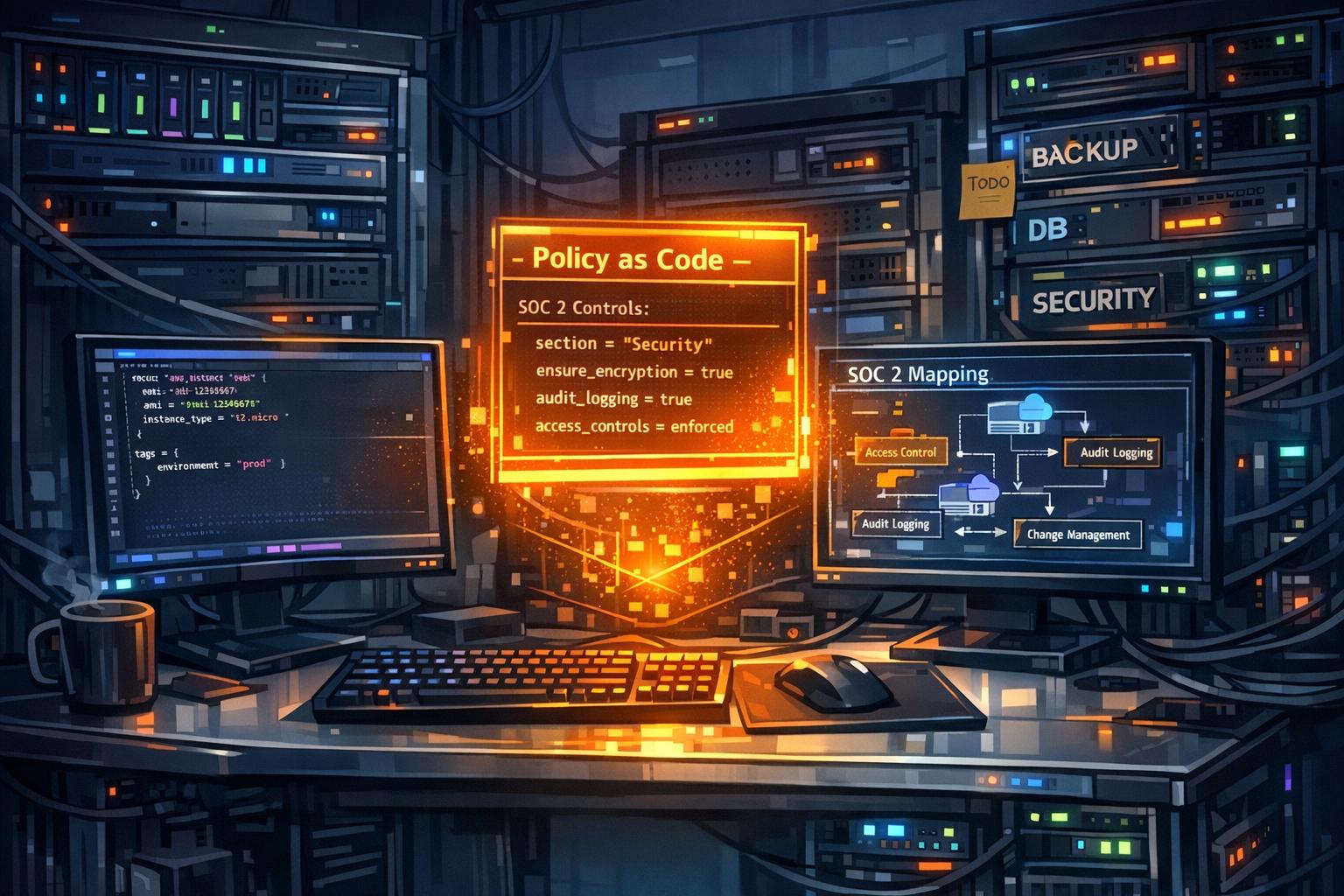
SOC 2 compliance is essential for SaaS and AI companies handling customer data. It ensures secure and responsible data management, focusing on five key areas: Security, Availability, Processing Integrity, Confidentiality, and Privacy. Using Terraform for SOC 2 compliance simplifies the process by automating infrastructure management, reducing errors, and creating an auditable trail. Here’s how:
- Why SOC 2 Matters: It’s a baseline requirement for partnerships, especially with government agencies and cloud vendors, and reduces costs from outages.
- Terraform Benefits: Automates compliance, prevents configuration drift, and integrates Policy as Code tools like Sentinel or Open Policy Agent to enforce rules.
- Key Steps:
- Use IAM roles and encryption to meet access control and data security requirements.
- Set up monitoring with tools like CloudTrail and CloudWatch.
- Maintain change management via Git workflows and Terraform’s plan-and-apply features.
- Tag resources with SOC 2 control identifiers for easier audits.
- Policy as Code: Ensures compliance by catching issues during code reviews, saving up to 92% of audit preparation time.
【AWS CDHK2025】AWS Compliance with Terraform – Anton Babenko
Understanding SOC 2 Controls and Terraform Mapping
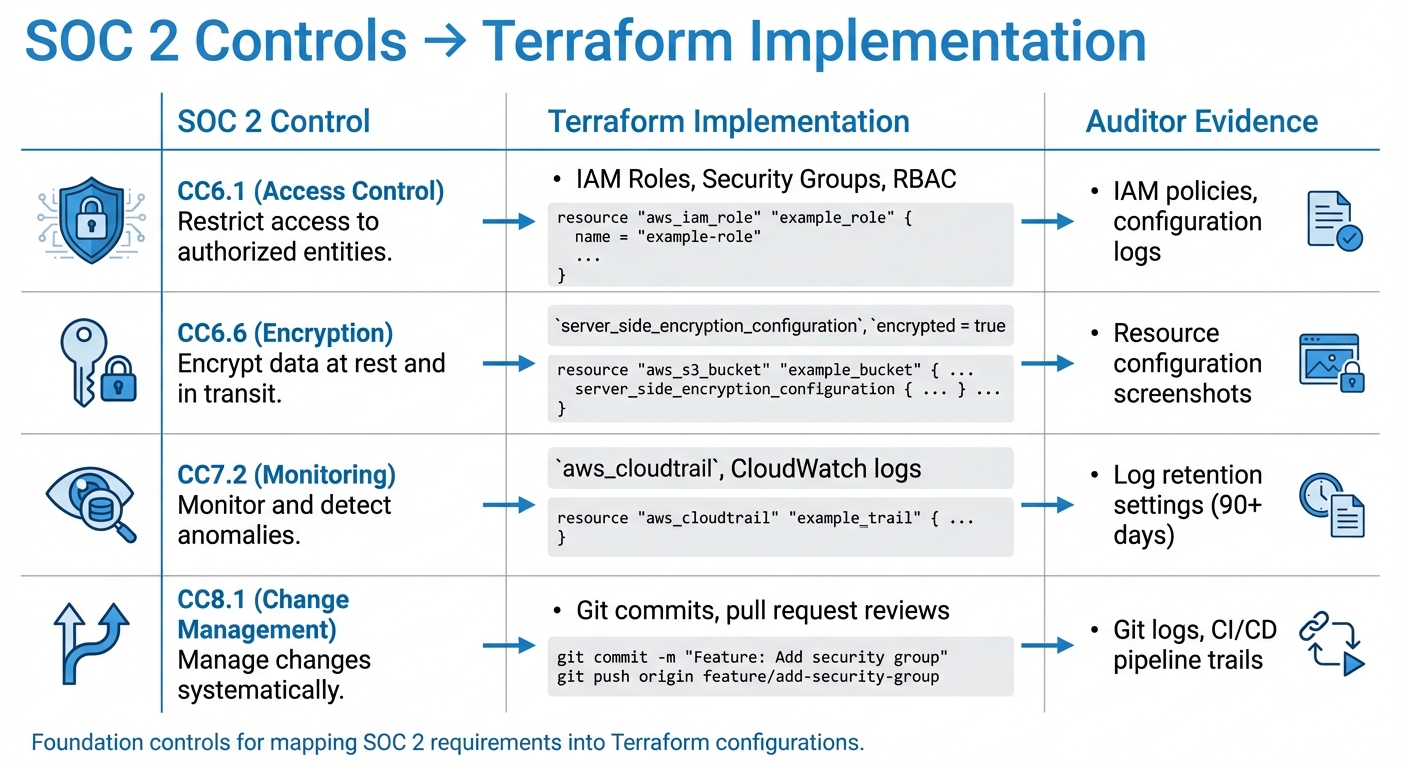
SOC 2 Controls to Terraform Implementation Mapping Guide
SOC 2 outlines controls across five Trust Services Criteria, which engineering teams need to translate into clear, auditable Terraform configurations. The Security category alone includes 33 core requirements, with an additional 28 controls addressing Availability, Processing Integrity, Confidentiality, and Privacy. For teams managing infrastructure, the challenge is turning these requirements into actionable configurations.
Key SOC 2 Controls for IaC
When implementing Infrastructure as Code (IaC), some SOC 2 controls are particularly relevant. For example, CC6.1 (access control) emphasizes the principle of least privilege, which can be addressed by defining IAM roles, security groups, and RBAC. Encryption requirements under CC6.6 can be met using arguments like server_side_encryption_configuration for S3 buckets or encrypted = true for EBS volumes.
CC7.2 focuses on monitoring and logging. Tools like aws_cloudtrail, aws_config_configuration_recorder, and CloudWatch logs help create an audit trail of system activity. For CC8.1, change management can be supported through Git workflows and Terraform’s plan-and-apply features.
| SOC 2 Control | Terraform Implementation | Auditor Evidence |
|---|---|---|
| CC6.1 (Access Control) | IAM Roles, Security Groups, RBAC | IAM policies, configuration logs |
| CC6.6 (Encryption) | server_side_encryption_configuration, encrypted = true |
Resource configuration screenshots |
| CC7.2 (Monitoring) | aws_cloudtrail, CloudWatch logs |
Log retention settings (90+ days) |
| CC8.1 (Change Management) | Git commits, pull request reviews | Git logs, CI/CD pipeline trails |
These controls provide a foundation for directly mapping SOC 2 requirements into Terraform configurations.
Mapping SOC 2 Controls to Terraform
Mapping SOC 2 controls means connecting compliance requirements to specific code implementations. One effective strategy is tagging Terraform resources with control identifiers (e.g., SOC2 = "CC6.6") to link compliance efforts with evidence. This tagging approach simplifies auditor reviews by clearly tying each control to its implementation.
Using standardized modules can also embed compliance into reusable components. For instance, a module for creating S3 buckets could automatically include encryption, versioning, and access logging, removing common audit risks. Together, tagging and reusable modules create strong audit trails. For added security, store Terraform state files in encrypted, versioned S3 backends to maintain a reliable history.
"If you are handling sensitive customer data or looking at Enterprise-Scale customers, especially in the US, SOC 2 becomes a table-stakes requirement for a sales engagement."
– Devika Anil, ISO Lead Auditor at Sprinto
Once these controls are mapped in Terraform, continuous enforcement through policy as code becomes the next critical step.
Using Policy as Code
Policy as Code enables ongoing compliance by enforcing rules during the infrastructure provisioning process. Tools like Open Policy Agent (OPA), HashiCorp Sentinel, or Checkov evaluate Terraform plans against compliance policies before deployment. This "shift-left" approach identifies issues – like publicly accessible S3 buckets or missing encryption – during code reviews instead of waiting for annual audits.
The process involves generating a Terraform plan, converting it to JSON, and running it through a policy engine. Non-compliant resources are flagged, blocked, and logged, creating immutable audit trails.
"Policy as code is the use of code to define and manage rules and conditions within the infrastructure provisioning process."
– Michael Fonseca, Solutions Engineer, HashiCorp
Organizations leveraging compliance automation report reducing audit preparation time by 80–92%. By offering real-time visibility and automatically generating evidence, Policy as Code minimizes manual effort during audits.
Step-by-Step Guide to Implementing SOC 2 Controls in Terraform
Now that we’ve covered SOC 2 control mapping, let’s dive into how you can put compliance into action using Terraform. Here’s a breakdown of the steps to structure your Terraform code for seamless auditor reviews and operationalize SOC 2 controls.
Defining Terraform Module Structure
Start by dividing your infrastructure into Platform Landing Zones and Workload Landing Zones. Platform Landing Zones are responsible for shared governance tasks like networking, security, and identity management. Meanwhile, Workload Landing Zones focus on application-specific resources. This separation helps reduce the impact of changes and keeps things manageable.
To align with SOC 2 control categories, organize your Terraform modules as follows:
- Access controls: Place these in an
iam/directory. - Monitoring configurations: Use a
monitoring/folder. - Network settings: Store these under
networking/. - Encryption resources: Keep these in an
encryption/directory.
For stricter control, adopt one workspace per AWS account, especially to enforce production policies. Save your version-controlled modules in a private registry. This avoids duplicating compliance efforts across workloads and ensures consistency. For example, some teams have automated pipelines to provision over 300 resources across Log, Audit, and Management accounts, achieving compliance from the start.
"Sentinel is a policy-as-code framework integrated into HCP Terraform. It enforces fine-grained, pre-deployment rules during the Terraform plan and apply phases… ensuring that only compliant configurations deploy." – HashiCorp
This well-structured module setup acts as the backbone for implementing and maintaining SOC 2 controls.
Implementing Key SOC 2 Controls
Here’s how to address key SOC 2 controls with Terraform:
CC6.1 (Access Control):
- Use IAM roles over individual users to enable temporary, auto-rotating credentials.
- Leverage
aws_iam_policy_documentto create minimal, least-privilege policies. - Implement OIDC for temporary credentials to enhance security.
CC6.6 (Encryption):
- Build KMS modules with key rotation enabled (
enable_key_rotation = true). - Require server-side encryption for S3 buckets and set encryption flags for block storage volumes.
- Ensure remote state storage is secured with server-side encryption.
CC7.2 (Monitoring):
- Configure CloudTrail to log all account activity and send logs to an encrypted, centralized S3 bucket.
- Enable AWS Config across accounts to maintain ongoing resource configuration records.
- Create a
log-archivemodule to store audit logs, ensuring data integrity and support for compliance reviews.
Once these controls are in place, the next step is enforcing them effectively.
Enforcing Controls with Terraform Policies
Terraform policies are essential for ensuring compliance. Use Sentinel’s policy-as-code framework to enforce strict rules on encryption, multifactor authentication, and other SOC 2 requirements. Sentinel operates during the Terraform plan and apply phases, blocking any non-compliant configurations before they’re deployed.
In addition to Sentinel, integrate static analysis tools like Checkov into your CI/CD pipelines. These tools scan Terraform plans for potential SOC 2 violations early in the process, preventing issues before deployment.
| Feature | Sentinel (HCP Terraform) |
|---|---|
| Scope | Terraform plans and applies |
| Timing | Pre-deployment (Prevention) |
| Granularity | Fine-grained, resource-level |
| SOC 2 Use Case | Enforcing tags, encryption, and IAM boundaries |
To stay aligned with SOC 2, enforce mandatory tags such as Environment, Owner, and CostCenter. Additionally, configure drift detection to ensure your infrastructure remains compliant over time.
sbb-itb-f9e5962
Validating, Deploying, and Auditing Terraform Configurations
Validating Configurations and Policies
Validation is a two-step process: pre-apply checks using terraform plan (converted to JSON) and post-apply validations. These steps help catch issues early and maintain SOC 2 compliance. Start by running terraform plan, then convert the output to JSON (terraform show -json tfplan.binary > tfplan.json). This JSON file feeds into policy engines like Sentinel or OPA, which evaluate your configurations against SOC 2 requirements before applying changes. For example, these tools can prevent deployments that enable open access (0.0.0.0/0) or lack encryption.
"OPA makes it possible to write policies check the changes Terraform is about to make before it makes them." – Open Policy Agent
Integrate static analysis tools like Checkov or Trivy into your CI/CD pipeline to block non-compliant code during pull requests. Within your Terraform code, use preconditions to validate resource requirements (e.g., instance sizes, security group rules) during the planning phase, and check blocks for ongoing validation after deployment. These steps support continuous monitoring and auditing efforts.
Set enforcement levels wisely: use "advisory" for new policies to alert teams without halting work, and "mandatory" for critical controls like encryption. Notably, Prowler version 5.14, released on November 25, 2025, integrates IaC scanning via Trivy, making it useful for both pre-apply and post-apply validations.
Deploying and Monitoring Infrastructure
Once validation is complete, deploy configurations through secure, version-controlled processes. Ensure all changes pass through a version-controlled repository with branch protection and mandatory code reviews. Standardized, pre-approved modules with built-in compliance controls help maintain consistency across deployments.
Protect your state files using encrypted, versioned S3 backends and strict RBAC policies. Store sensitive data like secrets externally in tools such as Vault or AWS Secrets Manager, and use environment variables to avoid exposing secrets in state files.
"Policy as code is the use of code to define and manage rules and conditions within the infrastructure provisioning process." – Michael Fonseca, Sr. Solutions Architect, HashiCorp
Enable drift detection and continuous validation to catch discrepancies between live infrastructure and defined configurations. HCP Terraform performs health assessments automatically every 12 hours, ensuring ongoing compliance. Use check blocks to monitor critical aspects, like TLS certificate validity, without blocking deployments if issues arise.
Auditing and Reporting for SOC 2 Compliance
After deployment, focus on continuous auditing to maintain compliance over time. Collect CI/CD logs, IaC scan results, and module histories to create audit-ready evidence. The check_results field in your state file serves as proof that internal assertions were met, which is essential for auditors. These logs and artifacts align with your implemented controls, ensuring a consistent compliance narrative.
Run post-apply scans with tools like Prowler, Powerpipe, or AWS Config to confirm deployed resources match compliant configurations and detect manual drift. Regularly scheduled scans can also identify resources created outside of Terraform.
"The combination of ‘you cannot disable logging in the module’ and ‘independent scanners confirm logging is on at both stages’ gives you a strong story for auditors." – Compliance.tf
Establish retention policies for audit data to support long-term compliance and threat detection. By combining preventive scans with post-deployment checks, you create repeatable processes and artifacts that demonstrate consistent enforcement of SOC 2 controls.
Conclusion
Key Takeaways
Using Terraform to map SOC 2 controls transforms compliance into a proactive and automated process rather than a reactive audit scramble. Here’s how it works: identify the relevant Trust Services Criteria, conduct a gap analysis, standardize secure modules, adopt Policy-as-Code, integrate CI/CD guardrails, maintain audit trails, and enable continuous drift detection. This approach not only scales with your infrastructure but also shifts compliance enforcement earlier in the development cycle, catching issues during pull requests instead of waiting until production.
The advantages go beyond just passing audits. Terraform-based compliance improves speed with automated CI/CD checks, ensures consistency through version-controlled configurations, and simplifies audits with a complete Git history. SOC 2’s five Trust Services Criteria – security (mandatory), availability, processing integrity, confidentiality, and privacy – align directly with Terraform features, such as IAM roles for access control and encryption policies to secure data.
If you’re looking for practical ways to implement this framework, the next section explains how TechVZero can streamline your compliance journey.
How TechVZero Can Support Compliance
TechVZero combines infrastructure expertise with compliance automation. Their track record speaks for itself: managing over 99,000 nodes, saving a client $333,000 in just one month, and successfully mitigating a DDoS attack. For engineering-focused founders who want to avoid becoming infrastructure specialists, TechVZero simplifies SOC 2, HIPAA, and ISO compliance, delivering results on your timeline instead of dragging through a six-month process.
Their approach includes creating Platform Landing Zones for centralized governance, deploying Policy-as-Code frameworks like Sentinel or Checkov, and setting up continuous drift detection to ensure audit readiness. They also eliminate static credentials by enabling dynamic OIDC-based authentication and integrate pre-approved compliance modules that block noncompliant configurations automatically. With performance-based pricing – where you pay 25% of the savings for a year or nothing if targets aren’t met – there’s no need to hire an in-house expert for teams of 10 to 50 people.
FAQs
How can Terraform simplify SOC 2 compliance automation?
Terraform simplifies the path to SOC 2 compliance by transforming the Trust Services Criteria into reusable, automated configurations. By using Infrastructure as Code (IaC), Terraform embeds security and compliance controls directly into your infrastructure, ensuring that every change aligns with SOC 2 standards.
Here’s how Terraform helps:
- Automated policy enforcement: With tools like Sentinel or Open Policy Agent, Terraform blocks the deployment of non-compliant resources, such as unencrypted storage or weak access controls.
- Audit-ready logs: Terraform’s state files and logs provide tamper-proof evidence for auditors, showcasing continuous compliance.
- Effortless integration: Terraform works seamlessly within CI/CD pipelines, enabling real-time monitoring and enforcement of SOC 2 controls during every infrastructure update.
By coding compliance into your infrastructure, Terraform reduces manual errors, maintains consistency across environments, and delivers the documentation auditors require. This approach makes SOC 2 compliance an integral and efficient part of managing your infrastructure.
What SOC 2 controls should I focus on when using Terraform for Infrastructure as Code?
When managing your infrastructure with Terraform, certain SOC 2 controls take center stage: secure provisioning, change management, and visibility. These controls align with the Trust Services Criteria of SOC 2 – security, availability, processing integrity, confidentiality, and privacy – translating these principles into actionable safeguards for Infrastructure as Code (IaC).
Here are some essential controls to consider:
- Access Management: Limit open network access, enforce least-privilege IAM roles, and apply strong password policies to protect your environment.
- Data Protection: Encrypt disks and storage buckets, and ensure public access or misconfigured permissions are blocked.
- Configuration Tracking: Leverage tools like AWS Config or Azure Policy to keep a record of all resources and detect configuration drift.
- Change Control: Use policy-as-code to require peer reviews and automated testing before rolling out changes.
- Monitoring: Log all Terraform runs and integrate with monitoring tools to catch any unauthorized changes.
By embedding these controls directly into your Terraform configurations and CI/CD pipelines, compliance becomes an automated, seamless part of your infrastructure lifecycle – not an afterthought.
How does Policy as Code simplify SOC 2 compliance with Terraform?
Policy as Code (PaC) takes SOC 2 requirements and turns them into automated, version-controlled rules that seamlessly integrate into Terraform workflows. For example, controls like "no public S3 buckets" or "require disk encryption" can be defined as code, allowing teams to align with SOC 2’s trust service criteria – security, availability, processing integrity, confidentiality, and privacy – right within their infrastructure pipelines. These policies are stored alongside Terraform configurations, making every change traceable and reversible.
Using a PaC engine, such as HashiCorp Sentinel, these policies are automatically checked during Terraform plan executions. If a configuration violates a SOC 2 requirement, the deployment is stopped in its tracks, ensuring non-compliant resources never make it to production. This level of automation not only cuts down on manual reviews and reduces errors but also provides continuous compliance evidence for audits. By embedding governance directly into the development process, teams can stay focused on building and innovating while maintaining SOC 2 compliance effortlessly.