Bare‑Metal Security: Meeting SOC2 Without a Full Security Team
If you’re managing a small SaaS or AI team on bare-metal infrastructure, achieving SOC 2 compliance can feel overwhelming. Unlike managed cloud services, bare-metal setups require you to secure everything – hardware, operating systems, and applications. Without a dedicated security team, manual audits and evidence collection can drain your time and resources.
Here’s the good news: automation and open-source tools make compliance achievable, even for small teams. By integrating tools like Falco, Open Policy Agent (OPA), and Trivy into your workflows, you can enforce security policies, monitor systems, and collect audit-ready evidence without hiring extra staff.
Key Takeaways:
- SOC 2 on Bare-Metal: You’re responsible for securing the full stack – hardware to applications.
- Challenges: Manual audits, ephemeral Kubernetes workloads, and hardware-level vulnerabilities.
- Solutions: Automate compliance with tools like Falco (runtime monitoring), OPA (policy enforcement), and Trivy (vulnerability scanning).
- Benefits: Save 80+ hours of manual effort and reduce compliance prep time by 82%.
By automating evidence collection and embedding security into your workflows, SOC 2 compliance becomes a routine process instead of a last-minute scramble.
SOC 2 Compliance: Everything You Need to Know in 2026
sbb-itb-f9e5962
SOC 2 Requirements for Bare‑Metal Environments
SOC 2 compliance evaluates your security measures against five Trust Service Criteria. While the Security criterion is mandatory, you may also need to address Availability, Processing Integrity, Confidentiality, and Privacy, depending on your agreements with customers. These criteria were initially developed with virtualized cloud environments in mind, where hypervisors create natural isolation between tenants. In a bare-metal setup, however, you control the entire stack, leaving no abstraction layers to help mitigate security risks.
The Security criterion focuses on safeguarding resources from unauthorized access. Availability involves proving system reliability, which includes documenting redundant systems like network interfaces, power supplies, and storage, as well as your disaster recovery plans. Processing Integrity ensures workloads run accurately and on time, a crucial aspect for high-performance applications where even minor delays caused by "noisy neighbors" can’t be tolerated.
Confidentiality requires protecting sensitive data through measures like dedicated network segmentation and encryption – using AES-256 for data at rest and TLS 1.3 for data in transit. Privacy governs how personal information is collected, used, and disposed of, requiring strict controls over physical disk access and secure data destruction when retiring hardware. The stakes are high: the average data breach costs around $4.5 million, with third-party incidents averaging $1.5 million. These risks highlight the need for specific hardware-level security measures, which we’ll explore next.
SOC 2 Criteria for Bare‑Metal Systems
Achieving compliance on bare-metal systems demands hardware-level controls that go beyond standard software configurations. For example, Secure Boot and TPM 2.0 ensure firmware integrity. Remote attestation adds another layer of security by verifying that workloads run only on machines with the intended boot stack, comparing attested measurements against your machine policy.
Dedicated VLANs are essential for isolating workloads and preventing lateral movement. This is particularly important in multi-tenant environments where multiple customers or sensitive workloads share the same physical infrastructure. BIOS and BMC integrity should also be continuously verified through firmware attestation.
A notable example of bare-metal risks comes from a 2019 study by Eclypsium. Researchers demonstrated a vulnerability in IBM SoftLayer’s bare-metal services by modifying the BMC firmware with a single "bitflip" and releasing the hardware. When they reacquired the same server under a different account, the altered firmware was still present, illustrating how malicious code could persist across users due to inadequate reclamation processes.
"By design, the BMC is intended for managing the host system, and as such, it is more privileged than the host… This provides an attacker with all the tools necessary for complete and stealthy control of a victim system." – Eclypsium
Network security in bare-metal environments should follow a default-deny approach. Block all inbound traffic by default, allowing only essential ports like port 443 for HTTPS in production. Disable password-based SSH and enforce key-based authentication to reduce the risk of brute-force attacks. For teams managing multiple clusters, separate administrative and user deployments to isolate management traffic from workload traffic. Restrict access to admin workstations holding critical SSH and service account keys. Even with these safeguards, teams without dedicated security expertise face unique challenges, which we’ll address next.
Compliance Challenges Without a Dedicated Security Team
Bare-metal environments present additional hurdles for teams without dedicated security personnel. In Bring Your Own License (BYOL) models, the provider manages hardware provisioning and initial setup, but responsibility for OS security, patching, and application-level controls falls entirely on your team. Providers don’t monitor or patch these systems, leaving you to handle vulnerabilities.
Firmware-level security risks in bare-metal setups are classified as "Critical", with a CVSS 3.0 score of 9.3. Without a dedicated security team, identifying these vulnerabilities before an audit is nearly impossible through manual processes.
"Bare metal security best practices differ fundamentally from virtual server security because you have direct control over hardware and the complete operating system stack. This advantage comes with increased responsibility." – Marcus Chen, Senior Cloud Infrastructure Engineer
Limited resources often force teams to make tough decisions. Traditional SOC 2 preparation involves tedious spreadsheets, manual evidence collection, and static snapshots that quickly become outdated in dynamic environments like Kubernetes, where pods frequently change. Over 80% of businesses now allow third-party vendors some level of access to their cloud environments, further complicating compliance efforts. Small teams often face "alert queues without ownership", where security tools generate more tickets than they can manage. These challenges make automated, continuous compliance strategies essential.
Automation and policy-as-code can simplify compliance. Instead of hiring external consultants, use GitOps workflows to maintain a version-controlled, single source of truth for cluster configurations. This creates an immutable audit trail that auditors require while reducing manual workload. Enable unattended security updates to ensure critical patches are applied automatically. Additionally, tools that check Infrastructure as Code (IaC) for configuration issues before deployment can catch problems early, preventing them from reaching production. This approach shifts your focus from reactive audit preparation to continuous compliance, with daily scans and monitoring keeping systems secure without constant manual intervention.
Automating Security Controls with Open-Source Tools
Managing security controls manually on bare-metal systems can be overwhelming and inefficient. Open-source tools simplify this process by automating SOC 2 controls, turning compliance into a continuous, policy-driven approach. The trick is to choose tools that monitor runtime behavior, scan for vulnerabilities, and enforce policies – all without constant human oversight.
Runtime Security Monitoring and Enforcement
Falco is a powerful tool that keeps an eye on Linux kernel syscalls in real time. It detects suspicious activities like unauthorized shell executions, unexpected file access, or privilege escalations by spotting behavioral anomalies rather than just known exploit patterns. For instance, in November 2025, Trendyol Platform Engineers Furkan Türal and Emin Aktas used Falco to monitor Kubernetes audit logs and kernel events in their production clusters. This helped them identify operational anti-patterns and block malicious access attempts. Similarly, Alexandre Lemaresquier, Head of SecDevOps at Incepto Medical, used Falco to protect sensitive patient data in a multi-tenant medical imaging service while still enabling custom partner workloads.
"Falco’s threat detection and real-time alerting capabilities… help effectively address security issues that might evade other security offerings" – Zsolt Nemeth, CEO, R6 Security Inc
Falco works best when paired with a modern eBPF driver and limited capabilities (like CAP_SYS_PTRACE, CAP_SYS_RESOURCE, CAP_BPF, CAP_PERFMON). It can forward alerts to over 50 third-party systems via Falcosidekick, integrating seamlessly with your SIEM.
While Falco handles runtime anomalies, Open Policy Agent (OPA) enforces preventive controls by implementing policy-as-code. OPA lets you define rules using its declarative language, Rego, and separates policy decision-making from enforcement. You can use it to set rules for user access, subnet traffic, or container OS capabilities. If a workload violates these rules, OPA blocks it before it even runs.
"OPA decouples policy decision-making from policy enforcement. When your software needs to make policy decisions it queries OPA and supplies structured data (e.g., JSON) as input." – Open Policy Agent Documentation
By combining Falco and OPA, you get a layered defense strategy: OPA prevents non-compliant workloads from starting, while Falco catches runtime violations that slip through. Together, they align with SOC 2 controls like CC7.2 (System Monitoring) and CC6.1 (Logical Access Controls).
Vulnerability Scanning and Hardware Integrity
Once runtime operations are secure, the next step is to continuously scan for vulnerabilities to ensure system configurations and hardware integrity remain compliant. Trivy is a versatile tool for this purpose. It scans container images, Kubernetes manifests, and bare-metal configurations for vulnerabilities and misconfigurations. Its --compliance flag runs checks against CIS Benchmarks, aligning with SOC 2 standards. In bare-metal setups, the Trivy node-collector gathers data directly from nodes, outputting results in JSON for further analysis.
You can even create custom compliance reports in YAML format to map SOC 2 Common Criteria to specific vulnerability checks (AVD IDs). For instance, you can map CC6.6 (Encryption of Data) to checks for TLS 1.3 configurations and encrypted volume annotations. The Trivy Operator can then continuously scan nodes for host-level misconfigurations, ensuring compliance with SOC 2 CC6.1 (Access Controls).
For hardware integrity, tools like TPM 2.0 and Secure Boot are essential. TPM chips store integrity measurements of the boot process in Platform Configuration Registers (PCRs). By establishing a "golden measurement" baseline for each server, you can monitor for tampering. TPM-backed disk encryption adds an extra layer of protection, automatically unlocking encrypted volumes during boot. Meanwhile, Secure Boot ensures only authorized code runs, halting execution if integrity checks fail.
To secure the provisioning process, handle PXE (Preboot eXecution Environment) traffic on a separate, isolated network. Build PXE firmware (like iPXE) with embedded TLS certificate chains to validate server certificates during boot-stage downloads. These measures help meet SOC 2 controls for access (CC6.1) and change management (CC8.1) by ensuring only authorized, unmodified code runs on your infrastructure.
| SOC 2 Control | Requirement | Open-Source Tool Implementation |
|---|---|---|
| CC6.1 | Logical Access Controls | RBAC enforcement via OPA Gatekeeper; Trivy RBAC scans |
| CC6.6 | Encryption of Data | Enforce TLS in Ingress and encrypted PVC annotations via Gatekeeper |
| CC7.2 | System Monitoring | Runtime threat detection with Falco; audit logging |
| CC8.1 | Change Management | GitOps audit trails and Trivy configuration scans |
To make compliance efforts seamless, integrate Trivy into your CI/CD pipeline. This allows you to test manifests against SOC 2 policies before they go live. You can also schedule a CronJob to generate weekly compliance reports, storing them in a persistent volume. These reports provide a historical audit trail, demonstrating to auditors that your controls are continuously active – not just during the audit period.
"Policy as Code transforms SOC2 compliance from a manual audit checklist into an automated, continuously enforced system." – Nawaz Dhandala, Author, OneUptime
Monitoring, Logging, and Continuous Compliance
SOC 2 Compliance Tools and Controls for Bare-Metal Infrastructure
Keeping up with SOC 2 compliance on bare-metal setups can feel daunting, especially with limited resources. But with automated monitoring and logging, it’s entirely doable. By building an efficient stack that generates auditor-ready evidence on its own, even smaller teams can maintain compliance. A complete security monitoring solution – using tools like Falco, VictoriaLogs, VictoriaMetrics, and Grafana – can run smoothly on just 2 cores and 4 GB of RAM. This "SIEM in a Box" approach makes compliance achievable without breaking the bank.
"Security monitoring shouldn’t require a six-figure budget and a dedicated team." – Matija Zezelj
Centralized Logging and Metrics Collection
Kubernetes audit logs are the backbone of SOC 2 compliance monitoring. They provide a detailed timeline of every API server request, helping answer critical questions like who accessed sensitive data or made key changes. To set this up, configure the API server with audit-log-path, audit-policy-file, and audit-log-maxage (30 days minimum, 100 MB max size, 10 file backups) following CIS Benchmarks.
However, managing log volume is key. For sensitive actions like secrets access or RBAC changes, log full request and response details. For routine GET requests, stick to metadata to avoid overwhelming your system. Make sure to ship logs off-node to immutable storage – this ensures evidence remains intact, even if the control plane is compromised.
For metrics, VictoriaMetrics is a game-changer. It uses up to 10x less memory than Prometheus while delivering the same results. Pair it with Grafana dashboards to monitor security events and policy compliance across your nodes. To reduce resource usage, deploy optimized metrics sets that exclude non-essential data like kube-state-metrics.
To meet SOC 2 confidentiality requirements, configure OpenTelemetry to redact PII, enforce TLS/mTLS for telemetry transport, and enable persistent queuing to prevent data loss.
Once centralized logging is in place, focus on securing your network with Zero-Trust principles.
Zero-Trust Access and Network Policies
Zero-Trust means treating every connection as untrusted until it’s authenticated and authorized. Use short-lived certificates and Kubernetes RBAC to manage access. Integrating Kubernetes RBAC with an OIDC provider like Okta or GitHub simplifies this process, offering seamless single sign-on and a clear audit trail.
For network security, enforce default-deny policies in all namespaces, allowing only essential traffic. This ensures that only necessary connections are permitted, aligning with SOC 2’s logical separation requirements (CC6.7). Tools like Cilium provide robust enforcement of network policies, enabling you to isolate different parts of your infrastructure effectively.
On bare-metal setups, run security agents like Falco natively instead of in containers. Containerized agents can miss host-level events, reducing visibility into critical processes.
Mapping Tools to SOC 2 Criteria
Integrating the right tools into your workflow can automate compliance and simplify audits. Policy-as-Code frameworks like OPA Gatekeeper or Kyverno help enforce rules automatically while maintaining detailed audit logs. By naming policies after specific SOC 2 controls (e.g., soc2_cc6_1_rbac.rego), you create clear, auditable links for reviewers.
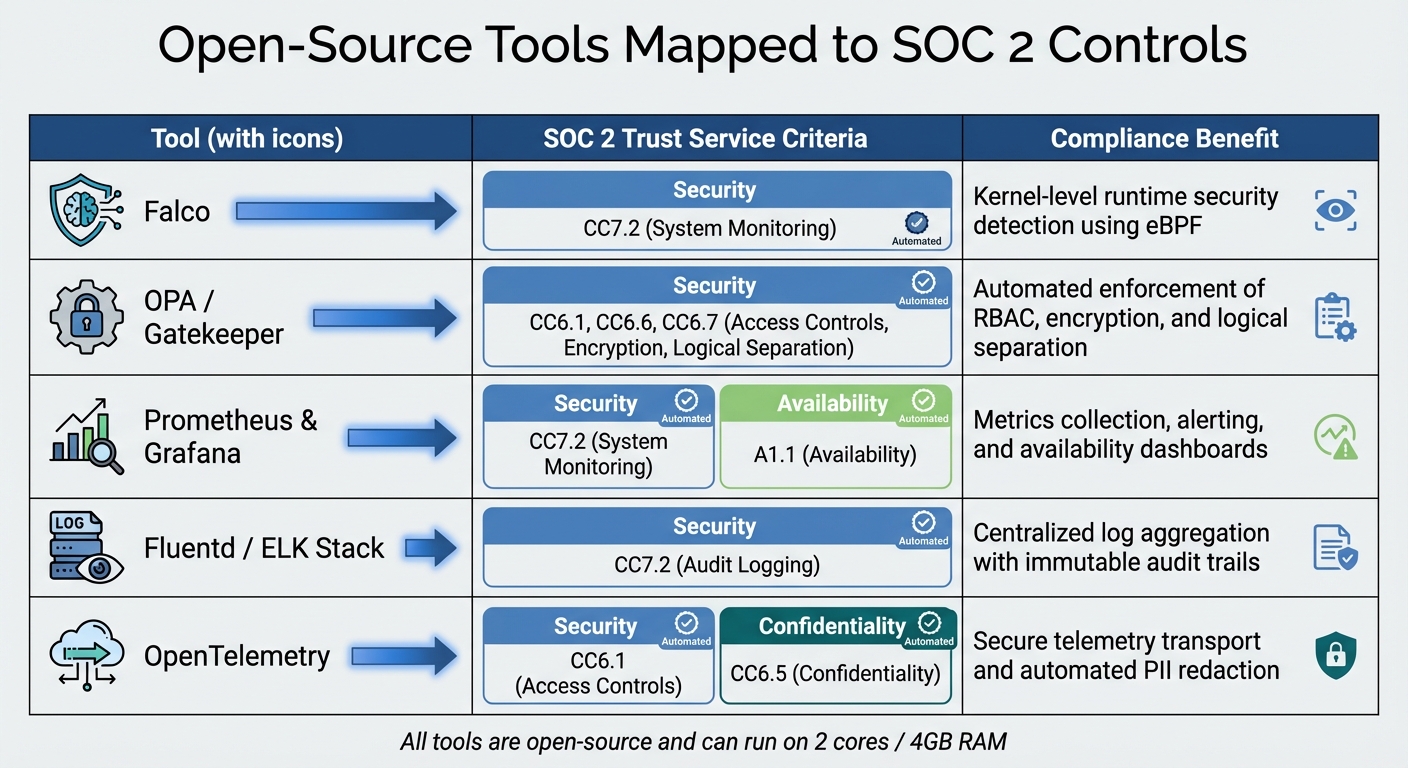
Here’s how some tools map to SOC 2 criteria:
| Tool | SOC 2 Trust Service Criteria | Compliance Benefit |
|---|---|---|
| Falco | CC7.2 (System Monitoring) | Kernel-level runtime security detection using eBPF |
| OPA / Gatekeeper | CC6.1, CC6.6, CC6.7 | Automated enforcement of RBAC, encryption, and logical separation |
| Prometheus & Grafana | CC7.2, A1.1 (Availability) | Metrics collection, alerting, and availability dashboards |
| Fluentd / ELK Stack | CC7.2 (Audit Logging) | Centralized log aggregation with immutable audit trails |
| OpenTelemetry | CC6.1, CC6.5 (Confidentiality) | Secure telemetry transport and automated PII redaction |
To keep compliance reporting consistent, schedule cron jobs or CI/CD scripts to generate weekly reports. These reports provide auditors with ongoing proof that controls are effective, not just during the audit period. Adopting GitOps workflows adds another layer of transparency, embedding author, timestamp, and approval history into every commit, which supports change management requirements (CC8.1).
"Compliance automation shifts the paradigm from periodic, stressful audits to a state of continuous, provable compliance." – policyascode.dev
Preparing for SOC 2 Audits on Bare-Metal Infrastructure
For growing teams without dedicated security personnel, automating the audit preparation process can transform compliance efforts. Instead of scrambling during audit periods, continuous automation ensures that compliance becomes a routine part of daily operations. By automating evidence collection and integrating it into workflows, teams can consistently demonstrate that controls are functioning as intended.
Automating Evidence Collection
Tools like kube-bench (run with the --json flag) help ensure continuous adherence to CIS benchmarks. For example, it can automatically verify permissions (600 for private keys, 700 for etcd data directories) and ownership (root:root) for critical files such as kubelet.conf.
In February 2026, Nawaz Dhandala from OneUptime shared how his team automated SOC 2 evidence collection using OPA Gatekeeper. They created ConstraintTemplates annotated with SOC 2 control IDs (e.g., CC6.1 for access control). A custom bash script pulled violations from the Gatekeeper API and generated weekly compliance reports.
"Policy as Code transforms SOC 2 compliance from a manual audit checklist into an automated, continuously enforced system." – Nawaz Dhandala, OneUptime
To streamline this further, schedule Kubernetes CronJobs to run compliance report generators weekly, ensuring consistent evidence collection for SOC 2 Type 2 audits. You can also integrate conftest into pull request workflows to validate manifests against SOC 2 policies before deployment, addressing change management requirements like CC8.1.
Once automated evidence gathering is in place, focus on documenting hardware and vendor separations to strengthen control verification efforts.
Documenting Hardware and Vendor Isolation
On bare-metal infrastructure, documenting hardware details manually is unavoidable since there’s no provider-managed inventory. However, tools like the Bare Metal Operator (BMO) can simplify this process by automatically inspecting and documenting hardware details – such as CPUs, RAM, disks, and network interfaces – as Kubernetes BareMetalHost custom resources. This creates a live, auditable inventory and eliminates the need for manual spreadsheets. Additionally, the Redfish API or IPMI can be used to collect logs from your Baseboard Management Controller (BMC), providing auditors with "hardware identity" and "firmware identity" proofs.
SOC 2’s logical separation requirements (CC6.7) can be implemented using OPA Gatekeeper or Kyverno to enforce Kubernetes policies. For instance, you can create constraints to ensure namespace isolation or require specific labels for audit tiers. These policies generate audit logs automatically, providing evidence that controls are functioning as intended.
Testing Disaster Recovery and Ransomware Protection
To maintain audit readiness, complement automated evidence collection with regular disaster recovery tests. SOC 2’s Availability criteria require proof that systems remain accessible through well-documented recovery procedures. For bare-metal setups using Ceph storage, conduct recovery drills regularly and document the outcomes. This not only demonstrates availability but also addresses processing integrity – two key SOC 2 trust service criteria.
Automate backup verification processes to avoid relying on manual checks. Store logs, recovery test results, and incident response post-mortems in a centralized system like GitHub for easy access during audits. Set service level objectives (SLOs) to ensure that 95% of audit evidence can be retrieved within 24 hours.
Develop a 12-24 month testing calendar with specific dates for disaster recovery and business continuity exercises. This approach shows auditors that resilience testing is an ongoing operational practice rather than a one-time activity. To further mitigate risks, encrypt your etcd key-value store and storage volumes, meeting SOC 2’s data protection requirements.
"The goal is not to focus on audits as discrete events, but to embed audit preparation into your ongoing operational practices – making compliance a continuous process rather than a periodic crisis." – CybersecurityOS
Conclusion
Achieving SOC 2 compliance on bare-metal infrastructure without a dedicated security team is no longer an unattainable goal. By leveraging automation and open-source tools, compliance shifts from being a sporadic, high-stress effort to an ongoing, seamless operational process. Tools like OPA Gatekeeper and Kyverno, which implement Policy as Code, replace manual checklists with automated systems that document control effectiveness through admission logs.
The benefits of automation are striking. Organizations using automated compliance platforms report an 82% decrease in time spent collecting evidence, saving more than 80 hours of manual effort. GitOps workflows ensure immutable audit trails, centralized logging provides real-time evidence, and zero-trust network policies enforce least-privilege access automatically [46, 3].
"The real challenge of SOC 2 is not passing the audit. It’s maintaining compliance day after day, month after month, in between audits." – Humadroid
Even smaller teams can stay competitive with enterprises by treating compliance as a dynamic, code-driven process rather than static documentation. Establishing regular practices – like weekly evidence spot-checks, monthly access reviews, and quarterly internal control assessments – prevents compliance gaps between audits. Security controls embedded in CI/CD pipelines and Kubernetes admission controllers ensure that non-compliant resources are blocked before they ever reach production. This approach means you’re not just preparing for audits – you’re always ready.
The solution is straightforward: automate evidence collection, enforce policies through code, and integrate security into your infrastructure from the start. With the right open-source tools and workflows, SOC 2 compliance becomes a manageable part of your engineering routine instead of a daunting challenge.
FAQs
What’s the minimum setup to get SOC 2-ready on bare metal?
When gearing up for SOC 2 compliance on bare-metal infrastructure, it’s essential to concentrate on the core Trust Services Criteria: security, availability, confidentiality, processing integrity, and privacy. These principles form the backbone of SOC 2 and guide the necessary controls and processes.
Start by implementing critical controls such as network security measures, access restrictions, and continuous monitoring. These are foundational to protecting your infrastructure and ensuring compliance. Tools like OPA Gatekeeper or Kyverno can help automate compliance workflows, saving time and reducing errors.
Equally important is defining clear policies and documenting processes. This ensures consistency and provides evidence of compliance efforts. Conducting readiness assessments will also help identify gaps and prepare your organization, even if you lack a dedicated security team.
The combination of careful planning and automation can make the path to SOC 2 compliance more manageable, even in complex bare-metal environments.
How can I prove hardware and firmware integrity to auditors?
To ensure hardware and firmware integrity, leverage attestation technologies that deliver verifiable evidence of system states. Tools like Keylime (for remote attestation) and hardware-based solutions, such as CPU attestation in Confidential VMs, help maintain transparency. Secure boot mechanisms, such as Google’s Titan hardware, further reinforce boot integrity by producing data that auditors can validate. These methods rely on trusted hardware and protocols to provide clear proof of system integrity.
How can a small team automate SOC 2 evidence collection in Kubernetes?
Small teams running Kubernetes can streamline SOC 2 evidence collection by leveraging open-source tools designed for compliance automation. Tools such as Probo and attestful make the process easier by integrating with platforms like AWS and GitHub or by enabling workflows that are compatible with OSCAL standards.
To enforce policies and maintain compliance, tools like OPA Gatekeeper, Kyverno, kube-bench, and Trivy come in handy. These tools help monitor compliance and enforce security measures, offering a scalable solution for teams working with limited resources on bare-metal Kubernetes setups.