Colocation vs Cloud: Negotiation Tactics for Startups
Choosing between colocation and cloud infrastructure can shape your startup’s costs and growth potential. Here’s the key takeaway:
- Cloud is ideal for fast scaling, unpredictable workloads, and minimal upfront costs. However, long-term expenses can rise due to egress fees and micro-charges.
- Colocation requires significant upfront investment in hardware but often saves money for predictable, high-volume tasks like AI or data-heavy operations.
Key Points:
- Cost Models:
- Cloud: Pay-as-you-go (OpEx), no upfront costs.
- Colocation: High upfront costs (CapEx) + monthly facility fees.
- Scalability:
- Cloud: Instant resource provisioning.
- Colocation: Slower scaling due to hardware setup.
- Savings:
- Cloud: Better for variable, short-term workloads.
- Colocation: Cheaper for steady, predictable tasks (up to 22.9% lower over 3 years).
- AI/SaaS Startups:
- AI: Colocation supports GPU-heavy workloads at lower costs.
- SaaS: Cloud flexibility suits fluctuating demand but watch for egress fees.
- Negotiation Tips:
- For colocation: Research market rates, negotiate power costs, and secure long-term discounts.
- For cloud: Use Reserved Instances to save up to 70%, reduce egress fees, and leverage provider credits.
Quick Comparison:
| Feature | Cloud | Colocation |
|---|---|---|
| Upfront Cost | Minimal | High (Hardware + Setup) |
| Monthly Billing | Variable | Predictable |
| Scalability | Instant | Slower (Weeks/Months) |
| Long-term Savings | Better for short-term | Cheaper for steady use |
| Flexibility | High | Limited by hardware |
Your choice depends on workload predictability, budget, and scaling needs. Startups can save significantly by negotiating smarter contracts tailored to their growth trajectory.
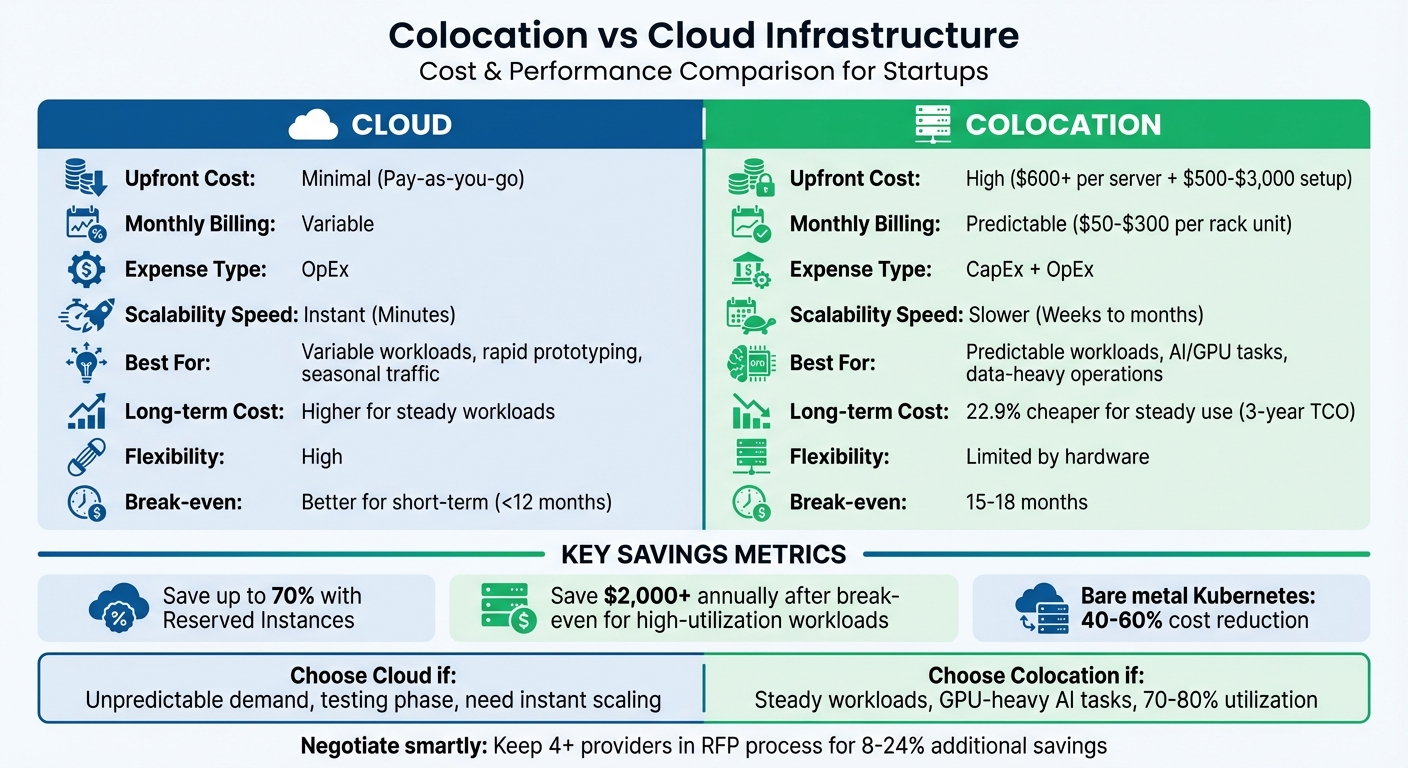
Colocation vs Cloud Infrastructure Comparison for Startups
Cost Models: Colocation vs Cloud
How Each Model Charges You
Cloud services operate on an OpEx (Operational Expenditure) model, meaning you only pay for the resources you use – like compute instances, storage, and network bandwidth – with little to no upfront costs. This makes cloud an appealing option for startups that need to conserve cash and move quickly.
Colocation, on the other hand, involves a mix of CapEx (Capital Expenditure) and OpEx. Before deploying workloads, you’ll need to invest in your own servers, storage, and networking equipment. Additionally, colocation providers charge one-time fees for things like rack installation, PDU setup, circuit activation, and cross-connects, with setup costs typically ranging from $500 to $3,000. Once operational, you’ll face monthly expenses for rack space (usually $50–$300 per rack unit), power (billed either as fixed capacity or based on usage), and cross-connects.
Power is often the biggest cost driver for colocation. In fact, 42% of operators predict power costs will see the largest unit cost increases by 2025. While cloud providers bundle power costs into their overall rates, colocation bills them separately. For AI startups running high-density GPU racks, this separation can actually work in your favor if you negotiate favorable terms.
Breaking down these costs is key to understanding how each model impacts scalability. The next step is to see how these pricing structures align with your ability to grow efficiently.
Scalability: When Each Model Works Best
Cloud platforms shine when it comes to scalability. You can add or remove resources within minutes, making cloud ideal for rapid prototyping, managing seasonal traffic spikes, or expanding globally without committing significant capital. For example, a mid-sized web application (20 servers, 10TB storage) was found to be about 8.3% cheaper in the cloud over three years.
Colocation, however, is better suited to predictable workloads where you can spread hardware costs over 3 to 5 years. Scaling in colocation requires purchasing and deploying physical hardware, which can take weeks or months, but the long-term economics often work out better once workloads stabilize. For instance, in data-heavy analytics scenarios (50 servers, 200TB storage), colocation was approximately 22.9% cheaper than cloud over three years.
"For organizations with consistent, predictable workloads, colocation often provides better long-term economics once the initial hardware investment is amortized over 3-5 years." – WhiteFiber
The choice between these models comes down to your workload profile. If your traffic is unpredictable or you’re still testing product-market fit, the cloud’s flexibility may justify its higher cost. On the other hand, if you’re managing steady AI inference tasks, large-scale data processing, or consistent baseline traffic, colocation’s upfront investment can pay off within 12 to 24 months.
This balance between cost and scalability is crucial in determining the right fit for your business.
Cost Comparison Table
| Cost Component | Cloud Model | Colocation Model |
|---|---|---|
| Upfront Investment | Minimal (Pay-as-you-go) | High (Hardware ~$600+ per server; Setup $500–$3,000) |
| Primary Expense Type | OpEx | CapEx (Hardware) + OpEx (Facility) |
| Monthly Billing | Variable (Compute, storage, egress) | Predictable (Rack $50–$300/U; power billed as metered or provisioned) |
| Scalability Speed | Instant (Minutes) | Slower (Weeks to months for hardware) |
| Long-term Savings | Better for variable/smaller workloads | Higher (up to 22.9% less for steady, data-heavy loads) |
| Maintenance | Managed by provider | Managed by startup or through "Smart Hands" (hourly) |
When comparing colocation providers, standardize all power quotes into a $/kW metric at peak usage to make fair comparisons. While colocation often proves more economical for data center operators, the right choice ultimately depends on your workload’s specific needs and your ability to negotiate effectively.
sbb-itb-f9e5962
How to Negotiate Colocation Contracts
Research Market Rates Before You Negotiate
Start by researching market rates to ensure you’re negotiating from a position of knowledge. Over the past five years, colocation prices have risen by an average of 17% globally, with North American vacancy rates in Tier 1 markets dropping below 2% – a trend that heavily favors providers. Knowing these dynamics can help you approach negotiations with realistic expectations.
Understand the different deployment tiers. Retail colocation (≤250 kW) tends to have the highest per-unit pricing, while wholesale (250 kW to 4 MW) and hyperscale (≥4 MW) deployments offer lower rates per unit. If you’re a startup planning to grow, identifying your deployment tier can help you benchmark pricing effectively.
Pay attention to power billing models. Some providers charge a fixed "Provisioned Power" fee, while others use a "Metered Power" model that bills based on actual energy consumption. For GPU-intensive workloads, like those common in AI startups, metered power can be a better choice if your usage varies significantly.
Location is another critical factor. Urban facilities close to airports or city centers often charge premium rates, while rural sites might have lower costs but higher bandwidth expenses due to limited connectivity. Additionally, Tier 4 facilities, which offer 99.995% uptime through full redundancy, are considerably pricier than Tier 1 or Tier 2 options.
"The price you end up paying will be based in part on your negotiating skills." – Brien Posey, TechTarget
One effective strategy is to keep at least four candidates in your RFP process. Michael Rareshide, Executive Vice President at Site Selection Group, notes that this can lead to savings of 8% to 24% compared to initial proposals.
Armed with this information, you can shift your focus to securing discounts through long-term commitments.
Get Discounts Through Long-Term Commitments
For startups looking to control costs, locking in long-term agreements can be a smart move. Renewing contracts often means facing rate increases as providers adjust to current market conditions. Committing to a 3- to 5-year contract can shield you from price volatility and give you more leverage during negotiations.
Use your long-term commitment to negotiate waivers for Non-Recurring Charges (NRCs) like setup, installation, and migration fees. If these can’t be waived, ask to spread them across your Monthly Recurring Charges (MRC) to reduce upfront expenses.
Consider requesting a ramp-up period where fees are discounted or waived for the first 60 to 90 days, giving you time to install and configure your hardware without financial strain. Additionally, secure rights to expand at fixed rates, ensuring predictable costs as your power needs grow.
"Using your renewal option should be a worst-case scenario since you would then be locked in to pre-determined rents." – Michael Rareshide, Executive Vice President, Site Selection Group
Start renewal discussions 18–24 months before your contract ends to stay updated on market trends and avoid default renewal clauses, which often come with annual rate increases of 3% to 5%. Timing your negotiations toward the end of a month, quarter, or year can also work in your favor, as providers may be more flexible to meet their sales targets.
Negotiate Strong SLAs and Support Terms
Once you’ve nailed down pricing and long-term commitments, shift your attention to the Service Level Agreement (SLA). This document is your safety net, so it’s important to ensure it covers more than just uptime guarantees. Look for terms that include power, cooling, and internet connectivity.
Demand redundant infrastructure, such as dual utility feeds, redundant cooling systems, and multiple telecom options for better network reliability. On-site support is also crucial – make sure the provider can respond quickly to any critical issues.
For managed colocation, clarify hardware replacement timelines. The difference between a four-hour replacement and a next-business-day response can significantly impact your operations. Also, understand the difference between "Remote Hands" (basic tasks like power cycling) and "Smart Hands" (more advanced IT support that typically costs extra). Instead of paying a flat monthly fee for these services, negotiate a pay-as-you-use model.
Ensure the SLA includes automatic service credits if uptime guarantees aren’t met. Be cautious, though – many SLAs exclude tasks like rebuilding accounts from backups or reloading operating systems, which may require separate support agreements.
"You might find that, even if two different providers offer five nines of availability, one of the provider’s SLAs might be very different from the other in terms of the scope of coverage." – Brien Posey, TechTarget
Finally, avoid providers that charge extra for access to multiple carriers. Redundant connectivity should be included as a standard feature, not an additional cost.
How to Negotiate Cloud Contracts
Save 40-70% with Reserved Instances
Reserved Instances (RIs) can help you cut cloud costs significantly, offering discounts of 30% to 70% compared to on-demand pricing. For instance, AWS Standard Reserved Instances can save you up to 72%, while Google Cloud‘s Committed Use Discounts offer savings between 57% and 70%. The catch? You need to commit to specific instance types or spending levels for one to three years.
To make the most of RIs, focus on steady-state workloads like production databases or persistent clusters. These are predictable and consistent, making them ideal for long-term commitments. On the other hand, testing environments or workloads with fluctuating demands are better suited for on-demand or Spot Instances.
Your payment option also impacts your savings and cash flow:
- All Upfront: Offers the highest discount but requires full payment upfront.
- Partial Upfront: Balances savings with liquidity.
- No Upfront: Keeps cash flow intact but offers the smallest discount.
For example, a 1-year RI typically breaks even after about six months of full usage, while a 3-year RI reaches its break-even point around nine months.
AWS offers two main types of RIs: Standard and Convertible. Standard RIs provide the deepest discounts but lock you into specific instance families. Convertible RIs, while slightly less discounted (around 66%), allow you to switch between instance types, operating systems, or tenancies during the term. If your needs change, you can even resell Standard RIs on the AWS Reserved Instance Marketplace – something you can’t do with Convertible RIs or Savings Plans.
One mistake to avoid is negotiating based on inefficient current usage. Studies suggest up to 30% of cloud budgets are wasted on idle or unused resources. Before committing, rightsize your infrastructure to avoid "commitment debt" and ensure your forecasts are accurate.
Once you’ve secured savings with RIs, you can use them as leverage for further negotiations on volume discounts and egress fees.
Negotiate Volume Discounts and Egress Fees
After locking in savings with Reserved Instances, you can aim for additional discounts through volume agreements. If your annual cloud spend exceeds $1 million, you may qualify for AWS’s Enterprise Discount Program (EDP), also known as a Private Pricing Agreement. These agreements offer tiered discounts for multi-year commitments, starting at 6% to 9% for a $1 million annual commitment. For three-year agreements, discounts often climb to around 15%.
To maximize your discount opportunities, consolidate all linked accounts under one management account. This approach improves your overall spend visibility and helps you reach higher discount tiers faster. Pay special attention to pricing for high-consumption resources like GPU-heavy instances, as these can significantly impact your costs.
Data egress fees – charges for transferring data out of the cloud – can also eat into your savings. To negotiate better terms, map your data flow and usage patterns carefully. For multi-region deployments, use your commitment as leverage to reduce or even eliminate egress fees. Be wary of "commitment floors", which lock you into maintaining certain spending levels and could lead to higher costs if your usage decreases.
Another strategy is to run a multi-vendor Request for Proposal (RFP) and host bidders’ conferences. This signals to providers that you’re ready to switch if needed, giving you more leverage during negotiations.
However, keep in mind that EDP agreements often require Enterprise Support, which costs 3% of your monthly spend or a minimum of $15,000 per month. These fees can offset some of the savings you’ve negotiated if not accounted for properly.
Use Provider Credits and Incentives
Provider credits and incentives can further reduce your cloud expenses. Many providers offer startup credits to help you manage costs early on. For example:
- AWS Activate: Up to $100,000 in credits.
- Google Cloud for Startups: $200,000 to $350,000.
- Microsoft for Startups: Up to $150,000.
If you’re affiliated with a major venture capital firm, you might qualify for additional bulk credit packages. For instance, Y Combinator startups often receive AWS credits exceeding $100,000.
"Credits are often not publicly listed; you must ask explicitly." – CloudShip
Timing is critical when applying for credits. Since credits typically expire within 12 to 24 months, it’s best to apply when your infrastructure spending is about to scale, not when it’s minimal. If you operate across multiple providers, consider stacking credits for legitimate use cases.
Migration incentives are another way to save. Providers often cover 10% to 30% of your committed spend when you switch platforms or expand into multi-cloud environments. Additionally, participating in co-marketing opportunities, such as case studies or conference speaking engagements, can earn you extra credits. Some programs even reward staff certifications with additional incentives.
If you’re working with a managed service provider or reseller, ask about partner pass-through credits. These can add another 10% to 30% in implementation credits. Year-end deals, especially in December, often include better offers – sometimes 20% to 40% more favorable – as providers aim to meet their quotas. Lastly, request that EDP commitments be calculated on a "pre-discount" basis to maximize your value.
How to Decide: Metrics and Tools
Calculate Your Total Cost of Ownership
Understanding your Total Cost of Ownership (TCO) over a 3–5 year period is critical. For colocation, this involves adding up CapEx for servers, storage, and networking, plus ongoing maintenance. On the other hand, cloud costs are mainly OpEx, but you’ll need to watch for additional charges like data egress and support fees. If your servers maintain 70–80% utilization, colocation often becomes more cost-effective. To make fair comparisons, normalize power costs to a standard $/kW metric and include Non-Recurring Charges (NRC) like rack installation and migration fees.
Start by assessing how predictable your workload is. Cloud services are ideal for variable workloads with unpredictable demand spikes, while colocation shines for steady, predictable use. Since power is the biggest cost driver for colocation, ensure all quotes use the same $/kW rate based on peak usage.
Don’t overlook hidden costs. For colocation, these include rack installation, cross-connect charges, and migration assistance. For cloud, data egress fees can be a major expense, especially for tasks like analytics, backups, or multi-region replication. Tiered support plans, which can start at $15,000 per month, are another consideration. You’ll also need to account for monitoring tools, staff training, and any hourly services like "Remote Hands" or "Smart Hands" for physical access at colocation sites.
These metrics not only help you understand your costs but also provide leverage during negotiations with providers. With this information, you can determine when colocation’s upfront investment translates into long-term savings.
When Colocation Becomes Cheaper
For predictable workloads, colocation often pays off within 15–18 months. After this break-even point, it can save more than $2,000 annually for high-utilization tasks like AI or SaaS operations. A 2025 survey revealed that 47% of data center operators consider colocation more cost-effective than public cloud, compared to only 29% who favor the cloud for cost savings. In data-heavy analytics, colocation reduced costs by 22.9% over three years – $1,332,000 versus $1,728,000 for cloud services. However, for scalable web services with variable loads, cloud edged out colocation by about 5%.
For startups in AI and HPC, owning GPU clusters such as H100 or RTX 4090 setups with NVMe fabrics can bypass hyperscaler markups. Additionally, heavy "east-west" traffic between regions can double cloud operating costs due to egress fees, making colocated storage near compute resources a smarter option.
TechVZero‘s Bare Metal Kubernetes Solution
TechVZero offers a hybrid approach for startups, combining the cost advantages of colocation with the flexibility of cloud-native tools. Their bare metal Kubernetes solution can cut costs by 40–60%, offering managed-cloud reliability without the high premiums of hyperscalers. Startups pay only 25% of the savings for the first year, and if savings don’t meet a predefined cost floor, there’s no charge.
One client reported saving $333,000 in a single month, during which TechVZero also mitigated a DDoS attack. Compliance hurdles are streamlined too, as SOC2, HIPAA, and ISO certifications remain on schedule.
This solution provides the control and cost efficiency of colocation while maintaining the orchestration and portability of cloud-native systems. Whether you’re running GPU-heavy AI workloads or steady-state databases, bare metal Kubernetes allows you to tailor power and density to your specific needs – without vendor lock-in or unnecessary egress fees.
Contract Mistakes to Avoid
Watch Out for Auto-Renewals and Exit Fees
Auto-renewal clauses can lock you into terms that aren’t always in your favor, often with annual increases of 3% to 5%, even when market rates drop due to growing competition. These clauses can quietly extend your agreement, leaving you stuck with higher costs.
To avoid this, start renewal discussions 18–24 months before your contract ends. This gives you enough time to explore the market and negotiate better terms. Define what "fair market rental" means in your contract so you can adjust pricing downward if market rates fall. Also, make sure cancellation terms are clear and include reduced exit fees.
Flexibility in contracts isn’t just about renewals – it’s also about preparing for growth.
Ensure Contracts Allow for Scaling
As your business expands, your contract should adapt to your needs. Negotiate terms that let you scale without unexpected costs. For example, lock in a fixed price per kWh for future power needs and secure a right of first refusal for adjacent rack space to make scaling easier.
On the flip side, include contraction rights that allow you to return unused power or capacity if your initial estimates were too high. A reasonable timeframe for these rights ensures you’re not stuck paying for what you don’t need. Additionally, negotiate a 60–90-day ramp-up period with reduced or waived fees to ease the transition. Technology refresh clauses are another must-have, ensuring you avoid being stuck with outdated infrastructure as your needs evolve.
Flexibility is great, but it won’t mean much if your pricing isn’t transparent.
Demand Clear Pricing and Terms
Vague contract language can lead to hidden costs that quickly add up. For instance, colocation agreements often include Non-Recurring Charges (NRC) for setup, migration, and equipment installation, which can double your initial quote. Monthly Recurring Charges (MRC) for bandwidth, cross-connects, and support services can also escalate your expenses. Cross-connect fees can run around $750 upfront, while monthly bandwidth costs range from $225 for 25 Mbps to $10,000 for 10 Gbps.
"40% of enterprise IT managers are paying more for colocation contracts than they had initially planned or expected." – Aligned
To avoid surprises, request a detailed, itemized cost breakdown before signing. Be cautious of the "20% Power Rule", where providers reserve up to 20% of your rack’s power for safety codes, meaning you pay for capacity you can’t fully use. In cloud contracts, cap egress fees or insist on detailed cost breakdowns to prevent unexpected overruns. You can also negotiate a set number of "free" configuration changes each month to avoid incremental charges as your setup evolves. If high upfront NRCs are a challenge, ask to spread these costs across your monthly payments instead.
A little diligence upfront can save you from costly surprises down the road.
Our Colocation Hosting versus AWS Costs Compared 2020 Edition
Conclusion: What Startups Should Remember
The strategies shared here provide a clear guide for startups to align their infrastructure decisions with their business goals. Instead of chasing a one-size-fits-all solution, focus on matching your workload needs to the most suitable cost model. The cloud excels for unpredictable, variable workloads where instant scalability is crucial. On the other hand, colocation is a better fit for stable, data-heavy applications. Detailed total cost of ownership (TCO) analyses show that colocation often offers lower costs for steady, data-intensive workloads, while the cloud shines in environments that demand flexibility. Striking the right balance between capital and operational spending is the foundation of smart decision-making.
When negotiating, don’t hold back – keeping multiple providers in the mix can help shave 8% to 24% off costs. As Brien Posey aptly puts it:
"The lease cost doesn’t matter nearly as much as your total monthly expenditures. Therefore, it might not be nearly as important to negotiate on the lease itself as it might be to negotiate more favorable terms for the ancillary costs."
Push for savings by waiving or spreading out non-recurring charges (NRCs), securing fixed power pricing for future growth, and ensuring the right of first refusal on adjacent rack space. These steps can create substantial long-term savings and set the groundwork for efficient scaling.
Right-sizing your capacity is equally essential. Start by accurately assessing your peak consumption, adding a manageable 20–30% buffer, and negotiating contraction rights to avoid paying for unused capacity. It’s worth noting that most customers only utilize 40–50% of their allocated power. For predictable workloads in the cloud, leverage Reserved Instances to save up to 70% and carefully manage egress fees to prevent unexpected costs.
Demand transparent, itemized pricing to avoid hidden pitfalls. Pay close attention to auto-renewal clauses, exit fees, and any recurring charges that could sneak into your monthly bills. Clear contract terms and disciplined negotiation are critical for maintaining financial health over the long term.
Startups that succeed treat infrastructure as a key strategic asset. By negotiating effectively, planning for growth, and securing favorable terms, you can build a solid foundation to scale efficiently – without draining your resources.
FAQs
When should a startup switch from cloud to colocation?
Startups should consider switching to colocation when the costs of using the cloud start to outweigh its advantages, especially as their workloads expand and infrastructure needs become more predictable. Colocation provides cost stability, long-term savings, and greater control, which can be particularly beneficial for handling large-scale or performance-sensitive workloads. Many startups make this transition to better manage expenses once their scaling demands level out and dedicated hardware becomes a more practical solution for their operations.
What costs do startups most often miss in colocation contracts?
Startups often miss the extra fees and hidden costs buried in colocation contracts. These might include charges for power, bandwidth, connectivity, change requests, and support services. While easy to overlook, these expenses can quietly add up over time, straining budgets. The fine print is where these details typically hide, so it’s crucial to thoroughly review the contract and fully understand all potential costs before committing.
How can I forecast cloud egress fees before signing a deal?
To estimate cloud egress fees, start by analyzing how much data you expect to transfer and get familiar with your cloud provider’s pricing structure. Tools like cost calculators can help you project monthly costs by comparing different scenarios, such as steady baseline usage versus peak periods. Pay attention to factors like tiered pricing and where the data is being sent – whether it’s across regions or to the internet.
Keep an eye on your logs and cost reports regularly to fine-tune your predictions. Additionally, explore cost-saving strategies like using CDNs or compressing data to keep expenses under control.