Convertible Reservations: When They Make Sense for Startups
Convertible Reserved Instances (CRIs) offer startups a way to save up to 66–68% on cloud costs compared to on-demand pricing. They provide flexibility by allowing you to switch instance families, operating systems, or sizes during a one- to three-year term without losing your initial investment. This makes them ideal for startups managing unpredictable growth or evolving infrastructure needs.
Key Points:
- CRIs allow you to modify reservations to match changing workloads, unlike Standard Reserved Instances, which are more rigid.
- Payment options include All Upfront, Partial Upfront, and No Upfront, catering to different cash flow situations.
- Best suited for startups with long-running services, architecture migrations, or scaling needs.
- They require hands-on management to avoid "stranded savings" and ensure effective usage.
For startups, CRIs balance cost savings with the ability to adjust as your business grows, making them a smart choice for dynamic infrastructure needs.
What are the differences between Standard and Convertible Amazon EC2 Reserved Instances?
sbb-itb-f9e5962
What Are Convertible Reservations?
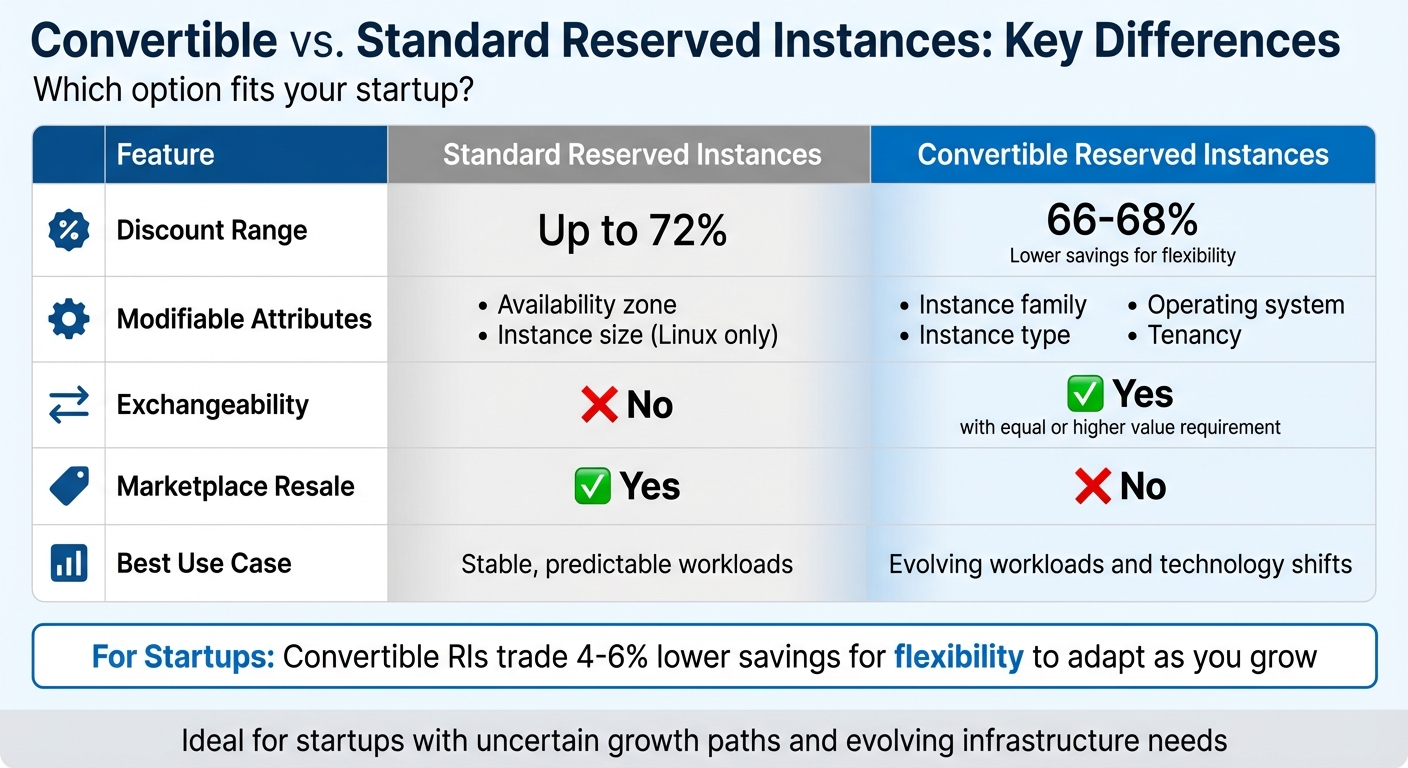
Convertible vs Standard Reserved Instances Comparison for Startups
Convertible Reserved Instances (CRIs) are one- to three-year cloud commitments that offer discounted compute power in exchange for upfront or periodic payments. What sets CRIs apart from traditional reservations is their flexibility. They allow you to adjust your configuration – switching instance families, types, operating systems, or tenancy – as long as the new setup is of equal or greater value. If the new configuration costs more, you’ll pay a prorated fee, but the original expiration date stays the same.
For example, you might start with t3.medium Linux instances and later decide to move to m7g Graviton instances or even switch to Windows. As Zesty aptly describes it:
"Think of this as a controlled refactor of your commitment, not a cancellation."
It’s important to note that CRIs are region-specific. While you can modify many attributes, transferring your reservation to a different AWS Region is not an option. This blend of flexibility and commitment makes CRIs especially appealing to startups navigating uncertainty or scaling quickly.
Core Features of Convertible Reservations
The standout feature of CRIs is their exchangeability. During your commitment term, you can adjust your reservation multiple times, as long as the new setup matches or exceeds the original value. For startups, this means you can adapt to changing needs without losing your initial investment.
CRIs also deliver cost savings of 66–68% compared to on-demand pricing. They come with three payment options:
- All Upfront: Pay the full amount upfront for the biggest discount.
- Partial Upfront: Pay part upfront, with the rest billed at discounted hourly rates.
- No Upfront: Skip the initial payment and pay discounted hourly rates instead.
In comparison, Standard Reserved Instances (RIs) can offer slightly higher discounts – up to 72% – but lack the flexibility of CRIs. For instance, if you exchange a higher-cost instance like m5.xlarge for lower-cost m5.large instances, CRIs will automatically adjust the instance quantity to maintain the total value of your commitment.
Convertible vs. Standard Reservations
To understand which option fits your needs, it helps to compare CRIs with Standard Reserved Instances. Both offer significant cost savings, but they cater to different priorities. Standard RIs lock you into a specific instance family and operating system, with limited options for adjustments like availability zones or instance sizes (Linux only). On the other hand, CRIs trade a slightly smaller discount (66–68%) for the ability to adapt to evolving requirements.
For startups, this flexibility can be a game-changer. Standard RIs work best for stable, predictable workloads. CRIs, however, are ideal for businesses expecting rapid growth, technological shifts, or changes in infrastructure – like transitioning from Intel to Graviton processors or switching operating systems.
| Feature | Standard Reserved Instances | Convertible Reserved Instances |
|---|---|---|
| Discount Range | Up to 72% | 66–68% |
| Modifiable Attributes | Availability zone, instance size (Linux only) | Instance family, type, OS, tenancy |
| Exchangeability | No | Yes (with equal or higher value requirement) |
| Marketplace Resale | Yes | No |
| Best Use Case | Stable, predictable workloads | Evolving workloads and technology shifts |
One key difference is that Standard RIs can be resold on the AWS Reserved Instance Marketplace if they are no longer needed, offering an exit strategy. CRIs, however, cannot be resold, locking you in for the full term. That said, their flexibility to exchange configurations as needed makes them a better fit for startups with dynamic infrastructure needs. While CRIs may require more hands-on management, they provide the adaptability to keep pace with growth and change.
Financial Benefits for Startups
Payment Options and Savings Analysis
Convertible Reserved Instances offer flexible payment plans that cater to different financial needs while providing long-term savings. Here’s how the options break down:
- All Upfront: Pay the entire cost at the start and enjoy the biggest discounts – around 40% savings for a one-year term and up to 60% for three years.
- Partial Upfront: Split the payment, with 30–50% upfront and the rest billed monthly at a reduced rate. This option delivers 36–38% savings for one year and approximately 56% for three years.
- No Upfront: Skip the initial payment and pay a discounted hourly rate instead. This approach saves about 29% for a one-year term and 52% for three years.
For startups, the No Upfront option is particularly helpful in the early stages when cash flow is tight. As operations stabilize, switching to All Upfront or Partial Upfront can maximize savings.
| Payment Option | Upfront Cost | Monthly Cost | Effective Hourly Rate | Total Annual Cost | Savings vs. On-Demand |
|---|---|---|---|---|---|
| On-Demand | $0 | N/A | $0.096 | $840.96 | 0% |
| All Upfront | $505 | $0 | $0.058 | $505.00 | ~40% |
| Partial Upfront | $265 | $22.63 | $0.061 | $536.56 | ~36% |
| No Upfront | $0 | $49.92 | $0.068 | $599.04 | ~29% |
These payment choices directly influence ROI outcomes, which we’ll explore next.
ROI Examples for Startups
The ROI of convertible Reserved Instances hinges on effective usage and the payment plan you choose. To calculate the breakeven point, divide the upfront cost by hourly savings. For example, an m5.large reservation with a $505 upfront cost and $0.038 hourly savings compared to on-demand pricing would break even after 13,289 hours – around 18 months of continuous use. To ensure strong ROI, aim for at least 80% utilization.
For startups with fluctuating traffic, starting with smaller instances like t3.medium can lock in savings during quieter periods. These can later be exchanged for larger instances, such as m5.large, when traffic spikes.
Nawaz Dhandala offers an important reminder:
"The biggest Reserved Instance mistake is not buying them. The second biggest is buying them without understanding your workload patterns first."
Flexibility Benefits for Startups
How to Exchange Reservations
Swapping convertible reservations gives startups the ability to adjust their infrastructure as their needs evolve. Here’s how it works: Open the EC2 console, pick the reservation you want to exchange, and start the process. From there, you’ll choose a new configuration – this could mean switching to a different instance family, size, operating system, or tenancy. The system automatically recalculates the instance count and adjusts for any additional costs if necessary. Just make sure the new setup matches or exceeds the value of the original reservation. Once you confirm the changes, the old reservation is retired, and the new one takes effect immediately. If the value of the new configuration is lower, AWS will increase the number of instances to meet the required value.
For example, imagine a startup starting with a t3.medium instance to handle light early-stage traffic. As demand grows, they might exchange it for an m5.large instance to better meet customer needs. This approach allows startups to secure early discounts while staying flexible enough to scale as they grow.
This process not only locks in initial savings but also ensures your infrastructure can adapt to changing workloads effectively.
Supporting Variable Workloads
Convertible reservations are perfect for startups dealing with unpredictable growth or changing infrastructure demands. They allow unlimited exchanges during the reservation term, as long as the new configuration meets the required value threshold. This flexibility removes the worry of being stuck with outdated architecture or wasted savings.
These reservations let you switch between instance families (like C5 to M6g), operating systems (such as Windows to Linux), or tenancy options (shared to dedicated). This is especially useful when adopting newer technologies. For example, transitioning from Intel-based instances to Graviton (ARM) processors lets you continue enjoying discounts while improving price-performance. Additionally, regional flexibility means your discount applies to any matching instance across all Availability Zones in a region, giving you the freedom to shift workloads as needed.
When to Use Convertible Reservations
Best Use Cases
Convertible reservations shine when your infrastructure needs are steady enough to commit but flexible enough to adapt. They’re perfect for long-running services like databases, message brokers, or control-plane components. These services form the backbone of your operations – the resources you’ll always need to keep running.
They’re also a great fit for architecture migrations. If you’re planning to upgrade to newer instance generations (like moving from M5 to M6i) or switching architectures (such as adopting ARM-based Graviton instances), convertible reservations let you lock in savings while staying flexible. Even operating system transitions – like moving workloads from Windows to Linux during cost-cutting efforts – can be managed without losing your discount. This adaptability is especially important for startups navigating different growth phases.
For startups, the "seeding" strategy is another smart use case. Start small with affordable instances like t3.medium to secure immediate savings, then scale up to larger instances like m5.large as demand grows. This way, you’re not gambling your entire budget on a specific configuration. As Shouri Thallam from nOps explains:
Convertible RIs work like planting seeds that grow into the infrastructure you need over time.
Rightsizing and autoscaling scenarios also benefit from convertible reservations. When your workload requirements evolve, your reservation commitments can evolve too. This is particularly useful in environments where the long-term architecture is still being refined, and flexibility is more important than squeezing out every last dollar of savings.
Evaluating Fit for Your Startup
To decide if convertible reservations make sense for your startup, start by analyzing your usage patterns. Look at 60 days of usage data to identify stable trends. Focus on your baseline capacity – the resources you consistently need – rather than peak or unpredictable workloads. For spiky or experimental workloads, On-Demand or Spot instances are usually a better choice.
When starting out, take a conservative approach. Aim to cover 70-80% of your production workloads, leaving room for unexpected changes. It’s much easier to add more commitments later than to undo an overcommitment. For your first reservations, consider the "No Upfront" payment option to minimize financial risk while you get the hang of managing reservations.
To figure out if a reservation makes financial sense, use this formula: Reserved instance price ÷ On-Demand price = Break-even in months. If you expect to use the resource longer than this period, a reservation is a good investment. For 1-year reserved instances, the break-even point is usually around 7 months of continuous use.
| Startup Stage | Workload Predictability | CRI Suitability | Reasoning |
|---|---|---|---|
| Early/Seed | Low | High | Start small and scale up as your product gains traction. |
| Growth/Scaling | Moderate | High | Supports frequent changes like rightsizing and upgrading instance types. |
| Mature/Stable | High | Low to Moderate | Standard RIs may offer better savings if your stack is fully optimized. |
| DevOps Optimization | Variable | High | Great for experimenting with Graviton or transitioning from Windows to Linux. |
Avoid committing to one large purchase. Instead, buy in smaller increments to minimize risk if your growth projections don’t pan out as expected. Regularly check for "family drift" or "OS drift" – situations where your reservations aren’t being fully utilized – and exchange them as needed to maximize their value.
Risks and Management Practices
Managing Common Risks
Convertible reservations demand hands-on management because AWS doesn’t automatically adjust them when your infrastructure changes. For instance, if you migrate workloads to a new instance family but don’t manually perform an exchange, your reservations become idle. This leads to "stranded savings", which can quietly drain your budget. Startups often fall into this trap, assuming their commitments will adjust automatically.
The "equal or higher value" rule adds another layer of complexity. Every exchange must result in a reservation of at least the same value as the original, making it difficult to downsize unless you increase the number of instances or extend the reservation term. If your goal is to scale down, you might end up with more capacity than you actually need.
Region lock-in is yet another hurdle. While you can modify instance families, operating systems, and tenancy, reservations are tied to a specific AWS region. For example, moving infrastructure from the US East region to the EU West region renders your existing reservations a financial liability – they can’t be transferred. This is especially challenging for startups experimenting with multi-region strategies, as it can lead to unexpected costs.
Managing these reservations becomes increasingly burdensome as your infrastructure scales. As Zesty points out:
"At scale, exchanges become a full-time job".
Manually tracking usage, calculating value matches, and identifying exchange opportunities can overwhelm small teams. Without dedicated resources, reservations can easily drift out of sync with actual usage.
To mitigate these risks, consider these practices:
- Right-size instances before committing: Focus on instances with less than 40% CPU utilization and downsize them first.
- Make staggered purchases: Instead of committing to one large reservation, buy in smaller increments. This reduces risk if your forecasts change.
- Set up CloudWatch alarms: Configure alerts to trigger if utilization stays below 80% for seven consecutive days.
- Regularly review your reservations: Establish weekly or biweekly reviews to check for instance family or OS drift and address exchange opportunities before they become costly mistakes.
By understanding these risks and implementing proactive strategies, startups can keep their reservation management under control.
Tools and Management Methods
Startups with limited engineering bandwidth should take advantage of tools designed to simplify reservation management. AWS Cost Explorer is a great starting point. It provides detailed utilization and coverage reports based on 60 days of data and offers purchase recommendations. This tool helps you make informed decisions about which reservations to buy or exchange.
To supplement manual monitoring, use CloudWatch alarms for automated alerts. Custom alarms can notify your team when reservation utilization drops below your target threshold, reducing the risk of prolonged inefficiencies. Additionally, AWS Trusted Advisor performs real-time checks for underutilized reservations and suggests ways to optimize costs, giving you another layer of oversight.
For teams looking to reduce manual effort, automation platforms like Zesty and nOps can be game-changers. These tools use AI to identify workload drift and execute exchanges automatically through APIs. By continuously monitoring your usage patterns and adjusting commitments as needed, they eliminate much of the guesswork and human error involved in manual management. While these platforms come with added costs, they often pay for themselves by saving time and preventing costly mistakes.
Start by using AWS’s free tools to gain a solid understanding of your usage patterns. As your infrastructure grows and manual tracking becomes unmanageable, consider investing in automation. The ultimate goal is to keep reservation utilization above 80% without tying up valuable engineering resources in the process.
Conclusion
Convertible reservations can help startups cut cloud costs by up to 68% while maintaining the flexibility to adjust their infrastructure as needs change. Unlike standard reservations, which lock you into specific configurations, convertible RIs let you modify instance families, operating systems, and sizes – features that are especially useful for startups navigating the early stages of growth.
The "seeding" strategy is a smart approach for early-stage companies. By starting with smaller, cost-efficient instances, you can achieve immediate savings and later upgrade to more robust resources as your traffic grows – without losing your initial investment.
To make the most of convertible reservations, focus on covering your baseline usage. This is typically calculated by analyzing the 10th percentile of your historical compute needs. For variable workloads, on-demand or spot instances can fill the gaps. Maintaining a utilization rate above 80% is key to avoiding unnecessary spending on unused capacity. Regular monitoring and automation tools can help ensure your reservations stay in sync with actual demand.
While convertible reservations may offer slightly lower savings (around 68% compared to up to 72% with standard reservations), the ability to upgrade instance generations, switch operating systems, and adjust capacity as your startup grows makes them a compelling choice. For startups with uncertain growth paths, this flexibility often outweighs the small difference in savings.
Start by analyzing 90 days of usage data to identify your stable baseline. Then, layer 1-year and 3-year commitments to strike the right balance between cost savings and adaptability. As your infrastructure grows and manual tracking becomes harder, automation platforms can simplify the process, keeping your reservations aligned with usage patterns.
FAQs
How much baseline usage should I reserve?
To figure out your baseline usage, start by identifying the minimum resources you consistently need. Analyze patterns in your typical usage and focus on steady workloads that don’t change, even during spikes. Reserving capacity for this predictable baseline helps you manage costs effectively while staying flexible. Avoid reserving resources for peak or fluctuating demands unless those demands are consistently high. This strategy strikes a balance between saving money and avoiding over- or under-utilization of resources.
Can I exchange a reservation to a different AWS Region?
Convertible Reserved Instances can be exchanged for others with different configurations, but only within the same AWS Region. Cross-region exchanges are not allowed. This approach provides flexibility to adjust resources as needs change while remaining tied to a specific region.
What happens if my new configuration is cheaper?
If your updated setup comes with a lower price tag, you’ll end up saving on your cloud expenses. These savings allow you to better allocate your budget while still keeping the adaptability your infrastructure requires.