Cost-Aware Autoscaling with AI: A Guide

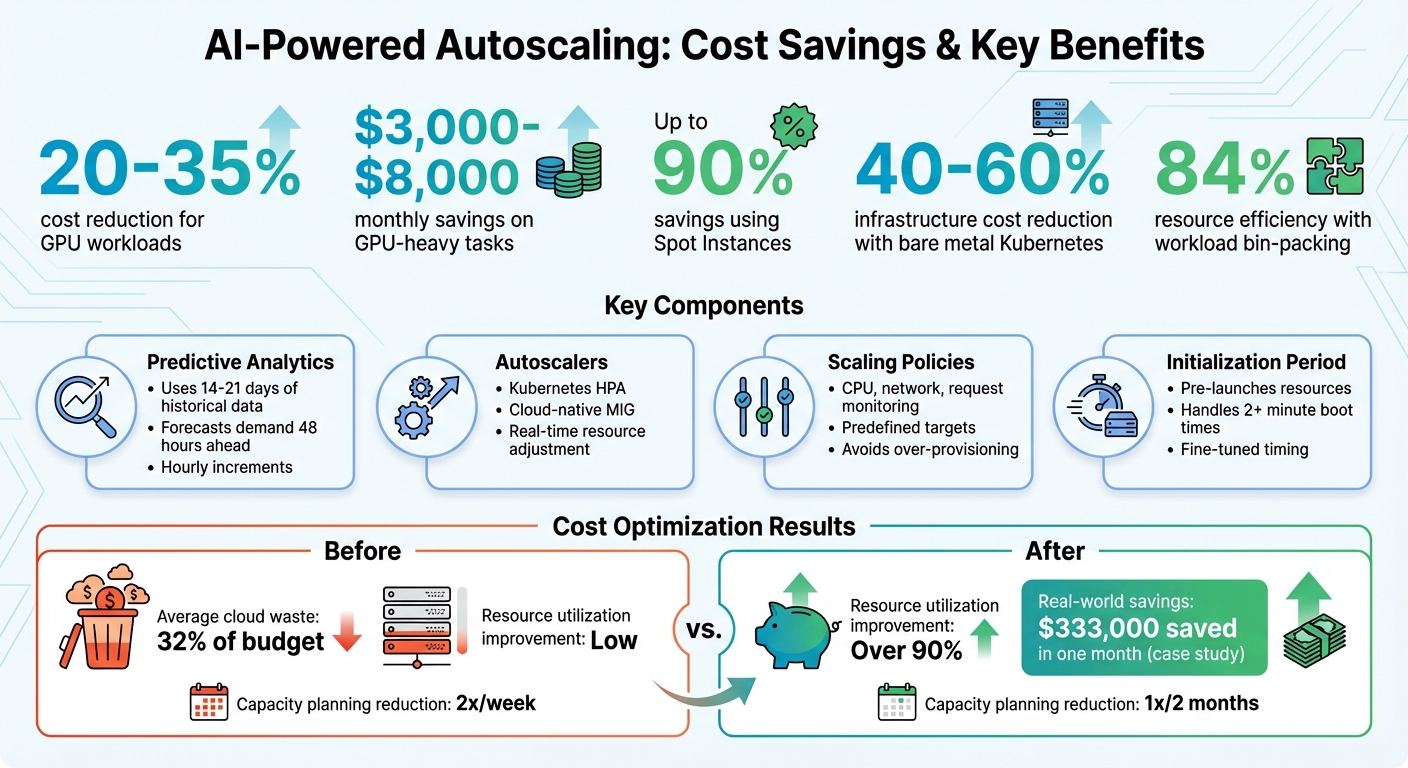
Cloud expenses often spiral out of control due to over-provisioned resources, idle GPUs, and reactive scaling delays. AI-powered autoscaling solves this by predicting demand based on historical data and scaling resources proactively. This approach optimizes resource usage, reduces idle time, and slashes costs by 20% to 35% for GPU workloads alone.
Key Benefits:
- Predictive Scaling: Uses 14–21 days of data to forecast demand and pre-scale resources.
- Cost Savings: Businesses save $3,000–$8,000 monthly on GPU-heavy tasks and up to 90% using Spot Instances.
- Improved Resource Utilization: Tools like Karpenter achieve up to 84% efficiency through workload bin-packing.
- Serverless Options: Eliminates idle costs by charging per request instead of per hour.
Quick Tips:
- Combine predictive and dynamic scaling for precise adjustments.
- Use tools like Kubernetes HPA and serverless platforms to scale efficiently.
- Separate batch jobs from real-time workloads to further reduce waste.
- Monitor cloud spending with tools like AWS Budgets or Google Cloud Monitoring.
By implementing AI-driven autoscaling, you can reduce cloud waste, improve efficiency, and free up your team to focus on core projects.
AI-Powered Autoscaling Cost Savings and Benefits Overview
DevOps Q&A: AI Workflows, Kubernetes Cost Optimization, and MCP Servers
Core Concepts of Cost-Aware Autoscaling
Cost-aware autoscaling is changing the game for cloud resource management by focusing on smarter, more efficient scaling. By blending AI-powered forecasting with careful cost management, it helps you keep performance strong while cutting down on unnecessary expenses. Let’s break down the key ideas and components behind this forward-thinking approach.
What Cost-Aware Autoscaling Means
At its core, cost-aware autoscaling uses AI and machine learning to predict demand and adjust resources accordingly. This ensures a balance between performance and budget constraints . Unlike traditional autoscaling, which reacts only after a surge in demand, this method anticipates it by analyzing historical data and scaling resources proactively .
This proactive approach addresses a common challenge: the time it takes for resources to boot up, which can exceed two minutes. By launching resources ahead of time, cost-aware autoscaling ensures that everything is ready exactly when it’s needed .
The beauty of this method is its flexibility. You can tailor your scaling strategy to your priorities – whether that means prioritizing availability (even if it costs more), focusing on cost efficiency, or finding a middle ground. Instead of relying on basic metrics like CPU or memory thresholds, cost-aware systems use detailed historical trends – such as daily or weekly usage patterns – to make more accurate predictions .
Let’s dive into the components that make this advanced scaling technique possible.
Components of AI-Powered Autoscaling
Four essential elements work together to ensure a seamless balance between performance and cost:
- Predictive Analytics: Machine learning models analyze 14 to 21 days of historical workload data to identify patterns and predict future demand . For instance, AWS uses 14 days of data to forecast demand over the next 48 hours in one-hour increments . This ensures resources align closely with actual needs, cutting down on idle costs.
- Autoscalers: Tools like Kubernetes Horizontal Pod Autoscaler (HPA) and cloud-native Managed Instance Group (MIG) autoscalers dynamically adjust resources in real time. These systems add or remove resources as demand changes, minimizing waste by scaling down as soon as demand decreases.
- Scaling Policies and Cost Models: These define your optimization goals – whether you’re prioritizing availability, cost savings, or a mix of both . Metrics such as CPU usage, network traffic, or request counts are monitored to trigger scaling actions based on predefined targets . Well-designed policies help avoid over-provisioning and keep spending in check.
- Initialization Period: This determines how far in advance resources need to be launched to handle predicted demand . Misjudging this timing can either waste resources or lead to delays. By using historical data, you can fine-tune these windows to reduce costs and maintain performance.
Interestingly, many major platforms like Google Cloud and AWS offer predictive autoscaling features at no extra cost – you only pay for the compute resources you actually use .
How to Implement AI-Powered Autoscaling
Starting with AI-powered autoscaling doesn’t require a deep background in machine learning. The process begins with gathering relevant data and leveraging pre-trained models from platforms like AWS and Google Cloud for demand forecasting. These tools are designed to work with minimal historical data, making them accessible even to teams new to predictive analytics. Once you have your data, configure predictive analytics to align your resource capacity with workload trends.
Setting Up Predictive Analytics for Demand Forecasting
To accurately forecast demand, focus on metrics that reflect your workload patterns, such as CPU usage, network I/O, and Application Load Balancer (ALB) request counts. For instance, Google Cloud’s predictive autoscaler uses historical data to make projections, while AWS provides hourly capacity forecasts for the next 48 hours, refreshing them every 6 hours. Before activating autoscaling, test your setup in "Forecast Only" mode (AWS) or simulation mode (Google Cloud) to compare predicted capacity against real-world demand.
An important step in this process is setting an initialization period. This tells the system how far in advance to launch new instances so they’re fully operational by the time the load increases. This is especially critical for applications with startup times longer than 2 minutes.
Creating Cost-Effective Scaling Policies
To balance performance and cost, combine predictive and dynamic scaling. Predictive scaling handles anticipated workload changes, while dynamic scaling addresses unexpected spikes or drops in demand. Configure your system to use the higher capacity suggested by either method and include a 10% buffer to handle temporary overages during peak times. Additionally, set a scale-down stabilization window of about 5 minutes to avoid rapid, unnecessary adjustments.
For cost savings, prioritize more affordable capacity options. For example, Spot Instances can cut costs by up to 90%, while AWS Compute Savings Plans and EC2 Instance Savings Plans offer discounts of up to 66% and 72%, respectively, for committed usage. Predictive scaling itself doesn’t add extra costs; you only pay for the compute resources you use.
To further optimize, consider container orchestration and serverless computing to make the most of your resources.
Using Kubernetes and Serverless for Dynamic Scaling
Kubernetes offers powerful autoscaling tools like the Horizontal Pod Autoscaler (HPA) for adjusting replica counts and the Cluster Autoscaler for managing node capacity. For cost-conscious setups, bare-metal Kubernetes can be a game-changer, reducing expenses by 40–60% compared to traditional cloud environments by eliminating hypervisor overhead and giving you direct control over hardware.
To avoid scaling inefficiencies, use tools like Goldilocks or Kubecost to match resource requests to actual usage. This ensures that scaling doesn’t amplify waste caused by misconfigured applications. For workloads with intermittent traffic, Kubernetes Event-Driven Autoscaling (KEDA) can scale workloads down to zero during off-hours, cutting compute costs entirely during periods of inactivity.
If you’re managing GPU-intensive AI workloads, consider coscheduling multiple model replicas on a single VM with multiple GPUs. This setup maximizes GPU utilization and reduces the number of nodes required, making it an efficient choice for inference tasks where both latency and throughput are key factors.
sbb-itb-f9e5962
Cost Optimization Strategies
Once predictive autoscaling is up and running, the next step is tackling cloud waste. The goal? Cut unnecessary expenses without compromising reliability. On average, companies waste about 32% of their cloud budgets, often due to poor resource allocation and inefficient workload management.
Separating Batch and Real-Time Workloads
A key strategy is to separate batch processing tasks from real-time services. Real-time workloads demand immediate response times and should scale based on metrics like request rate or latency. On the other hand, batch jobs – such as data processing, model training, or report generation – can scale according to queue depth or message count.
For batch processing, scaling Pods to zero during idle times is a smart move. As Google Cloud’s documentation explains:
Scaling the deployments to zero Pods saves resources during periods of inactivity (such as weekends and non-office hours), or for intermittent workloads such as periodic jobs.
Certain workloads, like those involving large language models (LLMs), benefit from dedicated node pools. For example, GPU-equipped nodes are ideal for hosting LLM servers, while standard batch jobs can run on more affordable non-GPU instances. For non-urgent tasks, using Spot Instances can reduce costs by up to 90% compared to on-demand pricing. Additionally, buffering real-time requests into a queue allows for asynchronous processing, which helps smooth out workload spikes and avoids overprovisioning.
Choosing the Right Instance Types and Resource Allocation
Optimizing resource allocation is another way to cut down on costs. Overestimating resource needs often results in paying for unused capacity. By rightsizing resources, you can align allocation with actual usage. Tools like Goldilocks, KRR, and Kubecost analyze CPU and memory utilization – typically over an 8-day period – and provide recommendations for adjusting resource requests and limits.
Hardware selection plays a big role as well. For example, AWS Graviton processors are often 20% cheaper and 60% more energy-efficient than x86-based instances. For AI workloads, using specialized chips like AWS Inferentia can further reduce costs compared to standard processors. Additionally, AWS Savings Plans and Reserved Instances can deliver savings of up to 72%, depending on the commitment term.
For GPU-heavy tasks, NVIDIA’s Multi-Instance GPU (MIG) technology allows a single physical GPU to be split into smaller, more efficient instances, which is perfect for lighter AI tasks. Deploying multiple AI models on a single instance – using multi-model or multi-container endpoints – further improves resource utilization and ROI. Autoscalers like Karpenter can also help by consolidating workloads, replacing expensive nodes with cheaper ones, or rerouting workloads to underutilized nodes.
Monitoring and Budget Alerts
Keeping an eye on key performance indicators (KPIs) is crucial for identifying inefficiencies. Monitoring tools reinforce cost-saving measures by providing real-time insights. Set alerts not just for overall budget limits but also for performance metrics like latency or accuracy drops, which might signal resource issues. Platforms like AWS Budgets, Amazon CloudWatch, Azure Cost Management + Billing, and Google Cloud Monitoring offer real-time tracking and threshold-based alerts.
Some modern platforms use AI to detect anomalies in spending before they spiral out of control. For example, Drift saved $4 million on AWS costs, and Ninjacat achieved a 40% reduction through real-time cost allocation. As CloudZero explains:
CloudZero aligns cloud costs to key business metrics, such as cost per customer or product feature… allowing teams to see how individual customers drive their cloud spend.
Tracking unit costs – like cost per customer or per inference – provides deeper insights than total spend alone. Consistent tagging of resources (e.g., by project, team, environment, or model name) is essential for attributing costs to specific business units or processes. For AI/ML workloads, setting clear stopping conditions and exit criteria for long-running processes can prevent excessive resource consumption. Tools like Infracost can even integrate into CI/CD pipelines to estimate costs during pull requests, helping to avoid costly infrastructure changes before they’re implemented.
These practices create a foundation for advanced cost-saving strategies, such as TechVZero’s Bare Metal Kubernetes approach.
TechVZero‘s Bare Metal Kubernetes Approach
For many founders and engineering teams, the limitations of managed cloud services often become glaringly apparent, especially after trying conventional cost-saving strategies. Managed Kubernetes platforms like AWS EKS, for example, charge $0.10 per hour per cluster just for the control plane. Add to that the costs of load balancers and EBS storage, and the expenses pile up quickly. To make matters worse, traditional managed environments frequently leave resources underutilized, leading to unnecessary waste.
TechVZero’s bare metal Kubernetes solution tackles these inefficiencies head-on. By removing the virtualization layer and the added costs of managed services, infrastructure expenses drop by a staggering 40–60% – all while maintaining the same level of reliability. The setup process is quick too: in under 30 seconds, you can install a lightweight, read-only operator that collects telemetry data on compute, memory, and network usage. From there, you can implement Kubernetes best practices and cost-aware policies to automate workload optimization. This streamlined approach is what makes TechVZero’s bare metal solution stand out.
How Bare Metal Kubernetes Cuts Costs by 40–60%
The cost savings come from two key factors: eliminating the so-called "cloud tax" and optimizing resource usage. Managed services often include recurring fees for control planes, which a bare metal setup completely avoids. Pair this with AI-powered bin packing, which consolidates workloads to maximize server performance, and the savings become clear.
TechVZero’s pricing model is also performance-based. You only pay 25% of the annual savings realized, and if the agreed-upon savings threshold isn’t met, you pay nothing. There are no upfront costs, making it a no-risk solution for companies looking to optimize their infrastructure spend.
Case Study: $333,000 Saved in One Month
One of TechVZero’s clients saved $333,000 in just one month while simultaneously thwarting a DDoS attack. The client had been running AI workloads on a managed cloud platform, incurring high overhead costs. By switching to TechVZero’s bare metal Kubernetes solution, they not only reduced expenses but also optimized resource allocation and integrated security into their autoscaling processes. This approach delivered massive savings without adding extra work for the internal team.
Security and Compliance Built In
Beyond cost savings, TechVZero places a strong emphasis on security and compliance. Security measures are embedded directly into the autoscaling logic, ensuring that scaling actions only occur when safety policies and confidence thresholds are met. The platform also supports SOC2, HIPAA, and ISO compliance, aligning with your timeline rather than requiring lengthy processes. For teams of 10–50 people, this means comprehensive infrastructure support without needing to hire additional in-house experts. It’s a solution that combines efficiency, security, and peace of mind.
Conclusion
Key Takeaways
AI-driven cost-aware autoscaling is more than just a way to save money on your cloud expenses – it’s about freeing up your team to focus on what truly matters. By reducing operational overhead, small teams can shift their attention to strategic projects. Companies leveraging AI-powered Kubernetes automation have reported cloud savings ranging from 40% to 70%, all while achieving resource utilization rates of over 90%. This translates to fewer wasted resources, less manual intervention, and more time to dedicate to core product development.
The main advantages can be grouped into three areas. First, automated rightsizing ensures workloads get precisely the resources they need, based on real usage patterns rather than estimates. Second, intelligent spot instance management simplifies handling interruptions and fallback scenarios, offering discounts of up to 90% without compromising reliability. Finally, real-time visibility into cloud spending – both at the cluster and workload levels – enables fast, informed financial decisions.
For AI workloads, the return on investment (ROI) is hard to ignore. Dan Udell from Bud shared his experience:
Enabling the Workload Autoscaler brought instant savings… the development teams can focus on coding instead of tweaking configurations.
On top of that, reducing capacity planning from twice a week to just once every two months can save teams hundreds of hours annually. These results set the stage for streamlined and optimized implementations.
Next Steps for Engineering-Aware Founders
If you’re ready to take the next step, start by deploying a read-only agent across your clusters. This quick process generates a detailed savings report and provides tangible ROI figures in minutes. From there, implement automated rightsizing and bin packing policies to consolidate workloads and further increase efficiency.
For teams running production Kubernetes, cutting costs by 40–60% without hiring additional staff is within reach. TechVZero’s bare metal approach offers a practical solution for engineering-savvy founders who want to scale efficiently without becoming infrastructure experts. It’s a clear path to cost-effective growth.
FAQs
How does AI-driven autoscaling forecast cloud resource needs?
AI-powered autoscaling predicts cloud resource requirements by examining historical usage patterns, such as daily or weekly trends. By leveraging machine learning techniques like time-series analysis, it forecasts future demand and adjusts resources accordingly. This approach helps maintain peak performance while keeping costs in check by scaling resources up or down as needed.
How can Spot Instances help reduce cloud costs in autoscaling?
Spot Instances offer a powerful way to cut cloud costs, with potential savings of up to 90% compared to On-Demand pricing. They’re a great fit for workloads that can handle interruptions, like batch processing, data analysis, or CI/CD pipelines. By tapping into unused cloud capacity, you can scale your operations efficiently while keeping your budget in check.
That said, Spot Instances can be interrupted if demand spikes. To make the most of them, it’s crucial to pair them with a strong autoscaling strategy. This ensures your workloads continue running smoothly, even if an instance gets interrupted.
How can businesses maintain security and compliance with AI-powered autoscaling?
To ensure safety and meet compliance standards when using AI-driven autoscaling, businesses need to adopt strong security measures and perform regular risk assessments. Essential steps include safeguarding sensitive data, protecting AI models, and implementing strict access controls. Keeping an eye out for unusual activity and using encryption are effective ways to secure cloud environments during periods of dynamic scaling.
Incorporating security measures directly into autoscaling policies helps align with industry regulations and standards. This involves practices like identity and access management (IAM), ensuring data privacy, and maintaining the integrity of AI models. By addressing potential vulnerabilities early, companies can scale their operations smoothly while reducing risks and adhering to security requirements.