Saving on GPUs with Preemptible Instances: A Playbook

Cutting GPU Costs by 70-91% with Preemptible Instances
Running GPUs in the cloud can be expensive, with costs for high-performance GPUs like the H100 exceeding $14,000 per month. Worse, GPU utilization often stays between 30-50%, meaning you’re paying for idle time. But there’s a smarter way to save: preemptible instances (also called Spot instances). These offer the same hardware at 70-91% discounts by using spare capacity that cloud providers can reclaim at short notice.
Here’s what you need to know:
- Massive Savings: Companies like Spotify and Pinterest cut GPU costs by millions annually using Spot instances.
- The Trade-Off: Instances can be interrupted with little notice, so workloads need to handle interruptions.
- Best Use Cases: Tasks like hyperparameter tuning, batch inference, and data preprocessing thrive on preemptible GPUs.
- What to Avoid: Production APIs, time-sensitive jobs, and non-checkpointed workloads are not suitable for Spot instances.
To succeed, design systems to handle interruptions with strategies like regular checkpointing, hybrid architectures (mixing on-demand and Spot instances), and diversified instance types. Tools like Kubernetes and AWS Spot Fleet can help automate these processes, ensuring reliability while keeping costs low.
If your GPU utilization is under 50%, you’re likely overspending. Start by auditing your workloads and switching fault-tolerant tasks to preemptible GPUs. With the right setup, you can dramatically reduce expenses without sacrificing performance.
Preemptible Virtual Machine(PVM) in Action | Learn GCP with Mahesh
sbb-itb-f9e5962
What Are Preemptible GPU Instances?
Preemptible GPU instances, often called Spot instances, are virtual machines equipped with GPUs that utilize a cloud provider’s surplus capacity. These instances are available at significantly reduced costs because the cloud provider can reclaim them at any time when resources are needed elsewhere.
Cloud providers typically reserve 15–30% of their capacity to handle maintenance, hardware failures, or sudden spikes in demand. Instead of letting this spare capacity go unused, they offer it at steep discounts. By opting for preemptible instances, you can access high-performance GPUs for a fraction of the standard cost. However, there’s a trade-off: these instances can be interrupted at short notice, lack Service Level Agreements (SLAs), and don’t support features like live migration. For workloads that can handle interruptions, this option can deliver savings ranging from 60% to 91% compared to on-demand pricing.
How Preemptible GPUs Work
When you launch a preemptible GPU instance, you’re tapping into the provider’s extra capacity. These instances function normally until the provider needs to reclaim the resources.
The process of termination varies by provider. For example:
- AWS Spot instances: Provide a two-minute warning through their metadata service before shutting down.
- Google Cloud: Issues a 30-second warning using an ACPI G2 Soft Off signal.
- Azure Spot VMs: Allow configurable termination settings.
Once interrupted, the instance transitions to a "TERMINATED" state. You can decide whether it stops (default behavior) or is deleted entirely.
Google Cloud’s older Preemptible VMs had a 24-hour maximum runtime, meaning they’d shut down after a day regardless of interruptions. However, newer Spot VMs don’t have this limitation unless you set one manually. By comparison, AWS and Azure Spot instances have no maximum runtime.
Interruption rates vary based on GPU type, timing, and region. For instance:
- H100 GPUs: 4.1% hourly interruption rate.
- A100 GPUs: 2.3% hourly interruption rate.
- V100 GPUs: 0.8% hourly interruption rate.
Regional demand also plays a role. For example, interruption rates in US-East-1 are three times higher than in US-West-2. Timing matters too – weekend interruptions are about 40% lower than weekdays. Additionally, most providers won’t charge for GPU or VM usage if the instance is reclaimed within the first 60 seconds of launch.
These operational details are key to understanding the cost-effectiveness of preemptible GPUs, as shown in the cost savings breakdown below.
Cost Savings Breakdown
The discounts offered by preemptible GPUs are substantial, with savings consistent across major cloud providers:
- AWS p5.48xlarge instance: Equipped with eight H100 GPUs, it costs $98.32 per hour on demand but averages $19.66 per hour on Spot – an 80% discount.
- AWS ml.p4d.24xlarge instance: Featuring eight A100 GPUs, its on-demand rate is $32.77 per hour, while Spot pricing ranges from $3.90 to $29.49 per hour, offering discounts between 10% and 88%.
- Google Cloud NVIDIA T4 instance: On-demand pricing is $0.35 per hour, but Spot rates fall between $0.03 and $0.14 per hour, translating to savings of 60–91%. Similarly, a NVIDIA V100 instance costs $2.48 per hour on demand, compared to $0.22–$0.99 per hour on Spot.
Several factors influence these savings:
- GPU generation: Older models like the V100 can deliver savings of up to 91%, while newer GPUs with higher demand may offer slightly smaller discounts.
- Region: Spot prices in US-West-2 are about 20% higher than in US-East-2 due to demand differences.
- Timing: Running batch jobs at night or on weekends can add another 10–15% in savings.
However, as of late 2025, the price gap between spot and on-demand GPUs has started to shrink. For example, AWS reduced on-demand H100 prices by 44% in June 2025, bringing costs down to approximately $3.90 per hour.
Which Workloads Fit Preemptible GPUs?
Preemptible GPU instances are ideal for workloads that are fault-tolerant and capable of checkpointing. These tasks can handle interruptions without significant setbacks, making them a cost-effective option for specific use cases.
The most suitable workloads are stateless or fault-tolerant tasks – those that can resume or restart without losing progress. For instance, jobs that save their state to shared storage (like S3 or NFS) every 10–30 minutes or tasks designed to be idempotent fit this category. Queue-based systems are another excellent candidate; if an instance is preempted, the unfinished task simply returns to the queue and is picked up by another worker.
"Preemptible VMs are a great fit for regularly run model training or tuning jobs with flexible completion times, or for large-scale HP tuning explorations." – Amy Unruh, Staff Developer Advocate, Google Cloud
Parallelizable experiments, such as hyperparameter tuning, thrive on preemptible GPUs. Since each configuration runs independently, the failure of one instance doesn’t affect the others. Similarly, batch inference and data preprocessing pipelines designed with retry logic and shared storage can handle interruptions seamlessly.
Fault-Tolerant Workload Examples
- Hyperparameter tuning: This workload is naturally resilient to interruptions. Testing multiple configurations simultaneously ensures that losing a few instances has minimal impact on the overall experiment. Tools like Ray Tune can automatically restart failed jobs, making this process interruption-resistant.
- Batch inference: Netflix provides a great example here. In 2024, they saved $3.2 million annually by processing 100 million thumbnails daily using spot instances for batch inference. Their queue-based architecture ensured that if a worker was preempted, the unfinished thumbnails were simply re-queued for another instance to handle.
- Data preprocessing and ETL pipelines: These tasks are well-suited for preemptible GPUs, especially when using frameworks like Apache Spark that checkpoint progress. For example, Snap’s computer vision pipeline processes 500 million images daily across 1,000 T4 GPUs, with 90% of those being spot instances. This setup saved them $6.2 million annually, cutting costs by 78% in 2024.
- CI/CD pipelines in non-production environments: Build and test jobs in these pipelines can be retried automatically, making them a good match for preemptible infrastructure. Since these jobs don’t impact customer-facing services, they can tolerate disruptions.
Workloads to Avoid
While preemptible GPUs offer cost savings, they’re not suitable for every scenario. Some workloads demand higher reliability and availability guarantees:
- Production inference APIs: These applications handle live customer traffic and require consistent, low-latency performance. Sudden interruptions can degrade the user experience, so preemptible instances are unsuitable. They lack availability guarantees and are not covered under Service Level Agreements (SLAs).
- Time-critical jobs: Tasks with strict deadlines, like model deployments tied to product launches, should avoid preemptible GPUs. Since availability varies by region and time, delays in securing replacement capacity can disrupt schedules.
- Long-running jobs without checkpointing: Jobs that don’t periodically save their state risk losing all progress if interrupted. For instance, an 18-hour training run without checkpoints would need to restart from scratch if preempted near completion. This limitation is particularly problematic with older Preemptible VMs, which had a guaranteed 24-hour termination.
- Critical infrastructure components: Essential services like DNS servers, cluster controllers, or system-critical pods should never rely solely on preemptible instances. Their failure can lead to cluster-wide instability, making them unsuitable for such roles.
Understanding which workloads align with the strengths of preemptible GPUs – and which don’t – is the first step toward effective deployment strategies. Up next, we’ll dive into how to maximize the value of preemptible GPU instances.
Deployment Strategies for Preemptible GPU Workloads
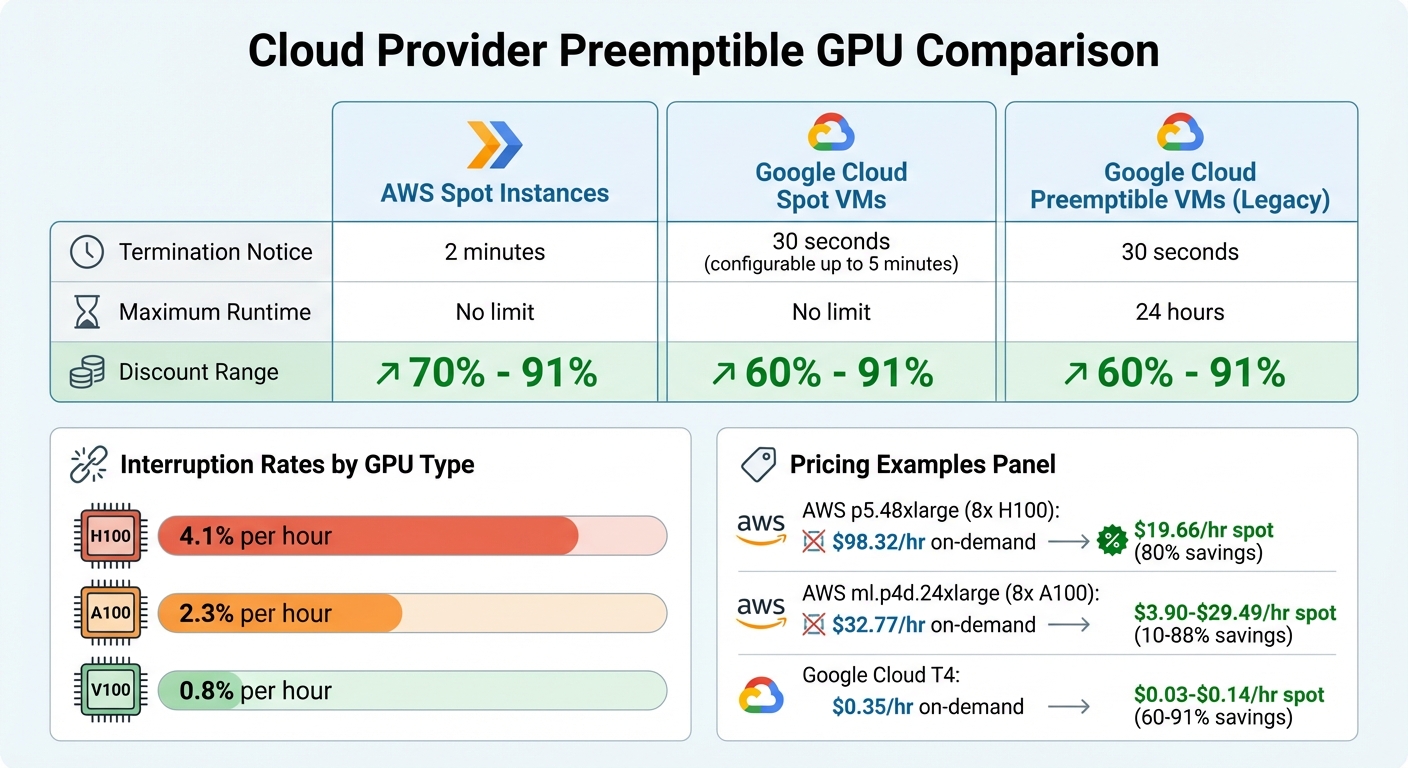
Cloud Provider GPU Spot Instance Comparison: Pricing, Termination Notices, and Discount Ranges
After identifying suitable workloads for preemptible GPUs, the next step is figuring out how to deploy them effectively. The goal? Maximize cost savings while keeping disruptions to a minimum. To do this, you need to design your architecture with interruptions in mind, treating them as a normal part of operations rather than rare occurrences.
Instance Diversification
Relying on just one GPU type or availability zone can lead to capacity shortages and downtime. A smarter approach is to spread your workloads across 10–15 different instance types to ensure you can find available capacity when needed. For example, if your workload requires 16GB of GPU memory, you could configure your autoscaler to select from options like g4dn.xlarge, g5.xlarge, or p3.2xlarge.
Tools like AWS Spot Fleet simplify this process by managing a variety of capacity pools and picking the cheapest available instance from your predefined list. Another key strategy is distributing workloads across multiple regions and availability zones. Interruption rates can vary by location, and weekends often have 40% fewer interruptions than weekdays. Combining these tactics with a mix of on-demand and preemptible resources can further boost reliability.
Hybrid Architectures
Using a combination of on-demand and preemptible instances provides a balance of reliability and cost savings. Critical components, such as parameter servers, control planes, or databases, should run on stable on-demand instances, while fault-tolerant worker nodes can utilize spot instances.
"Organizations mastering spot instance orchestration achieve 70-91% cost reductions compared to on-demand pricing, but those who deploy naively lose weeks of training progress to unexpected terminations." – Introl Blog
This hybrid setup not only makes your system more resilient but also improves workload scheduling, especially with Kubernetes. Use taints and tolerations to ensure proper workload isolation: for instance, taint on-demand nodes with CriticalAddonsOnly=true:NoSchedule and spot nodes with spot=true:NoExecute to guide pod scheduling.
Graceful Shutdown and Checkpointing
How you handle termination notices can make a huge difference in preserving work. AWS provides a 2-minute warning before reclaiming an instance, while Google Cloud offers a shorter 30-second notice, adjustable up to 5 minutes.
To minimize disruptions, set up signal handlers (e.g., SIGTERM) in your application code to trigger an emergency checkpoint as soon as a termination notice arrives. Ensure your startup script properly propagates these signals to the training process. Regular checkpoints to shared network storage, such as Amazon S3, Google Cloud Storage, or NFS, are essential – local disk storage is wiped when an instance is reclaimed.
Take Pinterest’s 2024 success as an example: by running 80% of their recommendation model training on 200 V100 Spot GPUs, they saved $4.8 million annually (a 72% cost reduction). Their system checkpointed every 15 minutes to S3 and could resume training within 5 minutes of an interruption thanks to a regional failover system.
Your startup scripts should also be designed to check for existing checkpoints in shared storage and load the latest state before starting execution. Additionally, when a workload is interrupted, have the process exit with a non-zero status (e.g., exit code "1") so your orchestrator can reschedule the job. These steps ensure work is preserved and operations remain cost-efficient.
| Cloud Provider | Termination Notice | Max Runtime | Discount Range |
|---|---|---|---|
| AWS Spot Instances | 2 minutes | No limit | 70% – 91% |
| Google Cloud Spot VMs | 30 seconds (up to 5 mins) | No limit | 60% – 91% |
| Google Cloud Preemptible VMs | 30 seconds | 24 hours | 60% – 91% |
Managing Risks and Improving Performance
Once you’ve successfully deployed preemptible GPU workloads, the next step is ensuring they run efficiently while keeping costs in check. This involves creating systems that can handle interruptions and adapt to changing conditions without missing a beat.
Risk Mitigation Strategies
One effective approach is adaptive checkpointing, which adjusts checkpoint frequency based on real-time conditions. For instance, if spot prices approach interruption levels, you can increase checkpointing to every 10–15 minutes. During more stable periods, reducing it to every 30 minutes helps lower storage costs.
Another key strategy is monitoring interruption rates by GPU type and region. For example, V100 GPUs have a relatively low interruption rate of about 0.8% per hour, while H100 GPUs experience a much higher rate of around 4.1%. Similarly, regions like US-East-1 often see interruption rates three times higher than US-West-2. Using this data, you can route workloads to more stable areas, reducing the likelihood of disruptions.
To add an extra layer of protection, implement regional failover systems. These systems ensure workloads can migrate smoothly to other regions when interruptions occur, keeping operations uninterrupted.
Once risks are under control, the next step is to focus on improving performance and efficiency.
Performance Optimization Techniques
Boosting performance involves taking proactive measures that go beyond risk management. Spot price prediction is one such method. By using machine learning models, you can forecast availability windows and price spikes, enabling smarter decisions about scaling and workload migration.
Dynamic scaling is another powerful tool. This technique adjusts the number of instances in real time, scaling up during low-demand periods (like weekends, when interruptions drop by 40%) and scaling down during peak times. Combined with adaptive checkpointing and right-sizing, dynamic scaling ensures a balance between cost savings and reliability.
Choosing the right GPU for the task is equally important. For models under 7 billion parameters, GPUs like the L4 or RTX 4090 often offer better cost-to-performance ratios compared to H100s.
"Success requires embracing interruption as a design constraint rather than fighting against the model." – Introl Blog
Finally, eliminate idle time by setting up auto-shutdown policies. Configure instances to terminate after 30–60 minutes of low GPU utilization, monitored through tools like nvidia-smi. Wrapping training scripts with auto-termination commands ensures billing stops as soon as jobs are completed.
Monitoring and Management Tools
Keeping an eye on your resources is key to avoiding surprises and keeping costs in check. The right tools can help you spot issues, monitor resource usage, and ensure your workloads stay healthy – all before small problems turn into big disruptions.
Monitoring Interruption Notifications
Cloud providers offer alerts before shutting down preemptible instances, but the time to act is short. AWS, for instance, gives a 2-minute termination notice via its instance metadata service, while Google Cloud provides just 30 seconds for Spot and Preemptible VMs. This makes it crucial to have systems in place that can quickly respond with checkpointing or graceful shutdowns. Your applications should be set up to listen for these signals and act immediately.
In Google Kubernetes Engine (GKE), the kubernetes.io/node/interruption_count metric tracks events such as PreemptionEvent (when resources are reclaimed for higher-priority tasks) and MaintenanceEvent. Additionally, GKE labels nodes with scheduled-maintenance-time in Unix epoch format for planned disruptions, giving you programmatic access to interruption schedules.
For Kubernetes workloads, setting spec.terminationGracePeriodSeconds to at least 600 seconds in your manifests allows enough time for checkpointing after receiving a SIGTERM signal. Tools like NVIDIA Run:ai can capture these termination signals, providing a grace period of up to 5 minutes to save states to shared storage.
GPU Utilization Tracking
When it comes to monitoring GPU performance, NVIDIA Data Center GPU Manager (DCGM) is the go-to tool. It delivers real-time metrics in a Prometheus-compatible format, covering compute usage, memory allocation, SM clock speed, and even GPU temperature. If you’re using Google Cloud, the Ops Agent integrates with DCGM, enabling GPU utilization and memory tracking per process, which is then fed into Cloud Monitoring.
Key metrics to monitor include DCGM_FI_DEV_GPU_UTIL (to measure how busy your GPU is) and DCGM_FI_DEV_FB_USED (to see how much VRAM is in use). These metrics help you identify underperforming instances that might be better consolidated or downsized. Just remember: high VRAM usage doesn’t always mean the GPU is working hard – a loaded model sitting idle still eats up memory without doing any actual work.
By keeping a close eye on these performance metrics, you can build a more reliable and efficient system that handles interruptions with ease.
Orchestration with Kubernetes
Kubernetes takes the hassle out of managing preemptible GPUs by automating much of the heavy lifting. For example, you can use taints and tolerations to ensure critical system pods don’t run on unreliable nodes. A common setup involves applying a taint like spot=true:NoExecute to preemptible nodes and then allowing only fault-tolerant GPU workloads to tolerate it. Similarly, node affinity and labels like cloud.google.com/gke-spot=true help you target batch jobs to cost-saving instances.
For more advanced control, Kueue, a Kubernetes-native queueing system, can manage resource quotas and prioritize workloads. This allows high-priority tasks, like inference jobs, to take precedence over lower-priority tasks, such as training jobs, when resources are tight.
To handle preemptions effectively, leverage the preStop hook. This lets you save a final checkpoint to persistent storage – like S3 or a persistent volume claim – immediately after receiving a preemption notice. Since workloads often resume on different nodes, storing checkpoints on shared network storage like NFS ensures smoother recovery.
Conclusion
Preemptible GPU instances can cut your infrastructure costs by 60-91% compared to on-demand pricing – but only if your workloads are designed to handle interruptions from the start. Companies like Spotify and Snap have achieved massive savings by building fault-tolerant systems that use adaptive checkpointing and diversified instance configurations, treating interruptions as an integral part of their design.
The strategies outlined here offer a way to maximize both cost-efficiency and performance. Whether it’s adopting hybrid architectures that combine on-demand and preemptible instances or leveraging Kubernetes for automated orchestration, these tools help you strike the right balance. It’s worth noting that 30% of cloud budgets are often wasted on inefficiencies like idle virtual machines and oversized resources. Tactics such as implementing checkpointing every 15–30 minutes, monitoring DCGM metrics to identify underutilized GPUs, and using graceful shutdown handlers for termination notices can help you avoid these common pitfalls.
If your GPU usage averages below 50%, you’re likely overspending. Start by auditing your current utilization. Set up auto-shutdown policies for idle instances, use time-based checkpointing instead of relying on epoch boundaries, and ensure your orchestration layer can manage preemptions seamlessly.
FAQs
How do I decide which GPU jobs are safe to run on preemptible instances?
When selecting GPU jobs, focus on tasks that can handle interruptions and don’t need constant uptime. Good examples include batch processing, model training with checkpointing, or tasks equipped with retry mechanisms. These types of workloads can pause and pick up where they left off without losing progress.
On the other hand, avoid running critical or latency-sensitive jobs that can’t tolerate interruptions. To reduce potential disruptions, make sure your workloads are designed with checkpointing or retry logic built in.
What checkpointing setup works best for frequent preemptions?
A multi-tier checkpointing system that regularly saves progress across various storage levels is a smart way to deal with frequent interruptions. This method reduces the mean time to recovery (MTTR) and boosts machine learning goodput, particularly for extensive AI training tasks. By effectively handling disruptions, it helps maintain performance while keeping costs under control.
How much on-demand capacity should I keep in a hybrid GPU cluster?
The right mix of on-demand capacity in a hybrid GPU cluster depends on how much your workload fluctuates and your comfort level with risk. A common approach is to keep a small, consistent pool of on-demand instances while using preemptible instances to handle additional demand. This setup strikes a balance between cost efficiency and reliability, helping you manage interruptions without over-allocating resources.