Self‑Hosted Runners vs Managed: Total Cost Comparison

When deciding between self-hosted runners and managed runners for CI/CD workflows, the choice boils down to control versus convenience. Managed runners are easy to use, with no maintenance required and costs based on active usage. Self-hosted runners offer more control and potentially lower compute costs but come with added responsibilities like infrastructure management and maintenance. Here’s a quick summary:
- Managed Runners: Pay-per-minute pricing (e.g., $0.006/min for Linux), no setup or maintenance, and automatic scaling. Ideal for teams with fewer than 5,000 monthly CI minutes or limited engineering resources.
- Self-Hosted Runners: Lower compute costs (e.g., AWS EC2 at $0.192/hour), full control over hardware and network, but higher operational overhead. Best for teams exceeding 50,000 monthly CI minutes or requiring specialized hardware.
Key Takeaway: Managed runners save time and effort, while self-hosted runners can be cost-effective at scale but require significant engineering investment. For many, a hybrid approach works best.
Quick Comparison
| Aspect | Managed Runners | Self‑Hosted Runners |
|---|---|---|
| Setup Time | Minutes | Weeks to months |
| Maintenance | None (provider managed) | High (OS updates, security, etc.) |
| Scaling | Automatic and instant | Manual or requires orchestration |
| Cost Model | Pay-per-minute (e.g., $0.006/min) | Hardware + platform fees + labor |
| Control | Limited | Full customization |
| Security | Isolated environments (shared infra) | Private VPC, full isolation |
| Specialized Hardware | Immediate access (e.g., GPUs) | Manual setup required |
For teams running fewer CI minutes, managed runners are often more practical. Large-scale operations may benefit from self-hosting, but the hidden costs, especially "people costs", should not be overlooked.
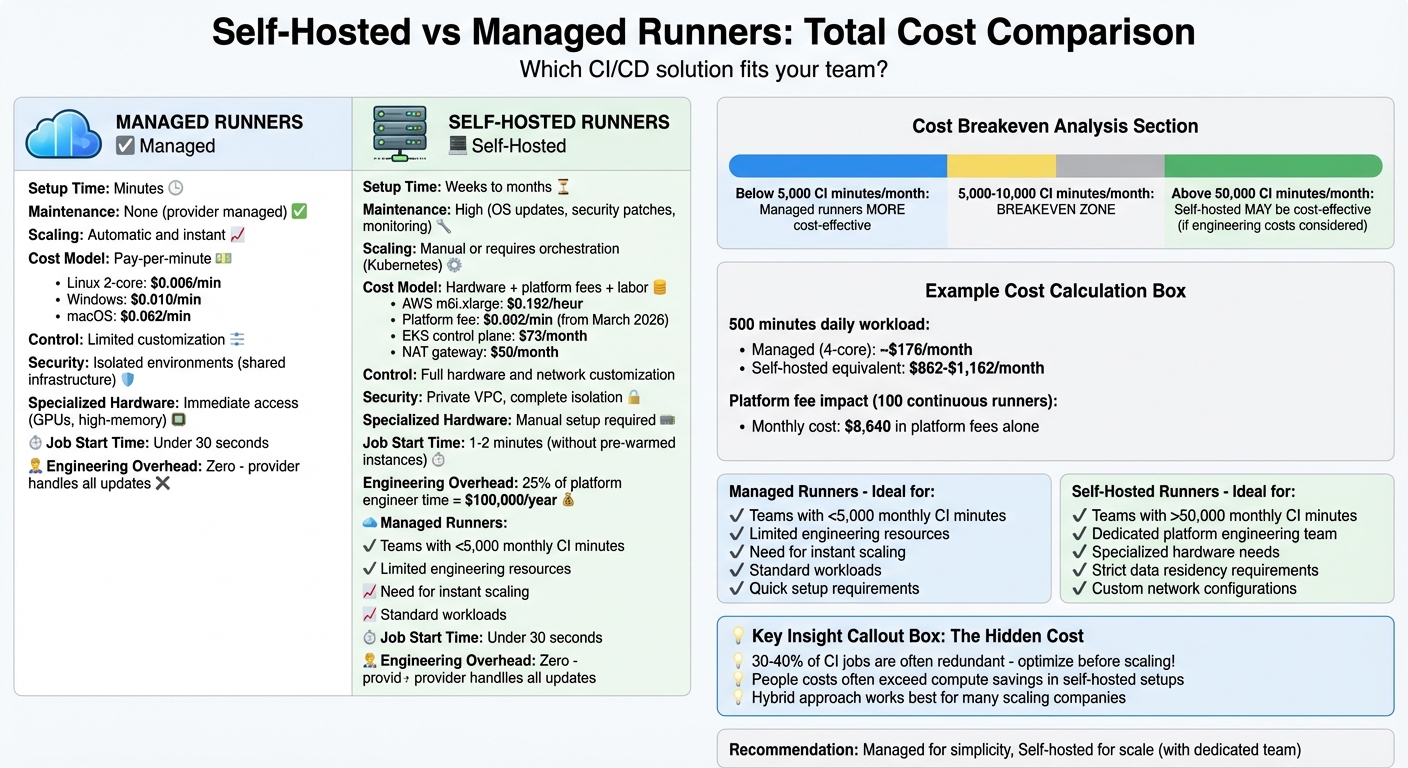
Self-Hosted vs Managed CI/CD Runners: Complete Cost and Feature Comparison
GitHub Actions Is NOT Free | Pricing Explained + Self-Hosted Runners & Jenkins Comparison
sbb-itb-f9e5962
1. Self‑Hosted Runners
The breakdown of infrastructure, operational, and security details below provides insight into the total cost of ownership (TCO) for self-hosted runners.
Infrastructure Costs
Compute costs are the largest factor. Many teams rely on services like AWS EC2, Azure VMs, or physical hardware. For instance, an on-demand AWS m6i.xlarge instance (4 vCPU, 16GB RAM) costs about $0.192 per hour. Spot Instances can slash these costs by 60% to 90%, but they come with the challenge of handling interruptions during jobs.
Other infrastructure expenses can add up quickly. Running runners on Kubernetes using the Actions Runner Controller introduces additional costs. For example:
- The EKS control plane costs about $73 per month.
- A NAT gateway for network egress adds $50 monthly.
- Persistent storage for caching dependencies runs around $20 per month.
Adding to this, starting March 1, 2026, GitHub will charge a $0.002 per minute platform fee for self-hosted runners in private repositories.
"At $0.002 per minute, a single runner operating continuously costs $86.40 per month. A fleet of 100 runners jumps to $8,640 monthly. Suddenly, that ‘free’ infrastructure you manage yourself isn’t free anymore." – Ban Andre, Engineering Management
Network and egress costs are another often-overlooked expense. Transferring artifacts, test results, and other data can escalate into six-figure amounts annually for large-scale operations.
"Without careful network architecture, data transfer costs can easily hit six figures annually." – John Stocks, Head of Solution Engineering at Depot
Unlike managed runners, where you only pay for execution time, self-hosted setups often require "warm" instances – pre-provisioned resources kept active to avoid delays – resulting in additional costs.
Operational Overhead
The time and effort required to maintain self-hosted runners are often underestimated. If two platform engineers dedicate 25% of their time to managing runners, with a loaded salary of $200,000/year, the annual labor cost reaches $100,000. This includes tasks like setup, monitoring, applying security patches, updating operating systems, capacity planning, and maintaining runner images for compatibility.
Using Kubernetes for runners adds a layer of complexity. Teams need expertise in areas like container orchestration, pod scheduling, networking, and RBAC configuration. Monitoring tools like Prometheus or Loki are also necessary for tracking runner health. Unlike managed services that handle uptime, self-hosting shifts the responsibility for troubleshooting and incident response to your team – potentially leading to weekend disruptions if pipelines fail.
Scalability and Efficiency
Scaling self-hosted runners introduces challenges that impact costs and efficiency. Self-hosting only becomes cost-effective when usage exceeds 5,000 to 10,000 CI minutes per month. To handle peak loads, idle "warm" instances are often maintained, which means paying for unused capacity during quieter periods. Resource allocation can also be tricky – while overall capacity might seem sufficient, individual nodes might lack the resources needed for memory-intensive jobs.
There’s also a trade-off between ephemeral runners (one job per runner) and reusable runners. Ephemeral runners ensure a clean state for reproducible builds but lose the speed benefits of local caching. Reusable runners are faster due to their persistent state but require careful management to avoid unintended state retention and potential security risks.
To improve efficiency, consider:
- Implementing scale-to-zero tools like the Actions Runner Controller or KEDA to eliminate idle costs.
- Using Spot Instances with a small fallback pool of on-demand instances for critical workloads.
- Optimizing instance sizes based on actual CPU and memory usage.
Security and Compliance
Self-hosted runners give you full control over security, but this also means greater responsibility. For authentication, it’s best to use GitHub Apps instead of Personal Access Tokens (PATs) to ensure tokens are short-lived and have limited scopes. For cloud-hosted runners, network policies should block access to the Instance Metadata Service (IMDS) to prevent credential theft.
Additionally, you’ll need to:
- Maintain your own security patching schedule.
- Manage network isolation within your VPC.
- Ensure compliance with organizational standards.
These tasks, typically handled by managed services, add to the hidden costs of self-hosting.
2. Managed Runners
Managed runners operate on a per-minute pricing model that covers compute, storage, and maintenance. Starting January 1, 2026, GitHub reduced hosted runner prices by up to 39%. For instance, a Linux 2-core runner now costs $0.006 per minute. Windows runners are priced at $0.010 per minute, while macOS runners come in at $0.062 per minute. These rates include a $0.002 per-minute cloud platform charge, which is bundled into the pricing.
Infrastructure Costs
One of the biggest benefits of using managed runners is the elimination of capital expenses for idle resources. You only pay for the time your jobs are actively running – there’s no need to worry about idle capacity, NAT gateways, or Kubernetes control planes. For example, running a 500-minute daily workload on a 4-core runner would cost approximately $176 per month, far less than the $862–$1,162 you’d spend on a self-hosted equivalent. Keep in mind that each job is billed in whole-minute increments.
However, be mindful of potential extra costs, such as storage overages and premium runners. Most plans include artifact storage (500MB for Free plans, 50GB for Enterprise plans) and 10GB of cache storage. Exceeding these limits incurs additional charges. Additionally, larger runner types are often excluded from "included minutes" in subscriptions, meaning they are billed from the very first minute.
Unlike self-hosted setups, managed runners require no extra engineering resources, making them a cost-efficient choice for many teams. This pricing structure reduces upfront expenses and simplifies daily operations.
Operational Overhead
Managed runners not only cut resource costs but also save significant engineering time by automating maintenance tasks. The provider takes care of OS patching, runner agent updates, security hardening, and incident response – tasks that could otherwise consume up to 25% of a platform engineer’s time. This removes the burden of managing clusters, autoscaling, and runtime troubleshooting.
"Unless you are a company specializing in infrastructure, managing CI runners is a distraction from your core mission." – Shipfox
Another advantage is speed. Managed runners can start jobs in under 30 seconds, compared to the 1–2 minutes typical of self-hosted setups – unless you invest in costly pre-warmed instances. This quick start time adds up, especially for teams running thousands of builds daily.
Scalability and Efficiency
Managed runners excel in scalability and resource management. They deliver instant elasticity, adapting to demand without requiring manual setup. For example, when 50 pull requests are pushed simultaneously, the platform automatically handles the load. This ensures you’re not paying for unused capacity during slower periods and avoids bottlenecks during high-demand times.
For teams working on AI projects or requiring specialized hardware like GPU-powered runners or high-memory instances, managed services provide immediate access to advanced resources. Setting up such hardware manually would be both complex and expensive. GitHub’s platform currently handles 71 million jobs daily, showcasing its ability to manage workloads at scale.
Security and Compliance
Managed runners also simplify security and compliance. Each job runs in a fresh, isolated environment, ensuring complete separation between tasks. Security updates are applied automatically, sparing your team from maintaining patch schedules or testing runner images for compatibility.
However, there is a trade-off: less control over network architecture and data residency. Organizations with strict requirements around data locality or custom network configurations may find managed runners less suitable.
Overall, managed runners streamline CI/CD workflows by offering predictable costs, reduced operational overhead, and enhanced scalability.
Pros and Cons
This section pulls together the key advantages and challenges of both self-hosted and managed runners, building on the earlier cost breakdowns.
The choice between self-hosted and managed runners often boils down to a trade-off between control and convenience. Managed runners simplify operations by handling OS patching, security updates, and scaling for you. You only pay for the actual job time, avoiding costs from idle capacity. However, this ease of use comes with limitations: less customization and higher per-minute rates, especially as usage scales.
On the other hand, self-hosted runners provide complete control over hardware, network access, and specialized resources like GPUs. They also offer lower compute costs, particularly when leveraging AWS Spot instances, which can be up to 90% cheaper than standard rates. But there’s a downside: the added "people cost." Managing and maintaining these systems often offsets the savings from raw compute costs.
The financial tipping point for self-hosting usually falls between 5,000 and 10,000 CI minutes per month. Below that range, managed runners are generally more cost-effective. Above it, self-hosting starts to make financial sense.
"Self‑hosting GitHub Actions runners isn’t the ‘set it and forget it’ option that folks may think it is." – Kyle Galbraith, CEO of Depot
| Aspect | Managed Runners | Self‑Hosted Runners |
|---|---|---|
| Setup Time | Minutes | Weeks to months |
| Maintenance | None (provider managed) | High (OS updates, security, troubleshooting) |
| Scaling | Automatic and instant | Manual or requires Kubernetes/ARC |
| Control | Limited to standard specs | Full hardware and network customization |
| Security | Shared infrastructure | Private VPC, full isolation |
| Cost Model | Pay‑per‑minute (OpEx) | Hardware + platform fees + engineering time |
| Specialized Hardware | Immediate access to GPUs, high‑memory | Manual procurement and configuration |
Managed runners are ideal for small-to-medium teams that value speed and simplicity for standard workloads. Conversely, self-hosted runners suit organizations with high build volumes (over 50,000 minutes per month), strict data residency requirements, or the need for specialized hardware. Before deciding to self-host for cost savings, it’s smart to review your pipelines. Many companies find 30–40% of jobs are redundant and can be eliminated.
Developer experience is another critical factor. Managed runners may cost more per minute, but they save engineering time and reduce operational headaches. The decision ultimately comes down to your organization’s priorities and workload demands.
Conclusion
Our cost comparison highlights the key trade-offs between control and convenience when choosing between self-hosted and managed runners.
For teams running fewer than 5,000 minutes per month, managed runners are often the better choice. Their lack of maintenance requirements and ability to scale instantly can offset the higher per-minute costs, especially when factoring in the "people cost" tied to self-hosting tasks like setup and maintenance.
On the other hand, self-hosted runners can become more economical for large organizations exceeding 50,000 build minutes per month. This is particularly true if they have a dedicated platform engineering team and need specialized hardware like GPUs or high-memory nodes. Even with GitHub’s $0.002-per-minute fee, the potential savings at high usage volumes remain considerable.
For teams without Kubernetes expertise or dedicated DevOps resources, managed runners are generally the safer option. The engineering effort required to maintain self-hosted infrastructure can quickly outweigh any savings on compute time. As noted, the "people cost" often surpasses raw compute expenses.
Before committing to self-hosting, it’s wise to review your current pipelines and eliminate inefficiencies. Studies suggest that 30–40% of CI minutes are often wasted. Optimizing caching and streamlining workflows can lead to immediate cost reductions.
For many scaling companies, a hybrid approach strikes the right balance. Managed runners can handle standard workloads and unexpected spikes, while a small fleet of self-hosted runners can address tasks requiring specific hardware or heightened security. This strategy offers flexibility without the full burden of maintaining an entirely self-hosted infrastructure.
FAQs
How do I calculate my true total cost of ownership (TCO) for self-hosted runners?
To figure out your total cost of ownership (TCO) for self-hosted runners, you need to consider both obvious and less apparent expenses over a few years. Here’s a breakdown of the main components:
- Infrastructure: This includes costs for hosting, storage, bandwidth, and any necessary certificates.
- Operational Overhead: Think about ongoing maintenance, system monitoring, and labor expenses.
- Hidden Expenses: Don’t overlook licensing fees, egress charges, or the cost of potential downtime.
By factoring in all these elements, you’ll get a clearer picture of the long-term costs tied to self-hosted runners.
What CI minute volume makes self-hosted runners cheaper than managed runners for my team?
Self-hosted runners start to make financial sense when your team reaches about 40,000 CI minutes per month, based on GitHub’s new pricing of $0.002 per minute, effective March 2026. This calculation factors in both infrastructure and operational expenses, giving you a clearer idea of when the switch might be worthwhile for your team.
Which hidden costs should I budget for when moving to self-hosted runners?
When moving to self-hosted runners, it’s important to account for less obvious expenses. For instance, there’s the operational overhead of keeping machine images updated and secure. You might also face egress charges, depending on your setup. Another factor is the risk of wasted capacity – if your infrastructure isn’t fully utilized, inefficiencies can add up quickly.
On top of that, engineering teams may need to spend a lot of time on tasks like maintenance and scaling, which can pull their attention away from their primary development work. And starting in March 2026, GitHub will introduce a fee of $0.002 per minute for self-hosted runners, adding another layer to your budget considerations.