Spot Fallback Patterns: Failover Without Downtime

Spot instances are a great way to cut cloud costs – offering discounts of up to 90% compared to On-Demand pricing. But there’s a catch: providers can reclaim these instances with just two minutes’ notice. This risk makes automated fallback strategies essential to keep your applications running smoothly.
Here’s the key takeaway: spot fallback mechanisms let you combine cost savings with reliability. By anticipating interruptions and automatically shifting workloads to On-Demand instances, you can avoid downtime. For example, Lyft reduced compute costs by 75%, and the NFL saved over $20 million using spot instances.
Key Insights:
- Spot interruptions happen due to capacity constraints, pricing changes, or placement issues.
- Best workloads for Spot: Stateless apps, batch jobs, CI/CD pipelines, and containerized tasks.
- Fallback strategies: Use mixed-instance Auto Scaling groups, queue-based logic, and external storage for stateful apps.
- Proactive tools: AWS features like Capacity Rebalancing, Node Termination Handler, and hibernation help mitigate risks.
With the right setup, interruptions become manageable, letting you leverage Spot instances without sacrificing uptime.
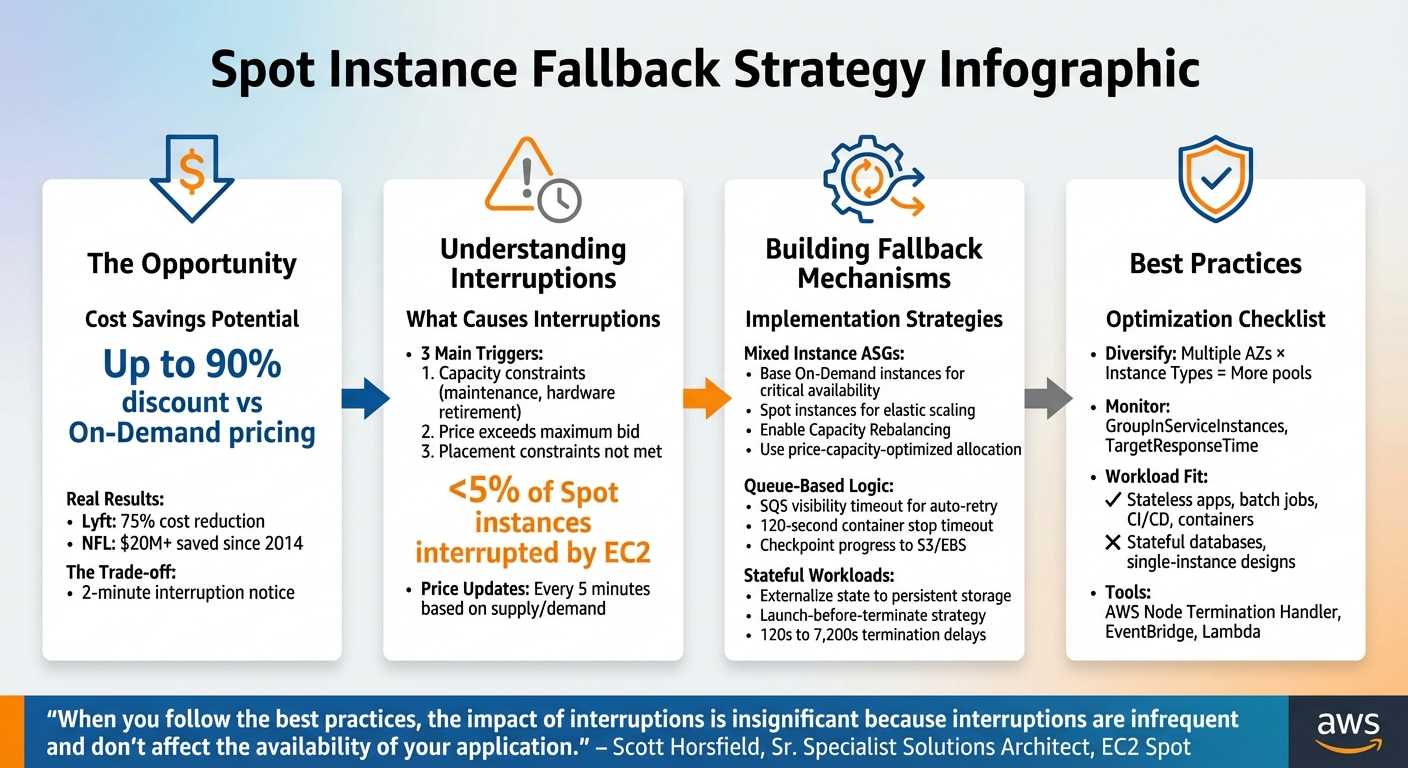
Spot Instance Fallback Strategy: 4-Step Implementation Guide
AWS EC2 Spot Usage | Real-life Examples | Three Common Patterns to Handle Interruption
sbb-itb-f9e5962
How Spot Instance Interruptions Work
Spot instances allow you to access spare compute capacity at a discount, but there’s a catch: the provider can reclaim that capacity if it’s needed for On-Demand customers.
Spot prices fluctuate dynamically, adjusting every five minutes based on the long-term supply and demand for each instance type within each Availability Zone. When demand is low, prices drop. But when capacity tightens, prices rise, and if the provider needs the hardware back, your instance might be interrupted – with only a two-minute warning.
"The only difference between an On-Demand Instance and a Spot Instance is that a Spot Instance can be interrupted by Amazon EC2 with two minutes of notification when EC2 needs the capacity back."
– Scott Horsfield, Sr. Specialist Solutions Architect, EC2 Spot
When an interruption occurs, your application could terminate abruptly, leading to potential data loss if temporary storage was in use. Services may experience downtime until replacement capacity is launched. This is why automated failover mechanisms are critical to keeping operations running smoothly.
What Causes Spot Interruptions
Spot interruptions typically happen for three main reasons:
- Capacity constraints: The provider might need to reallocate resources for On-Demand customers, perform maintenance on the host, or retire older hardware.
- Price-based interruptions: If the spot market price exceeds the maximum price you’ve set in your request, the instance is terminated.
- Placement constraints: Interruptions can also occur when specific requirements, like preferred Availability Zones or other placement conditions, can no longer be met.
Understanding these triggers is essential for planning effective automated failover strategies. Without proper auto scaling to launch replacement capacity from other pools, your workload could face prolonged disruptions.
Which Workloads Should Use Spot Instances
Not all workloads are a good fit for spot instances. The deciding factor is whether your application can handle interruptions. Workloads like stateless applications, containerized tasks, batch processing jobs, and CI/CD pipelines are well-suited because they can checkpoint progress and restart without significant issues.
"Spot Instances and containers are an excellent combination, because containerized applications are often stateless and instance flexible."
– Chris Foote, Sr. EC2 Spot Specialist Solutions Architect
Even workloads requiring high availability – like web servers or API backends – can leverage spot instances if they’re designed with robust fallback mechanisms. Techniques such as mixed-instance Auto Scaling groups, queue-based processing, and proactive capacity rebalancing can reduce service disruptions. However, stateful databases, tightly coupled applications, or single-instance designs aren’t ideal unless critical data is stored externally in persistent solutions like Amazon S3 or DynamoDB.
The distinction lies in how workloads handle interruptions. Fault-tolerant workloads can pause and resume without a major impact, making them a natural fit for spot instances. High-availability workloads, on the other hand, require seamless failover to maintain uninterrupted service. By aligning workload characteristics with fallback strategies, you can strike a balance between cost savings and operational reliability. With this understanding of interruptions, it’s easier to dive into effective fallback solutions.
Building Spot Fallback Mechanisms
Developing fallback systems ensures your workloads remain operational by automatically shifting to On-Demand instances when Spot capacity becomes unavailable.
Configuring Auto Scaling Groups for Mixed Instance Types
You can use a mixed instances policy within a single Auto Scaling Group (ASG) to combine Spot and On-Demand instances. Start by specifying a base number of On-Demand instances to guarantee critical availability. Beyond this baseline, scale your capacity with Spot instances to optimize cost savings.
Enable Capacity Rebalancing to proactively handle interruptions. When AWS predicts that a Spot instance may soon be reclaimed, it issues a rebalance recommendation – often ahead of the two-minute warning. The ASG then launches a replacement instance, temporarily exceeding its maximum size by up to 10%, ensuring the new instance is fully operational before the at-risk one is terminated.
To minimize the need for On-Demand fallback, configure your ASG with the price-capacity-optimized allocation strategy. This approach selects Spot pools offering the best combination of availability and cost. Additionally, diversify your instance types to tap into a broader range of Spot pools.
"When you follow the best practices, the impact of interruptions is insignificant because interruptions are infrequent and don’t affect the availability of your application."
– Scott Horsfield, Sr. Specialist Solutions Architect, EC2 Spot
Avoid setting a maximum Spot price. Allow it to default to the On-Demand price to ensure your instances launch as long as Spot pricing is lower, reducing the risk of "no capacity" errors. Distribute your ASG across multiple Availability Zones to access larger capacity pools and improve resilience.
Using Queue-Based Fallback Logic
Queue-based systems are naturally suited for handling Spot interruptions, as they separate task submission from execution. For instance, when a Spot instance processing a message from Amazon SQS is interrupted, the visibility timeout ensures the message reappears in the queue, ready for another worker to pick up.
To manage interruptions effectively, stop worker polling as soon as an interruption notice is received. This gives you up to two minutes to complete or checkpoint tasks. For ECS containerized workers, set ECS_CONTAINER_STOP_TIMEOUT to 120 seconds to allow proper cleanup.
AWS Batch integrates this pattern seamlessly, automatically retrying failed tasks on new instances if a Spot instance is reclaimed. For custom queue systems, you can set up a secondary "Fallback" ASG with only On-Demand instances. Use a CloudWatch alarm with the formula desired_spot - running_spot - desired_fallback to scale the fallback ASG when Spot capacity drops below the desired level.
| Scenario | Desired Spot | Running Spot | Desired Fallback | Action |
|---|---|---|---|---|
| Normal Operation | 4 | 4 | 0 | Do nothing |
| Spot Interruption | 4 | 3 | 0 | Launch 1 On-Demand |
| Fallback Active | 4 | 3 | 1 | Maintain capacity |
| Spot Recovery | 4 | 4 | 1 | Terminate On-Demand |
Regularly checkpoint progress to persistent storage. This ensures that if an interruption occurs, the replacement instance can resume from the last saved state rather than starting over.
"Checkpointing can help to minimize data loss and the impact of an interruption on your workload by saving state and recovering from a saved state."
– Scott Horsfield, Sr. Specialist Solutions Architect, EC2 Spot
These methods help maintain service continuity while keeping costs low.
Handling Failover for Stateful Applications
Managing stateful workloads requires specific strategies to handle failover effectively. One key approach is to externalize state to persistent storage solutions like Amazon S3, Amazon EBS, or managed databases, ensuring data survives when instances are reclaimed.
For EC2 Fleet or Spot Fleet configurations, use the launch-before-terminate strategy. This launches a replacement instance before terminating the at-risk one, allowing enough time for state transfer. You can set termination delays between 120 seconds and 7,200 seconds (up to 2 hours) based on your application’s needs.
In Kubernetes clusters, deploy the AWS Node Termination Handler to cordon and drain pods from Spot nodes flagged for termination. Use node labels and selectors to ensure that critical stateful components run on On-Demand instances, while Spot instances handle scalable, compute-intensive tasks.
"By guiding fault-tolerant pods to Spot Instance nodes, and stateful pods to On-Demand nodes, you can even use this to support multi-tenant clusters."
– Chris Foote, Sr. EC2 Spot Specialist Solutions Architect
Applications should monitor SIGTERM signals or poll the Instance Metadata Service at http://169.254.169.254/latest/meta-data/spot/instance-action every 5 seconds. This two-minute warning period allows you to finish pending operations, close database connections, and commit final state changes before the instance shuts down.
For workloads that can pause and resume, configure Spot instances to hibernate. AWS saves the instance memory to the EBS root volume, allowing the instance to resume when capacity becomes available again. This is especially useful for memory-resident state, but it requires applications to support hibernation.
Monitoring Spot Fallback Performance
Keeping an eye on performance in real time helps prevent user disruptions. Instead of just counting how often interruptions happen, focus on metrics that show the actual health of your service. Why? Because interruption frequency alone doesn’t tell the full story – what really matters is whether your application stays available and responsive during transitions. By prioritizing real-time metrics, you can connect fallback configurations to operational performance more effectively.
Metrics to Track
Once fallback mechanisms are in place, it’s essential to measure their performance continuously. This means monitoring both system capacity and user experience. For Auto Scaling Groups, check the gap between GroupInServiceInstances and GroupDesiredCapacity. A consistent gap could signal delays in replacing instances, which might impact scaling during failovers.
Load balancer metrics are another critical piece of the puzzle. Keep an eye on RejectedConnectionCount and TargetConnectionErrorCount to spot dropped connections. Also, monitor TargetResponseTime for any latency spikes, as these could indicate that remaining instances are struggling to handle the load. For containerized workloads running on ECS, track your service’s running task count alongside CPU and memory usage. This ensures tasks are migrating smoothly to healthy instances.
"Frequency of interruption, or number of interruptions of a particular instance type, are examples of metrics that do not directly reflect the availability or reliability of your applications."
– Scott Horsfield, Sr. Specialist Solutions Architect, EC2 Spot
It’s also helpful to analyze interruption patterns by Availability Zone and instance type. This data can reveal which Spot pools are more volatile, allowing you to make smarter decisions about workload placement and instance selection. Additionally, track the success rate of your fallback processes and calculate the cost per execution to verify that your solution is both effective and efficient.
Setting Up Event-Driven Monitoring
Real-time event triggers can further sharpen your fallback strategy. By capturing interruption signals as they happen, you can respond faster. Use Amazon EventBridge to listen for two key events: the two-minute "EC2 Spot Instance Interruption Warning" and the earlier "EC2 Instance Rebalance Recommendation", which warns of elevated risk before the final notice.
Route these events through Amazon SQS to ensure reliable queuing, then trigger AWS Lambda functions to process them. Your Lambda function can enrich the event with metadata – like which Auto Scaling Group or ECS cluster the instance belongs to – and index the data into Amazon OpenSearch Service. This setup enables real-time dashboards, ensuring no interruption signal goes unnoticed, even during high traffic periods.
Finally, adjust your Application Load Balancer’s deregistration_delay.timeout_seconds to 120 seconds. This aligns with the two-minute warning window, giving connections enough time to drain before termination.
Balancing Cost and Reliability
This section dives deeper into balancing cost savings with reliable service when using Spot Instances. While Spot Instances offer savings of 70% to 90% compared to On-Demand pricing, the focus should be on maintaining service performance rather than cutting costs at all costs. The key is finding the right balance between aggressive cost management and acceptable reliability.
Adjusting Fallback Thresholds
One way to reduce interruption risks and avoid unnecessary restart costs is by using the price-capacity-optimized allocation strategy. Additionally, fine-tuning termination settings can make a big difference. For instance, set termination delays to match your workload’s minimum requirements, and configure load balancer deregistration times to under 120 seconds. This ensures connections are drained quickly without overlapping payments for two instances during transitions.
For workloads that can handle minor capacity fluctuations, tweaking CloudWatch alarm evaluation periods can help. Instead of waiting for three consecutive 1-minute violations to trigger fallback to On-Demand instances, reduce this to one or two periods. This adjustment can shave up to 2 minutes off your response time, although it may slightly increase the chance of launching unnecessary On-Demand instances during normal scaling events. Experimenting with these thresholds can help you strike the right balance between cost efficiency and responsiveness.
Once you’ve fine-tuned these fallback thresholds, evaluate their impact on your overall costs.
Calculating Fallback ROI
To measure the financial efficiency of your fallback strategy, compare the cost of running entirely On-Demand instances with your current mixed-instance setup. Be sure to include interruption costs in your calculations, as these reflect the true expense of restarting interrupted work.
For tasks like batch processing or machine learning, checkpointing can significantly reduce interruption costs. By saving progress to external storage like Amazon S3, workloads can resume from the last save point instead of starting over. Lyft, for example, achieved a 75% cost reduction by enabling Spot Instances for flexible workloads with just a few lines of code.
Diversifying Spot capacity pools is another way to improve stability and extend the use of lower-cost Spot Instances. The number of pools is determined by multiplying the number of Availability Zones by the number of Instance Types. Increasing this number – say, from 2 pools to 24 – can yield better reliability and cost savings. The NFL, for example, has saved over $20 million since 2014 by utilizing EC2 Spot Instances across more than 20 instance types for its season scheduling workloads.
Finally, keep an eye on key metrics such as GroupInServiceInstances versus GroupDesiredCapacity to ensure your cost-saving measures aren’t creating capacity gaps. Monitor TargetResponseTime to confirm fallback instances are maintaining acceptable performance levels. It’s worth noting that less than 5% of Spot Instances are interrupted by EC2 before being intentionally terminated. If your interruption rates are higher, it may be a sign that your configuration needs adjustment.
Conclusion
Using spot fallback patterns is a smart way to cut cloud costs while ensuring failover happens without downtime. By spreading workloads across different instance types and Availability Zones, you create a reliable safety net that shields your operations from capacity shortages in any single area. Pairing this approach with proactive capacity rebalancing and automated interruption handling makes transitions smooth when Spot instances are reclaimed.
As shown earlier, real-world examples highlight how teams have achieved significant savings with minimal interruptions. These results are within reach when fallback mechanisms are tightly woven into your processes.
The trick is to view interruptions as routine events rather than crises. By externalizing state to durable storage, adding checkpointing for long-running tasks, and using tools like AWS Node Termination Handler or Karpenter, you can handle failovers smoothly within the two-minute warning window. Scott Horsfield, Sr. Specialist Solutions Architect at AWS, emphasizes:
"When you follow the best practices, the impact of interruptions is insignificant because interruptions are infrequent and don’t affect the availability of your application."
Start by focusing on stateless workloads and horizontal scaling scenarios, where Spot instances perform best. Maintain a dependable baseline of On-Demand capacity for critical services, and use Spot instances for elastic scaling. Keep an eye on metrics like GroupInServiceInstances and TargetResponseTime – as covered in the monitoring section – to confirm your fallback systems are functioning well. Don’t hesitate to run game days with AWS Fault Injection Simulator to test your setup under realistic conditions.
With the right setup and automation, spot interruptions become a routine, manageable part of your deployment.
FAQs
How much On-Demand capacity should I keep as a baseline?
The right baseline for On-Demand capacity varies based on your workload and how much risk you’re willing to take. A common practice is to allocate 10-20% of your total capacity to On-Demand instances. This approach helps maintain availability during times when spot instances are either interrupted or unavailable. It strikes a balance between ensuring reliability and keeping costs under control.
What’s the fastest way to handle the 2-minute Spot interruption notice?
To manage a 2-minute Spot interruption notice effectively, ensure your application is built to handle interruptions and react swiftly to signals. Set up a system to check for Spot Instance interruption notices every 5 seconds. This allows your application to either shut down gracefully or migrate workloads without disruption. Use automated failover tools like CloudWatch Events or EventBridge to trigger essential actions, such as saving the current state, detaching from load balancers, or replacing instances right away.
How do I use Spot Instances safely with stateful workloads?
To use Spot Instances safely with stateful workloads, it’s essential to design your setup to handle potential interruptions seamlessly. Leverage AWS’s two-minute interruption notice to automate the migration of workloads and implement capacity rebalancing to replace instances that might be at risk. Broaden the range of instance types you use, configure Pod Disruption Budgets, and rely on tools like Kubernetes or AWS Auto Scaling to maintain stability and safeguard data during interruptions.