Ultimate Guide to SLO Reporting for Compliance

SLO reporting bridges the gap between performance metrics and compliance requirements. It transforms internal goals into measurable evidence for audits, ensuring systems meet standards like SOC 2, HIPAA, and PCI DSS. This article explains how to:
- Create SLOs from compliance rules (e.g., uptime, error rates).
- Build reliable data pipelines for tracking and reporting.
- Set achievable targets aligned with historical data and SLAs.
- Automate reporting with tools like Datadog, CloudWatch, and TECHVZERO.
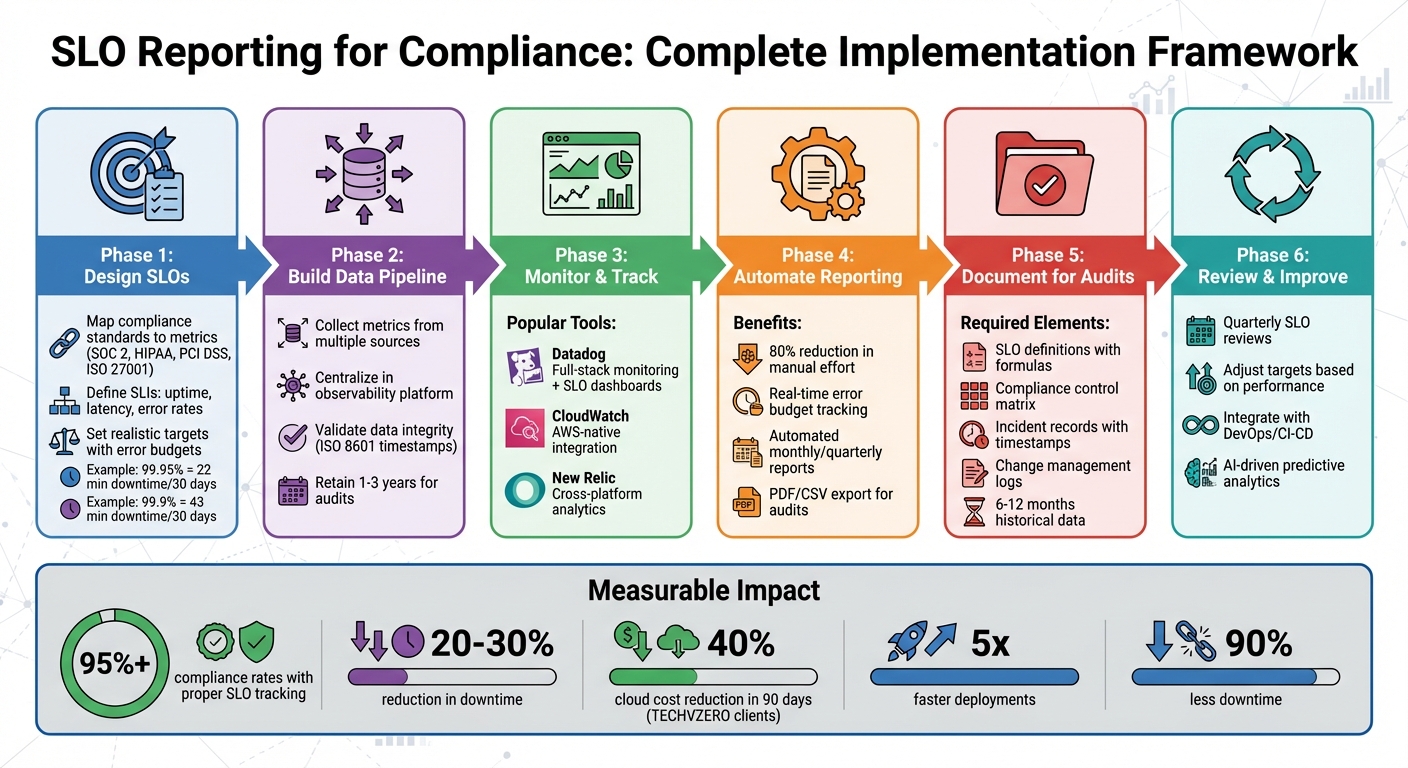
SLO Compliance Reporting Process: From Standards to Audit-Ready Documentation
Designing SLOs That Meet Compliance Requirements
Turning Compliance Standards into Measurable SLO Metrics
To align service-level objectives (SLOs) with compliance requirements, start by translating regulatory language into measurable performance goals. This involves mapping compliance controls to specific service behaviors. For example, SOC 2’s Availability criterion can be represented by SLOs focused on uptime, error rates, and incident recovery times. Similarly, ISO 27001‘s logging and monitoring controls can translate into metrics like detection times and alerting accuracy, while HIPAA’s technical safeguards often become SLOs centered on data integrity and access control effectiveness.
The process begins by breaking down the compliance requirement into specific, expected outcomes. From there, identify clear service-level indicators (SLIs) such as uptime, latency, or error rates. Define the details for measuring these indicators, including the time window, calculation method, and population scope. Collaborate with your risk and compliance teams to ensure the chosen indicators provide sufficient evidence that the related controls are working as intended.
For instance, a HIPAA-aligned SLO for data integrity might use an SLI like the "percentage of records processed without validation errors", with a target of 99.9% correctness over a seven-day period. For a payment API governed by PCI DSS, an SLO could require production API availability of 99.95% per calendar month, measured as the ratio of successful health-check responses to total minutes in that month. In an ISO 27001 environment, a security detection SLO might require 99% of critical security events to be detected and alerted within five minutes over a 90-day period.
Once these metrics are defined, set performance targets that balance operational capabilities with compliance expectations.
Setting Realistic SLO Targets for Audit Success
With measurable SLIs in place, the next step is to establish achievable SLO targets that can withstand audit scrutiny. These targets should align with historical performance data, the organization’s risk tolerance, and any service-level agreements (SLAs) in place. A common approach is to set internal targets slightly higher than customer-facing SLAs. For example, an internal SLO might aim for 99.95% availability, while the external SLA promises 99.9% availability. This creates an error budget – the allowable downtime within a given period. For instance, a 99.95% target allows for approximately 22 minutes of downtime over 30 days, while 99.9% allows for 43 minutes.
Auditors generally prefer targets that are consistently met, supported by documented corrective actions and risk assessments. An SLO is considered audit-ready when:
- Data sources are reliable and tamper-proof.
- Calculations can be reproduced for any specified time frame.
- All in-scope systems are covered comprehensively.
Additionally, maintaining six to twelve months of historical performance data, along with evidence of how breaches were managed, can strengthen your audit readiness. Detailed runbooks, escalation policies, and trend analyses further demonstrate that your targets are grounded in actual operational capacity and incident history.
Documenting and Managing SLOs Effectively
Once targets are set, proper documentation and ongoing management are key to maintaining compliance. Each SLO should be recorded in a standardized format that includes:
- A clear, plain-language objective.
- The service scope.
- A precise SLI definition (including formula, units, data source, measurement frequency, and time window).
- The SLO target and its error budget.
- The tools used for measurement.
- The responsible owner.
- A change history log.
Each SLO record should also specify the regulatory requirement it supports (e.g., a SOC 2 or HIPAA clause) and reference any related SLAs or internal policies.
To ensure continuous audit readiness, manage SLOs through formal change control processes. Store SLO definitions in version-controlled repositories and maintain detailed change histories with proper approvals. Any adjustments to thresholds or measurement methods should undergo risk and compliance reviews. Document the reasons behind changes – whether due to updated architecture, improved monitoring capabilities, or regulatory updates – and keep an audit trail of previous SLO versions.
A tiered approach to service monitoring can further optimize compliance efforts. For example, mission-critical services like payment APIs should have stricter SLOs compared to less critical internal systems. These differences should be justified based on factors like data sensitivity and user impact, providing auditors with a clear rationale for varying targets across systems.
Setting Up SLO Reporting Systems and Tools
Building Data Pipelines for SLO Reporting
To create an SLO reporting system that’s ready for compliance, you need a solid data pipeline that collects, processes, and stores performance metrics in a format that’s easy to audit. Start with your data sources – like application logs, CloudWatch metrics, monitoring tools, and incident systems. These feed raw SLIs (Service Level Indicators) such as latency, error rates, and uptime. A data ingestion layer, which might include agents, exporters, or APIs, pulls these metrics into a central platform. From there, time-series databases or observability platforms aggregate the data and calculate SLOs over specific time intervals.
Audit readiness hinges on data integrity and traceability. Each SLI should be clearly defined, including its source, unit, and calculation method. For example, you might document "HTTP 5xx error rate per minute from Nginx logs." Make sure to validate schemas during ingestion – like ensuring ISO 8601 timestamps and mandatory fields – and use storage solutions that are append-only or have strict access controls with logging. Additionally, base all SLO calculations on version-controlled queries (using tools like SQL or PromQL) so any reported figures can be verified for a given time frame.
For practical application, start by identifying SLOs that are relevant to compliance. For instance, a healthcare portal subject to HIPAA might require 99.9% monthly uptime. Use tools like OpenTelemetry or cloud-native metrics to gather data on latency, error rates, and availability. Centralize this data in an observability platform, set retention periods that meet audit standards (often 1–3 years in the U.S.), and define SLO queries using U.S.-style timeframes (e.g., 01/01/2025–01/31/2025) and formats (like 99.95%). Finally, automate monthly SLO compliance reports in PDF format, complete with alert thresholds based on error budgets. This setup ensures smooth SLO monitoring and compliance reporting.
Tools for SLO Monitoring and Reporting
When it comes to SLO monitoring, U.S.-based organizations often rely on Datadog, Amazon CloudWatch, and New Relic. Each platform offers distinct advantages:
- Datadog: Combines metrics, logs, and traces with built-in SLO features, error budget tracking, and alerting. It’s ideal for organizations needing detailed app performance monitoring alongside infrastructure visibility, thanks to its prebuilt SLO dashboards.
- Amazon CloudWatch: Perfect for AWS-focused environments, CloudWatch provides native monitoring with metrics, logs, and alarms. While it integrates seamlessly with AWS services, advanced SLO-specific features may require custom dashboards.
- New Relic: Designed for full-stack observability, it offers SLO and error budget tracking, advanced querying (NRQL), and reports tailored for both engineering and compliance teams. It’s especially useful for organizations managing diverse platforms.
For example, a "five nines" target (99.999% availability) translates to just 26 seconds of downtime per month. This highlights the importance of setting realistic SLO targets that balance compliance and operational goals. Additionally, moving from traditional per-metric alerts to error-budget–based alerting reduces alert fatigue by focusing on the metrics that truly impact users.
When selecting a tool, consider your specific needs. CloudWatch works well for AWS workloads with minimal integration requirements. Datadog shines in environments requiring robust DevOps integration and comprehensive SLO tracking. New Relic is a great choice for advanced analytics and cross-platform insights. All three platforms support audit-ready features like historical SLO views, drill-down access to SLIs, exportable reports in PDF and CSV formats, and detailed audit logs.
While these tools are powerful, automation can take your SLO reporting to the next level.
Automating SLO Reporting with TECHVZERO
Manual SLO reporting can be time-consuming and prone to errors. This is where automation, like TECHVZERO’s solutions, makes a huge difference. By integrating observability and cloud platforms (e.g., Datadog, New Relic, CloudWatch) with ticketing tools via APIs, TECHVZERO streamlines the entire SLO reporting process. Their system gathers SLO metrics, incident data, and remediation actions into centralized reporting pipelines. Their Data Engineering Solutions include robust pipeline architecture, data warehouse design, and real-time analytics that transform raw operational data into structured, audit-ready SLO reports.
Using Infrastructure as Code tools like Terraform or CloudFormation, TECHVZERO defines SLO configurations, dashboards, and alerts in a way that’s consistent, reviewable, and auditable across environments. This approach can cut manual work by up to 80%, freeing teams from repetitive data collection and report generation tasks. Their automated reporting schedules (monthly, quarterly, or annually) produce U.S.-localized reports complete with visuals, narratives, and compliance mappings.
TECHVZERO clients often see measurable benefits, such as a 40% reduction in cloud costs within 90 days, faster deployments, and significantly less downtime. These improvements directly support better SLO performance and compliance.
TECHVZERO also emphasizes Data Governance & Compliance, ensuring that SLO data meets quality and security standards throughout the reporting lifecycle. Their Monitoring & Alerting systems automatically integrate actionable insights into SLO reports, eliminating manual aggregation and establishing resilient systems that maintain SLO targets. This automation sets the stage for seamless compliance reporting and reliable operations.
Preparing SLO Documentation for Audits
Organizing SLO Documentation for Auditors
Auditors need a clear and logical trail that connects compliance requirements to specific Service Level Objectives (SLOs), incidents, and corrective actions. To achieve this, create a compliance control matrix that maps regulations to Service Level Agreements (SLAs), internal policies, and individual SLOs, along with their associated Service Level Indicators (SLIs). This "top-down" model ensures traceability at every step of the process.
Store all SLO-related artifacts in a centralized, access-controlled repository. This could be a tool like Confluence, a Governance, Risk, and Compliance (GRC) platform, or a document management system. Your core documentation should include the following:
- Definitions of SLOs (including SLIs, targets, time windows, and error budgets)
- Mappings between SLAs, policies, and SLOs
- Error-budget policies
- Incident and problem records
- Change-management records tied to SLO breaches
- Periodic review and approval logs
Organize these files with clear folder structures grouped by service or regulatory control. Use standardized templates and versioning to make it easy for auditors to see what changed, when it changed, and who approved it.
Each SLO record should follow a consistent format, including links to related artifacts. These might include monitoring dashboards, SLO reports, incident tickets that impacted the SLO, post-incident reviews, and records of changes made due to SLO breaches.
When presenting this information to auditors, use a concise table format. Each row should include:
- Control ID
- SLA clause
- SLO name and ID
- Key metrics (e.g., uptime, latency, error rate)
- Incidents during the reporting period
- Corrective actions and validation dates
This approach demonstrates a complete lifecycle of compliance, linking requirements directly to outcomes. Such structured documentation lays the groundwork for clear, detailed SLO reports.
Creating Complete SLO Reports
Once your documentation is in order, the next step is to compile audit-ready SLO reports. These reports typically cover a defined reporting period, such as quarterly or annually, and should use U.S. date formats (e.g., 01/01/2025–03/31/2025). A complete report should include:
- An executive summary of overall SLO compliance
- Per-service uptime/availability (expressed as percentages and total downtime in minutes)
- Latency metrics (e.g., 95th/99th percentile response times in milliseconds or seconds)
- Error rates
- Error-budget usage (visualized as bar or line charts)
- Summaries of severity-1 and severity-2 incidents
- SLA compliance compared to SLO performance
- Key remediation and improvement actions
For U.S.-based audits, express all financial impacts in USD. For example: "Estimated avoided SLA penalties: $125,000." When reporting on infrastructure or network performance, include appropriate conversions, such as bandwidth in Gbps or data transfer in GB/TB. If relevant, use miles for physical distances related to data center locality.
| Key Elements of SLO Compliance Reports | Description |
|---|---|
| Severity Level | Priority assigned to tickets based on urgency |
| Tickets Inside SLA | Number resolved within agreed parameters |
| Tickets Outside SLA | Number not resolved within timeframe |
| Total Tickets | All tickets in the report’s scope (e.g., date range, category) |
| % Within SLA | (Inside SLA / Total) x 100 |
| Drill-Down Details | Ticket #, customer, request nature, assignee, days over SLA, notes, timeline, resolution |
Incident records should include thorough details such as timestamps (with time zones like PT/ET), severity levels, affected services, and their related SLOs. Document the impact on SLIs and error budgets (e.g., "SLO availability dropped from 99.95% to 99.85%, consuming 80% of the monthly error budget"). Include root cause analyses, immediate containment steps, long-term corrective actions, and validation evidence to show the fixes are in place. Each report must link incidents affecting SLO compliance to their corresponding tickets and postmortems.
Common SLO Reporting Mistakes to Avoid
Even with well-organized documentation and reports, certain mistakes can undermine audit readiness. One frequent issue is inconsistent definitions of metrics like availability or latency across teams, which can confuse auditors and damage credibility. Misalignment between SLAs and SLOs is another red flag. For instance, if SLAs promise 99.99% uptime but internal SLOs only track 99.5%, auditors may question the organization’s control effectiveness.
Other common pitfalls include:
- Lack of version control and formal approvals for SLO changes
- Missing or incomplete error-budget policies
- Manually assembled reports that are prone to errors and cannot be easily reproduced
A problematic example: A payment API team claims "99.99% uptime" in a slide deck but cannot explain how uptime is calculated, which data source is used, or how it aligns with the SLA. Incidents are only tracked through informal emails, and changes to SLO targets lack documentation or approval. This weakens the evidence of effective controls.
To avoid these issues, enforce the use of a centralized SLO schema, maintain a shared glossary, align SLO targets with SLAs (with internal buffers where needed), require formal approvals for changes, and standardize report templates that can be automatically generated from monitoring tools.
A strong example: A healthcare SaaS provider maintains a centralized SLO registry. For its patient portal, it defines an SLO of 99.9% monthly availability, with an SLI based on HTTP 2xx/3xx success rates from a specific monitoring tool. It documents an error budget of 43.2 minutes per month and provides quarterly reports showing attainment, downtime breakdowns, related incidents, and change tickets for capacity upgrades. Auditors can easily trace the SLO to HIPAA-related availability policies and verify that controls are functioning effectively.
For U.S.-based environments, clearly specify the primary time zone used for calculations (e.g., Pacific or Eastern Time) and apply it consistently across charts and timestamps. Use UTC for cross-region systems when necessary. Retain SLO data, logs, incident records, and reports for a specified period (e.g., seven years) to meet U.S. financial and healthcare record-keeping standards.
sbb-itb-f9e5962
Maintaining and Improving Your SLO Compliance Program
Reviewing and Adjusting SLOs Over Time
SLO targets aren’t static – they need to shift as business priorities change, technology advances, and compliance standards evolve. To keep them relevant, conduct quarterly audits to ensure your SLOs align with current performance benchmarks. During these reviews, dive into historical SLI data to spot trends and determine whether adjustments are necessary. For instance, if your system has consistently maintained a 99.8% uptime over several quarters without using much of the error budget, it might be time to raise the bar to 99.9%. On the flip side, if error budgets are depleting too quickly, it could signal that the target is overly ambitious.
Keep a close eye on performance metrics – like how many SLOs are being met out of the total objectives (e.g., 8 out of 10 quarterly goals). Document every adjustment, including the reasoning behind it and the necessary approvals. This kind of audit trail not only shows that your SLO program is responsive to change, but it also makes the program transparent and auditable. An annual in-depth review can help confirm that SLOs remain aligned with regulatory requirements and address any new compliance challenges. This ongoing process naturally integrates into your DevOps workflows.
Connecting SLOs with DevOps Workflows
Integrating SLO checks directly into your DevOps workflows makes compliance seamless. For example, embed SLO monitoring into CI/CD pipelines to halt deployments when error budgets approach exhaustion. Real-time alerts are another essential tool – these notify teams the moment SLIs fall outside target ranges. Imagine your incident management system flags that high-severity ticket resolution rates have dropped below 95% compliance. With timely alerts, your team can jump in and take corrective action before the issue escalates. This setup allows SRE teams to maintain a balance between system reliability and the need for rapid innovation, ensuring both compliance and business goals are met.
Using Automation and AI for Better SLO Reporting
Manual processes can’t keep up with the demands of modern SLO management. That’s where automation and AI step in, offering scalable solutions. Automating SLO reporting can cut manual effort by as much as 80% by handling tasks like tracking SLIs, generating compliance reports, and triggering corrective actions such as auto-scaling. Real-time dashboards that display error budget usage and quarterly compliance trends make it easier to catch problems early.
AI tools take it a step further by analyzing SLIs to predict when error budgets might run out and speeding up root-cause analysis. Companies like TECHVZERO offer automation and AI services that streamline data pipelines, improve anomaly detection, and minimize downtime – all while simplifying audits. These tools ensure that your SLO program isn’t just effective but also efficient.
How to design the perfect SLA, SLO and SLM compliance dashboards
Conclusion
SLO reporting for compliance is about more than just meeting regulatory requirements – it’s about creating a system of accountability that ensures reliability and builds trust. By defining SLOs that translate compliance standards into measurable metrics like uptime percentages and response times, organizations can track performance effectively. Setting up automated data pipelines and maintaining audit-ready documentation further strengthens the foundation for predictable and dependable service delivery. Regular reviews, conducted quarterly, ensure your SLOs remain aligned with changing regulations, while integrating these processes into DevOps workflows keeps innovation and compliance working hand in hand.
The benefits speak for themselves. Implementing robust SLO reporting can improve compliance rates to over 95% by identifying deviations early and addressing them proactively. At the same time, downtime can be reduced by 20–30% through consistent monitoring and reporting. When SLOs are met consistently, SLA compliance naturally follows, fostering transparency, strengthening customer trust, and reducing audit risks. Error budgets play a key role here, providing a balance between maintaining reliability and enabling rapid feature development, so teams can innovate without sacrificing service quality.
Automation takes this process to the next level. Manual tracking simply can’t keep up with the complexity of today’s systems, but automated reporting tools offer real-time dashboards that highlight issues before they escalate. This approach not only reduces manual effort by up to 80% but also provides predictive analytics that can forecast potential shortfalls in error budgets, giving teams the opportunity to act before problems arise.
TECHVZERO specializes in streamlining every phase of SLO implementation, from building efficient data pipelines to leveraging AI for proactive corrections. Their clients typically experience impressive results, including a 40% reduction in cloud costs within just 90 days, 90% less downtime, and deployment speeds that are five times faster. This proves that compliance and operational efficiency are not just compatible – they complement each other seamlessly.
"After six months of internal struggle, Techvzero fixed our deployment pipeline in TWO DAYS. Now we deploy 5x more frequently with zero drama. Our team is back to building features instead of fighting fires." – Engineering Manager
Whether you’re establishing SLOs for the first time or refining an existing framework, combining well-crafted SLOs, automated monitoring, and a commitment to continuous improvement creates a compliance strategy that grows with your organization. TECHVZERO can guide you through this process, delivering measurable results – from audit-ready reporting systems to AI-driven adjustments that keep your SLOs aligned with both business objectives and regulatory demands. These practices form a cycle of ongoing improvement, ensuring your organization stays ahead in both compliance and operational excellence.
FAQs
How do you align SLOs with compliance standards like HIPAA or PCI DSS?
To ensure your Service Level Objectives (SLOs) align with compliance standards such as HIPAA or PCI DSS, the first step is pinpointing the core regulatory requirements – things like maintaining data confidentiality, ensuring availability, and upholding security protocols. From there, craft specific and measurable objectives that directly reflect these standards.
Consistently monitoring and documenting SLO performance plays a dual role. Not only does it help maintain compliance, but it also simplifies audits by offering clear evidence of adherence. By weaving compliance-focused metrics into your SLOs from the start, you can meet regulatory demands while boosting system reliability and fostering accountability.
What are the best tools to automate SLO reporting and stay audit-ready?
To make SLO reporting easier and stay ready for audits, leverage CI/CD pipelines for smooth deployment and rollback processes, Infrastructure as Code (IaC) tools to ensure consistent and repeatable infrastructure setups, and monitoring systems that provide real-time metrics and alerts. These tools not only simplify compliance tasks but also make data collection more efficient, keeping you audit-ready at all times.
What role do error budgets play in balancing compliance and innovation in SLO management?
Error budgets serve as a practical tool for balancing system reliability with the need for innovation. By setting a clear limit on acceptable system failures, they give teams the freedom to test new ideas and roll out features without breaching reliability agreements or compliance standards.
This method allows organizations to innovate confidently while preserving trust, adhering to regulations, and minimizing downtime.