Common IaC Security Issues in Multi-Cloud Environments
Infrastructure as Code (IaC) makes managing cloud environments easier by automating deployments with tools like Terraform and AWS CloudFormation. However, in multi-cloud setups (e.g., AWS, Azure, GCP), this convenience comes with risks. Misconfigurations can scale quickly, leading to security gaps. Here’s the core problem: 90% of companies use multi-cloud environments, but less than 30% have a single security tool that spans all providers.
The biggest challenges include:
- Policy Inconsistencies: Cloud providers handle IAM, networking, and policies differently, which can lead to enforcement gaps.
- Configuration Drift: Manual changes, auto-scaling, and provider updates cause live infrastructure to diverge from IaC templates.
- Limited Visibility: Fragmented logs and siloed monitoring tools make it hard to detect cross-cloud security incidents.
- Access Control Issues: Misaligned IAM models lead to privilege sprawl and excessive permissions.
- Compliance Gaps: Each provider has unique requirements, making it hard to meet regulations like GDPR or HIPAA consistently.
Key Solutions:
- Standardize policy intent across providers and use tools like Open Policy Agent (OPA) to enforce rules.
- Detect and prevent drift with regular scans (
terraform plan) and limit manual changes. - Centralize logging with formats like OCSF to improve visibility and incident response.
- Adopt least-privilege access models and automate identity management with JIT access.
- Use Policy-as-Code (PaC) tools to ensure compliance and continuously validate configurations.
Addressing these challenges requires a unified approach to security, focusing on automation, cross-cloud consistency, and proactive monitoring.
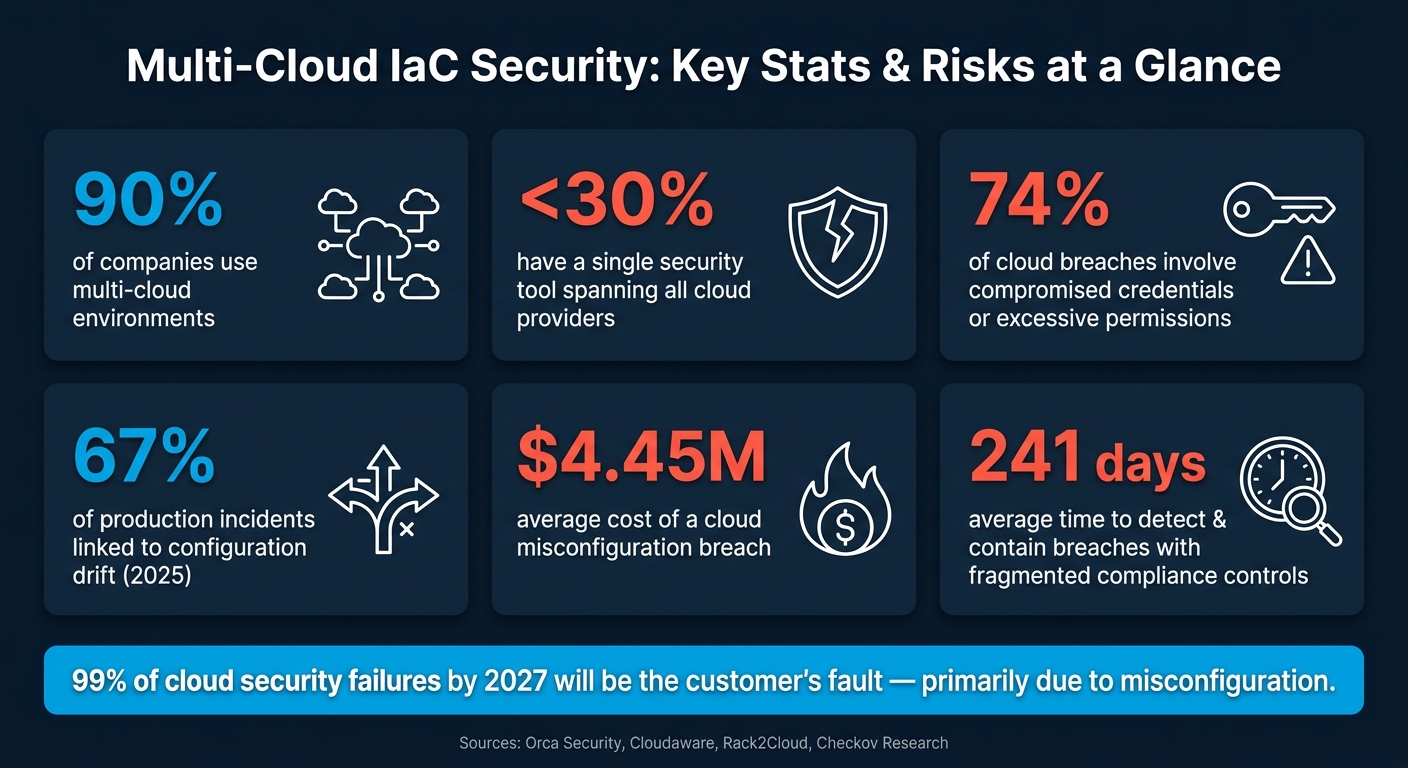
Multi-Cloud IaC Security: Key Stats & Risks at a Glance
What Is IaC Security Scanning? Terraform, Kubernetes & Cloud Misconfigurations Explained
Inconsistent IaC Policies Across Cloud Providers
One of the biggest challenges with multi-cloud Infrastructure as Code (IaC) is that security policies often fail to translate seamlessly across different cloud providers. AWS, Azure, and GCP each have their own unique identity and access management (IAM) systems, network configurations, and resource structures. If you write IaC templates without accounting for these variations, you might think you’ve created consistent policies, but they’ll behave very differently once deployed. These inconsistencies become especially clear when providers enforce what seem like similar security rules in completely distinct ways.
Here’s an example: AWS evaluates policies at request-time, while Azure enforces them at authentication-time using Conditional Access. GCP, on the other hand, applies controls at the boundary level through Service Perimeters. So, even if you write a simple rule like "deny unauthorized access", it’ll work differently depending on the provider.
Network defaults add another layer of complexity. On AWS, all outbound internet traffic is allowed by default, whereas GCP blocks it unless you explicitly configure a public IP or set up Cloud NAT. This means a workload that’s locked down on GCP could be unintentionally exposed on AWS unless you adjust your code.
"Identity is the first place where consistency breaks. Each provider implements IAM differently, including role structure, service identities, and default trust models." – Cloudaware
The Risks of Fragmented Policies
These differences lead to fragmented policies, which can create dangerous gaps in enforcement. While everything might seem fine in your IaC templates, the real issues often emerge during runtime when provider-specific defaults kick in.
Take workload identity as an example. AWS uses IAM Roles, Azure relies on Managed Identities, and GCP has Service Accounts. Each system has its own trust model and default permissions. If your IaC doesn’t account for these nuances, you could end up granting services far more access than intended.
The scale of the problem is staggering. Enterprises, on average, manage 17,000 cloud entitlements, but only 5% of those are actively used. This massive gap between provisioned and used permissions highlights how privilege sprawl can spiral out of control in a multi-cloud environment.
How to Standardize Policies Across Providers
The solution? Focus on standardizing policy intent rather than the specific syntax for each provider. Instead of writing something like "this S3 bucket must have a specific policy JSON", define the desired outcome: "sensitive data must not be publicly accessible." Then, translate that intent into provider-specific configurations.
"Standardize policy intent, not provider syntax. Define the rule once as an outcome, then translate it per provider." – Cloudaware
Tools like Open Policy Agent (OPA) and Conftest make this approach possible by allowing you to create portable policies that can evaluate configurations regardless of the cloud provider. Pair these tools with a centralized policy repository – stored in Git – to serve as your single source of truth. From there, use per-cloud renderers to generate provider-specific configurations. This ensures that any updates to your core policy automatically propagate across all providers, eliminating the need for manual adjustments in multiple codebases.
For IAM, adopting a unified role model can help simplify things. Define provider-agnostic roles like readonly, developer, or admin in Terraform, and map them to the corresponding primitives: AWS Managed Policies, Azure RBAC roles, and GCP IAM Bindings. This approach ensures consistency, even when working across multiple cloud platforms.
Configuration Drift and Template Misalignment
Even the best Infrastructure as Code (IaC) templates can fall out of sync with live infrastructure. This happens when manual changes are made in the cloud console, autoscalers tweak resources, or cloud providers update their defaults. The result? Your live infrastructure no longer matches the IaC definitions you painstakingly created. In 2025, 67% of production incidents were linked to configuration drift, and the average cost of a cloud misconfiguration breach reached a staggering $4.45 million.
Drift typically arises from three main sources:
- Human Drift: Manual edits in the console or emergency hotfixes.
- System Drift: Automated tools like Kubernetes operators or autoscalers making independent modifications.
- Provider Drift: Changes introduced by cloud vendors, such as updates to managed service defaults or version behaviors.
Shockingly, manual console changes alone account for 61% of drift cases. This underscores a critical point: configuration drift is more about human behavior and processes than just tooling.
"Terraform state describes what Terraform believes it owns – not necessarily what production has become." – Rack2Cloud
The risks are far from hypothetical. In 2023, Microsoft revealed a breach where a misconfigured Azure storage account exposed 38 TB of sensitive internal data, including private keys and passwords. This incident was directly caused by configuration drift from the intended security baselines. It’s a stark reminder of what can go wrong when live infrastructure diverges from its IaC source of truth.
How to Detect and Prevent Drift
To catch drift, the most reliable method is running terraform plan on a regular schedule. For critical environments, this should happen hourly, while standard workloads should be checked every 6 to 24 hours. Adding the -detailed-exitcode flag ensures that Terraform returns an exit code of 2 if drift is detected, enabling automated alerts in CI/CD pipelines without making any changes. Alternatively, use terraform plan -refresh-only to identify drift without altering the infrastructure.
Preventing drift starts with limiting manual intervention. One effective strategy is removing console access from production accounts. For example, Capital One implemented a "Zero-Drift Policy", requiring all changes to go through a Pull Request. Over two years, they eliminated manual changes in production and reduced audit preparation time by 80%. To handle expected variances – like autoscaling group size changes – use Terraform’s lifecycle.ignore_changes to filter out noise in drift reports and focus on real issues.
While detection and prevention are critical, managing drift effectively across multiple cloud platforms adds another layer of complexity.
Managing Drift Across Multiple Cloud Platforms
In multi-cloud setups, even identical policy intentions can result in inconsistent implementations. This creates security gaps that are easy to overlook. For example:
- AWS Security Groups are stateful, meaning return traffic is implicitly allowed.
- GCP firewall rules use priorities and can behave statelessly.
- Azure NSGs include default rules that might reintroduce outbound access you thought was blocked.
These subtle differences mean that rules appearing "equivalent" across providers may not behave the same way.
"The failures I keep seeing come from semantic mismatches… pick a canonical model that’s expressive enough to represent each provider’s semantics." – Tech Stack Guide
To address this, translate provider-specific rules into a single canonical model before comparing them. This approach helps you evaluate your actual security posture across clouds, rather than assuming that similar-looking rules yield similar outcomes. Tools like driftctl (now integrated into Snyk) are helpful for identifying shadow resources – those existing in the cloud but missing from your IaC definitions. In multi-cloud environments, combining driftctl with a unified asset inventory ensures you’re not relying solely on provider-scoped logs, which often lack the ability to correlate activity across platforms.
Fragmented Visibility and Incomplete Audit Trails
Configuration drift and gaps in audit trails often stem from fragmented multi-cloud controls, leaving security teams without a clear, unified view. When your infrastructure spans providers like AWS, Azure, and GCP, each platform – AWS CloudTrail, Azure Monitor, and Google Security Command Center – only tracks its own events. This siloed approach makes it nearly impossible to detect cross-provider breaches. For instance, if an attacker exploits a compromised Azure identity to access an AWS workload through federated trust, the events will appear as unconnected signals across separate consoles. To address this, organizations need to centralize and standardize log data.
In fact, security teams spend a staggering 40% to 60% of their investigation time navigating between these provider consoles instead of focusing on deeper analysis.
"Most security incidents in multi-cloud environments do not happen because a cloud provider was breached. They happen because the gaps between providers went unmonitored." – Orca Security
Logging blind spots make matters worse. While management-level logs like CloudTrail are usually enabled, data-level logging is often turned off by default. Attackers take advantage of these gaps, especially when logging is disabled or retention periods are too short. Even a brief 15-minute lapse can provide enough time for an attacker to move laterally undetected. On top of that, organizations often underestimate their cloud assets by 15% to 30%, meaning audits are incomplete from the start.
"Every cloud has its own inventory format and its own logging story. Until you normalize that, you don’t have a system view." – Cloudaware
Centralizing Logging and Monitoring
Each cloud provider uses its own log formats, APIs, and event structures, which makes standardizing logs a critical step for meaningful cross-cloud correlation. The Open Cybersecurity Schema Framework (OCSF) is gaining traction as a standard to address this challenge. Without this normalization layer, your SIEM (Security Information and Event Management) system will struggle to process incompatible data streams, limiting visibility. Centralizing logs into a unified correlation engine can dramatically cut mean time to detect (MTTD) from days to under four hours.
The choice of SIEM platform is especially important for multi-cloud environments:
| Platform | Multi-Cloud Correlation | Best For |
|---|---|---|
| Microsoft Sentinel | Strong via KQL | Azure-heavy environments |
| Google SecOps | Strong via YARA‑L | GCP-heavy or flat-rate needs |
| Splunk Cloud | Excellent via add‑ons | Cloud-agnostic enterprise deployments |
| AWS Security Lake | Excellent (full OCSF) | AWS-primary with multi-cloud extension |
Beyond centralizing logs, security scanning should be integrated into Infrastructure as Code (IaC) workflows. Tools that conduct shift-left scanning of Terraform, ARM templates, and CloudFormation files within CI/CD pipelines can catch misconfigurations before they reach production. This is especially crucial in multi-cloud setups, where a misstep in one provider’s template could expose vulnerabilities in another.
Improving Forensics and Governance
Enhanced logging does more than improve detection – it reshapes how governance is handled. As Joe Karlsson, Developer Advocate, explains:
"Traditional governance starts with policies and tries to enforce them. This fails because you can’t enforce rules about infrastructure you can’t see."
To overcome this, organizations should build a unified, queryable asset inventory that spans all cloud providers. This inventory should include environment labels (e.g., production vs. development), ownership details, and asset criticality. Linking this information to security alerts ensures incidents are routed to the right teams immediately, reducing the need for manual lookups.
For forensic investigations, storing logs in an immutable format is critical. Logs stored in the same account being monitored can be erased by attackers with sufficient permissions. Solutions like S3 Object Lock (WORM mode) or GCP retention locks, stored in a separate security account, safeguard this vital evidence. Additionally, using organizational-level trails like AWS Organizational CloudTrail ensures comprehensive coverage across all regions and new accounts without requiring extra manual setup.
When incidents occur, rapid cross-cloud containment is key. Actions like revoking compromised identities, terminating sessions, and isolating networks should happen within 15 minutes of detection. If your team is still switching between provider consoles during an active incident, you’re already losing valuable response time.
sbb-itb-f9e5962
Access Control Gaps and Privilege Sprawl
Expanding on earlier visibility issues, inconsistent identity models are another major hurdle in multi-cloud security. Each cloud provider has its own IAM framework – AWS uses identity-based and resource-based JSON policies, Azure employs RBAC with scoped assignments, and GCP applies allow-only bindings within a resource hierarchy. These differences make it tricky to enforce a true "least privilege" model, often resulting in excessive permissions and over-provisioned roles. Aligning identity strategies with standardized IaC policies is essential to closing security loopholes across platforms.
Here’s a concerning stat: 74% of all cloud breaches involve either compromised credentials or excessive permissions. Most enterprises juggle thousands of entitlements, yet only a small portion are actively used. This gap – between granted and used permissions – creates a prime opportunity for attackers.
"Identity models differ across providers, and these differences lead to excessive permissions and fragmented trust boundaries." – Cloudaware
Machine identities add to the problem. Service accounts and CI/CD automation tokens often accumulate permissions over time because they don’t undergo the same lifecycle management as human accounts. Unlike employees, whose access is reviewed during offboarding, service accounts can retain broad permissions for months or even years. By 2026, 67% of organizations will still depend on long-lived credentials like passwords, API keys, and tokens. These organizations report a 20% higher rate of security incidents compared to those that minimize reliance on such credentials.
Applying Least-Privilege Access
To address these gaps, stop treating each cloud’s IAM as a siloed challenge. Centralizing identity with a single Identity Provider (IdP) – such as Okta or Microsoft Entra ID – federated across all cloud environments ensures consistent MFA enforcement and unified account lifecycle management for both humans and machines. This means when an employee leaves or a service is retired, access is revoked in one place instead of across multiple platforms.
Another game-changer is Just-In-Time (JIT) access, which replaces the outdated model of standing privileges. For example, instead of granting a developer permanent admin access to production, JIT systems like AWS STS AssumeRole, Azure Privileged Identity Management (PIM), or GCP IAM Conditions provide time-limited, task-specific access that expires automatically. This drastically reduces the window of exposure. Tools like AWS IAM Access Analyzer, GCP IAM Recommender, and Azure Entra Access Reviews can identify unused or excessive permissions. Running these tools every 30–60 days helps keep entitlements in check.
The next step? Securing dynamic access setups in IaC pipelines.
Securing IaC Files and Deployment Pipelines
Hardcoded credentials in IaC files are a major but preventable risk in multi-cloud environments. Even organizations with robust security resources aren’t immune – take the May 2024 incident where CISA exposed AWS GovCloud keys on GitHub for six months before discovery. This highlights how easily long-lived credentials can slip through the cracks.
The solution? Eliminate long-lived credentials from pipelines entirely. OpenID Connect (OIDC) federation allows platforms like GitHub Actions or HCP Terraform to exchange short-lived tokens for cloud access, removing the need to store static API keys. Cloud-native workload identity mechanisms – like AWS IRSA, Azure Workload Identity, and GCP Workload Identity Federation – extend this approach across environments, allowing services to authenticate dynamically rather than relying on stored secrets.
Automated scanning is another must-have for IaC pipelines. Tools like Checkov, tfsec, and Semgrep catch hardcoded secrets and overly permissive role definitions before they reach production. Adding pre-commit hooks with tools like git-secrets provides an extra layer of protection by preventing developers from accidentally committing sensitive credentials to source control. For any credentials that must remain long-lived, centralized secrets managers – such as HashiCorp Vault or AWS Secrets Manager – offer automated rotation to keep them secure and prevent them from going stale.
Compliance and Governance Challenges in Multi-Cloud IaC
Beyond configuration and access issues, compliance and governance introduce additional layers of complexity to securing multi-cloud Infrastructure as Code (IaC). Each cloud provider has its own shared responsibility boundaries, legal agreements like HIPAA Business Associate Agreements (BAAs) and GDPR Data Processing Agreements (DPAs), and audit formats. This means compliance practices can’t simply be copied from one provider to another.
Data residency rules make things even trickier. For instance, with over 33 AWS regions, 60 Azure regions, and 40 GCP regions, ensuring workloads comply with regulations like GDPR or ITAR demands precise, provider-specific configurations. Adding to the challenge, frameworks such as NIST SP 800-53 Rev 5 require mapping over 1,000 controls across these environments. Managing this manually often leads to drift and inconsistencies.
"Every cloud has its own inventory format and its own logging story. Until you normalize that, you don’t have a system view." – Cloudaware
To tackle these challenges, organizations need a structured approach, combining policy-as-code (PaC) with continuous validation.
Using Policy-as-Code for Consistent Compliance
Policy-as-Code (PaC) is a practical way to address fragmented compliance processes. With PaC, you can define compliance goals – like ensuring sensitive data stays private – and enforce them across your IaC environments using tools like Checkov and Open Policy Agent (OPA).
Checkov, for example, offers over 1,000 pre-built checks, including 120+ aligned with the CIS AWS Benchmark and 100+ for CIS Azure. It also supports frameworks like SOC 2, PCI-DSS, and HIPAA out of the box. For scenarios where pre-built checks fall short, OPA allows you to write custom policies tailored to your business needs.
Here’s a real-world example: In February 2026, a healthcare startup used Checkov and OPA to achieve HIPAA compliance for its AWS infrastructure. Their initial scan revealed 47 violations, including 14 encryption issues and 11 network security gaps. Over a 12-week sprint, the team implemented custom OPA policies for mandatory tagging and customer-managed KMS keys. This effort not only resolved all violations but also blocked 31 additional non-compliant changes over the next four months.
A smart way to roll out PaC is by starting in "Warn" mode. This lets you identify non-compliant resources without disrupting ongoing development. Once the backlog is addressed, you can switch to "Deny" mode in your CI/CD pipeline. Treat your policies like application code – store them in Git, tag releases, and create an exception process with expiration dates to avoid permanent blind spots.
After setting up standardized policies, continuous validation ensures compliance is maintained over time.
Continuous Compliance Validation for Changing Infrastructure
IaC environments are dynamic, with changes introduced through automated pipelines, manual console edits, or external automation. Relying solely on CI/CD checks leaves gaps, as governance that only runs when code ships misses most of the changes that can lead to non-compliance. On average, organizations with fragmented compliance controls take 241 days to detect and contain breaches.
A three-layer validation model helps mitigate this risk: deploy-time checks, runtime scans, and historical snapshots for audits. Critical policies, such as detecting publicly exposed storage buckets, should be validated every 1 to 6 hours. Broader compliance and cost checks can run daily or weekly. For example, the healthcare startup mentioned earlier used weekly drift detection to catch three manual console changes, in addition to the 31 violations blocked at the pipeline level. This approach prevents drift and reinforces the secure baseline established through PaC.
"If your governance only runs when code ships, you’re blind to most of the changes that actually cause incidents." – Joe Karlsson, Developer Advocate, CloudQuery
Centralizing audit evidence into a unified SIEM system can also streamline compliance. Instead of scrambling to compile logs for audits, automated systems can generate audit-ready evidence.
"If you’re handling exceptions manually, they stop being exceptions and become blind spots." – Cloudaware
Conclusion: Strengthening IaC Security in Multi-Cloud Environments
Managing Infrastructure as Code (IaC) security in multi-cloud environments comes with a host of challenges: fragmented policies, configuration drift, incomplete audit trails, privilege sprawl, and compliance gaps. Each of these issues stems from the lack of a unified approach across different cloud providers, creating significant risks.
The statistics paint a stark picture. By 2027, it’s expected that 99% of cloud security failures will be the customer’s fault, primarily due to misconfiguration. Despite this, fewer than 30% of the 84% of enterprises operating on two or more clouds use a single security tool that spans all providers. These numbers highlight the critical need for unified security practices across multi-cloud environments.
"The core challenge is not any single provider’s security posture; it is the gaps between providers: inconsistent IAM models, fragmented audit logs, and configuration drift." – Orca Security
This underscores the importance of adopting standardized and automated practices across cloud platforms.
The path forward is straightforward: standardize intent and automate enforcement. Start by defining security policies at a provider-agnostic level, then tailor them to specific configurations for AWS, Azure, and GCP. This approach addresses issues like fragmented policies, configuration drift, and access management gaps. Use Git to centralize configurations as your single source of truth. Tools such as Checkov or tfsec can be integrated as pre-commit hooks to automate scanning, while drift detection jobs in your CI/CD pipeline can identify manual changes before they lead to incidents.
To ease the transition, begin with a "warn" mode to address existing policy violations and gradually enforce compliance. Normalize logs into a single platform for better visibility, and assign clear ownership for every resource. Success doesn’t hinge on having the largest security budget – it’s about treating consistency as a baseline requirement across all cloud providers.
FAQs
What’s the fastest way to standardize security policy intent across AWS, Azure, and GCP?
To streamline security management, consider using an abstraction layer that defines security as code. Tools like Open Policy Agent (OPA) or HashiCorp Sentinel can help you create a unified, vendor-neutral policy repository. This method ensures consistent security measures by converting high-level policies into configurations tailored to specific providers. It also minimizes configuration drift and simplifies managing security across multiple cloud environments.
How can we detect drift across multi-cloud without breaking production?
To keep an eye on drift without interfering with production, rely on continuous, non-intrusive monitoring instead of manual inspections. Set up regular infrastructure scans to match the current state of your cloud environment with your IaC configurations.
For a more reliable strategy, consider using API-based discovery tools, event-driven triggers, or GitOps workflows to identify changes almost immediately. Before acting on any detected drift, carefully evaluate its impact to ensure you don’t unintentionally worsen the situation.
What’s the minimum logging setup needed to investigate a cross-cloud incident?
To effectively investigate a cross-cloud incident, it’s crucial to establish a centralized, cloud-agnostic logging pipeline. This setup consolidates key telemetry into a single SIEM (Security Information and Event Management) platform. At the very least, make sure to collect and normalize logs from these sources:
- AWS CloudTrail: Ensure you include multi-region, organizational trails.
- Azure Activity Logs: Capture logs for comprehensive visibility into Azure operations.
- GCP Audit Logs: Focus on both Admin Activity and Data Access logs.
Centralized visibility allows you to trace attack chains that span multiple cloud platforms. Without this, fragmented logs can make it nearly impossible to correlate events effectively.