Dynamic Scaling vs. Fixed Resources: Cost Comparison

Dynamic scaling and fixed resources offer two distinct approaches to cloud resource management, each with its own cost implications and use cases:
- Dynamic Scaling adjusts capacity based on demand, ensuring you only pay for what you use. This approach is ideal for workloads with fluctuating traffic, like e-commerce during seasonal spikes. It can save up to 70% on cloud expenses but requires setup, monitoring, and fine-tuning.
- Fixed Resources allocate capacity for peak demand, offering predictable costs and simplicity. It works best for steady workloads but often leads to wasted resources during off-peak periods, increasing long-term expenses.
Key Differences:
- Dynamic scaling saves money during low-demand periods and handles traffic spikes automatically but has higher management overhead.
- Fixed resources are easier to manage and suitable for stable traffic but result in higher costs due to idle capacity.
Quick Comparison:
| Feature | Dynamic Scaling | Fixed Resources |
|---|---|---|
| Provisioning | Adjusts to demand | Fixed for peak demand |
| Cost Efficiency | High (pay for usage) | Low (idle resources add costs) |
| Management | Requires monitoring and automation | Simple to maintain |
| Best For | Variable traffic | Steady, predictable workloads |
Conclusion: If your traffic fluctuates, dynamic scaling is more cost-effective. For predictable workloads, fixed resources might be simpler but can lead to inefficiencies. The right choice depends on your traffic patterns and operational priorities.
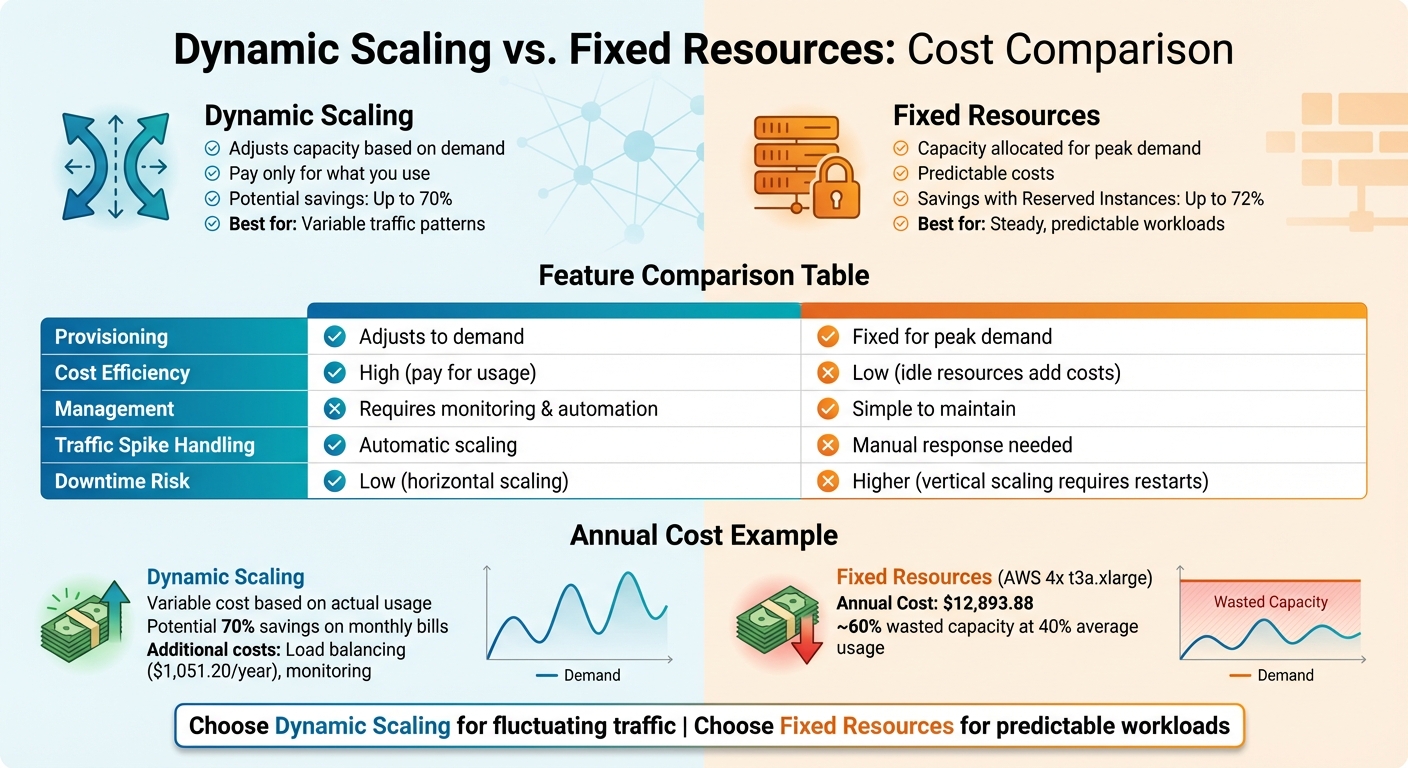
Dynamic Scaling vs Fixed Resources: Cost and Performance Comparison
What Is Dynamic Resource Scaling?
Dynamic resource scaling is a game-changer when it comes to managing costs during cloud migration. Instead of over-provisioning resources to handle worst-case traffic scenarios, this approach automatically adjusts compute capacity in real time based on actual demand. When traffic surges, your infrastructure scales up; when activity slows, it scales back down. This means you only pay for the resources you actually use, saving money and improving efficiency.
The system relies on monitoring tools, like Amazon CloudWatch, to track metrics such as CPU usage, request rates, or queue depth. When these metrics cross predefined thresholds, scaling actions are triggered automatically.
Cloud-native tools make this process seamless. For example, AWS Auto Scaling dynamically adjusts EC2 instances and charges only for the underlying resources. In containerized setups, Kubernetes uses the Horizontal Pod Autoscaler (HPA) to add or remove application replicas, while tools like Karpenter or the Cluster Autoscaler handle node-level scaling. For instance, the Cluster Autoscaler can terminate underutilized nodes (below 50% usage) after 10 minutes, ensuring optimal resource allocation.
The next sections break down how dynamic scaling works, its benefits, and the challenges you might face.
How Dynamic Scaling Works
Dynamic scaling operates through three key layers: monitoring, decision-making, and execution. These layers work together to track performance metrics, decide when to scale, and adjust capacity accordingly.
One popular approach is Target Tracking Scaling, which aims to maintain a specific metric at a target value – like keeping CPU usage at 75%. As workloads fluctuate, the system automatically adjusts resources to meet the target. This method is particularly helpful for workloads that experience seasonal shifts, as it adapts without requiring manual intervention.
Another method is Step Scaling, which responds to the severity of metric changes. For example, if CPU usage spikes from 50% to 90%, the system adds more resources than it would for a smaller increase, such as going from 50% to 60%. This approach is ideal for handling unpredictable or highly volatile traffic patterns.
Benefits of Dynamic Scaling
The biggest perk of dynamic scaling? Cost savings. By scaling down during off-peak hours, you avoid paying for idle resources. And when traffic spikes – whether due to a product launch or a marketing blitz – the system automatically scales up to handle the load, ensuring smooth performance without manual intervention.
It also eliminates the waste that comes with over-provisioning. Instead of running oversized servers "just in case", dynamic scaling ensures resources are allocated based on real-time demand. This not only optimizes efficiency but also reduces the need for constant manual adjustments.
Drawbacks of Dynamic Scaling
While dynamic scaling offers plenty of advantages, it’s not without its challenges. Setting it up requires careful planning – choosing the right metrics, defining thresholds, and thoroughly testing the system under different conditions.
Accurate monitoring is critical. If your metrics don’t accurately reflect the health of your application, the system might scale at the wrong times. In Kubernetes environments, you’ll also need to configure Pod Disruption Budgets to prevent scale-down events from shutting down critical pods, which could hurt application availability.
Another challenge is the inherent delay in scaling actions. When a traffic spike occurs, there’s a short lag before new resources are fully operational. This startup latency can temporarily impact performance. To avoid surprises, it’s a good idea to run test scenarios for scaling down to ensure your applications continue to function smoothly when resources are removed.
What Are Fixed Resources?
Fixed resource allocation offers its own set of advantages and challenges, especially when compared to dynamic scaling during migration. This approach sticks to a traditional method of infrastructure provisioning: you estimate the maximum demand, set up your capacity to meet that peak, and keep it running at that level around the clock – whether or not it’s being fully utilized. This approach has its roots in on-premises data centers, where adding physical servers was a slow and labor-intensive process that required careful planning.
In a fixed resource setup, your infrastructure doesn’t change. For instance, if you deploy 10 servers to handle a big sales event, those same 10 servers will remain operational even during quieter times when they’re barely being used.
This method is often seen in lift-and-shift migrations, but it frequently leads to oversized instances and unnecessary expenses.
How Fixed Resources Work
With fixed resources, you provision your infrastructure once, and it stays constant. You calculate your expected peak traffic, add a buffer for safety, and deploy that capacity. Whether your application is handling a hundred users or thousands, the same number of servers will remain active. This static setup doesn’t rely on monitoring, scaling policies, or automated tools to adjust resources. Essentially, the infrastructure stays the same no matter the traffic flow.
Now, let’s look at why some organizations choose fixed resource allocation despite its inefficiencies.
Benefits of Fixed Resources
The main appeal of fixed resources is their simplicity. You don’t need to worry about setting up scaling metrics, defining thresholds, or testing how autoscaling reacts to changes – you configure the capacity once, and it stays put. This makes costs predictable, which is helpful for organizations managing tight budgets.
Fixed allocation works well for workloads that remain steady over time. If your application operates at a constant, high level of usage, there’s minimal waste, and the advantages of dynamic scaling become less relevant. Similarly, some applications – like singleton systems that are designed to run as a single instance – can’t scale horizontally, making fixed resources the only practical option. Another benefit is cost savings for predictable workloads: by committing to Reserved Instances or Savings Plans, organizations can save up to 72% compared to on-demand pricing.
Despite these positives, fixed resources come with some notable downsides.
Drawbacks of Fixed Resources
The biggest drawback is wasted capacity. When you allocate resources for peak demand but operate at average usage most of the time, you’re essentially paying for servers that sit idle – a costly inefficiency, especially in cloud environments where billing is often hourly.
Another issue is the higher upfront cost. Many organizations over-provision by 20–40% to ensure they have a safety margin, leading to increased spending without a corresponding increase in value.
Fixed resources also struggle with workloads that fluctuate. For example, e-commerce platforms that see seasonal spikes or SaaS applications with high usage during business hours face challenges. Constant capacity means you either waste money during slower periods or have to manually adjust resources during unexpected surges. Without automation, the static nature of fixed allocation makes it ill-suited for changing traffic patterns.
| Feature | Fixed Resource Allocation (Static) | Dynamic Resource Scaling (Elastic) |
|---|---|---|
| Provisioning Strategy | Sized for peak demand | Sized based on actual demand |
| Cost Efficiency | Lower, due to waste during off-peak periods | Higher, pay only for what you use |
| Management Complexity | Simple (set once and maintain) | Requires monitoring and automation |
| Best For | Steady workloads with consistent demand | Variable traffic with predictable patterns |
Cost Comparison Over 12 Months
When comparing costs over a year, the difference between dynamic scaling and fixed resources becomes stark. It’s not just about compute costs – it’s the entire range of expenses, from initial planning to ongoing management.
For example, running four t3a.xlarge instances with a fixed-resource setup on AWS costs about $12,893.88 annually. This cost remains constant, regardless of how much the resources are actually used. If your usage averages around 40%, that means roughly 60% of your spending goes toward idle resources.
Dynamic scaling, on the other hand, charges only for what you actually use. When optimized to match workload demands, it can lead to as much as 70% savings on monthly bills. However, dynamic scaling does bring added management costs, such as configuring, monitoring, and adjusting scaling policies. For organizations without dedicated infrastructure teams, these management requirements can eat into those savings.
Ultimately, the cost-effectiveness of each approach depends heavily on your traffic patterns. For workloads with consistent, predictable demand, fixed resources using Reserved Instances can offer up to 72% savings compared to on-demand pricing. But if your traffic fluctuates – busy during peak hours and quiet at night – dynamic scaling ensures you aren’t paying for unused capacity.
This highlights why dynamic scaling is better suited for fluctuating traffic, whereas fixed resources work well for steady workloads.
Cost Breakdown by Category
Breaking down expenses by category provides a clearer picture of where each approach spends or saves.
| Cost Category | Fixed Resources | Dynamic Scaling |
|---|---|---|
| Upfront Costs | High (requires detailed planning) | Low (projects can start immediately) |
| Compute Expenses | $5,269.92/year (constant for 4 instances) | Variable (adjusts based on demand) |
| Database (RDS) | $3,271.92/year (always-on Multi-AZ) | Can scale down during off-peak hours |
| Load Balancing | Minimal or none | $1,051.20/year (essential for autoscaling) |
| Data Transfer | $1,104.84/year (predictable) | Potentially higher due to inter-zone traffic |
| Labor Costs | Low (minimal ongoing management) | High (requires constant oversight) |
Take the example of an Israeli cybersecurity company. Over two years, ending around 2024, they partnered with Belitsoft to build a dedicated team of 70–100 engineers. By moving from an overloaded in-house team to this dedicated model, they cut development and testing costs by 40% and sped up their ability to address a long backlog of product customizations.
Beyond these direct costs, both fixed and dynamic models come with hidden expenses that further impact the total cost.
Hidden Costs
Fixed resources can rack up costs through over-provisioning and change request fees. Paying for 100% utilization during low-traffic periods leads to significant waste. Many organizations over-provision by 20–40% as a safety buffer, which only adds to inefficiencies. Additionally, fixed pricing often includes an "uncertainty premium", and change requests during migrations can quickly inflate costs.
Dynamic scaling isn’t without its own hidden expenses. Management overhead is a key factor – you’ll need ongoing monitoring, feedback, and adjustments to keep scaling configurations efficient. Supporting services like Elastic Load Balancing (approximately $87.60 per month) and Amazon CloudWatch for monitoring also add to the bill. If scaling policies aren’t fine-tuned, you could face "thrashing", where excessive scaling events drive up costs and create instability.
Data transfer fees are another commonly overlooked expense. AWS offers 100 GB of free data transfer out to the internet each month, but costs beyond that can escalate quickly. Dynamic scaling can amplify these fees, especially during scale-out events when traffic between Availability Zones increases. Additionally, idle Elastic IP addresses tied to non-running instances can incur extra charges.
| Hidden Cost Type | Fixed Resource Impact | Dynamic Scaling Impact |
|---|---|---|
| Idle Resources | High: Paying for unused capacity | Low: Resources terminate when idle |
| Change Requests | High: Requires formal renegotiations | Low: Adjustments handled on the fly |
| Planning Phase | High: Delays due to extensive scope | Low: Iterative planning as you go |
| Management Time | Low: Minimal ongoing involvement | High: Requires regular monitoring |
| Supporting Services | Minimal | Higher: Needs ELB and CloudWatch |
Both approaches have their strengths and challenges, but understanding these costs – both visible and hidden – can help guide your choice based on your specific needs.
Performance Differences During Migration
When planning a migration, performance during the process is just as important as cost considerations. Factors like uptime, scalability, and downtime can directly affect timelines and user experience, making them critical to address.
Fixed resources follow a static model, provisioning for peak demand regardless of actual usage. While this approach might seem safe, it carries the risk of under-provisioning during unexpected traffic spikes, especially during migration. If demand surpasses capacity, manual intervention becomes necessary – a reactive and risky strategy. Vertical scaling, often needed to resize fixed resources, typically requires stopping and restarting instances, leading to planned downtime. This downtime can disrupt operations during crucial migration phases.
On the other hand, dynamic scaling adjusts compute capacity in real time, ensuring performance remains steady even as traffic fluctuates. Using target-tracking policies, dynamic scaling operates like a thermostat, automatically adding or removing instances to stabilize metrics like CPU usage. For migrations with predictable traffic patterns, predictive scaling leverages machine learning to analyze up to 14 days of historical data and forecast the next 48 hours. This allows capacity to be provisioned proactively, which is especially helpful for applications with long startup times.
"Configuring and testing the elasticity of compute resources can help you save money, maintain performance benchmarks, and improve reliability as traffic changes."
- AWS Well-Architected Framework
The importance of these approaches becomes particularly evident when looking at replication server performance. Under-provisioned replication servers can bottleneck the process, delaying cutovers and driving up costs. Dynamic scaling addresses this by enabling on-the-fly adjustments to server sizes using tools like CloudWatch metrics. In contrast, fixed resources lock you into static configurations that may not align with your actual workload needs during migration.
Uptime and Scalability Comparison
Here’s a quick comparison of how fixed resources and dynamic scaling differ across key performance metrics:
| Feature | Fixed Resources | Dynamic Scaling |
|---|---|---|
| SLA Guarantees | Relies on over-provisioning headroom to meet SLAs | Matches capacity to demand, maintaining performance |
| Traffic Spike Handling | Manual response to alarms increases saturation risk | Automatically scales out using target tracking or predictive ML |
| Over-provisioning Risk | High; provisioned for peak demand, often leading to waste | Low; adjusts capacity to match average usage |
| Provisioning Speed | Slow; manual setup and deployment | Fast; automated via APIs and scaling policies |
Dynamic scaling’s automation is a game-changer during migration. Manual provisioning can be slow and prone to errors, particularly when managing multiple workloads. Automated scaling through APIs allows for quicker adjustments, reducing the operational strain when it matters most.
Migration Downtime Impact
Downtime during migration often depends on how quickly resources can be adjusted when unexpected issues arise.
With fixed resources, increasing capacity requires manual intervention, whether by adding new instances or resizing existing ones. Vertical scaling, in particular, involves stopping and restarting instances, which leads to planned downtime. This can be especially disruptive during critical cutover phases.
Dynamic scaling eliminates this issue through horizontal scaling. Instead of resizing existing instances, it adds new ones to the pool while keeping the current instances running. This approach maintains uptime and distributes the workload across multiple resources, ensuring smoother operations.
The AWS Well-Architected Framework highlights the risks of skipping dynamic scaling, rating it as "High" for workload performance. Many organizations adopt a "lift and shift" strategy with oversized fixed resources to expedite migration, but this often results in long-term waste and performance inefficiencies when static on-premises sizing is applied in the cloud. By right-sizing before migration, businesses can reduce monthly infrastructure costs by up to 70%, showcasing the flexibility and efficiency dynamic scaling brings.
These insights help clarify which approach aligns best with your migration goals and challenges.
sbb-itb-f9e5962
When to Use Each Approach
Choosing the right approach boils down to aligning your infrastructure with workload patterns. This alignment is critical for avoiding over-provisioning and performance issues. As we’ve covered earlier, matching resources to demand is key to balancing costs and performance during migration.
Several factors influence this decision, including traffic predictability, capacity planning, and operational overhead. If your traffic is unpredictable, dynamic scaling ensures you’re not paying for idle resources during slow periods while still having enough capacity during sudden surges. On the other hand, for steady workloads, using fixed resources with Reserved Instances can save up to 72% compared to on-demand pricing.
Dynamic scaling does have its limitations. Spinning up new instances takes time, so for applications that can’t tolerate delays, consider over-provisioning or using predictive scaling to prepare capacity in advance. For workloads like long-running batch jobs that can’t handle interruptions, fixed resources with non-evict policies are a safer choice.
"Historically, IT departments have had to provision for peak demand. However, cloud environments minimize costs because capacity is provisioned based on average usage rather than peak usage."
- AWS Whitepaper
A hybrid strategy often works best: reserve fixed resources for your baseline, steady-state needs, and layer dynamic scaling on top to handle traffic fluctuations. This approach builds on earlier discussions about cost and performance to fine-tune your migration plan.
Dynamic Scaling for Variable Traffic
Dynamic scaling shines in scenarios with unpredictable or seasonal traffic. Businesses like e-commerce platforms, video transcoding services, and apps with irregular usage spikes benefit greatly from this flexibility.
Take Black Friday 2024, for instance. An online retailer used Auto Scaling to manage a surge in traffic, ensuring smooth customer experiences while avoiding the costs of maintaining high-capacity resources long-term. Similarly, during the COVID-19 pandemic, a telemedicine provider leveraged Auto Scaling to handle massive spikes in consultations, dynamically adding capacity during peak hours and scaling down during quieter periods.
For workloads with regular daily or weekly traffic patterns, predictive scaling offers a proactive solution. By analyzing up to 14 days of historical data, it forecasts the next 48 hours, eliminating the delays of reactive scaling – a major advantage for applications with lengthy startup times. This approach is also ideal for time-based workloads, such as development environments that run only during business hours. Automating the shutdown of non-production instances outside these hours can significantly cut costs.
When setting up dynamic scaling, avoid relying solely on CPU utilization as a trigger. For specialized workloads like video transcoding, custom metrics such as queue depth provide more accurate indicators for scaling events. Additionally, maintaining a buffer between supply and demand helps account for provisioning delays and potential resource failures.
Fixed Resources for Steady Workloads
While dynamic scaling is ideal for fluctuating demand, fixed resources are better suited for predictable workloads. They offer stable costs, making them a good fit for tasks like database management and compliance-related applications.
Some workloads simply can’t tolerate interruptions. For example, long-running batch jobs without checkpointing require a stable environment to avoid risks associated with node eviction during scaling events. In such cases, non-evict policies ensure critical workloads aren’t disrupted by autoscalers.
However, provisioning for peak demand can lead to wasted resources, while under-provisioning can harm performance. This is why right-sizing is essential before migration. Organizations that "lift and shift" their on-premises infrastructure often end up with oversized instances, incurring unnecessary costs from day one. Analyzing usage patterns and matching instance sizes to average needs rather than peak demand can reduce monthly expenses by as much as 70%.
"Right sizing is the process of matching instance types and sizes to your workload performance and capacity requirements at the lowest possible cost."
- AWS Whitepaper
Right-sizing isn’t a one-and-done task. Regularly monitoring metrics like CPU, memory, and network usage allows you to adjust resources as your application’s needs change. For instance, Amazon EBS volumes with minimal activity over seven days are candidates for deletion, while Amazon Redshift clusters with consistently low CPU utilization are likely underused. Keeping an eye on these metrics helps ensure you’re not paying for resources you don’t need.
Cost Savings Examples
Dynamic scaling offers a clear path to cutting costs by aligning resource provisioning with average usage instead of peak demand. Let’s dive into some specific examples that highlight how businesses can reduce infrastructure expenses and optimize total cost of ownership (TCO).
Infrastructure Cost Reduction
Dynamic scaling, combined with right-sizing, can significantly lower infrastructure costs. Take a dynamic site hosted on AWS in the US East region as an example. Here’s a breakdown of its baseline monthly expenses:
- EC2 compute (four t3a.xlarge instances): $439.16
- RDS database (one db.m5.large Multi-AZ): $272.66
- Load balancing: $87.60
- Data transfer (1 TB in/out): $92.07
- Route 53: $183.00
This setup totals $1,074.49 per month when fixed for peak capacity. Notably, compute and database services make up over 65% of the total cost, making them prime candidates for savings.
By implementing the AWS Instance Scheduler to stop non-production instances during off-hours and using target tracking scaling policies to automatically adjust capacity, businesses can avoid over-provisioning during low-demand periods. This approach reduces manual intervention and eliminates unnecessary spending.
"When you learn how to right size, you can save up to 70% percent on your monthly bill."
- AWS Whitepaper
Data Transfer and TCO Savings
Savings don’t stop at compute resources. Dynamic scaling also helps cut data transfer and operational expenses. For instance, handling 1 TB of traffic costs $92.07 per month. By utilizing CDNs and caching layers, businesses can offload traffic to the network edge, reducing backend strain and associated costs.
Operational costs are another piece of the TCO puzzle. Manual capacity adjustments not only take up valuable engineering time but also increase the risk of errors during traffic surges. Dynamic scaling automates these adjustments, ensuring resources are allocated efficiently without human intervention. Tools like Karpenter further consolidate workloads by replacing underutilized nodes with more cost-effective options. Setting a scale-down utilization threshold at 50% ensures that only necessary capacity is maintained, avoiding waste.
"Supplying resources based on demand will allow you to pay for the resources you use only, reduce cost by launching resources when they are needed, and terminate them when they aren’t."
- AWS Well-Architected Framework
Conclusion
Fixed resources work best for steady workloads, offering predictable billing and no startup delays. On the other hand, dynamic scaling adjusts to fluctuating demand, potentially cutting costs by up to 70% through right-sizing. As highlighted earlier, aligning resource allocation with actual demand is crucial. For workloads with unpredictable spikes, relying solely on fixed provisioning can lead to paying for peak capacity all the time – even when most of it goes unused.
When it comes to performance, each approach has its trade-offs. Dynamic scaling ensures consistent performance but requires more configuration, while fixed resources are simpler to manage but risk falling short during unexpected traffic surges. The key lies in understanding your traffic patterns. If you can anticipate load spikes, scheduled or predictive scaling can help ensure capacity is ready when needed – without unnecessary expenses during quieter periods.
Before migrating, it’s critical to right-size your resources to avoid the high costs of provisioning for peak demand in on-premises setups. Regular audits are just as important, as application needs evolve over time. These strategies lay the groundwork for efficient resource management.
At TechVZero, we’ve seen these principles in action. Our expertise helps engineering-driven founders make smart infrastructure decisions without needing deep technical knowledge. With experience managing over 99,000 nodes, saving a client $333,000 in a single month, and mitigating a DDoS attack, we specialize in delivering targeted audits and automated scaling policies that align infrastructure with business goals.
FAQs
What are the main advantages and challenges of using dynamic scaling?
Dynamic scaling lets cloud systems automatically adjust their computing power based on real-time demand. This approach helps businesses save money by only paying for the resources they actually use. It also ensures low latency during traffic surges, boosts reliability by scaling before bottlenecks hit, and eliminates the need to over-provision resources for peak times. Tools like target-tracking and predictive scaling take automation a step further, making the process smoother and more effective.
That said, dynamic scaling isn’t without its hurdles. Common pitfalls include failing to scale down after demand drops, sticking to outdated static sizing rules from on-prem setups, or relying too heavily on manual responses to alarms. To make the most of dynamic scaling, businesses need proper governance, accurate performance metrics, and finely-tuned policies. When done right, it strikes a balance between cost savings and consistent performance, whether during cloud migrations or long-term operations.
Why are fixed resources less cost-efficient during periods of low demand?
Fixed resource allocation often leads to higher costs during periods of low demand because you’re stuck paying for capacity you don’t actually use. The resources stay over-provisioned, which translates to wasted expenses that could have been avoided.
In contrast, dynamic scaling adjusts resource usage based on real-time demand. This means you’re only paying for what you actually need at any given moment. Not only does this approach help cut unnecessary costs, but it also adds a layer of flexibility to your operations.
When is it best for a business to combine dynamic scaling with fixed resource allocation?
A hybrid approach is ideal for businesses with a steady, predictable workload that occasionally faces unexpected or fluctuating demand spikes. By leveraging fixed resources to manage regular operations and scaling dynamically during surges, companies can strike a balance between cost-efficiency and performance.
This method helps businesses avoid wasting money on unused resources during slower periods while ensuring they can handle sudden demand increases without sacrificing reliability. It’s a smart way to keep operations running smoothly without overspending.