SOC 2 Compliance Automation: Tools for Startups
If you’re a startup pursuing SOC 2 compliance, automation tools can save you hundreds of hours and help secure enterprise deals. SOC 2 compliance is critical for demonstrating data security and trustworthiness, especially when targeting large customers. Manual processes are time-consuming and prone to errors, but automation simplifies evidence collection, monitors systems in real-time, and reduces the workload on your team.
Key Highlights:
- SOC 2 Basics: Focuses on five criteria: Security (mandatory), Availability, Confidentiality, Processing Integrity, and Privacy. Start with Security for your first audit.
- Why Automate?: Manual efforts can take 550–600 hours annually. Automation cuts this to 110–170 hours and ensures continuous monitoring.
- Top Tools: Platforms like Vanta, Drata, and Secureframe integrate with AWS, GitHub, Okta, and more to automate up to 60% of controls.
- Implementation Steps: Define your scope, choose tools that match your stack, and maintain compliance with regular reviews and alerts.
Pro Tip: Start small – focus only on required criteria and systems to avoid over-scoping. Automate evidence collection but retain human oversight for risk assessments and incident responses.
SOC 2 automation isn’t just about passing audits; it’s about building a scalable compliance process that supports growth.
SOC 2 Platforms & Promises | Delve | #CISOlife
sbb-itb-f9e5962
Getting Your Startup Ready for SOC 2 Automation
To avoid the headaches of manual SOC 2 processes, it’s essential to prepare your startup for automation early. Start by clearly defining your compliance goals before diving into automation tools – this can save you from costly, messy compliance issues down the road.
How to Scope SOC 2 for Your Startup
Scoping is the backbone of a successful SOC 2 audit. Poor scoping decisions can either overwhelm your team or leave gaps that auditors will flag.
Begin by defining your system boundary. This includes your production application and the infrastructure that supports it. Next, decide which Trust Services Criteria (TSC) apply to your business. While Security is mandatory, the other four – Availability, Confidentiality, Processing Integrity, and Privacy – should only be included if a customer contract specifically requires them. Of these, Privacy is the most demanding, covering eight distinct categories.
"The path to a strong SOC 2 posture is subtraction before addition." – Gradum Blog
For your first audit, it’s wise to focus solely on Security. This approach keeps the number of controls manageable, lowers auditor fees, and provides a solid starting point. As your company matures, you can expand the scope in later audits.
Systems Typically in Scope for SOC 2
Once you’ve nailed down your criteria, map out every system that interacts with customer data. Any system that stores, processes, or transmits this data – or impacts the security of your production environment – should be included. Systems outside this scope, like marketing websites or internal tools unrelated to customer data, can be excluded.
Here’s a breakdown of commonly in-scope systems and the evidence they generate:
| System Category | Common In-Scope Tools | Evidence Generated |
|---|---|---|
| Cloud Infrastructure | AWS, GCP, Azure | Encryption status, backup logs, VPC configurations |
| Identity & Access | Okta, Google Workspace, Azure AD | MFA status, user lists, offboarding logs |
| Source Control | GitHub, GitLab | Branch protection, pull request approvals, code reviews |
| HRIS | Rippling, Gusto, BambooHR | Employee rosters, background checks, training records |
| Ticketing & Ops | Jira, Linear, PagerDuty | Change approvals, incident logs, remediation records |
| Endpoint Management | Jamf, Kandji, Intune | Disk encryption, screen lock, remote wipe capability |
Development and staging environments, as well as experimental work, can usually be excluded if they don’t interact with customer data. Tools like AWS Landing Zone can help isolate production environments, keeping these non-production systems out of scope.
How Your Infrastructure Affects SOC 2 Automation
The structure of your infrastructure plays a key role in how much of the SOC 2 process you can automate. Managed cloud platforms like AWS, GCP, and Azure are built for automation, enabling tools to collect evidence – such as S3 encryption settings or CloudTrail logs – automatically through APIs. On the other hand, bare-metal or legacy systems often require manual evidence collection, which adds to your workload.
For a SOC 2 Type II report, evidence collection starts only after your controls are implemented and functioning. If your production environment isn’t set up correctly from the beginning – with isolated accounts, proper tagging, and logging enabled – you could face weeks of delays fixing these issues before the 90-day observation period can even begin. At TechVZero, we work with founders to design audit-ready infrastructure from day one, ensuring compliance is integrated into your operations.
"Automation doesn’t eliminate the need for compliance experts; it elevates their role. It frees them from manual drudgery to perform high-value analysis and strategic oversight." – Peter Korpak, Founder and Lead Editor, soc2auditors.org
SOC 2 Automation Tool Categories Startups Should Know
SOC 2 Automation Tools for Startups: Vanta vs Drata vs Secureframe
No single tool can cover every aspect of SOC 2 compliance. Instead, your compliance program relies on a combination of specialized tools, each designed to meet specific audit requirements. Knowing what each category offers – and its limitations – can help you avoid missteps, such as purchasing tools that don’t align with your needs or expecting more than they can deliver.
All-in-One SOC 2 Automation Platforms
These platforms act as the backbone of your compliance program. They integrate with your existing tools via read-only APIs, automatically gather evidence, store your policy library, and provide auditors with a portal to review necessary data. They also map tool outputs directly to the controls auditors require.
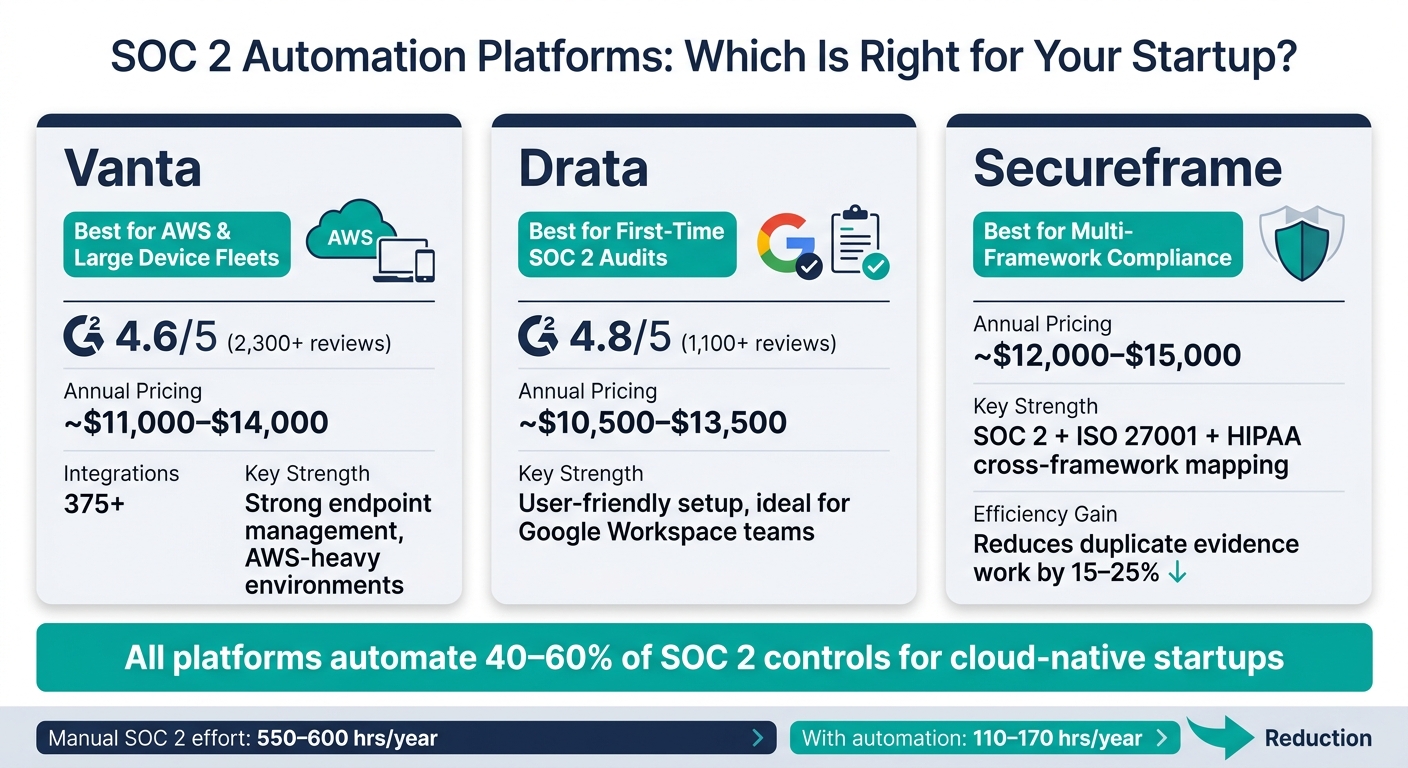
For startups, the top choices are Vanta, Drata, and Secureframe. Pricing for these platforms typically ranges from $10,500 to $15,000 annually, with the right choice depending on your tech stack:
- Vanta: Ideal for AWS-heavy environments with large device fleets. It offers 375+ integrations and strong endpoint management, earning a 4.6/5 rating on G2 from over 2,300 reviews.
- Drata: Best for teams using Google Workspace, especially those aiming for their first SOC 2 audit. Its user-friendly interface simplifies setup and has a 4.8/5 G2 rating from 1,100+ reviews.
- Secureframe: A go-to option if you’re planning to pursue ISO 27001 or HIPAA within 12–18 months. Its cross-framework control mapping can reduce duplicate evidence work by 15–25%.
However, these platforms typically automate only 40–60% of SOC 2 controls for most cloud-native startups. Tasks like risk assessments, management reviews, and business continuity testing still require human oversight.
| Platform | Best Fit | Startup Pricing (Annual) |
|---|---|---|
| Vanta | AWS-heavy, MDM-focused fleets | ~$11,000–$14,000 |
| Drata | Google Workspace, first-time audits | ~$10,500–$13,500 |
| Secureframe | SOC 2 + ISO/HIPAA frameworks | ~$12,000–$15,000 |
These platforms consolidate evidence collection, while other tools handle configuration, identity, and endpoint security.
Cloud Security and Configuration Management Tools
Your cloud provider – whether AWS, GCP, or Azure – hosts much of the evidence needed for SOC 2 compliance. Cloud Security Posture Management (CSPM) tools, either built into your cloud platform or integrated with your compliance solution, monitor your infrastructure to ensure settings meet control requirements. This includes verifying encryption, logging (e.g., CloudTrail), secure network configurations, and scheduled backups.
One standout feature of these tools is drift detection. For example, if a developer modifies a security group rule, the compliance platform can flag this change within an hour – long before an auditor might catch it months later.
Identity, Access, and Endpoint Management Tools
Beyond configuration, managing user access and securing devices are critical for SOC 2 audits. Auditors will scrutinize who has access to what and how company devices are protected. You’ll need timestamped evidence showing that MFA is enforced, terminated employees are promptly offboarded, and company devices maintain disk encryption throughout the audit period.
- Identity tools: Solutions like Okta or Google Workspace provide access logs, MFA data, and offboarding records, feeding this information directly into your compliance platform.
- Endpoint management tools: Tools such as Jamf, Kandji, or Intune report on disk encryption, OS patches, and screen lock settings, automating much of the evidence collection process.
When evaluating these tools, focus on integration depth rather than the number of integrations offered. During trials, confirm that the platform retrieves the exact data your auditor needs – like log retention durations, precise offboarding timestamps, or specific OS versions – not just a generic confirmation that settings are enabled.
"The tool is essential, but it’s one component of a triad: people, process, and technology." – Ali Aleali, Co-Founder & Principal Consultant, Truvo Cyber
How to Implement SOC 2 Automation: A Step-by-Step Guide
Now that you’re familiar with the types of tools you’ll need, the next step is putting them into action. The sequence matters – a misstep here could mean buying tools too early or starting your observation period before your controls are reliably in place.
Step 1: Define Scope and Run a Risk Assessment
Start by mapping out your scope. This includes identifying your production cloud accounts, identity provider, HRIS, source control, and ticketing system – essentially, the systems auditors will examine.
For your first audit, focus on the Security (Common Criteria) Trust Services Criterion, as it’s the only one required. The other criteria – Availability, Confidentiality, Processing Integrity, and Privacy – should only be included when a customer specifically asks for them. For instance, adding Privacy unnecessarily could create extra work, introducing eight additional categories of criteria to address.
Once the scope is clear, conduct a gap analysis. This helps you identify missing policies or technical vulnerabilities, like weak MFA enforcement. Many automation tools offer scoping wizards to model your environment before connecting live integrations. After this, build a basic risk register. List your critical assets (like customer databases, encryption keys, or code repositories), map out potential threats (e.g., insider risks or unauthorized access), and assign likelihood and impact scores. While some tools provide pre-filled threat libraries, it’s essential to validate these scores based on your actual setup.
With your scope and risk assessment complete, you’re ready to choose tools that fit seamlessly into your environment.
Step 2: Choose and Integrate Your Tools
Now that your scope is finalized, selecting the right tools becomes easier. Evaluate tools based on two key factors: integration breadth and automation depth. Ask yourself – does the tool support your specific stack? And does it go beyond surface-level checks? For example, a tool that merely confirms MFA is “enabled” isn’t as effective as one that ensures MFA is enforced for all users with production access.
Next, connect your evidence backbone – your cloud provider, identity provider, source control, ticketing system, and HRIS. These integrations typically cover most of the controls auditors will review. After setting up the integrations, sample the evidence to confirm it meets auditor standards (e.g., verifying offboarding timestamps). Only start the observation period once you’re confident all controls are functioning as intended.
Once your tools are integrated and evidence quality is verified, the focus shifts to maintaining compliance over time.
Step 3: Keep Compliance Running Continuously
Maintaining compliance is just as important as setting it up. Today’s enterprise customers expect ongoing trust signals, not just a one-time certification. Some platforms even run over 1,400 automated tests per hour to detect configuration drift immediately.
Establish a routine to stay on top of compliance. This could include weekly dashboard reviews, monthly compliance meetings, quarterly access reviews, and annual incident response drills. Set up alerts in platforms like Slack or Jira to ensure quick visibility into any issues. Assign a dedicated Compliance Owner to oversee these processes – automation enhances efficiency but doesn’t replace human oversight.
"SOC 2 automation transforms compliance from a defensive, reactive chore into a proactive, strategic part of your business. It gives you a live view of your security, so you can fix issues the moment they happen." – Peter Korpak, Founder, soc2auditors.org
Lastly, ensure your platform allows you to export controls and evidence logs in open formats like CSV or JSON. This protects your flexibility and prevents being locked into a single vendor as your compliance needs evolve.
Common SOC 2 Automation Mistakes and How to Avoid Them
Relying Too Much on Tools
Just because a dashboard shows all green doesn’t mean your organization is truly secure. Lorikeet Security emphasizes this point:
"A green dashboard does not mean you are secure. It means you are compliant with a set of controls that the platform checks."
While automation can handle about 60% of the work – like collecting evidence – the remaining 40% still requires human expertise. Tasks such as drafting security policies, conducting vendor risk assessments, and performing penetration tests cannot be automated. For example, while tools can confirm that MFA is enabled, they can’t determine if your access controls align with your specific risk profile.
To bridge this gap, assign a Compliance Owner to review dashboard alerts weekly and take necessary action. Automation provides the signals, but it’s up to your team to interpret and respond to them effectively.
Scoping Too Broadly or Adding Unnecessary Complexity
Another common mistake is overcomplicating your compliance efforts by scoping too broadly. Focus on what your contracts require. For instance, while the Security criterion is mandatory, adding optional criteria like Privacy can introduce unnecessary complexity unless it’s contractually needed. Start lean – add criteria like Availability only if uptime is a key contractual obligation. Save additional criteria for future audits when there’s a clear business reason.
Over-scoping can also happen when selecting tools. Many startups integrate every available connector without first confirming that the evidence these tools collect meets auditor standards. This can lead to a cluttered setup, making it harder to manage and increasing the likelihood of providing evidence that auditors might reject. To avoid this, validate your tool integrations early and expand your setup only when necessary.
Letting Compliance Slip After the First Audit
Securing your first SOC 2 report is only the beginning. One of the biggest pitfalls is failing to maintain compliance after that initial audit. Controls can degrade over time as your environment evolves, leading to what’s known as "compliance debt" – where controls exist only on paper.
Remember, the observation period for your next audit begins the day after your current one ends. SOC 2 compliance isn’t seasonal – it’s an ongoing process. To keep up, schedule quarterly access reviews, integrate compliance alerts into tools like Slack or Jira to ensure timely remediation, and conduct at least one tabletop incident response drill each year. Automation can’t test your response plan, so hands-on practice is essential.
Conclusion: Building Scalable SOC 2 Compliance with Automation
Using SOC 2 automation can significantly boost efficiency for startups, especially when combined with a clear focus, the right tools, and strong oversight. By automating, companies can cut internal labor requirements from 300–500 hours down to 110–170 hours and speed up certification by 40% compared to manual methods. However, a 2024 benchmark study revealed that 54.9% of audited SOC 2 reports contained at least one exception, underscoring that flawless dashboards don’t always guarantee a clean audit.
Automation is best suited for tasks like evidence collection and continuous monitoring, while human expertise remains essential for making critical decisions about risks, vendor evaluations, and incident responses. As Peter Korpak, Founder of SOC2Auditors, explains:
"Automation doesn’t eliminate the need for compliance experts; it elevates their role. It frees them from manual drudgery to perform high-value analysis."
This balanced approach ensures that automation supports, rather than replaces, expert judgment, creating a scalable system for managing compliance now and in the future.
By designing your SOC 2 platform as part of a robust trust infrastructure, you position your organization for future certifications. Evidence pipelines built for SOC 2 can often be reused for frameworks like ISO 27001 or HIPAA, saving time and resources by avoiding the need to start from scratch.
For engineering-driven founders aiming to move quickly without getting bogged down in compliance, partnering with a company like TechVZero can make a big difference. They specialize in helping smaller teams (10–50 people) with accurate control mapping, integration planning, and cost-effective compliance setups. The goal isn’t to completely outsource compliance but to ensure the foundation is solid from the start. This way, you avoid scrambling to gather evidence during an audit or paying for unnecessary scope. With the right setup, your engineers can stay focused on building and innovating, while compliance operates smoothly in the background.
FAQs
When should we start the SOC 2 Type II observation period?
The SOC 2 Type II observation period typically spans 3 to 12 months, with 6 months being the standard for first-time audits. However, don’t rush into this phase. It’s crucial to complete a readiness assessment first to address any security gaps. Starting too soon can lead to failed audits or receiving a qualified opinion – neither of which you want.
Make sure your controls are fully in place and your evidence collection process is running smoothly before kicking off the observation period. This preparation helps you avoid unnecessary setbacks or expensive rework during the audit itself.
How do we keep SOC 2 scope small without failing the audit?
To keep your SOC 2 scope under control, start with just the Security criterion unless specific contracts or enterprise clients demand additional criteria like Availability or Confidentiality. Use account isolation to clearly separate production and development environments – this helps avoid expanding the audit scope unnecessarily. Automate evidence collection by leveraging API-driven logs, which can save time and reduce manual effort. Lastly, clearly document what’s out of scope early on. This prevents sales teams from overcommitting and adding to your audit workload.
What parts of SOC 2 still need humans even with automation?
Automation tools can take care of tasks like collecting evidence from cloud logs and identity providers. However, 40–60% of SOC 2 compliance still relies on human effort. Critical responsibilities include performing risk assessments, tailoring policies to fit organizational needs, conducting BCDR (Business Continuity and Disaster Recovery) exercises, testing incident response plans, and reviewing vendor security measures. Additionally, management plays a crucial role in designing controls, addressing exceptions, and verifying processes throughout the audit period to maintain compliance.