How to Monitor IaC Security in Multi-Cloud Environments
Managing IaC security in multi-cloud environments is challenging but essential. Misconfigurations account for 70% of cloud security incidents, and by 2025, 99% of cloud failures will result from user errors. With tools like Terraform and Pulumi, you can deploy infrastructure across AWS, Azure, and GCP, but inconsistent security policies, IAM models, and manual changes increase risks.
Key Takeaways:
- Inventory Your IaC Tools: Track tools like Terraform and CloudFormation and ensure all resources are accounted for.
- Set Security Baselines: Use frameworks like CIS Benchmarks and enforce policies with tools like OPA or Sentinel.
- Monitor Consistently: Implement pre-merge scans, CI/CD gates, and runtime drift detection to catch issues early.
- Consolidate Findings: Centralize alerts from AWS, Azure, and GCP into a unified dashboard for better visibility.
- Automate Security Checks: Use static scanning tools like Checkov and tfsec in CI/CD pipelines to block vulnerabilities before deployment.
Pro Tip: Start with "soft-fail" policies to warn developers, then switch to "hard-fail" for stricter enforcement. Centralized monitoring and automated workflows can save time and reduce errors.
This guide explains how to secure multi-cloud environments by integrating IaC tools, defining policies, and monitoring for drift. Let’s dive into the details.
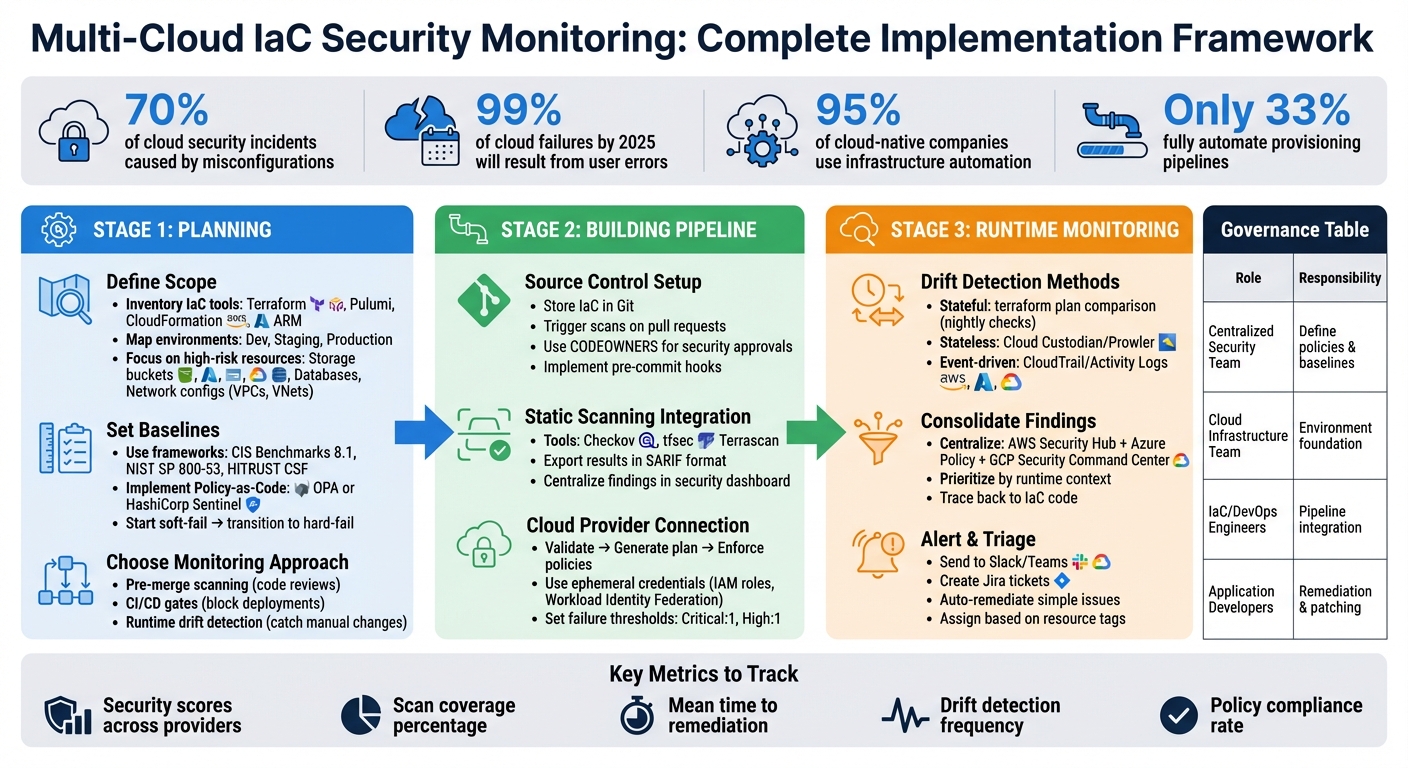
Multi-Cloud IaC Security Monitoring Pipeline: 3-Stage Implementation Framework
Using Devops and Infrastructure as Code to Secure Your Multi-Cloud Environments
Planning Your Multi-Cloud IaC Security Monitoring
Good planning is the backbone of effective multi-cloud IaC (Infrastructure as Code) security monitoring. Without a clear plan, you risk missing critical threats, duplicating efforts, or getting bogged down by provider-specific policies that don’t work together.
Define Your IaC and Cloud Scope
Start by building a comprehensive inventory of all the IaC tools your teams use. These might include Terraform, Pulumi, AWS CloudFormation, and Azure Resource Manager (ARM). Be thorough – untracked projects can lead to security blind spots. Document which cloud providers each tool interacts with, and map out your environments, such as development, staging, and production.
One common issue to watch out for is resources created manually through cloud consoles instead of IaC tools. These manual changes can introduce vulnerabilities that automated scans might miss. To address this, enforce mandatory tagging policies across all clouds. Tags like owner and cost-center help ensure that every resource is accounted for.
Focus on high-risk resources first. These include storage buckets (like S3, Azure Blob, and GCP Storage), databases, and network configurations such as VPCs and VNets. These components often hold sensitive data and are frequent targets for attackers. Additionally, analyzing outputs like terraform plan JSON files can help you identify dynamic dependencies and transient secrets.
Once you’ve completed your inventory, you can move on to setting consistent security baselines across all environments.
Set Security Baselines and Policies
Industry standards are a great place to start when defining your security baselines. Frameworks like CIS Benchmarks 8.1, NIST SP 800-53, and HITRUST CSF offer tried-and-tested rules for securing multi-cloud environments. Instead of writing separate policies for each cloud provider, simplify your approach by creating an abstraction layer. This allows you to define a single logical policy that applies to similar resources across different providers. For instance, you can write one "storage" policy that covers AWS S3, Azure Blobs, and GCP Buckets.
"A key strategy for multi-cloud policy is to create an abstraction layer… Instead of writing separate policies for AWS S3 Buckets, Azure Storage Containers, and GCP Storage Buckets, you write a single, logical policy for ‘storage’ that applies to all of them." – policyascode.dev
Implement these baselines as Policy-as-Code using tools like Open Policy Agent (OPA) or HashiCorp Sentinel. This approach moves security rules from static documents into version-controlled, testable code that runs automatically. Start with a "soft-fail" mode, where developers are warned but not blocked. Once your team gets comfortable, switch to "hard-fail" mode, which stops non-compliant code from reaching production. Pre-built policy packs for frameworks like CIS and PCI DSS can speed up this process, so you don’t have to start from scratch.
With consistent policies in place, you’re ready to design a unified monitoring strategy.
Choose a Unified Monitoring Approach
Effective monitoring happens at three key stages: pre-merge scanning, CI/CD gates, and runtime drift detection.
- Pre-merge scanning: Identifies issues during code reviews.
- CI/CD gates: Block deployments that don’t meet your security policies.
- Runtime drift detection: Catches manual changes made in cloud consoles that deviate from your IaC configurations.
| Timing | Primary Goal |
|---|---|
| Pre-deployment | Block non-compliant resources before creation |
| Post-deployment | Detect drift and manual changes in live environments |
Centralized visibility is crucial for effective monitoring. Consolidate findings from tools like AWS Security Hub, Azure Policy, and Google Security Command Center into a unified dashboard. This reduces the risk of visibility gaps that attackers could exploit. To maintain consistency, establish a Cloud Center of Excellence (CCoE). This team can oversee governance, standardize tools, and ensure your organization sticks to specific IaC and policy engines.
Building Your Multi-Cloud IaC Security Monitoring Pipeline
Once you’ve mapped out your strategy, the next steps involve organizing code, integrating security scanners, and connecting to cloud providers. Each piece works together to create a system that identifies security issues before they can disrupt production.
Set Up Source Control and IaC Repositories
Store all your Infrastructure-as-Code (IaC) files in Git, using version control to manage changes. Configure your repositories to trigger security scans on pull requests – this catches misconfigurations early in the process.
For teams managing multiple cloud environments, centralized policy management becomes essential. Benjamin Morris from Amazon Web Services outlined a useful framework in January 2026. In this setup, a central repository holds custom security policies and reusable CI/CD workflows. Individual application repositories then reference these workflows, ensuring consistent security checks across AWS, Google Cloud, and Azure.
To protect this setup, implement CODEOWNERS files that require mandatory security team approvals for any changes to workflows. Also, include a .checkov.yaml file to define global skip-checks, severity thresholds, and scan directories. Encourage developers to run local scans using pre-commit hooks before pushing their code. This simple step reduces pipeline failures and flags issues early in development.
With repositories secured and workflows in place, the next step is to incorporate static scanning tools for early vulnerability detection.
Integrate Static IaC Security Scanning
Static scanning tools evaluate your infrastructure code before deploying any resources. Well-known tools include Checkov, tfsec, and Terrascan. Each has its strengths:
- Checkov supports multiple frameworks like Terraform, CloudFormation, Kubernetes, and ARM templates. It also provides graph-based analysis to identify resource relationships.
- tfsec specializes in Terraform, offering fast scans with minimal false positives.
- Terrascan is highly flexible, allowing API-based integration and server-side operation.
Developers can install these tools locally (e.g., with pip install checkov) and integrate them into CI/CD workflows. These workflows should check out code, install the scanner, and execute scans against the repository directory. Exporting scan results in formats like SARIF allows findings to be consolidated in your version control system’s security dashboard, aligning with the centralized monitoring strategy.
"In the early phases of implementing Checkov custom policies, you can use the soft-fail option… As the process matures, switch from the soft-fail option to the hard-fail option." – Benjamin Morris, Amazon Web Services
If a finding is deemed a false positive or an acceptable risk, use inline code comments (e.g., # checkov:skip=CKV_AWS_18:reason) to suppress the alert. This keeps an audit trail, ensuring transparency around any bypassed security checks.
With static scanning integrated, the next focus is connecting your CI/CD pipelines to cloud providers for secure deployments.
Connect CI/CD Pipelines to Cloud Providers
A robust pipeline workflow typically involves three key steps: validate with static analysis, generate a provider-specific execution plan, and enforce policy checks before applying changes. This structure ensures consistent security monitoring across multi-cloud environments by blocking non-compliant resources before they reach production.
For consistency, convert infrastructure plans into JSON format before scanning. This allows tools to evaluate the intended state against organization-wide policies before provisioning any resources.
Google Cloud simplifies this process with its "Analyze Code Security" GitHub Action, which integrates seamlessly with Workload Identity Federation. This action initializes Terraform, generates a plan file, converts it to JSON, and runs validation reports against organizational security standards. You can also define failure criteria (e.g., "Critical:1,High:1,Operator:OR") to automatically block builds based on severity.
To enhance security, use ephemeral, identity-based credentials instead of static secrets. AWS IAM service roles work well for AWS-native pipelines, while Workload Identity Federation securely connects GitHub Actions to Google Cloud. Establish clear thresholds for pipeline failures – any high-severity vulnerability should block deployment automatically. Start with a "soft-fail" approach when introducing new policies, and transition to "hard-fail" once the environment meets compliance standards.
sbb-itb-f9e5962
Monitoring Runtime Drift and Consolidating Findings
Once your infrastructure is deployed, it’s not uncommon for manual fixes, automated tweaks, or untracked resources to cause configuration drift. This section dives into ways to identify these changes and transform scattered findings into actionable insights. Let’s explore how stateful, stateless, and event-driven methods can help detect drift effectively.
Detect Configuration Drift Across Providers
Configuration drift happens when your live environment no longer matches the definitions in your Infrastructure as Code (IaC). Here’s how different detection methods tackle this challenge:
Stateful comparison relies on tools like terraform plan to compare your Terraform state file with the actual cloud resources. This method pinpoints precise changes but only works for resources already managed by your IaC. Scheduling nightly checks (e.g., at 2:00 AM) can help you quickly spot manual changes.
Stateless scanning evaluates live resources against policy sets using tools such as Cloud Custodian or Prowler. This method is ideal for identifying "shadow IT" – resources created manually that aren’t tracked in your IaC. However, it’s resource-intensive and only detects drift during scheduled scans.
Event-driven detection offers near real-time monitoring by triggering policy checks whenever cloud event streams (like AWS CloudTrail or Azure Activity Logs) record a resource modification. This approach catches unauthorized changes immediately but requires a more complex setup and can generate a high volume of events.
Platforms like HCP Terraform simplify this process by automating health checks approximately every 24 hours, ensuring drift detection without interrupting your operations. To minimize risks, limit manual console access and use "break-glass" procedures strictly for emergencies.
| Detection Method | How It Works | Ideal For | Limitations |
|---|---|---|---|
| Stateful | Compares state file to live environment via terraform plan |
Tracking managed resources | Only works for IaC-defined resources |
| Stateless | Scans live environment against policies | Spotting unmanaged "shadow IT" | Resource-heavy; scheduled only |
| Event-Driven | Monitors cloud event streams in real-time | Immediate detection of key changes | Complex setup; high event volume |
Aggregate and Normalize Security Findings
To manage security effectively, centralize alerts from AWS, Azure, and Google Cloud into a single, actionable view.
Use tools like Prowler in a centralized security account to consolidate findings across multiple accounts. For AWS environments, AWS Config aggregators can bring together drift detection results from various regions and accounts into one management account.
Filter out non-actionable errors before consolidation. For instance, exclude "Access Denied" errors from restricted buckets that your scanning tool isn’t allowed to access. When dealing with large-scale environments, adopt concurrent processing to speed up assessments across hundreds of accounts.
Modern platforms prioritize risks based on runtime context instead of raw severity. For example, a misconfigured S3 bucket might rank low if it’s internal-only, but high if it’s publicly exposed and contains sensitive data. This kind of prioritization helps teams focus on what matters most.
To streamline remediation, implement a unified data model that allows you to query risks across providers and resource types in a single interface. Some tools can even trace runtime misconfigurations back to the specific IaC code that caused them, significantly speeding up the fix.
Automate monitoring setup using Terraform or CloudFormation StackSets to deploy roles consistently across all accounts. This ensures that new environments are automatically included in your unified view.
With findings consolidated, you can now set up real-time alerts and workflows to address issues promptly.
Set Up Alerting and Triage Workflows
Real-time alerting depends on event-driven detection. Cloud event streams trigger policy checks as resources change. Tools like OPA or Sentinel evaluate these events against your desired state definitions to determine if a change poses a security risk.
"Infrastructure drift occurs when the real-world state of your live environment deviates from the state defined in your Infrastructure as Code (IaC)." – policyascode.dev
Configure detection tools to initiate automated workflows. For example, you can send alerts to resource owners via Slack or Teams, create Jira tickets, or automatically remediate straightforward changes. Integrate your unified view with ticketing systems to ensure issues are assigned to the appropriate teams.
For event-driven alerts, assign issues automatically based on resource tags. Default to read-only access for most users, reserving write access for emergencies through break-glass procedures. In multi-region setups, use centralized aggregators to collect data from various accounts into a single dashboard.
HCP Terraform offers a Free Edition that includes one policy set with up to five policies, while the Standard Edition allows connecting policy sets to version control repositories. This scalability lets teams start small and expand as their monitoring needs grow.
Best Practices for Operating IaC Security Monitoring
Define Governance and Role Assignments
A solid governance structure is the backbone of effective IaC security monitoring. Start by assigning centralized teams to establish baselines and decentralized teams to handle application-specific remediation tasks. For instance, your centralized security team should manage delegated administrator accounts for services like AWS Security Hub and GuardDuty, consolidating security findings across all cloud accounts. Meanwhile, application owners are better suited for remediation and patching since they understand how changes impact their code.
When implementing IaC scans, consider starting with a "soft-fail" approach. This gives teams time to adapt before transitioning to a "hard-fail" model, which blocks non-compliant deployments as your processes mature. To streamline access management, deploy Attribute-Based Access Control (ABAC) using resource tags.
| Role | Primary Responsibility | Key Security Task |
|---|---|---|
| Centralized Security Team | Governance & Baselines | Define custom scanning policies, manage admin accounts |
| Cloud Infrastructure Team | Environment Foundation | Create default roles, enforce SCPs, manage account settings |
| IaC/DevOps Engineers | Pipeline Integration | Implement reusable security workflows, manage secrets |
| Application Developers | Application Security | Write IAM policies, remediate vulnerabilities |
Once roles are clearly defined, the next step is to standardize security controls across different cloud environments.
Standardize Patterns Across Clouds
To simplify security operations, create a catalog of approved Terraform modules that include built-in security controls. Open Policy Agent (OPA) can help by creating an abstraction layer to handle provider-specific differences. For example, helper functions can ensure that AWS and Azure resources include tags, while GCP resources are checked for labels – all within the same policy. This approach ensures consistency across providers and complements earlier inventory and monitoring efforts.
Implement universal tagging and naming standards to track cost centers and ownership effectively. Establishing a Cloud Center of Excellence (CCoE) can further enhance governance by defining common security baselines. Automate remediation for low-risk issues like missing tags, while reserving manual reviews for high-risk security changes.
| Security Control Pattern | AWS Attribute | Azure Attribute | GCP Attribute |
|---|---|---|---|
| Resource Metadata | tags |
tags |
labels |
| Public Storage Access | acl == "public-read" |
container_access_type == "blob" |
member == "allUsers" |
| Identity Model | IAM Roles | Managed Identities | Service Accounts |
By aligning these patterns, teams can maintain a consistent security posture across all cloud environments.
Track Metrics and Improve Continuously
"What gets measured, gets done." – AWS Well-Architected Framework
Keeping an eye on performance metrics is critical for continuous improvement. Monitor security scores across all cloud providers and regions to get a comprehensive view of your security posture. Identify and address blind spots by tracking which resources are actively scanned versus those left unmonitored. Unified dashboards can help teams correlate standardized practices with real-time performance data.
Group findings by resource, account, or environment to pinpoint high-risk areas. Use automated responders – like AWS Lambda functions – to speed up remediation for common issues. Regularly review these metrics with stakeholders to ensure security operations align with broader business goals. Tools like Amazon Inspector can simplify tracking by automatically closing findings once issues are resolved, making it easier to measure progress.
Conclusion
Final Thoughts
Keeping your cloud infrastructure secure is no longer optional – it’s a necessity, especially in multi-cloud environments. Gartner estimates that by 2025, 99% of cloud-related security failures will stem from internal misconfigurations. That’s a staggering number, underscoring the need for proactive strategies.
To stay ahead, focus on three pillars: early detection through shift-left security, enforcing policies via policy-as-code, and continuous runtime monitoring. Embedding IaC scanners into your CI/CD pipelines and using unified policy engines like OPA or Sentinel can help you catch and address issues across AWS, Azure, and GCP efficiently and cost-effectively.
"Infrastructure as code (IaC) tools like HashiCorp Terraform increase provisioning velocity, but do not change this reality [of security risks] alone." – HashiCorp
Here’s the challenge: while 95% of cloud-native companies rely on infrastructure automation, only 33% fully automate their provisioning pipelines. Relying on manual security reviews slows everything down. The solution? Automation that ensures security without compromising speed. This approach not only streamlines operations but also strengthens your multi-cloud strategy.
For founders and teams looking to scale their cloud operations without exponentially growing their security resources, effective IaC security monitoring is the answer. With automated modules, drift detection, and centralized dashboards, you can expand your cloud footprint quickly while your security team focuses on tackling critical threats – not chasing down every misconfigured resource. By unifying and automating your IaC security processes, you pave the way for secure, rapid cloud innovation.
FAQs
How can I maintain consistent security policies across multiple cloud providers?
To ensure your security policies remain consistent across AWS, Azure, GCP, and other cloud platforms, it’s a smart move to adopt a policy-as-code approach. This method lets you define security rules in code, creating a standard that can be applied across all environments. By using tools like multi-cloud policy engines, you can evaluate these rules against specific resources for each provider, helping to maintain compliance effortlessly.
Integrating policy checks into your CI/CD pipeline is another crucial step. This allows you to automatically validate infrastructure changes before deployment, ensuring every update aligns with your security standards. To streamline operations further, consider automating the remediation of non-compliant resources and centralizing compliance reporting. This approach makes it easier to track enforcement across all your cloud providers.
By treating your policies as code, you can version-control them, review changes, and maintain consistent governance – even at scale. This not only simplifies management but also strengthens your overall security posture.
What are the best tools to automate IaC security checks in CI/CD pipelines?
To integrate Infrastructure as Code (IaC) security checks into your CI/CD pipelines, there are several tools that can help you catch misconfigurations early and keep your deployments secure. Here are some popular options to consider:
- Snyk IaC: With the Snyk CLI, you can run commands like
snyk iac testdirectly in your pipeline. This scans your configurations for potential issues and halts the build if it detects any problems. - Checkov: Install Checkov using
pipand add it to your workflow. It supports scanning for misconfigurations in Terraform, Kubernetes, and other IaC files. Plus, it integrates seamlessly with platforms like GitHub Actions and other CI/CD tools. - Microsoft Defender for Cloud: Enable IaC scanning within Defender to automatically review templates like Terraform and ARM directly in Azure pipelines, ensuring your cloud configurations are secure.
- Pulumi Policies: Create custom policies using languages like TypeScript or Python, and enforce them during
pulumi previewruns. This allows you to identify and address issues before any deployment takes place.
By embedding these tools into your CI/CD pipeline, you can proactively detect and resolve security vulnerabilities. A good rule of thumb? Scan early and scan often to minimize risks and maintain secure, multi-cloud environments.
How can I detect and manage configuration drift in a multi-cloud environment effectively?
To tackle configuration drift in a multi-cloud environment, it’s crucial to combine native cloud tools with Infrastructure-as-Code (IaC) and policy-as-code practices. Begin by leveraging drift detection tools tailored to each cloud provider – such as AWS CloudFormation Drift Detection, Azure Policy, or GCP Config Connector. If you’re using Terraform to manage resources, lightweight tools like driftctl can help you compare live resources against your IaC state.
Make it a habit to schedule regular scans to catch any changes. Centralizing these findings on a dashboard can provide better visibility and make it easier to manage discrepancies. Automating remediation is another key step – reapply IaC templates or run commands like terraform apply to bring the live state back in sync with your code. To prevent future drift, enforce strict policies that mandate all changes go through IaC pipelines. Finally, keep your detection and remediation processes up to date by reviewing and refining them regularly as new resources and configurations are introduced.
By implementing these practices, you can ensure consistent and secure configurations across platforms like AWS, Azure, and GCP, all while reducing manual effort and mitigating risks.